Overview

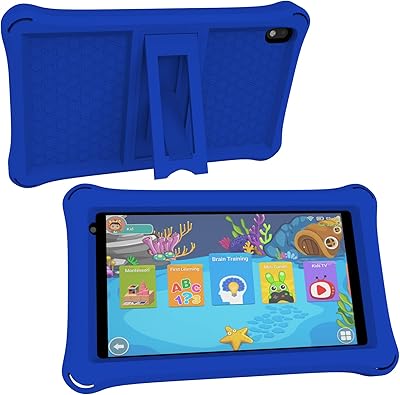
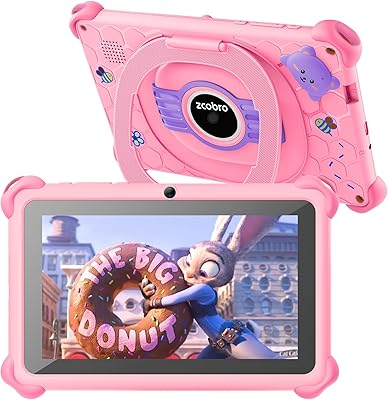
The qunyiCO Y7 7-inch Kids Android Tablet is a straightforward, budget-priced option for parents who want to hand a young child their own device without a large investment. Launched in early 2025, this is a value-tier device from a brand most buyers won’t recognize — and that’s worth acknowledging upfront. It ships with a protective silicone case already in the box, which is a genuine plus at this price point. It runs Android 11, a reasonably current foundation, but the Allwinner quad-core processor keeps it firmly in the entry-level category. Set the right expectations: this handles light educational use well, but it is not built for demanding apps.
Features & Benefits

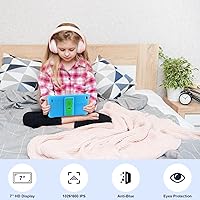
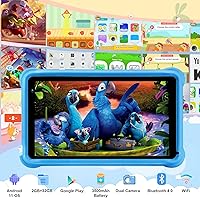
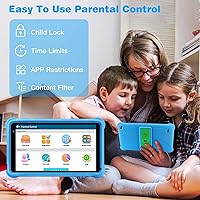
The 7-inch display runs at 1280x800 pixels — sharp enough for a child watching cartoons or working through reading apps without eye strain. The quad-core processor with 2GB of RAM handles everyday apps and a decent media library, though multitasking can cause noticeable slowdowns. What really makes this toddler tablet work right out of the box is the iWAWA platform that comes pre-installed — a curated environment of learning games and content that saves parents the hassle of building a kids-safe app library from scratch. Parental controls let you cap screen time, filter websites, and monitor usage remotely. Dual cameras and Bluetooth round out the package.

Best For

This kids tablet is best suited for parents looking to give a first tablet to toddlers or early elementary-age kids who mainly use devices for educational apps, simple games, and streaming child-friendly video. If having built-in parental controls matters to you — rather than relying on a third-party app — this covers that ground without any extra cost. It’s also a practical choice for gift buyers since the included case means the device is ready to hand over without hunting for accessories separately. Families comfortable trading brand familiarity for meaningful cost savings will likely feel good about this purchase.

User Feedback

Parents who’ve used this kids tablet commonly praise ease of setup and how quickly young children adapt to the interface. The included protective case gets consistent credit for surviving drops. That said, recurring criticisms flag performance lag when running heavier apps, and while the dual cameras handle video calls adequately, their image quality is nothing to write home about. Battery life feedback lands in mixed territory — some users get comfortable session lengths, others report faster drain than they’d like. Brand trust is a sticking point for a few buyers given how new this brand is, though the 24-hour customer support commitment earns mostly positive feedback.

Pros

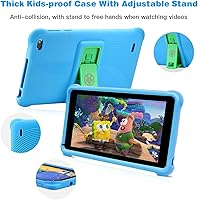
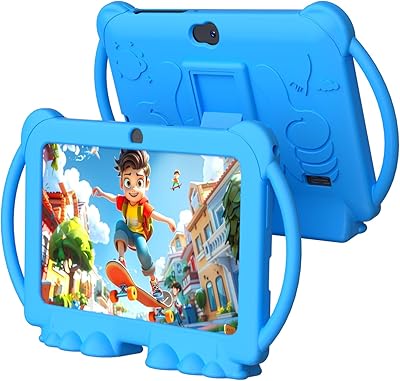
  • Protective silicone case with stand is included in the box, saving you an extra purchase.
  • Built-in parental controls cover screen time limits, content filtering, and remote activity monitoring.
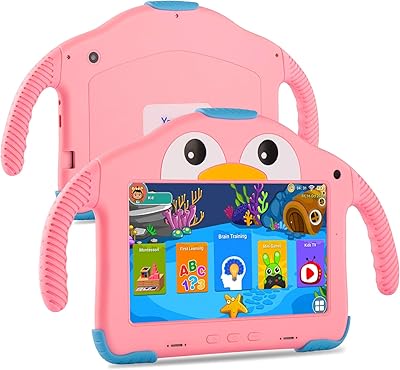
  • The iWAWA kids platform comes pre-installed with curated learning and play content ready to go.
  • Android 11 is a reasonably current OS for a tablet in this price range.
  • 32GB of onboard storage gives kids enough room for apps, videos, and downloaded content.
  • The 7-inch 1280x800 display is clear and comfortable for young children watching video or reading.
  • Dual cameras handle video calls with grandparents or basic creative play without extra setup.
  • Wi-Fi and Bluetooth connectivity work reliably for streaming and connecting wireless headphones or speakers.
  • Setup is straightforward — parents report getting kids up and running within minutes of unboxing.
  • At this price point, losing or damaging it is far less stressful than breaking a premium device.

Cons

  • The Allwinner processor struggles with heavier apps, and lag is a real issue when multitasking.
  • Brand trust is a genuine concern — qunyiCO has almost no established track record as of early 2025.
  • Battery life is inconsistent, with some users reporting shorter-than-expected usage sessions.
  • Camera quality is mediocre even by budget tablet standards — fine for calls, poor for photos.
  • 2GB of RAM is a tight ceiling that limits how smoothly the device handles modern app demands.
  • Long-term software updates and security patches from an unknown brand are far from guaranteed.
  • The protective case, while included, is basic — heavier drops or rough daily use may test its durability.
  • Customer service responsiveness is unproven beyond the brand’s own 24-hour support claims.

Ratings

The qunyiCO Y7 7-inch Kids Android Tablet scores below are generated by AI after analyzing verified user reviews from buyers worldwide, with spam, bot-submitted, and incentivized feedback actively filtered out. The result is an honest, balanced picture that reflects both where this toddler tablet genuinely delivers and where real buyers have run into frustrations. Nothing has been softened or cherry-picked — the strengths and the shortcomings are both here.
Value for Money
83%
For parents who just want a functional first tablet without committing to a premium brand, this kids tablet hits a sweet spot that is hard to argue with. The included protective case alone offsets a meaningful chunk of what you would otherwise spend separately, and the pre-loaded content means there is nothing extra to buy just to get started.
A handful of buyers feel the performance limitations become apparent quickly enough to dull the value proposition — if the tablet lags through apps your child actually wants to use, the savings start to feel less impressive. Longevity is also an open question given the brand’s limited track record.
Ease of Setup
88%
Most parents report having the tablet ready to hand to a child within minutes of opening the box, which is genuinely appreciated by anyone who has wrestled with confusing first-boot setups on budget Android devices. The iWAWA kids platform launches automatically, so there is no need to configure a custom home screen before a toddler can start using it.
A small number of users found the Google account setup step mildly confusing, particularly those less familiar with Android. The parental control configuration, while functional, takes a bit more time to work through if you want everything locked down tightly before handing the device over.
Performance & Speed
54%
46%
For its intended purpose — light educational apps, simple games, and streaming YouTube Kids — the qunyiCO Y7 manages well enough on a day-to-day basis. Young children using age-appropriate content rarely push the processor hard enough to notice sluggishness during normal play sessions.
The Allwinner quad-core chip and 2GB of RAM hit their ceiling faster than most parents expect. Heavier apps stutter noticeably, and if a child has multiple things open, the device slows down in ways that can cause frustration. This is not a subtle limitation — it is one of the most commonly flagged issues in user feedback.
Parental Controls
81%
19%
The built-in parental control suite covers the essentials that most parents actually care about: daily screen time caps, content filtering, and the ability to check app usage history remotely without installing a third-party app. Buyers specifically mention appreciating that these tools work without any additional subscription cost.
The controls are functional but not particularly granular — parents looking for app-level time budgets or detailed behavioral reports may find them a bit blunt. A few users also noted that determined older children can sometimes find workarounds, so this is best treated as a first layer of oversight rather than an airtight lock.
Display Quality
72%
28%
The 7-inch 1280x800 screen is comfortably sharp for a child watching cartoons, working through phonics apps, or browsing illustrated e-books. Colors are reasonably vivid and the panel holds up well under typical indoor lighting conditions where young kids are most likely to use it.
Outdoor visibility in direct sunlight is noticeably poor, which limits spontaneous use in the backyard or on road trips with strong window glare. The display is adequate for its purpose but is clearly not a standout component — do not expect a crisp, vibrant panel on par with more expensive kids’ tablets.
Build Quality & Durability
76%
24%
The included silicone case absorbs everyday drops and knocks reasonably well, and parent reviewers who have tested it through a few months of toddler ownership generally report it holding together better than expected. The stand built into the case is sturdy enough for propped-up video watching, which kids tend to use constantly.
The tablet body itself feels lightweight and somewhat plasticky without the case on, and a few buyers question how well it would survive a hard fall onto tile or concrete. The case is included but is not a ruggedized shell — it is a basic protective layer, not an Otterbox-style barrier.
Battery Life
61%
39%
Under light use — a 45-minute learning session or a short video stream — the battery gets through a typical child’s afternoon without needing a top-up. Parents using it for contained, scheduled screen time find it adequate for their daily routine.
Heavier use drains the battery faster than many buyers anticipate, and real-world longevity feedback is noticeably mixed. Some users report significantly shorter sessions than the marketing implies, which becomes a recurring complaint among those who expected it to last through a long car ride or flight without needing a charge.
Camera Quality
46%
54%
Both the front and rear cameras are present and functional, covering the main use case of video calls with family members. For a child just wanting to wave at grandparents over a video chat, the front camera does the job without any technical hiccups.
Image quality is mediocre even by budget tablet standards, and parents who hoped their child could use it for casual photos or short videos will be disappointed. Shots are soft, colors are flat, and low-light performance is poor — the cameras feel like an afterthought rather than a considered feature.
Content & Pre-installed Apps
78%
22%
The iWAWA kids platform provides a genuinely useful starting library of learning games and educational content that children in the 3 to 7 age range engage with naturally. It saves parents the work of curating a safe app environment from scratch, which is a real practical advantage right out of the box.
The iWAWA catalog is not exhaustive, and older children within the target age range may exhaust the most engaging content faster than expected. Parents will likely need to supplement with additional Google Play downloads before too long, and not every app available on the Play Store is optimized for this hardware.
Connectivity & Wi-Fi Stability
79%
21%
Both 802.11ac and 802.11n Wi-Fi support means this toddler tablet connects reliably to most home routers without the dropout issues that plague some budget devices. Bluetooth pairing with headphones works cleanly, which parents who use wireless headphones to spare themselves from children’s video audio will genuinely appreciate.
The Wi-Fi range is not exceptional, and users in larger homes or with the tablet used in rooms farther from the router report occasional buffering during streaming. It handles standard home network conditions well, but it is not a strong performer at the edges of wireless coverage.
Portability & Size
84%
At 1.54 pounds and slim enough to slip into a bag without a second thought, this kids tablet travels easily. The 7-inch form factor is a practical choice for small hands, and children in the target age range hold and carry it without the awkwardness that larger slates sometimes cause.
The weight and form factor are genuinely fine for young children, but the thin profile means the device can flex slightly under pressure, which some parents find slightly unnerving. It does not feel structurally fragile, but it lacks the reassuring solidity of more expensive competitors.
Brand Trust & Reliability
43%
57%
For buyers who are primarily motivated by price and are comfortable taking a chance on an unfamiliar brand, the qunyiCO Y7 has delivered an acceptable experience for enough early buyers to suggest it is not a total gamble. The 24-hour customer service claim has been honored in several reviewed interactions.
qunyiCO has almost no established reputation outside this product, and the absence of a clear warranty policy or long-term support commitment is a legitimate concern. Buyers who factor in durability over 18 to 24 months, software updates, or post-purchase brand accountability will find the trust gap hard to overlook.
Parental Setup & Controls Learning Curve
69%
31%
Parents who are comfortable with Android will find the parental control tools intuitive and quick to configure. The ability to monitor activity remotely without a third-party app is a meaningful time-saver for households with multiple young children.
Less tech-savvy caregivers — grandparents buying this as a gift, for instance — may find the initial configuration of content filters and screen time rules moderately confusing without guidance. The onboarding for parental settings could be clearer for first-time Android users.
Sound Quality
58%
42%
The built-in speaker is loud enough for a child to watch videos or play educational games in a quiet room without straining to hear. It serves the basic function adequately for the target age group, who are not particularly discerning about audio fidelity.
Speaker quality is tinny and distortion creeps in at higher volumes, which parents notice even if their children do not. For households where shared family spaces mean the tablet audio is heard by everyone, the sound quality is likely to become a minor but persistent irritant over time.

Suitable for:

The qunyiCO Y7 7-inch Kids Android Tablet is a solid pick for parents who want to give a young child their first dedicated device without spending a lot. If your child is between roughly 3 and 7 years old and mostly uses a tablet for educational apps, simple games, and streaming kid-friendly video, this covers that ground reliably. The included silicone case with stand means it is genuinely ready to hand over the moment it comes out of the box — no scrambling for accessories. Households that prioritize built-in parental controls will appreciate being able to cap screen time, filter content, and check usage remotely without needing a separate app or subscription. It also works well as a gift purchase, since the complete package and low price make it an easy, practical choice for grandparents or relatives shopping for a young child.

Not suitable for:

The qunyiCO Y7 7-inch Kids Android Tablet is not the right choice for parents expecting performance comparable to an Amazon Fire HD or a name-brand Android tablet. The Allwinner quad-core processor and 2GB of RAM are entry-level by any measure, meaning apps that are even moderately demanding will likely stutter or load slowly. If your child is older — say, 8 or above — and wants to run games, creative apps, or multitask, this toddler tablet will frustrate them quickly. Buyers who place a high value on brand reliability, long-term software support, or a proven manufacturer track record should look elsewhere, since qunyiCO is a new and largely unvetted brand. The cameras are functional for basic video calls but will disappoint anyone hoping for decent photo or video quality.
Specifications

  • Screen Size: The display measures 7 inches diagonally, making it a comfortable and portable size for small hands.
  • Resolution: The screen outputs at 1280x800 pixels, providing clear and readable visuals for children's apps, video, and e-books.
  • Operating System: The tablet runs Android 11, a reasonably modern OS that supports Google Play and a wide range of child-friendly applications.
  • Processor: An Allwinner quad-core chip handles the device's processing tasks, suited for light educational apps and media playback.
  • RAM: 2GB of RAM is on board, sufficient for basic multitasking but limiting for heavier or more demanding applications.
  • Storage: 32GB of internal flash storage is included, providing practical space for apps, downloaded videos, and learning content.
  • Wireless: Wi-Fi connectivity supports both 802.11ac and 802.11n standards for reliable home network streaming and app downloads.
  • Bluetooth: Bluetooth is built in, allowing the tablet to connect to wireless headphones, speakers, and other compatible accessories.
  • Cameras: Dual cameras are included — one front-facing and one rear-facing — supporting video calls and basic photo use.
  • Included Case: A silicone protective case with an integrated stand ships in the box, offering impact resistance and hands-free viewing.
  • Dimensions: The tablet measures 7.44 x 4.29 x 0.37 inches, keeping it slim and easy for young children to hold.
  • Weight: At 1.54 pounds, the device is light enough for extended use by toddlers and early elementary-age children.
  • Pre-installed App: The iWAWA kids platform comes pre-loaded, offering a curated library of educational games and child-safe content from first boot.
  • Parental Controls: Built-in parental controls support screen time scheduling, content filtering, and remote monitoring of app usage and browsing activity.
  • Target Age Range: The manufacturer recommends this tablet for children aged 3 to 7 years old.
  • Color Option: The reviewed unit is available in Blue; other color variants may be offered depending on availability.
  • Battery: The device is powered by one included CR5 battery pack; no separate battery purchase is required.
  • Brand and Model: This tablet is manufactured by qunyiCO under the Y7 model designation, first listed for sale in February 2025.

Related Reviews
PEICHENG PCQ8 7-Inch Kids Android Tablet
68%
83%
Value for Money
78%
Parental Controls
67%
Display Quality
62%
Performance & Speed
71%
Build & Durability
More
YosaToo ZIDS701 7-inch Kids Tablet
67%
83%
Value for Money
86%
Parental Controls
74%
Durability
51%
Display Quality
62%
Performance & Speed
More
Aheadthink AHQ82K 7-inch 32GB Kids Android Tablet
70%
83%
Value for Money
78%
Parental Controls
81%
Ease of Setup
62%
Display Quality
71%
Performance & Speed
More
ATOZEE Q8K 7-inch 32GB Kids Tablet
71%
88%
Value for Money
91%
Ease of Setup
57%
Display Quality
83%
Parental Controls
74%
Build Quality & Durability
More
QISTOQI KD88 7-inch Kids Tablet
69%
83%
Value for Money
78%
Durability & Build
87%
Ease of Setup
72%
Parental Controls
61%
Display Quality
More
NEWISION K7 7-inch Kids Tablet 32GB
84%
88%
Build Quality & Durability
94%
Parental Controls
90%
Educational Value
63%
Battery Life
80%
Display Quality
More
YosaToo KIDS712 Kids Tablet 7-inch 32GB
84%
89%
Value for Money
85%
Battery Life
92%
Parental Controls
88%
Build Quality/Durability
75%
Display Quality
More
ZZB ZZBAT70K Kids Tablet 7-inch, 32GB
84%
90%
Value for Money
88%
Durability
93%
Parental Controls
85%
Display Quality
80%
Battery Life
More
ATOZEE Q2 8-Inch Kids Android Tablet
65%
83%
Value for Money
81%
Parental Controls
58%
Display Quality
62%
Performance & Speed
74%
Build Quality & Durability
More
zcobro KIDS710 7-inch 32GB Kids Tablet
68%
83%
Value for Money
78%
Parental Controls
86%
Ease of Setup
54%
Performance & Speed
63%
Battery Life
More

FAQ

The silicone case with stand comes included in the box — you do not need to buy one separately. That is actually one of the more practical things about this purchase at its price point, since budget tablets often leave you hunting for a compatible case after the fact.

Yes, the tablet has access to Google Play, so you can download any compatible Android app including popular kids’ titles. The pre-installed iWAWA platform gives you a curated starting point, but you are not limited to it.

The built-in parental controls are part of the tablet’s software and do not require a separate subscription. You can set daily screen time limits, block certain types of content, and remotely check which apps your child has been using and for how long.

It works for children as young as 3, particularly because the iWAWA app provides a simple, visually driven interface that young toddlers can navigate. The included case also helps protect against the inevitable drops. That said, it will likely remain useful well into the early elementary years too.

32GB is plenty for a young child’s typical use. A library of educational apps, some downloaded videos, and a handful of games will not come close to filling it up at this age range. If your child is a heavy downloader of offline content, you may eventually feel the limit, but for most kids aged 3 to 7, it should not be an issue for some time.

Expect some lag when running heavier apps or if multiple things are open at once. The processor and 2GB of RAM are firmly entry-level, so this toddler tablet is not fast by any modern standard. For educational apps, basic games, and streaming video, the performance is generally acceptable, but managing expectations upfront is fair.

Yes, the front-facing camera supports video calls through apps like Google Meet or similar platforms available on Google Play. Call quality is functional rather than impressive, but it is more than adequate for chatting with grandparents or relatives.

The brand states their customer service team responds within 24 hours if you reach out with an issue. However, qunyiCO is a new brand with a limited track record, so it is worth keeping your purchase documentation in case you need to escalate a problem. A formal warranty period is not prominently detailed in the product listing.

The product listing and specifications provided do not confirm microSD card support for this model. If expandable storage is important to you, it is worth confirming directly with the seller before purchasing, as this detail is not explicitly stated.

Setup is straightforward — most parents report getting the tablet up and running within a few minutes. The iWAWA kids platform launches automatically, so younger children can start using it almost immediately while you configure parental controls in the background.