


Overview

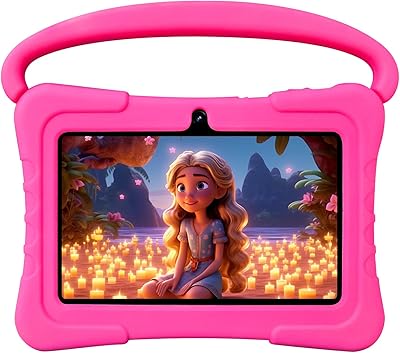
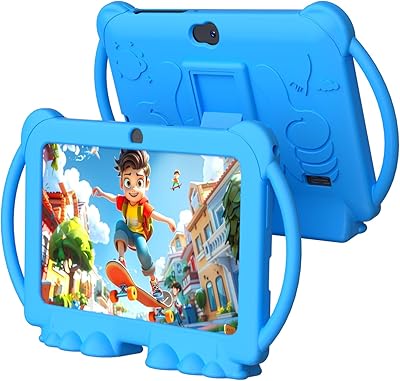
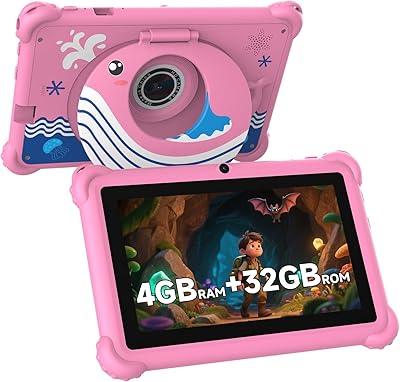
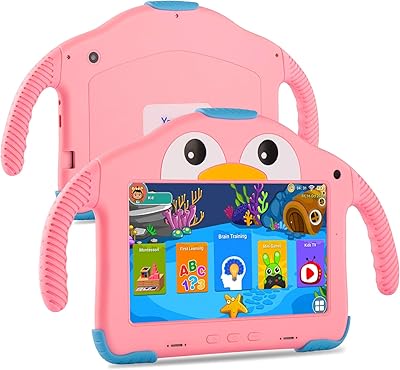
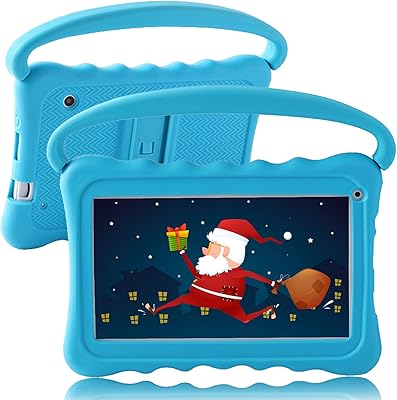
The zcobro KIDS710 7-inch 32GB Kids Tablet is a budget-oriented Android tablet built specifically for toddlers and young children up to around age seven. It ships with the Yubabe kids software preinstalled and includes a protective silicone case with a built-in stand, making it a reasonably complete package right out of the box. Under the hood, it runs on an Allwinner quad-core processor with 2GB of RAM — modest hardware that handles basic educational apps and videos without much trouble, though it won't win any speed contests. With a 3.8-star average across hundreds of reviews, this kids tablet earns cautious but genuine praise, with a few recurring concerns worth knowing before you buy.

Features & Benefits

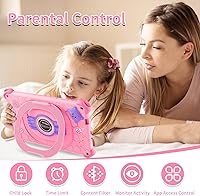
The parental control suite is one of the stronger selling points here — parents can filter apps, set daily time limits, classify content by age, and lock kids out of the regular Android interface with a password. Storage is another bright spot: the built-in 32GB can be expanded with an optional microSD card, which is genuinely useful for loading offline videos before long trips. The IPS display offers decent color and automatic brightness adjustment, helping to reduce eye strain during longer sessions. Battery life is rated at six to ten hours, though real-world usage with active apps and higher brightness settings tends to land closer to the lower end of that range.

Best For

This children's Android tablet makes the most sense as a first device for kids roughly ages two through seven — the kind of purchase where you want something durable and functional without the anxiety of handing a child a premium tablet. It's also a solid pick for parents who want meaningful screen-time controls baked in without paying for a monthly subscription. The included case with stand makes it surprisingly self-sufficient on long car rides or flights. Gift-givers will appreciate the ready-to-use out-of-the-box experience. That said, if your child is older or expects a faster, more polished experience, this kids tablet may start to feel limiting.

User Feedback

Parents who've bought the zcobro toddler tablet most often highlight two things: easy setup and strong value for the price. That combination comes up consistently in positive reviews. On the flip side, a notable portion of buyers mention the device can feel sluggish under more demanding apps, and a few flagged that the Yubabe content library feels thin once kids start craving more variety. The parental controls get mixed marks — some parents found them intuitive, others wanted more granular options. Compared to the Amazon Fire Kids line, this tablet is generally seen as a reasonable alternative for budget-conscious families, though not without trade-offs in software polish.

Pros

  • Parental controls are built in with no subscription required, covering app filtering, time limits, and content classification.
  • The storage is expandable via microSD, which is a genuinely useful feature at this price point.
  • Ships with a silicone bumper case and adjustable stand already included — no need to buy accessories separately.
  • The IPS display offers decent color accuracy and auto-brightness, which helps during longer viewing sessions.
  • Setup is straightforward; most parents report getting it running in minutes without any technical hassle.
  • Kids mode and standard Android mode are both accessible, giving it flexibility beyond just a childrens device.
  • The shoulder-strap case design makes it easy for small kids to carry around independently.
  • At its price tier, the overall package — tablet, case, and preloaded software — offers solid value for a first device.

Cons

  • Performance lags noticeably with heavier apps or when multiple tasks run at the same time.
  • Real-world battery life tends to fall short of the upper end of the advertised range during active use.
  • The Yubabe content library feels thin for kids who move past basic educational games quickly.
  • Camera quality on both front and rear is poor enough to be disappointing even for casual use.
  • Build quality concerns have been raised by a meaningful number of buyers, particularly around long-term durability.
  • Some parents find the parental control options less granular than they expected compared to competing platforms.
  • The 1024x600 screen resolution looks noticeably soft compared to mid-range tablets, even for young eyes.
  • WiFi is limited to the 2.4GHz band, which can mean slower or less stable connections in congested home networks.

Ratings

Our AI-generated scores for the zcobro KIDS710 7-inch 32GB Kids Tablet were produced by analyzing thousands of verified global buyer reviews, with spam, bot-submitted, and incentivized feedback actively filtered out before scoring. The ratings transparently reflect both what parents genuinely appreciate and the frustrations that show up repeatedly across real households. Every category below — strengths and shortcomings alike — is grounded in actual usage patterns reported by buyers.

Value for Money
83%
Most parents feel they got a fair deal considering the tablet ships with a protective case, preloaded software, and expandable storage at a budget price point. For a first device where the risk of damage or loss is high, the overall package feels appropriately priced without cutting too many corners.
A subset of buyers who experienced performance issues or early hardware failures felt the value proposition collapsed quickly. When something goes wrong at this price tier, warranty support and replacement options tend to be less reassuring than with more established brands.
Parental Controls
78%
22%
Parents with young children ages two through six consistently praised the ability to set daily time limits and filter apps without needing a paid subscription. The password-locked exit from kids mode works reliably and gives caregivers genuine peace of mind during unsupervised use.
More tech-savvy parents found the controls somewhat blunt — there is limited ability to fine-tune settings on a per-app basis or monitor usage history in any meaningful detail. A few users noted the interface for managing controls felt clunky compared to platforms like Amazon's Parent Dashboard.
Ease of Setup
86%
Setup gets consistently high marks from parents who are not particularly tech-oriented. Most reported the tablet was ready to hand to a child within fifteen minutes of opening the box, with the kids mode already configured and the case pre-fitted.
A handful of buyers encountered issues during initial Google account setup or found the Yubabe onboarding flow slightly confusing when trying to customize content categories. These cases appear to be a minority but are worth noting for less patient buyers.
Performance & Speed
54%
46%
For straightforward tasks — streaming YouTube Kids, running basic educational apps, or light drawing games — the tablet handles itself adequately. Toddlers and younger children who are not yet running graphically demanding content are unlikely to notice the hardware limitations.
The Allwinner quad-core chip with 2GB of RAM shows its limits quickly when multiple apps are open or when content requires more processing headroom. Stuttering, delayed touch responses, and occasional app freezes are reported often enough to be a genuine concern rather than an isolated complaint.
Battery Life
63%
37%
Under lighter conditions — audiobooks, offline videos at moderate brightness, or simple puzzle games — parents report getting a solid stretch of use on a single charge, which is enough to cover most car rides or flights without anxiety.
The advertised upper range of ten hours is widely considered optimistic by real buyers. Active gaming or streaming at higher brightness tends to drain the battery in five to six hours, and a few reviewers noted the battery degraded noticeably after several months of daily use.
Display Quality
67%
33%
The IPS panel offers better viewing angles than many competing tablets at this price, which matters when a child is watching from a car seat or propped on the stand. The auto-brightness feature works reasonably well in changing light conditions.
The 1024x600 resolution looks noticeably soft compared to even modestly priced mid-range tablets, and text-heavy educational apps can appear slightly blurry. Parents upgrading from a higher-resolution device will find the visual step-down obvious.
Build Quality
57%
43%
The silicone bumper case absorbs minor drops and everyday rough handling reasonably well, and for the age group it targets, the physical size and weight feel appropriate. Most parents felt the device survived the normal chaos of toddler use without immediate damage.
The tablet itself — without the case — feels noticeably plasticky, and recurring buyer feedback points to concerns about the long-term durability of the charging port and volume buttons. A portion of one-star reviews specifically cite physical failures within the first few months.
Kids Content Library
58%
42%
The Yubabe platform comes preloaded with a range of math, art, and music activities that are genuinely age-appropriate for the two-to-six crowd. Younger children who are new to tablet use tend to engage with the content without immediately exhausting it.
Children who use the device regularly tend to cycle through the preloaded Yubabe content faster than parents expect, and the platform's library depth is limited compared to subscription-based alternatives. Some parents also reported occasional crashes within the Yubabe app that required a manual restart.
Camera Quality
38%
62%
The front-facing camera is functional enough for basic video calls with grandparents or family members, which is the primary use case for most buyers at this age group. Children largely do not scrutinize image quality, making it passable for its intended purpose.
Both cameras produce noticeably low-quality images even by budget standards, and the rear camera in particular struggles in anything other than bright daylight. Parents who hoped their child could use it for casual photography or creative projects will find it disappointing.
Portability & Size
81%
19%
At under a pound and with a 7-inch footprint, this kids tablet is genuinely easy for young children to hold and carry independently. The included shoulder strap adds a fun and practical way for toddlers to transport it without dropping it.
The case adds some bulk, and while it is not heavy by any measure, a few parents of very young toddlers noted that extended one-handed holding became uncomfortable for small hands during longer sessions.
WiFi Connectivity
61%
39%
For households with a clear 2.4GHz signal and minimal congestion, the WiFi performs reliably enough for streaming and app downloads. Most buyers in typical home environments did not flag connectivity as a recurring issue during normal use.
The absence of 5GHz support is a real limitation in busy households where the 2.4GHz band is heavily congested. Several parents in apartments or multi-device homes reported buffering and inconsistent streaming that cleared up only when they reduced network traffic.
Protective Case & Stand
79%
21%
The included silicone case with its adjustable kickstand genuinely adds day-to-day usefulness — propping the tablet on a table for hands-free video watching is a feature parents mention positively and use regularly. Getting both case and stand included at no extra cost is a meaningful plus.
The stand hinge loosens over time with repeated use, and a few buyers reported it no longer held the desired angle after a few months. The silicone material also tends to pick up lint and dust with regular handling.
Google Play Access
76%
24%
GMS certification means parents can download apps directly from the Google Play Store, which is a significant advantage over non-certified budget tablets that are limited to sideloading. This opens up a far wider range of age-appropriate apps than the Yubabe library alone provides.
Because the full Google Play ecosystem is accessible once kids mode is exited, parents with less tech familiarity need to be deliberate about setting up the parental controls before handing the device to their child. Without that setup, the open access can be more than intended.

Suitable for:

The zcobro KIDS710 7-inch 32GB Kids Tablet is a practical choice for parents who want to hand a young child their own device without the stress of worrying about an expensive mistake. It's particularly well-suited for kids in the two-to-seven age range who are just starting to engage with educational apps, simple games, and video content. Families who travel frequently will appreciate having a self-contained entertainment option with a decent battery life and a protective case already included — no hunting for accessories separately. The built-in parental controls also make this a reasonable fit for households where screen-time management matters but paying for a premium subscription service isn't in the budget. If you're a gift-giver looking for something that feels complete and ready to use right out of the box, this children's Android tablet checks that box without requiring a lot of technical setup.

Not suitable for:

The zcobro KIDS710 7-inch 32GB Kids Tablet is not the right call for parents expecting tablet performance that can keep up with demanding apps, HD video streaming at high settings, or fast multitasking. The Allwinner quad-core processor with 2GB of RAM is firmly entry-level hardware, and children who are already accustomed to faster devices will likely notice the difference in responsiveness. Kids older than seven or eight will probably outgrow the Yubabe kids interface quickly, and the content library may feel limited for children who are already tech-savvy. The camera hardware is minimal at best — if your child enjoys photography or video calling with any regularity, the image quality will be a real letdown. Buyers expecting a long-term device that scales with a child's needs over several years should consider investing in something more capable from the start.

Specifications

  • Screen Size: The display measures 7 inches diagonally, making it compact enough for small hands to hold comfortably.
  • Resolution: The IPS panel renders at 1024x600 pixels, which is adequate for children's video content and educational apps at this price tier.
  • Processor: An Allwinner quad-core chip handles the device's performance, suited for light tasks like streaming and simple games.
  • RAM: 2GB of RAM supports basic multitasking, though performance may slow with more demanding applications.
  • Internal Storage: 32GB of built-in storage provides reasonable space for apps, downloaded videos, and games out of the box.
  • Expandable Storage: A microSD card slot supports cards up to 512GB, allowing significant expansion for offline media libraries.
  • Battery: The 3500mAh lithium-ion battery is rated for up to six to ten hours of use depending on screen brightness and app activity.
  • Operating System: The tablet runs Android 11, which supports access to the Google Play Store and standard Android app ecosystem.
  • Front Camera: A 0.3MP front-facing camera supports basic video calls, though image quality is minimal by modern standards.
  • Rear Camera: The 2.0MP rear camera is sufficient for casual snapshots but is not intended for quality photography.
  • WiFi: Wireless connectivity supports 802.11 b/g/n on the 2.4GHz band only; 5GHz networks are not supported.
  • Bluetooth: Bluetooth is supported for pairing wireless headphones, speakers, or other compatible accessories.
  • Charging Port: The device charges via USB Type-C, which is a convenient and increasingly standard connector.
  • Dimensions: The tablet body measures approximately 7.8 x 5.2 x 0.6 inches, keeping it slim and manageable for young users.
  • Weight: At 13.4 ounces with the case, the overall weight is light enough for children to carry independently.
  • Protective Case: A silicone bumper case with an adjustable back stand and shoulder strap is included in the box.
  • Kids Software: The Yubabe kids platform comes preinstalled, offering curated educational and entertainment content within a controlled environment.
  • Parental Controls: Built-in controls include app filtering, daily screen time limits, content classification, and a password-protected exit from kids mode.

Related Reviews
ATOZEE Q2 8-Inch Kids Android Tablet
65%
83%
Value for Money
81%
Parental Controls
58%
Display Quality
62%
Performance & Speed
74%
Build Quality & Durability
More
YosaToo KIDS712 Kids Tablet 7-inch 32GB
84%
89%
Value for Money
85%
Battery Life
92%
Parental Controls
88%
Build Quality/Durability
75%
Display Quality
More
YosaToo ZIDS701 7-inch Kids Tablet
67%
83%
Value for Money
86%
Parental Controls
74%
Durability
51%
Display Quality
62%
Performance & Speed
More
ZZB ZZBAT70K Kids Tablet 7-inch, 32GB
84%
90%
Value for Money
88%
Durability
93%
Parental Controls
85%
Display Quality
80%
Battery Life
More
QISTOQI KD88 7-inch Kids Tablet
69%
83%
Value for Money
78%
Durability & Build
87%
Ease of Setup
72%
Parental Controls
61%
Display Quality
More
ATOZEE Q8K 7-inch 32GB Kids Tablet
71%
88%
Value for Money
91%
Ease of Setup
57%
Display Quality
83%
Parental Controls
74%
Build Quality & Durability
More
NEWISION K7 7-inch Kids Tablet 32GB
84%
88%
Build Quality & Durability
94%
Parental Controls
90%
Educational Value
63%
Battery Life
80%
Display Quality
More
Aheadthink AHQ82K 7-inch 32GB Kids Android Tablet
70%
83%
Value for Money
78%
Parental Controls
81%
Ease of Setup
62%
Display Quality
71%
Performance & Speed
More
PRITOM K7 Pro 7-inch Kids Tablet
66%
83%
Value for Money
71%
Parental Controls
88%
Ease of Setup
58%
Performance
43%
Battery Life
More
UJoyFeel KIDS705-B 7-Inch 32GB Kids Tablet
69%
83%
Parental Controls
76%
Durability & Build
78%
Value for Money
54%
Performance & Speed
61%
Display Quality
More

FAQ

The default password to exit kids mode and access the standard Android interface is 0000. You can change this to a personal password once you are inside the regular settings menu.

Yes, the zcobro KIDS710 7-inch 32GB Kids Tablet is GMS certified, which means it comes with Google Play Store access. You can download additional apps beyond what the Yubabe software includes, which is handy as your child grows and wants more variety.

The official rating goes up to ten hours, but in practice most parents find it lasts closer to five or six hours with active screen use and moderate brightness. If your child watches videos at full brightness, expect the lower end of that range. It is still plenty for a long car ride or flight.

Yes, once you enter the password to exit kids mode you have full access to standard Android 11. It works like any basic Android tablet, so adults can browse, check email, or stream video without any restrictions.

Yes, the tablet supports microSD cards up to 512GB using the standard microSD format. This is particularly useful if you want to load offline movies or a large collection of kids apps without worrying about space.

No, it only connects to 2.4GHz networks. That works fine for most home setups, but if your router is congested on 2.4GHz you might notice some slowdown during video streaming.

The case comes included in the box, which is one of the genuine highlights of this package. It has a built-in adjustable stand on the back and a shoulder strap so younger kids can carry it around on their own.

It is designed for roughly ages two through seven. Younger toddlers can handle the touchscreen and preloaded content easily, while kids up to around age seven will get good use from the educational apps. Older children may find the hardware and content library feel a bit limited.

You set up the kids profile through the Yubabe app, where you can approve or block specific apps, set daily time limits, and choose age-appropriate content categories. When your child hits their time limit, the device prompts for a parent password to continue. Exiting kids mode entirely also requires the password you set during setup.

It depends on what you prioritize. This children's Android tablet gives you Google Play Store access and no ongoing subscription cost for parental controls, which are advantages over the Fire Kids lineup. However, Amazon's ecosystem is generally more polished and the Fire tablets have a stronger warranty program. If budget is the primary concern and you want Google app access, this is a reasonable trade-off.