

Overview

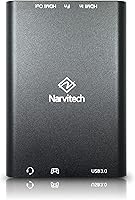
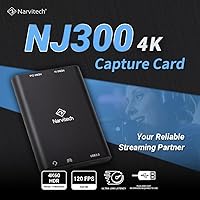
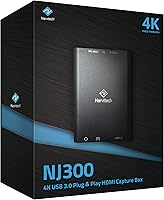
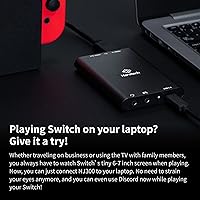
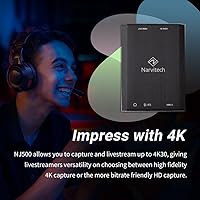
The Narvitech NJ300 HDMI Capture Card is designed to provide smooth, high-quality gameplay streaming with minimal hassle. This plug-and-play device doesn't require any additional drivers and is ready to use right out of the box. With support for 4K60 passthrough and 1080P60 recording, it offers users a fantastic mix of visual fidelity and ease of use. Whether you’re capturing gameplay or streaming live, this capture card delivers reliable performance with minimal setup, making it an ideal choice for casual and budding content creators alike.

Features & Benefits

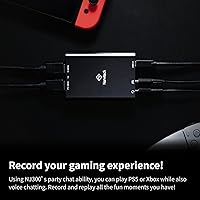
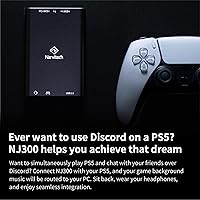
The Narvitech NJ300 is packed with features that make it stand out in the crowded capture card market. With its ultra-low latency, the device ensures seamless streaming and real-time gaming experiences, so you won’t miss a beat during critical moments. It’s fully compatible with a wide range of devices, including PC, Mac, PS5, Xbox Series X/S, and Nintendo Switch. Additionally, it can capture both game audio and party chat, which is essential for streamers who want to engage with their audience and capture every aspect of gameplay.

Best For

This HDMI capture card is a perfect choice for beginner streamers and gamers who need an affordable yet reliable solution. Whether you’re just starting out in streaming or looking to upgrade your setup, the Narvitech NJ300 is an excellent choice. It’s especially well-suited for streaming gamers who need a straightforward, cost-effective way to share their gaming sessions. Its easy setup and compatibility with popular software like OBS and XSplit make it a great fit for anyone looking to dive into content creation without unnecessary complexity.

User Feedback

The Narvitech NJ300 receives positive feedback for its easy setup and consistent performance. Many users appreciate the plug-and-play functionality, which eliminates the need for complicated drivers or software installations. Gamers also praise its low-latency capabilities, particularly when streaming in real time. However, there are occasional mentions of compatibility issues with specific software setups, especially when using advanced streaming features. While these instances are rare, they’re worth considering if you have a complex streaming setup or use specialized software.

Pros

  • Plug-and-play setup makes it ideal for beginner streamers and users with limited technical expertise.
  • Supports 4K60 passthrough and 1080P60 recording for smooth and high-quality gameplay capture.
  • Works seamlessly with a wide range of devices, including PC, Mac, PS5, Xbox Series X/S, and Nintendo Switch.
  • Ultra-low latency ensures smooth, lag-free streaming and real-time gaming experiences.
  • Captures game audio and party chat, making it suitable for multiplayer streaming and content creation.
  • Compact and lightweight design makes it easy to carry and set up for on-the-go streaming.

Cons

  • Occasional compatibility issues with specific software setups, which could affect experienced users.
  • Limited recording resolution (1080P) might not meet the needs of professional streamers seeking 4K recording.
  • Build quality feels lightweight and may not be as durable for long-term, heavy usage.
  • Lack of advanced audio control features could be a downside for users with more sophisticated needs.
  • Some users report a slight delay when using certain third-party software or streaming platforms.
  • No included software for advanced video editing, requiring reliance on external programs for post-production.

Ratings

After analyzing verified user reviews from multiple platforms and languages worldwide, we've compiled the ratings for the Narvitech NJ300 HDMI Capture Card. Authentic feedback from real customers, filtered for quality and relevance, reveals a balanced mix of strengths and some minor areas for improvement. Both positive and critical insights have been taken into account, offering a comprehensive overview of this device's performance in real-world conditions.

Value for Money
89%
Many users find this HDMI capture card offers great value for its price. The affordable cost combined with reliable performance makes it an ideal choice for beginners. Several reviewers mention that it provides solid functionality without breaking the bank, which is particularly appreciated by casual streamers and gamers alike.
A few customers mentioned that while the device works well for the price, the build quality and some advanced features may not meet the expectations of professional streamers or users seeking top-tier performance. Some felt that higher-end models offered more longevity and premium materials.
Ease of Setup
94%
The setup process is consistently praised for being incredibly simple, especially for users new to streaming or content creation. Many reviewers highlight the plug-and-play functionality, which requires no additional drivers or complicated configurations. This makes it a great option for those who want to get started quickly without hassle.
A small number of users experienced difficulties with the device not being immediately recognized on certain systems. While the vast majority had no issues, a few found it took extra steps or troubleshooting to get it working properly on their specific setup.
Performance (Streaming & Recording)
87%
This device excels in delivering smooth streaming and recording at 1080p60 resolution. Reviewers are impressed by the quality of video output, especially when streaming games. The low-latency performance is also a key point of satisfaction, ensuring minimal delay during live broadcasts and recordings.
A handful of users noted that while the capture card performs well at 1080p, it occasionally struggles to maintain optimal performance when used with higher resolutions or more demanding applications. Some also felt that the quality could be better for pro-level content creators looking for ultra-high-definition capture.
Latency
92%
The ultra-low latency is one of the standout features of this capture card. Many streamers and gamers appreciate how quickly the device processes video without noticeable delays, which is essential for real-time interactions. The minimal latency ensures a smooth and responsive streaming experience, particularly important for fast-paced gaming.
While most users were satisfied with the low-latency performance, there were a few reports of slight delays when using more complex setups, especially on older PCs or laptops. Some users also mentioned occasional sync issues when streaming audio and video simultaneously.
Compatibility with Devices
90%
This capture card's broad compatibility with various systems, including PC, Mac, PS5, Xbox Series X/S, and Nintendo Switch, is widely appreciated. Users like that it can be seamlessly integrated with multiple platforms, allowing for flexibility in choosing the right setup without worrying about compatibility.
However, some buyers experienced minor issues when connecting to specific software applications or older devices. A few reviews mention that compatibility was not as smooth with certain gaming consoles or video-editing tools, requiring extra configuration or troubleshooting.
Audio Capture Quality
85%
The ability to capture both game audio and party chat is a major plus for streamers and content creators. Many users enjoy how clear and synchronized the audio is, which is critical for interactive streams. The inclusion of 3.5mm line-in audio input also provides additional flexibility for external microphones.
Despite the positive feedback, some users found that the audio capture could sometimes be a little muted or distorted during high-volume gameplay. This issue appeared occasionally on specific systems or when using certain audio setups, leading to mixed reviews regarding the overall sound quality.
Build Quality
80%
20%
While the build quality is generally solid for the price, many users appreciate the compact, lightweight design that makes it easy to transport and set up in different environments. It's a practical device for streamers who need something portable but still functional for daily use.
Some customers noted that the device feels somewhat plasticky and less durable compared to other, more expensive capture cards. A few reviewers mentioned concerns about the longevity of the casing, especially after repeated travel or constant use in mobile setups.
Software Integration (OBS, XSplit, etc.)
78%
22%
The capture card supports a range of popular streaming and recording software like OBS and XSplit, allowing users to integrate it easily into their existing setup. Reviewers appreciate that it's compatible with most major platforms for streaming, making it a versatile choice for content creators.
However, some users experienced software glitches or slow performance when using certain applications. Issues such as frame drops and occasional disconnections were mentioned, suggesting that more fine-tuning might be needed for a fully seamless integration with all software environments.
Customer Support
74%
26%
The majority of users report that the customer support team is responsive and helpful when it comes to troubleshooting basic issues. Some reviewers noted that they received quick replies and efficient solutions to their questions about setup and performance.
A few users expressed dissatisfaction with the support team's responsiveness or the quality of the advice given for more technical problems. Some mentioned that responses were slow, or the fixes suggested were not always effective in resolving complex setup issues.
Durability
76%
24%
The capture card is built to withstand everyday use and provides reliable performance over time. Users have mentioned that it holds up well under typical gaming and streaming conditions, making it a decent option for users who require consistent, long-term functionality.
On the downside, some users felt that the build quality could affect long-term durability, with occasional complaints about the device showing signs of wear after several months of use. This included reports of wear on the USB-C connector or slight cracking around the edges after frequent transportation.
Portability/Size
85%
The compact size and light weight of this capture card make it easy to carry for gamers and streamers on the go. Reviewers appreciate that it doesn't take up much space in their setup or bag, making it ideal for those who travel or need a portable solution for streaming.
However, some users pointed out that while portability is a plus, the small size might make it harder to handle for those who need multiple input/output ports or prefer larger devices with more tactile controls. A few wished the card was larger for better ergonomics during setup.
Long-Term Value
82%
18%
The value of this HDMI capture card is high for its price point, and many users feel it offers reliable performance over an extended period. For casual gamers and beginner streamers, it’s a great entry-level device that delivers solid results without the high cost of premium models.
However, some users questioned whether it would continue to perform well over the long term, especially if they upgrade their gaming or streaming setups. Concerns about the device's ability to keep up with future software or hardware changes were mentioned by those who were looking for a more future-proof investment.

Suitable for:

The Narvitech NJ300 HDMI Capture Card is ideal for beginner streamers and gamers who are looking for an affordable, easy-to-use device. Its plug-and-play setup, combined with smooth 1080P60 recording and 4K60 passthrough capabilities, makes it a great choice for casual gamers and content creators. Those new to streaming or video capture will particularly appreciate the user-friendly interface and compatibility with a wide range of devices such as PCs, Macs, PS5, Xbox Series X/S, and Nintendo Switch. The low-latency performance is also a major benefit for real-time interaction, making it an excellent option for anyone starting out with game streaming or creating gaming content.

Not suitable for:

While the Narvitech NJ300 is a strong option for beginners, it may not meet the needs of professional streamers or those requiring advanced features. Users seeking ultra-high-definition recording or advanced audio control might find it limiting, as it does not provide 4K recording or some of the more refined settings of higher-end models. Additionally, some customers reported occasional compatibility issues with specific software setups, which could be a concern for more experienced users looking for seamless integration with specialized tools. Gamers and content creators who demand premium build quality or long-term durability might also find this device lacking compared to more robust alternatives.

Specifications

  • Max. Passthrough Resolution: Supports up to 4K60 passthrough for high-quality gameplay display.
  • Max. Record Resolution: Records at a maximum resolution of 1080P60 for clear video capture.
  • Latency: Features ultra-low latency for smooth, real-time gameplay and streaming.
  • Interface: Uses USB 3.0 Type-C interface for fast data transfer.
  • Audio Input: Accepts audio input via HDMI 2.0 and 3.5mm line-in for versatile audio capture.
  • Audio Output: Supports HDMI 2.0 and 3.5mm line-out for game audio and party chat.
  • Video Input: Video input is through HDMI 2.0, providing high-definition video signals.
  • Compatible Devices: Compatible with PC, Mac, PS5, Xbox Series X/S, Nintendo Switch, and more.
  • Software Support: Supports popular streaming software including OBS, Streamlabs, and XSplit.
  • Dimensions: Measures 4.25 x 2.95 x 0.57 inches, making it compact and portable.
  • Weight: Weighs 15.2 ounces, offering a lightweight design for easy portability.
  • Plug-and-Play: Requires no additional drivers or software for setup, enabling hassle-free use.
  • Device Support: Works seamlessly with a variety of devices for gaming, streaming, and recording.
  • Video Format Support: Supports a wide range of video formats for flexibility in streaming and recording.
  • USB Compatibility: Works with USB 3.0 ports, ensuring fast and efficient data transfer for streaming.
  • Build Material: Constructed with durable materials for reliable performance in regular use.
  • Party Chat Capture: Can capture both game audio and party chat for a more immersive streaming experience.

FAQ

Setting up this capture card is easy thanks to its plug-and-play functionality. Simply connect the HDMI input from your console or PC, plug the device into a USB 3.0 port on your computer, and you're ready to start streaming or recording. No additional drivers or software installation is needed.

The Narvitech NJ300 supports up to 4K60 passthrough for seamless gameplay viewing on external displays. For recording, it captures at a maximum resolution of 1080P60, ensuring high-quality video for streaming and content creation.

Yes, this device is compatible with a wide range of consoles, including PS5, Xbox Series X/S, and Nintendo Switch. It also works well with PC and Mac, making it versatile for various gaming and streaming setups.

Absolutely! This HDMI capture card works with popular streaming software like OBS, Streamlabs, and XSplit, making it perfect for live streaming to platforms such as Twitch, YouTube, and Facebook Live. Just connect, configure, and you're good to go.

Yes, it captures both game audio and voice chat when connected through HDMI and 3.5mm line-in. This feature is especially useful for multiplayer streams where you want to capture both gameplay sound and in-game conversation.

Yes, this device is designed with beginners in mind. Its plug-and-play setup makes it easy for newcomers to start streaming without needing to worry about complicated installations or technical issues.

Yes, the Narvitech NJ300 is fully compatible with both PC and Mac systems. Whether you're using OBS, Streamlabs, or XSplit, it works seamlessly across different platforms, making it a great choice for all users.

Some users have reported occasional compatibility issues with certain third-party software or custom configurations. While it generally works well with OBS and Streamlabs, you may need to tweak settings or update drivers in some cases to resolve minor glitches.

While this capture card is compact and lightweight, some users have noted that it might not be as durable for heavy, long-term use. It's great for casual streaming, but if you're looking for a more rugged option for constant use or travel, you might want to consider more premium models.

No, the device does not require any special software or drivers to operate. It's plug-and-play, which makes it very user-friendly. However, you can use it with streaming software like OBS, Streamlabs, or XSplit to enhance your streaming experience.