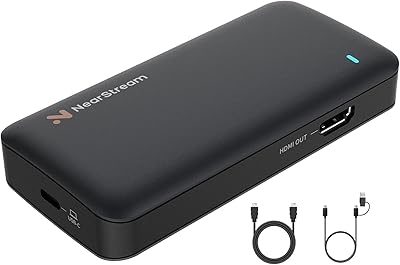
VANGREE VC-003 Capture Card

Overview
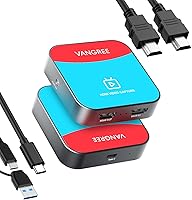
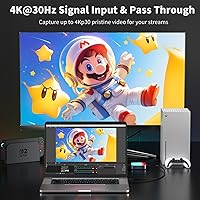
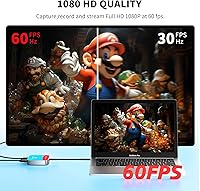
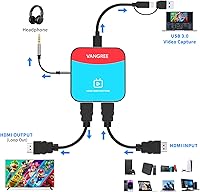
The VANGREE VC-003 Capture Card sits comfortably in the mid-range capture space, offering a practical balance of portability and solid video output for everyday streamers and console gamers. It fits in the palm of your hand — barely 3 inches square — yet handles HDMI input up to 4K@30Hz while outputting at 1080p at 60fps over USB-C 3.0. No driver installation, no software headaches. It just works across Windows, macOS, Linux, and Android straight out of the box, making it one of the more genuinely plug-and-play options in its price class.
Features & Benefits
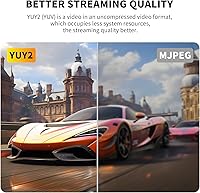
What makes this capture card worth a closer look is how well it handles the gap between what goes in and what gets recorded. It accepts a 4K HDMI signal but captures at 1080p60 via USB-C — that distinction matters, and the hardware scaling does a clean job of it. The pass-through signal stays virtually lag-free, which is critical if you're gaming on a TV while recording at the same time. Color fidelity holds up well too; the YUY2 uncompressed format means no compression artifacts muddying your footage. A 3.5mm jack handles audio monitoring, and it works right away with OBS, XSplit, and PotPlayer.
Best For
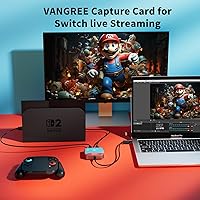
This streaming device makes the most sense for console players who want to get recording or streaming without spending an afternoon configuring drivers and settings. Switch owners in particular — including those with the new Switch 2 — will find it ready to go immediately. It's also a smart pick for content creators who move around a lot, since it's bus-powered and small enough to drop in a bag without a second thought. Mac and Linux users who've struggled with driver compatibility elsewhere will appreciate that the VC-003 genuinely works cross-platform. That said, if 4K capture output is your goal, look elsewhere — this records at 1080p.
User Feedback
Among buyers, the most consistent praise centers on how quickly the VC-003 gets up and running — many note OBS recognized it immediately with no setup required. Pass-through latency also draws positive comments, with users confirming it held up during fast-paced gaming sessions. On the other side, iPhone users hit a wall: iOS requires a third-party camera app like CamX or MoniCon, which catches some buyers off guard and is worth knowing before you purchase. A handful of reviews flag that long-term build quality feels modest, though short-term durability reports are mostly positive. Overall, ratings land around four stars — genuinely useful, but with realistic expectations.
Pros
- Truly plug-and-play — recognized instantly by OBS, XSplit, and PotPlayer with zero driver installation.
- Works reliably across Windows, macOS, Linux, and Android, covering far more platforms than most rivals at this price.
- HDMI pass-through latency is minimal enough that competitive gamers report no noticeable display lag.
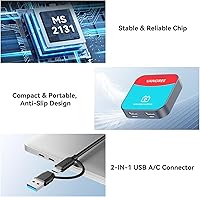
- Compact enough to tuck into a laptop bag or jacket pocket without adding meaningful weight.
- YUY2 uncompressed color format delivers clean, artifact-free footage at 1080p60.
- Compatible with Nintendo Switch, Nintendo Switch 2, PS5, and Xbox Series X/S right out of the box.
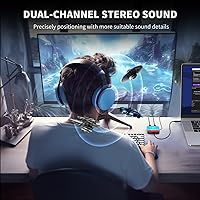
- 3.5mm audio jack adds flexibility for direct monitoring or microphone input without extra adapters.
- Bus-powered via USB-C — no wall outlet or external power brick needed.
- Ranked in the top 60 capture cards on Amazon with a consistently solid average rating across hundreds of buyers.
Cons
- Capture output is capped at 1080p60 — there is no path to 4K recording regardless of input signal.
- iOS support requires a third-party camera app and is not mentioned clearly enough on the product page.
- Build quality feels modest; the plastic housing raises questions about longevity under frequent travel or daily desk use.
- No included software bundle — buyers relying solely on free tools like OBS are fine, but beginners may feel underdirected.
- Android support exists but requires specific camera apps, adding steps that frustrate non-technical users.
- No hardware H.264 or H.265 encoding, so the encoding load falls entirely on the host CPU during streaming.
- The 3.5mm audio jack is functional but lacks gain control, limiting usefulness for serious audio monitoring.
- At roughly 9.9 ounces, it is slightly heavier than expected for its footprint, which surprises some buyers.
Ratings
The scores below for the VANGREE VC-003 Capture Card were generated by our AI after analyzing verified global buyer reviews, actively filtering out incentivized, bot-generated, and outlier feedback to surface what real everyday users actually experienced. Each category reflects both what this streaming device genuinely does well and where it falls short, so you can make a confident, eyes-open purchase decision.
Ease of Setup
OBS Compatibility
Pass-Through Latency
Video Capture Quality
Cross-Platform Support
Build Quality
Portability
Console Compatibility
Audio Performance
Value for Money
Streaming Performance
Software Flexibility
Long-Term Reliability
Packaging & Included Accessories
Suitable for:
The VANGREE VC-003 Capture Card is a strong fit for casual-to-intermediate streamers and console gamers who want a low-friction way to get footage onto their PC without wrestling with drivers or software configuration. If you play on a Nintendo Switch, PS5, or Xbox and simply want your sessions recorded or broadcast through OBS, this card removes almost every barrier between you and a working setup. It also makes practical sense for traveling content creators who need a bus-powered, pocket-friendly device that does not require a separate power cable or a dedicated encoding PC. Mac and Linux users will find it particularly refreshing, since cross-platform driver issues that plague many competing cards simply do not apply here. Remote workers or educators who occasionally need to capture camera feeds or screen output for video calls or tutorials will also get real, reliable value out of this streaming device.
Not suitable for:
The VANGREE VC-003 Capture Card is not the right tool if your goal is true 4K capture — it accepts a 4K HDMI signal, but everything it records or streams is output at 1080p60, full stop. Serious content creators who need 4K recording for professional post-production work should look at purpose-built cards in a higher tier. iPhone users should also think twice: iOS is not natively supported, and getting this capture card to work with a phone requires downloading a third-party camera app, which adds friction many buyers do not anticipate. If you stream competitively or professionally and need features like multi-track audio, hardware H.264 encoding, or advanced mixing controls, the VC-003 will feel limiting in short order. And if long-term durability under heavy daily use is a priority, the build quality — while acceptable for occasional use — has drawn enough skepticism in user reviews to warrant caution.
Specifications
- Brand: Manufactured by VANGREE under the model series designation VC-003.
- Dimensions: The unit measures 2.81 × 2.81 × 0.67 inches, making it compact enough to fit in a shirt pocket.
- Weight: The device weighs 9.9 ounces, which is slightly heavier than it looks but still fully portable.
- Video Input: Accepts HDMI input signals up to 4K at 30Hz from consoles, cameras, or other HDMI-equipped sources.
- Capture Output: Records and streams video at up to 1080p at 60fps via USB-C 3.0 to the host computer.
- Pass-Through: HDMI pass-through supports up to 4K at 30Hz with near-zero latency for uninterrupted on-screen gameplay.
- Color Format: Captures in YUY2 (YUV 4:4:4) uncompressed format, preserving full color and luma-chroma detail without compression artifacts.
- Interface: Connects to the host device via USB-C 3.0, providing sufficient bandwidth for continuous 1080p60 data throughput.
- Audio Port: Includes a 3.5mm audio jack for direct headphone monitoring or microphone input alongside video capture.
- Driver Requirement: No drivers or additional software are required; the device is recognized automatically by supported operating systems.
- Compatible OS: Works natively with Windows, macOS, Linux, and Android without any driver installation.
- iOS Support: iOS is not natively supported; iPhone and iPad users must use a third-party camera app such as CamX or MoniCon.
- Software Support: Compatible out of the box with OBS Studio, XSplit, and PotPlayer on supported operating systems.
- Console Support: Works with Nintendo Switch, Nintendo Switch 2, PlayStation 5, and Xbox Series X/S via standard HDMI output.
- Power Source: Bus-powered entirely through the USB-C connection, requiring no external power adapter or wall outlet.
- Color: Available in red, giving it a distinctive appearance compared to the typically black or grey capture cards in this category.
- Scaling: Uses hardware-accelerated scaling to downscale 4K input to 1080p60 output with minimal processing overhead on the host CPU.
- Amazon Ranking: Ranked #59 in the Internal TV Tuner and Video Capture Cards category on Amazon at the time of review.
- Average Rating: Holds a 4.3 out of 5 star average rating based on 205 customer ratings on Amazon.
- Release Date: First made available for purchase on July 30, 2023.
Related Reviews

XIIXMASK MS2131 Video Capture Card
Razer Ripsaw X USB Capture Card
EVGA XR1 Lite (141-U1-CB20-LR)
Qonakism Dual HDMI Capture Card with Switcher

Bytebridges 4K HDMI Capture Card (affd05f3)
VIXLW Video Capture Card Pro+
ORIVISION U923 4K HDMI Video Capture Card
Narvitech NJ300
August VGB400 Video Capture Card