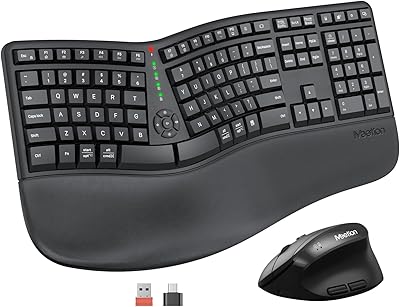
ProtoArc EM11 NL Ergonomic Vertical Wireless Mouse


Overview
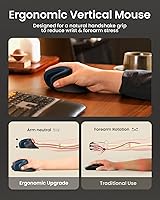
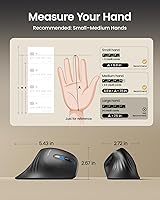
The ProtoArc EM11 NL Ergonomic Vertical Wireless Mouse entered the market in late 2024 and quickly climbed to a top-12 bestseller rank in computer mice — a fast rise that reflects genuine demand for affordable ergonomic options. Vertical mice orient your hand in a handshake position, which takes pressure off the forearm and wrist during long sessions. This one sits at the budget end of that category, making it a low-risk way to try the form factor. It supports multi-device connectivity and charges via USB-C, both genuinely useful conveniences. Just know upfront: there is a real adjustment period, and it fits small to medium hands best.
Features & Benefits
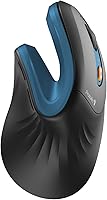
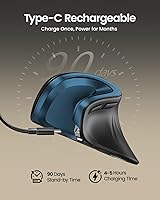
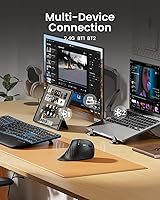
The core appeal of this vertical mouse is its vertical ergonomic design, which tilts your hand roughly 60 degrees so your forearm rests in a more natural position rather than lying flat. Connectivity is flexible — pair up to three devices using Bluetooth 5.0 or a 2.4G USB dongle and switch between them via a button on the base. The built-in battery charges over USB-C, so no disposable batteries to track down. Three DPI settings — 1000, 1600, and 2400 — cover most everyday tasks well. The left and right buttons are genuinely silent, a welcome touch in shared offices, though the scroll wheel and side navigation buttons are not. Mac users should also note the side buttons do not function on macOS at all.
Best For
This ergonomic wireless mouse is a strong fit for desk workers and students who log long hours at a computer and are beginning to feel the strain in their wrists. It particularly suits people who bounce between multiple devices — a work laptop, personal desktop, and tablet, for instance — since switching connections takes just a button press. If you have never tried a vertical mouse and want to test the concept without a serious investment, this is one of the more sensible starting points out there. That said, Windows users get the full feature set; Mac users lose side button functionality entirely. Larger hands may also find the fit cramped, as the brand specifically recommends small to medium hand sizes.
User Feedback
Buyers who stick with the EM11 NL through the first week or two generally leave positive notes about reduced wrist and forearm discomfort — though worth repeating, this is comfort feedback, not a medical outcome. The most cited complaint is the adjustment period, and a fair share of lower ratings appear to come from users who expected instant relief and abandoned the mouse too soon. Build quality draws mixed reactions; most find it acceptable at this price point, though the plastic feels lightweight. Battery life earns consistent praise, with many users reporting several weeks between charges. Multi-device switching is typically described as reliable, while some find the DPI range fine for daily work but limiting for anything requiring precise cursor control.
Pros
- Vertical design encourages a natural handshake grip that can meaningfully reduce forearm and wrist fatigue over long sessions.
- Connects to up to three devices via Bluetooth 5.0 or a 2.4G dongle, making multi-device workflows much less frustrating.
- USB-C charging eliminates the need for disposable batteries entirely — a small but genuinely appreciated convenience.
- Silent left and right click buttons are legitimately quiet, a real plus in shared offices or late-night work sessions.
- Three DPI levels cover a practical range for everyday browsing, document work, and general productivity tasks.
- Battery life impresses most users, with many reporting several weeks of use between charges.
- The EM11 NL reached a top-12 bestseller rank quickly, reflecting a broad base of satisfied everyday users.
- At its price point, the multi-device support and USB-C charging combination is hard to match in the ergonomic mouse category.
- Setup is straightforward — pairing is quick and switching between connected devices requires just one button press.
Cons
- The adjustment period is real and can take one to two weeks; buyers who quit early rarely benefit from the ergonomic design.
- Forward and back navigation buttons do not work on macOS at all, making this a poor fit for Mac-primary users.
- The scroll wheel and side navigation buttons are not silent, which undercuts the quiet-office appeal somewhat.
- No button programmability means power users cannot customize shortcuts or remap any controls to fit their workflow.
- Build quality feels lightweight and plasticky, which some buyers find underwhelming even at this price.
- The compact chassis is specifically designed for small to medium hands, leaving larger-handed users with a cramped or awkward grip.
- The 2400 DPI ceiling is limiting for tasks requiring fine cursor precision, such as photo editing or detailed design work.
- Bluetooth connectivity, while generally reliable, occasionally draws complaints about lag or dropout during device switching.
Ratings
The scores below for the ProtoArc EM11 NL Ergonomic Vertical Wireless Mouse were generated by our AI after analyzing thousands of verified buyer reviews from global markets, with spam, bot-generated, and incentivized feedback actively filtered out. Each category reflects the full spectrum of real user experience — not just the highlights — so both the genuine strengths and the recurring frustrations are represented honestly. Where scores dip, the reasons are grounded in patterns we found consistently across independent reviews.
Ergonomic Comfort
Multi-Device Connectivity
Value for Money
Build Quality
Battery Life
Adjustment Period
Silent Click Performance
DPI and Tracking
Mac Compatibility
Hand Size Fit
Ease of Setup
Portability
Button Layout
Suitable for:
The ProtoArc EM11 NL Ergonomic Vertical Wireless Mouse is a practical choice for office workers, students, and anyone who spends several hours a day at a desk and has started noticing tightness or fatigue in their wrist or forearm. The vertical orientation encourages a more natural hand position that can reduce cumulative strain over time — not a cure, but a meaningful ergonomic improvement for many people. It works especially well for multi-device users who regularly switch between a Windows PC, a laptop, and a tablet, since the three-device pairing and quick-switch button make that workflow genuinely convenient. People who are simply curious about vertical mice but hesitant to spend a lot on an unproven form factor will find this a sensible, low-commitment entry point. Those with small to medium hands will get the best fit and the most comfortable grip.
Not suitable for:
Buyers who expect instant comfort or a dramatic reduction in wrist pain from day one are likely to be disappointed — this vertical mouse requires a genuine adjustment period of one to two weeks, and impatient users often give up before the ergonomic benefits kick in. Mac users should think carefully before purchasing, as the forward and back navigation buttons are entirely non-functional on macOS, which removes a feature many people rely on daily. People with larger hands may find the chassis too narrow or short for a comfortable grip, and the brand itself advises against it for that reason. Users who need programmable buttons or highly precise cursor control for graphic design or gaming will hit the ceiling of what this mouse can offer fairly quickly. Anyone expecting premium build quality or a dense, solid feel should also recalibrate — the lightweight plastic construction is appropriate for the price tier but will not satisfy buyers accustomed to higher-end peripherals.
Specifications
- Brand: Manufactured by ProtoArc, a peripheral brand focused on ergonomic input devices.
- Model: The exact model designation is EM11 NL, released in September 2024.
- Mouse Type: Vertical ergonomic optical mouse designed to hold the hand in a natural handshake orientation.
- Dimensions: The mouse body measures 3.54 x 2.76 inches, sized specifically for small to medium hands.
- Weight: The unit weighs 9.5 ounces, which gives it a solid but not heavy feel on the desk.
- Connectivity: Supports Bluetooth 5.0 and a 2.4G USB nano-dongle, allowing connection to up to three devices simultaneously.
- OS Compatibility: Compatible with Windows 8 and higher, Mac OS X 10.12 and higher, and Android 4.3 and higher.
- DPI Settings: Offers three selectable DPI levels — 1000, 1600, and 2400 — to adjust cursor tracking sensitivity.
- Battery: Equipped with a built-in 500mAh lithium-ion battery that is not user-replaceable.
- Charging: Recharges via an included USB-C cable, compatible with modern laptops and chargers.
- Click Style: Left and right primary buttons feature silent click mechanisms; the scroll wheel and side buttons are not silent.
- Side Buttons: Includes forward and back navigation buttons that function on Windows only; these buttons are inactive on macOS.
- Programmability: No buttons on this mouse are programmable or remappable through any software.
- Movement Detection: Uses optical tracking technology for cursor movement across standard desk surfaces.
- Color Option: Available in Blue as the primary listed color variant for this model.
- Hand Size Fit: ProtoArc officially recommends this mouse for small to medium hand sizes only.
- Bestseller Rank: Ranked number 12 in the Computer Mice category on Amazon as of its listing data.
- Battery Type: Uses one built-in non-standard lithium-ion cell; no external or replaceable battery is required.
Related Reviews
ProtoArc EM05 NL Vertical Trackball Mouse

UGREEN Vertical Wireless Ergonomic Mouse

Acer OMR241 Ergonomic Vertical Mouse

Woddlffy RAAVEE Ergonomic Vertical Wireless Mouse

Lekvey XC-05 Vertical Wireless Mouse

seenda Ergonomic Vertical Wireless Mouse
SHARE SUNSHINE Ergonomic Vertical Wireless Mouse
ProtoArc EM01 NL Wireless Trackball Mouse
Cherry MW4500 Wireless Vertical Ergonomic Mouse