Overview

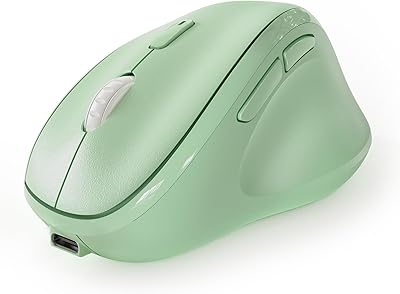
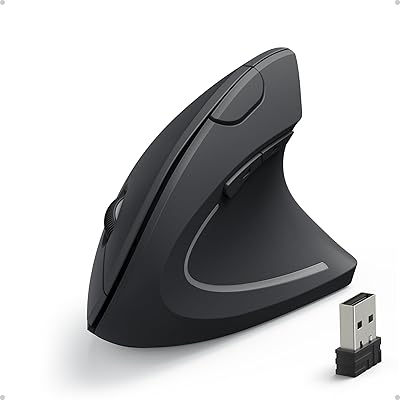
The SHARE SUNSHINE Ergonomic Vertical Wireless Mouse enters a crowded category with one genuinely useful twist: you can adjust the tilt angle rather than being locked into a fixed position. Most vertical mice sit at a rigid 57 degrees, which works for some hands and not others. As a relatively newer name in the ergonomic space, the brand makes a reasonable case for itself among budget-to-mid-range options. If you've been dealing with wrist fatigue and want to try the vertical format without spending a fortune, this adjustable ergonomic mouse is worth a look — just don't expect a medical solution.
Features & Benefits

The adjustable angle is the real standout here. Unlike fixed vertical mice where you take whatever tilt the mold dictates, this vertical mouse lets you dial in the angle to match your specific hand size and wrist preference — a small detail that makes a meaningful difference over a long workday. The removable magnetic palm rest adds cushioning for extended sessions, though some users may prefer working without it. Wireless connectivity runs on 2.4GHz with a plug-and-play nano receiver and no drivers needed. Five DPI settings range from 1000 for precise work up to 3600 for quick screen sweeps. The RGB lighting looks sharp on a dark desk but offers limited practical value in a standard office setting.

Best For

This adjustable ergonomic mouse is a solid pick for right-handed office workers who are starting to notice wrist strain but haven't committed to a more expensive ergonomic setup yet. It's particularly well-suited to people with medium or large hands who find flat mice uncomfortable after a few hours. If you're new to the vertical format and nervous about committing to a fixed angle, the tilt adjustment makes the learning curve far less frustrating. Home-office users who enjoy a little personality in their workspace will appreciate the RGB lighting. That said, it's not ideal for hardcore gamers or anyone needing precision tracking at very high speeds — the optical sensor has its limits.

User Feedback

Buyers consistently point to comfort improvement over standard flat mice, especially during longer work sessions, and the plug-and-play setup earns high marks for simplicity. Build quality feels surprisingly solid for this price tier. On the critical side, several users flag that the scroll wheel feels cheap and imprecise compared to the rest of the unit — a recurring weak point at this price level. Battery drain has come up as a mild frustration for heavier users, and some wish the RGB lighting could be fully switched off. Most reviews are also relatively recent, so long-term durability data remains thin. It shows promise, but how it holds up after a year of daily use is still an open question.

Pros

  • Adjustable tilt angle sets it apart from rigid fixed-angle vertical mice at a similar price.
  • Plug-and-play setup works instantly on Windows, macOS, and Linux with no software needed.
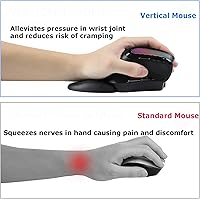
  • The upright grip position noticeably reduces forearm rotation during long desk sessions.
  • Five DPI levels cover a useful range from careful document work to fast multi-monitor sweeping.
  • Removable magnetic palm rest adds cushioning support during extended use without being permanently attached.
  • Wireless range is reliable and stable across typical home and office distances.
  • The body feels more solid and premium than the price tier would typically suggest.
  • Side navigation buttons are well-positioned for natural thumb reach during browsing and file management.
  • RGB breathing light adds genuine desk personality for home-office setups that welcome it.

Cons

  • Scroll wheel feels noticeably cheaper than the rest of the unit and lacks crisp tactile feedback.
  • The tilt mechanism can shift during use on some units rather than locking firmly in position.
  • AA battery dependency is an ongoing cost, and heavy users may need replacements every few weeks.
  • RGB lighting cannot be fully disabled on some firmware versions, which is frustrating in professional settings.
  • No companion software means zero button remapping or custom profile support.
  • Long-term durability data is limited given the product only launched in mid-2024.
  • The nano USB receiver is small enough to misplace easily, especially for users who move between workstations.
  • Tracking consistency drops off at the highest DPI setting, making it unreliable for precision-heavy tasks.
  • Exclusively right-handed design offers no option for left-handed or ambidextrous users.

Ratings

The scores below for the SHARE SUNSHINE Ergonomic Vertical Wireless Mouse were generated by AI after analyzing verified buyer reviews from multiple global markets, with spam, bot activity, and incentivized feedback actively filtered out. The result is an honest snapshot of what real daily users experienced — from first unboxing through weeks of office and home use. Both the genuine strengths and the recurring frustrations are reflected here without sugarcoating.

Ergonomic Comfort
83%
Most users noticed a real reduction in wrist strain within the first few days of switching from a flat mouse. The upright handshake position keeps the forearm in a more neutral alignment during long work sessions, which office workers dealing with early fatigue found noticeably helpful.
A handful of users with smaller hands found the grip angle still felt slightly off even after adjustment, suggesting the ergonomic benefit is most pronounced for medium-to-large hand sizes. It is a comfort aid, not a therapeutic device, and buyers expecting dramatic carpal tunnel relief may be disappointed.
Adjustable Tilt Angle
79%
21%
The ability to customize the tilt is genuinely useful and sets this mouse apart from rigid vertical designs. Users transitioning from flat mice appreciated being able to ease into the vertical position gradually rather than committing to a steep fixed angle right away.
The adjustment mechanism feels a little loose on some units, with a few users reporting the angle shifting slightly during use rather than locking firmly in place. The range of adjustment, while helpful, is not as wide as some buyers expected based on the product listing.
Build Quality
71%
29%
For its price tier, the outer shell feels more substantial than expected — the oil-injected finish gives it a premium texture that holds up reasonably well to daily handling. Most buyers were pleasantly surprised by how solid it felt out of the box.
The scroll wheel is a consistent weak point across reviews; it feels noticeably cheaper than the rest of the unit and lacks the crisp tactile feedback that heavier users want. A few buyers also reported side button wobble after a couple of months of regular use.
Palm Rest Comfort
74%
26%
The removable magnetic palm rest is a thoughtful addition that adds a cushioning layer during extended desktop sessions. Users who work 6-plus hours at a desk found it reduced the pressure on the lower palm noticeably compared to using the mouse without it.
The palm rest attachment relies on magnets that are functional but not especially strong — it can shift or detach during more dynamic mouse movements. Some users simply stopped using it after a while, finding the base mouse comfortable enough on its own.
Wireless Connectivity
88%
The 2.4GHz connection via nano receiver is reliably stable across normal office distances, and plug-and-play setup genuinely requires no software whatsoever. Users on Windows, macOS, and Linux all reported immediate recognition with no configuration headaches.
A small number of users reported occasional micro-stutters when the receiver was plugged into a rear USB port far from the mouse, though moving the receiver to a front or hub port resolved this in most cases. The nano receiver is easy to lose if you travel frequently with the mouse.
Tracking & Precision
67%
33%
The five DPI tiers give a useful spread for switching between detailed document work at 1000 DPI and quick multi-monitor navigation at 3600 DPI. General office users found the mid-range settings smooth and predictable on both fabric pads and hard desk surfaces.
At the top DPI setting, tracking consistency drops off, which rules this mouse out for any precision-dependent tasks like photo editing or competitive gaming. The optical sensor performs adequately for everyday productivity but does not compete with dedicated performance mice.
Battery Life
62%
38%
The auto-sleep feature does kick in during idle periods, and light users report the AA batteries lasting several weeks before needing replacement. The power indicator gives a heads-up before the batteries are fully drained.
Heavier users — those keeping the mouse active 8-plus hours a day with RGB lighting on — report noticeably faster drain, sometimes needing fresh batteries within two to three weeks. Running on disposable AAs rather than a rechargeable built-in battery is an ongoing cost and inconvenience some buyers did not anticipate.
RGB Lighting
69%
31%
The breathing RGB effect looks genuinely attractive in a darkened home-office setup, and the color cycling adds a bit of personality to an otherwise functional peripheral. Users who appreciate desk aesthetics gave it consistent praise as a bonus feature.
The inability to fully disable the RGB lighting on some firmware versions is a recurring complaint, particularly from users in shared or professional office environments. It also draws on battery life, so those prioritizing longevity over looks would prefer a simple off switch.
Ease of Setup
93%
Plug-and-play means exactly that here — every tested operating system recognized the receiver instantly. Users who are not technically confident appreciated not having to install drivers or navigate software, especially on work-managed machines with restricted installs.
There is no companion software at all, which means DPI settings can only be changed via the onboard button cycle rather than a precise app. For users who want to remap buttons or save custom profiles, this mouse offers no such options.
Button Layout & Navigation
76%
24%
The two side navigation buttons (back and forward) are positioned well for thumb reach and make browser and file-explorer navigation noticeably faster for everyday office use. The total six-button layout covers most productivity needs without overcomplicating the design.
The side buttons require a slightly firmer press than ideal, and a few users with weaker grip strength found them tiring after repetitive use. There is no button remapping capability, so if the default layout does not suit your workflow, you are stuck with it.
Right-Hand Fit (Large Hands)
81%
19%
Users with larger right hands consistently praised the generous body dimensions, noting that the mouse fills the palm properly rather than leaving fingers awkwardly suspended. This is one area where it clearly outperforms compact vertical mice designed for a narrower audience.
The right-hand-only design excludes left-handed users entirely, and those with small hands may find the grip too wide for comfortable sustained use. The mouse is explicitly sized for larger hands, so smaller-handed users should size-check before purchasing.
Value for Money
78%
22%
At its price point, the combination of adjustable angle, removable palm rest, wireless freedom, and RGB lighting represents solid value compared to fixed-angle vertical mice that often cost the same or more. First-time vertical mouse buyers in particular felt they got more than expected.
The scroll wheel quality and battery dependency temper the overall value perception for long-term ownership. Users who end up replacing it within a year due to component wear may ultimately spend more than if they had invested in a slightly pricier, more durable option from the start.
Portability & Travel Use
58%
42%
The wireless design and compact nano receiver make it easy to toss in a bag for portable use between home and office. At 9 ounces it is not ultralight, but it is manageable for commuters who do not want a tethered mouse at a secondary workstation.
The bulky vertical form factor does not pack as neatly as a flat travel mouse, and the risk of losing the tiny USB receiver during transit is a real concern. The AA battery dependency also means carrying spares if you are away for extended periods.
Long-Term Durability
61%
39%
Early feedback from buyers in the first three to six months of use is largely positive, with the main body and click switches holding up well under daily office workloads. The build does not feel like it will fall apart quickly under normal use.
The review base is still relatively young given the product launched in mid-2024, so multi-year durability data is genuinely limited. The scroll wheel and tilt mechanism are the two components most likely to show wear first, based on patterns already emerging in critical reviews.

Suitable for:

The SHARE SUNSHINE Ergonomic Vertical Wireless Mouse is a well-matched pick for right-handed office workers who spend six or more hours a day at a desk and are starting to feel the early signs of wrist fatigue or forearm tension. It is especially valuable for people who have been curious about vertical mice but hesitated because of the fixed-angle designs that dominate the category — the adjustable tilt here genuinely lowers the barrier to entry. Medium-to-large handed users will find the body dimensions comfortable rather than cramped, which is a common complaint with more compact vertical alternatives. Home-office setups where a bit of RGB ambiance is welcome rather than frowned upon will get extra mileage out of the aesthetic touches. Budget-conscious buyers who want a meaningful ergonomic upgrade without stretching to a premium brand will find this adjustable ergonomic mouse hits a reasonable value sweet spot.

Not suitable for:

The SHARE SUNSHINE Ergonomic Vertical Wireless Mouse is not the right tool for anyone expecting a clinically validated solution for serious repetitive strain injury or advanced carpal tunnel syndrome — it is a comfort-oriented peripheral, not a medical device, and should not be treated as one. Left-handed users are completely excluded by the right-hand-only design, with no ambidextrous option available. People with small hands will likely find the grip too wide for sustained comfortable use, and the ergonomic benefits depend heavily on a proper hand fit. Power users who rely on precision tracking for photo editing, illustration, or competitive gaming will hit the ceiling of the optical sensor fairly quickly. Anyone who dislikes disposable battery dependency — or works in a shared professional space where RGB lighting would be disruptive and cannot be fully disabled — should look elsewhere before committing.

Specifications

  • Brand: Manufactured by SHARE SUNSHINE, a newer entrant in the ergonomic peripheral market.
  • Connectivity: Uses a 2.4GHz wireless radio frequency connection via a plug-and-play USB nano receiver.
  • Wireless Range: Operates reliably at distances of up to 33 feet from the connected receiver.
  • DPI Settings: Five selectable sensitivity levels: 1000, 1600, 2000, 2400, and 3600 DPI, toggled via an onboard button.
  • Buttons: Six total buttons including left-click, right-click, scroll wheel click, DPI toggle, and two side navigation buttons.
  • Power Source: Powered by 2 AA batteries (included or required depending on package variant) with an auto-sleep energy-saving mode.
  • Tilt Angle: Features an adjustable angle gradient that allows the user to customize the vertical tilt to suit individual hand and wrist preferences.
  • Palm Rest: Includes a removable palm rest attached via a magnetic connection, designed to reduce lower-palm pressure during extended sessions.
  • Lighting: Equipped with a customizable RGB breathing light effect that cycles through colors during active use.
  • Hand Orientation: Designed exclusively for right-handed use; no ambidextrous or left-handed configuration is available.
  • Compatibility: Compatible with Windows, macOS, and Linux operating systems without requiring additional drivers or software.
  • Package Dimensions: Packaged dimensions measure 6.61 × 4.09 × 3.5 inches, reflecting the full vertical body with palm rest attached.
  • Weight: The mouse weighs 9 ounces, which includes the body and removable palm rest but excludes batteries.
  • Movement Detection: Uses optical tracking technology suited to standard office surfaces including fabric mouse pads and hard desk surfaces.
  • Design Style: Vertical upright ergonomic form factor intended to hold the hand in a natural handshake-style position to reduce forearm rotation.
  • Setup: Plug-and-play design requires no software installation; simply insert the nano receiver into a USB port to begin use.
  • Warranty: SHARE SUNSHINE states a one-year worry-free warranty covering manufacturer defects from the date of purchase.
  • Model Number: Listed under the internal model designation ergo mouse wireless with ASIN B0D1R2LPMY.

Related Reviews

Acer Ergonomic Vertical Wireless Mouse
80%
92%
Ergonomics & Comfort
88%
Battery Life
85%
Build Quality
90%
Wireless Connectivity
80%
DPI Adjustability
More
seenda Ergonomic Vertical Wireless Mouse
86%
90%
Wrist Comfort & Ergonomics
87%
Battery Life & Charging
91%
Quiet Click Performance
85%
Compatibility & Connectivity
88%
Build Quality & Durability
More
Woddlffy Ergonomic Vertical Wireless Mouse
83%
89%
Ergonomic Comfort
82%
Build Quality
88%
Wireless Performance
85%
DPI Accuracy
75%
Size and Fit for Small Hands
More
UGREEN Vertical Wireless Ergonomic Mouse
84%
88%
Ergonomic Comfort
84%
Connectivity Performance
80%
Ease of Use
91%
Design and Build Quality
82%
Battery Life
More
Lekvey XC-05 Vertical Wireless Mouse
75%
83%
Ergonomic Comfort
66%
Build Quality
88%
Battery Life
54%
Sleep Mode & Wake Responsiveness
81%
Wireless Connectivity
More
Cherry MW4500 Wireless Vertical Ergonomic Mouse
83%
89%
Ergonomics & Comfort
74%
Battery Life
81%
DPI Performance
77%
Ease of Use
85%
Build Quality
More
MEETION DirectorC Ergonomic Wireless Keyboard and Vertical Mouse
86%
94%
Typing Comfort
91%
Mouse Ergonomics
88%
Build Quality
90%
Battery Longevity
86%
Connectivity Stability
More
DeLUX Seeker M618XSD Wireless Ergonomic Vertical Mouse
85%
88%
Ergonomics & Comfort
93%
Connectivity Options
85%
Customizability (DPI & RGB)
91%
Display & Functionality
82%
Battery Life
More
Anker AK-98ANWVM-UBA Wireless Vertical Mouse
78%
83%
Ergonomic Comfort
71%
Build Quality
58%
Scroll Wheel Performance
86%
Wireless Connectivity
93%
Ease of Setup
More
Micropack MP-V01B Ergonomic Vertical Wireless Bluetooth Mouse
85%
88%
Ergonomics and Comfort
91%
Connectivity and Device Support
85%
Battery Life and Rechargeability
79%
Silent Click Mechanism
84%
Precision and Adjustable DPI
More

FAQ

It is completely plug-and-play. Just insert the nano USB receiver into any available USB port on your computer and the mouse is recognized automatically on Windows, macOS, and Linux. There is no software, no drivers, and no account setup involved.

This is one of the more common frustrations buyers mention. Some units allow you to cycle through lighting modes including an off state, but a number of users have reported that their unit does not offer a full off mode — the light simply cycles through brightness levels. If a fully dark mouse is important to you, this is worth factoring into your decision.

The angle adjustment is built into the body design and allows you to shift the tilt of the grip surface to better match your hand size and wrist preference. It is not a freely rotating hinge but rather a gradient mechanism that lets you set a preferred position. Some users have noted that the lock is not as firm as they would like, so very dynamic movements can occasionally shift it slightly.

Plenty of users skip the palm rest entirely and find the base mouse comfortable on its own, especially those with larger hands whose palms naturally rest lower. The palm rest is held on magnetically and snaps off easily, so you can experiment and decide what suits your setup — there is no commitment either way.

The SHARE SUNSHINE Ergonomic Vertical Wireless Mouse is designed to reduce the forearm rotation that contributes to wrist strain, and many users report genuine relief from mild daily discomfort. That said, it is a comfort-focused peripheral, not a medical device, and it should not be treated as a treatment for diagnosed carpal tunnel syndrome. If your symptoms are significant, it is always worth consulting a healthcare professional alongside any ergonomic changes.

Under moderate use — roughly 4 to 6 hours a day with the auto-sleep mode activating during idle periods — most users report getting several weeks from a set of AA batteries. If you use the mouse heavily all day with RGB lighting on, expect faster drain, potentially closer to two to three weeks. Keeping a spare set of AAs on hand is a sensible habit.

This vertical mouse is genuinely sized for medium to large hands, and buyers with bigger palms consistently note that it fills the hand properly without feeling cramped or awkwardly small. If you have been frustrated by vertical mice that feel like gripping a tall pebble, the dimensions here should feel more natural.

Yes, it works with macOS out of the box via the USB nano receiver. The basic functions — clicking, scrolling, and the side navigation buttons — all operate normally. Since there is no companion app, you cannot remap buttons or adjust settings beyond the onboard DPI toggle, but for standard daily use on a Mac it performs without any setup friction.

There is a dedicated DPI button on the mouse body that cycles through the five available sensitivity levels: 1000, 1600, 2000, 2400, and 3600. A single press steps up to the next level, and it loops back to 1000 after the highest setting. There is no on-screen indicator, so you learn the steps by feel or a brief test movement after switching.

Losing the nano receiver is the most common hardware headache with this type of wireless mouse, since it is small enough to disappear easily. Unfortunately, replacement receivers are not universally available through standard retail channels for this brand, and a lost receiver typically means the mouse becomes unusable. Keeping the receiver plugged into a dedicated USB port rather than removing it frequently is the safest approach.