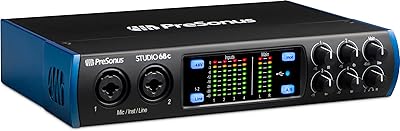
PreSonus Quantum 26x32 Thunderbolt Audio Interface



Overview
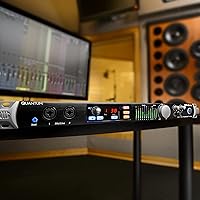
The PreSonus Quantum 26x32 Thunderbolt Audio Interface arrived in 2017 as a serious contender for producers who needed both high channel counts and hands-on studio control in a single unit. Packing 26 inputs and 32 outputs into a 1U rack frame is no small feat, and this Thunderbolt interface doubles as a monitor controller with physical knobs, talkback, and dim controls — territory usually covered by a separate piece of hardware. PreSonus also bundles Studio One Artist and the Studio Magic plug-in suite, adding genuine value right out of the box. Worth noting: Thunderbolt 2 is an older standard, so compatibility with your current rig is worth checking before buying.
Features & Benefits
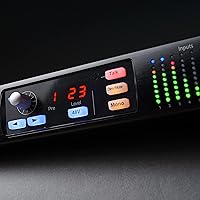
The Quantum 26x32 centers its appeal on eight XMAX recallable preamps, where digitally controlled gain means you can save and restore exact settings between sessions — a genuine workflow advantage when you return to a half-finished project days later. Thunderbolt 2 keeps latency low enough to track performers comfortably without buffer-induced delays creeping into headphone mixes. The center-console controls — talkback mic, monitor dim, and mute — mean you are not reaching for a separate controller unit during takes. ADAT and S/PDIF ports let you bolt on extra preamps if eight channels is not enough, and the 1U rack form keeps everything organized and tidy.
Best For
This studio command center is a natural fit for recording engineers who regularly track bands or multiple musicians simultaneously and need a high channel count to do it. If your studio already runs on Studio One or other PreSonus gear, the Quantum 26x32 slots in without friction. Mac users with Thunderbolt 2 ports will have the smoothest experience; Thunderbolt 3 or 4 machines can use an adapter, but verifying compatibility first is non-negotiable. Windows or USB-only users should look elsewhere — Thunderbolt dependency is real and unavoidable here. This is also not a beginner purchase; the feature set assumes you already know what you need.
User Feedback
With 34 ratings averaging 3.8 out of 5, the picture here is mixed — and that sample size is small enough that a handful of bad experiences can pull the average down noticeably. Satisfied users consistently highlight low latency performance and the convenience of having monitor control baked into the interface rather than spread across two units. The friction points tend to cluster around driver stability on certain OS versions and Thunderbolt pairing headaches, which are frustrating to debug if you hit them. PreSonus has generally kept up with firmware updates, though some users feel support response times lag behind. Take both the praise and the complaints with appropriate weight given the limited review pool.
Pros
- Exceptional I/O count — 26 inputs and 32 outputs — for a single 1U rack unit.
- Eight recallable XMAX preamps let you save and restore gain settings between sessions without guesswork.
- Thunderbolt 2 delivers genuinely low latency that holds up when tracking live performers.
- Built-in talkback, monitor dim, and mute eliminate the need for a separate monitor controller.
- ADAT and S/PDIF ports allow straightforward expansion with outboard preamp units.
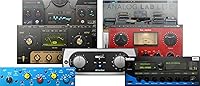
- Studio One Artist and the Studio Magic plug-in bundle add meaningful out-of-box value.
- Clean 1U rackmount design fits neatly into a dedicated studio rack without wasting space.
- Well-suited as a central hub for studios already running PreSonus gear or Studio One workflows.
Cons
- Thunderbolt 2 is an aging standard — many modern computers require an adapter, and compatibility is not always guaranteed.
- Driver stability on certain OS versions has caused headaches for a notable portion of real-world users.
- With only 34 ratings, the 3.8-star average is based on a thin sample that may not reflect the broader user experience.
- No USB fallback means the Quantum 26x32 is completely unusable if your machine lacks Thunderbolt support.
- The hybrid interface-plus-monitor-controller concept adds complexity that can be overkill for smaller, simpler setups.
- Released in 2017, this unit sits behind newer-generation interfaces in terms of connectivity standards and firmware maturity.
- Pairing issues between Thunderbolt host controllers and the interface have been reported, requiring troubleshooting that is not always straightforward.
- Customer support response times have drawn criticism from some users dealing with technical issues post-purchase.
Ratings
The PreSonus Quantum 26x32 Thunderbolt Audio Interface earns a mixed but considered verdict: our AI-driven scoring system analyzed verified owner reviews from across global platforms, actively filtering out incentivized, bot-generated, and outlier submissions to surface what real studio professionals actually experienced. The scores below reflect both the genuine strengths that earned this unit loyal advocates and the recurring pain points that tempered enthusiasm for others — nothing is glossed over.
Latency Performance
Preamp Quality
Preamp Recall System
I/O Count & Routing
Driver Stability
Thunderbolt Compatibility
Monitor Control Section
Talkback Integration
Build Quality
Software Bundle Value
Setup & Configuration
Value for Money
Support & Firmware Updates
ADAT Expansion Capability
Suitable for:
The PreSonus Quantum 26x32 Thunderbolt Audio Interface is built for recording engineers and producers who regularly track multiple musicians at once and cannot afford to compromise on channel count or latency. If you run a home studio or small commercial room where sessions involve live bands, drum kits with multiple mics, or large ensemble setups, the combination of 26 inputs and 32 outputs in a single 1U rack unit is a genuinely practical solution. Producers already working inside the Studio One ecosystem will find the integration especially smooth, with the bundled DAW and plug-in suite reducing the cost of getting up and running. The integrated monitor control section — talkback, dim, and mute all in one place — is a real advantage for anyone tired of juggling a separate controller unit on their desk. Mac users with Thunderbolt 2 ports or a compatible adapter will get the most out of this interface with the least friction.
Not suitable for:
The PreSonus Quantum 26x32 Thunderbolt Audio Interface is a poor fit for anyone working on a Windows PC or a machine without Thunderbolt connectivity, since there is simply no workaround for that dependency. Beginners or home producers who only need a couple of inputs for vocals or a guitar will find the feature set excessive and the setup complexity unnecessary. If your current Mac runs only Thunderbolt 3 or 4, adapter compatibility is not guaranteed and requires careful research before purchasing — it is not as simple as plugging in a dongle. Users who have had persistent trouble with driver stability on recent OS updates should also weigh that risk carefully, as this has been a recurring frustration in real-world use. Finally, buyers looking for a current-generation product with the latest connectivity standards and active community support should explore PreSonus's more recent interface lineup before committing here.
Specifications
- Connectivity: This interface connects to a host computer via Thunderbolt 2, delivering the high bandwidth and low latency required for professional multi-channel recording.
- Total Inputs: The unit provides 26 total inputs, accommodating a combination of analog microphone, line-level, and digital sources simultaneously.
- Total Outputs: 32 total outputs are available, covering analog monitor outputs, headphone outs, and digital expansion channels for complex routing scenarios.
- Onboard Preamps: Eight XMAX microphone preamps are built in, each with digitally recallable gain settings that can be stored and restored between sessions.
- Digital I/O: ADAT optical and S/PDIF digital I/O ports allow connection to external preamp units or converters, expanding the total channel count beyond the eight onboard mic inputs.
- Form Factor: The unit is housed in a 1U rackmount chassis, designed to slot cleanly into a standard studio equipment rack.
- Dimensions: Physical dimensions measure 7 x 19 x 1.75 inches, consistent with a standard 1U rack profile and single-rack-space depth.
- Weight: The unit weighs 6 pounds, making it manageable for installation in a rack or repositioning within a studio environment.
- Talkback: A built-in talkback microphone is integrated into the front panel, allowing the engineer to communicate with performers in a live room without a separate talkback unit.
- Monitor Control: The center-console section includes a main monitor volume knob, dim function, and mute control, effectively replacing a standalone monitor controller for many setups.
- Bundled DAW: Studio One Artist is included in the box, giving new users a fully functional digital audio workstation to begin recording immediately.
- Bundled Plugins: The Studio Magic Plug-in Suite is also included, providing a collection of third-party and PreSonus plug-ins covering dynamics, EQ, and effects processing.
- OS Compatibility: The interface is compatible with both Mac and Windows operating systems, though Thunderbolt support availability varies significantly by machine and platform.
- Color: The unit is finished in black, consistent with standard professional rack equipment aesthetics.
- Release Date: This interface was first made available in April 2017, placing it in an earlier generation of the PreSonus Quantum product line.
Related Reviews

PreSonus Quantum 4848 Thunderbolt Audio Interface
PreSonus Quantum 2626 Thunderbolt Audio Interface
PreSonus Quantum 2 Thunderbolt Audio Interface
PreSonus Studio 192 USB 3.0 Audio Interface
Universal Audio Arrow Thunderbolt 3 Audio Interface

Universal Audio Apollo X16 Audio Interface
Universal Audio Apollo 8 QUAD Audio Interface
PreSonus Studio 1824c
PreSonus Studio 26c USB Audio Interface