Overview

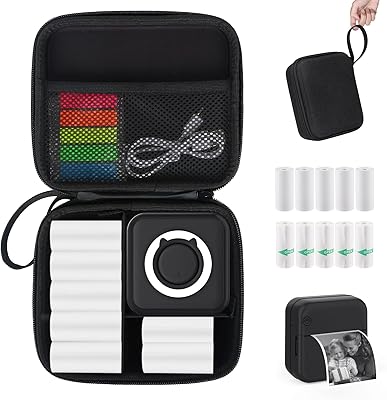
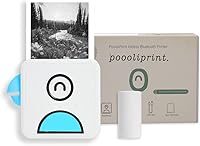
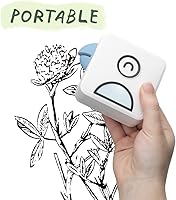
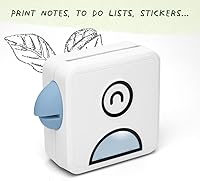
The Poooliprint L1 Inkless Pocket Thermal Printer is a compact, square gadget that arrived in late 2020 to fill a specific gap: portable printing without the mess of ink cartridges. About the size of a large cookie and weighing under six ounces, it slips into a jacket pocket without a second thought. It uses a Japanese thermal print head to burn monochrome images onto heat-sensitive paper, connecting to your phone via Bluetooth only — no Wi-Fi required. A starter paper roll is included in the box, and it supports sticky, colored, and semi-transparent rolls sold separately.
Features & Benefits

One of the more practical advantages of this pocket printer is that ink is simply not part of the equation — you buy paper rolls, and that is the ongoing cost. The unit measures 3.25 x 3.25 x 1.5 inches and feels surprisingly solid for its size. Its built-in battery handles roughly 24 hours of standby, so you rarely think about charging it. Each roll yields up to 100 prints on 1.9 x 3-inch media at 200 x 200 DPI — perfectly adequate for labels and journaling stickers, though noticeably soft on detailed photographs. The companion app lets you add text overlays and pick templates before sending a print job.

Best For

This inkless mini printer is a natural fit for journalers, bullet planner fans, and anyone who decorates notebooks or scrapbooks with custom stickers. Students find it handy for printing to-do lists or reminders without access to a full-size machine. Travelers appreciate how little space it takes up, and the output — rated water-resistant with a claimed 10–25 year lifespan — holds up reasonably in everyday conditions. It also makes a genuinely fun gift for creative teens or hobbyists. If you need sharp, detailed photo prints, manage expectations upfront — this is casual, creative printing, not a professional imaging tool.

User Feedback

Buyers consistently praise the Poooli L1 for how easy it is to set up — most report pairing via Bluetooth in under a minute and getting their first print within moments. The compact build earns steady compliments. Where opinions diverge is on print quality: many users are satisfied printing stickers and labels, but those expecting crisp photo output tend to be let down by the modest resolution. The app draws mixed reactions — occasional connection drops and a limited feature set frustrate some, while others find it perfectly adequate for simple tasks. Battery life rarely surfaces as a complaint, which is a quiet but meaningful win.

Pros

  • Fits in a jacket pocket and weighs under six ounces — genuinely portable, not just marketed as such.
  • No ink cartridges ever — paper rolls are the only thing you need to replace.
  • Bluetooth pairing with iOS and Android is quick and rarely requires troubleshooting.
  • The built-in battery holds up well and rarely needs mid-day charging during normal use.
  • Printed stickers and labels are water-resistant and hold up to everyday handling.
  • Works with multiple paper types including sticky, colored, and semi-transparent rolls.
  • Great entry-level option for journaling and scrapbooking without a steep learning curve.
  • A starter paper roll is included so you can print something the moment you open the box.
  • Compact square shape makes it easy to store in a desk drawer or bag pocket.

Cons

  • Print resolution is modest — fine photo details and subtle gradients do not reproduce well.
  • Output is monochrome only, which limits creative options for color-focused projects.
  • The Poooli app has reported connectivity hiccups and a fairly limited set of editing tools.
  • Replacement paper rolls are a recurring expense that is easy to underestimate at the start.
  • Print area is small at 1.9 x 3 inches, which can feel restrictive for anything beyond labels or stickers.
  • App dependency means no printing at all if the app misbehaves or loses pairing mid-session.
  • Not suitable for printing standard document sizes — purely a small-format, casual-use device.
  • Monochrome thermal output may fade faster than expected if stored in warm or sunlit conditions.

Ratings

The scores below reflect an AI-driven analysis of verified global buyer reviews for the Poooliprint L1 Inkless Pocket Thermal Printer, with spam, bot activity, and incentivized feedback actively filtered out before scoring. Each category is weighted against real usage patterns — from daily journaling sessions to travel photography — so both the genuine strengths and the honest frustrations are represented without bias. Where users consistently agreed, the scores reflect that consensus; where opinions split, you will see it in the numbers.

Portability
93%
Buyers repeatedly describe this pocket printer as one of the few gadgets they actually remember to bring with them. At under six ounces and barely larger than a stack of index cards, it disappears into a bag or coat pocket without adding any real bulk to a daily carry.
A small number of users note that the square shape, while compact, can feel slightly awkward in narrower pockets compared to a rectangular device. It is a minor complaint, but worth knowing if you carry slim bags or minimalist wallets.
Print Quality
58%
42%
For text, simple icons, QR codes, and journaling stickers with bold outlines, the output looks clean and readable. Users printing labels, to-do lists, or decorative stamps for notebooks are broadly satisfied with what they get.
At 200 x 200 DPI monochrome output, detailed photographs come out noticeably soft and flat — this is a consistent and recurring complaint from buyers who purchased the device primarily for photo printing. Gradients and fine facial details fare particularly poorly.
Ease of Setup
88%
The Bluetooth pairing process is genuinely quick for most users — many report going from unboxing to first print in under five minutes. The Poooli app is straightforward enough that even less tech-savvy buyers rarely struggle with initial connection.
A subset of users report that Bluetooth pairing becomes unreliable after the first few sessions, requiring the app to be force-closed and reopened before reconnecting. This does not happen to everyone, but it comes up often enough to note.
App Experience
61%
39%
The app covers the basics well: you can select an image, crop it, add a text overlay, pick a template, and send the job in a matter of taps. For straightforward printing tasks, most users find it functional and accessible without reading any instructions.
Beyond basic functionality the app feels underdeveloped — editing tools are limited, the interface has not been updated meaningfully in some time according to longer-term users, and connection drops mid-session frustrate a meaningful portion of buyers. It is the most consistent source of negative feedback across reviews.
Battery Life
84%
The built-in battery earns quiet but consistent praise in reviews — most buyers simply do not find themselves worrying about it. The roughly 24-hour standby rating translates well to real life for users who print occasionally throughout the day rather than in high-volume bursts.
Heavy users who run through multiple rolls in one sitting report the battery draining faster than expected. There is also no battery level indicator beyond what the app displays, which some users find frustrating when the device dies without much warning.
Value for Money
76%
24%
At its price point, the Poooli L1 delivers a genuinely capable novelty gadget without a steep financial commitment. For journalers and hobbyists, the combination of inkless printing and sticker-compatible paper makes the cost feel reasonable relative to what you get.
The real cost of ownership is higher than the upfront price suggests once you factor in ongoing paper roll purchases — particularly specialty sticky or colored rolls. Buyers who did not anticipate this recurring cost tend to feel slightly misled, even if it is disclosed.
Build Quality
72%
28%
The physical unit feels more solid than its modest price would imply — the casing does not creak or flex, and the paper feed mechanism works smoothly out of the box. Multiple users describe it holding up well through months of bag-tossing daily use.
The plastic finish picks up scratches and scuffs fairly easily over time, and a handful of buyers report that the paper feed slot becomes slightly less reliable after extended use. It is durable enough for casual use, but not built to take real punishment.
Print Durability
79%
21%
Most users are pleasantly surprised that stickers and labels printed with this inkless mini printer hold up well to daily handling — they resist smudging under fingers and survive light moisture exposure without running or fading in normal indoor conditions.
Thermal paper is inherently sensitive to heat and prolonged direct sunlight, and a number of users who stored prints in warm environments reported noticeable fading within months. The manufacturer claim of 10 to 25 years applies only under controlled storage conditions.
Paper Roll Availability
71%
29%
Standard and sticky white rolls are widely available online and reasonably priced when bought in multipacks. Users who use this pocket printer frequently have found a consistent supply without difficulty, especially through the brand's own listings.
Specialty rolls — colored, semi-transparent, or gold-foil variants — can be harder to source and noticeably pricier per print than standard rolls. Some users have also noted inconsistent adhesive quality between batches of third-party compatible rolls.
Bluetooth Stability
63%
37%
Initial pairing works reliably for the majority of users and does not require any technical knowledge — just open the app, turn on the printer, and connect. In stable short-range conditions it tends to hold its connection without issue during a print session.
Mid-session disconnections are a recurring theme in negative reviews, particularly on Android devices and in environments with Bluetooth congestion. Re-pairing usually resolves it, but having to restart the app every few prints quickly becomes tiresome for regular users.
Compatibility
82%
18%
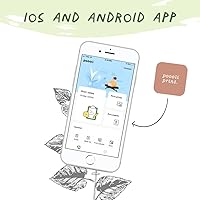
Support for both iOS and Android through a single app means this inkless mini printer works for the vast majority of smartphone users without any workarounds. Most current devices pair and print without any reported compatibility issues.
A small number of users on older Android versions or less common device brands report inconsistent behavior in the app, including failed connections and print jobs that stall. Keeping the app updated helps, but is not always a complete fix.
Print Speed
77%
23%
For a device this small, the print speed feels snappy enough that you are not standing around waiting. Simple jobs like a label or a small sticker come through in seconds, which keeps the experience feeling responsive and satisfying for casual on-the-go use.
Denser images with heavy coverage take meaningfully longer and can cause the unit to warm up noticeably. This is not unusual for thermal technology, but users printing batches of detailed images in quick succession will notice the slowdown.
Unboxing & First Impression
86%
The out-of-box experience is consistently praised — the printer arrives in tidy packaging, includes a starter roll, and most buyers are up and running within minutes of opening the box. As a gift item particularly, the first impression lands well.
The included starter roll is short, giving new users only a handful of prints before they need to buy more. A few buyers felt the quick depletion of the bundled roll felt slightly rushed as a way to prompt an immediate paper purchase.
Suitability for Journaling
91%
This is arguably where the Poooli L1 shines brightest. The combination of sticky paper compatibility, compact print size, and quick Bluetooth printing makes it a genuinely practical tool for bullet journalers, planner enthusiasts, and scrapbookers who want custom stickers on demand.
The monochrome output limits creative options for users who want color-coded systems in their planners. Those who rely heavily on color coding or vibrant imagery in their journals will find the black-and-grey output a consistent creative constraint.

Suitable for:

The Poooliprint L1 Inkless Pocket Thermal Printer was clearly built with a specific type of creative, on-the-go user in mind — and it delivers well for them. Journalers and bullet planner enthusiasts who want to print custom stickers, labels, or small memory snapshots directly into their notebooks will find it a genuinely useful daily companion. Students who need a no-fuss way to print reminders, checklists, or study notes on the fly — without hunting for a printer or relying on a campus library — will appreciate how little friction is involved. Travelers who want to produce small physical keepsakes without carrying anything bulky will also get solid value from it. And if you are shopping for a gift for a creative teenager or a craft-obsessed friend, this pocket printer hits that sweet spot between fun, functional, and accessible.
Not suitable for:

Anyone expecting photo-quality output will want to look elsewhere — the Poooliprint L1 Inkless Pocket Thermal Printer produces monochrome prints at 200 x 200 DPI, which is perfectly fine for text, simple graphics, and sticker art, but falls noticeably short on anything with fine detail or gradients. It is not a color printer; everything comes out in shades of black and grey on whatever paper roll you load. People who rely on a printer for professional documents, presentations, or anything client-facing should treat this as a novelty gadget rather than a work tool. The ongoing cost of replacement paper rolls — sticky, standard, or specialty — is easy to overlook at first but adds up over time, so buyers who assume ink-free means cost-free may be surprised. Anyone who finds mobile apps unreliable or frustrating to navigate will also run into friction, since the Poooli app is the only way to operate the device.
Specifications

  • Dimensions: The unit measures 3.25 x 3.25 x 1.5 inches, making it roughly square and flat enough to slip into a pocket or small bag compartment.
  • Weight: At 5.9 oz (approximately 0.37 lb), this pocket printer is light enough to carry all day without noticing it.
  • Connectivity: Connects to smartphones exclusively via Bluetooth — no Wi-Fi network or USB cable is required for normal operation.
  • Print Technology: Uses an inkless thermal print head of Japanese manufacture, applying heat to thermally sensitive paper to produce monochrome output.
  • Print Resolution: Maximum resolution is 200 x 200 DPI for black-and-white output, which suits text, icons, and simple graphics well.
  • Print Speed: The rated maximum print speed is 20 pages per minute, though real-world speed varies depending on image complexity.
  • Media Size: Prints on 1.9 x 3-inch paper strips, with support for roll sizes up to 3 x 5 inches depending on paper type.
  • Roll Capacity: A single paper roll yields up to 100 prints before needing replacement, based on standard usage conditions.
  • Output Type: All printed output is monochrome only — no color printing is supported regardless of the paper roll used.
  • Battery: Houses a built-in lithium-ion battery rated for approximately 24 hours of standby use on a full charge.
  • Compatible OS: Works with iOS and Android smartphones via the dedicated Poooli app, available on both major app platforms.
  • Control Method: All print jobs are initiated and configured through the Poooli smartphone app — there are no physical print controls on the unit.
  • Paper Types: Compatible with standard white rolls as well as sticky-back, colored, and semi-transparent specialty paper rolls sold separately.
  • Durability Claims: Printed output is marketed as water-resistant, oil-proof, and scratch-resistant with a manufacturer-stated lifespan of 10 to 25 years.
  • Duplex Printing: Duplex (double-sided) printing is not supported — the device prints on one side of the thermal paper only.
  • Included Contents: The box includes the printer unit and one starter paper roll to allow immediate use after setup.
  • Warranty: Covered by a limited manufacturer warranty; specific terms and duration should be confirmed directly with the seller at time of purchase.
  • Power Source: Powered by the integrated rechargeable lithium-ion battery — no disposable batteries or external power adapter is needed during printing.

Related Reviews

PhoFuta Portable Bluetooth Thermal Printer
84%
91%
Portability
77%
Print Quality
89%
Battery Life
85%
Ease of Use
82%
Wireless Connectivity
More
Rongta PN81 A4 Portable Thermal Printer
74%
93%
Portability & Form Factor
81%
Print Quality
89%
Ink-Free Running Costs
71%
Bluetooth Connectivity
66%
App Experience (SoPrint)
More
RIX Pocket K2 Thermal Monocular
76%
93%
Portability & Form Factor
78%
Thermal Image Quality
71%
Detection Range
82%
Display & Viewing Experience
74%
Electronic Image Stabilization
More
HUIJUTCHEN US-032 Mini Pocket Printer
83%
93%
Portability & Size
89%
Battery Life
75%
Print Quality
91%
Ease of Use
86%
Connectivity & Compatibility
More
Polaroid Hi-Print 2x3 Pocket Photo Printer
77%
83%
Print Quality
67%
App Experience
58%
Value for Money
91%
Ease of Setup
88%
Portability
More
DJI Pocket 2
DJI Pocket 2
85%
96%
Portability & Size
91%
Stabilization Performance
89%
Video Quality (4K)
87%
Ease of Use
85%
Audio Quality & Noise Reduction
More
KEXWAXX KX-1000-CY Kids Pocket Digital Microscope
76%
91%
Ease of Setup
63%
Magnification Clarity
71%
Screen Quality
67%
Build Quality & Durability
78%
Battery Life
More
LIJIANI SH01 Portable NOAA Weather Radio
75%
83%
Reception Quality
81%
NOAA Weather Alert Performance
91%
Portability & Size
67%
Battery Life
88%
Ease of Use
More
KiiPix Smartphone Portable Photo Printer
75%
88%
Ease of Use
61%
Print Quality
93%
Portability
58%
Build Quality & Durability
84%
Film Compatibility & Availability
More
Lifeprint Ultra Slim Portable Bluetooth Photo Printer
73%
93%
Portability & Form Factor
78%
Hyperphoto Video Feature
62%
Print Quality
59%
App Experience
84%
Ease of Setup & Use
More

FAQ

No Wi-Fi is needed at all. The Poooli L1 connects directly to your phone via Bluetooth, so it works anywhere — on a train, in a cafe, or out in the middle of nowhere.

No, all output is monochrome. The print head applies heat to the paper rather than depositing any kind of ink or toner, so color is simply not part of how the technology works. If you load colored paper rolls, the printed design will still appear in black against whatever background color the paper is.

You download the Poooli app from the App Store or Google Play, pair the printer via Bluetooth, and you are generally ready to go within a couple of minutes. The app is fairly straightforward for basic tasks like printing a photo or adding a text label. Some users find the editing options limited, and occasional Bluetooth drops have been reported, but for most casual use it gets the job done without a steep learning curve.

Inkless means there are no cartridges to replace, which is a genuine convenience. That said, the paper rolls are a recurring purchase, so the ongoing cost does not disappear entirely — it just shifts from ink to paper. Rolls are available in several types including standard, sticky, and colored, and costs vary by type and quantity.

The manufacturer rates the built-in battery at around 24 hours of standby time. In practice, active printing will draw it down faster, but most users find they do not need to charge it daily under normal casual use. Battery complaints are notably rare among verified buyers.

Yes, and this is honestly one of the most popular use cases for the Poooli L1. If you load sticky paper rolls (sold separately), the output peels off like a sticker, which makes it popular for journaling, planners, and scrapbooking. The adhesive rolls are specifically designed for this printer and are widely available online.

Honest answer: it is adequate but not impressive for photos. The resolution tops out at 200 x 200 DPI and output is monochrome, so detailed portraits or landscapes will look noticeably soft and flat. For simple snapshots, QR codes, or graphic art with bold lines, the quality is much more acceptable. Expecting it to rival a dedicated photo printer will lead to disappointment.

Yes, the Poooliprint L1 Inkless Pocket Thermal Printer supports both iOS and Android devices through the Poooli app. As long as your phone has Bluetooth and can run the app, you should be compatible — just make sure the app is updated to the latest version to avoid any pairing issues.
The manufacturer claims water resistance, oil resistance, and scratch resistance with a stated lifespan of 10 to 25 years. In everyday conditions that holds up reasonably well, but thermal paper in general is sensitive to heat and prolonged sunlight exposure, which can cause fading over time. Storing printed outputs away from direct light and heat will help them last longer.

Each print measures 1.9 x 3 inches, which is small — roughly the size of a large postage stamp or a journaling sticker. The printer supports rolls up to 3 x 5 inches. Third-party rolls labeled as compatible with the L1 or L2 models generally work, but quality and adhesive strength can vary, so it is worth sticking with well-reviewed options if you go that route.

Where to Buy