Zoolion P831 Portable Printer

Overview
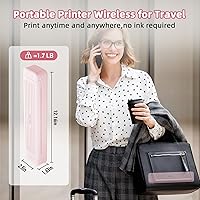
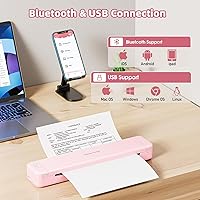
The Zoolion P831 Portable Printer is a ribbon-based heat transfer device — and that distinction matters before you buy. It is not a traditional inkjet or laser printer, and despite some marketing language suggesting otherwise, it does require a proprietary carbon ribbon to function. Think of it as roughly the size of a pencil case, light enough to hold in one hand, and easy to slip into a backpack or work bag. It connects via Bluetooth or USB-C and works across iOS, Android, Windows, macOS, Chrome OS, and Linux. For commuters, students, and field workers who need occasional document printing on the go, the core proposition is genuinely compelling.
Features & Benefits
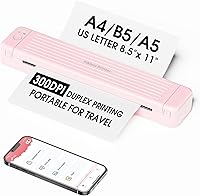
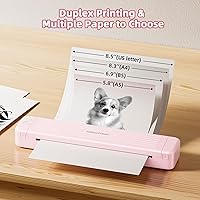
The heat transfer process fuses carbon from the ribbon directly onto plain paper, producing monochrome output that is permanent and fade-resistant — handy for archiving documents. Automatic duplex printing is a standout here; it is rare on a printer this small. The built-in resizing mechanism lets you switch between Letter, A4, B5, and A5 paper without manual adjustment. File format support is broad — Word, Excel, PPT, TXT, JPG, and PDF all work natively. The 2000mAh battery handles around 120 sheets per charge, with a 90-day standby. One setup note worth knowing: mobile users print through the dedicated app, while laptop users need to download a driver and connect via USB-C cable.
Best For
This travel-friendly printer makes the most sense for people who need to print real documents — not photos — while away from a desk. Business travelers printing contracts or expense receipts, students who need a backup printer in a dorm or library, and field workers operating from a car or client site are the natural fit. It also works well as a secondary home printer for occasional use, since there are no ink cartridges to dry out between jobs. If you want color output or sharp graphics, look elsewhere. But for text-heavy documents where plain-paper portability is the priority, the P831 genuinely delivers where it counts.
User Feedback
Buyers consistently praise the compact form and quick Bluetooth pairing, especially iPhone and Android users who found setup straightforward. The automatic duplex feature earns positive mentions too. On the downside, the 3.24 ppm print speed is a recurring complaint — at that pace, a 10-page document feels slow. Monochrome-only output also disappoints buyers who assumed color was possible. A more persistent frustration is the ribbon confusion: many expected a fully consumable-free device, and discovering that ribbons need replacing at an added cost catches people off guard. The app experience is mixed, with Android users reporting more friction than iOS users. Long-term ownership costs are worth factoring in before committing.
Pros
- Fits in a backpack or briefcase with no meaningful added bulk — truly pocketable for a full-size document printer.
- Automatic duplex printing on a device this small is rare and genuinely useful for multi-page documents.
- Connects to virtually any device: iOS, Android, Windows, macOS, Chrome OS, and Linux are all supported.
- Prints on standard plain paper in Letter, A4, B5, and A5 sizes — no special media required.
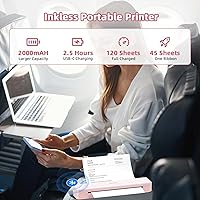
- The 2000mAh battery handles around 120 sheets per charge, covering most short-trip printing sessions comfortably.
- Heat transfer output is permanent and fade-resistant, making it reliable for documents that need long-term readability.
- Supports Word, Excel, PPT, PDF, TXT, and JPG natively — no format conversion needed for common work files.
- The 90-day standby means infrequent users can pick it up after weeks of inactivity without a dead battery.
- Starter kit includes a storage bag, USB-C cable, and ribbon — ready to use from the moment you open the box.
Cons
- Carbon ribbons need replacing over time, adding an ongoing consumable cost the upfront price does not reflect.
- Print speed of 3.24 ppm makes multi-page print jobs noticeably slow compared to any desktop printer.
- Monochrome only — no color output whatsoever, regardless of the file or image being printed.
- Laptop users cannot print via Bluetooth; a USB-C data cable and driver download are required for PC and Mac.
- The Android app is significantly less stable than the iOS version, with reported crashes and inconsistent pairing.
- Marketing use of the term inkless is misleading and has led to genuine disappointment among buyers post-purchase.
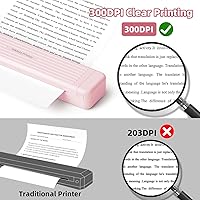
- Print quality for images and graphics is poor — pixelation and loss of fine detail are common at 300 DPI.
- The paper feed mechanism has shown wear in longer-term use, raising questions about durability beyond the first year.
- Complex PDF layouts and table-heavy Excel files do not always render correctly through the companion app.
Ratings
The Zoolion P831 Portable Printer scores below are generated by AI after analyzing verified buyer reviews from global markets, with spam, bot activity, and incentivized feedback actively filtered out. This compact ribbon printer attracted a wide range of users — from road-tripping sales reps to college students — and the scores reflect both the genuine strengths and the friction points that real owners ran into. Nothing has been smoothed over; the pain points are represented just as honestly as the praise.
Portability
Print Quality
Setup & Connectivity
Battery Life
Duplex Printing
Paper Format Flexibility
App Experience
Ribbon & Consumable Costs
Build Quality & Durability
File Format Support
Print Speed
Value for Money
Packaging & Included Accessories
OS & Device Compatibility
Suitable for:
The Zoolion P831 Portable Printer was built for people whose printing needs are real but occasional, and who are always on the move. Business travelers who need to produce a signed contract, a client receipt, or a boarding pass without finding a hotel business center will get genuine value here. Students living in dorms or rotating between libraries and study spaces benefit from a printer that fits in a bag and does not need ink cartridge replacements on a schedule. Field workers — inspectors, sales reps, delivery coordinators — who operate from vehicles or temporary sites will find it practical for producing basic paperwork on the spot. It also works well as a low-maintenance secondary printer at home for anyone who prints infrequently and hates discovering a dried-out inkjet cartridge right when they need it most. As long as the expectation is monochrome text documents and not high-quality graphics, this travel-friendly printer fills the gap it was designed for.
Not suitable for:
The Zoolion P831 Portable Printer is a poor fit for anyone who needs color output, high-resolution graphics, or fast print turnaround. At 3.24 pages per minute, printing a 20-page report is a slow, patience-testing exercise — if speed matters in your workflow, this will frustrate you. Buyers who saw the word inkless in the product listing and assumed zero consumable costs will be disappointed: the carbon ribbon needs periodic replacement, and that ongoing expense is real. The print quality, while adequate for plain text, falls short for anything with images, charts, or visual design — marketing materials, photo prints, or illustrated documents will look poor. Android users in particular should be aware that the companion app has a rougher experience than on iOS, with reported crashes and connectivity drops. And if you need a printer that connects to a laptop wirelessly, note that Bluetooth is not an option for PC or Mac — you will need a USB-C cable with data transfer capability and a driver install, which is not the plug-and-play experience some expect.
Specifications
- Dimensions: The printer measures 2.5″ deep, 12.17″ wide, and 1.6″ tall — roughly the footprint of a large pencil case.
- Weight: It weighs approximately 795g (1.75 lbs), light enough to carry in one hand without fatigue.
- Print Technology: Uses heat transfer combined with a carbon ribbon to press permanent monochrome output onto plain paper.
- Print Resolution: Maximum black-and-white resolution is 300 DPI, suitable for text documents and basic graphics.
- Print Speed: Rated at 3.24 pages per minute for monochrome output, which is slow by desktop standards.
- Output Color: Monochrome only — the printer does not support color printing under any configuration.
- Duplex Printing: Supports automatic dual-sided printing, allowing double-sided documents without manual page flipping.
- Paper Sizes: Compatible with US Letter, A4, B5, and A5 paper widths via a built-in resizing mechanism.
- File Formats: Natively supports Word, Excel, PPT, TXT, JPG, and PDF files through the companion app or desktop driver.
- Connectivity: Connects to mobile devices via Bluetooth and to laptops or PCs via USB-C cable with data transfer support.
- OS Compatibility: Works with iOS, Android, Windows 7 and above, macOS, Chrome OS, and Linux operating systems.
- Battery Capacity: Houses a built-in 2000mAh lithium polymer battery that is not user-replaceable.
- Battery Life: Delivers up to 2.5 hours of continuous printing or approximately 120 sheets per full charge.
- Standby Time: Maintains a standby duration of up to 90 days, making it practical for infrequent users between trips.
- Charging: Charges via USB-C at 5V; the manufacturer recommends against using high-wattage adapters to avoid overheating.
- Consumable Type: Requires a proprietary carbon ribbon cartridge — the starter ribbon is included, but replacements must be purchased separately.
- Print Media: Prints on standard plain paper only; no specialty media, photo paper, or label stock is supported.
- Max Sheet Capacity: The paper input capacity supports up to 120 sheets loaded at one time.
- Power Draw: Operates at 19.24 watt-hours, keeping energy consumption low relative to desktop alternatives.
- Included Accessories: Box contains one carbon ribbon, one storage bag, one USB-C to USB-A cable, and one USB-C converter header.
Related Reviews
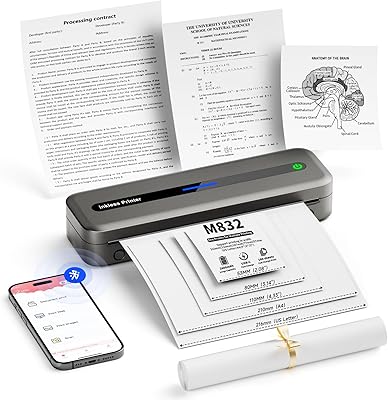
PhoFuta M832 Portable Wireless Thermal Printer
Rongta PN81 A4 Portable Thermal Printer
Brady M210 Portable Label Printer
Canon PIXMA TR160 Portable Inkjet Printer
Canon SELPHY Square QX10 Portable Photo Printer
Kodak Mini 3 Retro Portable Photo Printer
HP Sprocket Select Portable Photo Printer
Paradmas Wide Portable Folding Massage Table
SereneLife Portable Massage Table