PhoFuta M832 Portable Wireless Thermal Printer

PhoFuta M832 Portable Wireless Thermal Printer — image 1
PhoFuta M832 Portable Wireless Thermal Printer — image 2
PhoFuta M832 Portable Wireless Thermal Printer — image 3
PhoFuta M832 Portable Wireless Thermal Printer — image 4
PhoFuta M832 Portable Wireless Thermal Printer — image 5
PhoFuta M832 Portable Wireless Thermal Printer — image 6
PhoFuta M832 Portable Wireless Thermal Printer — image 7
PhoFuta M832 Portable Wireless Thermal Printer — image 8
PhoFuta M832 Portable Wireless Thermal Printer — image 9
77%
23%

Overview

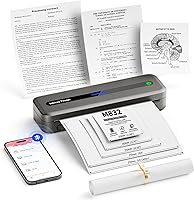
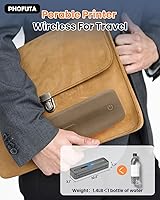
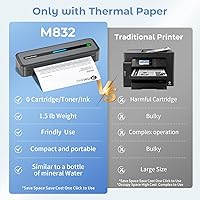
The PhoFuta M832 Portable Wireless Thermal Printer is a compact, inkless device built for people who need to print on the move — not tied to a desk. It's roughly pencil-case sized and weighs about as much as a full water bottle, which means it genuinely disappears into a bag or backpack. One thing worth knowing upfront: this wireless inkless printer runs exclusively on thermal paper — not regular copy paper — and prints only in black and white. PhoFuta is a newer name in this space, but the M832 has built a real following among travelers, students, and remote workers looking for a practical, low-maintenance printing option.

Features & Benefits

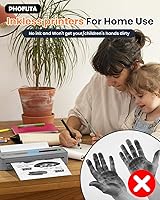
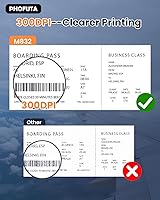
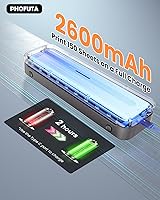
What makes the M832 genuinely useful day-to-day starts with the obvious: no ink, ever. Thermal printing means no cartridges to replace, no clogged heads, and per-page costs that stay remarkably low. The resolution sits at 300 DPI, which is a step above the 203 DPI found in most rivals at this tier — text comes out crisp and very readable. It handles five paper sizes, from full US Letter and A4 down to 2-inch rolls, all stored in a built-in paper bin. The 2600 mAh battery gets you around 150 pages per charge, and Bluetooth plus USB-C connectivity keeps things flexible across phones, tablets, and laptops.

Best For

This portable thermal printer is a natural fit for anyone whose printing needs are practical rather than color-critical or high-volume. Business travelers who need to print a boarding pass, a quick contract, or a hotel itinerary will appreciate not scrambling for a lobby printer. Students can churn out notes or assignment drafts between classes without hauling a bulky unit. Field reps, delivery drivers, and small vendors who need quick receipts will also find it capable. It handles off-grid use well too — the rechargeable battery means no wall outlet required. If color or photo-quality output is your goal, this wireless inkless printer simply isn't the right choice.

User Feedback

With a 4.0 out of 5 rating from over 360 buyers, the M832 sits in solid, well-reviewed territory. The most consistent praise is for Bluetooth setup — people say it connects quickly and without hassle. Print sharpness also gets called out positively, especially given the device's small footprint. On the downside, some users flag that sourcing thermal paper can be inconvenient locally; most end up ordering it online. The companion app has a noticeable learning curve for first-timers. The lifetime warranty earns genuine appreciation across reviews. Where the ratings dip, it's usually from buyers expecting color or photo output — that's a mismatch of expectations, not a product failure.

Pros

  • No ink cartridges means zero clogging, zero drying out, and very low running costs per page.
  • At roughly 1.5 lb and pencil-case dimensions, the M832 fits into almost any bag without adding meaningful weight.
  • 300 DPI resolution produces noticeably crisper text than most competitors in this portable tier.
  • The built-in 2600 mAh battery handles up to 150 pages per charge — plenty for a full work trip.
  • Supports five paper sizes, from full US Letter down to 2-inch rolls, covering most everyday printing needs.
  • Bluetooth setup is consistently praised by buyers as fast and hassle-free across iOS and Android.
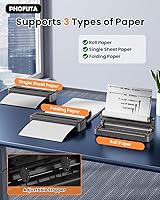
  • The built-in paper bin handles both roll and folded paper formats without any adapter accessories.
  • USB-C connectivity adds flexibility for users who prefer a wired connection over Bluetooth.
  • A lifetime warranty provides meaningful peace of mind for a portable device that takes daily wear.
  • Thermal printing produces no ink smudge risk, keeping bags and travel gear clean.

Cons

  • Thermal paper is not widely available in physical stores, which can leave you stuck if you run out unexpectedly.
  • The companion app has a noticeable learning curve; first-time setup is not always intuitive.
  • Output is strictly black and white — there is absolutely no color printing capability.
  • Print speed of 5 pages per minute makes it impractical for anyone printing more than a handful of pages at a time.
  • Thermal prints can fade over time, especially if stored in warm environments or exposed to direct sunlight.
  • App dependency means printing experience is only as reliable as the app itself, which has drawn occasional complaints.
  • PhoFuta is a relatively new brand with a limited independent reputation compared to established names like Brother or Canon.
  • Not suitable for printing photographs or detailed graphics — fine lines and image gradients do not reproduce well.

Ratings

The PhoFuta M832 Portable Wireless Thermal Printer has been scored below by our AI rating system after analyzing verified purchase reviews from buyers worldwide, with spam, bot activity, and incentivized feedback actively filtered out. Scores reflect the honest spread of user experiences — not just the highs — so both the standout strengths and the recurring frustrations are accounted for transparently.

Portability
93%
This is the category where the M832 earns its strongest praise. Buyers consistently describe slipping it into a backpack or carry-on without a second thought, and the pencil-case footprint genuinely surprises people when they first see it in person. For frequent travelers, the weight difference versus any traditional printer is dramatic.
A small number of users who expected something closer to a pocket-sized device — think smartphone dimensions — were mildly surprised by the actual length. It is compact by any printer standard, but it is not a device that disappears into a jacket pocket.
Print Quality
78%
22%
For a thermal printer at this size, 300 DPI produces text that is crisp and genuinely readable — class notes, receipts, and short documents all come out cleanly. Users who switched from 203 DPI competitors notice the difference in font sharpness, particularly with smaller type sizes.
Images and graphics are a weak spot. Fine gradients, detailed logos, and photographic content come out muddy or patchy, and the manufacturer itself flags this limitation. Buyers who tested it with photo content almost universally reported disappointment, dragging down this category's overall score.
Battery Life
84%
The 2600 mAh battery holds up well during real-world use — a full day of intermittent printing on a business trip rarely drains it completely. The ability to recharge via USB-C from a laptop or power bank is a practical bonus that road-warrior users specifically call out.
The roughly 150-page ceiling shrinks noticeably in colder environments, which matters for users in vehicles or outdoor settings during winter months. Some buyers also noted that the battery indicator is not particularly precise, making it hard to gauge remaining charge before a critical print job.
Connectivity & Setup
81%
19%
Bluetooth pairing gets consistently positive remarks — most buyers had it connected to their phone and printing within five minutes of unboxing. The dual option of Bluetooth and USB-C adds flexibility that users who print from both phones and laptops particularly appreciate.
A portion of users experienced occasional Bluetooth drops or needed to re-pair after their phone's operating system updated. The wireless connection is reliable enough for most, but it is not the rock-solid always-on pairing you get from a dedicated USB-only printer.
App Experience
66%
34%
Once users get over the initial learning curve, the companion app provides enough control to handle different paper sizes and basic print settings without being overwhelming. Buyers who took time to explore the app reported appreciating the formatting options for labels and receipts.
The app is the single most polarizing aspect of this wireless inkless printer. Complaints include an unintuitive layout, occasional crashes on certain Android versions, and limited feedback when a print job fails silently. For less tech-comfortable users, the app dependency adds friction that a simpler printer would not.
Paper Versatility
82%
18%
Supporting five paper widths — from full US Letter down to 2-inch rolls — in a single compact unit is genuinely uncommon at this price tier. The built-in paper bin handling both roll and folded paper without extra adapters is a thoughtful design choice that field workers and small vendors appreciate.
Loading different paper sizes requires some manual adjustment and occasional fiddling that is not fully intuitive from the included manual alone. A few users reported minor paper feed issues when switching between roll and folded formats without resetting the paper guides properly.
Running Costs
89%
No ink, no toner, no ribbon — the ongoing cost of ownership is genuinely low, and buyers who track their expenses appreciate that thermal paper is cheap per sheet at volume. For low-to-mid volume printing, the M832 costs far less to operate over a year than almost any inkjet alternative.
The cost advantage assumes you can source thermal paper affordably and consistently. Buying thermal paper in small quantities or from convenience-oriented sources can push the per-sheet cost higher than the ideal figure, partially eroding the savings argument for irregular users.
Build Quality
74%
26%
The chassis feels solid enough for daily portable use, and the plastic construction keeps weight down without feeling hollow or cheap. Most buyers who have been using the M832 for several months report no structural issues, and the mechanism for loading paper is sturdy under repeated use.
The overall material quality reads as mid-range rather than premium — the casing has some flex under pressure and the finish attracts fingerprints. A handful of buyers noted minor cosmetic issues arriving from the factory, though functional defects were rarely reported.
Thermal Paper Availability
57%
43%
US Letter and A4 thermal paper can be sourced from Amazon and other online retailers at reasonable prices, and buyers who set up a recurring order rarely report supply issues. The paper bin design accommodates multiple formats, so users have flexibility in what they stock.
This is a consistent frustration in user reviews. Thermal paper in full letter size is simply not a product most physical stores carry, and running out during a trip or work event without a backup supply is a real pain point that multiple buyers have flagged. The dependency on advance planning does not suit all users.
Ease of Use
72%
28%
For straightforward document printing from a smartphone, the process becomes second nature quickly. Buyers who use the M832 regularly as part of a work routine — printing the same types of documents repeatedly — report that it becomes a fast, low-effort workflow.
First-time setup, particularly navigating the app and loading paper correctly, has a learning curve that catches some buyers off-guard. The user manual is described by several reviewers as thin on detail, which means some trial and error is expected before things click into place.
Value for Money
77%
23%
For buyers whose use case genuinely fits — mobile document printing, no need for color or photos — the M832 delivers on its core promise at a fair mid-range price. The lifetime warranty also adds perceived value that buyers weigh against cheaper competitors without any warranty.
For buyers who discover after purchase that they need color output, photo quality, or high-volume capacity, the value proposition collapses. The price is justifiable only when the product is well-matched to the buyer's actual needs, which makes thorough pre-purchase research essential.
Noise Level
71%
29%
Thermal printing is mechanically simpler than inkjet printing, and the M832 is noticeably quieter during operation than most inkjet home printers. Buyers who print in libraries, open-plan offices, or during meetings appreciate that it does not draw attention.
It is not silent. The paper feed mechanism produces an audible mechanical sound that some users find louder than expected for such a compact device. In genuinely quiet environments — a library study room, for example — it is noticeable enough that a few users have commented on it.
Warranty & Support
83%
A lifetime warranty from a brand at this price tier is an unusual and reassuring commitment. Multiple buyers specifically mentioned the warranty as a deciding factor, and it signals that PhoFuta stands behind the hardware quality with more confidence than most competitors in this segment.
PhoFuta is a newer brand without the established customer service infrastructure of household-name printer manufacturers. While the warranty promise is strong, buyers who have needed to invoke it report variable response times and some friction in the claims process.
Print Speed
68%
32%
At 5 pages per minute, the M832 handles small print jobs — a page or two, a quick receipt, a short report — without any meaningful wait. For the low-volume use case it is designed for, the speed feels appropriate rather than limiting during everyday use.
Anyone who occasionally needs to print a ten-page document in a hurry will feel the slowness. The 5 ppm rating is functional for one-off prints but starts to feel sluggish when stacked against a backlog, and there is no high-speed draft mode to compensate.

Suitable for:

The PhoFuta M832 Portable Wireless Thermal Printer was clearly designed with a specific kind of buyer in mind: someone who prints infrequently, values portability above all else, and is tired of dealing with ink cartridges that dry out between uses. Frequent travelers fit this profile perfectly — whether it is a consultant who needs to print a quick contract at a client site, a teacher preparing handouts during a commute, or a student who wants to print lecture notes without finding a campus printer. Field-based professionals like delivery coordinators, market vendors, or real estate agents who need fast receipt or label printing will also find it capable and refreshingly low-maintenance. RV owners and van-lifers appreciate the rechargeable battery that keeps it functional far from any power outlet. If your printing is mostly text-based, occasional, and needs to happen wherever you happen to be, this wireless inkless printer earns its place in your bag.

Not suitable for:

The PhoFuta M832 Portable Wireless Thermal Printer has real limitations that will frustrate certain buyers, and it is worth being direct about them. Anyone who needs to print in color should stop here — thermal printing is monochrome by nature, and no setting or workaround changes that. Photographers, designers, or anyone printing marketing materials will find the output genuinely insufficient for professional use; the manufacturer itself acknowledges the device is not built for high-quality image reproduction. High-volume users — offices printing dozens of pages daily — will find the output speed and paper capacity better suited to short bursts than sustained workloads. The reliance on thermal paper is also a practical inconvenience: it is not something you can pick up at most corner stores, so running out at the wrong moment means waiting for an online order. Finally, buyers who are uncomfortable with app-dependent devices may find the setup and print workflow less intuitive than a traditional plug-and-print USB printer.

Specifications

  • Brand: Manufactured by PhoFuta under the M832 model series.
  • Dimensions: The printer measures 12.2 x 4.49 x 3.62 inches, roughly the size of a large pencil case.
  • Weight: It weighs approximately 1.5 lb (992 g), light enough to carry in a backpack or tote bag without notice.
  • Print Technology: Uses thermal printing, which requires no ink, toner, or ribbon — only compatible thermal paper.
  • Print Resolution: Delivers output at 300 DPI, which is sharper than the 203 DPI standard found in many competing portable thermal printers.
  • Output Color: Prints exclusively in black and white; color output is not supported by this technology.
  • Print Speed: Rated at 5 pages per minute for standard monochrome document output.
  • Paper Sizes: Supports five sizes: US Letter (8.5 x 11 inches), A4, 4-inch, 3-inch, and 2-inch wide formats.
  • Paper Formats: Compatible with thermal roll paper, sheet paper, and folded (fan-fold) paper, all loadable via the built-in paper bin.
  • Battery: Equipped with a built-in 2600 mAh rechargeable lithium-ion battery, rated for up to 150 pages on a single full charge.
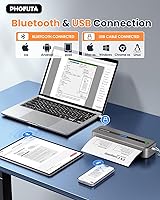
  • Connectivity: Connects wirelessly via Bluetooth and also supports wired connection through a USB Type-C port.
  • Compatible Devices: Works with smartphones, tablets, laptops, and desktop PCs running iOS, Android, or standard PC operating systems.
  • Control Method: Printing is managed through a dedicated companion app, available for both iOS and Android devices.
  • Hardware Interface: Uses a USB Type-C port for both wired printing and battery charging.
  • Duplex Printing: Does not support automatic two-sided printing; manual duplex is the only option if needed.
  • Included Items: Package includes the printer unit, a USB cable with Type-C converter, one roll of A4 thermal paper, and a printed user manual.
  • Warranty: Covered by a lifetime warranty as stated by the manufacturer, PhoFuta.

Related Reviews
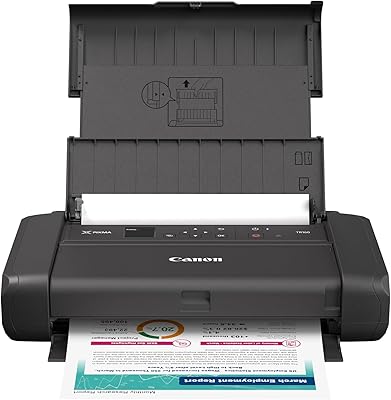
Canon PIXMA TR160 Portable Inkjet Printer
74%
88%
Print Quality
73%
Portability & Form Factor
84%
Wireless Connectivity
81%
Setup & Ease of Use
86%
Photo Printing Performance
More
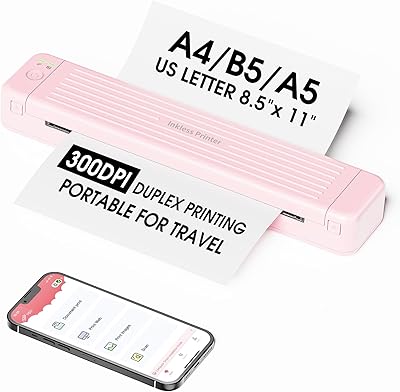
Zoolion P831 Portable Printer
69%
93%
Portability
61%
Print Quality
74%
Setup & Connectivity
78%
Battery Life
82%
Duplex Printing
More
JIAHAYAU 40W IPX7 Portable Bluetooth Speaker
75%
91%
Volume & Loudness
88%
Waterproof Reliability
83%
Battery Life
74%
Sound Quality
71%
Bass Performance
More
Brady M210 Portable Label Printer
85%
88%
Ease of Use
94%
Build Quality
91%
Durability
89%
Portability
86%
Label Print Quality
More
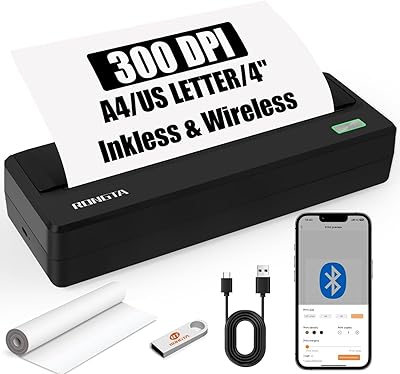
Rongta PN81 A4 Portable Thermal Printer
74%
93%
Portability & Form Factor
81%
Print Quality
89%
Ink-Free Running Costs
71%
Bluetooth Connectivity
66%
App Experience (SoPrint)
More
Canon PIXMA TS9520 Wireless All-in-One Printer
74%
88%
Print Quality (Documents)
83%
Print Quality (Photos)
91%
Wide-Format Capability
54%
Ink System & Running Costs
67%
Auto Document Feeder (ADF)
More
Klipsch Gig XL Portable Bluetooth Speaker
75%
88%
Bass Output
79%
Build Quality
58%
Portability
76%
Battery Life
71%
Lighting Effects
More
Canon PIXMA TS3720 Wireless All-in-One Printer
71%
91%
Ease of Setup
83%
Print Quality – Documents
67%
Print Quality – Photos
48%
Ink Cost & Cartridge Yield
74%
Wireless Connectivity
More
UBOTIE Retro 84-Key Wireless Bluetooth Keyboard
78%
93%
Design & Aesthetics
58%
Typing Experience
86%
Multi-Device Connectivity
63%
Battery Life
79%
Value for Money
More
Audio-Technica AT-SP65XBT Portable Bluetooth Speaker
75%
84%
Sound Clarity
61%
Bass Performance
79%
Bluetooth Reliability
88%
Turntable Compatibility
67%
Build Quality
More

FAQ

No, it does not. The M832 uses thermal printing technology, which requires heat-sensitive thermal paper to produce an image. Standard copy or printer paper will feed through blank. You will need to purchase compatible thermal paper separately in the size you intend to use.

Not with this one. Thermal printing is inherently a black-and-white technology — the heat activates dark pigment in the paper, and there is no mechanism for color. If color output is important to you, you would need a different type of printer entirely.

You download the companion app provided by PhoFuta, turn on Bluetooth on your phone, and pair the printer through the app. Most buyers report the initial pairing is straightforward and takes only a couple of minutes. Once paired, the printer reconnects quickly on subsequent uses.

It is not the right tool for that. The manufacturer explicitly notes it is not intended for professional-level image printing, and thermal output at 300 DPI will not render photo gradients or fine visual detail the way an inkjet photo printer would. It handles text documents, simple charts, and basic graphics reasonably well, but leave photo printing expectations at the door.

Thermal paper in the sizes this portable thermal printer supports — especially US Letter and A4 — is not something most brick-and-mortar stores stock reliably. Your best bet is ordering online from Amazon or similar retailers. It is worth keeping a backup supply on hand so you are never caught short when you actually need to print.

The built-in 2600 mAh battery is rated to handle around 150 pages per full charge, which is generous for a device this size. Recharge time is not officially specified, but based on battery capacity it typically takes a couple of hours via the USB-C port. It charges from any standard USB power source, including laptop ports and wall adapters.

It connects to laptops and desktop PCs as well, via the USB Type-C cable. Bluetooth connectivity also works with computers that have Bluetooth capability. So if you need to print a document straight from your laptop without reaching for your phone, that is a supported option.

Yes, full US Letter (8.5 x 11 inch) and A4 printing are both supported. This wireless inkless printer is not limited to narrow receipt rolls — it handles standard document sizes, which is one feature that sets it apart from many compact thermal printers that top out at 4-inch widths.

Thermal prints are generally less archival than ink-printed documents. Heat, UV light, and prolonged friction can cause fading over months or years. For temporary documents — receipts, travel printouts, class notes — this is rarely a problem. If you need prints to last for years without fading, thermal is not the best long-term storage format.

PhoFuta offers a lifetime warranty on the M832, which is notably generous for a product in this category. For support or warranty claims, you would contact PhoFuta directly through the brand contact information included in the package documentation or via the product listing. A lifetime warranty is a meaningful commitment and suggests the brand stands behind the hardware.