Overview

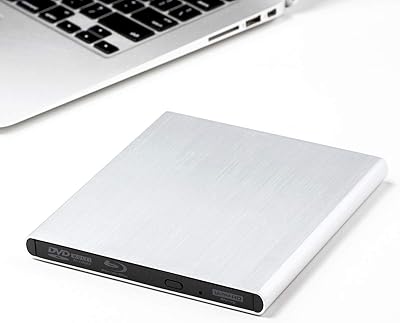
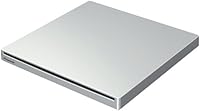
The Pioneer BDR-XU03 Slim External Blu-ray Writer enters a niche but genuinely useful category — portable optical drives built for people who still rely on Blu-ray media regularly. Pioneer has decades of credibility in optical storage, and that reputation carries real weight here. At under half an inch thick, this slim Blu-ray writer is remarkably compact for what it does. It runs entirely off USB 3.0, so there is no power adapter to pack or forget. It sits in the mid-to-premium price range, competing against drives from LG and ASUS, but the magnesium alloy body immediately signals that corners were not cut to reach a lower price.
Features & Benefits

The 0.47-inch profile is the first thing you notice — it is thinner than most hardcover books and barely adds weight to a laptop bag at under 9 ounces. The USB 3.0 connection handles both data transfer and power simultaneously, which means no hunting for wall outlets. Write speeds cap at 6x for Blu-ray, which will not satisfy high-volume disc duplicators, but for typical archiving or occasional burns it is more than adequate. The magnesium chassis keeps the drive feeling solid without adding bulk, and it reads discs at the same 6x ceiling — fine for movie playback and data retrieval without noticeable lag.

Best For

This external optical drive makes the most sense for laptop users on the move who occasionally need to burn or read Blu-ray discs without lugging around a full desktop setup. Archivists and content creators backing up footage to BD-R discs will appreciate the compact footprint and reliable burn quality. It is also a solid pick for home theater users who want Blu-ray playback on a Windows laptop or small PC without installing an internal drive. One clear caveat: Mac compatibility is not officially confirmed, so Windows users are the primary intended audience here. Heavy, high-volume disc burning workloads may outpace the 6x write speed.

User Feedback

Buyers consistently praise the build quality and slim design, with many noting that the magnesium body feels far more substantial than competing plastic drives at similar price points. Long-term owners report solid reliability over extended use, which counts for a lot in this category. On the downside, some users flag that the included software bundle is limited, and a few mention the drive running warm during prolonged burns — not alarming, but worth noting. The 6x write speed draws occasional criticism from power users who expected faster throughput. Mac users report mixed results, so verify compatibility before buying. Most agree the premium feels justified, though just barely.

Pros

  • The magnesium alloy body feels substantially more durable than plastic rivals at a comparable price point.
  • At under half an inch thick, this slim Blu-ray writer is one of the most travel-friendly optical drives available.
  • A single USB 3.0 cable handles both power and data — no adapter, no extra cables to manage.
  • Plug-and-play on Windows 10 and 11 means setup takes seconds, not minutes.
  • Weighing under 9 ounces, the Pioneer BDR-XU03 adds almost no burden to a laptop bag.
  • Burn quality on name-brand BD-R and BD-RE media is consistently reliable across moderate use.
  • Long-term owners report solid durability, with the drive performing well after years of regular use.
  • The drive runs quietly during playback and light burns, making it office- and library-friendly.
  • No external power adapter needed makes it ideal for working in cafes, airports, or anywhere outlets are scarce.

Cons

  • The 6x Blu-ray write speed is a real limitation for anyone burning more than a handful of discs per session.
  • Mac compatibility is not officially supported, and real-world results on macOS are inconsistent at best.
  • The bundled software feels dated and lacks features that more demanding users will expect.
  • Extended burning sessions cause the chassis to run noticeably warm, which may concern some users.
  • Off-brand or budget disc media can trigger burn errors, effectively forcing you toward pricier name-brand discs.
  • Some users report the disc slot mechanism feeling less precise after prolonged heavy use over time.
  • The drive occasionally fails to initialize on underpowered USB hubs, requiring a direct port connection.
  • At this price tier, the overall value is harder to justify for buyers who prioritize speed over build quality.

Ratings

The scores below reflect an AI-assisted analysis of verified global buyer reviews for the Pioneer BDR-XU03 Slim External Blu-ray Writer, with spam, bot activity, and incentivized feedback actively filtered out before scoring. Each category captures real patterns from how people use this slim Blu-ray writer in daily life — from travel workflows to home archiving setups. Both the genuine strengths and the recurring frustrations are reflected honestly here.

Build Quality
92%
The magnesium alloy chassis is the single most praised aspect across verified buyers. Users who have carried this external optical drive in laptop bags for months report zero flex, no scratches, and no creaking — a stark contrast to the plastic-bodied alternatives they switched from.
A small number of users note that the matte magnesium surface attracts fingerprints and fine scuffs over time, particularly around the disc slot. It is not a structural issue, but for buyers who care about long-term aesthetics, it is worth knowing.
Portability & Form Factor
91%
At under half an inch thick and weighing just 8.6 ounces, this slim Blu-ray writer genuinely disappears into a laptop bag. Frequent travelers highlight it as one of the few Blu-ray drives they can carry without dedicating a separate pouch or worrying about added bulk.
The footprint — roughly 5.25 by 5.25 inches — is slightly larger than some competing slim drives, which a few users with minimalist carry setups found mildly inconvenient. It is not heavy, but it does occupy a noticeable amount of flat bag space.
Read Performance
83%
For movie playback and data retrieval, the 6x read speed feels fluid and consistent. Users burning archival projects report clean reads with no mid-session errors, and playback on Windows laptops via media software runs without buffering issues on standard Blu-ray titles.
At 6x, this is not a drive built for rapid large-disc data extraction. Users ripping personal Blu-ray libraries or pulling large datasets describe the process as noticeably slow, particularly compared to desktop internal drives they may have used previously.
Write Speed
71%
29%
For casual and moderate burning tasks — archiving footage, backing up files to BD-R, burning the occasional disc — the 6x write speed gets the job done reliably without errors. Users who burn a few discs per week report no frustration with the pace.
Power users or anyone burning in volume will hit the 6x ceiling fast and feel it. Several verified buyers specifically flagged that the write speed is the drive's biggest functional limitation, and a handful switched to desktop solutions after finding it too slow for high-output workflows.
USB Connectivity & Bus Power
89%
Running entirely off a single USB 3.0 connection is a genuine practical advantage. Users consistently highlight that not needing a power adapter simplifies travel setups, hot desk arrangements, and any situation where wall outlets are limited or unavailable.
On a small number of older USB 3.0 ports or USB hubs, a few users experienced insufficient power delivery, resulting in the drive failing to initialize. Using a direct port rather than a hub resolves this, but it is an occasional friction point worth flagging.
Windows Compatibility
88%
On Windows 10 and Windows 11, the Pioneer BDR-XU03 is consistently reported as plug-and-play. Most users note it was recognized immediately without driver installation, and popular burning software like ImgBurn and CyberLink worked without configuration issues.
Compatibility is clearly optimized for Windows, and the official listing does not confirm Mac support. Users who attempted macOS use reported inconsistent recognition and limited software support, making this a poor choice for Mac-primary workflows.
Mac Compatibility
38%
62%
A minority of macOS users report the drive being physically recognized by the system and readable for standard data discs. In basic, low-demand use cases on newer Macs, some buyers got partial functionality without additional drivers.
Blu-ray playback and burning on macOS is largely non-functional without third-party software, and even then results are inconsistent. Pioneer does not officially support macOS for this model, and buyers expecting smooth Mac integration are frequently disappointed.
Software Bundle
52%
48%
The included software covers basic burning tasks and is sufficient for users who just need to get a disc written quickly. For buyers who already own CyberLink or Nero, it is a non-issue since the drive integrates well with third-party applications.
The bundled software is widely described as dated and limited in features. Users wanting advanced disc management, full Blu-ray authoring, or a polished UI will need to invest in separate software, which adds to the overall cost of ownership.
Noise & Heat During Operation
68%
32%
During short burns and routine disc reading, the drive operates quietly enough that users in office environments report no disturbance. For playback and light archiving, thermal and acoustic behavior is generally unremarkable.
Extended burns — particularly long BD-R sessions — generate noticeable warmth in the chassis, and the drive becomes audibly active under sustained load. It does not overheat in any dangerous sense, but users burning multiple discs in a row mention it runs hotter than expected.
Disc Compatibility
76%
24%
Standard BD-R and BD-RE media from major brands like Verbatim and Panasonic work reliably. Users focused on data archival and standard movie playback report broad, consistent compatibility across single-layer and dual-layer disc formats.
A subset of users report inconsistent results with off-brand or budget disc media, including failed burns and verification errors. Sticking to quality disc brands largely resolves the issue, but it is an extra cost consideration for high-volume disc users.
Long-Term Durability
81%
19%
Buyers who have owned this external optical drive for two or more years speak positively about its staying power. The magnesium body shows minimal wear, and the read/write mechanism remains consistent for moderate-use owners over extended periods.
A small but notable number of users report the disc slot mechanism loosening or becoming less precise after prolonged heavy use. This appears to be more common with users burning frequently rather than occasionally, suggesting the drive is optimized for moderate workloads.
Value for Money
67%
33%
For buyers who prioritize build quality and Pioneer brand reliability over raw speed, the premium pricing feels justified. The magnesium construction alone differentiates this drive from similarly priced plastic alternatives that feel fragile by comparison.
At this price tier, the 6x write ceiling and the limited software bundle leave some buyers questioning whether they received full value. Competitors offer comparable or faster performance closer to the same price, making this a harder sell for spec-focused shoppers.
Setup & Ease of Use
87%
Plug-and-play behavior on Windows is one of the most consistently mentioned positives in verified reviews. Users report having the drive operational within seconds of connecting it, with no manual driver hunting required in modern Windows environments.
First-time Blu-ray users occasionally need to source their own playback software, as Windows does not include native Blu-ray support. The drive itself is straightforward, but the broader software ecosystem around Blu-ray on Windows requires some initial setup effort.

Suitable for:

The Pioneer BDR-XU03 Slim External Blu-ray Writer is built for a specific kind of buyer, and it serves that buyer well. If you are a Windows laptop user who occasionally needs to burn archival discs, rip a Blu-ray collection, or play back physical media without being tethered to a desktop, this drive fits the bill without compromise. Content creators and archivists who burn BD-R discs in moderate volumes will appreciate the reliable performance and the fact that no wall adapter is needed — one cable, one port, done. Frequent travelers who need optical drive capability on the road will find the slim magnesium chassis genuinely practical; it adds almost nothing to a laptop bag. Home theater users who want to play Blu-ray titles on a Windows laptop or compact PC will also find this external optical drive a clean, no-fuss solution that looks and feels like it belongs alongside premium hardware.
Not suitable for:

The Pioneer BDR-XU03 Slim External Blu-ray Writer is a poor match for anyone who needs to burn discs at volume or speed. If your workflow involves duplicating dozens of discs regularly or extracting large Blu-ray data sets quickly, the 6x write ceiling will slow you down in ways that become genuinely frustrating over time. Mac users should approach this drive with real caution — it is designed for Windows, and Blu-ray playback or burning on macOS requires third-party software that may still deliver inconsistent results. Budget-focused buyers comparing purely on specs-per-dollar may find competing drives offer similar throughput at a lower price, especially if the magnesium build quality is not a priority for them. Anyone expecting a comprehensive software bundle out of the box will likely need to invest in third-party burning or playback software, adding to the total cost of ownership.
Specifications

  • Form Factor: Ultra-slim external optical drive measuring 5.24 x 5.21 x 0.47 inches, designed for portable use with laptops and compact desktops.
  • Weight: The drive weighs 8.6 ounces, making it light enough to carry daily in a laptop bag without noticeable added bulk.
  • Body Material: The chassis is constructed from magnesium alloy, providing a rigid, premium feel that is notably more durable than the plastic enclosures common at this price tier.
  • Interface: Connects via a single USB 3.0 port, which handles both data transfer and power delivery simultaneously with no external adapter required.
  • Bus Power: Fully bus-powered through USB, eliminating the need for a separate power cable or wall adapter in standard laptop and desktop setups.
  • Blu-ray Write Speed: Writes to Blu-ray media at up to 6x speed, suitable for moderate disc burning tasks including data archival and BD-R backups.
  • Blu-ray Read Speed: Reads Blu-ray discs at up to 6x, providing adequate throughput for movie playback and data retrieval on compatible software.
  • DVD Write Speed: Supports DVD writing at up to 8x, covering standard DVD-R, DVD+R, and rewritable DVD formats in addition to Blu-ray media.
  • CD Write Speed: Writes to CD-R and CD-RW media at up to 24x, maintaining backward compatibility with legacy disc formats.
  • Disc Compatibility: Compatible with BD-R, BD-RE, BD-ROM, DVD-R, DVD+R, DVD-RW, DVD+RW, DVD-RAM, CD-R, and CD-RW disc types.
  • USB Ports: Features one USB 3.0 port; the drive is also backward compatible with USB 2.0 ports, though at reduced transfer speeds.
  • OS Support: Officially supported on Windows operating systems; macOS compatibility is not confirmed by the manufacturer for this model.
  • Hardware Platform: Designed for use with laptops and desktop PCs, functioning as a versatile external peripheral across both form factors.
  • Model Series: Part of Pioneer's BDR-XU03 series, positioned as a slim portable optical drive within Pioneer's broader external drive lineup.
  • Manufacturer: Designed and sold by Pioneer Electronics USA, a brand with a long-standing reputation in consumer and professional optical storage hardware.
  • Availability Date: This model was first made available in December 2013 and as of the latest data remains an active, non-discontinued product.

Related Reviews
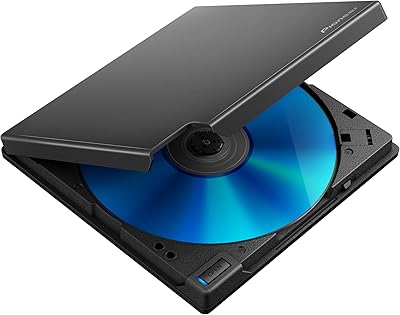
Pioneer BDR-XD08B Portable External Blu-ray Drive
77%
88%
Build Quality
91%
Portability & Size
86%
Disc Read Accuracy
72%
Software & Compatibility (Windows)
61%
Mac Compatibility
More
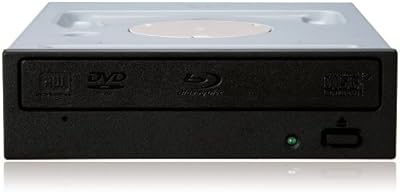
Pioneer BDR-207DBK Blu-ray Combo Drive
85%
88%
Performance & Speed
81%
Build Quality
90%
Setup & Installation
85%
Compatibility
89%
Portability & Size
More
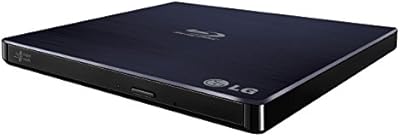
LG BP50NB40 Portable Blu-ray Writer
79%
93%
Portability & Form Factor
91%
Mac Compatibility
88%
M-DISC Archival Support
58%
Transfer & Write Speed
84%
Noise & Vibration During Operation
More
Archgon UHD 4K External Blu-Ray Writer

78%
93%
Build Quality
89%
PC Compatibility
61%
Mac Compatibility
88%
Ease of Setup
78%
UHD 4K Performance
More
Yaeonku 50GB External Blu-ray Drive
70%
86%
Plug-and-Play Setup
78%
Blu-ray Read & Burn Performance
89%
Dual-Interface Connectivity
41%
Software & Playback Experience
83%
Compatibility Across Operating Systems
More
NOLYTH Portable External Blu-ray Drive

71%
91%
Portability & Form Factor
88%
Plug-and-Play Setup
44%
Blu-ray Playback Software Experience
71%
Disc Read & Write Performance
67%
Build Quality & Materials
More
Wintale Portable External Blu-ray Drive

72%
91%
Ease of Setup
72%
Read Performance
69%
Write & Burn Reliability
44%
Software & Out-of-Box Readiness
61%
Build Quality
More
Alphami USB-C External Blu-ray Drive
65%
78%
Ease of Setup
67%
Blu-ray Playback Quality
59%
Compatibility
54%
Portability
56%
Build Quality
More
VSVABEFV External USB Blu-Ray Drive
82%
93%
Ease of Use
90%
Portability
65%
Write Speed
78%
Software Compatibility
88%
Compatibility with Operating Systems
More
LG WP50NB40 External Blu-ray Writer
78%
93%
Portability & Form Factor
91%
Bus-Powered Convenience
89%
Plug-and-Play Setup
86%
Burn Quality & Reliability
78%
Blu-ray Playback Performance
More

FAQ

Officially, no — Pioneer only confirms Windows support for this model. Some macOS users have reported the drive being physically detected, but Blu-ray playback and burning on macOS typically requires third-party software and results are inconsistent. If you are primarily a Mac user, it is worth researching current third-party solutions before committing to this purchase.

No, and that is one of the genuine practical advantages of this slim Blu-ray writer. It draws all the power it needs directly from your USB 3.0 port. Just connect the cable and you are ready to go — no power brick, no wall outlet required in most cases. The only exception is underpowered USB hubs, which can occasionally cause initialization issues.

The drive comes with a basic software bundle, but many users find third-party options like CyberLink PowerDVD for playback or ImgBurn for burning to be more capable and reliable. On Windows 10 and 11, the drive is recognized automatically without any driver installation, so you can pair it with your preferred software right away.

For occasional burns — backing up files, archiving projects, burning a disc every now and then — 6x is perfectly workable. Where it starts to feel slow is if you are burning multiple discs in a session or regularly working with large BD-R data sets. Heavy-volume users often find the speed ceiling frustrating over time.

Yes, easily. The Pioneer BDR-XU03 Slim External Blu-ray Writer is under half an inch thick and weighs less than 9 ounces, so it slides into a laptop bag sleeve or even a document pocket without issue. The magnesium body also means it can handle the bumps and pressure of regular travel without concern.

It does run warm during extended burns — noticeably so if you are doing back-to-back discs for an extended period. It does not reach temperatures that indicate a hardware problem, but the chassis will feel warm to the touch. If you are burning frequently in one sitting, giving it short breaks between sessions is a reasonable precaution.

Name-brand media from Verbatim, Panasonic, and Sony consistently delivers reliable results. Where some users run into trouble is with cheap, off-brand discs — burn errors and failed verifications are more common with those. Sticking to quality media is especially important for long-term archival work where reliability matters.

Not on modern Windows. On Windows 10 and Windows 11, this external optical drive is recognized as plug-and-play — connect the USB cable and the system identifies it immediately. Older Windows versions may behave differently, but for current Windows users the setup experience is generally effortless.

It handles the full range — Blu-ray, DVD, and CD formats are all supported for both reading and writing. So if you need a single external drive that covers all your optical media needs, this one covers that ground without requiring separate hardware.

The difference is noticeable right away. The magnesium alloy body on this slim Blu-ray writer feels solid and substantial in a way that plastic drives at similar price points simply do not. Long-term users consistently report that the chassis holds up well over time, with no flexing, cracking, or loosening of the shell even after extended daily use.

Where to Buy