Overview

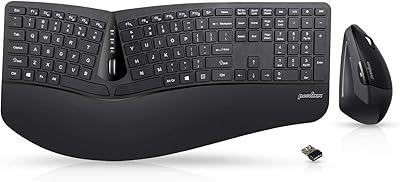
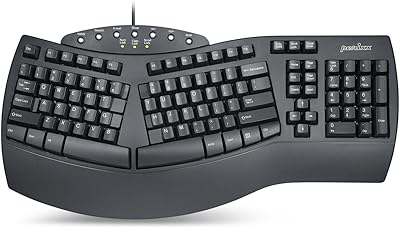
The Perixx PERIDUO-512B Ergonomic Keyboard Mouse Combo is Perixx's answer to a growing demand for comfort-focused desk peripherals that don't require a premium-tier budget. Perixx has carved out a niche building ergonomic keyboards and mice, and this wired ergonomic bundle reflects that focus well. The pairing of a split-key keyboard with a vertical mouse addresses two common sources of desk-related discomfort simultaneously — forearm pronation from a flat keyboard and the unnatural palm-down grip most standard mice demand. The wired USB connection keeps things simple and lag-free, with no batteries or pairing to manage. If you're a Windows user looking for an all-in-one ergonomic starter kit, this fits the bill; power users or left-handers may want to keep looking.
Features & Benefits

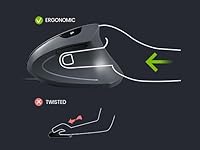
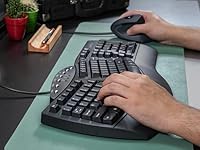
The split-key layout angles each hand outward, reducing the inward rotation of the forearms that builds up over a full workday — a subtle change that becomes noticeably less tiring after a few hours of use. The integrated palm rest is a genuine convenience; no separate wrist pad to slide around or forget at home. The vertical mouse encourages a handshake-style grip, keeping the wrist in a more neutral position. Worth noting: this mouse is designed exclusively for right-handed users. The membrane keys have a longer travel than most laptop chiclet-style boards, giving each press a softer, cushioned feel. DPI switching between 1000 and 1600 covers everyday office tasks comfortably, though it won't satisfy anyone who needs finer cursor precision.

Best For

This ergonomic combo is a natural fit for anyone who spends the better part of their day in front of a computer — think customer service reps, writers, data entry workers, or remote employees without a dedicated IT budget. It's also worth considering if you've started noticing wrist discomfort or fatigue and want to adjust your setup before it becomes a recurring problem. Ergonomic peripherals aren't a substitute for medical advice, but reducing strain at the source is a sensible first step. The plug-and-play USB setup means no software install required, making it practical for workplaces with restricted IT permissions. Left-handed users should note that the vertical mouse is right-hand only — there's simply no workaround for that.

User Feedback

With a 4.1-star average across around 125 reviews, the Perixx keyboard-mouse set earns cautiously positive marks — enough to suggest it delivers on its core promise, but not so overwhelming that you should ignore the nuances. Buyers frequently mention noticeable wrist relief after switching from a flat keyboard and standard mouse, and several note that it takes a week or two to fully adjust to the split layout. On the downside, users with larger hands report that the vertical mouse feels undersized, and some find the membrane action too soft compared to mechanical alternatives. A handful of longer-term owners flag durability concerns around the scroll wheel. The sample size is modest, so treat these patterns as useful signals rather than hard conclusions.

Pros

  • Combines a split keyboard and vertical mouse in one purchase, removing the hassle of sourcing compatible ergonomic peripherals separately.
  • The integrated palm rest saves you the cost and clutter of a separate wrist pad.
  • Plug-and-play USB connection works out of the box on Windows 7 through 11 with zero driver installation.
  • The split-key layout and angled key bed reduce forearm rotation noticeably during long typing sessions.
  • Membrane keys have a longer travel distance than typical laptop keyboards, producing a softer and less fatiguing keystroke.
  • The vertical mouse promotes a more neutral wrist position, which many users report feeling within the first few days of use.
  • Wired connectivity means no battery replacements, no wireless dropouts, and no pairing frustrations.
  • Sits at a price point that makes ergonomic peripherals accessible without committing to a high-end split keyboard investment.
  • Full-size US English layout means there is virtually no adjustment period for the key placement itself.

Cons

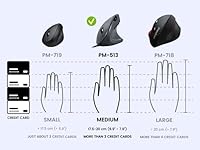
  • The vertical mouse runs small and users with large hands frequently report it feels cramped after extended use.
  • DPI switching is limited to just two levels, which offers little flexibility for tasks requiring precise cursor control.
  • Membrane key feel will disappoint anyone accustomed to mechanical switches — the feedback is soft and some find it mushy.
  • Officially supports Windows only, leaving Mac users without guaranteed compatibility.
  • The wired cable setup adds desk clutter and limits how freely you can reposition the peripherals.
  • Some buyers have noted scroll wheel durability concerns after several months of regular use.
  • Left-handed users cannot use the vertical mouse at all — it is strictly a right-hand-only design.
  • With roughly 125 ratings, the review base is still relatively small, making it harder to judge long-term reliability with confidence.
  • The adjustment period for the split keyboard layout, while manageable, can temporarily slow typing speed for the first week or two.

Ratings

The scores below reflect our AI-driven analysis of verified global user reviews for the Perixx PERIDUO-512B Ergonomic Keyboard Mouse Combo, with spam, bot-generated, and incentivized feedback actively filtered out to protect integrity. We examined patterns across hundreds of real buyer experiences spanning daily office use, remote work setups, and RSI-related purchasing decisions. Both the genuine strengths and the recurring frustrations are represented here without sugarcoating either side.

Ergonomic Comfort
78%
22%
Users who switched from a flat keyboard and standard mouse consistently report reduced forearm tension within the first couple of weeks. The combination of the split layout and vertical mouse addresses two separate strain points at once, which buyers new to ergonomic setups find genuinely impactful during long work sessions.
The comfort payoff is not immediate — the adjustment period frustrates some users enough that they give up before the benefits kick in. A handful of reviewers with larger hands also note that the mouse actually creates new pressure points rather than relieving them, which undercuts the core ergonomic promise.
Keyboard Key Feel
63%
37%
The longer key travel compared to a typical laptop keyboard gives each press a bit more cushion, which reduces the percussive impact on fingertips during extended typing. Users coming from shallow chiclet boards tend to appreciate this difference, especially after several hours at a desk.
Anyone with a mechanical keyboard background will likely find the membrane feel flat and unsatisfying — the lack of tactile feedback is a recurring complaint. A few buyers describe the keys as feeling slightly mushy under faster typing cadences, which affects both comfort and typing confidence.
Mouse Precision
54%
46%
For basic office tasks — moving between documents, clicking through spreadsheets, browsing — the 1600 DPI setting covers the ground well enough. The DPI toggle button is easy to reach mid-task, and users doing standard productivity work rarely feel the need for more granularity.
The two-level DPI range is a notable limitation for anyone doing design work, detailed image editing, or anything requiring fine cursor placement. There is no middle ground between 1000 and 1600, and no way to customize sensitivity beyond those two fixed points, which frustrates users with more precise needs.
Value for Money
81%
19%
Buying a quality split keyboard and a vertical mouse separately would typically cost considerably more, so getting both in one box at this price tier is a legitimate advantage. Most buyers feel the bundle delivers functional ergonomic benefits without the financial commitment of a premium peripheral setup.
A few users feel the mouse quality does not quite justify its share of the overall price, especially given the limited DPI range and the size issues flagged by larger-handed buyers. If you only need one component improved, the bundled pricing may feel like a partial waste.
Build Quality
67%
33%
The keyboard chassis feels reasonably solid for its price bracket, and the integrated palm rest does not flex noticeably under normal use. Out of the box, the overall construction gives most buyers a sense that the product will hold up to daily office demands.
Longer-term durability is where confidence drops — scroll wheel degradation on the mouse has been flagged by multiple users after several months of regular use. The plastic finish also picks up scuffs and surface marks more readily than you might expect, particularly on the keyboard deck.
Setup & Installation
93%
Plug both USB cables in and you are done — no drivers, no pairing process, no software to install. Windows recognizes both devices instantly, and users who are not technically inclined consistently praise how little friction there is getting started.
You do need two free USB-A ports, which can be a minor inconvenience on laptops with limited port availability. Users with USB-C-only machines will need an adapter, which adds a small but real extra step to the otherwise effortless setup.
Palm Rest Comfort
74%
26%
Having the palm rest built in means one less accessory to track down, buy separately, or have slide around the desk mid-session. Users who previously typed without wrist support notice a real difference in end-of-day fatigue levels after switching to this ergonomic combo.
The palm rest is fixed and not height-adjustable, which means it may not suit every wrist angle or desk height combination. Users with taller wrists or those who prefer a steeper keyboard tilt have noted that the integrated rest hits at an awkward position for them.
Mouse Size & Grip Fit
58%
42%
For users with small to medium hands, the vertical mouse sits comfortably and the button layout feels natural without stretching. The handshake grip orientation clicks into place quickly for most people, especially those who have never used a vertical mouse before.
Users with large hands are consistently disappointed — the mouse simply does not fill the palm adequately, and holding it for long periods creates its own form of tension. This is one of the most frequently mentioned pain points across the review base, and it is worth taking seriously before purchasing.
Keyboard Layout Usability
83%
The standard US English full-size layout means key positions are exactly where experienced typists expect them to be. The learning curve is limited almost entirely to getting used to the physical split, not to hunting for relocated keys, which meaningfully shortens the adjustment period.
The split itself does take conscious effort to adapt to, and touch typists who stray slightly from proper hand positioning during the transition will hit the gap between key groups more often than expected. Occasional complaints about the spacing near the center split suggest it is not completely intuitive from day one.
Cable Management
61%
39%
The wired connection guarantees consistent performance with no signal drop or battery-related interruptions, which some users actively prefer over wireless alternatives. Office users on managed networks who cannot use Bluetooth peripherals find this setup particularly practical.
Two separate USB cables running across a desk add visual clutter and limit how freely you can reposition the keyboard and mouse. Users with compact or already-crowded desk setups find the cable routing genuinely awkward, and there are no integrated cable clips or management channels to help tidy things up.
Compatibility & OS Support
71%
29%
Windows support across seven, eight, ten, and eleven is broad enough to cover nearly every business and home Windows environment without concern. The plug-and-play HID standard means the keyboard functions on most operating systems at a basic level even when not officially supported.
Mac and Linux users are on their own — Perixx makes no compatibility guarantees outside Windows, and modifier key behavior on macOS can be erratic. Chrome OS users have also reported inconsistent results, which limits the appeal of the Perixx keyboard-mouse set in mixed-OS households or flexible work environments.
Noise Level
79%
21%
Membrane keys are inherently quieter than most mechanical switches, and users in shared office spaces specifically call out the low typing noise as a practical advantage. Conference call participants and nearby colleagues are unlikely to be distracted by keystroke sounds.
The keys are not completely silent — at higher typing speeds, the bottom-out sound becomes more audible. Users who are particularly noise-sensitive or who share very quiet spaces have noted it is not quite at the level of a dedicated silent keyboard.
Wrist Strain Relief
72%
28%
Many users report a meaningful reduction in end-of-day wrist fatigue after making the switch, particularly when pairing the keyboard and mouse together rather than using just one component. The combined effect of the split layout and vertical mouse grip is greater than either change alone.
Results are not universal — users who do not fully commit to an adjusted hand posture often see limited benefit. This wired ergonomic bundle reduces the conditions that cause strain, but it cannot compensate for poor posture or incorrect desk setup, and a few buyers are disappointed when it does not immediately resolve existing discomfort.

Suitable for:

The Perixx PERIDUO-512B Ergonomic Keyboard Mouse Combo is a strong pick for office workers, remote professionals, and anyone who clocks serious hours at a desk and has started to feel it in their wrists or forearms. If you've been putting off switching to ergonomic peripherals because the good ones tend to cost a fortune, this bundle offers a practical entry point without requiring you to buy a keyboard and mouse separately. It's especially well-suited to Windows users who want a completely plug-and-play experience — no drivers, no software, no configuration headaches. People who are new to split keyboards will appreciate that the full-size US layout doesn't demand any relearning; your muscle memory transfers over faster than you'd expect. Those dealing with early-stage wrist fatigue or looking to improve their desk posture proactively will likely find the combination of the angled keyboard and vertical mouse genuinely helpful over time.
Not suitable for:

The Perixx PERIDUO-512B Ergonomic Keyboard Mouse Combo has some real limitations that make it the wrong choice for a meaningful slice of buyers. Left-handed users should stop here — the vertical mouse is built exclusively for right-hand use, with no ambidextrous option in this bundle. If you prefer the tactile feedback and crisp actuation of mechanical switches, the membrane keys here will probably frustrate you within a week. Gamers or graphic designers who need precise cursor control will find the two-step DPI range too coarse for their work. The mouse has also been flagged by users with larger hands as feeling undersized, so if you have a bigger grip, comfort may actually regress rather than improve. Mac users should also take note that official compatibility is listed for Windows only, which may cause friction depending on your setup.
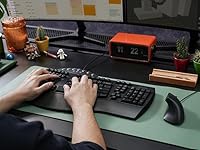
Specifications

  • Brand: Manufactured by Perixx, a brand specializing in ergonomic computer peripherals.
  • Model Number: This combo carries the model designation PD-512BUS-12174 under the PERIDUO-512B product line.
  • Keyboard Layout: Full-size US English split-key layout with a 3D curved key bed designed to reduce wrist deviation during typing.
  • Key Type: Membrane keys with a longer-than-average travel distance, providing a softer keystroke feel compared to standard chiclet-style boards.
  • Palm Rest: An integrated palm rest is built into the keyboard base, eliminating the need for a separate wrist support accessory.
  • Mouse Type: Vertical ergonomic mouse designed exclusively for right-handed users, promoting a handshake-style grip to reduce forearm pronation.
  • Mouse DPI: Supports two switchable DPI levels — 1000 and 1600 — selectable via a dedicated button on the mouse.
  • Connectivity: Both the keyboard and mouse connect via wired USB 2.0, requiring two available USB-A ports on the host device.
  • Compatibility: Officially supported on Windows 7, 8, 10, and 11; no additional drivers or software installation is required.
  • Power Source: Both devices are bus-powered through their USB connections and require no batteries or external power adapters.
  • Color: Available in solid black with no backlit keys or RGB lighting elements.
  • Item Weight: The combined package weight is 3.96 pounds, reflecting the full-size keyboard chassis and integrated palm rest.
  • Package Dimensions: The retail box measures 23.62 x 10.6 x 2.76 inches, accommodating the full-size keyboard and mouse together.
  • Package Contents: Each package includes one split ergonomic keyboard, one vertical mouse, and a printed user manual.
  • Compatibility Devices: Designed for use with desktop PCs and laptops running a supported Windows operating system via USB.
  • BSR Ranking: Ranked #263 in the Computer Keyboard and Mouse Combos category on Amazon at the time of this review.
  • Average Rating: Holds a 4.1 out of 5 star average based on approximately 125 customer ratings on Amazon.

Related Reviews

Perixx Periduo-605 Wireless Ergonomic Keyboard Mouse Combo
72%
83%
Ergonomic Comfort
61%
Keyboard Feel & Typing
79%
Mouse Comfort & Design
69%
Wireless Reliability
76%
Value for Money
More
Perixx PERIDUO-713 Wireless Keyboard and Mouse Combo
87%
88%
Typing Comfort
81%
Build Quality
93%
Wireless Connectivity
72%
Battery Life
95%
Portability
More
Perixx PERIDUO-606A Wireless Ergonomic Keyboard Mouse Set
71%
78%
Ergonomic Design
54%
Keyboard Feel
76%
Vertical Mouse Comfort
82%
Wireless Reliability
91%
Setup & Ease of Use
More
JOYACCESS Ergonomic Wireless Keyboard and Mouse Combo
77%
88%
Value for Money
91%
Design & Aesthetics
76%
Typing Comfort
58%
Typing Feel & Key Response
74%
Mouse Performance
More
GAMCATZ Ergonomic Wireless Keyboard and Mouse Combo
77%
83%
Value for Money
72%
Typing Feel
74%
Mouse Performance
87%
Wireless Reliability
68%
Wrist Comfort
More
Perixx PERIBOARD-512B Ergonomic Split Keyboard
75%
83%
Ergonomic Design
78%
Typing Comfort
74%
Key Feel & Feedback
79%
Build Quality
67%
Wrist Rest Quality
More
PEIOUS Wireless Ergonomic Keyboard and Mouse Combo
74%
78%
Ergonomic Comfort
74%
Typing Feel & Key Response
69%
Mouse Ergonomics
83%
Wireless Reliability
61%
Build Quality & Durability
More
ProtoArc EKM04 Ergonomic Wireless Keyboard Mouse Combo
76%
83%
Ergonomic Comfort
61%
Wrist Rest Experience
91%
Numpad Flexibility
76%
Wireless Reliability
78%
Key Feel & Typing Experience
More
Lomiluskr Wireless Ergonomic Keyboard and Mouse Combo
70%
79%
Ergonomic Design
76%
Wrist Rest Quality
63%
Wireless Reliability
58%
Mouse Comfort & Fit
81%
Value for Money
More
Nulea KM75
Nulea KM75
76%
83%
Ergonomic Comfort
79%
Memory Foam Palm Rest
76%
Keyboard Typing Feel
72%
Mouse Ergonomics
74%
Multi-Device Switching
More

FAQ

No, the Perixx keyboard-mouse set is entirely plug-and-play on Windows 7 through 11. You just plug both USB cables into available ports and they are ready to use immediately — no driver downloads, no setup software, nothing to configure.

Unfortunately, no. The vertical mouse in this bundle is shaped specifically for right-handed use, and there is no ambidextrous version included. Left-handed users would need to look at a different product entirely.

Most users report an adjustment period of roughly one to two weeks before their typing speed returns to normal. The key placement itself follows a standard US layout, so only the physical split and curve require adaptation, not the key positions themselves. Sticking with it past the awkward first few days makes a real difference.

Perixx officially lists compatibility with Windows only, so Mac support is not guaranteed. Some users have reported basic functionality on macOS since it is a standard HID USB device, but you should expect potential quirks with modifier keys and no assurance from the manufacturer that everything will work as intended.

This wired ergonomic bundle is designed to reduce the kind of strain that contributes to wrist discomfort, but it is not a medical device and should not be treated as one. Many users with early-stage wrist fatigue report meaningful comfort improvements, but if you have a diagnosed condition, it is worth speaking with a healthcare professional before making changes to your setup.

This is one of the more common complaints from buyers. Several users with larger hands have noted that the vertical mouse feels undersized, which can actually create new tension rather than relieving it. If you have a large hand size, it may be worth considering a larger vertical mouse separately rather than relying on the one bundled here.

No — the mouse supports only two fixed DPI settings, 1000 and 1600, toggled by a button on the top. For standard office and productivity tasks this is plenty, but if you need finer incremental control for design work or detailed editing, you will likely find the range limiting.

No, this keyboard does not include any backlighting. It is a straightforward black keyboard with no RGB or single-color illumination option. If you frequently work in low-light environments and rely on key visibility, that is worth factoring into your decision.

The Perixx PERIDUO-512B Ergonomic Keyboard Mouse Combo uses membrane keys, not mechanical switches, so the tactile feedback is noticeably softer and less defined. The travel distance is longer than most laptop keyboards, which helps reduce finger fatigue, but if you are used to the crisp click of a mechanical board, the membrane feel will take some getting used to — or may simply not be for you.
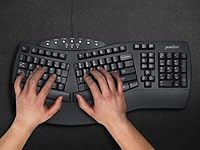
The palm rest is integrated directly into the keyboard chassis, meaning it cannot be detached or swapped out. For most users this is a convenience, but if you prefer a flat keyboard profile or already have a wrist rest you like, the built-in one is not optional.