Overview

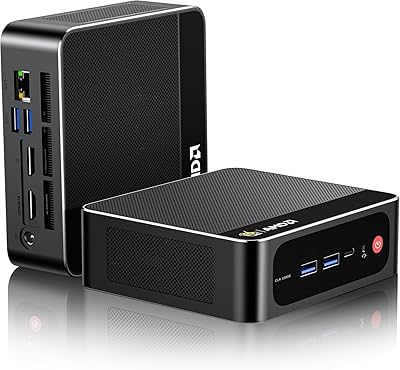
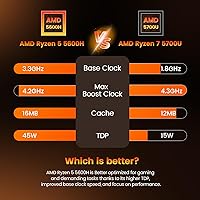
The PELADN WO4 Mini PC (Ryzen 5 5600H, 16GB, 512GB) enters a crowded sub-$300 compact desktop market with a chip choice that immediately sets it apart. While most budget machines lean on Intel N-series or older AMD U-series processors, PELADN opted for the Ryzen 5 5600H — a genuine H-class mobile chip built for higher sustained output. It ships ready to use with Windows 11 Pro, 16GB of dual-channel DDR4, and a 512GB NVMe SSD, so there is no extra day-one spending required. PELADN is a lesser-known OEM, and that is worth keeping in mind when weighing long-term support expectations against what is otherwise an attractive spec sheet.
Features & Benefits

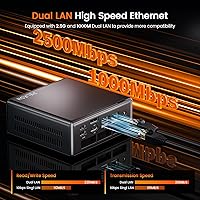
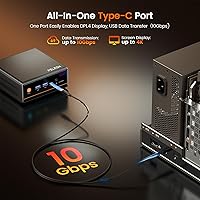
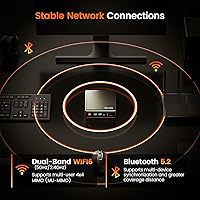
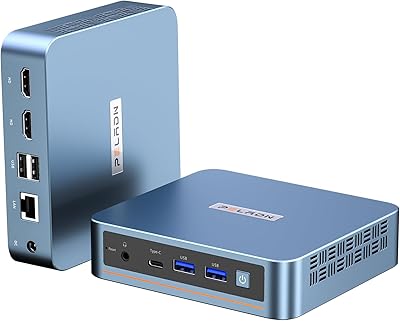
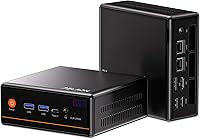
The dual NIC configuration — a 2.5GbE port alongside a standard Gigabit port — is honestly the most surprising inclusion at this price. Most competing machines from Beelink or Minisforum at a similar cost ship with a single LAN port, making the WO4 a legitimate pick for anyone running a home lab or light routing tasks. On the display side, this compact desktop handles triple 4K output through HDMI 2.0, DisplayPort 1.4, and a Type-C port running at 10Gbps. The Vega 7 iGPU clocked at 1800MHz handles older games and indie titles at 1080p reasonably well — just do not expect dedicated GPU performance. Wi-Fi 6 and Bluetooth 5.2 cover modern wireless needs without requiring any add-ons.

Best For

This mini PC fits cleanly into a few specific scenarios. Home office workers who need multi-monitor productivity without a bulky tower will appreciate the triple display support and the tidy footprint it leaves on a desk. Students or secondary household users wanting a capable all-rounder for browsing, streaming, and light productivity will find it more than sufficient. The dual LAN setup makes the WO4 genuinely useful for homelabbers running VMs or pfSense-style routing experiments. It also works well as a low-power background machine — media server, remote desktop host, or always-on utility box. Budget-focused light gamers can extract real value here too, provided they keep GPU expectations realistic.

User Feedback

Since the WO4 launched in mid-2025, the pool of verified buyer reviews is still relatively small, so patterns observed now may shift as more units reach real households. Early adopters have largely praised the out-of-box experience, noting that initial setup is straightforward and that the performance-per-dollar ratio feels strong for everyday tasks. On the downside, a handful of buyers have raised concerns about sustained thermal performance under longer workloads — fitting an H-series chip into a chassis this compact is a thermal balancing act, and throttling under prolonged load remains a legitimate question mark. A few users also flagged minor quirks with display output configuration, while overall build quality impressions have been cautiously positive for the price tier.

Pros

  • Ryzen 5 5600H delivers noticeably more burst performance than typical mini PC processors at this price tier.
  • Dual NIC with 2.5GbE is a rare and genuinely useful feature for home lab and network enthusiasts.
  • Triple display output supporting 4K 60Hz covers real multi-monitor productivity setups without extra hardware.
  • Ships with 16GB dual-channel RAM and a 512GB NVMe SSD — no forced day-one upgrades required.
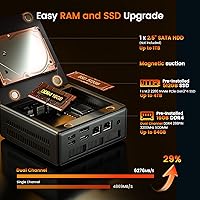
  • Two SO-DIMM slots and an open storage bay give this compact desktop a real upgrade path.
  • Wi-Fi 6 and Bluetooth 5.2 handle modern wireless peripherals and networks without needing adapters.
  • Windows 11 Pro comes preinstalled with minimal bloatware, making initial setup fast and clean.
  • The small footprint frees up significant desk space compared to even mid-tower budget builds.
  • Older game titles and indie games run at playable 1080p settings on the Vega 7 iGPU.
  • The machine runs quietly under typical home office and media playback workloads.

Cons

  • Thermal throttling under sustained heavy loads is a documented concern given the small chassis size.
  • Only two USB 3.2 ports is limiting for users with multiple high-speed peripherals.
  • Build materials feel a step below competitors like Beelink at a similar price point.
  • Some early buyers needed manual driver updates for the 2.5GbE port to reach full speed.
  • Getting all three display outputs active simultaneously can require specific cables and troubleshooting.
  • PELADN offers limited support documentation compared to more established mini PC brands.
  • The 512GB base SSD fills up faster than expected once the OS, apps, and files are installed.
  • Fan noise becomes clearly audible under gaming or extended CPU-intensive tasks.
  • Brand longevity and long-term parts availability remain open questions for a lesser-known OEM.
  • The 12-month warranty period is shorter than what some rival brands offer at comparable prices.

Ratings

The PELADN WO4 Mini PC (Ryzen 5 5600H, 16GB, 512GB) scores here reflect an AI-driven analysis of verified buyer reviews sourced globally, with spam, bot-generated, and incentivized submissions actively filtered out before scoring. Across categories ranging from raw processing muscle to long-term reliability signals, both the genuine strengths and the real frustrations buyers have reported are reflected without softening either side. The result is a balanced picture that should help you decide whether this compact desktop fits your specific situation.
CPU Performance
83%
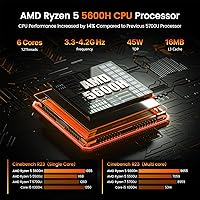
Buyers coming from Intel N100 or older Celeron-based mini PCs are consistently surprised by how much headroom the Ryzen 5 5600H provides. Everyday multitasking — browser tabs, video calls, spreadsheets running simultaneously — feels genuinely responsive rather than sluggish, which is the most common praise in daily work contexts.
Under longer sustained workloads like extended video encoding or multi-hour compile jobs, a portion of users have noted performance dipping noticeably, suggesting thermal limits are being reached inside the compact chassis. For burst tasks it excels; for prolonged heavy loads, expect some inconsistency.
Gaming Capability
67%
33%
For the target audience — someone wanting to revisit older library titles or run indie games without a dedicated GPU box — the Vega 7 iGPU at 1800MHz delivers a workable experience at 1080p medium settings. Games from the early-to-mid 2010s run comfortably, and lighter modern titles like Stardew Valley or Hades run without issue.
Anyone expecting to push more demanding modern titles will hit a wall quickly. The WO4 is not positioned for AAA gaming, and users who tested titles like Cyberpunk 2077 or Elden Ring reported unplayable framerates even at low settings. Managing those expectations upfront is critical.
Thermal Management
58%
42%
Under light to moderate loads — web browsing, office work, 4K video playback — the machine runs quietly and surface temperatures stay reasonable. For the majority of home office use cases, thermal performance holds up fine and fan noise stays in the background.
This is the most recurring concern in early buyer feedback. Fitting an H-series chip into a chassis this small creates genuine thermal pressure under sustained workloads. Several users reported throttling during extended gaming sessions or prolonged CPU-intensive tasks, and the fan audibly ramps up under stress in ways that some found distracting.
Connectivity & Networking
91%
The dual NIC setup — 2.5GbE plus Gigabit — is the single most praised hardware feature among technically inclined buyers. Homelabbers and small office users running pfSense, VM clusters, or NAS configurations specifically called this out as the deciding factor in choosing the WO4 over similarly priced rivals from Beelink or Minisforum.
A small number of early buyers flagged occasional driver hiccups with the 2.5GbE port on fresh Windows installs, requiring a manual driver update before achieving full speed. It is a solvable issue but one that caught a few less experienced users off guard at setup.
Display Output
79%
21%
Triple display support across HDMI 2.0, DisplayPort 1.4, and Type-C is a legitimate productivity asset. Users running dual or triple monitor home office setups praised how straightforward the configuration was, and 4K 60Hz output over both HDMI and DP worked reliably for media and design work.
A handful of buyers experienced initial confusion getting all three outputs active simultaneously, with some reporting that the Type-C display output required specific cable types or adapters to function correctly. The setup process is not always plug-and-play, particularly when mixing display generations.
RAM & Storage
82%
18%
Arriving with 16GB of dual-channel DDR4 and a 512GB NVMe SSD means the machine is genuinely usable from day one without forced upgrades. Boot times are fast, application launches feel snappy, and buyers upgrading from older HDD-based machines consistently commented on how much of a difference it made in daily responsiveness.
The 512GB base storage fills up faster than expected once Windows, drivers, and a handful of applications are installed. Users who do creative work or store local media libraries flagged this quickly. The 2.5-inch SATA bay helps, but it requires sourcing and installing a drive separately.
Upgradeability
77%
23%
Two accessible SO-DIMM slots with support up to 64GB total RAM and an open M.2 slot alongside the 2.5-inch bay give this machine more headroom than many locked-down mini PCs in the same price range. Tinkerers appreciated having real upgrade paths rather than soldered memory.
Accessing the internals requires opening the chassis, which voids the warranty during the 12-month coverage window for some buyers who were cautious about that trade-off. The process itself is not overly complex, but documentation from PELADN on the upgrade procedure is sparse.
Build Quality
69%
31%
The chassis feels solid enough for a desk-bound machine and the overall assembly does not feel like it will fall apart under normal use. At this price tier, buyers generally found the physical quality acceptable and appreciated the compact, understated look that fits into a home or office setting without drawing attention.
Compared to established brands like Beelink or Intel NUC, the plastics feel a notch below in perceived quality. A few buyers noted minor flex in the casing and pointed out that the overall finish does not quite match the premium impression the spec sheet suggests. It is functional rather than impressive.
Wireless Performance
81%
19%
Wi-Fi 6 with dual-band support and MU-MIMO performed well in real household environments, with users in busy network homes noting more stable connections compared to Wi-Fi 5 machines they had used previously. Bluetooth 5.2 pairing with keyboards, mice, and audio devices was consistently reported as reliable.
Real-world Wi-Fi throughput in congested apartment environments showed some variation, and a couple of users in thick-walled older buildings found signal penetration less impressive than expected. It is a fine wireless implementation but not exceptional enough to replace a wired connection for truly latency-sensitive tasks.
Software & Out-of-Box Experience
74%
26%
The machine arriving with Windows 11 Pro preloaded and essentially ready to use within minutes of unboxing was a recurring positive in buyer feedback. Most users reported a clean initial setup with minimal bloatware, which is not always a given with smaller OEM brands.
Some early adopters encountered driver gaps — particularly around display output and NIC configuration — that required manual resolution before full functionality was achieved. PELADN's support documentation is limited compared to larger brands, so less technically confident users may find troubleshooting more frustrating than it needs to be.
Value for Money
86%
For buyers who understand what they are getting — a capable, upgradeable compact machine with an H-series chip and dual LAN — the price feels genuinely competitive. When stacked against similarly priced Beelink or Minisforum units using older U-series processors, the WO4 offers a meaningful performance step up.
The value equation depends heavily on use case. Buyers who expected it to replace a mid-range gaming desktop walked away disappointed. The value is real for the right buyer, but those who misjudged the product category felt the price was not justified once they hit the GPU ceiling.
Noise Level
71%
29%
During typical home office tasks, media playback, and light browsing, the WO4 runs quietly enough that it fades into the background. Users who replaced aging noisy desktop towers appreciated the contrast, and for living room or bedroom setups under normal use, fan noise is not a real concern.
Under gaming or sustained CPU load, the single fan becomes audible in a way that some users found more intrusive than expected for a machine this size. It is not loud by desktop standards, but in a quiet home office environment during a long processing task, it becomes noticeable enough to mention.
Port Selection
66%
34%
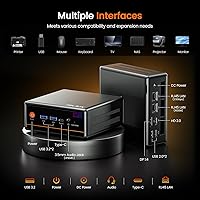
Having two USB 3.2 ports, two USB 2.0 ports, HDMI, DisplayPort, Type-C, and a 3.5mm jack covers the basics for most home or office setups. Users running standard peripherals — keyboard, mouse, external drive, headset — found the available ports sufficient without needing a hub.
Power users with more complex peripheral setups hit the port ceiling quickly. Only two high-speed USB-A ports feels thin in 2025, and the absence of any front-facing ports on some configurations means constant reaching around the back of the unit for plugging in USB drives or headsets.
Brand Reliability & Support
54%
46%
Buyers who needed to use PELADN's after-sales support generally reported that the team was responsive via email and willing to help troubleshoot remotely. The 12-month warranty is standard for the category, and no widespread reports of DOA units have emerged in early buyer data.
PELADN's limited mainstream track record is a genuine uncertainty. The brand lacks the community knowledge base, third-party repair ecosystem, and long-term reliability data that established names carry. Buyers choosing this over a Beelink or Minisforum equivalent are accepting a slightly higher unknown-factor risk.

Suitable for:

The PELADN WO4 Mini PC (Ryzen 5 5600H, 16GB, 512GB) is a strong fit for home office workers who want to run two or three monitors without a bulky tower eating up desk space — the triple 4K display support makes that a genuinely practical setup rather than a theoretical one. Students and secondary household users who need a responsive all-rounder for browsing, video calls, streaming, and light productivity will find it more than capable right out of the box. The dual NIC configuration is a real differentiator for homelabbers and network enthusiasts who want to experiment with routing, VMs, or pfSense without spending extra on a separate appliance. Budget-conscious users who want to revisit older game libraries or run lighter indie titles will also get real mileage from the Vega 7 iGPU, provided expectations are set around what integrated graphics can realistically deliver. Finally, anyone looking for a low-power machine to leave running continuously as a media server, remote desktop host, or always-on utility box will find the WO4 a sensible and space-efficient choice.
Not suitable for:

The PELADN WO4 Mini PC (Ryzen 5 5600H, 16GB, 512GB) is the wrong tool for anyone expecting dedicated GPU gaming performance — the Vega 7 iGPU handles older and lighter titles reasonably well, but modern AAA titles at acceptable framerates are simply out of reach, and no amount of settings tweaking will change that. Users who run sustained heavy workloads — extended video encoding, large dataset processing, or multi-hour 3D rendering — should also look elsewhere, since the H-series chip inside a chassis this compact faces real thermal pressure that can lead to performance throttling over time. Buyers who prioritize long-term brand support, an established repair ecosystem, or extensive community knowledge should be aware that PELADN is a smaller OEM without the track record of Beelink or Minisforum, which introduces a degree of uncertainty around durability and post-warranty support. Power users with complex peripheral setups will also find the port selection limiting, particularly the modest two high-speed USB-A ports. If your work demands consistent maximum CPU throughput over hours rather than bursts, a larger-chassis machine with better active cooling would serve you more reliably.
Specifications

  • Processor: AMD Ryzen 5 5600H, 6-core/12-thread, base clock 3.3GHz, turbo up to 4.2GHz, built on TSMC 7nm FinFET process.
  • Integrated GPU: AMD Radeon RX Vega 7 iGPU with 7 compute units running at up to 1800MHz, sharing system RAM for graphics workloads.
  • RAM: 16GB DDR4 3200MHz dual-channel memory installed across two SO-DIMM slots, expandable to a maximum of 64GB total.
  • Primary Storage: 512GB PCIe 3.0 NVMe M.2 2280 SSD providing fast boot times and application load speeds out of the box.
  • Secondary Storage: One internal 2.5-inch SATA bay supports an additional HDD or SSD up to 1TB for expanded local storage.
  • Display Outputs: Three simultaneous display outputs: HDMI 2.0 (max 4K 60Hz), DisplayPort 1.4 (max 4K 60Hz), and Type-C with DP alt mode.
  • Wired Networking: Dual RJ45 LAN ports consisting of one 2.5GbE and one Gigabit Ethernet interface for flexible wired network configurations.
  • Wireless: Wi-Fi 6 (802.11ax) dual-band 2.4GHz and 5GHz with MU-MIMO support, plus Bluetooth 5.2 for peripheral connectivity.
  • USB Ports: Four USB ports total: two USB 3.2 Gen 1 Type-A at up to 5Gbps and two USB 2.0 Type-A ports.
  • Type-C Port: One USB 3.2 Gen 2 Type-C port running at up to 10Gbps, supporting both data transfer and DisplayPort alternate mode output.
  • Audio: Single 3.5mm combo audio jack supporting both headphone output and microphone input.
  • Operating System: Windows 11 Pro comes preinstalled and activated, ready to use immediately after first-boot setup.
  • Dimensions: The chassis measures 6.57 x 6.46 x 4.45 inches, keeping desk footprint minimal compared to even small form factor towers.
  • Weight: Complete unit weighs 2.94 lbs, making it easy to mount behind a monitor or relocate between rooms as needed.
  • Warranty: PELADN provides a 12-month limited warranty from date of purchase covering manufacturing defects in design and workmanship.

Related Reviews
BOSGAME E2 Mini PC 16GB/512GB

80%
88%
Value for Money
83%
Performance for Everyday Tasks
76%
Build Quality & Design
61%
Thermal Management & Fan Noise
82%
Display Output & Multi-Monitor Support
More
ACEMAGICIAN Kron Mini K1 Mini PC, Ryzen 7 7730U, 16GB RAM, 512GB SSD
85%
88%
Value for Money
91%
Performance for Everyday Tasks
94%
Compact Design & Portability
90%
Setup & Ease of Use
78%
Gaming Performance (Light)
More
PELADN WI-6 Mini PC (N100, 16GB DDR4, 512GB SSD)
79%
88%
Value for Money
83%
Performance for Daily Tasks
91%
Triple-Display Support
74%
Build Quality & Design
71%
Setup & Out-of-Box Experience
More
LXZ Desktop PC Ryzen 5 5600GT 16GB RAM 512GB SSD
85%
88%
Performance for Multitasking
92%
Value for Money
90%
Ease of Setup
85%
Design and Aesthetics
75%
Graphics for Light Gaming
More
KAMRUI E3B Mini PC (Ryzen 5 7430U, 32GB RAM, 512GB SSD)
86%
94%
Multitasking Performance
91%
Office Productivity
89%
Display Connectivity
93%
Value for Money
96%
Space Efficiency
More
FIREBAT AM02 Mini PC (AMD Ryzen 6600H, 16GB/512GB)
76%
86%
Raw Processing Performance
74%
Integrated GPU (Radeon 660M)
61%
Memory Configuration (Out of Box)
83%
Storage Speed & Capacity
88%
Expandability & Upgrade Headroom
More
KAMRUI AM21 Mini PC
KAMRUI AM21 Mini PC
74%
88%
CPU Performance
61%
Thermal Management
93%
Port Selection & Connectivity
76%
Integrated GPU & Display Output
82%
Build Quality & Form Factor
More
ACEMAGICIAN S3A Mini PC (Ryzen 7 5875U, 32GB, 1TB)
79%
91%
Value for Money
88%
Processing Performance
63%
Gaming Capability
89%
Memory & Storage
61%
Thermal Management & Cooling
More
Ninkear M7 Light Gaming Mini PC Ryzen 7430U 16GB RAM 512GB SSD
88%
87%
Performance for Light Gaming
92%
Value for Money
94%
Energy Efficiency
85%
Multitasking Ability
88%
Setup and Installation
More
Beelink SEI Mini PC (Ryzen 5500U, 16GB/500GB)
81%
84%
Everyday Performance
61%
RAM Configuration
91%
Display & Multi-Monitor Support
73%
Cooling & Thermal Management
88%
Networking
More
GMKtec Nucbox G10 Mini PC Ryzen 5 3500U 16GB RAM 1TB SSD
84%
86%
Performance
92%
Value for Money
82%
Build Quality
89%
Ease of Setup
88%
Portability
More

FAQ

Realistically, the Vega 7 iGPU handles games from a few years back and lighter indie titles at 1080p with medium settings reasonably well. If your library includes titles like GTA V, Rocket League, or older RPGs, you will get playable framerates. For current AAA releases like Cyberpunk 2077 or Alan Wake 2, the integrated graphics simply cannot keep up regardless of how low you set the quality. Set your expectations around the catalog you actually play, not the latest releases.

Yes, it ships with Windows 11 Pro preinstalled and activated, so you are not buying a bare-bones machine that requires a separate OS purchase. The first-boot experience is straightforward for most users, though some early buyers noted they needed to download a couple of drivers manually — particularly for the 2.5GbE NIC — to get everything running at full capability.

Under typical workloads like web browsing, video calls, and document editing, the fan is barely noticeable and fades into the background. When you push it harder — extended gaming sessions or sustained CPU tasks — the fan does ramp up audibly. It is not jet-engine loud, but in a very quiet room during a long processing job, you will hear it. For standard home office use it should not be a problem.

The hardware supports three simultaneous displays through HDMI, DisplayPort, and the Type-C port, but getting all three active at once sometimes requires the right cables. The Type-C display output in particular needs a cable or adapter that explicitly supports DisplayPort alternate mode — a generic USB-C cable will not work for video. If you buy the appropriate cables upfront, the setup works, but it is not always as plug-and-play as the spec sheet implies.

Both RAM and storage are genuinely upgradeable. There are two physical SO-DIMM slots, so you can swap or add RAM sticks up to 64GB total. The M.2 2280 slot can accept a larger NVMe drive, and there is a 2.5-inch SATA bay inside for a secondary drive. You will need to open the chassis to access these, which is not overly complicated but does involve voiding the warranty during the coverage window.

For light always-on tasks like media serving, remote desktop hosting, or running a small home automation stack, this compact desktop is a practical choice. The H-series processor is more power-hungry than an N100-based machine at idle, so running it continuously will use more electricity than a purpose-built low-power server. Thermal performance at low sustained loads is generally stable, and users running it as a background machine have not widely reported issues.

Most home users will only ever plug in one, and that is perfectly fine. The real value of the dual NIC setup is for people running pfSense or OPNsense as a home router, building a small homelab with separate network segments, or setting up a NAS with link aggregation. If none of that applies to you, treat the second port as a nice bonus for redundancy or a direct machine-to-machine connection rather than a feature you need to use.

Functionally it is comparable, but the physical materials and finish feel a slight step below what Beelink offers at a similar price point. The chassis is sturdy enough for normal desktop use and does not feel fragile, but the plastics lack the tighter tolerances and premium feel of some rivals. For a machine that will sit on a desk and rarely be moved, it is perfectly adequate — just do not expect it to feel like a premium product in hand.

It is compatible with Linux distributions, and PELADN lists Ubuntu and general Linux support on the product page. Real-world Linux users have generally had success with major distros, though driver support for the 2.5GbE NIC and Wi-Fi 6 card may require some manual setup depending on your kernel version. If you are comfortable troubleshooting drivers on Linux, it is a workable machine for that use case.

Windows 11 Pro, system files, and drivers alone consume roughly 40 to 50GB, and once you add your main applications the usable space narrows faster than the raw number suggests. For a lean productivity or media streaming setup it is manageable, but anyone storing local video libraries, game installs, or large project files will feel the pinch. The internal 2.5-inch SATA bay is there for a reason — budget for a secondary drive if storage matters to your workflow.