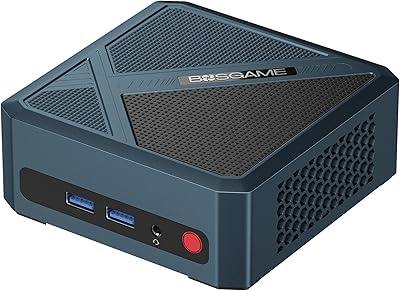
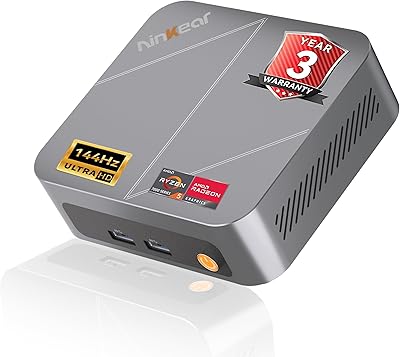
Overview

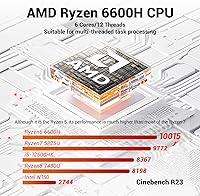
The FIREBAT AM02 Mini PC (AMD Ryzen 6600H, 16GB/512GB) is a surprisingly capable little box that punches above its weight for the size. At just 5×5×2 inches, it runs on a genuine H-class processor — six cores, twelve threads, boosting to 4.5GHz — not one of those power-sipping U or N-series chips found in most budget mini PCs. It ships with 16GB DDR5 RAM and a 512GB PCIe 4.0 SSD, which covers most everyday workloads without immediate upgrades. FIREBAT has been building PCs for over a decade out of Shenzhen, and while they're not a household name, their hardware track record earns reasonable buyer confidence.
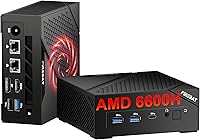
Features & Benefits

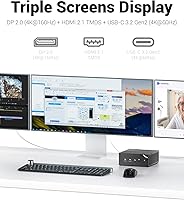
What really separates this compact desktop from cheaper Intel N-series rivals is the processor's 45W TDP — that means sustained performance under real workloads, not just a brief burst before throttling. The Radeon 660M adds genuine graphics headroom for 4K media playback and lighter gaming. Display output options are notably strong: DP 2.0 at 4K and 160Hz, HDMI 2.1, and a USB-C port that handles power delivery, video, and data together — three external monitors fully supported. Connectivity includes WiFi 6, Bluetooth 5.2, and dual Gigabit LAN. One critical detail: it ships without an OS, so factor in a Windows license cost before purchasing.

Best For

The FIREBAT AM02 hits a sweet spot for home office users who want a quiet, space-saving desktop with real processing muscle. Students juggling research, video calls, and light editing will find it more than capable. The Radeon 660M handles older and less demanding games at reasonable settings, but anyone expecting to run modern AAA titles at high detail will be disappointed — this simply isn't that machine. The dual LAN ports and compact footprint also make it an appealing pick for small business deployments. Multi-monitor content work and 4K media playback are genuinely comfortable use cases here.

User Feedback

Buyers generally appreciate how responsive boot times and app launches feel compared to N-series machines they've replaced, and the chassis build quality draws consistent praise as solid for the price. Fan noise under moderate loads is described as manageable, though heavier tasks do spin it up noticeably. On the downside, the RAM ships in a single-channel configuration, which limits GPU bandwidth — a second stick helps meaningfully. Initial driver setup trips up some users, and the missing operating system catches buyers off guard more often than it should. Overall, most reviewers agree the H-series performance gap over budget N100 alternatives justifies the price for anyone doing more than basic tasks.

Pros

  • Genuine H-class processor delivers sustained performance that budget N-series mini PCs simply cannot match.
  • DDR5 memory and a PCIe 4.0 SSD make the system feel fast and responsive from day one.
  • Triple 4K display output — including 160Hz via DP 2.0 — is rare at this size and price point.
  • Dual M.2 slots and dual SODIMM slots give meaningful upgrade headroom as needs grow over time.
  • The versatile USB-C port handles power delivery, video output, and data transfer simultaneously.
  • WiFi 6 and dual Gigabit LAN cover both wireless and wired connectivity needs without add-ons.
  • At under a pound and 5×5×2 inches, this compact desktop fits anywhere without cluttering a workspace.
  • Radeon 660M handles older games and 4K media playback better than most integrated GPUs at this tier.
  • Adding a second RAM stick is straightforward and delivers a noticeable real-world performance boost.

Cons

  • No operating system is included — buyers need to budget for and install Windows or Linux separately.
  • RAM ships in single-channel configuration, which limits integrated GPU bandwidth right out of the box.
  • Fan noise under sustained heavy workloads is noticeable enough to be distracting in quiet environments.
  • Thermal throttling can occur during prolonged intensive tasks due to the constraints of the small chassis.
  • FIREBAT brand support response times are inconsistent, with some buyers waiting longer than expected for help.
  • WiFi driver instability has been reported on certain Windows builds, requiring manual driver updates to fix.
  • Only one USB-A 2.0 port is included alongside the faster ports, limiting simultaneous peripheral connections.
  • The plastic chassis feels functional rather than premium, with minor quality control variations across units.
  • Storage fills up quickly once an OS and applications are installed on the 512GB base drive.

Ratings

The FIREBAT AM02 Mini PC (AMD Ryzen 6600H, 16GB/512GB) scores below are generated by AI after analyzing verified buyer reviews from global markets, with spam, bot-submitted, and incentivized feedback actively filtered out. The ratings reflect a honest cross-section of real ownership experiences — both where this compact desktop impresses and where it leaves buyers wanting more. Strengths and friction points are weighted equally so you can make a genuinely informed decision.
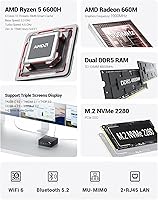
Raw Processing Performance
86%
Users who upgraded from Intel N100 or N150 mini PCs consistently describe a night-and-day difference in sustained workload handling. The Ryzen 6600H keeps pace through multi-tab browsing, video calls, and background tasks without the sluggishness those lower-TDP chips show after a few minutes of load.
A handful of buyers running more demanding workflows — video transcoding, large spreadsheet models — note that the chip does eventually throttle in the small chassis under prolonged stress. Cooling headroom is finite, and the 45W TDP is not always fully sustained in real-world continuous use.
Integrated GPU (Radeon 660M)
74%
26%
For a machine without a discrete graphics card, the Radeon 660M handles casual gaming and 4K media playback better than most buyers expect. Titles from a few years back run at playable settings, and hardware-accelerated video decoding makes streaming and local 4K content genuinely smooth.
Modern AAA titles at acceptable frame rates are largely out of reach, and buyers who expected more from the gaming angle have been vocal about disappointment. This GPU is a strong integrated option — but it is still an integrated option, and that ceiling is real.
Memory Configuration (Out of Box)
61%
39%
16GB of DDR5 at 4800MHz is a solid starting point for productivity and everyday use, and most home office users find it sufficient without touching the RAM slots at all. The fast memory speed does help the Radeon 660M, which shares system bandwidth.
The RAM ships as a single stick, which means single-channel operation — a known bottleneck for integrated graphics performance. Buyers who noticed sluggish GPU behavior after purchase often found that adding a second matching stick meaningfully improved responsiveness in both games and GPU-accelerated tasks.
Storage Speed & Capacity
83%
The 512GB PCIe 4.0 x4 SSD delivers fast sequential read and write speeds that make the system feel responsive from first boot. Application launches and file operations are quick, and the drive is noticeably faster than the SATA SSDs still bundled in some competing mini PCs.
512GB fills up faster than expected once an OS, applications, and media libraries are installed. There is a second M.2 slot available, but buyers who did not know they would need more storage upfront find themselves adding a drive sooner than anticipated.
Expandability & Upgrade Headroom
88%
Dual M.2 PCIe 4.0 slots and two SODIMM slots supporting up to 64GB total RAM give this machine genuine long-term flexibility. Buyers who added a second RAM stick or a larger storage drive report the process was straightforward, with no unusual compatibility issues encountered.
The chassis is compact, which means accessing internals requires care — a few users mention the screws are small and the fit is tight. Nothing impossible, but not a tool-free upgrade experience either, and first-timers may feel a little uncertain opening it up.
Display Output Versatility
91%
Triple 4K display support through DP 2.0, HDMI 2.1, and USB-C is genuinely uncommon at this price and size. Multi-monitor productivity users and content viewers running a large 4K screen both report excellent output quality, and the 160Hz capability on the DP 2.0 port is a welcome detail for anyone pairing it with a high-refresh display.
The USB-C display output shares bandwidth with data and power delivery, so buyers daisy-chaining all three displays at maximum resolution simultaneously may encounter limitations. Documentation on exact multi-display bandwidth sharing is sparse, which causes initial confusion during setup.
Port Selection & Connectivity
84%
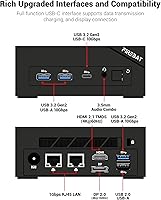
The port layout covers most real-world desk setups well — three fast USB-A ports, a versatile USB-C, dual LAN, and a combined headphone and microphone jack. WiFi 6 and Bluetooth 5.2 perform reliably in mixed wireless environments, and the dual LAN ports are a genuine bonus for home lab or small office use.
There is only one USB-A 2.0 port alongside the faster 3.2 ports, which is a minor annoyance if you are plugging in multiple peripherals. A few buyers also wish there were a USB-C port on the front or side for easier day-to-day access rather than reaching around to the rear panel.
Build Quality & Form Factor
79%
21%
For a machine weighing under a pound and fitting in the palm of your hand, the chassis feels appropriately solid with no flex or rattling. The matte black finish resists fingerprints reasonably well, and buyers mounting it behind a monitor with a VESA adapter appreciate how unobtrusive it looks.
It does not feel premium in the way a more expensive small-form-factor PC might — the plastic construction is functional rather than impressive. A small number of buyers have mentioned sharp edges on the chassis and inconsistent port alignment, suggesting quality control is not perfectly uniform across units.
Thermal Management & Fan Noise
72%
28%
Under light to moderate workloads — web browsing, document editing, video calls — the fan stays quiet enough to comfortably ignore. Thermal management under everyday productivity use is competent, and the machine does not run hot to the touch during typical office sessions.
Push it into sustained heavy tasks and the fan spins up to a level some buyers find distracting in quiet rooms. A few users report occasional thermal throttling during extended encoding or large compilation jobs, which suggests the cooling system is working close to its limits under real load.
Operating System Situation
53%
47%
Shipping without a pre-installed OS keeps the purchase price lower and gives technically capable buyers the freedom to install Linux or a clean Windows build of their choice. For buyers who already own a Windows license or prefer Linux, this is genuinely a non-issue.
A surprising number of buyers were caught off guard by the missing OS and had to factor in the additional cost and setup time after purchase. The product listing mentions it, but the implication is easy to miss — and for less experienced users, the process of sourcing, creating, and installing an OS added unwanted friction right out of the box.
WiFi & Wireless Reliability
77%
23%
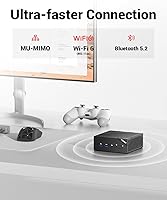
WiFi 6 delivers noticeably stable connections for video conferencing and large file transfers, and most buyers in standard home and office environments report solid range without dropouts. Bluetooth 5.2 pairs reliably with keyboards, mice, and headsets without the lag complaints common to older BT implementations.
A subset of buyers using the Realtek WiFi chip have encountered occasional driver instability on Windows, requiring reinstallation or updated drivers to resolve. Performance in dense wireless environments with heavy interference is adequate but not exceptional — the antenna design inside such a small chassis has inherent limitations.
Value for Money
82%
18%
Compared to Intel N-series mini PCs at lower price points, the real-world performance gap is significant enough that most buyers feel the premium is justified. The combination of a genuine H-class processor, fast DDR5 memory, and a PCIe 4.0 SSD in a package this small is hard to replicate for less.
The missing OS adds a hidden cost that erodes the value proposition for buyers who did not budget for it. At full price, it competes with refurbished business-grade mini PCs from established brands that may offer better long-term software support and more robust warranties.
Brand Trust & After-Sales Support
66%
34%
FIREBAT has been operating in the PC hardware space for over ten years, and there is a traceable support email and dedicated product website for buyers who need post-purchase assistance. Most straightforward hardware issues reported by users were eventually resolved through the brand's support channels.
FIREBAT is not a recognized name among mainstream buyers, and response times from support have been inconsistent based on user reports. Warranty terms and the process for returning or replacing faulty units lack the clarity and speed that buyers expect from more established brands in this category.
Setup & Out-of-Box Experience
68%
32%
Once an operating system is installed, the actual hardware setup is simple — plug in your peripherals, connect a display, and the machine is ready to go. Drivers for core functions generally install without complications on clean Windows builds, and the physical setup takes only a few minutes.
The out-of-box experience requires more technical confidence than most plug-and-play mini PCs. Between sourcing an OS, dealing with potential driver gaps, and the single-channel RAM situation, buyers who expected a ready-to-use desktop experience out of the box have left some of the more critical reviews.

Suitable for:

The FIREBAT AM02 Mini PC (AMD Ryzen 6600H, 16GB/512GB) is a strong match for anyone who needs a real desktop experience in a tiny footprint — without compromising on day-to-day speed. Home office workers who have grown tired of underpowered N-series machines will notice the difference immediately: sustained multitasking, smooth video calls, and snappy application switching feel closer to a mid-range tower than a typical mini PC. Students handling research, cloud-based tools, and light creative work will find the hardware more than capable of keeping up with a demanding academic schedule. The triple 4K display support also makes this compact desktop genuinely attractive for productivity setups where screen real estate matters — connecting two or three monitors to a box this small is not something most competitors offer at this price. Small business buyers who need quiet operation, dual wired LAN connections, and room to upgrade storage or memory down the road will also find it a practical and cost-effective choice.
Not suitable for:

Anyone hoping to use the FIREBAT AM02 Mini PC (AMD Ryzen 6600H, 16GB/512GB) as a gaming machine for modern titles should reset their expectations before purchasing. The Radeon 660M is a capable integrated GPU, but it cannot compete with even an entry-level discrete card — recent releases at playable frame rates and detail settings are largely off the table. Buyers who need a ready-to-use PC out of the box should also be cautious: no operating system is included, and sourcing, creating installation media, and configuring Windows or Linux adds time, cost, and technical effort that less experienced users may not anticipate. Anyone doing heavy 3D rendering, video encoding at scale, or running professional creative software will quickly run into the thermal and performance ceiling of a compact chassis with integrated graphics. Finally, buyers who prioritize brand reliability and fast, responsive after-sales support may find FIREBAT's lesser-known status and inconsistent support response times a genuine concern compared to more established alternatives.
Specifications

  • Processor: AMD Ryzen 6600H, 6 cores and 12 threads, base clock not specified, boost up to 4.5GHz, built on Zen 3+ architecture.
  • TDP & Power: The CPU operates at a 45W TDP, supplied by an included 96W external power adapter.
  • Integrated GPU: AMD Radeon 660M integrated graphics running at 1900MHz, sharing system memory bandwidth with the CPU.
  • RAM: 16GB DDR5 SODIMM at 4800MHz, installed as a single stick in one of two available slots.
  • Max RAM: The dual SODIMM configuration supports up to 64GB total, with a maximum of 32GB per slot.
  • Storage: 512GB M.2 2280 SSD using a PCIe 4.0 x4 interface, offering fast sequential read and write performance.
  • M.2 Slots: Two M.2 M-Key PCIe 4.0 x4 slots are available, both supporting standard 2280 form-factor drives.
  • Display Outputs: Three simultaneous display outputs are supported: DP 2.0 at 4K and 160Hz, HDMI 2.1 at 4K and 60Hz, and USB-C at 4K and 60Hz.
  • USB Ports: Four USB-A ports are included — three USB-A 3.2 Gen 2 at up to 10Gbps and one USB-A 2.0 — plus one USB-C 3.2 Gen 2 supporting PD, DP, and data.
  • Audio: A single 3.5mm combo jack supports both headphone output and microphone input simultaneously.
  • Networking: Dual Gigabit Ethernet LAN ports are included alongside a Realtek RTL8852BE WiFi 6 (802.11ax) wireless card.
  • Bluetooth: Bluetooth 5.2 is built in via the same Realtek wireless card that handles WiFi.
  • Operating System: No operating system is pre-installed; the unit ships in a default bare state requiring the buyer to install their preferred OS.
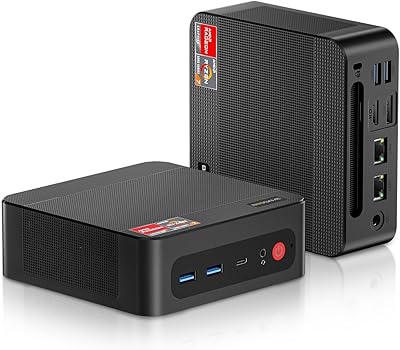
  • Dimensions: The chassis measures 5 × 5 × 2 inches, making it small enough to mount behind a monitor or sit on a crowded desk.
  • Weight: The unit weighs 13.9 ounces without peripherals or power adapter.
  • Color & Design: The chassis is finished in matte black with a compact square profile and rear-facing port layout.
  • Brand & Model: Manufactured by Shenzhen Qingfen Tingxiu Information Technology Co., Ltd. and sold under the FIREBAT brand as model AM02.
  • Memory Type: RAM uses the SODIMM form factor with DDR5 specification, the same standard found in modern thin-and-light laptops.

Related Reviews

BOSGAME P4 Mini Gaming PC AMD Ryzen 7 5700U 16GB RAM 512GB SSD
85%
88%
Performance
85%
Build Quality
91%
Size & Portability
89%
Setup & Installation
93%
Noise & Quiet Operation
More
KAMRUI Hyper H1 Mini Gaming PC, AMD Ryzen 7 6800H, 16GB RAM, 512GB SSD
86%
91%
Performance
88%
Design & Build Quality
85%
Connectivity (WiFi/Bluetooth)
92%
Multitasking Efficiency
89%
Gaming Experience
More
ACEMAGICIAN Kron Mini K1 Mini PC, Ryzen 7 7730U, 16GB RAM, 512GB SSD
85%
88%
Value for Money
91%
Performance for Everyday Tasks
94%
Compact Design & Portability
90%
Setup & Ease of Use
78%
Gaming Performance (Light)
More
KAMRUI AM21 Mini PC
KAMRUI AM21 Mini PC
74%
88%
CPU Performance
61%
Thermal Management
93%
Port Selection & Connectivity
76%
Integrated GPU & Display Output
82%
Build Quality & Form Factor
More
BOSGAME E2 Mini PC 16GB/512GB
80%
88%
Value for Money
83%
Performance for Everyday Tasks
76%
Build Quality & Design
61%
Thermal Management & Fan Noise
82%
Display Output & Multi-Monitor Support
More
ACEMAGICIAN S3A Mini PC (Ryzen 7 5875U, 32GB, 1TB)
79%
91%
Value for Money
88%
Processing Performance
63%
Gaming Capability
89%
Memory & Storage
61%
Thermal Management & Cooling
More
Beelink SER3 Mini PC, AMD Ryzen 3 3200U, 16GB RAM, 500GB SSD
84%
85%
Performance
92%
Value for Money
88%
Build Quality
94%
Compact Design
90%
Ease of Setup
More
Beelink SEI Mini PC (Ryzen 5500U, 16GB/500GB)
81%
84%
Everyday Performance
61%
RAM Configuration
91%
Display & Multi-Monitor Support
73%
Cooling & Thermal Management
88%
Networking
More
Ninkear M7 Light Gaming Mini PC Ryzen 7430U 16GB RAM 512GB SSD
88%
87%
Performance for Light Gaming
92%
Value for Money
94%
Energy Efficiency
85%
Multitasking Ability
88%
Setup and Installation
More
BOSGAME P5 Mini PC with AMD Ryzen 7 6800H, 32GB RAM, 512GB SSD
86%
88%
Performance
85%
Value for Money
94%
Compactness & Size
90%
Multitasking Ability
86%
Cooling & Noise Control
More

FAQ

No, it does not. The FIREBAT AM02 Mini PC (AMD Ryzen 6600H, 16GB/512GB) ships without any operating system installed. You will need to purchase a Windows license separately or install a Linux distribution of your choice. Factor that cost and setup time into your buying decision before purchasing.
Yes, and for most users it genuinely is worth doing. The machine ships with a single 16GB stick, which puts the memory in single-channel mode. Adding a second matching DDR5 SODIMM stick enables dual-channel operation, which meaningfully improves the Radeon 660M integrated GPU performance and overall memory bandwidth. The upgrade process involves removing a few screws and accessing the SODIMM slots — straightforward for anyone comfortable with basic PC hardware.

The difference is substantial in real-world use. The Ryzen 6600H is a 45W H-class processor designed for sustained workloads, while N100 and N150 chips are 15W low-power chips that throttle quickly under load. For everyday productivity, the AMD-based machine handles multitasking, video calls, and background tasks more fluidly. If your needs are very light — basic browsing, streaming, office documents — a cheaper N-series machine may suffice, but for anything more demanding, the performance gap justifies the price difference.

Yes, three simultaneous display outputs are supported through DP 2.0, HDMI 2.1, and USB-C. The DP 2.0 port is the standout here, supporting 4K at 160Hz — which is genuinely useful if you own a high-refresh-rate monitor. The HDMI and USB-C outputs each support 4K at 60Hz. Keep in mind that all three displays running at maximum resolution simultaneously will use shared system memory bandwidth, so managing your RAM configuration wisely matters.

During light to moderate work, the fan stays quiet enough that most users barely notice it. The noise level becomes more apparent during sustained heavy tasks like long video exports or large file compressions. If you work in a very quiet environment and plan to push the machine hard for extended periods, it may be noticeable. For typical home office or study use, thermal management is competent and unobtrusive.

It depends entirely on what you want to play. The Radeon 660M handles older titles, indie games, and less graphically demanding releases quite well at 1080p with moderate settings. Think titles from several years ago or games with lighter rendering requirements. Modern AAA releases at acceptable frame rates are largely out of reach — this machine has no discrete GPU, and integrated graphics have a hard ceiling regardless of how capable the CPU is.

The second M.2 slot is a great option for expanding storage without replacing your existing drive. It accepts standard M.2 2280 M-Key drives using the PCIe 4.0 x4 interface, which means you can add a fast NVMe SSD for additional capacity, a separate OS drive, or bulk media storage. Most mainstream PCIe 4.0 NVMe drives from brands like Samsung, WD, or Crucial will be compatible without issues.

The USB-C port on this compact desktop supports power delivery, DisplayPort output, and data transfer simultaneously — it is a fully featured USB-C 3.2 Gen 2 port running at up to 10Gbps. You can use it to charge compatible laptops or phones, connect a USB-C monitor, or attach storage devices. However, note that it is located on the rear panel, so frequent hot-swapping of devices may require reaching around the back of the unit.

For the majority of users in standard home or office environments, WiFi 6 on this machine performs reliably for video calls, streaming, and large downloads. The dual LAN ports are also a strong option if you prefer a wired connection for stability or speed. A small number of users have reported occasional driver issues with the Realtek wireless chip on certain Windows versions, so checking for updated drivers after OS installation is a good first step.

It is accessible for someone with basic hardware experience, but not quite tool-free. You will need a small screwdriver to remove the bottom panel, after which the RAM and M.2 slots are accessible. The chassis is compact and the fit is tight, so working carefully is important. Most buyers who have upgraded the RAM or added a second SSD describe the process as manageable, though first-timers should watch a teardown video before diving in to avoid unnecessary stress on the chassis.