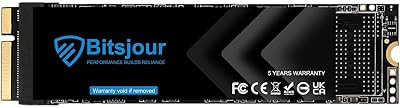
Overview

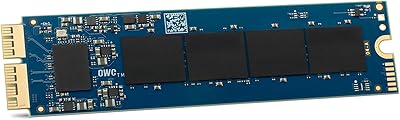
The OWC Aura Pro 6G 1TB Internal SSD is a purpose-built replacement drive designed specifically for MacBook Pro Retina models from mid-2012 to early 2013 — and that narrow compatibility is intentional, not a limitation. OWC has spent decades as one of the most trusted names in Mac upgrades, and this OWC SSD reflects that focused expertise. Unlike a standard M.2 or 2.5-inch drive, it uses a proprietary blade form factor that slots directly into the original connector. With 1TB of capacity at a mid-range price, it gives aging MacBook owners a meaningful storage boost without replacing the whole machine. This is strictly an internal DIY upgrade — not a portable drive — so go in with that expectation.
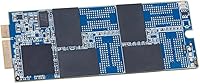
Features & Benefits

The speed difference you feel day-to-day is what matters most here. The Aura Pro 6G upgrade delivers read speeds up to 530MB/s and writes up to 500MB/s — a real step up over the sluggish original factory drive in these older MacBooks, even if it won't match a modern NVMe. The 3D NAND flash means better long-term endurance, so the drive should hold up well over years of heavy use. For anyone handling sensitive files, AES 256-bit encryption support is a practical security bonus. The ultra-slim blade fits the chassis perfectly, and OWC backs it all with a 5-year warranty — genuinely rare for an aftermarket upgrade at this price tier.

Best For

This MacBook storage upgrade makes the most sense for a specific kind of buyer. If you own a MacBook Pro Retina from mid-2012 or early 2013 and your original drive is failing, nearly full, or just frustratingly slow, this is a logical fix. Creatives and students with growing photo or video libraries will appreciate having 1TB of headroom inside the machine they already know. That said, installation does require opening the laptop with the right screwdrivers — OWC provides solid guides, but it is not a zero-effort swap. If you are comfortable doing basic hardware work, extending your MacBook's lifespan this way makes far more financial sense than buying a new computer.

User Feedback

With a 4.5-star average across nearly 450 ratings, this OWC SSD carries a well-earned reputation among buyers who have actually done the upgrade. The most consistent praise centers on noticeable speed gains and how straightforward the installation turned out to be, especially for first-time upgraders. Long-term reliability comes up often too — many report the drive holding strong after years of daily use. On the critical side, a handful of reviewers note that installation tools are not included in the box, which catches some buyers off guard. A few outlier complaints mention packaging concerns or confusion over compatibility with non-listed MacBook models. Overall consensus: highly recommended if you have the right machine and the confidence to open it.

Pros

  • Purpose-built blade form factor fits mid-2012 to early-2013 MacBook Pro Retina models perfectly with no adapter needed.
  • Read speeds up to 530MB/s deliver a noticeable real-world boost over the sluggish original factory drive.
  • 1TB of capacity gives creative users plenty of room for photos, video projects, and large application libraries.
  • 3D NAND flash technology improves long-term endurance compared to older NAND used in original Apple SSDs.
  • AES 128/256-bit full-drive encryption support is a practical security feature for professionals handling sensitive files.
  • The 5-year OWC warranty is unusually generous for an aftermarket internal drive at this price tier.
  • OWC is a well-established, Mac-focused brand with a strong track record and reliable customer support.
  • Verified buyers consistently report straightforward installation, especially when following OWC's own guides.
  • Extending an older MacBook's useful life this way costs far less than purchasing a comparable new machine.

Cons

  • No installation tools are included in the box, which can catch unprepared first-time upgraders off guard.
  • Compatibility is locked to just two MacBook Pro models, making it useless for anyone outside that narrow range.
  • SATA 6G interface means performance is solid but well behind what modern NVMe-based Macs achieve.
  • Opening the MacBook voids any remaining Apple warranty, a concern for buyers with newer-than-expected coverage.
  • The upgrade requires comfort with precision hardware work; a single wrong move can risk other internal components.
  • No external or portable use case whatsoever — buyers wanting flexible storage need a completely different product.
  • A small number of buyers report inconsistencies in retail packaging quality, which can create uncertainty about authenticity.
  • Those with MacBook Pro Retina units outside the listed production window have no upgrade path with this drive.

Ratings

The scores below reflect an AI-driven analysis of verified global buyer reviews for the OWC Aura Pro 6G 1TB Internal SSD, with spam, bot activity, and incentivized feedback actively filtered out before scoring. Each category captures both what real users praised and where genuine frustrations surfaced, so the picture here is as honest as it gets. No single score is inflated — the strengths and the trade-offs are weighted equally.

Compatibility Accuracy
93%
Buyers consistently report that this OWC SSD slots into the target MacBook Pro Retina models without any fitment issues whatsoever. The precision engineering around the proprietary blade connector means there is virtually no guesswork at installation time, which is a major source of relief for first-time upgraders who feared buying the wrong part.
The flip side of that precision is an extremely narrow compatibility window — only two MacBook Pro model identifiers are supported. Buyers who check their model number after purchasing rather than before account for almost all the negative reviews in this category.
Read & Write Performance
81%
19%
Users upgrading from a degraded or years-old factory SSD report a clearly noticeable improvement in boot times, app launch speed, and large file transfers. For daily tasks like opening Lightroom catalogs or exporting video timelines, the Aura Pro 6G upgrade delivers a responsive, frustration-free experience that breathes new life into older hardware.
Buyers who came in expecting NVMe-class speeds were let down — this is a SATA 6G drive, and benchmarks reflect that ceiling. Those who compared it to drives in newer MacBooks rated the performance more critically, though the comparison is arguably unfair given the hardware generation involved.
Installation Experience
78%
22%
The majority of reviewers describe the physical swap as straightforward once they had the right tools in hand, with OWC's own guides and video walkthroughs filling in any knowledge gaps. Many first-time laptop openers express genuine surprise at how manageable the process turned out to be with a bit of patience.
The absence of installation tools in the box is a recurring complaint, catching buyers off guard when they unpack the drive expecting a complete kit. A handful of reviewers also note that the process, while doable, is intimidating enough that they would have preferred a tool bundle included at this price point.
Long-Term Reliability
88%
A meaningful portion of the review base includes buyers who installed this MacBook storage upgrade a year or more ago, and the vast majority report zero issues — no data loss, no degradation, no unexpected failures. The 3D NAND construction appears to hold up well under sustained daily use, which is exactly what aging-laptop upgraders need to hear.
Long-term data is naturally limited since the product targets a niche machine that fewer users are upgrading over time. A small number of outlier reviews mention drive failures within the first year, though it is difficult to separate manufacturing defects from installation-related damage in those cases.
Value for Money
74%
26%
Buyers who frame the purchase as an alternative to buying a new laptop consistently rate value highly — getting 1TB of faster storage into an already-paid-for machine for a fraction of a new computer's cost is a calculation that resonates strongly with the target audience. The 5-year warranty adds perceived security that generic alternatives cannot match.
A recurring minority of reviewers feel the per-gigabyte cost is high given the drive's SATA interface and the age of the target platform. Some note that the price point requires a firm belief in the MacBook's remaining useful life, and buyers on the fence about whether to upgrade or replace the laptop sometimes feel the value case is thinner than expected.
Warranty & Brand Trust
91%
OWC's 5-year limited warranty stands out sharply in a category where most aftermarket SSD makers offer two years or less. Buyers frequently cite OWC's Mac-specialist reputation and responsive customer service as reasons they chose this drive over cheaper alternatives, treating the brand premium as a form of insurance.
A small number of buyers report friction during warranty claim attempts, citing response time and documentation requirements as pain points. The warranty covers manufacturing defects specifically, so users who damage the drive during installation find themselves outside its scope, which has generated frustration in a handful of cases.
Packaging & Unboxing
62%
38%
Most buyers receive the drive in functional, adequately protective packaging with no physical damage to the unit. The compact form factor means there is not much to protect, and the majority of unboxing experiences are neutral-to-positive with no drama.
Several reviewers flag concerns about packaging quality — some units arrived in what appeared to be resealed or minimalist retail packaging that raised questions about authenticity. This is not a widespread problem, but it surfaces often enough in negative reviews to be worth noting for buyers who are particular about retail presentation.
Physical Fit & Form Factor
94%
The ultra-slim blade profile fits the MacBook Pro Retina chassis so cleanly that several users comment it looks factory-installed once seated. There is no flexing, no forced fitting, and no clearance issues with the surrounding components, which gives hands-on upgraders a satisfying sense of engineering accuracy.
Because the form factor is entirely proprietary, there is no secondary use case for the drive if the host MacBook is eventually retired. Buyers cannot repurpose it in another laptop, desktop, or enclosure without OWC-specific accessories, which limits the long-term flexibility of the purchase.
Data Security Features
83%
Support for AES 256-bit full-drive hardware encryption is a meaningful differentiator for professionals and students who store sensitive documents, client files, or personal data on their MacBook. Enabling FileVault on macOS works smoothly with this drive, and users in security-conscious fields specifically call out encryption support as a deciding factor.
Encryption support is hardware-level and passive — there is no bundled software or management utility from OWC to configure or monitor it. Users who are not already familiar with macOS FileVault setup may not realize the feature exists or how to activate it properly.
Speed vs. Original Factory SSD
79%
21%
Side-by-side comparisons posted by technically inclined reviewers show consistent gains in sequential read and write benchmarks over the original Apple-branded drives in these MacBook models, particularly in units whose factory SSD has aged and slowed. The improvement is tangible in real workflows, not just synthetic tests.
The margin of improvement over a healthy, non-degraded factory SSD is narrower than some buyers expect. Users whose original drive was still functioning well report a more modest perceived difference, which can make the upgrade feel less transformative for those not coming from a failing or near-full drive.
Ease of macOS Migration
77%
23%
Buyers who used cloning tools like Carbon Copy Cloner before swapping drives report a smooth transition with no data loss and macOS booting correctly on the first try. The drive is immediately recognized by macOS without any additional drivers or configuration, which simplifies the entire migration process considerably.
There is no migration software included or officially bundled with the drive, leaving buyers to research and choose their own cloning approach. A handful of reviewers who skipped the pre-swap clone and relied solely on Time Machine restoration encountered longer-than-expected restore times or minor configuration issues post-install.
Customer Support Quality
72%
28%
OWC's support channels receive generally positive marks from buyers who reached out with pre-purchase compatibility questions, with staff demonstrating solid knowledge of which MacBook identifiers are supported. Response quality for technical questions is rated above average compared to generic SSD brands.
Post-purchase support experiences are more mixed — some buyers report slower email response times and describe a process that feels more bureaucratic than the pre-sales experience. A few users attempting to resolve warranty claims mention inconsistent follow-through, which tempers the otherwise solid brand reputation.

Suitable for:

The OWC Aura Pro 6G 1TB Internal SSD is the right call for a very specific group of people: those still running a MacBook Pro Retina from mid-2012 or early 2013 who want to get more mileage out of a machine they already know and trust. If your original drive is filling up fast, throwing beach balls during routine tasks, or showing early signs of failure, this MacBook storage upgrade addresses all three problems in one swap. Creative professionals who keep large photo archives, video project files, or music libraries locally will especially appreciate having a full terabyte of fast internal storage without relying on external drives. Students and professionals who cannot justify the expense of a new laptop right now will find this a genuinely cost-effective way to restore responsive, day-to-day performance. If you are reasonably comfortable opening up your laptop with a couple of precision screwdrivers and following a step-by-step guide, the installation process is manageable even for first-timers.

Not suitable for:

The OWC Aura Pro 6G 1TB Internal SSD will not work for you if you own any MacBook other than the specific mid-2012 to early-2013 Retina models — the proprietary blade connector is not compatible with any other laptop, Mac or otherwise. If you are hoping for NVMe-level performance, this drive will disappoint; it runs on a 6G SATA interface, so while it is faster than the factory original, it is nowhere near what a modern MacBook with an NVMe SSD delivers. Anyone expecting an external plug-and-play storage solution should look elsewhere entirely, since this OWC SSD is strictly an internal replacement requiring physical installation. If you are not comfortable opening your MacBook and do not want to pay a technician, the upgrade becomes harder to justify. Finally, buyers who prioritize the absolute lowest possible cost-per-gigabyte over brand trust and warranty coverage may find cheaper generic options, though with considerably less confidence in long-term reliability.

Specifications

  • Brand: Manufactured by OWC (Other World Computing), a company specializing in Mac-compatible hardware upgrades and accessories.
  • Model Number: The official OWC part number for this drive is OWCS3DAP12RT01.
  • Capacity: This drive provides 1TB (1000GB) of usable flash storage for internal installation.
  • Read Speed: Sequential read speeds reach up to 530MB/s under typical operating conditions.
  • Write Speed: Sequential write speeds reach up to 500MB/s, a meaningful improvement over the original factory-installed SSD.
  • Flash Technology: The drive uses 3D NAND flash, which offers improved data retention and cell endurance compared to planar NAND.
  • Interface: Connects via a 6G SATA interface using OWC's proprietary blade connector format.
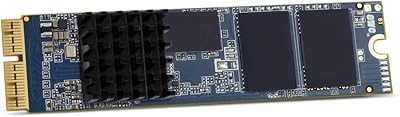
  • Form Factor: Proprietary ultra-slim blade design, not compatible with standard M.2 or 2.5-inch drive bays.
  • Dimensions: The drive measures 3.46 x 1.26 x 0.12 inches, engineered to fit precisely within the target MacBook chassis.
  • Weight: The drive weighs just 0.353 ounces, adding negligible mass to the host laptop.
  • Encryption: Supports AES 128-bit and 256-bit full-drive hardware encryption for data security compliance.
  • Compatible Models: Designed exclusively for MacBook Pro Retina 15-inch and 13-inch, Mid 2012 to Early 2013 (MacBookPro10,1 and MacBookPro10,2).
  • Installation Type: Internal replacement drive requiring physical disassembly of the MacBook Pro using precision screwdrivers.
  • Warranty: Backed by a 5-year OWC limited warranty covering defects in materials and workmanship.
  • PCB Color: The drive features a blue PCB, consistent across all units of this model.
  • Manufacturer: Produced by Other World Computing, headquartered in Woodstock, Illinois, USA.
  • First Available: This product was first listed for sale on February 22, 2019.
  • Discontinued: As of the available product data, this drive has not been discontinued by the manufacturer.

Related Reviews

OWC 500GB Aura Pro 6G Flash SSD Upgrade Kit
86%
91%
Installation Ease
88%
Performance Boost
93%
Compatibility with MacBook Air 2012
85%
Storage Capacity
90%
Value for Money
More
OWC 500GB Aura Pro X2 SSD
86%
94%
Performance
91%
Ease of Installation
93%
Compatibility with Mac Pro (Late 2013)
88%
Reliability
86%
Value for Money
More
OWC Mercury Extreme Pro 6G 2TB SSD
82%
83%
Read/Write Performance
86%
Sustained Speed Consistency
91%
Compatibility
88%
Installation Experience
84%
Build Quality
More
OWC Envoy Pro Elektron Portable SSD 1TB
89%
94%
Performance
91%
Build Quality
89%
Ease of Use
96%
Durability
90%
Speed (Data Transfer)
More
OWC 2.0TB Aura Pro X2 SSD
87%
91%
Performance
88%
Speed (Read/Write)
87%
Installation Process
75%
Value for Money
94%
Compatibility with Mac Pro (Late 2013)
More
OWC 240GB Aura Pro X2 NVMe SSD
84%
88%
Performance
92%
Speed Improvements
85%
Ease of Installation
90%
Reliability
76%
Compatibility with macOS
More
Bitsjour 1TB Internal SSD for MacBook Pro A1425 A1398 (2012-2013)
85%
87%
Performance
92%
Ease of Installation
85%
Compatibility with MacBook Pro Models
90%
Value for Money
88%
Speed Improvement
More
Apple MacBook Pro 14-inch M1 Pro Laptop

84%
96%
Raw Performance
88%
Battery Life
94%
Display Quality
91%
Thermal Management
93%
Build Quality
More
HP Pro Tower 290 G9 Desktop (i5-12500, 32GB RAM, 1TB SSD)
81%
96%
Multitasking Capability
91%
Value for Money
88%
Port Selection
84%
Thermal & Acoustic Performance
93%
Boot Speed & Storage
More
OWC Envoy 1TB External SSD
83%
88%
Transfer Speed
91%
Build Quality
94%
Portability
93%
Mac & iPad Compatibility
71%
Value for Money
More

FAQ

This upgrade is compatible with only two specific MacBook Pro configurations: the MacBookPro10,1 (15-inch Retina, Mid 2012) and the MacBookPro10,2 (13-inch Retina, Mid 2012 to Early 2013). To confirm your model, click the Apple menu, select About This Mac, then System Report, and check the Model Identifier field. If it does not say MacBookPro10,1 or MacBookPro10,2 exactly, this drive will not work in your machine.

It is a direct replacement — no adapter needed. The Aura Pro 6G upgrade uses OWC's proprietary blade connector that matches the original slot in these MacBook Pro models exactly. You simply remove the old drive and insert the new one.

It is a manageable DIY job for most people who are reasonably careful, but it does require opening the laptop with precision screwdrivers — specifically a P5 pentalobe and a T5 Torx. OWC provides detailed installation guides and video walkthroughs on their website. If you have never opened a laptop before, budget about 30 to 45 minutes and work slowly.

No, the tools are not included with the drive itself. You will need to source a P5 pentalobe screwdriver and a T5 Torx screwdriver separately. OWC sells an installation toolkit as a separate purchase, or you can find compatible tool sets from third-party vendors.

The improvement is real but worth keeping in perspective. These older MacBooks shipped with SATA-based SSDs that were already reasonably fast for their era, so the upgrade is not a dramatic night-and-day transformation. That said, users consistently report faster boot times, quicker app launches, and snappier file transfers compared to the original drive — especially if the factory drive has aged or degraded over time.

No. This is strictly an internal replacement drive. It uses a proprietary blade connector and has no USB interface, so it cannot be used externally without a compatible OWC enclosure designed specifically for this drive format.

Opening the MacBook Pro to replace the SSD can void any remaining Apple hardware warranty or AppleCare coverage. For a laptop that is now well over a decade old, most units are long out of warranty, but it is worth confirming your own coverage status before proceeding.

OWC has a generally solid reputation for customer support among Mac enthusiasts. The 5-year limited warranty covers manufacturing defects, and claims are typically handled through OWC's support portal. Keep your purchase receipt and packaging as proof of purchase to make any claim straightforward.

You can clone your existing macOS installation to the new drive before swapping it in, using tools like Carbon Copy Cloner or SuperDuper. Alternatively, you can install the new drive first and then restore from a Time Machine backup during macOS setup. Most buyers find the clone-first approach faster and less disruptive.

Yes, in most cases you can. OWC sells an Envoy Pro enclosure that accepts the original Apple blade SSD from these MacBook Pro models, turning it into a portable external drive. It is a practical way to repurpose the old drive for backups or extra storage rather than throwing it away.

Where to Buy