Overview

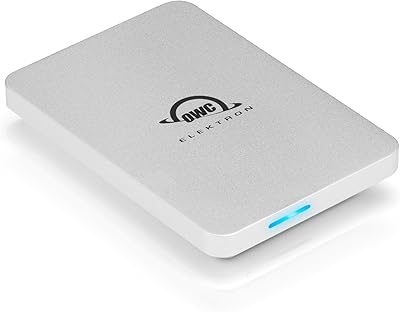
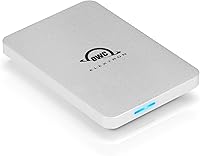
The OWC Envoy Pro Elektron 1TB Portable SSD is one of those rare storage devices that makes you feel like the company actually thought about how real people use external drives in the field. OWC has been building Mac-focused storage solutions for decades, and that experience shows in every detail here — from the aircraft-grade aluminum housing to the IP67 durability rating that puts it firmly above typical consumer-grade drives. This isn't a budget buy, but the build quality and performance specs make a credible case for the premium price. The included 3-year warranty adds a layer of long-term confidence that cheaper alternatives rarely offer.
Features & Benefits

The Envoy Pro Elektron's speed is genuinely practical, not just a spec-sheet boast. At around 1,000MB/s in real-world reads, you can offload a 10GB batch of RAW photos or a 4K video clip in seconds rather than minutes — a meaningful difference on a tight shoot schedule. The USB 3.2 Gen 2 interface plays well with Thunderbolt ports and legacy USB-A machines alike, with both cable types included in the box. IP67 means the drive can handle being submerged in up to one meter of water for 30 minutes, survive dust, and take everyday drops without complaint. A subtle LED activity light confirms transfers are running, which sounds minor but is genuinely useful when juggling multiple drives.

Best For

This rugged pocket SSD is a natural fit for creative professionals — video editors pulling footage directly off the drive on set, photographers backing up cards between shoots, or documentary crews hauling gear through dusty or rainy conditions. Mac and iPad Pro users get the best out-of-box experience since it arrives formatted for APFS, ready to use the moment it's plugged in. Travelers who want one reliable drive rather than a collection of fragile alternatives will appreciate the pocket-sized form factor. iPhone 15 owners can connect it directly for fast photo and video offloads. If you're running Windows or Android, this OWC drive is still a solid choice — you'll just need to reformat it first.

User Feedback

With a 4.5-star average across more than 370 ratings, this OWC drive has earned consistently strong marks, and the recurring themes in buyer reviews are worth noting. Most praise centers on build quality — people frequently comment on how solid and substantial it feels, a refreshing contrast to the cheap plastic shells common at lower price points. Speed comparisons are also favorable, with buyers noting it competes well against pricier rivals. The main sticking point is formatting: Windows and Chromebook users need to reformat out of the box, which catches some buyers off guard. A handful of reviews mention the included cable runs short for certain desk setups. No reliability complaints of note surface, which for a storage device is arguably the most important data point of all.

Pros

  • Real-world read speeds around 1,000MB/s make offloading large video or photo files noticeably faster than most competing drives.
  • IP67 rating means it genuinely survives submersion, dust, and drops — not just light splashes.
  • Aircraft-grade aluminum housing feels reassuringly solid and doubles as a passive heatsink to prevent speed throttling.
  • Plug-and-play ready for Mac, iPad Pro, and iPhone 15 with zero reformatting or driver installation needed.
  • Both a USB-C cable and a USB-A adapter are included, so the drive works out of the box on virtually any machine.
  • At just over three ounces, the Envoy Pro Elektron is light enough to forget it's in your bag.
  • The LED activity indicator provides a quick visual confirmation that transfers are actually running.
  • A 3-year warranty from OWC provides longer coverage than most competing portable SSDs at this tier.
  • Compatible with Thunderbolt ports for users who want to future-proof their storage setup.
  • Buyer reviews consistently praise the build quality as exceeding expectations even at a premium price point.

Cons

  • Ships in APFS format, so Windows and Android users must reformat the drive before it works correctly on their devices.
  • The included USB-C cable is on the shorter side, which can be awkward in certain desk or workstation setups.
  • 1TB capacity may feel limiting for professionals managing large 4K or RAW libraries over time.
  • The premium price is hard to justify for casual users who only need occasional file transfers or light backups.
  • APFS formatting makes sharing the drive between Mac and Windows machines inconvenient without third-party software.
  • No built-in hardware encryption is advertised, which may be a concern for professionals handling sensitive client files.
  • Thunderbolt speeds are theoretical maximums — users without a Thunderbolt host port will not reach peak performance.
  • The multicolor finish may show scratches or scuffs more visibly than a matte or anodized all-black alternative.

Ratings

Based on AI-driven analysis of verified global buyer reviews for the OWC Envoy Pro Elektron 1TB Portable SSD — with spam, incentivized, and bot-generated feedback actively filtered out — the scores below reflect what real users across professional and consumer use cases consistently report. This drive earns high marks in several critical areas, but the analysis also surfaces genuine friction points that the overall star rating alone would not reveal. Both strengths and limitations are scored transparently so you can make a well-rounded decision based on the full picture.
Build Quality
93%
The aircraft-grade aluminum shell inspires immediate confidence — it feels nothing like the hollow plastic found on cheaper drives. Users describe it as feeling like professional equipment, and it consistently holds up without rattles, flex, or surface damage after months of bag carry on location.
The aluminum finish picks up fine surface scratches more visibly than a matte or rubberized coating would over time. OWC does not include a protective sleeve or pouch despite the premium price, which is a notable omission for buyers who share bag space with keys or other hard gear.
Transfer Speed
89%
At close to 1,000MB/s in real-world reads, this OWC drive outpaces most portable SSDs at its price tier in practical use. Video editors moving a 20GB batch of ProRes clips from a location shoot to a workstation will feel the difference immediately compared to drives sitting in the 500MB/s range.
Write speeds do not always match the headline read figures under sustained load, which is standard for NVMe portables but worth knowing for write-heavy workflows. Reaching peak speeds also requires a USB 3.2 Gen 2 or Thunderbolt host port — users on older USB 3.0 connections will be significantly bottlenecked by their hardware.
Durability & Weather Resistance
91%
Users who have accidentally dropped this rugged pocket SSD in puddles, worked through dusty environments, and survived rainy outdoor shoots report it coming through without complaint. For field photographers and documentary crews, that track record represents a meaningful confidence boost over unrated drives.
The IP67 rating covers fresh water submersion up to one meter for 30 minutes but does not extend to saltwater, pressurized jets, or deeper exposure. The crushproof claim addresses static compression more than high-impact drops onto hard surfaces, a distinction worth understanding before relying on it in truly extreme conditions.
Value for Money
72%
28%
For Mac-centric creative professionals who need both speed and ruggedness, the price is easier to justify than it first appears. Pairing a fast NVMe SSD with a ruggedized enclosure separately would likely cost more, and the 3-year warranty adds long-term assurance that budget alternatives rarely provide.
Buyers who need basic file storage or occasional backups will find the premium hard to rationalize when slower, cheaper alternatives handle light-duty tasks just fine. Windows users face the added friction of reformatting before first use, compounding the sense of paying for features optimized for an ecosystem they are not part of.
Mac & Apple Compatibility
96%
Plug it into any Mac or iPad Pro with a USB-C port and it simply works — no drivers, no formatting wizards, no prompts. iPhone 15 users can connect it directly for on-the-go photo and video offloads, removing the laptop middleman from a workflow that used to require one.
The APFS-only default format makes the drive essentially a Mac-first peripheral until reformatted, limiting flexibility for users who occasionally share files with PC-based colleagues. There is no exFAT option out of the box, which is a miss for households where multiple platforms coexist on a daily basis.
Windows & Cross-Platform Use
54%
46%
Once reformatted to exFAT, the Envoy Pro Elektron works reliably on Windows PCs and Chromebooks, and the included USB-A adapter means even legacy laptops can connect without hunting for extra cables. Speed performance on Windows after reformatting is consistent with Mac performance, which is a reassuring result.
The APFS default is a genuine stumbling block — some Windows users report being unable to access the drive at all on first connection without knowing to reformat it. Android compatibility is not officially supported, making this drive a poor fit for users whose primary digital ecosystem lives entirely outside Apple.
Thermal Management
88%
The aluminum housing does an effective job pulling heat away from the NVMe module during sustained transfers, keeping speeds consistent where plastic-shell drives often throttle. During long backup sessions or extended editing runs, the drive stays warm but never reaches temperatures that interrupt performance.
The drive does get noticeably warm during heavy use, which some users find uncomfortable to hold during an active transfer — a minor annoyance rather than a performance concern. In very hot ambient environments such as prolonged direct sunlight, some additional thermal variation under sustained load is plausible.
Portability
87%
At just over three ounces, the Envoy Pro Elektron disappears into a jacket pocket, camera bag, or travel kit without any meaningful bulk penalty. Field workers already hauling heavy gear particularly appreciate not having to sacrifice space or weight budget to their external storage solution.
The drive is slightly larger than the smallest thumb-drive-style SSDs available, which some ultralight travelers may prefer for minimal-carry setups. It also ships without a carrying pouch or sleeve, so buyers who want to protect the aluminum finish in a shared bag pocket must source their own solution.
Cable & Accessory Bundle
67%
33%
Including both a USB-C cable and a USB-A adapter in the box covers most connection scenarios without requiring buyers to order extras on day one. Having both options immediately available removes a common frustration typically associated with premium storage accessories that assume a specific port environment.
The included USB-C cable is noticeably short — a recurring complaint across verified reviews — creating awkward reach problems when the host port sits on the far side of a laptop or desktop tower. A cable closer to one meter long would suit most real-world desk and field setups far more practically.
Setup & Ease of Use
83%
For Mac users, setup is as simple as plugging in — the drive mounts instantly, requires no software installation, and the LED confirms it is active and transferring. Even less technically experienced users report no friction getting started, which is a meaningful design achievement for a professional-grade product.
Windows and Chromebook users face a friction-heavy first experience, needing to locate OWC's Drive Setup tool or reformat manually before the drive functions correctly. A clearer quick-start guide that directly addresses non-Apple users and walks them through reformatting would prevent a significant amount of avoidable post-purchase frustration.
Long-Term Reliability
86%
With more than 370 verified ratings and a 4.5-star average, significant reliability failures are conspicuously absent from the feedback pool — a strong signal for a storage device where data loss is the worst possible outcome. OWC's established standing in professional Mac storage also adds brand-level trust that newer generic competitors cannot match.
Long-term SSD endurance depends on write-cycle intensity, and independent longevity data for this specific model remains relatively limited given its market age. Some users also note that OWC's warranty claim process requires direct brand engagement rather than a straightforward retail return, which can be slower when a working drive is urgently needed.
Sustained Performance
84%
Unlike some portable SSDs that hit peak speeds in short bursts and then drop sharply, this OWC drive maintains consistent throughput over longer transfers thanks to its passive cooling design. Professionals backing up a full day of RAW image files report that speeds stay steady from start to finish without the mid-transfer slowdowns common in plastic-encased competitors.
Performance consistency is tied to ambient temperature and host controller quality — users on weaker host setups may see more variation than the specs suggest. Heavily write-dominant workflows, such as continuous large-file ingestion scenarios, can expose a wider gap between read and write throughput than light casual transfers would ever reveal.
Storage Capacity
71%
29%
At 1TB, this rugged pocket SSD holds roughly 10 to 12 hours of 4K H.264 footage or tens of thousands of high-resolution RAW photo files, making it genuinely viable as a primary working drive for most location-based professionals rather than just a short-term overflow buffer.
For professionals managing long-form documentary footage, cinema-grade RAW files, or large design asset libraries, 1TB fills uncomfortably fast during an intensive project. The absence of higher-capacity variants in the same ruggedized form factor forces heavy users to either carry multiple drives or look to an entirely different product line.

Suitable for:

The OWC Envoy Pro Elektron 1TB Portable SSD was clearly built with a specific kind of buyer in mind: someone who works in the field, moves fast, and cannot afford to lose data or baby their gear. Video editors and photographers who shoot on location will get the most out of it — at roughly 1,000MB/s real-world read speeds, pulling a full day of 4K footage off the drive takes seconds, not minutes. Mac and iPad Pro users in particular benefit from plug-and-play simplicity, since the drive arrives already formatted for Apple's file system and requires zero setup. Outdoor content creators, travel journalists, and field researchers will also appreciate the IP67 rating, which means the drive can survive being dropped in a puddle, buried in a dusty backpack, or caught in a rainstorm without skipping a beat. iPhone 15 owners who want to offload photos and videos directly to external storage — without a laptop in the middle — will find this one of the few drives that actually supports that workflow out of the box.

Not suitable for:

Windows and Android users should think twice before buying the OWC Envoy Pro Elektron 1TB Portable SSD without doing a little homework first, because the drive ships formatted for Apple's APFS file system and will need to be reformatted before it works properly on non-Apple platforms — a straightforward but annoying extra step that catches a surprising number of buyers off guard. Casual users who just need somewhere to park old photos or stream media from a home couch will likely find the price hard to justify when slower, cheaper drives exist that handle light-duty tasks just fine. Anyone who regularly transfers files between Mac and Windows machines on the same drive faces compatibility headaches, since APFS is not natively readable on Windows without third-party software. Users who need multi-terabyte capacity for large archival libraries or long-term video projects may also find 1TB limiting for the investment. Finally, buyers who prioritize maximum value per gigabyte over durability and speed should know there are less expensive external SSDs on the market — this OWC drive asks for a premium, and it earns it, but only if ruggedness and sustained performance are actually priorities for your workflow.

Specifications

  • Storage Capacity: The drive offers 1TB of usable solid-state storage, suitable for large photo libraries, video projects, and comprehensive system backups.
  • Interface: Connectivity is handled via a USB 3.2 Gen 2 Type-C port, supporting data transfers at up to 10Gb/s with backward compatibility for USB 2.0 and 3.0 hosts.
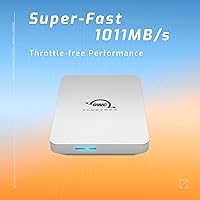
  • Real-World Speed: In real-world conditions the drive sustains read speeds of up to 1,011MB/s, well above the theoretical ceiling of many competing portable SSDs in this class.
  • Peak Throughput: Theoretical maximum throughput reaches up to 1,250MB/s when paired with a compatible Thunderbolt or USB 3.2 Gen 2 host port.
  • Internal Module: Storage is powered by an OWC Aura Pro III PCIe 3.0 NVMe M.2 2242 SSD, a professional-grade module designed for sustained read and write performance.
  • Durability Rating: The enclosure carries an IP67 certification, meaning it is fully dustproof and can withstand submersion in up to 1 meter of fresh water for up to 30 minutes.
  • Crush Resistance: The housing is engineered to be crushproof, protecting the drive against physical compression forces common in packed bags and on-set environments.
  • Housing Material: The outer shell is machined from aircraft-grade aluminum, which provides structural rigidity while passively dissipating heat generated during sustained data transfers.
  • Weight: The drive weighs 3.04 oz (approximately 86g), making it light enough to carry daily without adding noticeable bulk to a bag or jacket pocket.
  • Dimensions: Physical dimensions measure 2.17 x 5.12 x 3.54 inches, giving the drive a compact footprint roughly comparable to a large smartphone.
  • Compatibility: The drive works plug-and-play with Thunderbolt and USB Macs, Windows PCs, Chromebooks, iPad Pro, and iPhone 15 devices; reformatting is required for non-Apple platforms.
  • Default Format: The drive ships pre-formatted in APFS, Apple's native file system, which is optimized for macOS and iPadOS environments and requires no setup on Apple hardware.
  • In-Box Accessories: Package includes one USB-C cable and one USB-C to USB-A adapter, providing out-of-box connectivity for both modern and legacy host ports.
  • Status Indicator: An integrated LED light signals both power status and active data transfer, offering a quick visual confirmation without requiring any software.
  • Cooling System: Thermal management is entirely passive, relying on the aluminum housing to conduct and dissipate heat, enabling silent operation with no fan noise or throttling under sustained load.
  • Warranty: OWC backs the drive with a 3-year limited warranty, which is longer than the 1- to 2-year coverage offered by many competing portable SSD brands.

Related Reviews

OWC Envoy Pro Elektron 4TB Portable SSD
87%
91%
Performance
96%
Build Quality
94%
Durability
85%
Ease of Use
88%
Compatibility
More
OWC Envoy Pro FX 480GB NVMe SSD
82%
93%
Transfer Speed
91%
Build Quality
88%
Durability & Ruggedness
82%
Thermal Management
79%
Compatibility
More
OWC Envoy 1TB External SSD
83%
88%
Transfer Speed
91%
Build Quality
94%
Portability
93%
Mac & iPad Compatibility
71%
Value for Money
More
OWC Aura Pro 6G 1TB Internal SSD
81%
93%
Compatibility Accuracy
81%
Read & Write Performance
78%
Installation Experience
88%
Long-Term Reliability
74%
Value for Money
More
SanDisk Extreme Pro 1TB Portable SSD
84%
88%
Transfer Speed
93%
Build Quality
91%
Durability & Protection
94%
Portability & Form Factor
87%
Storage Capacity
More
OWC Express 1M2 1TB Portable NVMe SSD
86%
93%
Read & Write Performance
91%
Thermal Management
88%
Build Quality & Materials
82%
Compatibility & Versatility
74%
Value for Money
More
OWC Envoy 2TB External NVMe SSD
80%
88%
Transfer Speed
91%
Build Quality
94%
Portability
93%
Ease of Setup
87%
Compatibility
More
OWC Envoy Ultra 4TB Thunderbolt 5 SSD
83%
93%
Transfer Speed Performance
88%
Build Quality & Durability
86%
Portability & Form Factor
71%
Built-in Cable Design
67%
Thermal Management
More
OWC Envoy Ultra 2TB Thunderbolt 5 Portable SSD
85%
94%
Transfer Speed
91%
Build Quality
78%
Thermal Management
88%
Portability & Form Factor
86%
Compatibility
More
Timetec 1TB Pro Portable USB 3.2 Gen 2 SSD
88%
93%
Performance
90%
Portability/Size/Weight
92%
Compatibility/Connectivity
95%
Speed (Read/Write)
85%
Value for Money
More

FAQ

Not immediately. The OWC Envoy Pro Elektron 1TB Portable SSD ships formatted in APFS, which is Apple's file system and is not natively readable by Windows. You will need to reformat it to exFAT or NTFS before Windows can use it, which takes only a few minutes but is an extra step worth knowing about before you buy.

At sustained real-world read speeds around 1,000MB/s, this rugged pocket SSD is fast enough to handle direct editing of 4K and even some 8K footage in most professional editing applications. Whether you can edit without copying files first depends on your codec and bitrate, but for standard H.264, H.265, or ProRes workflows, editing directly from the drive is a realistic option.

Yes, the iPhone 15 introduced a USB-C port that supports external storage, and this OWC drive connects directly using the included USB-C cable. You can import or export photos and videos through the Files app without needing a computer in between, which is genuinely useful for photographers and videographers shooting in the field.

IP67 is a standardized rating that breaks into two parts: the 6 means the drive is completely sealed against dust ingress, and the 7 means it can survive being submerged in up to 1 meter of fresh water for up to 30 minutes. In practical terms, this means a drop in a puddle, rain on a shoot, or a spill in a bag is not a disaster. It is not rated for deeper or prolonged submersion, however, and saltwater exposure is a different matter entirely.

No external power is needed at all. The Envoy Pro Elektron draws power directly from the USB or Thunderbolt port it is connected to, so there are no extra cables, bricks, or dongles involved — just plug it in and it works.

Yes, a USB-C to USB-A adapter is included in the box precisely for this situation. The drive will work at USB 3.0 speeds through a USB-A connection, which is still very fast for most tasks, though you will not reach the peak speeds available through a USB-C or Thunderbolt port.

The aluminum housing is specifically designed to pull heat away from the internal SSD and dissipate it passively, so the drive may feel warm during an intensive session but should not overheat or throttle its speed the way plastic-encased drives sometimes do. There is no fan, so it stays completely silent regardless of workload.

Not without some extra effort. APFS is not natively readable on Windows, so if you want true cross-platform compatibility, you would need to reformat the drive to exFAT, which both macOS and Windows can read and write natively. Keep in mind that reformatting erases all existing data, so do this before loading the drive with files.

Most consumer-grade portable SSDs come with a 1- to 2-year warranty, so the 3-year OWC limited warranty is meaningfully better coverage. It signals a level of confidence in build quality that is worth something when you are relying on a drive for professional work. As always, review OWC's specific warranty terms on their website to understand what is and is not covered.

Yes, the Envoy Pro Elektron connects directly to iPad Pro models with USB-C ports and works through the Files app for reading and writing data. Since the drive ships in APFS, it is immediately recognized by iPadOS without any reformatting, which makes setup as simple as plugging it in.

Where to Buy