Overview

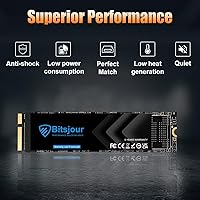
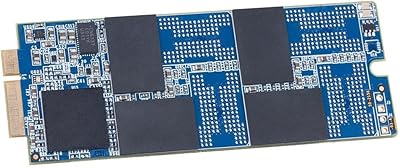
The Bitsjour 1TB MacBook Pro A1425/A1398 Internal SSD is a purpose-built storage upgrade for a very specific slice of Apple hardware — the Retina MacBook Pro models from Late 2012 through Early 2013. It uses a proprietary 7+17-pin connector that only fits the A1425 and A1398 chassis, so compatibility is non-negotiable before you buy. Bitsjour launched this Mac storage upgrade in October 2024, and it arrives with macOS 10.15 Catalina already installed, which removes the reinstallation headache most drive swaps involve. Available from 256GB up to 2TB, the 1TB variant hits a practical sweet spot for users who want room to breathe without overspending on a machine that is, frankly, over a decade old.
Features & Benefits

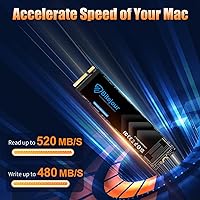
At its core, this Retina MacBook SSD kit runs on the SATA III interface, hitting sequential reads of up to 520 MB/s and writes of up to 480 MB/s. Those numbers will not turn heads in 2025, but next to a failing original Apple SSD or a spinning hard drive, the difference in daily use is hard to miss — boot times drop, apps open faster. The drive uses 3D TLC NAND with ECC error correction, TRIM support, and S.M.A.R.T. monitoring baked in, which matters for long-term reliability. Power draw is kept low, an important consideration in a chassis that is already thermally sensitive. The included screwdrivers and printed instruction guide round out a genuinely complete package.

Best For

This Mac storage upgrade is a narrow fit by design, and that is not a criticism — it is just the reality. The target buyer is someone sitting in front of a Late 2012 or Early 2013 Retina MacBook Pro (specifically the A1425 or A1398 models — EMC numbers must match too) whose drive has failed or whose storage is simply maxed out. It suits first-time DIY upgraders who have never cracked open a laptop; the bundled tools and pre-installed operating system mean you are not left hunting for drivers or an external USB installer. If you own a 2014 or 2015 Retina MacBook Pro, stop here — those use a different connector and this drive will not fit.

User Feedback

With 70 ratings and a 4.3-star average, this Bitsjour SSD has generated a reasonably positive early reception for a product that only launched in late 2024. Buyers frequently call out the straightforward installation and the convenience of a working macOS right out of the box. Speed improvements get mentioned too — people upgrading from degraded original drives notice the difference in boot and load times. On the downside, a handful of buyers ran into compatibility confusion after ordering without verifying their EMC number, which is a pre-purchase research issue rather than a product flaw. A few users also flagged iCloud sign-in friction after swapping drives. The 5-year warranty does soften concerns about trusting a newer brand with an older, irreplaceable machine.

Pros

  • macOS Catalina comes pre-installed, so you can boot straight into a working system after swapping the drive.
  • The included screwdrivers make this a genuinely self-contained kit — no need to hunt for specialty tools.
  • SATA III speeds of up to 520 MB/s read deliver a noticeable real-world improvement over degraded original Apple SSDs.
  • At 1TB, this Bitsjour SSD offers far more headroom than the 128GB or 256GB drives many of these machines shipped with.
  • 3D TLC NAND with ECC support adds a layer of data protection that older replacement drives often skip.
  • TRIM, NCQ, and S.M.A.R.T. support means you can monitor drive health over time rather than flying blind.
  • A 5-year warranty is generous for this price tier and adds meaningful confidence when upgrading older hardware.
  • Low power consumption keeps thermals in check on a chassis that is already over a decade old.
  • The detailed installation guide is well-suited to first-time upgraders, reducing the intimidation factor considerably.
  • Available in multiple capacities, so buyers can choose based on their actual needs and budget.

Cons

  • Bitsjour is a new brand launched in late 2024, so long-term reliability data is still limited.
  • Compatibility is extremely narrow — one wrong EMC number and the drive is useless in your machine.
  • macOS Catalina is pre-installed, but it is an older OS that Apple no longer supports with security updates.
  • Some buyers have reported iCloud sign-in friction after the drive swap, which can be frustrating to troubleshoot.
  • SATA III performance, while adequate, is a hard ceiling — do not expect NVMe-level responsiveness.
  • The 70-rating review pool is still small, making it harder to draw firm conclusions about defect rates.
  • 2013–2015 MacBook Pro owners frequently order this by mistake, as listing titles can cause confusion.
  • No USB enclosure is included, so you cannot clone your old drive before installation without buying extra hardware.
  • macOS activation and Apple ID issues post-install are not well-documented in the included guide.
  • Customer support quality, while advertised as 24-hour, has not yet been widely validated by a large reviewer base.

Ratings

Our editorial team used AI-assisted analysis to evaluate verified global buyer reviews for the Bitsjour 1TB MacBook Pro A1425/A1398 Internal SSD, actively filtering out incentivized, bot-generated, and low-signal feedback to surface what real users genuinely experienced. The scores below reflect a balanced synthesis of both what works well and where this Mac storage upgrade falls short, so you can make an informed decision without having to wade through hundreds of individual reviews yourself.

Compatibility Accuracy
72%
28%
When buyers take the time to verify their model number and EMC code before purchasing, the drive fits and functions exactly as described — no adapter required, no modification needed. Users who did their homework consistently reported a clean, confident installation experience.
Compatibility confusion is the single most common complaint in the review pool. A significant number of buyers ordered without confirming their EMC number, received a drive that physically would not seat in their machine, and blamed the product — making this category a genuine weak point in the overall experience.
Installation Experience
88%
The bundled screwdrivers and step-by-step instruction guide genuinely lower the barrier for first-time DIY upgraders. Reviewers who had never opened a laptop before described the process as manageable, and many completed the swap in under 30 minutes without consulting any external resources.
The guide, while useful, does not address every edge case — particularly around iCloud re-authentication and Apple ID verification after the swap, which caught some users off guard. A short troubleshooting section covering post-installation software steps would make this kit meaningfully more complete.
Pre-installed macOS
83%
Arriving with macOS 10.15 Catalina already loaded is a genuine convenience that sets this Retina MacBook SSD kit apart from bare drives. Buyers who replaced a failed SSD appreciated being able to boot directly into a working system without needing a separate USB installer or a second Mac to create one.
Catalina is several major versions behind current macOS releases and is no longer receiving Apple security patches, which is a real concern for anyone using the machine for anything beyond light productivity. A small number of users also encountered iCloud sign-in and Apple ID activation issues on the fresh install that required additional troubleshooting.
Real-World Speed
79%
21%
Users upgrading from degraded or factory-spec original Apple SSDs noticed meaningful improvements in boot times and application loading — not dramatic, but consistently reported as a noticeable daily difference. For a machine used for documents, web browsing, and light creative work, the SATA III throughput is more than adequate.
This is a SATA III drive, and its performance ceiling reflects that. Buyers expecting NVMe-level responsiveness will be disappointed, and anyone coming from a well-maintained modern SSD may not perceive much change. The rated 520 MB/s read speed is a best-case figure that real-world mixed workloads rarely sustain.
Value for Money
81%
19%
Paying a mid-range price for a tool-complete 1TB kit with pre-installed macOS and a 5-year warranty represents solid value for the specific use case this drive targets. Keeping a capable older MacBook Pro in service for another few years costs far less than a new machine, and this Bitsjour SSD makes that math work.
Buyers who already own the necessary screwdrivers are effectively paying a small premium for tools they do not need. The value calculation also shifts if you factor in that Catalina is outdated and that a newer machine with current macOS support might be a more future-proof investment at a higher total cost.
Build & Component Quality
74%
26%
The 3D TLC NAND and ECC-supported controller are legitimate, respectable components for this price tier — not bargain-bin flash. Users who ran S.M.A.R.T. diagnostics after installation reported healthy drive readings, which aligns with what you would expect from a properly manufactured unit.
Bitsjour is a brand with under a year of market history, which makes long-term durability genuinely unknown. The 70-review pool is too small to draw firm conclusions about failure rates, and the 3D TLC NAND, while adequate, is a step below MLC in write endurance over multi-year heavy use.
Packaging & Presentation
77%
23%
The kit arrives well-organized, with the drive, screwdrivers, and instruction guide clearly separated and protected. Several reviewers noted that the unboxing experience felt more considered than they expected for an aftermarket Mac upgrade at this price point.
The packaging does not include a static-protective bag for the SSD itself in all reported cases, which is a minor but genuine oversight for a storage device. There is also no USB enclosure included for users who want to clone their existing drive first, requiring a separate purchase.
Reliability Over Time
66%
34%
Early adopters who installed this Mac storage upgrade in late 2024 and early 2025 have largely reported stable, error-free operation in the months since. S.M.A.R.T. monitoring support means users can keep an eye on drive health rather than waiting for problems to surface without warning.
With the product only a few months old and a relatively small review base, there is simply not enough data to make strong claims about multi-year durability. TLC NAND drives used as primary system storage accumulate write cycles over time, and how this drive holds up after two or three years of daily use remains an open question.
Customer Support
63%
37%
Bitsjour advertises 24-hour technical support and a 5-year warranty, and a handful of reviewers mentioned receiving responsive replies when they reached out with installation questions. The warranty commitment is notably generous for a brand at this price tier.
Because the brand is new, there is limited third-party evidence of how warranty claims are actually handled when a drive fails outside the return window. Buyers should document their purchase carefully and keep all correspondence, since support quality at the one-year or three-year mark remains untested in the public review record.
Drive Health Monitoring
84%
Full S.M.A.R.T. support means users can run tools like DriveDx or smartmontools on macOS to check the drive health at any time — a feature that cheaper replacement drives sometimes omit. This is particularly reassuring for anyone using the machine for work files they cannot afford to lose.
S.M.A.R.T. data is useful only if you actually check it, and the included documentation does not guide users toward any monitoring tools or routine. Buyers who are not already familiar with drive health software may never use this feature, even though it is one of the more valuable long-term safeguards this kit offers.
Thermal Performance
82%
18%
Low power consumption translates to less heat generated inside an already thermally constrained 2012–2013 chassis. Users who previously experienced fan activity spikes with aging original drives noted quieter, cooler operation after swapping to this Bitsjour SSD during everyday tasks.
Under sustained write workloads — large file copies or backup operations — any SATA SSD will generate some heat, and the limited airflow in these older MacBook Pro designs means the chassis may still run warm during intensive tasks. This is a platform limitation more than a drive-specific flaw, but it is worth knowing.
Capacity Options
86%
Offering the same product line from 256GB to 2TB gives buyers genuine flexibility to match storage to actual usage, rather than forcing a one-size-fits-all compromise. The 1TB variant in particular hits a practical sweet spot for users who have outgrown the 128GB or 256GB drives their machine originally shipped with.
The 2TB variant, while available, pushes the price into territory where the cost-versus-machine-age calculation becomes harder to justify. Buyers at the higher capacities should weigh whether the investment makes more sense on this specific hardware versus applying those funds toward a newer machine altogether.
Documentation Quality
69%
31%
The printed guide covers the physical installation steps clearly enough that most users with no prior hardware experience can follow along successfully. Multiple reviewers specifically called out the instruction booklet as more detailed than they anticipated for an aftermarket kit at this price.
The documentation ends at the hardware swap and does not address the software side of the process — restoring from Time Machine, dealing with iCloud activation prompts, or what to do if macOS does not boot on the first attempt. These are exactly the scenarios where a first-time installer is most likely to panic and need guidance.

Suitable for:

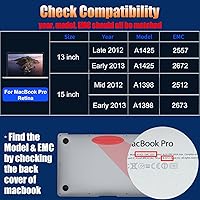
The Bitsjour 1TB MacBook Pro A1425/A1398 Internal SSD is the right call for a specific and underserved group of Mac owners: people still running a Late 2012 or Early 2013 Retina MacBook Pro (model A1425 with EMC 2557 or 2672, or model A1398 with EMC 2512 or 2673) whose original drive has either failed or is simply too small for modern use. If your machine still handles your workload — web browsing, document editing, light photo work — but sluggish storage is dragging everything down, this upgrade makes genuine sense. It is also a strong fit for non-technical users who dread reinstalling an operating system from scratch, since macOS Catalina comes pre-loaded and ready to go. First-time DIY upgraders will appreciate that the kit includes every tool needed, removing one of the most common barriers to doing this kind of repair independently. In short, if you want a cost-effective way to get several more usable years out of a machine you already know and trust, this Retina MacBook SSD kit is a practical, well-packaged option.
Not suitable for:

The Bitsjour 1TB MacBook Pro A1425/A1398 Internal SSD is not a universal Mac upgrade, and buying the wrong version is the most common — and most avoidable — mistake buyers make. If you own a MacBook Pro Retina from 2013 through 2015, your machine uses a 12+16-pin connector, which is physically incompatible with this drive; it will not fit, full stop. Beyond compatibility, buyers who need cutting-edge storage performance should look elsewhere — this is a SATA III drive in an aging platform, not an NVMe solution, and benchmarks reflect that reality. Bitsjour is also a relatively new brand with a limited track record, which may give pause to buyers who prioritize proven reliability over the long haul, even with a 5-year warranty in place. Finally, anyone running macOS Monterey or later on their 2012–2013 MacBook Pro through unofficial patching should research carefully, since Catalina is the pre-installed OS and compatibility with patched system configurations can introduce complications this Mac storage upgrade was not designed to address.
Specifications

  • Brand: This drive is manufactured by Bitsjour, a brand focused on Mac-compatible storage solutions, first available on the market in October 2024.
  • Capacity: The drive offers 1TB (1024 GB) of usable storage, with the same product line also available in 256GB, 512GB, and 2TB variants.
  • Interface: It uses a proprietary 7+17-pin SATA III connector designed exclusively for compatible 2012–2013 MacBook Pro Retina models.
  • Read Speed: Sequential read speed is rated at up to 520 MB/s under ideal conditions, which represents a meaningful performance improvement over original aging Apple SSDs.
  • Write Speed: Sequential write speed reaches up to 480 MB/s, sufficient for everyday tasks such as file transfers, application launches, and OS operations.
  • NAND Type: The drive uses 3D TLC (Triple-Level Cell) NAND flash memory, paired with a premium controller to balance write endurance and day-to-day performance.
  • Error Correction: ECC (Error Correction Code) support is built in, helping to detect and correct data errors transparently to maintain storage integrity over time.
  • Supported Features: The drive supports TRIM for long-term performance maintenance, NCQ for command optimization, and S.M.A.R.T. for real-time health monitoring.
  • Compatible Models: Compatible exclusively with MacBook Pro Retina 13″ A1425 (EMC 2557/2672, Late 2012–Early 2013) and MacBook Pro Retina 15″ A1398 (EMC 2512/2673, Mid 2012–Early 2013).
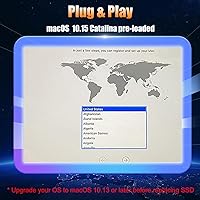
  • Pre-installed OS: macOS 10.15 Catalina comes pre-loaded on the drive, allowing users to boot into a functional operating system immediately after installation.
  • Form Factor: The drive uses a proprietary Mac blade form factor (functionally equivalent to 2.5-inch SATA) with the 7+17-pin edge connector required by these specific MacBook Pro generations.
  • Package Contents: The kit includes the SSD itself, two screwdrivers (one for the back panel screws, one for the SSD mounting screw), and a printed installation instruction guide.
  • Warranty: Bitsjour covers this drive with a 5-year hassle-free warranty and advertises 24-hour technical support for post-purchase assistance.
  • Weight: The drive weighs 0.353 ounces, consistent with the lightweight blade-style SSD format used in this era of MacBook Pro hardware.
  • Dimensions: Physical dimensions measure 4.72 x 2.76 x 0.39 inches, matching the form factor required for direct installation into the A1425 and A1398 chassis.
  • Power Consumption: The drive is designed for low power draw, which is an important consideration given the thermal and battery constraints of these older MacBook Pro models.

Related Reviews

Apple MacBook Pro 14-inch M1 Pro Laptop
84%
96%
Raw Performance
88%
Battery Life
94%
Display Quality
91%
Thermal Management
93%
Build Quality
More
HP Pro Tower 290 G9 Desktop (i5-12500, 32GB RAM, 1TB SSD)
81%
96%
Multitasking Capability
91%
Value for Money
88%
Port Selection
84%
Thermal & Acoustic Performance
93%
Boot Speed & Storage
More
LaCie Rugged SSD Pro 1TB External SSD
80%
92%
Transfer Speed
94%
Build Quality
91%
Water & Dust Resistance
88%
Portability
67%
Port Compatibility
More
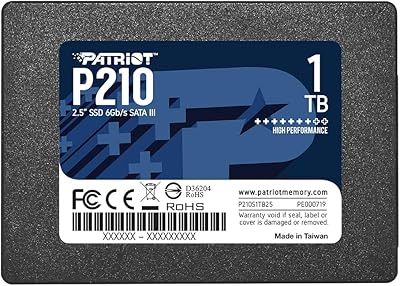
Patriot P210 1TB 2.5″ Internal SSD
83%
91%
Value for Money
83%
Real-World Performance
94%
Installation Ease
92%
Boot Time Improvement
67%
Long-Term Reliability
More
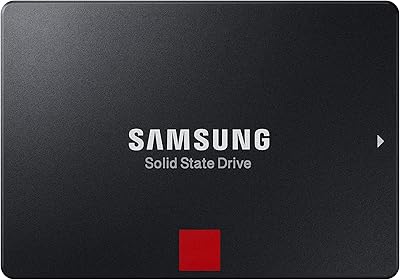
Samsung 860 Pro 1TB Internal SSD
84%
88%
Read & Write Performance
93%
Endurance & Longevity
58%
Value for Money
91%
Build Quality
86%
Installation Ease
More
Samsung 990 Pro 1TB M.2 SSD
85%
93%
Raw Read/Write Speed
89%
Random IOPS Performance
71%
Thermal Management
84%
Gaming Performance
91%
Installation & Compatibility
More
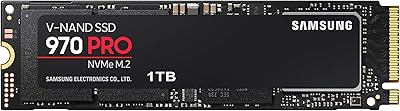
Samsung 970 PRO SSD 1TB
88%
94%
Performance
92%
Speed & Data Transfer
90%
Reliability
88%
Thermal Management
87%
Ease of Setup
More
RAOYI 1TB 2.5″ SATA III Internal SSD
73%
88%
Value for Money
76%
Read/Write Performance
92%
Installation Ease
89%
Compatibility
61%
Brand Reliability
More
Seagate BarraCuda Q5 1TB NVMe SSD
81%
88%
Sequential Read Speed
74%
Sequential Write Speed
91%
Value for Money
93%
Ease of Installation
87%
Real-World Boot Performance
More
SSK SD311 Pro 1TB External SSD
81%
91%
Transfer Speed
88%
Speed Consistency
86%
Build Quality
79%
Heat Management
93%
Connector Design
More

FAQ

You need to match both the model number and the EMC number — not just one of them. Flip your MacBook Pro over and read the small text on the bottom case. You are looking for model A1425 with EMC 2557 or 2672 (Retina 13″, Late 2012 or Early 2013), or model A1398 with EMC 2512 or 2673 (Retina 15″, Mid 2012 or Early 2013). If those numbers do not match exactly, this drive will not fit.

No, it will not. The 2013–2015 Retina MacBook Pro models use a different 12+16-pin connector, which is physically incompatible with this 7+17-pin drive. Buyers frequently make this mistake, so please verify your model and EMC number before purchasing.

The Bitsjour 1TB MacBook Pro A1425/A1398 Internal SSD does ship with macOS 10.15 Catalina genuinely pre-installed on the drive. Once you swap it in and power on your MacBook, you should boot directly into the setup screen without needing an external installer or USB drive. That said, you will still need to sign in with your Apple ID and restore your personal data from a backup.
You can, but you will need to buy a USB enclosure separately since one is not included in the kit. Cloning beforehand is the safest approach if your current drive is still functional — tools like Carbon Copy Cloner or Disk Utility make the process straightforward. If your original drive has already failed, the pre-installed macOS on this drive is your starting point.

It depends on what you use the machine for. Catalina runs well on this hardware generation and is stable, but Apple stopped issuing security updates for it, so it is not ideal for sensitive tasks like online banking on an unpatched system. Many users run it without issues for general productivity, but it is worth knowing the limitation going in.

Yes, most people find this manageable with a bit of patience. The kit includes both screwdrivers you need, and the installation guide walks you through the process step by step. The trickiest part is usually removing the back panel screws without stripping them, so use the correct screwdriver and do not force anything. Watching a YouTube teardown for your specific model beforehand is a smart move.

If your original drive is healthy and relatively new, the difference will be modest since both are SATA-based. But if your original SSD has aged significantly or was a slower early-generation unit, the improvement in boot time and application loading is genuinely noticeable. This is not an NVMe drive, so do not expect figures comparable to modern MacBook storage.

Bitsjour advertises a 5-year warranty and 24-hour technical support. Since the brand is relatively new (launched late 2024), there is limited real-world data on how smoothly warranty claims are handled in practice. Keep your proof of purchase and document any issues carefully — that is good advice with any lesser-known brand.

You start fresh with the pre-installed Catalina unless you clone your existing drive first or restore from a Time Machine backup. If you have a recent backup, restoring through macOS Setup Assistant during first boot is the most reliable path. If you have never made a backup, now is a good time to reconsider that habit before swapping drives.

A handful of users have reported iCloud sign-in friction after swapping drives, and it is a known edge case rather than a consistent defect. Apple ties certain activation behaviors to hardware identifiers, and a fresh OS install on new storage can occasionally trigger additional verification steps. If you hit a wall, signing out and back in, or contacting Apple Support directly with your serial number, usually resolves it.