Overview

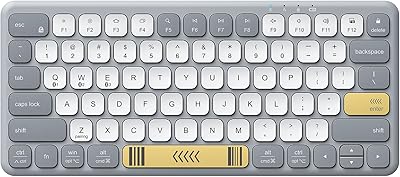
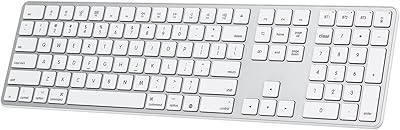
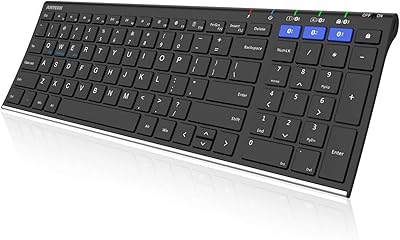
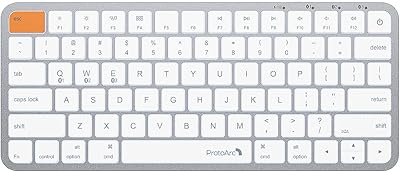
The iClever BK10 Bluetooth Keyboard sits comfortably in the mid-range wireless market, designed for people who work across multiple devices and want a tidy, capable board without overspending. Its scissor-switch keys give it a laptop-like typing feel, and the slim profile with aluminum-accented trim looks noticeably cleaner than most boards in this price range. Ranking in the top 35 of all computer keyboards on Amazon says something real about its sustained popularity. That said, keep expectations grounded — this Bluetooth board is built for everyday productivity, not for heavy typists chasing mechanical feedback or tactile depth.

Features & Benefits

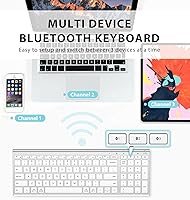
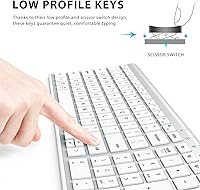
Bluetooth 5.1 powers the BK10's three-device pairing, letting you hop between a MacBook, iPad, and Android phone with a single key tap — genuinely handy if your workflow spans platforms. The quiet scissor-switch keys strike a nice balance: softer than standard membrane boards yet still registering cleanly, which matters in a shared office. A full 99-key layout with a dedicated numpad adds real practicality for data entry or finance work. USB-C charging is a welcome modern touch, and the auto-sleep function helps stretch battery life between charges. The included silicone key cover is easy to overlook but useful for dusty or busy desks.

Best For

This wireless keyboard makes the most sense for multi-device remote workers — people toggling between a work laptop, personal tablet, and a phone throughout the day. Students who need a quiet typing companion in libraries or shared study spaces will also find it fits well. Mac and iPad users specifically benefit because the pairing stability on Apple devices tends to be consistently solid. It is also a smart step-up for anyone tired of mushy budget keyboards who is not ready to commit to a mechanical board. Clean-desk enthusiasts will appreciate the slim footprint and the absence of cables.

User Feedback

Buyers tend to praise the key feel and responsiveness, frequently noting that typing on the BK10 feels noticeably better than similarly priced competitors. The clean design earns regular compliments too. On the critical side, the advertised battery life seems optimistic under heavy daily use — many users report needing to charge more frequently than expected. Multi-device switching works well most of the time, but a handful of buyers mention occasional re-pairing hiccups after the board sits idle for a while. Long-term durability appears acceptable overall, though some note that key stability can feel slightly less firm after months of regular use.

Pros

  • Three-device Bluetooth switching lets you move between a laptop, tablet, and phone without unplugging anything.
  • Scissor-switch keys are noticeably quieter than standard membrane boards, making shared spaces much more tolerable.
  • USB-C charging means one less proprietary cable cluttering your desk.
  • The full numpad is a practical differentiator for anyone who handles numbers or data entry regularly.
  • Cross-platform compatibility works reliably across macOS, Windows, iOS, and Android without driver headaches.
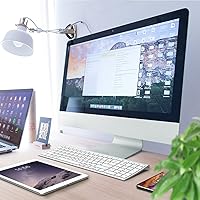
  • The slim, silver-white design looks clean and professional on a tidy desk setup.
  • Auto-sleep kicks in after 30 minutes of inactivity, helping stretch the charge between longer gaps in use.
  • The included silicone key cover is a thoughtful addition for dusty environments or messy desks.
  • Setup across all three paired devices is fast and requires no companion app or software.
  • At its price tier, the feature-to-cost ratio is genuinely competitive against single-device alternatives.

Cons

  • Battery life under heavy daily use falls well short of the 45-day figure advertised on the packaging.
  • Some keys develop a slightly looser feel after several months of intensive use.
  • No adjustable tilt legs means you are locked into the fixed 10-degree angle regardless of preference.
  • Occasional reconnection failures after idle periods are disruptive, especially when switching back from a mobile device.
  • The ABS plastic chassis flexes under firm pressure and does not feel particularly robust long-term.
  • ChromeOS key mapping is incomplete, and some system shortcuts require manual remapping.
  • The numpad cluster spacing is tighter than a traditional desktop keyboard, causing mis-hits until you adapt.
  • There is no wrist rest included, and extended typing sessions beyond a few hours expose that omission.
  • The charging port placement at the back edge is awkward if your keyboard sits close to a wall or monitor stand.
  • The manual and in-box documentation are minimal, leaving first-time multi-device Bluetooth users to figure things out on their own.

Ratings

The iClever BK10 Bluetooth Keyboard scores below are generated by AI after analyzing thousands of verified global user reviews, with spam, bot activity, and incentivized feedback actively filtered out. The result is an honest, data-driven snapshot that captures what real buyers consistently praise and where frustrations tend to surface. Both strengths and pain points are reflected transparently so you can make a confident, informed decision.

Typing Feel
83%
Most users transitioning from budget membrane keyboards describe the scissor-switch keys as a meaningful upgrade — quieter, more responsive, and far easier on the fingers during long writing sessions. The laptop-style key travel feels familiar without demanding an adjustment period.
Buyers coming from mechanical keyboards consistently find the feedback too shallow and the actuation too soft. There is no tactile bump or audible click, which is a dealbreaker for typists who rely on physical confirmation when they hit each key.
Multi-Device Switching
78%
22%
For users who rotate between a MacBook, iPad, and a phone throughout the workday, the one-tap device switching works reliably in the vast majority of sessions. Initial pairing across platforms is straightforward and takes only a minute or two per device.
A recurring complaint involves the board occasionally failing to reconnect automatically after extended idle periods, forcing a manual re-pair. This happens most often when switching back to a mobile device, and while not frequent, it is disruptive mid-workflow.
Battery Life
61%
39%
Under light to moderate use — a few hours of typing daily with the auto-sleep feature kicking in regularly — many users report going several weeks between charges, which is genuinely convenient for a wireless board used at a single desk setup.
The advertised 45-day battery figure appears to assume very conservative usage. Heavy typists using the board for six or more hours daily report needing to charge every one to two weeks, which is still acceptable but well below the marketing claim and disappointing for users who factored that spec into their purchase.
Build Quality
71%
29%
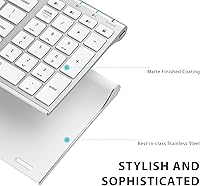
The slim profile and silver-white finish give the BK10 a clean, professional look that holds up well in photos and on minimalist desks. The stainless steel accenting along the frame adds a visual premium that punches slightly above the price tier.
It is important to note that the stainless steel is accent trim, not structural material — the chassis is primarily ABS plastic, and it flexes slightly under firm pressure. After several months of daily use, some buyers report that the overall rigidity feels less confidence-inspiring than it did out of the box.
Key Stability & Longevity
67%
33%
For the first several months of regular use, key wobble is minimal and the keys register consistently. Users who type at moderate pressure tend to report no degradation in feel or accuracy over time, especially in lighter home-office environments.
A subset of longer-term users note that individual keys — particularly the spacebar and high-frequency letters — develop a slightly looser feel after six-plus months of heavy use. It does not affect function for most, but the tactile consistency does diminish noticeably.
Connectivity Stability
79%
21%
Day-to-day Bluetooth stability is solid on Windows and macOS, with most users reporting zero dropout during normal use. The Bluetooth 5.1 standard keeps the connection snappy and the latency low enough that even fast typists do not notice any input lag.
iOS and Android users occasionally experience brief disconnection events, particularly when the phone screen locks and unlocks. It is a minor annoyance rather than a fundamental flaw, but users who frequently pair with mobile devices should factor this in.
Noise Level
88%
This is one of the BK10's clearest strengths. Colleagues and family members in the same room consistently report not being disturbed, and users working in quiet library or co-working environments describe the key noise as genuinely unobtrusive. The dampened bottom-out sound is well-controlled.
The keys are not completely silent — there is still an audible soft click on each keystroke that some users in very quiet, high-focus environments find distracting. It is quieter than most boards but falls short of dedicated silent switches found on more specialized keyboards.
Layout & Key Coverage
86%
Having a full numpad at this size and price point is genuinely useful for users who handle spreadsheets, accounting software, or data entry regularly. The hotkeys for volume, mute, and calculator feel well-placed and save real time once you build muscle memory around them.
The key spacing on the numpad cluster is slightly tighter than a traditional desktop keyboard, which can cause occasional mis-hits for users with larger hands until they adapt. Function-layer shortcuts also require referencing the manual at first, as the labeling on the keys is subtle.
Cross-Platform Compatibility
82%
18%
Switching between macOS, Windows, iOS, and Android without any driver installation is a practical advantage that saves setup friction. Mac-specific function keys like Mission Control and Spotlight work correctly, which is a detail that many competing boards in this range get wrong.
ChromeOS compatibility exists but feels like an afterthought — a few system-level shortcuts do not map cleanly, and there is no dedicated ChromeOS key layout mode. Users who work primarily on a Chromebook may need to remap certain functions manually.
Ergonomics & Comfort
74%
26%
The fixed 10-degree tilt keeps wrist strain manageable during moderate typing sessions, and the low-profile key height means hands naturally stay in a relatively neutral position. Most users who type for two to four hours daily report no discomfort.
There are no adjustable tilt legs, so users who prefer a steeper or flatter angle are stuck with what the chassis provides. Extended sessions beyond four or five hours expose the lack of wrist-rest support, which becomes noticeable for users without a separate pad.
USB-C Charging
91%
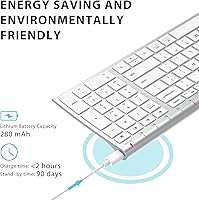
Switching from the micro-USB standard that dominated budget keyboards for years, USB-C charging means most users can charge the BK10 with the same cable they use for their phone or laptop. The roughly two-hour full charge time is fast and predictable.
The charging port is positioned on the back edge, which makes plugging in slightly awkward if the keyboard is pushed close to a wall or monitor stand. It is a minor ergonomic oversight but one that comes up just often enough in reviews to be worth mentioning.
Portability
77%
23%
At just over 13 ounces and with a slim footprint, the BK10 slips into a laptop bag without adding meaningful bulk. Users who occasionally carry it between home and office report that it survives daily transport without issues when the silicone key cover is in place.
The board lacks a dedicated travel case, and the silicone cover — while helpful — does not fully protect the board from impacts or compression inside a packed bag. Users who travel frequently with it may want to invest in a separate sleeve.
Value for Money
84%
At its price point, the combination of Bluetooth 5.1, three-device pairing, a full numpad layout, and USB-C charging is genuinely competitive. Most buyers feel they are getting noticeably more than similarly priced single-device wireless boards offer.
The battery life overstatement and the plastic-dominant build do take some shine off the value argument for buyers who researched the specs carefully. At a slightly higher price, competing options offer better long-term durability, which makes the value case less clear-cut over a two-year horizon.
Setup & Ease of Use
89%
Pairing the board for the first time takes under two minutes on any platform, and there is no companion app or driver download required. The plug-and-play experience is consistent across devices, which buyers new to multi-device Bluetooth keyboards specifically appreciate.
The manual is minimal, and the key labeling for Bluetooth channel switching is small enough to require close inspection during initial setup. A clearer quick-start guide — or even a printed one-pager in the box — would reduce the small amount of confusion some first-time users report.

Suitable for:

The iClever BK10 Bluetooth Keyboard is a strong fit for remote workers and students who regularly switch between multiple devices throughout the day — think hopping from a MacBook in the morning to an iPad for reading, then quickly typing a reply on a paired Android phone. If you work in an open office or shared living space where key noise is a genuine consideration for the people around you, the quiet scissor-switch action handles that concern without forcing you to sacrifice typing responsiveness. Mac and iPad users in particular tend to get reliable mileage out of this board, since cross-platform function key mapping works correctly and pairing holds steady across Apple devices. The full numpad is a real practical advantage for anyone doing spreadsheet work, light bookkeeping, or data entry who does not want to give up that number cluster for the sake of a slimmer form factor. If you are currently on a worn-out budget membrane keyboard and want a noticeable upgrade in typing feel without committing to the cost and noise of a mechanical board, this wireless keyboard lands in exactly the right spot.

Not suitable for:

The iClever BK10 Bluetooth Keyboard is not the right choice for typists who genuinely need tactile or clicky mechanical feedback — the scissor switches are quiet and smooth, but they will feel flat and unsatisfying if you have grown accustomed to the physical bump of Cherry MX or similar switches. Heavy daily users should also temper expectations around battery life; the advertised figures assume conservative use, and people typing for five or more hours a day will likely find themselves reaching for the USB-C cable more often than the spec sheet implies. The build is primarily ABS plastic with cosmetic metal accenting, so buyers expecting a premium all-aluminum chassis at this price will be disappointed — the board flexes slightly under firm pressure and does not feel engineered for rough handling. Gamers should look elsewhere entirely, as there is no RGB lighting, no anti-ghosting, and no polling rate tuning of any kind. Finally, if Bluetooth reliability on mobile devices is critical to your workflow, occasional reconnection hiccups after idle periods may be frustrating enough to warrant considering a more connectivity-focused alternative.

Specifications

  • Connectivity: Uses Bluetooth 5.1 for a stable, low-latency wireless connection with no USB dongle required.
  • Multi-Device: Pairs with up to three devices simultaneously and switches between them with a dedicated one-tap key.
  • Key Type: Scissor-switch keys provide a low-profile, laptop-style typing feel with dampened bottom-out noise.
  • Layout: Full 99-key layout includes a dedicated numeric keypad, hotkeys for volume, mute, and a calculator shortcut.
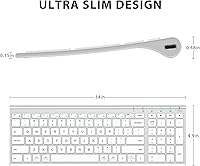
  • Dimensions: The keyboard measures 14.41″ in length, 4.92″ in width, and 0.66″ in height.
  • Weight: Complete unit weighs 13.1 ounces, making it light enough for occasional transport between workspaces.
  • Materials: Body is constructed from ABS plastic with stainless steel accent trim along the frame.
  • Tilt Angle: Fixed 10-degree typing angle is built into the base; no adjustable tilt legs are included.
  • Charging: Rechargeable via USB-C with a full charge completing in approximately 2 hours.
  • Battery Life: Rated for up to 45 days of use per charge under light to moderate usage conditions.
  • Auto-Sleep: Enters a power-saving sleep state automatically after 30 minutes of inactivity; any key press wakes it instantly.
  • Compatibility: Works across Windows, macOS, iOS, Android, and ChromeOS without requiring any driver installation.
  • Color: Available in a Silver and White colorway combining a pale keycap surface with metallic frame accenting.
  • Included Accessory: Ships with a fitted silicone key cover designed to protect keys from dust accumulation and minor liquid exposure.
  • Language: Key labeling is in English with a standard US QWERTY layout.
  • Power Source: Powered by a built-in rechargeable lithium-ion battery; no replaceable batteries are required.
  • Model Number: Official model designation is IC-BK10, released under the iClever brand.

Related Reviews
iClever BK50 Bluetooth Keyboard
87%
88%
Typing Experience
91%
Multi-Device Support
94%
Battery Life
89%
Portability
85%
Build Quality
More
iClever BK20 Bluetooth Keyboard
80%
83%
Bluetooth Connectivity
78%
Typing Experience
62%
Build Quality
81%
Battery Life
86%
Numeric Keypad Usability
More
iClever BK18 Foldable Bluetooth Keyboard
84%
93%
Portability & Design
88%
Battery Life
90%
Multi-device Pairing
74%
Typing Comfort
92%
Compatibility
More
iClever BK08 Foldable Bluetooth Keyboard
77%
88%
Build Quality
93%
Portability & Form Factor
74%
Typing Experience
71%
Touchpad Performance
78%
Multi-Device Pairing
More
iClever BK05 Backlit Foldable Bluetooth Keyboard
86%
92%
Portability & Travel-Friendliness
89%
Multi-Device Connectivity
85%
Battery Life
90%
Build Quality & Durability
75%
Typing Comfort
More
GEODMAER Foldable Bluetooth Keyboard
82%
93%
Portability
71%
Typing Experience
88%
Multi-Device Switching
63%
Touchpad Usability
91%
Battery Life
More
OMOTON Bluetooth Keyboard for Mac
77%
91%
Value for Money
88%
Mac Compatibility
67%
Bluetooth Reliability
78%
Multi-Device Switching
74%
Typing Experience
More
Links9+ Wireless Bluetooth Keyboard
86%
89%
Typing Comfort
85%
Build Quality
78%
Connectivity Stability
90%
Battery Life
91%
Design & Aesthetics
More
Arteck Bluetooth Keyboard HB086
86%
93%
Portability & Size
94%
Battery Life
83%
Ergonomics & Comfort
90%
Ease of Use & Setup
88%
Multi-Device Compatibility
More
Geyes GK608 Foldable Bluetooth Keyboard
75%
93%
Portability
81%
Build Quality
58%
Typing Experience
77%
Dual Device Connectivity
84%
Value for Money
More

FAQ

Pretty straightforward — there are dedicated keys along the top of the board for each of the three paired devices. One tap switches the active connection, and in most cases the target device picks it up within a second or two. It is not instantaneous like a wired switch, but it is fast enough that it does not interrupt your workflow in any meaningful way.

Yes, and this is actually one of the stronger use cases for this board. Mac-specific function keys like Mission Control and Spotlight map correctly without any manual configuration, and pairing stability on Apple devices tends to be more consistent than on Android. Switching between a MacBook and an iPad is where most Mac-focused buyers get the most value out of the three-device setup.

Treat it as a best-case figure rather than a reliable daily expectation. Under light use — maybe two to three hours of typing per day with the auto-sleep doing its job — you can get close to that range. For anyone typing five or more hours daily across multiple paired devices, expect to charge every one to two weeks instead. The USB-C top-up is quick, so it is manageable either way.

In most real-world shared environments — open offices, libraries, study halls — the answer is no. The scissor switches have noticeably dampened bottom-out noise compared to standard membrane or mechanical keyboards. There is still a soft click on each keystroke, but it is the kind of sound that blends into background noise rather than cutting through it.

None at all. The keyboard is fully plug-and-play across all supported platforms. You pair it via your device's standard Bluetooth settings, and everything — including the hotkeys and function layer — works immediately without installing anything extra.

It is a fitted cover that sits over the entire key surface to block dust and minor splashes when the keyboard is not in use. It is not a typing overlay — you remove it before using the board. It is a small but genuinely practical addition if you keep the keyboard on an open desk, especially in a dusty environment or near food and drinks.

Yes, Android pairing works fine for general typing tasks. The main caveat is that Android devices are slightly more prone to the occasional reconnection hiccup after the phone screen has been locked for a while. For typing-heavy tasks like drafting messages or documents on a tablet, it performs well. For quick one-line replies on a phone, the re-pairing delay can be a minor annoyance.

It holds up reasonably well for occasional transport, particularly with the silicone cover protecting the keys. That said, the chassis is primarily plastic and flexes slightly under pressure, so it is not built for rough handling. If you plan to carry it in a packed bag every day, a padded sleeve is worth considering to prevent scratches or stress on the frame over time.

It connects and types without issue on ChromeOS, but the key mapping is not fully optimized for it. A few system-level shortcuts do not translate cleanly from the default layout, so some functions may require manual remapping in ChromeOS settings. For basic typing and productivity tasks it works fine, but Chromebook users should know going in that it is not a dedicated ChromeOS layout.

Most mid-session dropouts are resolved by pressing any key, which wakes the board from its auto-sleep state. If the device has fully lost the Bluetooth pairing — which happens occasionally after extended idle periods — you may need to toggle the Bluetooth channel key for your device or re-initiate pairing from your device's Bluetooth settings. It takes about 30 seconds and is not a frequent occurrence for most users, but it is worth knowing the quick fix before it happens.