Overview

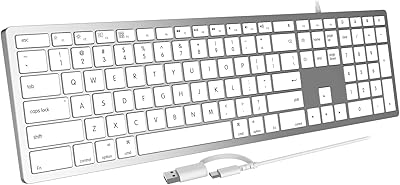
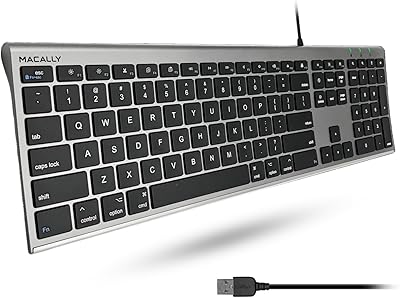
The Macally BLSLIMKEYPROSG Backlit Wired Mac Keyboard sits in a practical sweet spot — a Mac-dedicated peripheral for people who want backlit keys without committing to wireless. Macally has been building Apple-focused accessories for decades, so this is not some generic rebranded board; the brand understands Mac layout conventions. Since its late 2021 release, it has accumulated over 880 ratings on Amazon and cracked the top 300 in its category — numbers that reflect genuine buyer adoption. The space gray finish blends naturally with iMac setups and Apple accessories, and getting started takes seconds: plug in the USB cable, and you are typing.
Features & Benefits

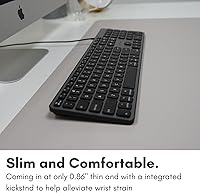
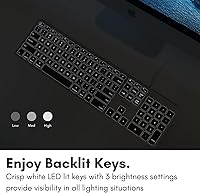
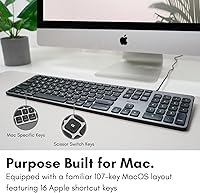
At its core, this backlit Mac keyboard delivers a full 107-key layout with 16 macOS-specific shortcut keys — Mission Control, Launchpad, media controls — all exactly where a Mac user expects them. The white LED backlight offers three brightness steps: subtle enough for a late-night session, bright enough to be genuinely useful in a dim office. It is not RGB, and that restraint suits most buyers just fine. The low-profile keys sit under an inch tall, keeping wrist fatigue manageable over long stretches. As for the quiet key action, it lands softer than a mechanical board but is not quite as hushed as Apple's scissor-switch Magic Keyboard — somewhere comfortably in between.

Best For

This Macally keyboard makes the most sense for iMac desktop users who have always wanted a backlit keyboard — Apple's own desktop accessories have never included that option. It also suits students and professionals who routinely work in low-light conditions: evening sessions, dimmed home offices, or workstations tucked into darker corners. If your original Apple keyboard gave out and you want a familiar layout without the steep Apple replacement cost, the Macally wired keyboard is a logical pick. One honest caveat: anyone on a newer MacBook with only USB-C ports will need a separate USB-A adapter, which adds a small but real friction point to the otherwise effortless setup.

User Feedback

With a 4.4-star average across more than 880 reviews, the overall verdict on this backlit Mac keyboard leans clearly positive. Buyers consistently highlight how well the key feel and layout match expectations for everyday Mac use, and several note that backlight clarity holds up well in moderately dim rooms. The criticisms are worth knowing upfront: the backlight can wash out in brightly lit spaces, and the USB-A connector creates friction for anyone on a recent MacBook. A handful of longer-term users have raised questions about key legend durability under heavy daily use. That said, Macally's two-year warranty provides a reasonable safety net, and the brand's free-return policy adds meaningful confidence for first-time buyers.

Pros

  • Full 107-key Apple layout means zero relearning curve for Mac users switching from a native keyboard.
  • Sixteen dedicated macOS shortcut keys keep common actions like Launchpad and Mission Control one tap away.
  • Three backlight brightness levels make it genuinely useful across a range of lighting conditions.
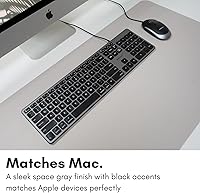
  • The space gray finish coordinates naturally with iMac, Mac mini, and Apple accessory setups.
  • Plug-and-play USB-A connection requires no software, no drivers, and no configuration.
  • The 5-foot cable gives desktop users enough slack to position the keyboard comfortably.
  • Low-profile key design keeps hand and wrist position natural during extended typing sessions.
  • Up to a two-year warranty offers solid peace of mind at this price point.
  • Over 880 Amazon ratings with a 4.4-star average reflects a broad and consistent user base, not a handful of outliers.
  • Free return policy lowers the risk of trying the Macally wired keyboard for the first time.

Cons

  • USB-A connector is a real obstacle for newer MacBook users without a USB-A port — an adapter is not included.
  • Backlight washes out noticeably in bright ambient environments, limiting its usefulness in well-lit rooms.
  • Key feel is softer and less tactile than mechanical options, which may frustrate heavy typists.
  • Quiet key action, while decent, does not quite match the refined hush of Apple's own scissor-switch keyboards.
  • Some long-term users have raised concerns about key legends fading with sustained daily use.
  • No wireless or Bluetooth option exists — buyers who occasionally work away from their desk are stuck with the cable.
  • Single backlight color with no customization means users who want RGB or alternate hues have no options here.
  • At full-size dimensions, this backlit Mac keyboard is not a practical choice for compact or travel setups.

Ratings

The scores below reflect an AI-driven analysis of verified global buyer reviews for the Macally BLSLIMKEYPROSG Backlit Wired Mac Keyboard, with spam, bot submissions, and incentivized feedback actively filtered out before any scoring was applied. Each category is weighted against real-world usage patterns reported by everyday Mac users, students, and home office professionals. Both the standout strengths and the recurring frustrations are represented honestly, so you can make a fully informed decision.

Mac Layout Accuracy
93%
Users switching from a failed Apple keyboard consistently report that the key placement, modifier key labeling, and function row feel immediately familiar. The 16 dedicated macOS shortcut keys cover actions like Launchpad and Mission Control exactly where Mac users expect them, eliminating any adjustment period.
A small number of users noted that the function key behavior sometimes requires toggling depending on macOS settings, which can briefly confuse buyers who have only ever used Apple's own keyboards. This is a macOS configuration quirk rather than a hardware flaw, but it catches some buyers off guard.
Backlight Usability
78%
22%
In dim home offices and evening work sessions, the white LED backlight performs its job well, with three brightness levels giving users enough range to find a comfortable setting. Buyers working at night particularly appreciate that the keys are easy to read without being harsh on the eyes.
Under strong ambient lighting or near a sunny window, the backlight largely disappears and provides no practical benefit. Several users noted that the highest brightness setting still falls short in well-lit open-plan offices, which limits the feature's usefulness to genuinely low-light environments.
Typing Comfort
83%
The low-profile key design keeps wrist angle natural during long stretches of typing, and many users working multi-hour office shifts report noticeably less fatigue compared to taller keyboards. The key travel is short but not shallow to the point of feeling mushy, which most everyday typists find acceptable.
Writers and coders who prefer deeper key travel or tactile mechanical feedback find the membrane-style action unsatisfying over time. This Macally keyboard is not built for power typists, and buyers coming from a mechanical board may feel the lack of click and resistance fairly quickly.
Noise Level
74%
26%
In shared home environments and small offices, users report that the keyboard produces a subdued keystroke sound that does not carry across the room. It is a reasonable choice for anyone who finds clicky mechanical keyboards disruptive to people nearby.
The key noise, while soft, is not as refined or controlled as Apple's scissor-switch Magic Keyboard, which sets a high bar in this category. Users working in recording-adjacent environments or extremely quiet settings may still find the sound level slightly intrusive compared to that benchmark.
Build Quality
69%
31%
For a mid-range peripheral, the keyboard feels solid enough on a desk and does not flex noticeably under normal typing force. The overall construction gives an impression of durability that holds up reasonably well in everyday home or student use.
A portion of long-term users have raised concerns about key legends beginning to fade after several months of heavy daily use, which undermines confidence in the keyboard's longevity. The plastic construction, while functional, does not inspire the same confidence as Apple's own hardware when handled side by side.
Connectivity Reliability
88%
Being wired, this backlit Mac keyboard simply does not drop connections, lag, or require battery checks — a practical advantage for users who have had frustrating experiences with wireless peripherals. Buyers coming from Bluetooth keyboards often highlight the refreshing consistency of the wired connection.
The USB-A connector is a real barrier for anyone using a recent MacBook Pro or Air with only USB-C ports, since an adapter is required and is not included in the box. This single limitation generates more buyer frustration than any other aspect of the keyboard's connectivity.
Plug-and-Play Setup
96%
On any Mac with an available USB-A port, setup is genuinely instant — no software download, no driver installation, no onboarding steps. Less technically confident users, including older adults setting up a home computer, consistently highlight this as one of the most satisfying aspects of the experience.
The only scenario where setup is not frictionless is when the user needs a USB-C adapter, at which point the simplicity advantage largely evaporates. Buyers who realize this only after unboxing tend to leave notably more critical feedback about the overall experience than those who prepared in advance.
Aesthetic & Design
87%
The space gray finish coordinates with iMac setups and Apple-branded accessories in a way that generic black or silver keyboards cannot. Users building minimalist or Apple-coherent desk setups specifically mention the color match as a deciding factor in their purchase, and most are satisfied with how it looks in person.
The color is a close but imperfect match to Apple's space gray under some lighting conditions, and finicky buyers comparing them directly may notice a slight tonal difference. The keyboard also lacks any premium surface texture, so it reads as visually complementary rather than as a true design equal to Apple hardware.
Value for Money
81%
19%
Compared to Apple's own keyboard offerings — which lack backlighting and a number pad at any price — this Macally keyboard delivers a meaningful set of practical features at a more accessible cost. Buyers replacing a broken Apple keyboard frequently cite the overall value proposition as genuinely strong for what they receive.
Users who paid expecting a premium typing experience and then compared it to even a budget mechanical keyboard sometimes feel the price-to-feel ratio does not fully hold. The warranty and free-return policy help soften that judgment, but the keyboard is best evaluated as a functional daily tool rather than a tactile enthusiast product.
Key Durability
66%
34%
For light to moderate daily use, the keys hold up adequately across the first year without significant issues reported by the majority of buyers. Users who type at a measured pace rather than hammering keys throughout the day tend to have fewer concerns about long-term wear.
Frequent heavy typists have reported visible legend fading on high-use keys — letters like A, S, and E showing wear — within six to twelve months of daily use. This is a meaningful durability gap compared to what most users expect from a keyboard at this price point.
Backlight Brightness Range
63%
37%
The lowest brightness setting is genuinely subtle and comfortable for users who want just enough illumination to distinguish keys in a dark room without disrupting a low-light atmosphere, such as a home theater setup or a dimmed bedroom workspace.
The top brightness ceiling is not high enough to compete with ambient light in typical daytime office conditions, which makes the backlight feature feel situationally limited. Buyers who anticipated using the backlight throughout the full workday in a normal office environment are often disappointed by its practical reach.
Numeric Keypad Usability
89%
The inclusion of a full numeric keypad is a practical differentiator for data entry, accounting work, and spreadsheet-heavy users who cannot work efficiently without one. This is a feature Apple itself omits from its standard Magic Keyboard, making this board a more complete tool for certain professional workflows.
The full-size form factor naturally takes up more horizontal desk space, and users with compact setups occasionally find the added width pushes their mouse further right than feels comfortable. There is no compact variant for buyers who want the backlight without the footprint.
Cable Management
71%
29%
The 5-foot cable provides enough slack for most standard desk configurations, allowing users to position the keyboard at a natural distance from a desktop Mac without the cable feeling taut or restrictive. Users with tidier setups generally find it easy to route neatly along the back of a desk.
The cable is not detachable, so if it is damaged the entire keyboard must be replaced. Users running particularly clean cable-managed desks also note that a fixed cable is harder to integrate invisibly than a wireless solution, slightly working against the minimal aesthetic the keyboard otherwise supports.

Suitable for:

The Macally BLSLIMKEYPROSG Backlit Wired Mac Keyboard was built with a specific buyer in mind, and it delivers best when that buyer shows up. iMac users are the primary fit: Apple has never sold a backlit wired desktop keyboard of its own, so this fills a real gap without demanding a premium price or a Bluetooth setup. Students pulling late-night study sessions and home office workers who operate in dimly lit rooms will find the three-level white backlight genuinely practical rather than decorative. Anyone replacing a failed Apple keyboard on a budget will appreciate that the layout, shortcut keys, and overall feel require almost no adjustment period. The wired connection also appeals to users who simply want a keyboard that works every time they sit down — no battery levels to check, no pairing hiccups.
Not suitable for:

There are clear scenarios where the Macally BLSLIMKEYPROSG Backlit Wired Mac Keyboard is the wrong tool. Owners of recent MacBook Pro or MacBook Air models with exclusively USB-C ports will need a separate adapter just to plug it in, which undercuts the plug-and-play appeal and adds an ongoing inconvenience. Dedicated typists who prefer mechanical switches will find the low-profile membrane keys underwhelming — this board is not built for tactile feedback enthusiasts or heavy-volume writers who care deeply about keystroke feel. The white LED backlight, while useful in dim conditions, does not hold its own against strong ambient light, so bright open-plan offices or sunlit desks will neutralize one of its main selling points. Finally, buyers looking for wireless freedom or Bluetooth multi-device switching should look elsewhere entirely.
Specifications

  • Key Count: The keyboard features 107 keys arranged in a full-size Apple macOS layout, including a dedicated numeric keypad.
  • Shortcut Keys: Sixteen dedicated macOS function keys provide direct access to system controls such as Launchpad, Mission Control, and media playback.
  • Backlight Color: Keys are illuminated by white LEDs with no color customization, keeping the aesthetic clean and distraction-free.
  • Brightness Levels: The backlight offers three distinct brightness settings, adjustable directly from the keyboard without any software.
  • Connectivity: The keyboard connects via a USB-A connector and is not compatible with USB-C ports without a separate third-party adapter.
  • Cable Length: The attached USB cable measures 5 feet, providing comfortable reach for most standard desktop arrangements.
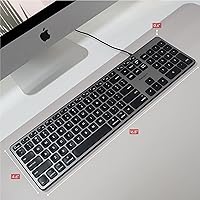
  • Dimensions: The keyboard measures 16.54 x 5.51 x 0.79 inches, making it a full-size board that includes a numeric keypad without being unnecessarily bulky.
  • Weight: At 12.3 ounces, the keyboard is light enough to reposition easily but substantial enough to stay stable during use.
  • Key Style: Low-profile scissor-style keys sit under 1 inch in total height, reducing wrist strain during extended typing sessions.
  • Color: The keyboard is finished in space gray, designed to complement Apple iMac, Mac mini, and related accessories visually.
  • Compatibility: Officially compatible with Mac, iMac, MacBook Pro, and MacBook Air running macOS; not designed or optimized for Windows systems.
  • Driver Requirement: No drivers or software installation are required; the keyboard is recognized and fully functional immediately upon plugging in.
  • Switch Type: The keyboard uses a quiet membrane-style mechanism rather than mechanical switches, prioritizing noise reduction over tactile click feedback.
  • Warranty: Macally covers this keyboard with a warranty of up to two years from the date of purchase, backed by direct brand support.
  • Return Policy: The manufacturer offers free returns, providing an added layer of confidence for buyers purchasing the keyboard for the first time.
  • Manufacturer: Produced by Mace Group Inc under the Macally Peripherals brand, a company with an established history of Mac-focused accessories.
  • Availability Date: This keyboard model was first made available for purchase in November 2021.

Related Reviews

Macally SLIMKEYCA Compact Wired Keyboard
77%
83%
Typing Experience
68%
Build Quality
89%
Value for Money
92%
Mac Compatibility
57%
Keycap Durability
More
HP 400 Backlit Wired Keyboard
77%
67%
Typing Experience
83%
Backlight Quality
71%
Build Quality
88%
Portability
86%
Connectivity & Compatibility
More
Atelus Full Size Retro Backlit Wired Keyboard
72%
83%
Value for Money
61%
Typing Experience
84%
Noise Level
78%
Backlight Quality
54%
Build Quality
More
Acebaff CK140U Wired Keyboard for Mac
85%
91%
Typing Experience
88%
Ergonomics
84%
Build Quality
95%
Ease of Setup
90%
Compatibility
More
MOWUX SK-693EL Wired Backlit Keyboard
73%
83%
Value for Money
67%
Typing Experience
71%
Backlight Quality
62%
Build Quality
94%
Ease of Setup
More
Macally ACEKEYSG
Macally ACEKEYSG
77%
78%
Typing Comfort
72%
Build Quality
91%
Mac Compatibility
83%
Windows Compatibility
88%
Numeric Keypad
More
Perixx PERIBOARD-317R Wired Backlit Keyboard
78%
93%
Key Readability
74%
Backlighting Quality
61%
Typing Feel
68%
Build Quality
82%
Setup & Compatibility
More
POWZAN KB770
POWZAN KB770
79%
83%
Typing Experience
88%
Build Quality
91%
Noise Level
67%
RGB Backlighting
74%
Mac Compatibility
More
Perixx PERIBOARD-333RGB Wired Backlit USB Keyboard
85%
88%
Typing Comfort & Responsiveness
84%
RGB Backlighting Customization
79%
Build Quality & Durability
91%
Value for Money
83%
Multimedia Key Functionality
More
ProtoArc KM100-A Bluetooth Keyboard and Mouse Combo
75%
91%
Value for Money
83%
Typing Experience
88%
Multi-Device Connectivity
74%
Backlighting
68%
Build Quality
More

FAQ

Not directly out of the box. The Macally BLSLIMKEYPROSG Backlit Wired Mac Keyboard uses a USB-A connector, which is not compatible with USB-C-only MacBooks without a separate adapter or hub. A basic USB-A to USB-C adapter will solve the problem, but it is worth knowing you will need one before you buy.
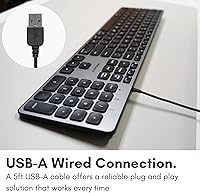
No, nothing to install. Just plug the cable into an available USB-A port and your Mac will recognize it immediately. It is fully plug-and-play, which makes it especially convenient if you are replacing a keyboard quickly and just need things working right away.

The keys are noticeably quieter than a mechanical keyboard and sit in a range similar to many standard laptop-style boards. They are not as whisper-quiet as Apple's own Magic Keyboard, but most coworkers or family members nearby should not find them distracting during normal use.

It will work as a basic keyboard on Windows since it is USB HID-compliant, but the 16 dedicated macOS shortcut keys will not function as intended and some key labels will not match Windows behaviors. It is really designed and optimized around macOS, so Windows users would be better served by a keyboard built with that system in mind.

Yes, on the highest of the three brightness settings the keys are clearly visible in low-light and dark conditions. However, in a brightly lit room or under direct sunlight the backlight becomes hard to notice, so if your workspace is well-lit the backlight may not add much practical value.

You can cycle through the three brightness levels directly from the keyboard itself using the dedicated brightness keys — no software needed. It is a simple press to step up or down through the settings.

It is a close match, and most users find it blends well with Apple's space gray finish on iMacs, Mac minis, and related accessories. It may not be a pixel-perfect color match under every lighting condition, but it is far more cohesive than a generic black or silver keyboard would look next to Apple hardware.

Yes, the full 107-key layout includes a numeric keypad on the right side. This is one of the practical advantages over Apple's own Magic Keyboard, which drops the number pad in its standard version.

The cable is 5 feet long, which is enough for most standard desk setups where the computer is sitting on or beside the desk. If your Mac tower or monitor is positioned unusually far away, you might want a USB extension cable, but for typical home or office arrangements the 5-foot length works well.

Macally covers this keyboard with a warranty of up to two years, so a defect or failure within that window should qualify for a replacement or resolution through their support team. The brand also offers free returns, which gives you an additional fallback if you find the keyboard is not right for your setup early on.

Where to Buy