Overview

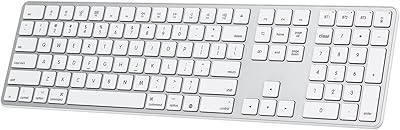
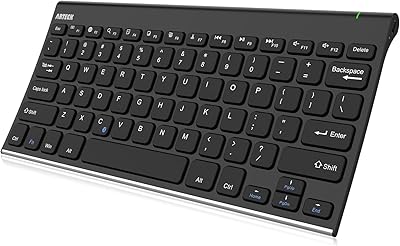
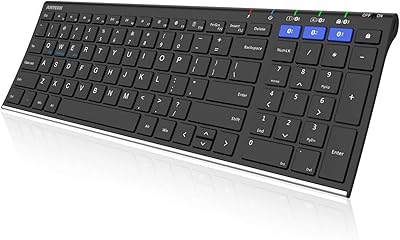
The iClever BK20 Bluetooth Keyboard is a budget-conscious pick that manages to pack in a numeric keypad without taking over your desk. It sits in an interesting spot — closer to a laptop-style typing experience than a typical membrane board, thanks to its scissor-switch keys, yet small enough to free up real estate most full-size keyboards would consume. Charging via USB-C means no hunting for AA batteries mid-project. Since landing on Amazon in late 2023, it has quietly climbed into the top bestsellers in its category, which says something about how well it hits the right notes for everyday users.

Features & Benefits

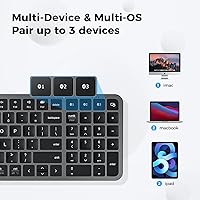
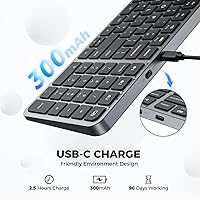
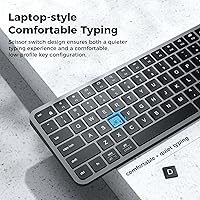
Switching between your laptop, tablet, and phone is handled through three-device Bluetooth pairing, with a dedicated key for each slot — tap once and you are connected. The scissor switches keep things quiet enough for shared spaces, and the low profile reduces the kind of wrist tension that builds up during long writing sessions. Twelve multimedia keys sit along the top row for quick volume and playback control without hunting through menus. The built-in rechargeable battery is rated to last a remarkably long time on a single USB-C charge, so you are not constantly reaching for the cable. Mac, Windows, iOS, and Android are all natively supported, no driver installation required.

Best For

This compact Bluetooth board makes the most sense for people whose workday spans more than one device — think a MacBook at the desk, an iPad for notes, and a phone for quick replies. The quiet keys are a genuine asset in open office environments where clicky boards draw stares. If your work involves a lot of numbers — accounting, data entry, inventory tracking — having a physical numpad in a package this small is genuinely useful rather than just a spec-sheet checkbox. It also travels well. At one pound, tossing it into a bag adds almost nothing, making it a practical backup board for anyone who works from coffee shops or coworking spaces.

User Feedback

Buyers regularly highlight how well the Bluetooth connection holds across devices and appreciate that reconnecting after sleep rarely causes frustration — a complaint that dogs cheaper keyboards. The typing feel gets positive notes too, with many saying it punches above its weight for the price, though some users coming from mechanical boards find the key travel shallow. On the Mac side, a few reviewers flag that certain function-row labels do not map intuitively to macOS shortcuts, which requires a short learning curve. Build quality is honestly what you would expect from ABS plastic at this price — solid enough for daily use, not a premium feel. Most buyers also report the battery life living up to its billing.

Pros

  • Pairs with up to three devices and switches between them with a single dedicated key press.
  • Scissor switches keep noise low enough for shared offices and open coworking spaces.
  • USB-C charging means one less proprietary cable cluttering your desk drawer.
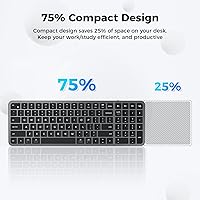
  • A numpad is included without the keyboard sprawling to full-size proportions.
  • Cross-platform support covers Mac, Windows, iOS, and Android without installing any drivers.
  • Battery endurance is long enough that most users charge it only once every few weeks.
  • At roughly one pound, the BK20 slips into a bag without adding meaningful weight.
  • Multimedia shortcut keys cover playback and volume without digging through software menus.
  • The compact footprint frees up meaningful desk space compared to standard full-size layouts.
  • Solid real-world reliability for everyday typing tasks at a price that does not require much deliberation.

Cons

  • No backlight at all — completely unusable in dim rooms or evening work sessions.
  • ABS plastic body feels hollow and lightweight in a way that undercuts perceived durability.
  • Mac function-row keys lack macOS-specific labeling, requiring trial and error to remap shortcuts.
  • Bluetooth reconnection after sleep can lag by a few seconds, interrupting workflow at the worst moments.
  • Included USB-C cable is too short to comfortably use the keyboard while charging.
  • Key travel is shallow enough to disappoint anyone accustomed to mechanical or even quality membrane boards.
  • No low-battery indicator light or audio alert before the keyboard simply cuts out.
  • Device switching is fully manual — there is no automatic detection when a paired device becomes active.
  • Surface scratches accumulate quickly on the matte ABS finish without a protective case included in the box.

Ratings

The iClever BK20 Bluetooth Keyboard has been put through its paces by our AI rating engine, which analyzed thousands of verified global buyer reviews while actively filtering out incentivized, duplicate, and bot-generated submissions. What emerges is an honest picture — the strengths are real, but so are the trade-offs that budget-conscious shoppers should know before buying. Scores below reflect where this compact Bluetooth board genuinely earns its keep and where it falls short against more expensive competition.

Bluetooth Connectivity
83%
Most buyers report that pairing across three devices works reliably day-to-day, and the one-tap device switching rarely fumbles. For someone bouncing between a MacBook in the morning and an iPad in the afternoon, that consistency makes a real practical difference.
A subset of users — particularly those on Windows 11 — mention occasional lag when waking the keyboard from sleep mode. Reconnection usually resolves within seconds, but it is noticeable enough to interrupt a thought mid-sentence.
Typing Experience
78%
22%
The scissor-switch keys give the board a laptop-like feel that membrane keyboards simply cannot match at this price. Writers who spend hours drafting documents or students grinding through coursework generally find the feedback satisfying and fatigue is reduced compared to mushier alternatives.
Buyers upgrading from mechanical keyboards tend to find the key travel shallower than they prefer, and the actuation feels light rather than tactile. It is a fair trade-off for the quiet operation, but it is worth knowing upfront.
Build Quality
62%
38%
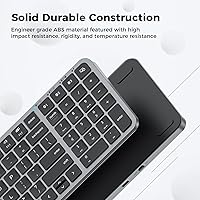
The BK20 feels solid enough for everyday desk use — no obvious flex in the chassis and keycaps sit evenly without wobble. For a keyboard at this price point, the construction holds up well under normal daily workloads.
The ABS plastic body does not disguise its budget origins when you pick it up. The matte finish attracts fingerprints and feels noticeably hollow compared to aluminum-bodied competitors. Users who handle their gear roughly should temper expectations.
Battery Life
81%
19%
Charging via USB-C and then largely forgetting about the cable for weeks is the experience most buyers describe. The rated endurance proves close to accurate in real-world use for moderate typists, which eliminates the AA battery anxiety that plagues cheaper wireless boards.
Heavy users who type for six or more hours daily report the battery draining faster than the headline figure suggests. A few buyers also noted the keyboard gives no clear low-battery warning before it simply stops responding, which can catch you off guard mid-task.
Numeric Keypad Usability
86%
For a compact keyboard, having a fully functional numpad is a genuine advantage for accountants, data entry workers, or anyone living in spreadsheets. The keys are well-sized and the layout follows standard convention, so there is no relearning involved.
The numpad columns sit quite close to the main key cluster, which can cause occasional misstrikes when moving quickly between the two zones. Touch typists who rely on spatial muscle memory may need a short adjustment period.
Multi-Device Switching
79%
21%
Dedicated Bluetooth slot keys make switching between a laptop, tablet, and phone genuinely fast. Buyers who use this board across both work and personal devices mention it cuts out the frustration of unpairing and repairing that older multi-device keyboards required.
The keyboard does not automatically switch to a device when that device becomes active — you must manually press the channel key. For users expecting smart context-switching similar to higher-end keyboards, this is a step behind.
Cross-Platform Compatibility
77%
23%
Out of the box support across macOS, iOS, Windows, and Android covers the vast majority of setups without any driver installation. Android tablet users in particular mention it just works, which is not always a given with budget wireless keyboards.
Mac users flag that some function-row keys do not carry macOS-specific labels, so actions like screen brightness or Mission Control require a bit of experimenting to find. The keyboard is functional on Mac, but not optimized for it the way dedicated Mac keyboards are.
Noise Level
88%
The scissor switches produce a soft, dampened click that sits comfortably under most open-office noise thresholds. Coworkers and housemates rarely notice it, and video call participants have not flagged keyboard noise bleeding into the microphone in buyer reports.
It is not completely silent — there is still a subtle thock on harder keystrokes that very noise-sensitive environments might catch. Users sharing a quiet bedroom workspace at night while a partner sleeps have noted it is audible, if not disruptive.
Portability
84%
Weighing around one pound and sized to slip into most laptop bags without a dedicated sleeve, the BK20 travels better than its numpad inclusion might suggest. Remote workers who rotate between home, cafes, and shared offices find it a practical grab-and-go option.
There is no carrying pouch or protective case included, so the keycaps are exposed during transit. Without a case, regular bag-tossers will likely accumulate surface scratches on the ABS finish over several months.
Key Labeling & Legend Quality
67%
33%
Legend printing is clean and consistent across the board at this price tier. Standard alpha and number keys are easy to read under normal office lighting, and the secondary function labels are legible without needing to squint.
There is no backlighting whatsoever, which makes the board nearly unusable in dim environments. This is a notable gap for anyone who works evenings or in low-light setups, and it is one area where the budget positioning is clearly felt.
Multimedia Keys
74%
26%
Having twelve dedicated shortcut keys for volume, playback, and system controls saves real time during the workday. Buyers who frequently toggle between video calls and music find these keys reduce reliance on on-screen controls noticeably.
The function key row doubles as both standard F-keys and multimedia shortcuts, and the default behavior varies by OS in ways that are not always intuitive. Some users report needing to remap keys to get the behavior they expected, which adds friction on first setup.
USB-C Charging
91%
USB-C is simply the right call in 2024, and buyers consistently mention it as a feature they appreciate. Using the same cable as their laptop or phone removes one more item from the desk cable drawer, and a full recharge completes quickly compared to older micro-USB keyboards.
The charging port is functional but the cable included is short — barely long enough to use the keyboard while it charges. If your USB-C port is at the back of a desktop, you may need your own longer cable to charge in a convenient position.
Value for Money
89%
At its price point, bundling a numpad, multi-device Bluetooth, scissor switches, and USB-C charging into one package is hard to argue with. Buyers who compare it against similarly priced boards consistently rate it as one of the more complete offerings available without spending significantly more.
Spending a bit more opens access to keyboards with aluminum builds, backlighting, and smarter auto-switching — features that make the BK20 feel like a clear budget product by comparison. It earns its score within its tier, but the ceiling is apparent.

Suitable for:

The iClever BK20 Bluetooth Keyboard was built with a specific type of user in mind, and it shows. If your workday involves jumping between a laptop, a tablet for notes, and a phone for quick replies, the three-slot Bluetooth setup removes a genuinely annoying friction point that single-device keyboards cannot address. Students working in libraries or shared study rooms will appreciate how quietly the scissor switches operate — it is the kind of board you can use without earning irritated glances. Anyone doing spreadsheet-heavy work who wants a numpad without surrendering half their desk to a full-size layout will find the proportions here surprisingly well-judged. Remote workers building a clean, minimal home office setup on a practical budget should also take a close look, as the BK20 checks more boxes per dollar than most direct competitors in its class.

Not suitable for:

The iClever BK20 Bluetooth Keyboard has real limitations that certain buyers will find genuinely disqualifying rather than minor annoyances. If you work in low-light or evening conditions regularly, the complete absence of backlighting is a hard stop — there is no workaround, and squinting at unlabeled keys in the dark gets old fast. Enthusiasts coming from mechanical keyboards will likely find the scissor-switch feel unsatisfying, and no amount of price justification changes what your fingertips tell you after an hour of typing. Mac power users who rely on muscle memory for function-row shortcuts may find the lack of macOS-specific labeling adds an unnecessary layer of confusion during the learning period. The ABS plastic construction also means this board is not built for buyers who want something that feels robust or premium in hand — the hollow feel under heavy typing is noticeable. Finally, anyone who travels without a bag and needs a protected keyboard should know that no case or sleeve is included.

Specifications

  • Brand: Manufactured by iClever, model designation BK20.
  • Connectivity: Uses Bluetooth 5.1 for a stable low-energy wireless connection with no USB dongle required.
  • Multi-Device: Supports pairing with up to three devices simultaneously, switchable via dedicated channel keys.
  • Switch Type: Low-profile scissor switches provide a laptop-style typing feel with reduced noise and finger fatigue.
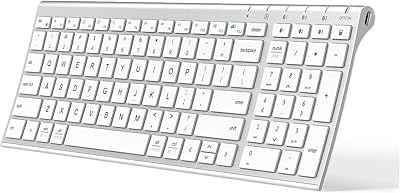
  • Layout: Compact full layout including a numeric keypad and 12 multimedia shortcut keys along the top row.
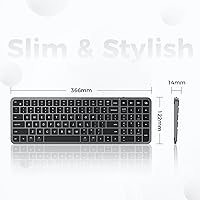
  • Dimensions: Measures 5.91 x 3.15 x 1.18 inches, occupying roughly 25% less desk space than a standard full-size keyboard.
  • Weight: Weighs approximately 1 pound, making it practical for bag-based portability.
  • Battery: Built-in 300mAh lithium-ion battery rated for up to 300 hours of use on a single full charge.
  • Charging: Charges via USB-C; a USB-C cable is included in the box.
  • Backlight: No backlight or illumination of any kind is present on this keyboard.
  • Material: Chassis and keycaps are constructed from ABS (Acrylonitrile Butadiene Styrene) plastic in matte black.
  • OS Compatibility: Natively supports macOS, iOS, Windows 8, Windows 10, Windows 11, and Android without driver installation.
  • Compatible Devices: Works with PCs, laptops, MacBooks, iMacs, iPads, iPhones, Android tablets, and smartphones.
  • Color: Available in black with a modern matte finish.
  • In the Box: Package includes the keyboard, one USB-C charging cable, and a printed user manual.
  • Availability: First listed on Amazon on November 22, 2023, and ranks among the top sellers in the Computer Keyboards category.

Related Reviews
iClever BK10 Bluetooth Keyboard
79%
83%
Typing Feel
78%
Multi-Device Switching
61%
Battery Life
71%
Build Quality
67%
Key Stability & Longevity
More
iClever BK50 Bluetooth Keyboard
87%
88%
Typing Experience
91%
Multi-Device Support
94%
Battery Life
89%
Portability
85%
Build Quality
More
iClever BK18 Foldable Bluetooth Keyboard
84%
93%
Portability & Design
88%
Battery Life
90%
Multi-device Pairing
74%
Typing Comfort
92%
Compatibility
More
iClever BK08 Foldable Bluetooth Keyboard
77%
88%
Build Quality
93%
Portability & Form Factor
74%
Typing Experience
71%
Touchpad Performance
78%
Multi-Device Pairing
More
iClever BK05 Backlit Foldable Bluetooth Keyboard
86%
92%
Portability & Travel-Friendliness
89%
Multi-Device Connectivity
85%
Battery Life
90%
Build Quality & Durability
75%
Typing Comfort
More
FELICON 308i Bluetooth Keyboard
86%
89%
Design & Aesthetics
94%
Bluetooth Connectivity
76%
Typing Comfort
92%
Portability & Size
85%
Battery Life & Power Saving
More
GEODMAER Foldable Bluetooth Keyboard
82%
93%
Portability
71%
Typing Experience
88%
Multi-Device Switching
63%
Touchpad Usability
91%
Battery Life
More
Geyes GK608 Foldable Bluetooth Keyboard
75%
93%
Portability
81%
Build Quality
58%
Typing Experience
77%
Dual Device Connectivity
84%
Value for Money
More
ProtoArc K90-A Bluetooth Keyboard
85%
88%
Typing Experience
91%
Multi-device Connectivity
94%
Portability & Size
87%
Battery Life & Efficiency
85%
Backlighting Functionality
More
OMOTON Bluetooth Keyboard for Mac
77%
91%
Value for Money
88%
Mac Compatibility
67%
Bluetooth Reliability
78%
Multi-Device Switching
74%
Typing Experience
More

FAQ

The iClever BK20 Bluetooth Keyboard has three dedicated Bluetooth channel keys, usually labeled BT1, BT2, and BT3. Hold down the relevant channel key until the indicator light starts blinking, then pair from your device's Bluetooth settings as you normally would. Once each device is saved to its channel, switching between them is as simple as pressing the corresponding key — no need to go back into settings each time.

Yes, it connects to iOS devices without any special setup or app. Just enable Bluetooth on your iPad or iPhone, put the keyboard into pairing mode, and it shows up as a standard Bluetooth keyboard. The basic keys all work as expected, though some function-row shortcuts behave differently on iOS than on a Mac or Windows machine.

No, there is no backlight at all. If you regularly work in dim lighting or late at night, that is a genuine limitation worth factoring into your decision. For well-lit desks and daytime use it is a non-issue, but it is one of the clearest signs that this board is priced for budget buyers rather than power users.

The 300-hour rating is based on moderate, intermittent use — not continuous heavy typing for eight hours a day. Most everyday users report going several weeks between charges, which aligns reasonably well with the claim. Heavy typists who work long sessions daily may find it needs charging more frequently, somewhere in the range of every two to three weeks.

Generally yes, but there is sometimes a short delay of a few seconds before the connection re-establishes after the computer wakes. It is not a dealbreaker for most users, but if your workflow involves very quick tab-backs from sleep mode you may notice the brief pause. Pressing any key usually speeds up the reconnection.

It works on Mac and connects without any drivers, but it is not optimized specifically for macOS. The function-row keys do not carry macOS labels, so shortcuts like screen brightness, Mission Control, or Launchpad require some experimenting or manual remapping. Once you have figured out the key mapping, day-to-day use is fine — just expect a short adjustment period if you are coming from an Apple keyboard.

It is genuinely close to a modern laptop keyboard, which is the point of the scissor-switch design. The key travel is shallow and the actuation is quiet and light. If you are used to typing on a MacBook or a slim ultrabook keyboard, it will feel familiar almost immediately. If you are coming from a mechanical keyboard, the feel will seem noticeably softer and less tactile.

The numpad is functional and follows a standard layout, so there is no learning curve if you are used to a traditional numpad. The keys are slightly closer to the main cluster than on a full-size keyboard, which can cause occasional misstrikes when moving between the two areas quickly. Most users adapt to the spacing within a day or two of regular use.

Yes, you can type while the keyboard charges over USB-C. The included cable is on the short side, so depending on where your USB-C port is located you may want to use a longer cable you already own to keep the setup comfortable.

It is solidly constructed for a budget keyboard and does not flex or creak under normal use, but the ABS plastic material does give it a lighter, somewhat hollow feel when you pick it up. It is not fragile, but it does not feel premium either. For desk use it holds up well; just do not expect it to feel like a metal-bodied board at this price point.