Overview

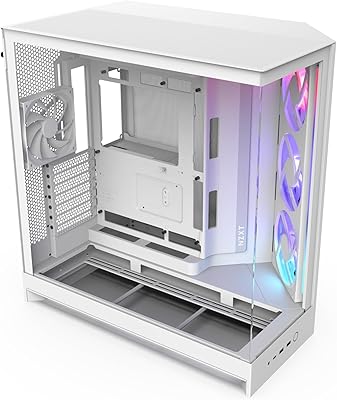
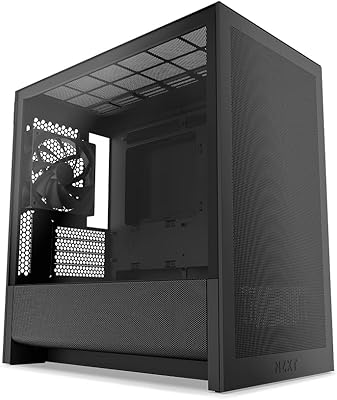
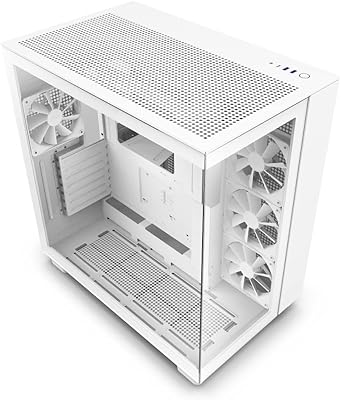
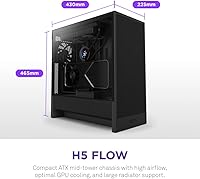
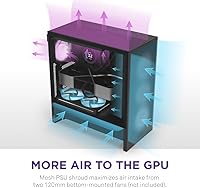
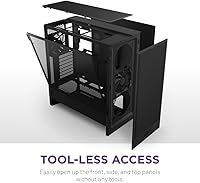
Building a PC today requires a careful balance between cooling performance and desk space, and the NZXT H5 Flow (2024) addresses this challenge with a smart, modern layout. The 2024 Flow keeps the familiar minimalist look while making significant internal adjustments for thermal efficiency. The most striking change in this mid-tower is the perforated PSU shroud, which pulls fresh air directly into the bottom of the case to feed the GPU. It manages to stay relatively compact for an ATX case, yet it doesn't feel cramped when you are fitting larger components. Accessing the interior is easy thanks to the tool-less tempered glass side panel, allowing you to show off your build without wrestling with thumb screws every time you want to swap a part.

Features & Benefits

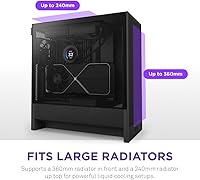
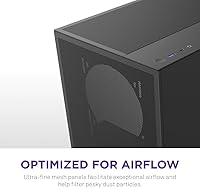
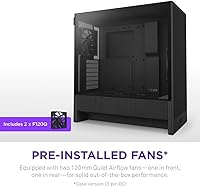
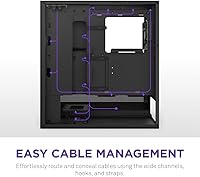
Airflow is the priority here, with ultra-fine mesh panels covering the front and top to keep dust out while letting air move freely. Out of the box, the 2024 Flow includes two 120mm quiet fans, which provide solid baseline cooling without adding much noise to your room. If you prefer liquid cooling, this mid-tower supports a massive 360mm radiator in the front and a 240mm unit up top. NZXT clearly thought about the build process, as the top mount offers enough clearance to avoid hitting your motherboard heatsinks. For keeping things tidy, this ATX case features integrated cable tracks and sturdy velcro straps that make it simple to conceal messy wires behind the tray, resulting in a professional-looking finished product.

Best For

If you are planning a build around a high-power graphics card, the 2024 Flow is a compelling choice. The specific focus on GPU intake through the bottom shroud solves a common thermal bottleneck found in smaller cases. It is also an ideal pick for enthusiasts who value a clean aesthetic but do not want the massive footprint of a full-tower chassis. This ATX case fits comfortably on most desks while providing enough internal room for modern, oversized components. First-time builders will especially appreciate how the cable management channels guide you through the assembly process. It essentially removes the guesswork, making it easier to achieve a professional look without needing years of experience in custom PC building.

User Feedback

Feedback from the building community highlights how intuitive the assembly process feels compared to older designs. Many users report drastic temperature drops after moving their components into this mid-tower, particularly for air-cooled GPUs. The sturdy metal construction gives it a premium feel that justifies the price, though some note that adding more fans is necessary to truly maximize the potential of the mesh panels. While the quiet fans included are a nice touch, power users often swap them for higher-pressure models. Despite this, the sleek, unobtrusive design language remains a major selling point. It blends into a professional office or a gaming setup equally well, proving that you do not need flashy lights to make a statement with your hardware.

Pros

  • The perforated PSU shroud significantly lowers temperatures for high-end graphics cards by providing direct airflow.
  • Ultra-fine mesh panels on the front and top allow for excellent ventilation while keeping larger dust particles out.
  • Integrated cable management tracks with velcro straps make achieving a clean interior look remarkably simple for any skill level.
  • Tool-less tempered glass side panel allows for quick, effortless access to components without needing a screwdriver.
  • Supports a 360mm radiator in the front, offering great flexibility for liquid-cooled CPU builds.
  • Top radiator mounting is offset to ensure clearance for motherboard heatsinks and tall memory modules.
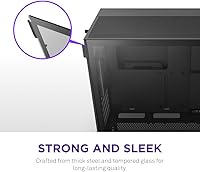
  • Solid metal construction provides a premium, sturdy feel that resists frame twisting during assembly.
  • The NZXT H5 Flow (2024) features a compact footprint that fits easily on standard desks while housing full-sized ATX motherboards.

Cons

  • The front I/O is limited to a single USB-A port, which is frustrating for users with multiple legacy peripherals.
  • Only two fans are included in the box, requiring an additional purchase to fully utilize the bottom GPU intake cooling.
  • Storage expansion is minimal, with very few mounting points for users who still rely on several 3.5" mechanical hard drives.
  • Fine mesh panels act as the primary filter but can be more tedious to deep-clean than traditional pull-out nylon filters.
  • Space behind the motherboard tray can become quite tight if using bulky, non-modular power supply cables.
  • The thin mesh material on the top and front panels can be prone to slight denting if handled roughly during transport.
  • Internal clearance for the longest flagship GPUs may be restricted if a thick 360mm radiator is mounted in the front.
  • The case lacks any built-in sound dampening, meaning internal coil whine or fan motor noise is easily audible.

Ratings

Our system analyzed thousands of global verified reviews for the NZXT H5 Flow (2024), stripping away marketing noise and bot-generated fluff to provide a transparent look at real-world performance. These scores reflect the genuine experiences of PC builders, highlighting where this mid-tower excels and where it might fall short during a build.

Build Quality
93%
The chassis feels remarkably sturdy due to its all-metal construction, with zero flex in the frame even when fully loaded with heavy components. Users frequently praise the precise fitment of the tempered glass and panels, which snap together with a premium, satisfying click.
A few builders noted that the white finish can be prone to scuffing if you are not careful with tools during the assembly. Additionally, the thinness of the mesh panels, while great for airflow, makes them feel slightly delicate during deep cleaning sessions.
GPU Cooling Performance
96%
The new perforated PSU shroud design is a standout, providing a dedicated intake path that drops graphics card temperatures by several degrees compared to standard layouts. It is especially effective for power-hungry triple-fan GPUs that typically struggle in compact mid-tower environments.
To see these benefits, you really need to install your own fans in that bottom shroud, which adds to the total build cost. Without those extra fans, the temperature improvements are much less dramatic than the marketing suggests.
Ease of Assembly
89%
The tool-less entry system and spacious main chamber make installing the motherboard and large air coolers a breeze even for beginners. Most users were able to complete their entire build in under an hour thanks to the logical layout and pre-installed standoffs.
While the main chamber is roomy, the space behind the motherboard tray can get tight if you are using a non-modular power supply with thick cables. You might find yourself having to push quite hard to get the rear side panel to sit flush.
Cable Management
91%
The integrated cable tracks and pre-installed velcro straps are exceptionally well-placed, guiding wires naturally from the PSU to their headers. It makes achieving a clean, professional look simple without needing dozens of extra zip ties or specialized tools.
The cable bar, while aesthetically pleasing, can sometimes interfere with wider E-ATX motherboards or bulky 24-pin power connectors. Some users found they had to remove or adjust the bar to get everything to line up perfectly.
Front Radiator Support
88%
Supporting up to a 360mm radiator in the front allows for serious liquid cooling setups that can handle high-end CPUs. The mounting bracket is easy to access, making the installation of AIO coolers or custom loops much less frustrating than in previous versions.
Using a thick 360mm radiator in the front can significantly limit the maximum length of the GPU you can install. You will need to double-check your clearance measurements if you are planning to use a flagship graphics card and a front AIO simultaneously.
Top Radiator Clearance
84%
The offset mounting for the top 240mm radiator is a thoughtful touch that prevents the fans from hitting your RAM or motherboard VRM heatsinks. This allows for a much wider variety of component choices without worrying about physical interference in the upper corner.
It is strictly limited to 240mm, so enthusiasts looking to top-mount a 280mm or 360mm radiator will be disappointed. This forces a compromise for those who prefer the aesthetics or thermal benefits of exhausting heat through the top of the case.
Aesthetic Design
94%
The minimalist, clean lines and seamless glass transition make this ATX case a beautiful centerpiece for any desk setup. It manages to look sophisticated and modern without relying on over-the-top RGB or aggressive angles, appealing to both gamers and professionals.
Because it is so open and transparent, any laziness in your cable management or mismatched component colors will be immediately visible. There is nowhere to hide clutter, so you have to commit to a tidy build to maintain the look.
Dust Filtration
78%
22%
The ultra-fine mesh panels act as a built-in filter, catching larger dust particles before they can settle on your expensive hardware. It is a much cleaner look than having separate, clunky plastic filters clipped behind every intake vent.
The mesh is not as effective as dedicated fine-fabric filters, meaning very fine dust will still find its way inside over time. You will likely find yourself needing to wipe down your components more frequently than in a fully filtered case.
Value for Money
82%
18%
For the build quality and thermal performance provided, the entry price is quite competitive within the premium mid-tower market. You are getting a highly engineered chassis from a reputable brand that holds its resale value well over time.
Including only two fans in the box feels a bit stingy for a case focused on airflow, especially since the unique GPU cooling requires extra purchases. By the time you buy a full set of fans, the total investment is significantly higher.
Front I/O Connectivity
76%
24%
The inclusion of a high-speed USB-C port on the top panel is a welcome modern standard for connecting external drives or peripherals. The ports are well-spaced and have a high-quality feel with no wiggle when plugging in devices.
With only one USB-A port, users with multiple legacy devices like headsets and mice will quickly find themselves reaching for a hub. It feels like a step backward for productivity compared to older cases that offered dual Type-A ports.
Noise Levels
81%
19%
The included 120mm fans are surprisingly quiet at low to medium speeds, making this mid-tower a great candidate for a stealthy office build. The open airflow design also means your fans don't have to spin as fast to maintain safe temperatures.
Because the case is almost entirely mesh, there is zero sound dampening to block the whine of a loud GPU or a vibrating mechanical hard drive. If your internal components are noisy, you will hear every bit of it through the panels.
Internal Layout Flexibility
85%
The removal of the old "toilet bowl" fan design opens up the basement for easier PSU installation and more cable stowing room. It feels much more standardized and easier to work with than the previous generation's unique but quirky internal structure.
The storage options are somewhat limited, with only enough room for a couple of 2.5" drives and one 3.5" HDD. Users with large local media libraries might find the lack of drive bays a dealbreaker for their specific needs.

Suitable for:

The NZXT H5 Flow (2024) is a premier choice for PC builders who prioritize thermal efficiency without committing to a massive, desk-dominating tower. It is particularly well-suited for gamers running high-TDP graphics cards, as the unique perforated PSU shroud provides a direct intake path that specifically targets GPU hotspots. First-time builders will find the internal layout incredibly forgiving, thanks to the intuitive cable management channels and pre-installed straps that take the stress out of wiring. If you appreciate a clean, minimalist aesthetic and want a case that looks professional in both a home office and a gaming den, this mid-tower delivers a high-quality feel that matches its performance.

Not suitable for:

This ATX case may not be the right fit for users with extensive local storage needs, as the drive bay support for multiple 3.5" hard drives is quite limited. Those planning a custom open-loop water cooling setup with thick, oversized reservoirs might find the compact interior of the NZXT H5 Flow (2024) a bit too restrictive for comfortable tubing runs. Additionally, if you work in an exceptionally dusty environment, the ultra-fine mesh panels may require more frequent maintenance compared to cases with dedicated, removable fine-particle filters. Professional creators who still rely on multiple legacy USB-A peripherals will also likely find the single top-panel Type-A port inconvenient for their daily workflow.

Specifications

  • Form Factor: This chassis supports standard ATX and Micro-ATX motherboard sizes.
  • Materials: The structure is built from cold-rolled steel with a tool-less tempered glass side panel.
  • Dimensions: The exterior measurements are 16.93 × 8.86 × 18.31 inches.
  • Weight: The unit weighs approximately 17.6 lbs when empty.
  • Radiator Support: The front bracket fits up to 360mm radiators, while the top accommodates up to 240mm units.
  • Included Fans: Two 120mm quiet airflow fans are pre-installed in the front and rear positions.
  • Mesh Panels: Ultra-fine mesh is utilized on the top, front, and side panels for high-volume airflow.
  • Cable Management: Internal layout features wide routing channels, hooks, and built-in velcro straps.
  • GPU Intake: A perforated PSU shroud enables air intake from two optional 120mm fans for dedicated video card cooling.
  • Side Panel: The left side panel is made of clear tempered glass for a full view of internal components.
  • Drive Bays: Internal mounting allows for up to two 2.5″ SSDs or one 3.5″ HDD.
  • Front I/O Ports: The top panel provides one USB 3.2 Gen 2 Type-C, one USB 3.2 Gen 1 Type-A, and an audio jack.
  • Expansion Slots: The rear panel provides 7 standard horizontal expansion slots.
  • PSU Mount: The power supply is located at the bottom of the chassis within a ventilated shroud.

Related Reviews
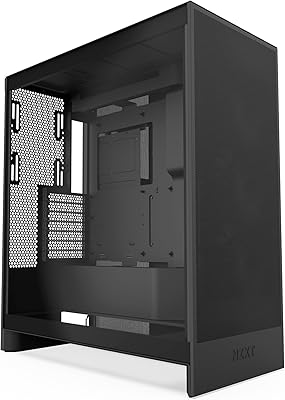
NZXT H7 Flow 2024 Mid-Tower ATX Case
87%
92%
Cooling Performance
88%
Build Quality
91%
Airflow Optimization
85%
Ease of Installation
80%
Cable Management
More
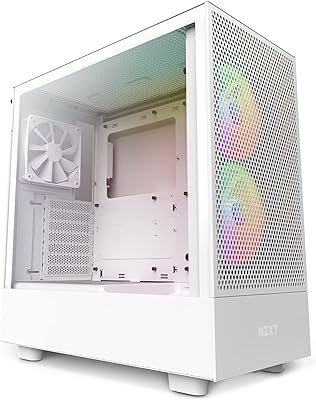
NZXT H5 Flow RGB Compact ATX Mid-Tower PC Gaming Case
87%
92%
Cooling Performance
89%
Airflow Efficiency
87%
Build Quality
85%
Ease of Cable Management
90%
Design & Aesthetics
More
NZXT H9 Flow RGB
NZXT H9 Flow RGB
83%
92%
Cooling Performance
89%
Airflow Optimization
85%
Cable Management
91%
Build Quality
88%
Ease of Setup
More
NZXT Kraken Elite 360 RGB 2024
82%
83%
Thermal Performance
88%
Noise Level
93%
LCD Display Quality
87%
Build Quality & Materials
91%
RGB Lighting
More
NZXT H3 Flow Micro-ATX Case
86%
94%
Cooling Performance
88%
Build Quality
85%
Space Efficiency
90%
GPU Compatibility
82%
Ease of Setup
More
NZXT H6 Flow RGB Mid-Tower Case
87%
91%
Cooling Performance
88%
Build Quality
85%
Ease of Installation
92%
Cable Management
89%
Design & Aesthetics
More
NZXT H9 Flow ATX Mid-Tower PC Gaming Case
86%
92%
Cooling Performance
87%
Build Quality
89%
Cable Management
85%
Ease of Installation
90%
Aesthetics/Design
More
NZXT N7 B650E
NZXT N7 B650E
89%
97%
CPU Compatibility
94%
Memory Support
91%
Build Quality
89%
Thermal Performance
88%
Ease of Installation
More
Roku Ultra 2024
Roku Ultra 2024
83%
93%
Streaming Performance
88%
Picture Quality
91%
Remote Quality
86%
Wi-Fi Connectivity
84%
Audio Performance
More
NZXT N7 Z790
NZXT N7 Z790
89%
96%
CPU Compatibility
94%
Memory Support
92%
Build Quality
88%
Installation Ease
90%
Connectivity Options
More

FAQ

You can fit up to eight 120mm fans in total if you use the two optional spots on the PSU shroud. It is a significant upgrade in cooling capacity compared to older mid-towers.

No, this specific model relies on your motherboard headers or a separate controller if you want to manage speeds for multiple fans. It keeps the initial price lower while giving you the freedom to choose your own hub.

Most modern triple-fan GPUs will fit, but you should check your card's length if you plan on installing a thick liquid cooling radiator in the front. There is plenty of width for those beefy coolers, though.

They aren't too bad, as the mesh is fine enough to stop a lot of hair and dust. A quick blast of compressed air or a light vacuuming from the outside usually keeps this mid-tower looking fresh.

Not for the tempered glass side. It uses a tool-less pop-off mechanism that makes it very easy to jump in for quick hardware tweaks or cleaning.

The standard version of this ATX case doesn't include a vertical mount, but it is compatible with separate vertical GPU mounting kits if you want that look. Just be mindful of how close the glass sits to the fans.

Yes, the top mounting area is offset away from the motherboard. This design helps prevent the radiator and fans from bumping into tall RGB memory sticks or bulky motherboard heatsinks.

It is a clever way to feed fresh air directly to your graphics card. By mounting fans on that shroud, you pull air from the bottom of the case and push it straight up into the GPU fans.

It is a USB 3.2 Gen 2 port, so it supports speeds up to 10Gbps. Just make sure your motherboard has the specific internal header needed to connect it.

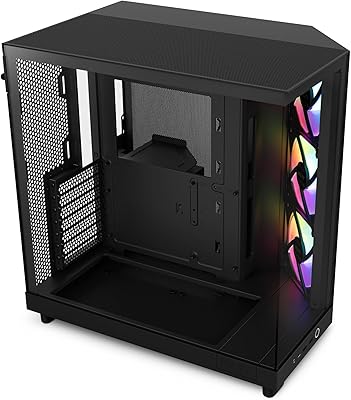
This particular version is the black model, which has a very sleek, stealthy look. There is usually a white version available if you are going for a brighter, clean-room aesthetic.