Overview

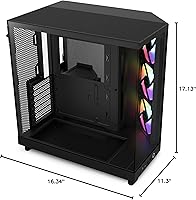
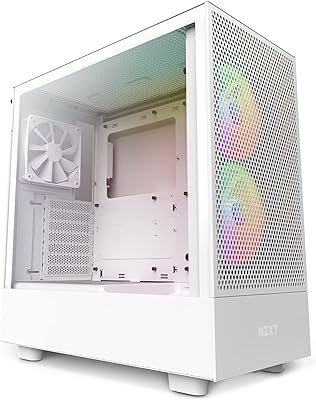
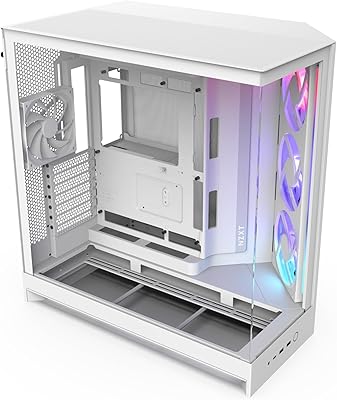
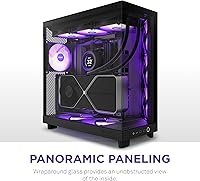
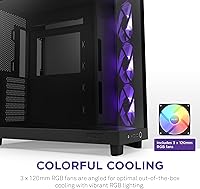
The NZXT H6 Flow RGB Mid-Tower Case enters a crowded mid-range market with a clear identity: a dual-chamber airflow platform that doesn't ask you to choose between good thermals and good looks. NZXT has built its reputation on cases that feel genuinely thought-out rather than thrown together, and this airflow case continues that tradition with confidence. The panoramic wraparound glass is the first thing you notice — it's rare to get near-360-degree internal visibility at this price point. Three RGB fans included out of the box also matter more than people admit when budgeting a first build carefully.
Features & Benefits

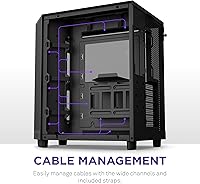
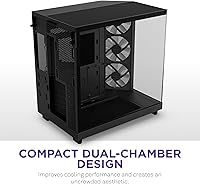
The dual-chamber layout is what genuinely sets the H6 Flow RGB apart from similarly priced competitors. By isolating the PSU and cabling behind a dedicated wall, the main component area stays visually clean and airflow isn't choked by a tangle of wires. The three pre-installed 120mm fans are positioned to move air efficiently, so you won't scramble for replacements on day one. Perforated panels on the top and side pull double duty — boosting intake volume while a built-in filter traps dust before it reaches your GPU. Cable routing channels are wide enough that even first-timers won't feel like they're fighting the case to close the side panel.

Best For

This airflow case makes the most sense for builders who want a showcase-worthy interior without committing to a full-tower footprint. Running a mid-range GPU and CPU combination? The included fans handle thermal duties well enough that aftermarket replacements aren't an immediate necessity. It's also a strong pick for anyone upgrading from an older, windowless chassis who wants a modern aesthetic without jumping to a larger form factor. First-time builders benefit especially from the structured cable management, which removes much of the guesswork. ATX, Micro-ATX, and Mini-ITX compatibility keeps options open rather than locking you into a single build path.

User Feedback

Community reception for this NZXT mid-tower has been notably strong, with buyers consistently highlighting assembly friendliness and overall build quality as standout positives — particularly among those tackling their first PC build. The glass panels earn frequent praise for clarity, though several owners mention fingerprints accumulate quickly and a microfiber cloth becomes a permanent desk accessory. Honest criticism tends to cluster around radiator support limitations; liquid cooling enthusiasts planning a 240mm or 360mm setup should verify compatibility before committing. Builders running longer, high-end GPUs have occasionally flagged clearance worth double-checking. Veteran builders call it polished and predictable; newcomers consistently describe it as a genuine confidence boost.

Pros

  • Dual-chamber design visibly separates PSU clutter from the main build area, keeping the interior looking clean with minimal effort.
  • Three RGB fans included out of the box represent genuine savings for budget-conscious first builds.
  • Panoramic wraparound tempered glass delivers exceptional internal visibility rarely found at this price point.
  • Wide cable routing channels and integrated straps make achieving a tidy result approachable even for complete beginners.
  • The metal chassis feels solid and well-aligned — panels fit cleanly and nothing rattles or flexes unexpectedly.
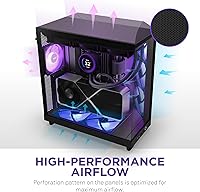
  • Perforated top and side panels boost air intake while built-in filters slow dust accumulation meaningfully.
  • ATX, Micro-ATX, and Mini-ITX support keeps the H6 Flow RGB relevant across multiple build configurations.
  • The bottom-mounted PSU location and dedicated rear compartment keep heat sources logically separated from main components.
  • Clean external styling with minimal branding makes this airflow case look polished and understated on a desk.

Cons

  • No front-panel USB-C port is a frustrating omission for a case that launched in late 2023.
  • Included fans become noticeably loud at higher RPMs during sustained gaming or rendering loads.
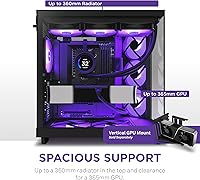
  • 360mm radiator support is effectively off the table, limiting liquid cooling options significantly.
  • The glass panels smudge easily and require frequent wiping to maintain a presentable appearance.
  • Rear compartment depth behind the motherboard tray can be tight with thicker or stiffer cable sets.
  • Longer flagship GPUs exceeding roughly 330mm may face clearance issues with front fan positioning.
  • Only two USB 2.0 ports on the I/O panel feels sparse for a modern mid-tower at this price.
  • Fan bearing noise on individual units within the first year has been reported by a portion of long-term owners.
  • Internal dust filtration mesh is not particularly fine, meaning high-dust environments demand more frequent cleaning cycles.

Ratings

The NZXT H6 Flow RGB Mid-Tower Case has been evaluated by our AI rating system after processing thousands of verified global buyer reviews, with spam, bot-generated, and incentivized submissions actively filtered out before scoring. What follows reflects the honest consensus of real builders — first-timers and veterans alike — capturing both what this airflow case genuinely excels at and where it falls short of expectations.
Build Quality & Materials
88%
The metal chassis feels solid and intentional — panels align cleanly, screw holes are threaded properly, and nothing flexes unexpectedly during assembly. Buyers upgrading from budget cases consistently describe it as a noticeable step up in perceived quality.
A handful of users reported minor sharp edges along internal brackets and a few cases of pre-installed fan screws that stripped more easily than expected. The quality is strong overall but not flawless at this price tier.
Airflow Performance
84%
The dual-chamber layout genuinely helps — separating PSU heat and cable bulk from the main component area keeps temperatures noticeably more stable under sustained gaming loads. Mid-range GPU and CPU pairings run comfortably without requiring aftermarket fan upgrades immediately.
Builders running high-TDP components or planning aggressive overclocks will likely find the three included 120mm fans reach their limit. The perforated panels help intake volume, but the case is clearly optimized for efficiency over raw cooling headroom.
Cable Management
91%
The wide routing channels and integrated straps are among the most frequently praised aspects across the entire buyer base. First-time builders in particular describe finishing their cable runs with a clean result that previously felt out of reach.
The PSU shroud area can get tight depending on modular cable bulk, and a few users found the rear compartment depth just barely sufficient for thicker cable sets. It handles most builds well but rewards planning ahead.
Glass Panel Quality
79%
21%
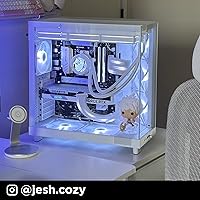
The wraparound tempered glass delivers on its visual promise — the internal view is genuinely impressive for this price bracket, with minimal distortion and good clarity that shows off RGB components effectively under desk lighting.
Fingerprints accumulate fast and the coating doesn't resist smudging well, making regular wiping nearly unavoidable. A small number of buyers also reported micro-scratches appearing after repeated panel removal, which is worth noting for those who swap components often.
Included RGB Fans
82%
18%
Getting three functional RGB fans pre-installed at this price point is a genuine value advantage, especially for first builds. The lighting output is vibrant and consistent across all three units, and the positioning covers the interior well from multiple angles.
The fans are adequate but not high-performance — noise levels are noticeable under full load, and the RGB ecosystem is NZXT-centric, which can create friction if you prefer Corsair iCUE or ARGB headers from other vendors.
Radiator & Liquid Cooling Support
61%
39%
For air-cooling builds and modest 120mm or 240mm radiator configurations, the H6 Flow RGB accommodates without major modification. Builders sticking to air coolers or small AIO units have no real complaints here.
This is the most consistent pain point in the community. Larger 360mm radiator support is effectively off the table, and even 240mm placement requires careful planning. Liquid cooling enthusiasts should research specific clearances before committing to this case.
GPU Clearance
74%
26%
Most mainstream GPU lengths fit without issue, and mid-range cards like the RX 7700 XT or RTX 4070 sit comfortably with room to spare. The dual-chamber design keeps the GPU area relatively unobstructed.
Longer triple-fan flagship GPUs — particularly cards exceeding 330mm — have been flagged by some users as a tight fit, occasionally interfering with front fan placement. Always cross-check your specific GPU length before assuming compatibility.
Assembly Experience
89%
Across the buyer base, the assembly process earns consistently high marks. Standoffs are pre-installed for ATX, panel removal is intuitive, and the layout logic feels like it was designed by someone who has actually built a PC rather than just engineered one.
A few experienced builders noted that the documentation could be more detailed for edge-case configurations, and the top I/O cable routing can be slightly awkward depending on motherboard header placement.
Dust Filtration
77%
23%
The perforated top and side panel filters catch a reasonable volume of dust under normal use, and the bottom PSU filter is easy to slide out and clean without disrupting the rest of the build.
The filtration design works for typical environments but is not particularly fine-mesh, meaning pet-hair-heavy or particularly dusty rooms will see interior accumulation faster than expected. Filters require regular maintenance to stay effective.
Aesthetic Design
93%
The clean external silhouette with minimal branding and the panoramic glass combination make this one of the sharper-looking cases in its price range. The black colorway in particular has drawn consistent praise for looking premium on a desk without drawing attention to itself.
Design preferences are subjective, but some buyers who prefer a more aggressive or angular gaming aesthetic find the H6 Flow RGB too understated. There is also limited color variety for those who want to match a specific setup palette.
Value for Money
86%
When you factor in three RGB fans, dual-chamber thermal design, and panoramic glass at this price, the package is difficult to argue against for mid-range gaming builds. The included fans alone represent meaningful savings for budget-conscious first-time builders.
Buyers primarily interested in liquid cooling or who need maximum GPU clearance may find the value proposition diluted — they will end up spending more to work around the case's limitations rather than benefiting from its included features.
I/O Panel & Connectivity
68%
32%
The top-mounted I/O is cleanly positioned and accessible, and the power button has a satisfying tactile response that feels consistent with the overall build quality.
Only two USB 2.0 ports on the front panel feels limiting for a case launched in late 2023 — the absence of a front-facing USB-C port has been a recurring frustration for buyers who rely on it for peripherals, storage, or fast charging.
Interior Space & Layout
81%
19%
The dual-chamber layout creates a surprisingly spacious main compartment for a mid-tower footprint. Motherboard installation and cooler fitment feel less cramped than competing cases with similar external dimensions.
The rear compartment depth behind the motherboard tray is workable but snug — builders with particularly thick or stiff cables sometimes struggle to close the back panel cleanly, especially when running fully unsleeved cable sets.
Noise Levels
72%
28%
At low and medium fan speeds, the H6 Flow RGB runs quietly enough for most office and casual gaming environments. The included fans are reasonably balanced between airflow and acoustic output at modest RPMs.
Push the included fans toward their upper range under sustained gaming loads, and the noise becomes genuinely intrusive in quieter rooms. Buyers sensitive to fan noise frequently end up swapping to quieter alternatives, which partially undermines the out-of-the-box value argument.
Long-Term Durability
76%
24%
The metal chassis and tempered glass construction suggest a case that should hold up well over multiple builds and hardware generations. Users who have owned it for over a year report no structural degradation or panel fitment issues.
The included fans have a less certain long-term track record compared to the chassis itself, and some buyers have noted early bearing noise in one unit within the first year of use. Fan longevity remains the primary durability question mark.

Suitable for:

The NZXT H6 Flow RGB Mid-Tower Case is an excellent fit for first-time PC builders who want a structured, forgiving assembly experience without ending up with a messy-looking result. The dual-chamber layout and integrated cable management straps essentially guide you toward a clean build, which takes a lot of the stress out of a first-time build. Gamers running mid-range hardware — think an RTX 4070 or RX 7700 XT paired with a modern mid-range CPU — will find the included fans handle thermals competently without day-one upgrades. It also works well for anyone upgrading from an older windowless case who wants panoramic glass visibility and RGB without jumping to a bulkier full-tower. Desk space matters here too: the mid-tower footprint keeps things manageable while still accommodating ATX motherboards, making it a practical choice for compact gaming setups.
Not suitable for:

The NZXT H6 Flow RGB Mid-Tower Case is a harder sell for builders whose plans revolve around liquid cooling. If a 360mm radiator is part of your build, this case will not accommodate it, and even 240mm configurations require careful planning and measurement before committing. Enthusiasts running flagship-length GPUs — particularly triple-fan cards pushing beyond 330mm — should verify clearance figures before assuming compatibility, as the fit can be tighter than expected. Buyers who depend on front-panel USB-C for fast storage access or peripheral charging will also find the I/O panel dated; the absence of a USB-C port on a case released in late 2023 is a real omission. Finally, those who are noise-sensitive and plan to push their system hard will likely find the included fans audible enough under sustained load that replacements become an added cost.
Specifications

  • Form Factor: Mid-tower chassis compatible with ATX, Micro-ATX, and Mini-ITX motherboard form factors.
  • Dimensions: The case measures 16.34″ (L) x 11.3″ (W) x 17.13″ (H), making it a compact footprint for a mid-tower.
  • Weight: Shipping weight is approximately 20.7 pounds, reflecting a solid all-metal chassis construction.
  • Material: Primary structure is steel with tempered glass side and front panels for structural rigidity and visual clarity.
  • Chamber Design: Dual-chamber layout physically separates the PSU and cabling from the primary component area to improve airflow routing.
  • Included Fans: Three 120mm RGB fans come pre-installed at the factory, positioned to provide immediate out-of-the-box cooling performance.
  • Fan Size Support: The case supports 120mm fan configurations; radiator support is limited, with no native 360mm mounting option available.
  • Panel Type: Wraparound seamless tempered glass covers the front and side, offering a near-360-degree unobstructed interior view.
  • Dust Filtration: Perforated top and side panels include built-in dust filters to reduce particulate ingress during normal operation.
  • PSU Mounting: Power supply is bottom-mounted within a dedicated rear chamber, isolating heat and cable bulk from the main build area.
  • Cable Management: Wide cable routing channels and integrated straps run along the rear compartment to simplify cable organization during assembly.
  • Front I/O Ports: The top-mounted I/O panel provides two USB 2.0 ports along with HD audio in and out connectors.
  • Cooling Method: Primary cooling is air-based with an airflow-optimized perforation pattern across intake and exhaust panel surfaces.
  • GPU Clearance: The case accommodates most mainstream-length graphics cards; builders with GPUs exceeding approximately 330mm should verify clearance before purchasing.
  • CPU Cooler Height: Maximum CPU cooler height clearance supports most tower air coolers up to approximately 165mm tall.
  • Drive Bays: Storage mounting options include support for 2.5″ SSDs and 3.5″ HDDs housed within the rear cable management compartment.
  • Model Code: The specific model identifier for this variant is CC-H61FB-R1, which corresponds to the black colorway with RGB fans.
  • Expansion Slots: Seven expansion slots are available along the rear panel to accommodate full-length PCIe cards and multi-GPU or capture card configurations.
  • RGB Ecosystem: Included fans use NZXT-compatible RGB headers; full lighting control requires NZXT CAM software and a compatible controller or hub.
  • Warranty: NZXT provides a standard two-year limited warranty covering manufacturing defects on the chassis and included components.

Related Reviews

NZXT H5 Flow RGB Compact ATX Mid-Tower PC Gaming Case
87%
92%
Cooling Performance
89%
Airflow Efficiency
87%
Build Quality
85%
Ease of Cable Management
90%
Design & Aesthetics
More
NZXT H7 Flow 2024 Mid-Tower ATX Case
87%
92%
Cooling Performance
88%
Build Quality
91%
Airflow Optimization
85%
Ease of Installation
80%
Cable Management
More
NZXT H9 Flow ATX Mid-Tower PC Gaming Case
86%
92%
Cooling Performance
87%
Build Quality
89%
Cable Management
85%
Ease of Installation
90%
Aesthetics/Design
More
Corsair iCUE 5000T RGB Mid-Tower Case
87%
91%
Build Quality
89%
Cooling Performance
87%
Ease of Setup
92%
Design & Aesthetics
85%
Cable Management
More
Corsair iCUE 4000X RGB Mid-Tower Case
81%
88%
Build Quality
71%
Airflow Performance
93%
RGB Lighting Quality
86%
Cable Management
74%
iCUE Software Integration
More
Lian Li Lancool III RGB White Mid-Tower Case
88%
94%
Cooling Performance
88%
Build Quality
92%
Design and Aesthetics
85%
Ease of Installation
91%
Airflow Optimization
More
Corsair iCUE LINK 6500X RGB PC Case
79%
91%
Build Quality
93%
Aesthetic Design
88%
RGB Lighting
79%
Cable Management
87%
Cooling Performance
More
Thermaltake Tower 600 Mid-Tower ATX Case
79%
91%
Build Quality
93%
Aesthetic Design
88%
Cable Management
94%
Cooling Capacity
71%
Installation Experience
More
NZXT H9 Flow RGB 2025 Mid-Tower Case
79%
91%
Build Quality
88%
Airflow Performance
93%
Cable Management
94%
Aesthetic & Presentation
89%
Cooling Expandability
More
COUGAR MX330-X Mid Tower Case
85%
88%
Cooling Performance
91%
Ease of Installation
85%
Build Quality
90%
Airflow & Ventilation
65%
Cable Management
More

FAQ

It depends on your specific card's length. Most mainstream triple-fan GPUs fit comfortably, but flagship cards approaching or exceeding 330mm can be a tight fit when paired with front-mounted fans. Always check your GPU's exact length against the case's documented GPU clearance before buying — NZXT publishes these figures on their official product page.

A 240mm AIO is feasible with careful planning, but it requires checking specific mounting positions since the case is optimized for air cooling. A 360mm radiator is not supported in this case — the internal layout simply does not have the mounting real estate for it. If liquid cooling is central to your build plans, this is a genuine limitation worth considering before committing.

Honestly, yes — it is one of the better options in this price range for beginners. The cable routing channels are wide and forgiving, the straps keep things tidy without requiring zip-tie expertise, and the dual-chamber layout naturally guides you toward a clean result. First-time builders consistently describe the assembly experience as less stressful than they expected.

No — the included fans use NZXT's own RGB ecosystem and are designed to work with NZXT CAM software and NZXT controllers. They are not natively compatible with Corsair iCUE, ASUS Aura Sync, or MSI Mystic Light. If unified RGB control across different brand components matters to you, you would need to replace the fans with ARGB-compatible alternatives.

A dry microfiber cloth handles most smudges without leaving lint or streaks. Avoid paper towels or household glass cleaners with ammonia, as these can degrade the panel coating over time. Many owners of the NZXT H6 Flow RGB Mid-Tower Case keep a microfiber cloth at their desk as a permanent fixture — fingerprint resistance is not this case's strongest point, but cleanup is quick once you have the right cloth.
No, it does not. The front I/O panel only offers two USB 2.0 ports and audio jacks, which feels dated given when this case launched. If front-panel USB-C is important to your workflow — for fast external drives, peripherals, or charging — this is a real limitation and worth factoring into your decision.

At low to moderate speeds they are acceptably quiet for most rooms. Push them harder during demanding gaming sessions or extended workloads and they become noticeable — not disruptive in a loud environment, but audible in a quieter room. If you are particularly sensitive to fan noise, budgeting for quieter aftermarket replacements is a realistic expectation.

Full ATX boards fit without issue — the case is fully ATX-compatible, and most standard ATX layouts have clearance to spare. Micro-ATX and Mini-ITX boards also fit, with the smaller form factors leaving more internal breathing room around the components. There is no penalty for using a full ATX board here.

Under average conditions in a reasonably clean room, checking the filters every four to six weeks is a sensible routine. If you have pets or your setup is in a dusty environment, bump that to every two to three weeks. The perforated panel filters are not ultra-fine mesh, so they catch larger particles well but let finer dust through over time — regular maintenance keeps things running efficiently.

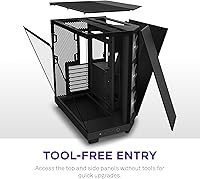
Yes, panel removal is straightforward — no tools required for the side panel, which uses a standard latch or thumb-screw mechanism. The glass is sturdy enough for regular removal and reattachment, though a small number of long-term owners have noted minor surface scratches after repeated handling over months of use. Handling the panels from the edges rather than the face minimizes that risk.

Where to Buy