Overview

The NZXT Capsule Elite landed in January 2025 as a focused entry into a market already packed with solid competitors, and it's made a quick impression — sitting at #31 in Computer Microphones on Amazon with over 950 ratings averaging 4.3 stars. That's a strong debut for any new peripheral. This USB mic is built for PC gamers and streamers who want noticeably better audio without the overhead of an audio interface or DAC. It won't replace a studio condenser, and it's not trying to. Think of it as a practical, well-built desk mic for people whose audio needs revolve around gaming sessions, live streams, and late-night Discord calls.

Features & Benefits

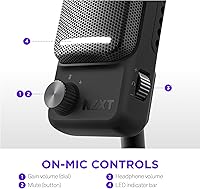
Plug it in and it works — no drivers, no setup menus, no audio interface required. That alone removes a barrier that puts off a lot of first-time mic buyers. The built-in mute button earns its place quickly; cutting your audio mid-stream without fumbling through software is more useful than it sounds until you actually need it. Audio capture runs at a 60 dB signal-to-noise ratio, which produces clean, low-hiss voice pickup in a typical room environment — solid for streaming and calls, though not quite broadcast studio territory. At 898g, the Capsule Elite feels reassuringly sturdy on a desk without being cumbersome, and its compact dimensions keep it from crowding your workspace.

Best For

This desktop microphone makes the most sense for PC gamers upgrading from a headset boom mic who want cleaner voice audio without committing to a full audio chain. If your current setup involves shouting into a headset mic on Twitch or YouTube and you want something purpose-built for voice, this is a logical, low-friction step up. It also works well for home office use — the dedicated mute button alone is worth something during back-to-back video calls. And if you already own NZXT cases, coolers, or other hardware, the visual cohesion of matching gear is a real, if secondary, bonus.

User Feedback

Buyers consistently praise how quick the setup is — most reviews mention being up and running in under a minute. Voice clarity gets strong marks across the board, particularly from users switching away from headset mics. On the downside, a recurring complaint involves the stand feeling less stable than the mic's price point suggests, and several reviewers wish the USB cable ran longer. Those who cross-shopped against the HyperX SoloCast noted the performance gap is narrow. NZXT CAM software integration divides opinion — some find it useful, others skip it entirely. The mute button, though, draws near-universal approval for its responsiveness during live use.

Pros

  • Plug-and-play USB setup works instantly — no drivers, no configuration, no wasted time before a session.
  • The physical mute button cuts audio immediately and reliably without producing any audible pop or click.
  • Build quality punches above its weight class — the metal body feels genuinely premium in hand and on the desk.
  • Voice clarity is a clear step up from any headset boom mic in normal room conditions.
  • Compact dimensions keep desk real estate free without sacrificing a stable, grounded presence.
  • The NZXT Capsule Elite integrates cleanly into existing NZXT setups for buyers who care about visual consistency.
  • No audio interface required — the entire upgrade path is a single USB cable.
  • Well-suited for Discord, OBS, Microsoft Teams, and all major streaming platforms without any compatibility workarounds.
  • At 4.3 stars across nearly a thousand reviews, buyer satisfaction skews consistently positive for core use cases.
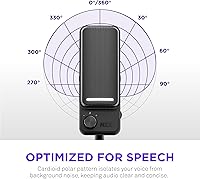
  • Cardioid pickup pattern keeps side and rear noise rejection solid in typical home desk environments.

Cons

  • No physical gain knob means adjusting input levels requires diving into software or OS settings mid-session.
  • The included stand has been widely criticized for feeling flimsy relative to the mic body it is supposed to support.
  • Cable length is too short for setups where the PC tower sits on the floor or at any distance from the desk.
  • NZXT CAM software integration adds startup overhead that most buyers will disable or ignore entirely.
  • No visual mute indicator bright enough to confirm status at a glance from a typical streaming distance.
  • Long-term durability data is limited — the mic only launched in January 2025, so multi-year reliability is unproven.
  • Single color option and no RGB variant limits appeal for buyers wanting more personalization in their setup.
  • Audio performance alone may not justify the price premium when compared to established rivals at a lower cost.
  • No detachable cable design makes cable management less flexible for users with custom desk routing preferences.

Ratings

The NZXT Capsule Elite has been put through its paces by our AI rating engine, which analyzed hundreds of verified buyer reviews from global markets while actively filtering out incentivized, bot-generated, and low-credibility submissions. What emerges is an honest, data-grounded picture of where this desktop microphone genuinely excels and where real users have run into friction. Scores reflect both the enthusiastic praise and the recurring frustrations that show up consistently across independent purchaser accounts.

Ease of Setup
94%
Buyers repeatedly highlight how fast this USB mic gets them up and running — plug it into a USB Type-A port and it is recognized instantly by Windows without any driver installation. For gamers and streamers who just want to start a session without troubleshooting, that frictionless experience carries real weight.
A small number of users on older systems or specific USB hubs reported occasional recognition hiccups, though these appear to be edge cases rather than a systemic issue. There is no companion quick-start guide included, which a handful of first-time mic buyers found mildly frustrating.
Audio Clarity
81%
19%
Voice pickup is noticeably cleaner than a typical headset boom mic, with a 60 dB signal-to-noise ratio that keeps background hiss low enough for streaming and Discord use without post-processing. Reviewers switching from entry-level headset mics consistently describe the jump in vocal presence as immediately obvious.
Against dedicated condenser mics in the same price range, the audio ceiling becomes apparent — room ambience and breath sounds can creep in at higher input gain settings. It is not a mic for acoustic musicians or anyone recording in an untreated room expecting broadcast-quality results.
Build Quality
88%
At just under 900 grams, the Capsule Elite has a satisfying heft that signals premium construction — it does not wobble or shift during use the way lighter plastic mics tend to. The metal body finish feels consistent with NZXT's broader hardware aesthetic, and nothing creaks or feels fragile.
The included stand has drawn repeated criticism for not matching the solid feel of the mic body itself, with some buyers reporting it feels less confident on slick desk surfaces. A few users noted they replaced the stand within weeks of purchase to get the stability they expected.
Mute Button
91%
The physical mute button is one of the most praised features in the review pool — it responds immediately, cutting audio without producing a pop or audible click that bleeds into a live stream. For streamers who need to step away mid-session or handle background noise fast, this reliability matters more than any spec on paper.
There is no LED ring or clear visual indicator bright enough to confirm mute status from a typical viewing distance, which caused a few streamers to accidentally broadcast while thinking they were muted. Better visual feedback would remove that anxiety entirely.
Value for Money
74%
26%
For buyers upgrading from a headset mic or a budget USB option, the Capsule Elite delivers a noticeable quality step that feels justified at its price point. The build quality and plug-and-play convenience together make it feel like a purposeful purchase rather than a compromise.
Cross-shoppers comparing it directly to the HyperX SoloCast or even older Blue Yeti models frequently question whether the premium is fully earned on audio performance alone. The value equation depends heavily on how much the NZXT branding and ecosystem coherence matter to the individual buyer.
Stand Stability
58%
42%
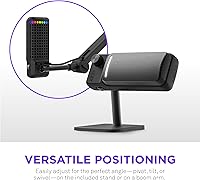
The compact base keeps the overall desk footprint small, and for users with clean, flat desk surfaces it functions adequately during normal use. The stand design does complement the mic aesthetically and keeps cable management tidy.
On textured desk mats or near vibration sources like mechanical keyboards, the stand struggles to hold its position reliably. This is one of the most consistent pain points in the review pool — a significant number of buyers purchased a third-party boom arm or weighted stand replacement shortly after unboxing.
Cable Length & Quality
62%
38%
The included USB cable feels sturdy and does not show the cheap braiding issues seen on some competing mics in this category. For desktop setups where the PC tower sits close to the desk, the length works without issue.
Multiple reviewers flagged the cable as too short for setups where the tower sits on the floor or at any distance from the desk surface. There is no USB-C option or detachable cable design, which limits flexibility for users who prefer to manage their own cable routing.
Noise Rejection
72%
28%
The cardioid pickup pattern does a reasonable job of rejecting sound coming from behind and to the sides, which helps in shared living spaces or rooms with moderate ambient noise. Keyboard and mouse click bleed is relatively contained at normal gain settings.
In louder environments — open-plan offices, households with background TV noise, or rooms with hard surfaces — the mic picks up more room sound than users anticipate. It is not a mic that compensates for poor acoustic conditions the way some software-enhanced alternatives do.
Software Integration
66%
34%
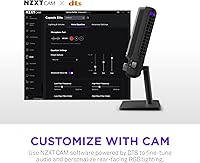
Users already running NZXT CAM for system monitoring find the mic integration convenient, with gain and EQ controls accessible in one familiar interface. For those already in the NZXT ecosystem, it removes the need to install a separate audio utility.
Buyers who do not use NZXT CAM — which is the majority of purchasers — find the software either redundant or actively intrusive at startup. Several reviewers explicitly noted they uninstalled it and relied on Windows audio settings instead, which means the software layer adds no practical value for a large segment of users.
Compatibility
86%
USB Type-A connectivity covers virtually every desktop PC configuration without needing adapters, and the mic is recognized natively by all major streaming and communication apps including OBS, Discord, and Microsoft Teams. No compatibility complaints surfaced in the mainstream review pool.
Mac compatibility, while technically functional, is not officially emphasized and a small number of Mac users reported minor gain inconsistency. Console users on PS5 or Xbox should note this mic is PC-optimized and results may vary on console USB ports.
Aesthetics & Design
83%
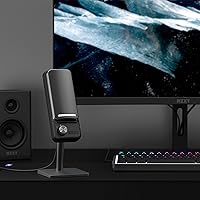
The all-black cylindrical form factor photographs well in streaming setups and blends into most desk environments without looking out of place. NZXT has carried over the clean industrial design language from its PC cases, which appeals strongly to users who care about visual consistency.
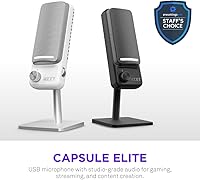
There is currently only a single color option available, which limits personalization compared to some competing mics that offer white or limited-edition variants. Users who prefer RGB lighting accents in their setup will find this mic noticeably understated.
Portability
69%
31%
At under two pounds with a compact form, this desktop microphone is easy enough to pack into a bag for LAN events or temporary setups away from a home desk. The rigid build means it survives transport without needing a dedicated case.
There is no carrying pouch or protective case included, which is a minor oversight at this price point for buyers who travel with their gear. The fixed stand design also makes it slightly bulkier to pack than mics with detachable or foldable bases.
Gain Control
63%
37%
Default gain settings are calibrated reasonably well for typical desktop voice use, and most buyers report acceptable levels without needing to adjust anything manually. For casual users this set-and-forget approach works fine.
There is no physical gain knob on the mic body itself, meaning adjustments require going into Windows audio settings or NZXT CAM — a friction point that competing mics in this range address with direct hardware controls. Power users find this omission frustrating during live sessions.
Longevity & Durability
77%
23%
The metal construction and weighty build suggest this mic is engineered to last through years of regular desk use, and early adopters since the January 2025 launch have not reported any hardware degradation or connector wear issues in their feedback.
With only a few months of real-world data available given the recent launch date, long-term durability remains unproven. Buyers making a purchase decision based on multi-year reliability are essentially betting on build quality signals rather than established track record.

Suitable for:

The NZXT Capsule Elite is a strong match for PC gamers and streamers who are tired of their headset mic holding back their audio quality but have no interest in learning the ropes of audio interfaces, XLR cables, or recording software. If you spend meaningful time on Twitch, YouTube, or in Discord voice channels and want your voice to sound noticeably cleaner without any technical overhead, this USB mic delivers that upgrade with minimal friction. Home office workers who sit through video calls all day will also find real value here — having a dedicated desk mic with a reliable physical mute button changes the rhythm of back-to-back meetings in ways a headset simply cannot match. It fits naturally into NZXT-heavy setups where visual consistency matters, and its compact footprint means it earns desk space without demanding it. For anyone making their first jump from a boom mic to a standalone microphone, this is a well-built, approachable starting point that does not require a manual to use.

Not suitable for:

The NZXT Capsule Elite is not the right call for anyone whose audio needs extend beyond clean voice capture for gaming or communication. Podcasters recording in untreated rooms, musicians tracking acoustic instruments, or anyone comparing this side-by-side with a condenser mic and audio interface will hear the 60 dB SNR ceiling fairly quickly — it is a respectable spec for its category, not a professional one. If physical gain control is important to your workflow, the absence of a hardware knob on the mic body will frustrate you during live sessions when you need fast adjustments. Buyers on a tight budget who are cross-shopping against the HyperX SoloCast may find it harder to justify the price delta if raw audio performance is their only metric. Mac users or anyone hoping to use this with a gaming console should also approach with caution, as the experience is optimized for Windows PC environments.

Specifications

  • Brand: Manufactured by NZXT, a PC hardware company known for cases, coolers, and gaming peripherals.
  • Model Number: The official model identifier is AP-PUMIC-B1.
  • Connectivity: Connects via USB Type-A, compatible with standard desktop and laptop USB ports without adapters.
  • Plug-and-Play: Requires no driver installation and is recognized natively by Windows as a USB audio device.
  • Pickup Pattern: Cardioid polar pattern captures sound primarily from the front while rejecting noise from the sides and rear.
  • Channels: Records in mono (single channel), optimized for voice-forward applications like streaming and communication.
  • Signal-to-Noise Ratio: Rated at 60 dB, delivering low background hiss suitable for voice capture in typical desktop environments.
  • Mute Function: Features a built-in physical mute button that silences audio output without producing audible noise artifacts.
  • Weight: The microphone body weighs 898g (1.98 lbs), providing a stable, grounded desk presence.
  • Dimensions: Measures 3.82 x 3.82 x 9.49 inches, offering a compact cylindrical footprint suited to most desk setups.
  • Color: Available in Black only as of its January 2025 launch date.
  • Compatible Devices: Designed and optimized for use with Windows-based personal computers.
  • Software Support: Optional integration with NZXT CAM software allows gain and EQ adjustments through a familiar NZXT interface.
  • Recommended Use: Intended primarily for PC gaming, live streaming, podcasting, and video call communication.
  • UPC: The product UPC is 810074845595, corresponding to the black variant.
  • Amazon Ranking: Holds a Best Sellers Rank of #31 in the Computer Microphones category as of early 2025.
  • Average Rating: Rated 4.3 out of 5 stars based on 957 verified ratings on Amazon at time of review.
  • Release Date: First made available for purchase on January 28, 2025.
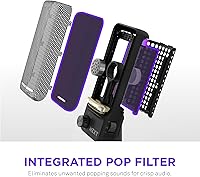
  • Included Components: Package includes the microphone unit and its integrated desktop stand; no boom arm or pop filter is included.
  • Cable Type: Ships with a fixed USB Type-A cable; the cable is not detachable or field-replaceable by the user.

Related Reviews
NZXT Capsule Mini USB Microphone
85%
92%
Audio Quality
85%
Build Quality
89%
Usability & Setup
90%
Design & Compactness
80%
Software Experience (NZXT CAM)
More
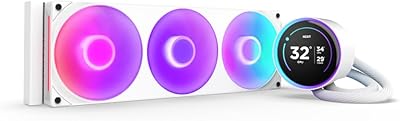
NZXT Kraken Elite 280 RGB
85%
94%
Cooling Performance
88%
RGB Lighting Customization
90%
Noise Level
75%
Installation Ease
70%
Display Visibility
More
NZXT Kraken Elite 360 RGB 2024
82%
83%
Thermal Performance
88%
Noise Level
93%
LCD Display Quality
87%
Build Quality & Materials
91%
RGB Lighting
More
INTENSE ELITE Orient Elite Woods Eau de Parfum for Men 100mL
85%
92%
Longevity
89%
Scent Complexity
87%
Versatility for Day & Night
91%
Value for Money
82%
Packaging Quality
More
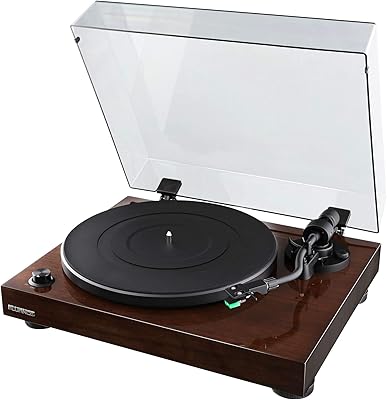
Fluance RT81
Fluance RT81
84%
88%
Sound Quality
74%
Build Quality
83%
Ease of Setup
91%
Cartridge & Stylus Performance
86%
Vibration & Isolation
More
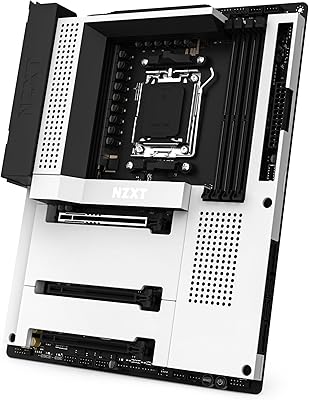
NZXT N7 Z790
NZXT N7 Z790
89%
96%
CPU Compatibility
94%
Memory Support
92%
Build Quality
88%
Installation Ease
90%
Connectivity Options
More
NZXT N7 B650E
NZXT N7 B650E
89%
97%
CPU Compatibility
94%
Memory Support
91%
Build Quality
89%
Thermal Performance
88%
Ease of Installation
More
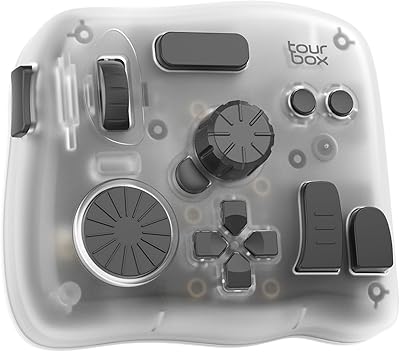
TourBox Elite Plus
TourBox Elite Plus
87%
94%
Ergonomics & Comfort
91%
Workflow Efficiency
88%
Software Integration
90%
Programmability & Customization
85%
Build Quality
More
NEBULA Capsule Air Projector
86%
94%
Portability
88%
Battery Life
91%
Ease of Setup
85%
Brightness in Low Light
80%
Audio Quality
More
Eton Elite Field Radio
85%
91%
Reception Quality
88%
Bluetooth Connectivity
85%
Build Durability
89%
Sound Clarity
78%
Portability
More

FAQ

No, you do not. The Capsule Elite is fully plug-and-play on Windows — just connect it to a USB Type-A port and your PC will recognize it automatically as an audio input device. NZXT CAM software is available if you want extra control over gain and EQ, but it is entirely optional and most users skip it.

It will technically function on a Mac since it uses standard USB audio protocols, but NZXT has optimized it for Windows PC use and does not officially support macOS. Console use on PS5 or Xbox is similarly untested and unsupported, so results on those platforms can be inconsistent.

The mute button cuts your audio signal cleanly and without any audible click or pop bleeding into your stream or call. It is a hardware-level mute, which means it works instantly regardless of what software you have open. The main complaint from users is that the indicator light is not bright enough to confirm mute status from a distance.

The stand works fine on flat, hard desk surfaces for casual use, but it has been a consistent complaint in buyer reviews — many users describe it as noticeably less solid than the mic body itself. If you use a desk mat, plan for heavier sessions, or just want more flexibility in mic positioning, investing in a third-party boom arm is a worthwhile upgrade.

The HyperX SoloCast sits below this desktop microphone in price and is genuinely competitive on core audio quality, which is why some reviewers question the value gap. The Blue Yeti offers more pickup pattern options and a hardware gain knob, making it more versatile for varied recording scenarios. This mic competes on build quality, design coherence, and NZXT ecosystem fit rather than outright audio specs.

Yes, but not through the mic itself — there is no physical gain knob on the body. You would need to adjust input levels through Windows Sound Settings or your streaming application of choice, such as OBS. This is a known limitation that users coming from mics with hardware gain controls tend to notice immediately.

It handles podcasting well in a controlled environment — if you are recording in a quiet room, voice clarity is solid and consistent. Where it shows limitations is in louder or acoustically untreated spaces, where the cardioid pattern alone cannot compensate for significant room noise. For a home studio podcast with some acoustic treatment, it performs comfortably within its category.

The exact cable length is not officially specified, but buyer feedback consistently flags it as shorter than ideal for setups where the PC tower sits on the floor. The cable is fixed and not detachable, so you cannot swap it out for a longer one without using a USB extension cable as a workaround.

At moderate gain settings the cardioid pattern does a reasonable job of keeping keyboard click bleed to a minimum, but it is not immune — louder mechanical switches in close proximity will still be audible to listeners. Positioning the mic closer to your mouth and keeping gain conservative helps reduce this significantly.

You get the microphone itself with the integrated desktop stand and the attached USB cable. There is no pop filter, no boom arm, no carrying case, and no printed setup guide in the box. For most buyers this is sufficient to get started immediately, but those wanting a complete out-of-the-box professional setup should budget for a few additional accessories.