Overview

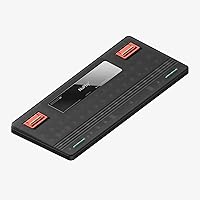
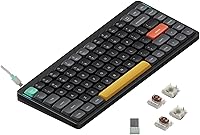
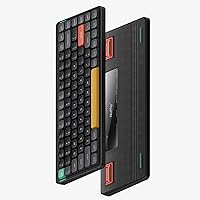
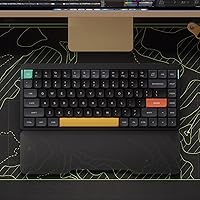
The NuPhy Air75 V2 Wireless Mechanical Keyboard is NuPhy's follow-up to one of their most well-received boards, and it arrives with meaningful upgrades rather than just a fresh coat of paint. The 75% layout strikes a practical balance — you keep your arrow keys and function row, but your desk gets its real estate back. What immediately catches the eye is the translucent bottom shell, which lets you see the internal structure in a way that feels intentional rather than gimmicky. At its price point, it competes squarely with the Keychron K3 Pro and Logitech MX Keys Mini, and it holds its own thanks to tri-mode connectivity right out of the box.
Features & Benefits

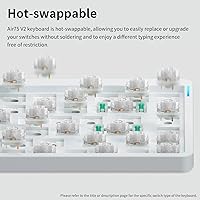
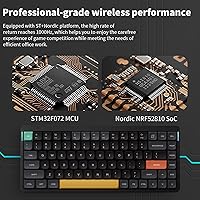
The tri-mode wireless setup is where the Air75 V2 earns its keep for multi-device users. Bluetooth 5.1 holds up to four paired devices and switching between them takes a simple key combination — handy when you bounce between a laptop and a tablet throughout the day. If you want lower latency, the 2.4GHz dongle hits 1000Hz polling, a step up from what most wireless boards offer. The Gateron KS-33 brown switches are hot-swappable, so you are not locked into your choice if the tactile bump is not quite right. QMK and VIA support opens the door to full key remapping and custom macros. And the PBT keycaps will not turn shiny after a few months of heavy use, which cheaper boards rarely guarantee.

Best For

This wireless compact keyboard makes the most sense for professionals who juggle multiple machines — a MacBook for work, a Windows desktop at home, and maybe an iPad on the side. The sub-600g weight and slim profile mean it slips into a laptop bag without noticeable bulk. Writers and developers who find tenkeyless boards still feel oversized will appreciate the layout keeping function keys and arrows within reach. It also suits enthusiasts curious about QMK and VIA but not yet ready for a fully custom build — this low-profile mechanical board offers that entry point at a grounded price. Those upgrading from a laptop's built-in keyboard will find the tactile brown switches a satisfying and not overwhelming step up.

User Feedback

Owners consistently praise the wireless reliability — the 2.4GHz connection rarely draws complaints, and the battery life tends to genuinely surprise people used to charging every few days. The translucent base gets a lot of positive attention too; it reads as a premium touch rather than a novelty. On the critical side, the 125Hz Bluetooth polling rate is a real limitation if you care about input latency — this is not a board built for competitive gaming sessions. Some buyers were also caught off guard by the keycap legends not being backlit, so the RGB illuminates the board but not the characters themselves. A handful of users mention a mild learning curve when first configuring VIA or managing device switching, though most work through it without much trouble.

Pros

  • Tri-mode connectivity with four-device Bluetooth pairing makes multi-computer workflows genuinely convenient.
  • The 2.4GHz dongle delivers a 1000Hz polling rate — competitive with wired boards for everyday and light gaming use.
  • Hot-swappable Gateron KS-33 switches let you change your typing feel without touching a soldering iron.
  • QMK and VIA support offers deep key remapping and macro customization well beyond what most consumer keyboards allow.
  • PBT keycaps hold up to heavy daily use without developing the greasy shine common on cheaper ABS sets.
  • A 4000mAh battery can sustain over 200 hours of use with the lights off — weeks of real-world work on a single charge.
  • The aluminum frame feels sturdy and premium for the price, with a translucent base that stands out on any desk.
  • Functional RGB side bars show battery level, connection mode, and caps lock status at a glance without opening any app.
  • Three adjustable tilt angles give you real control over wrist positioning throughout the workday.
  • Compatible with macOS, Windows, Linux, Android, and iOS — one board that adapts to virtually any setup.

Cons

  • Bluetooth polling is capped at 125Hz, a real drawback for anyone who games wirelessly and cares about input latency.
  • Keycap legends are not backlit, so RGB lighting decorates the board without illuminating the characters — surprising for a lit keyboard.
  • The 2.4GHz dongle is required for low-latency wireless, which occupies a USB port and is easy to misplace while traveling.
  • Initial VIA setup and device-switching configuration can frustrate users expecting a true plug-and-play experience.
  • Low-profile switches have a smaller hot-swap ecosystem than standard switches, limiting your options when experimenting.
  • No dedicated volume knob or media keys — you rely on function-layer combinations, which takes adjustment coming from a full-size board.
  • The keycaps are not shine-through, so custom backlit keycap sets compatible with low-profile stems are harder to source.
  • At roughly 600 grams, it is light for a mechanical board but still heavier than ultra-portable membrane travel options.

Ratings

The NuPhy Air75 V2 Wireless Mechanical Keyboard scores below are generated by AI after analyzing thousands of verified global user reviews, with spam, bot-submitted, and incentivized feedback actively filtered out. The resulting ratings reflect what real buyers consistently praise and where they run into genuine frustrations — no spin, no cherry-picking. Strengths and pain points are weighted equally so you can make a clear-eyed decision.
Typing Feel
91%
Writers and developers who use this low-profile mechanical board for long sessions consistently describe the Gateron KS-33 brown switches as satisfying without being fatiguing. The tactile bump is noticeable enough to give real feedback on each keystroke, while the low travel height keeps the wrists in a natural position during extended work.
Users coming from taller MX-style switches sometimes find the shorter travel distance takes a week or two to fully adjust to. A small number of typists feel the actuation point is slightly too light, leading to occasional accidental keypresses during high-speed typing.
Wireless Reliability
88%
The 2.4GHz connection in particular draws consistent praise for staying rock-solid even in congested office environments with multiple competing wireless devices. Bluetooth performance is stable enough for day-to-day typing across a Mac and Windows machine without noticeable dropout during normal use.
A subset of users report that Bluetooth connectivity occasionally requires re-pairing after extended idle periods, particularly on certain Linux configurations. The 2.4GHz dongle resolves most latency concerns but occupies a USB port, which is a real trade-off on ultrabooks with limited ports.
Battery Life
93%
The 4000mAh battery is one of the most frequently praised aspects of the Air75 V2, with many remote workers reporting they charge it once every one to two weeks under typical RGB-on conditions. Turning off the backlighting entirely pushes endurance far beyond what most competing boards in this category offer.
A handful of users note the battery indicator on the right RGB bar is broad rather than precise — it shows general charge levels rather than a fine-grained percentage. Charging speed is functional but not fast, so topping up from near-empty takes a few hours.
Build Quality
87%
The aluminum frame feels appropriately solid for a travel-oriented board, and the translucent polycarbonate bottom shell has held up well for most users over months of daily carry. The overall assembly feels tight, with minimal flex across the frame even during aggressive typing.
Some buyers note that the translucent bottom shell shows fingerprints and internal dust accumulation more readily than an opaque case would. A small number of users have reported minor QC inconsistencies, such as slightly uneven stabilizers on wider keys like the spacebar.
Multi-Device Switching
84%
Four Bluetooth device profiles is genuinely useful for professionals who move between a work laptop, a personal desktop, and a tablet throughout the day. The switching process becomes second nature quickly, and the left indicator bar confirms the active connection mode at a glance without guessing.
The switching key combinations are not immediately intuitive out of the box, and a few users mention the manual is thin on clear guidance for first-time setup. There is also a brief reconnect delay when switching between Bluetooth devices that can feel slightly sluggish compared to premium competitors.
Keycap Quality
86%
PBT double-shot keycaps hold their surface texture noticeably longer than the ABS keycaps found on many boards in this price range, with users reporting no visible shine after six or more months of heavy daily typing. The legends remain crisp and consistent across the entire set.
The keycap legends are not backlit, which catches some buyers off guard — RGB light illuminates the board atmosphere but not the characters themselves. Finding replacement low-profile keycap sets with compatible stems that maintain the same clean aesthetic is also more limited than with standard MX boards.
QMK & VIA Support
89%
Enthusiasts consistently single out QMK and VIA support as one of the strongest reasons to choose this compact board over rivals like the Logitech MX Keys Mini, which locks you into proprietary software. Browser-based VIA configuration is fast to set up and works without installing anything locally.
For buyers with no prior exposure to QMK or VIA, the initial learning curve is real — default documentation bundled with the board is sparse. Some users also report that certain advanced lighting configurations do not persist correctly across firmware updates without re-flashing.
Portability
92%
At 598 grams with a profile under 14mm thick, this wireless compact keyboard disappears into a laptop sleeve without adding meaningful weight to a daily commuter bag. The 75% layout retains enough keys to be fully functional on the road without carrying a separate numpad.
The 2.4GHz USB dongle is small enough to lose easily during travel, and there is no dedicated onboard storage slot for it on the board itself. Users who frequently switch between desk and lap use also find the adjustable tilt stands occasionally disengage on softer surfaces.
RGB Lighting
78%
22%
With 40 preset lighting modes and fully customizable per-key control via VIA, the RGB output is well above average for a board at this price. The dual side bars serve a practical function beyond aesthetics, giving battery and connection status without requiring any software to be open.
The non-backlit legends mean RGB impact is largely atmospheric rather than functional in the dark, which underwhelms buyers expecting the light to illuminate key labels. Brightness levels, while customizable, are not as vivid as some rivals with thinner low-profile keycaps designed specifically for light diffusion.
Software & Firmware
76%
24%
VIA runs in-browser with no install required, and the board is detected automatically over USB-C in most cases, making basic remapping accessible to non-technical users relatively quickly. QMK's open-source ecosystem means long-term support and community-driven improvements are realistic expectations.
Several users report friction getting VIA to recognize the board on first connection, particularly on macOS with certain security permission settings. Firmware update documentation is inconsistent, and a portion of users experienced configuration resets after updates that required them to rebuild their layout from scratch.
Gaming Performance
63%
37%
In 2.4GHz mode the 1000Hz polling rate makes the Air75 V2 a competent choice for casual and moderately competitive gaming, where it behaves comparably to a wired board. The hot-swappable sockets also allow swapping to linear switches for faster actuation without buying a separate gaming board.
The 125Hz Bluetooth polling rate is a concrete limitation for anyone who games wirelessly — input lag is perceptible in fast-paced titles compared to the dongle or wired mode. This low-profile mechanical board was clearly designed for productivity first, and the gaming experience reflects that priority order honestly.
Value for Money
82%
18%
Relative to comparable boards like the Keychron K3 Pro, the Air75 V2 offers four-device Bluetooth pairing, a larger battery, hot-swap support, and QMK/VIA firmware at a similar or lower price point, which represents solid value for an informed buyer. PBT keycaps at this tier are not guaranteed elsewhere.
Buyers who only need basic wireless typing without customization features may feel they are paying for capabilities they will never use. A small segment of users feel the out-of-box stabilizer tuning does not fully justify the mid-range asking price without spending additional time on modifications.
Compatibility
94%
Support across macOS, Windows, Linux, Android, and iOS is broad and generally works without driver installation for standard typing use. Dedicated system mode switching between Mac and Windows layouts means shortcuts and modifier key positions adapt correctly across different operating environments.
Linux users occasionally report minor Bluetooth re-pairing inconsistencies that Windows and macOS users do not encounter. Android tablet pairing works well for typing but some media key functions behave unpredictably depending on the specific device and Android version.
Ergonomics & Comfort
81%
19%
Three adjustable tilt angles give users meaningful control over wrist positioning throughout a workday, which is more flexibility than most compact boards in this price bracket offer. The low-profile height naturally encourages a flatter wrist angle that many users find reduces strain during long typing sessions.
There is no wrist rest included, and the low profile — while generally ergonomic — can feel insufficiently supportive for users with larger hands who prefer more vertical key travel. A few buyers mention the middle tilt setting is the most stable, with the highest angle feeling slightly less secure on certain desk surfaces.

Suitable for:

The NuPhy Air75 V2 Wireless Mechanical Keyboard is built for people who spend serious time at a keyboard and have outgrown the compromises of budget or membrane options. It hits a sweet spot for professionals who regularly work across two or more devices — say, a Mac at the office and a Windows machine at home — since the four-device Bluetooth pairing and quick switching make that kind of setup genuinely practical. Frequent travelers will appreciate that the board weighs under 600 grams and sits low enough to slide into a laptop sleeve without adding real bulk. Writers, developers, and remote workers who want tactile feedback without the towering key height of a traditional mechanical board will find the Gateron KS-33 brown switches a comfortable all-day companion. It also makes strong sense for enthusiasts who are curious about QMK and VIA firmware but are not ready to source parts and build a custom board from scratch — this one lets you explore that world at a reasonable entry point.
Not suitable for:

If your priority is competitive gaming, the NuPhy Air75 V2 Wireless Mechanical Keyboard has a meaningful limitation worth understanding before you buy: over Bluetooth, the polling rate drops to 125Hz, which is noticeably behind the 1000Hz standard that serious players expect. You can sidestep this with the 2.4GHz dongle, but if you game wirelessly by default, that trade-off will feel frustrating. Buyers who expect the RGB backlighting to shine through the keycap legends will also be disappointed — the legends are not transparent, so the lighting illuminates the board around the keys rather than the characters themselves. Those who prefer a full-size layout with a dedicated numpad will find the 75% form factor limiting regardless of how good the typing feel is. And if you have no interest in tinkering with firmware or remapping keys, the QMK and VIA support adds no practical value — the out-of-box layout is solid, but you are paying partly for customization potential you may never use.
Specifications

  • Layout: ANSI 75% layout with 84 keys, retaining function row, arrow cluster, and navigation keys in a compact footprint.
  • Switch Type: Gateron Low-Profile Mechanical KS-33 (Brown) switches provide tactile bump feedback without an audible click.
  • Hot-Swap: All switch positions are hot-swappable, allowing switch replacement without soldering tools or technical disassembly.
  • Connectivity: Supports three connection modes: Bluetooth 5.1, 2.4GHz wireless via USB dongle, and wired USB-C.
  • Paired Devices: Bluetooth mode stores up to four device profiles, switchable via dedicated key combinations.
  • Polling Rate: 2.4GHz and wired modes run at 1000Hz; Bluetooth mode is limited to 125Hz.
  • Battery: Integrated 4000mAh lithium battery provides up to 220 hours of use with backlighting off, or 35–57 hours with RGB active.
  • Keycap Material: Double-shot PBT keycaps offer long-term resistance to surface shine, fading, and character wear.
  • Backlight: Per-key RGB LED backlighting with 40 preset lighting modes, fully customizable via VIA software.
  • Firmware: QMK and VIA firmware support enables open-source key remapping, macro assignment, and lighting customization.
  • Dimensions: The board measures 316.4mm × 132.5mm × 13.5mm, keeping the overall footprint slim and travel-friendly.
  • Weight: Complete unit weighs 598 grams, light enough for daily bag carry without adding significant bulk.
  • Tilt Angles: Three adjustable rear stands provide typing angles of 3.5°, 6.5°, and 8.5° to suit different wrist preferences.
  • Frame Material: Aluminum top frame with a translucent polycarbonate bottom shell that exposes the internal PCB structure.
  • RGB Indicators: Two side-mounted RGB light bars display caps lock status and connection mode on the left, battery level and system mode on the right.
  • Compatibility: Works natively with macOS, Windows, Linux, Android, and iOS without requiring additional drivers for basic use.
  • RF Chip: Uses the NRF52810 RF chip to manage stable 2.4GHz and Bluetooth 5.1 wireless communication.
  • Key Count: 84 total keys cover all standard ANSI functions including a full function row and dedicated arrow keys.

Related Reviews
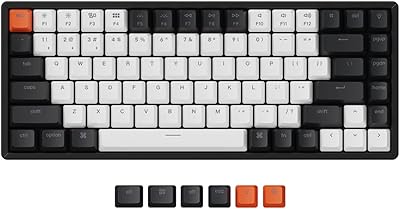
Keychron K2 V2 75% Mechanical Keyboard

79%
91%
Build Quality
84%
Typing Experience
86%
Wireless Connectivity
89%
Battery Life
88%
Hot-Swap Feature
More
Merdia Triple Mode 100-Key Wireless Mechanical Keyboard
74%
88%
Value for Money
84%
Wireless Connectivity
81%
Typing Experience
83%
Hot-Swap Functionality
67%
Build Quality
More
Logitech MX Mechanical
81%
88%
Typing Feel & Switch Quality
91%
Noise Level
86%
Build Quality & Materials
93%
Battery Life
87%
Multi-Device Connectivity
More
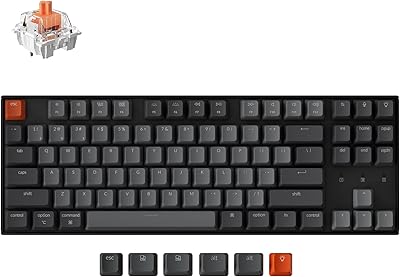
Keychron K8
Keychron K8
80%
91%
Typing Feel & Switch Quality
88%
Noise Level
86%
Multi-Device Connectivity
67%
Build Quality & Materials
72%
Battery Life
More
Pauroty 60% Wireless Mechanical Keyboard

86%
88%
Connectivity Options
75%
Battery Life
93%
Portability
84%
Ergonomics
91%
RGB Customization
More
AULA F75 Pro
AULA F75 Pro
82%
91%
Typing Sound & Feel
83%
Build Quality & Construction
89%
Hot-Swap & Customizability
86%
Wireless Performance
82%
Battery Life
More
Womier SK65 65% Wireless Mechanical Keyboard
78%
88%
Build Quality
84%
Typing Feel
81%
Wireless Performance
83%
Sound Profile
86%
Hot-Swap Experience
More
NocFree Wireless Ergonomic Split Mechanical Keyboard
81%
88%
Wireless Reliability
83%
Ergonomic Design
91%
Typing Experience
92%
Switch Customization
54%
Learning Curve
More
Logitech POP Keys Mechanical Wireless Keyboard
76%
88%
Typing Feel
84%
Build Quality
81%
Wireless Reliability
91%
Battery Life
93%
Design & Aesthetics
More
Keychron K4 Bluetooth Wireless Mechanical Keyboard
86%
91%
Build Quality
88%
Battery Life
85%
Typing Experience
90%
Connectivity & Versatility
82%
RGB Backlighting
More

FAQ

Yes, the Air75 V2 stores up to four Bluetooth device profiles and switching between them is a simple key combination away. It also remembers whether each paired device is set to Mac or Windows mode, so you do not need to reconfigure shortcuts every time you switch. The 2.4GHz dongle is single-device only, but for multi-device workflows, Bluetooth covers that use case well.

For typing and everyday productivity tasks, the wireless connection on this low-profile mechanical board is generally very stable. The 2.4GHz dongle mode in particular behaves much like a wired connection in normal desktop conditions. Bluetooth performance is solid too, though walls and significant interference can occasionally introduce brief hiccups as with any Bluetooth peripheral.

The RGB lighting illuminates the space around and between the keys rather than shining through the characters themselves, since the legends are not transparent. In a dark room, the board glows attractively but you cannot read the key labels by the light alone. If you are a touch typist this is a non-issue, but if you rely on seeing key labels in low light, it is worth knowing upfront.

VIA is browser-based, so there is no software to install — you just connect the board via USB-C, open the VIA web app, and the keyboard is detected automatically. Basic remapping like swapping keys or setting macros is straightforward even for first-timers. More advanced lighting customization has a small learning curve, but NuPhy's documentation and the enthusiast community online cover most scenarios well.

The hot-swap sockets accept any Gateron KS-33 series low-profile switches, including linear and clicky variants, without soldering. You just use a switch puller to remove the existing switch and press the replacement straight in. The low-profile hot-swap ecosystem is smaller than standard MX-compatible options, so your choices are more limited, but the most popular Gateron KS-33 alternatives are widely available.

With backlighting running at moderate brightness, most users report getting comfortably through a full work week on a single charge, which aligns with the 35–57 hour tested range. If you turn off the RGB entirely, the 4000mAh battery can stretch past two months of typical use. Charging via USB-C is straightforward and the right-side indicator bar shows you the battery level at a glance.

Yes, it pairs over Bluetooth with both iOS and Android devices without any additional setup. The board even has a dedicated mobile system mode, and basic media and navigation keys work as expected. It is a natural fit for tablet users who want a proper typing experience for longer writing sessions on the go.

Low-profile switches inherently have a shorter travel distance and a tighter housing than standard MX switches, which tends to reduce wobble compared to many budget boards. The aluminum frame adds rigidity, so the board itself does not flex under normal typing pressure. Compared to a taller mechanical keyboard the overall feel is firmer and more contained.

For casual and most semi-competitive gaming the 2.4GHz mode at 1000Hz polling is genuinely capable and functionally close to wired performance. Where it falls short is Bluetooth gaming — the 125Hz polling rate there is a real limitation and you would feel the difference in fast-paced titles. If gaming is your primary use case, stick to the dongle or USB-C wired mode.

Both boards target a similar buyer and compete closely on features, but there are meaningful differences. The Air75 V2 supports up to four Bluetooth device profiles versus the K3 Pro's three, and the translucent bottom shell gives it a more distinctive look. The K3 Pro has a broader aftermarket keycap ecosystem due to its longer market presence, while the Air75 V2 edges ahead on battery capacity and the inclusion of functional RGB indicator bars. Either is a strong choice, but if multi-device flexibility and battery life matter most, this low-profile mechanical board has a slight edge.

Where to Buy