
Overview

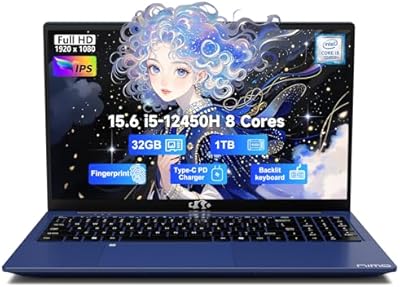
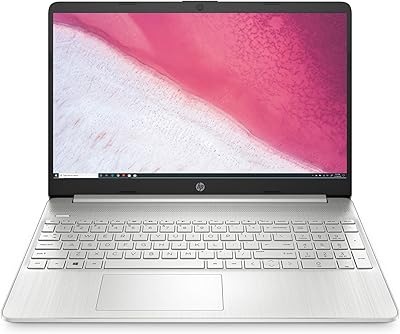
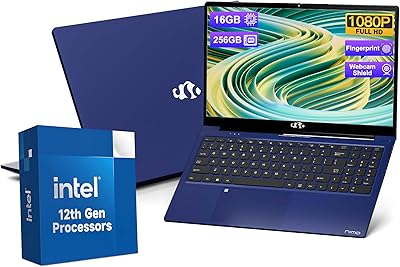
The NIMO N154 15.6″ Laptop enters a crowded budget market with a straightforward pitch: a 12th-gen Intel processor, a full HD display, and Windows 11 — all in a slim gray chassis that measures just 0.76 inches thick. NIMO isn't a household name, and that's worth acknowledging upfront. What partly offsets the brand-recognition gap is a 2-year warranty and a 90-day return window, which signals real confidence in the build. This is a machine designed for everyday computing — web browsing, word processing, video calls — not video editing or gaming. Set your expectations accordingly, and it holds up surprisingly well for the price.

Features & Benefits

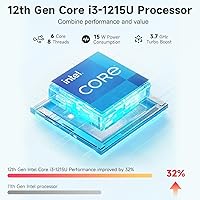
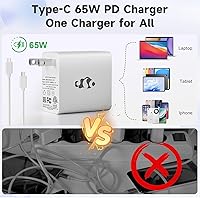
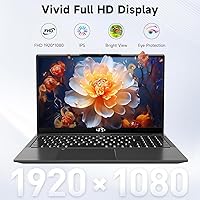
At the heart of this budget laptop sits Intel's i3-1215U, a 6-core 12th-gen chip that comfortably outpaces older i5 processors from two generations back. In practical terms, that means keeping a dozen browser tabs open alongside a video call without things grinding to a halt. The 15.6-inch IPS anti-glare screen renders text crisply at 1080p — adequate for schoolwork and streaming, though color-sensitive creative tasks will reveal its limits. The 8GB of DDR4 RAM handles daily workloads, and an upgradable slot means you can add more yourself down the line. Storage at 256GB fills up faster than expected, so cloud backups or an external drive are worth planning for early. The included 65W USB-C charger handles the laptop and your phone simultaneously — a genuine convenience for travelers.

Best For

This student notebook hits a sweet spot for a fairly specific group of buyers. College students doing research, writing papers, and jumping on video calls will find it more than capable. Remote workers running email, spreadsheets, and browser-based tools day-to-day will feel the same. It also makes a solid choice for someone upgrading from an old, sluggish machine — the difference will feel significant. Light travelers will appreciate the sub-4-pound weight. Where it falls short is for anyone pushing the hardware hard: no discrete GPU, limited local storage without upgrades, and not a realistic pick for photo or video editing. Know what you need it for, and this budget laptop delivers on its core promise.

User Feedback

Buyers tend to praise the fast startup times and keyboard comfort — both stand out positively for a machine at this price tier. Build quality gets favorable mentions too, with most users finding it sturdier than expected. On the downside, storage runs out quicker than many anticipate; several reviewers note that 256GB disappears fast once Windows updates and a few applications settle in. The fingerprint reader works reliably for most, though a small number report occasional misreads during initial Windows Hello setup. Fan noise under sustained workloads — long downloads, back-to-back calls — comes up periodically, though it doesn't appear widespread. Customer support sentiment is largely positive, with NIMO's team described as responsive when issues arise.

Pros

  • The 12th-gen i3-1215U handles everyday multitasking noticeably better than older-generation i5 chips.
  • Wi-Fi 6 and Bluetooth 5.2 keep connections stable and fast on modern home and campus networks.
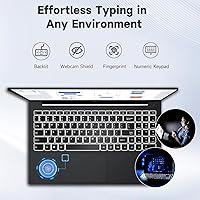
  • The backlit keyboard with numeric keypad is comfortable for long writing or data-entry sessions.
  • A 65W USB-C charger is included out of the box, and it doubles as a charger for phones and tablets.
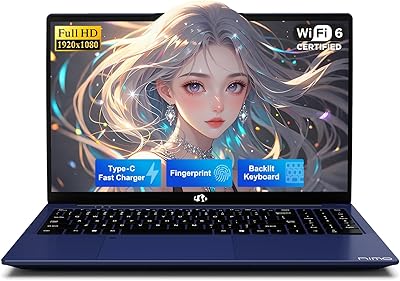
  • The fingerprint reader on the touchpad makes Windows Hello login quick and reliable for most users.
  • RAM is user-upgradable, giving this budget laptop a meaningful path to better performance down the road.
  • At under 3.75 pounds and 0.76 inches thick, it slips easily into a backpack without adding noticeable weight.
  • The 2-year manufacturer warranty and 90-day return policy provide real buyer protection from a lesser-known brand.
  • Fast SSD boot times mean the machine is ready to work within seconds of opening the lid.
  • Three USB 3.0 ports offer enough connectivity for external drives, a mouse, and a monitor without needing a hub.

Cons

  • 256GB of storage fills up quickly once Windows updates, apps, and personal files start accumulating.
  • The display covers a limited color gamut, making it a poor choice for any color-sensitive work.
  • NIMO is a lesser-known brand with limited third-party repair options if something goes wrong after warranty.
  • Fan noise becomes noticeable during sustained workloads like long downloads or back-to-back video calls.
  • The 2MP webcam produces mediocre image quality in anything less than bright, direct lighting.
  • Battery life claims of up to 9 hours are optimistic; real-world use with Wi-Fi active falls shorter.
  • The integrated graphics offer no headroom for GPU-accelerated tasks, even light ones like video export.
  • Some users report occasional fingerprint sensor misreads during initial Windows Hello enrollment.
  • The USB-C port supports charging but its data transfer and display output capabilities are not clearly documented.
  • Brand reputation and long-term resale value are uncertain compared to established laptop manufacturers.

Ratings

The scores below for the NIMO N154 15.6″ Laptop were generated by our AI engine after analyzing verified purchase reviews from buyers worldwide, with spam, bot-submitted, and incentivized feedback actively filtered out. Ratings reflect the honest distribution of real user experiences — strengths are acknowledged where earned, and recurring pain points are weighted proportionally. This student notebook has clear wins and clear trade-offs, and both are represented transparently here.

Performance
78%
22%
For the target audience — students and home office users — the i3-1215U handles daily workloads without frustration. Juggling a video call, a Google Doc, and a dozen browser tabs is genuinely comfortable, and the chip outpaces older i5 processors many buyers are upgrading from.
Push it toward anything more demanding — running a local development environment, exporting a short video, or using multiple creative apps simultaneously — and the limits surface quickly. Users expecting mid-range performance will be disappointed by sustained slowdowns under heavier workloads.
Value for Money
82%
18%
Buyers consistently note that the combination of a 12th-gen processor, Wi-Fi 6, a backlit keyboard, and a fingerprint reader at this price tier is genuinely difficult to match from more established brands. For first-time laptop buyers or students on a tight budget, the hardware-to-cost ratio is a real strength.
The value calculation shifts if you factor in the cost of an external SSD or RAM upgrade — both realistic needs for many users. Some buyers also feel the 256GB base storage should be larger at this price point, citing competitors that offer 512GB at similar or lower cost.
Build Quality
71%
29%
Most buyers are pleasantly surprised by how solid the chassis feels relative to the price. The 0.76-inch slim profile does not feel flimsy in everyday handling, and the gray finish resists minor smudges reasonably well during typical backpack-to-desk use.
The build is plastic throughout, and under close inspection the flex in the lid and keyboard deck is noticeable. Long-term durability over two or three years of daily student use remains a question mark, and some reviewers report minor fit-and-finish inconsistencies around the port edges.
Display Quality
66%
34%
The 1080p IPS anti-glare panel is clear and easy to read in well-lit rooms, which matters a lot for students working near windows or in bright classrooms. Text is sharp, and the anti-glare coating does its job during outdoor study sessions in moderate sunlight.
Color accuracy is the screen's weakest point — the limited color gamut makes images look washed out compared to displays on premium machines. Anyone doing photo editing, graphic design, or color-sensitive work will find this display inadequate, and blacks appear grayish in low-light viewing conditions.
Battery Life
63%
37%
Under light use — primarily document editing and occasional video calls with screen brightness at mid-level — the battery comfortably covers a morning of classes or a half-day of remote work without reaching for the charger. The included 65W USB-C charger tops it back up reasonably fast.
The advertised 9-hour claim is optimistic for real-world mixed use with Wi-Fi active. Most users report 5 to 6.5 hours before needing a charge, which falls short of a full school day or workday. Buyers who rely on untethered use all day will want to keep the charger accessible.
Storage Capacity
54%
46%
The SSD makes a meaningful difference in everyday speed — boot times are fast and apps open without the lag that plagues older hard-drive machines. For students who rely on cloud platforms and keep local files lean, 256GB can function adequately with discipline.
This is the most frequently cited frustration across buyer reviews. Windows 11 itself consumes a significant chunk of the drive, and once a few applications, browser caches, and downloaded course files accumulate, space runs out faster than expected. External storage is a near-mandatory add-on for most users.
Keyboard & Typing Experience
83%
The backlit keyboard with numeric keypad is one of the more positively reviewed aspects of this budget laptop. Key travel feels adequate for extended typing sessions, and the backlighting is evenly distributed — useful for late-night study sessions in dimly lit dorm rooms or cafes.
The numeric keypad, while useful for data entry, compresses the main key layout slightly, which some touch-typists find takes adjustment time. A small number of reviewers note that the spacebar or shift keys can feel slightly inconsistent in their actuation force compared to the rest of the board.
Connectivity & Ports
86%
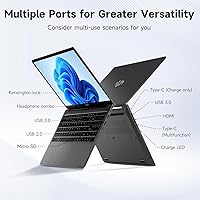
Three USB 3.0 ports cover the essentials without requiring a hub for most setups — external mouse, USB drive, and a wired headset all plug in simultaneously. Wi-Fi 6 keeps the connection stable even on busy campus or shared apartment networks, which is a tangible daily-use upgrade over older Wi-Fi standards.
The single USB 2.0 port is an odd inclusion when USB 3.0 is so widely available, and its slower speeds are noticeable for file transfers. The USB-C port's full capabilities — including whether it supports video output for external monitors — are not clearly documented, which creates uncertainty for buyers planning a dual-screen home setup.
Fingerprint Sensor
73%
27%
Once properly enrolled in Windows Hello, the touchpad-integrated fingerprint reader works quickly and reliably for the majority of users. It removes the daily friction of typing a password, which is a small but genuinely appreciated quality-of-life feature on a budget machine.
Initial enrollment can require multiple attempts to register accurately, and a subset of users report intermittent misreads that force a PIN fallback. The sensor's placement on the touchpad — rather than a dedicated side button — means occasional accidental activations during normal trackpad use.
Webcam Quality
47%
53%
The 2MP webcam covers the basic requirement of joining a video call and being identifiable on screen. For standard online class attendance or a quick work check-in, it is functional enough that most users do not immediately reach for an external camera.
In anything less than bright, direct lighting the image becomes noticeably grainy and soft. Color reproduction is flat, and the camera struggles with backlit environments — common in dorm rooms or home offices near windows. Users who attend frequent video meetings or record content will find it underwhelming.
Thermal Management
67%
33%
For typical light-to-moderate workloads, the machine stays cool enough that it is comfortable to use on a lap or a desk without becoming distracting. The chassis does not develop hotspots in areas where hands rest during normal typing.
Under prolonged heavier tasks — extended video streaming, large file downloads, or sustained multitasking — the fan spins up audibly and the bottom of the machine warms noticeably. In quiet environments like libraries or shared study spaces, the fan noise becomes a real consideration.
Portability
84%
At under 3.75 pounds and less than an inch thick, this student notebook sits in a comfortable weight class for daily carry. It fits in standard laptop compartments without adding bulk, and the slim profile means it slides in and out of a bag without fuss.
The 15.6-inch footprint — while not unusual for the screen size — does make it slightly wide for tight desks or economy-class tray tables. Buyers specifically looking for ultraportable dimensions may prefer a 13-inch or 14-inch alternative despite the weight being competitive.
Brand Trust & Support
68%
32%
The 2-year warranty and 90-day return window go a meaningful distance toward offsetting skepticism about NIMO as a lesser-known brand. Buyers who have contacted support describe responses as timely and reasonably helpful, which builds a degree of post-purchase confidence.
NIMO lacks the established repair ecosystem and third-party service network of brands like Lenovo, HP, or Acer. If something fails outside the warranty window, options are limited. The brand's long-term product support trajectory — firmware updates, driver maintenance — is also an open question for buyers planning multi-year ownership.
Setup & Out-of-Box Experience
79%
21%
Windows 11 comes pre-installed and the machine boots into setup quickly, which first-time laptop buyers particularly appreciate. The included charger and cable mean there are no immediate additional purchases required to get started, and most users are up and running within 20 minutes of unboxing.
Like most Windows laptops, the initial setup involves a round of system updates and some pre-installed software that needs clearing out. A handful of reviewers note that driver installation for certain peripherals required manual steps, which is a minor but real friction point for less technically confident users.

Suitable for:

The NIMO N154 15.6″ Laptop is a practical fit for students who spend most of their time in a browser, a word processor, or a video call — the kind of everyday workload where a modern 6-core i3 handles things without complaint. It also works well for home office users who need a dependable second machine, or a primary one for email, spreadsheets, and light administrative tasks. Budget-conscious buyers upgrading from a years-old laptop with a spinning hard drive will notice a real improvement in responsiveness thanks to the SSD and current-gen processor. First-time laptop buyers get meaningful peace of mind from the two-year warranty and 90-day return window, which is generous for a lesser-known brand. Travelers who want a lightweight machine for on-the-go productivity will appreciate the slim build and sub-4-pound weight.

Not suitable for:

The NIMO N154 15.6″ Laptop is not the right tool for anyone who regularly edits photos, cuts video, or runs creative software that leans on GPU performance — the integrated graphics simply are not built for that kind of sustained demand. Power users running virtual machines, heavy data processing, or professional development environments will hit the ceiling of 8GB RAM faster than expected, and while the slot is upgradable, that is an added cost and effort to factor in. The 256GB SSD is a genuine constraint for users with large media libraries or multiple software installations; without external storage or a cloud strategy already in place, it will fill up faster than most people anticipate. Gamers should look elsewhere entirely — this student notebook was never designed for that use case. Anyone who needs a color-accurate display for design work will also find the IPS panel underwhelming, as it covers a narrow color gamut relative to what professional creative tasks require.

Specifications

  • Processor: Powered by an Intel Core i3-1215U with 6 cores, 8 threads, and a maximum boost clock of 4.4GHz, representing Intel's 12th-generation architecture.
  • RAM: Comes with 8GB of DDR4 memory running at 3200MHz, with one upgradable slot available for expanding capacity.
  • Storage: Equipped with a 256GB solid-state drive, providing faster boot and load times compared to traditional hard drives.
  • Display: Features a 15.6″ IPS anti-glare panel with a 1920x1080 resolution and an 85% screen-to-body ratio for reduced bezel framing.
  • Operating System: Ships with Windows 11 Home pre-installed, ready to use out of the box.
  • Wireless: Supports Wi-Fi 6 (802.11a/b/g/n/ac) and Bluetooth 5.2 for stable, modern wireless connectivity.
  • Ports: Includes three USB 3.0 ports, one USB 2.0 port, and a USB-C port that supports 65W Power Delivery charging.
  • Charging: A 65W USB-C PD fast charger with a 6.56ft cable is included in the box.
  • Battery: Houses a lithium polymer battery rated at 11.4V with a manufacturer-claimed battery life of up to 9 hours.
  • Weight: Weighs 3.75 pounds, making it manageable for daily carry in a backpack or laptop bag.
  • Dimensions: Measures 14.07 x 8.98 x 0.76 inches, giving it a slim profile relative to its 15.6″ screen size.
  • Webcam: Built-in 2MP front-facing camera suitable for standard video calls and virtual meetings.
  • Graphics: Uses Intel integrated graphics built into the i3-1215U processor; no discrete GPU is included.
  • Keyboard: Full-size backlit keyboard with an integrated numeric keypad and adjustable backlight brightness levels.
  • Security: Fingerprint reader is embedded in the touchpad and supports Windows Hello biometric login.
  • Color & Build: Available in gray with a chassis that measures 0.76 inches thin, giving it a clean, understated appearance.
  • Warranty: Backed by a 2-year manufacturer warranty and a 90-day hassle-free return policy direct from NIMO.

Related Reviews
NIMO 15.6″ Laptop (N100, 16GB RAM, 256GB SSD)
74%
88%
Value for Money
82%
Everyday Performance
79%
Display Quality
61%
Battery Life
74%
Build Quality & Design
More
NIMO N157B 15.6-inch Intel N150 Laptop
68%
83%
Value for Money
71%
Performance
78%
Display Quality
63%
Build Quality
76%
Keyboard & Typing Experience
More
NIMO N155R 15.6″ Gaming Laptop
74%
88%
Processing Performance
52%
Gaming Capability
93%
RAM & Multitasking
91%
Storage Speed & Capacity
74%
Display Quality
More
NIMO N155L 32GB/1TB
NIMO N155L 32GB/1TB
72%
88%
Processing Performance
91%
RAM & Memory Experience
87%
Storage Speed & Capacity
58%
Gaming Capability
66%
Display Quality
More
NIMO N156B 15.6″ 1TB Business Laptop
71%
88%
Value for Money
83%
Processing Performance
71%
Display Quality
54%
Battery Life
67%
Build Quality
More
HP 15 Intel N100 16GB/256GB
77%
88%
Value for Money
83%
Everyday Performance
91%
RAM & Multitasking
67%
Display Quality
72%
Build Quality & Portability
More
HP Laptop 15-fc0099nr
71%
83%
Value for Money
71%
Performance
88%
Battery Life
61%
Display Quality
84%
Touchscreen Responsiveness
More
HP 15.6-inch Laptop 15-ef0021nr, Ryzen 3 3200U, 8GB RAM, 256GB SSD
82%
92%
Value for Money
85%
Performance
83%
Build Quality
89%
Portability
81%
Battery Life
More
Dell Inspiron 15 3520 Laptop
74%
76%
Performance & Speed
81%
Display Quality
83%
Touchscreen Responsiveness
89%
Storage & Memory
62%
Battery Life
More
HP 15-DY1031WM 256GB 15.6″ Refurbished Laptop
67%
83%
Value for Money
88%
SSD Performance
74%
Everyday Performance
41%
Battery Life
53%
Display Quality
More
Dell Inspiron 3593 15.6-inch Laptop
68%
74%
Everyday Performance
81%
SSD Speed & Storage
52%
Display Quality
63%
Battery Life
57%
Build Quality
More

FAQ

It depends on how you work. For most students focused on documents, presentations, and browser-based research, 256GB is workable — especially if you use cloud storage like OneDrive or Google Drive for larger files. Where it gets tight is if you store a lot of videos, downloaded course material, or multiple software suites. An external SSD or USB drive is a smart and inexpensive addition from day one.

The NIMO N154 15.6″ Laptop has an accessible RAM slot, so upgrading it yourself is possible if you're comfortable opening the bottom panel. Most users with basic technical confidence can handle it. Just make sure the replacement module is DDR4 and compatible with the board's supported speeds before purchasing.

For browsing, writing, video calls, and light multitasking, it performs noticeably better than older i5 chips from the 10th and 11th generation. The jump to 6 cores makes a real difference when you have multiple apps and tabs open simultaneously. That said, it is not a machine for heavy creative software, and you will feel its limits if you push it with demanding applications.

Under normal workloads — typing, browsing, video calls — the fan stays quiet and the machine runs comfortably cool. During sustained heavier tasks like large downloads or extended video streaming, the fan does spin up and becomes audible. It is not unusually loud for a budget laptop, but it is something to be aware of in quiet environments like libraries.

Most users find it consistent and fast once Windows Hello is properly enrolled. The initial setup can occasionally require a few attempts to register the fingerprint accurately, but after that it works smoothly for the majority of people. If you run into issues, re-enrolling the fingerprint in Windows settings usually resolves them.

The 9-hour claim is based on light, screen-dimmed use. In practical terms — Wi-Fi active, moderate brightness, mix of browsing and document work — expect somewhere in the range of 5 to 7 hours. That is a comfortable full school day with a charger nearby, but not a cross-country flight without one.

Yes, through the USB-C port, though you will want to verify it supports DisplayPort Alt Mode output before purchasing a cable or adapter. The three USB 3.0 ports also give you room to connect peripherals alongside the monitor without needing a hub for most setups.

NIMO is not a major-name brand, which is a fair concern. What partly compensates for that is the 2-year warranty and 90-day return window — both more generous than many budget competitors offer. Buyer feedback on customer support is generally positive, with users describing the team as responsive. That said, third-party repair options are limited compared to established brands, so you are largely relying on NIMO's own support channel.

For those use cases, yes — the 1080p IPS anti-glare panel is clear and easy on the eyes, and the anti-glare coating helps in bright rooms. Where it falls short is color accuracy; it covers a limited color gamut, so anything requiring true-to-life color reproduction will look washed out. For video playback and standard classroom use, it is perfectly adequate.

Yes, and that is genuinely useful. The 65W USB-C PD charger included in the box works with most modern smartphones and tablets that use USB-C charging, so you can travel with a single charger for multiple devices. Just note that some devices may negotiate a lower wattage depending on their own charging specifications.