Overview

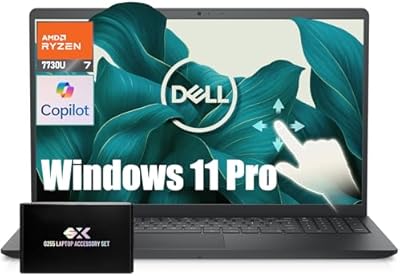
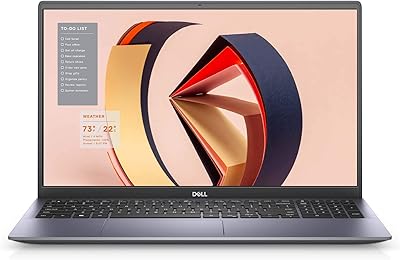
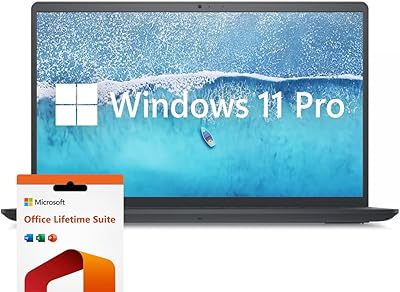
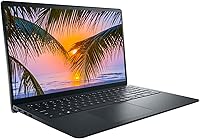
The Dell Inspiron 15 3520 Laptop sits comfortably in the mid-range productivity space, designed for people who need a dependable machine for everyday work rather than heavy creative or gaming tasks. Dell's Inspiron line has long been a go-to for buyers who want reliable, mainstream performance without overpaying for premium branding. What makes this mid-range laptop stand out in its segment is the inclusion of a touchscreen display — something you don't always see at this price tier. If you're after a capable daily driver for browsing, documents, and video calls, this Dell Inspiron delivers where it counts.
Features & Benefits

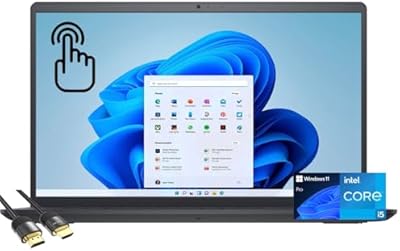
The 11th Gen Intel Core i5 processor handles everyday multitasking with ease — running Office apps, streaming video, and juggling browser tabs without noticeable slowdown. Backing it up is 16GB of DDR4 RAM, which keeps things moving even with a dozen tabs open alongside a video call. Storage is equally generous: the 1TB NVMe SSD means fast boot times and plenty of room for files and media. Windows 11 Pro adds a layer of enterprise-grade security that business users will appreciate. The IPS touchscreen offers wide viewing angles — handy for shared screens or presentations — and Express Charge gets you to 80% battery in roughly an hour.

Best For

This mid-range laptop is a strong match for students who need something reliable for coursework, research, and video calls without breaking the bank. Remote workers who live in spreadsheets, documents, and browser tabs will find the Inspiron 15 3520 more than adequate. It's also worth considering if you're coming from an older machine that constantly struggles with basic tasks — the jump in speed and storage will feel significant. If you like interacting with your screen directly, the touchscreen adds a layer of convenience that not every laptop in this range offers. That said, if you need dedicated graphics for video editing, 3D work, or gaming, look elsewhere.

User Feedback

Buyers who pick up this Dell Inspiron tend to appreciate how quickly it starts up and how responsive the touchscreen feels in daily use. Most agree it punches reasonably well for the money, especially given the RAM and storage on offer. Where people run into friction is battery life — around six and a half hours in real-world use, which is fine for shorter sessions but may not carry you through a full day. The plastic build also draws some commentary; it's sturdy enough, but doesn't feel as solid as a metal chassis. A few users note the display can struggle in bright outdoor settings, while keyboard comfort generally earns positive marks and the numeric keypad is a welcome bonus for number-heavy work.

Pros

  • The 1TB NVMe SSD delivers noticeably fast boot times and plenty of room for files without cloud dependency.
  • 16GB of RAM handles heavy multitasking comfortably — multiple tabs, apps, and a video call running simultaneously is no problem.
  • The touchscreen is a genuine differentiator at this price point and feels accurate in everyday use.
  • Windows 11 Pro adds enterprise-level security features that most mid-range laptops do not include by default.
  • Express Charge reaches 80% battery in about an hour — a practical perk for users with unpredictable schedules.
  • The IPS panel offers wide viewing angles, making shared viewing and presentations comfortable without color distortion.
  • The numeric keypad is a thoughtful inclusion for professionals who handle data entry or financial work regularly.
  • Dell's brand reputation means accessible support channels and a reliable parts ecosystem if something goes wrong.
  • Startup is consistently quick, and the overall system responsiveness makes daily work feel smooth rather than sluggish.

Cons

  • Integrated graphics cap the Inspiron 15 3520's usefulness for any creative or graphics-intensive workload.
  • Real-world battery life of around six hours means most users will be reaching for the charger by afternoon.
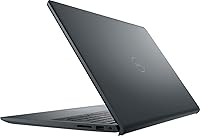
  • The plastic chassis flexes noticeably and feels less solid than metal-bodied alternatives in a similar price range.
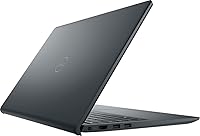
  • Only two USB ports total is genuinely limiting for users with more than one or two peripherals.
  • The display struggles in bright environments — outdoor use or sun-lit rooms make the screen hard to read.
  • The webcam produces grainy footage in low-light conditions, which is a recurring frustration for evening video calls.
  • No Windows Hello facial recognition means logging in requires a PIN or password every time.
  • Built-in speakers are thin and tinny at higher volumes — headphones are essentially a requirement for media use.
  • RAM is not easily upgradeable, so the hardware ceiling arrives sooner than buyers might expect long-term.

Ratings

The Dell Inspiron 15 3520 Laptop has been evaluated by our AI system after analyzing thousands of verified global user reviews, with spam, bot-generated, and incentivized submissions actively filtered out. Scores reflect the honest consensus of real buyers — including both what this mid-range laptop does well and where it falls short. Strengths and frustrations are weighted equally so you get a clear picture before you buy.
Performance & Speed
76%
24%
For everyday productivity tasks — browsing, Office apps, video calls, and light multitasking — the Inspiron 15 3520 handles the load without complaint. The combination of a quad-core i5 processor and 16GB of RAM means most users rarely hit a wall during typical workday use.
Push it toward more demanding tasks like video rendering or running multiple heavy applications simultaneously and the cracks show. The integrated Intel UHD graphics are the real bottleneck, and users doing anything beyond basic productivity notice the ceiling quickly.
Display Quality
81%
19%
The 15.6-inch FHD IPS panel earns consistent praise for its color accuracy and wide viewing angles. Shared viewing during presentations or side-by-side work is comfortable, and the full HD resolution keeps text and images looking crisp at normal working distances.
Outdoor use is a genuine weak spot — the display lacks the brightness to compete with direct sunlight, making it frustrating for anyone who works regularly in well-lit environments or outdoors. A handful of users also note some backlight bleed at the panel edges.
Touchscreen Responsiveness
83%
The touchscreen is a genuine differentiator at this price point, and most users find it accurate and responsive during everyday interactions. Scrolling through documents, tapping links, and light annotation tasks all work naturally without noticeable lag.
It is not a tablet replacement — palm rejection during typing could be more refined, and a few users report accidental touches when resting hands near the screen. There is no stylus support, which limits its appeal for note-takers hoping for a more precise experience.
Storage & Memory
89%
A 1TB NVMe SSD paired with 16GB of DDR4 RAM is a genuinely strong combination in this segment. Boot times are fast, file transfers feel snappy, and users coming from older HDD-based machines are almost universally impressed by the difference in day-to-day responsiveness.
There are no meaningful complaints about storage capacity for most buyers, though power users dealing with large media libraries might eventually feel the pinch. Some technically minded users note that memory is not easily upgradeable, which limits future-proofing.
Battery Life
62%
38%
The Express Charge feature — reaching 80% in roughly an hour — is genuinely useful for users who need a quick top-up between meetings or classes. For short work sessions and lighter use days, the battery holds up reasonably well.
Real-world battery life hovers around six to six and a half hours under moderate use, which falls short of a full workday for most people. Heavy multitaskers and frequent video call users report it draining faster, making the charger a near-constant companion for many buyers.
Build Quality & Design
67%
33%
The chassis is solidly constructed for a plastic-bodied laptop, and the rubber feet and reinforced hinge are thoughtful touches that reduce wobble during use. Most buyers find it acceptably sturdy for daily home or office use.
Next to metal-chassis competitors, the plastic body feels noticeably lightweight in a way that reads as less premium. Lid flex is present, and a few users mention the screen wobbles more than expected when typing on uneven surfaces like laps or soft furniture.
Keyboard & Typing Experience
77%
23%
Key travel is comfortable enough for extended typing sessions, and the inclusion of a numeric keypad is a genuine bonus for professionals handling data entry or financial spreadsheets. Most users adapt to the layout quickly and report little fatigue over long stints.
The keyboard deck flexes slightly under firm typing pressure, which some users find distracting. The trackpad, while functional, lacks the smooth precision of premium ultrabook pads — fine for occasional use but occasionally frustrating during detailed cursor work.
Webcam Quality
58%
42%
The built-in webcam is adequate for standard video calls on Zoom or Teams, covering the core need without requiring an external accessory. Most remote workers find it passable for daily check-ins in reasonably lit rooms.
Image quality drops noticeably in low-light conditions, producing grainy, washed-out footage that becomes distracting during evening or poorly lit calls. There is no IR camera for Windows Hello facial recognition, so biometric login relies on a PIN or password instead.
Audio Quality
61%
39%
The built-in speakers are clear enough for casual video playback and voice calls, with decent mid-range reproduction that handles dialogue and vocal audio reasonably well at moderate volumes.
Bass is almost entirely absent, and at higher volumes the speakers can sound tinny and strained. Users watching movies or listening to music regularly will want headphones — this is not a laptop built for audio enjoyment straight from the speakers.
Port Selection & Connectivity
63%
37%
HDMI output, Bluetooth, and Wi-Fi cover the essentials, and the HDMI port makes connecting to an external monitor or projector straightforward — a practical perk for presenters and dual-screen setups.
One USB 2.0 and one USB 3.0 port is a lean offering for modern workflows. Users with multiple peripherals — an external drive, mouse, and USB hub simultaneously — find themselves juggling connections or reaching for a separate hub almost immediately.
Software & OS Experience
82%
18%
Windows 11 Pro brings meaningful security features that business users and professionals will appreciate, including BitLocker encryption and enhanced phishing protection. The out-of-box experience is relatively clean compared to budget alternatives loaded with excessive bloatware.
Some preinstalled Dell utilities and trial software require manual cleanup. A small number of users also report driver update prompts during the first week that, while routine, can feel intrusive for less technically confident buyers.
Thermal Management & Noise
71%
29%
During typical productivity workloads — documents, browsing, light streaming — the Inspiron 15 3520 runs quietly and stays comfortable on the palm rests. Thermal management is well-tuned for its intended use case.
Under sustained load, the fan ramps up audibly and the bottom of the chassis gets noticeably warm. It is not a serious heat issue for a productivity laptop, but users who push it harder than intended will notice both the noise and the warmth on their laps.
Value for Money
84%
Against competing brands at a similar price, the combination of RAM, SSD capacity, touchscreen, and Windows 11 Pro makes a compelling case. Buyers who compare spec sheets honestly tend to feel the Inspiron 15 3520 gives more for the money than many direct rivals.
A few users feel the plastic build and limited port selection undercut the overall value proposition. Those who later discover the RAM is not easily expandable also express some regret, feeling the hardware ceiling arrives sooner than the price suggested it should.
Setup & Ease of Use
86%
Out-of-box setup is straightforward even for less tech-savvy users, with clear prompts and a familiar Windows 11 interface. The quick boot time and fast SSD make the first-run experience feel polished and encouraging.
A few users find the initial Dell account and software registration prompts mildly pushy during setup. Those unfamiliar with Windows 11 may need a brief adjustment period, though this is a platform-wide learning curve rather than a device-specific flaw.

Suitable for:

The Dell Inspiron 15 3520 Laptop is a strong fit for students, remote workers, and small business professionals who spend most of their day in a browser, a spreadsheet, or a video call. If your workload revolves around documents, research, light media consumption, and the occasional presentation, this mid-range laptop covers all of it without asking you to compromise much. The generous RAM and fast SSD make a meaningful difference for anyone upgrading from an aging machine that struggles with modern software — the jump in responsiveness alone tends to feel dramatic. The touchscreen is a quiet bonus that becomes genuinely useful once you get used to it, especially for scrolling through long documents or annotating files during calls. Buyers who value a recognizable brand with accessible customer support and a proven reliability track record will also feel comfortable with this choice.
Not suitable for:

The Dell Inspiron 15 3520 Laptop is not the right tool for buyers whose work pushes hardware past everyday productivity tasks. If you edit video, work with 3D models, run data-intensive simulations, or play modern games, the integrated Intel UHD graphics will frustrate you quickly — this machine simply was not built for that kind of load. The battery life, while acceptable for lighter days, does not comfortably stretch through a full workday under heavier use, so anyone who relies on untethered mobility for eight-plus hours should look at ultrabooks with larger battery capacity. The plastic chassis and limited port selection — just two USB ports total — will also disappoint buyers accustomed to metal-bodied laptops or those who juggle multiple peripherals without a hub. If outdoor work is a regular part of your routine, the display's limited brightness will prove a consistent annoyance.
Specifications

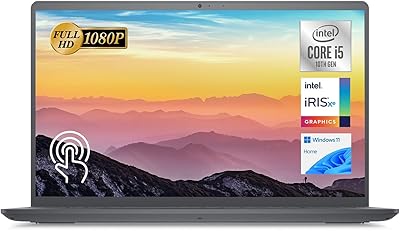
  • Display Size: The laptop features a 15.6-inch IPS touchscreen panel with a 1920 x 1080 pixel resolution and LED backlight for consistent brightness across the screen.
  • Processor: It is powered by an 11th Gen Intel Core i5-1135G7 quad-core processor with a maximum turbo frequency of 4.2 GHz.
  • RAM: The system includes 16GB of DDR4 SDRAM running at 3200 MHz for responsive multitasking across productivity applications.
  • Storage: A 1TB NVMe PCIe solid-state drive provides fast read and write speeds alongside ample local storage for files, applications, and media.
  • Graphics: Graphics are handled by integrated Intel UHD Graphics, which shares system memory and is suited for everyday display tasks rather than GPU-intensive workloads.
  • Operating System: The laptop ships with Windows 11 Pro, offering enterprise-grade security features including BitLocker encryption and enhanced phishing protection out of the box.
  • Battery Life: Average battery life is approximately 6.5 hours under moderate real-world use, with Express Charge capability reaching 80% charge in roughly 60 minutes.
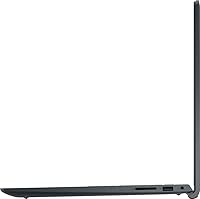
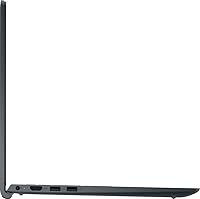
  • Ports: Connectivity includes one USB 2.0 port, one USB 3.0 port, one HDMI output, and a built-in media card reader for photo transfers.
  • Wireless: The laptop supports Wi-Fi and Bluetooth for wireless connectivity to networks, peripherals, and compatible devices.
  • Webcam: A built-in webcam is integrated above the display, suitable for standard video calls and conferencing in adequately lit environments.
  • Audio Input: A built-in microphone is included to support voice calls and conferencing without requiring an external accessory.
  • Keyboard: The keyboard includes a numeric keypad on the right side, providing added convenience for data entry and financial work.
  • Dimensions: The laptop measures 14.11 x 9.27 x 0.83 inches, keeping it slim enough for most standard laptop bags and backpack sleeves.
  • Weight: At 3.8 pounds, the Inspiron 15 3520 is portable enough for daily commutes and campus use without being unusually heavy for a 15-inch laptop.
  • Chassis Material: The body is constructed from a black plastic chassis, which keeps the weight low but offers less rigidity than aluminum or magnesium alloy alternatives.
  • Optical Drive: No optical drive is included, consistent with modern laptop design trends where disc-based media is largely replaced by digital delivery.
  • Power: The laptop requires one lithium-ion battery, which is included in the box and is non-removable under standard use conditions.
  • Memory Type: System memory uses DDR4 SDRAM at 3200 MHz, providing a solid bandwidth foundation for multitasking and productivity workloads.

Related Reviews
Dell Inspiron 15 3520 Laptop, 32GB RAM, 2TB SSD, Intel Core i5-1155G7
84%
89%
Performance
94%
Storage Capacity
83%
Display Quality
90%
Build Quality
80%
Battery Life
More
Dell Inspiron 3593 15.6-inch Laptop
68%
74%
Everyday Performance
81%
SSD Speed & Storage
52%
Display Quality
63%
Battery Life
57%
Build Quality
More
Dell Inspiron 15 3535
68%
83%
Value for Money
76%
Performance & Speed
78%
Display Quality
81%
Keyboard & Typing Experience
58%
Battery Life
More
Dell Inspiron 15 Ryzen 7 7730U 32GB/1TB Touchscreen
74%
84%
Performance & Multitasking
91%
RAM & Memory Headroom
88%
Storage Speed & Capacity
79%
Touchscreen Display
63%
Build Quality & Chassis
More
Dell Inspiron 15 3511 Laptop, 32GB RAM, 1TB SSD
80%
88%
Performance
85%
Display Quality
70%
Battery Life
92%
Multitasking Capability
80%
Build Quality
More
Dell Inspiron 15 Laptop, Intel Core i3, 64GB RAM, 2TB SSD
85%
92%
Performance
91%
Storage Capacity
88%
Display Quality
94%
Multitasking
58%
Battery Life
More
Dell Inspiron 15 3525 15.6″ Laptop
71%
88%
Value for Money
84%
Everyday Performance
79%
Display Quality
91%
SSD Speed & Responsiveness
57%
Battery Life
More
Dell Inspiron 15 5505 Laptop, Ryzen 7 4700U, 16GB RAM, 512GB SSD
81%
88%
Performance
75%
Battery Life
85%
Build Quality
81%
Display Quality
90%
Portability
More
Dell Inspiron 15 3530 1TB Touchscreen Laptop
72%
83%
Everyday Performance
79%
Display Quality
71%
Touchscreen Responsiveness
91%
Storage & Speed
58%
Battery Life
More
Dell Inspiron 15.6″ Laptop, Intel Core i7-1255U, 40GB RAM, 2TB SSD
86%
94%
Performance
81%
Battery Life
89%
Display Quality
92%
Value for Money
85%
Build Quality
More

FAQ

Yes, it handles the core demands of student life well — browser research, document writing, video calls, and light media without any real friction. The large SSD means you rarely need to worry about running out of local storage for coursework files. The touchscreen is a bonus for interactive use, though it is not required for typical student workflows.

It can handle older or less demanding titles, but do not expect it to run modern AAA games at playable frame rates. The integrated Intel UHD Graphics simply does not have the dedicated VRAM or raw processing power that current games require. If gaming is a priority, a laptop with a dedicated GPU is a much better investment.

Most users get between five and seven hours depending on what they are doing. Lighter tasks like document editing or reading stretch closer to the higher end, while video calls and streaming pull it down faster. Heavy multitasking can drain it in under five hours, so having the charger nearby during full workdays is a safe habit.

At 3.8 pounds it is not ultrabook-light, but it is well within the comfortable range for a 15-inch laptop. It fits in most standard laptop bags and backpacks without issue, and the slim profile helps it slide in and out easily.

This is one area where the Inspiron 15 3520 has limitations. RAM upgradeability is restricted on this model, so the 16GB you get out of the box is effectively the ceiling for most users. Storage upgrades are more feasible if you are comfortable opening the chassis, but it is not something Dell officially encourages or makes trivially simple.

It works genuinely well for the tasks it is designed for — scrolling, tapping, and light navigation feel natural once you get used to reaching for the screen. It is not a full tablet replacement and there is no stylus support, but for everyday interaction it adds real convenience rather than just being a checkbox feature.

It is adequate in good lighting — your colleagues will see you clearly during a morning Zoom call with decent daylight or office lighting. In dim or evening conditions, image quality drops off noticeably and the footage can look grainy. If you do a lot of evening calls, an external webcam is worth considering.

The 1080p IPS panel offers solid color reproduction and wide viewing angles, making it comfortable for casual streaming and video content. It is not a high-brightness display, so direct sunlight or very bright rooms can make it harder to see clearly. For indoor viewing it performs well above average for this price tier.

For most home users the difference is subtle, but for business or remote work environments it matters. You get BitLocker drive encryption, improved phishing protection, and better enterprise network compatibility out of the box. If you connect to corporate systems or handle sensitive files, having Pro pre-installed is a genuine advantage.

On pure specs — RAM, storage capacity, and touchscreen inclusion — it holds up very well against direct competitors. Where it falls slightly behind some rivals is build quality and port selection, since the plastic chassis and two-port USB setup feel modest compared to some alternatives at a similar price. That said, Dell's brand reliability and support infrastructure give it a practical edge for buyers who value long-term peace of mind.

Where to Buy

ExcelDisc
In stock $400.00
UCLA Store
In stock $430.00
UC Davis Book Store
In stock $499.00
Montgomery College Campus Store
In stock $499.99
neweggbusiness.com
In stock $566.79
UMKC Bookstore
In stock $649.00