Overview

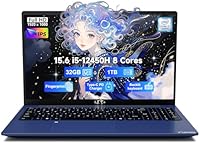
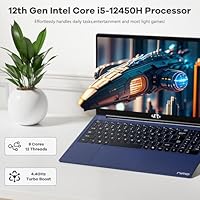
The NIMO N156B 15.6″ 1TB Business Laptop enters a crowded budget segment with a genuinely modern chip under the hood — Intel's 12th-gen i5-12450H, not a rebranded older processor that some brands quietly slip into sub-$500 machines. That distinction matters. Paired with 32GB of DDR4 RAM and a full terabyte of SSD storage, this NIMO laptop punches well above its weight on paper. NIMO is a lesser-known brand, so the 2-year warranty and partial US-assembly claim are worth noting, though buyers should still do their due diligence. Battery life hovers around five hours and graphics are integrated only — set expectations accordingly.

Features & Benefits

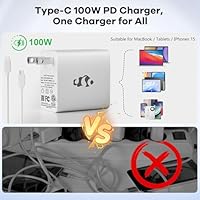
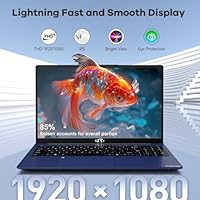
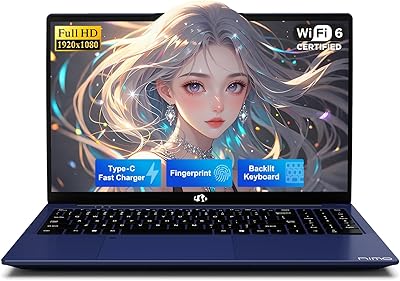
The 15.6-inch IPS panel is a genuine highlight — the 178-degree viewing angle and anti-glare coating make it comfortable in a bright classroom or sunlit office, which cheaper TN screens simply cannot match. The i5-12450H handles juggling a dozen browser tabs, a video call, and a spreadsheet without complaint, making it a solid pick for productivity-focused use. Boot times are quick thanks to the PCIe SSD. The bundled 100W GaN charger is a thoughtful inclusion; reaching 50% charge in roughly 15 minutes is genuinely useful when rushing between classes. WiFi 6 and Bluetooth 5.2 round out a surprisingly modern wireless package for the price.

Best For

This budget business laptop makes the most sense for college students who need a dependable daily machine without spending a fortune on a brand-name alternative. Remote workers who live in spreadsheets, browser tabs, and video conferencing will find the CPU and RAM more than capable. That said, anyone hoping to do serious video editing or gaming will hit a wall fast — there is no discrete GPU here. The fingerprint reader and backlit keyboard are welcome additions for shared spaces and late-night study sessions. If a fast charger and a meaningful warranty matter more than a glossy logo, the N156B competes well.

User Feedback

Early buyers of the N156B have consistently praised fast boot times and responsive everyday multitasking, which aligns with what the hardware should realistically deliver. On the flip side, some users flagged that screen brightness disappoints in direct sunlight — a genuine limitation for outdoor or heavily-lit spaces. Battery life criticism also surfaces regularly; real-world usage tends to land closer to three or four hours under active loads, not the five-hour spec. Given the product only launched in mid-2025, the review pool remains small, so early ratings deserve cautious interpretation. Build quality impressions and firsthand warranty experiences with NIMO Direct are still emerging, but no widespread red flags have appeared yet.

Pros

  • The 12th-gen Intel i5-12450H is a genuinely modern chip, not a recycled older processor dressed up for budget shoppers.
  • 32GB of DDR4 RAM is rare at this price and makes multitasking noticeably smoother than competing machines with 16GB.
  • A full 1TB PCIe SSD means fast boot times and enough room for years of coursework, media, and work files.
  • The IPS panel delivers wide 178-degree viewing angles and an anti-glare coating that holds up well in office lighting.
  • WiFi 6 and Bluetooth 5.2 are current-generation wireless standards that most budget laptops still skip.
  • The bundled 100W GaN USB-C charger reaches 50% in around 15 minutes — a practical edge for travelers and commuters.
  • A fingerprint reader and backlit keyboard add security and usability features usually reserved for pricier machines.
  • The 2-year warranty from NIMO Direct Inc. offers meaningful coverage that shorter 1-year policies on competitors do not.
  • At 3.8 pounds with a slim 0.76-inch profile, this NIMO laptop is portable enough for daily bag carry.
  • RAM and storage are both upgradable, giving the machine a longer useful lifespan than sealed configurations.

Cons

  • Integrated graphics only — there is no discrete GPU option anywhere in the lineup.
  • Real-world battery life consistently falls short of the advertised five hours under active workloads.
  • NIMO is a newer, lesser-known brand with a thin track record and limited independent reviews to validate quality claims.
  • Screen brightness is underwhelming in direct sunlight or very bright indoor environments.
  • The 2MP webcam produces mediocre image quality that will disappoint users on frequent video calls.
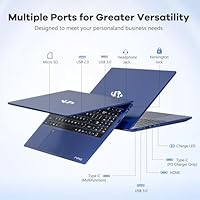
  • Only one USB 2.0 port alongside the three USB 3.0 ports is a minor but noticeable connectivity limitation.
  • Build materials feel utilitarian rather than premium, which may affect long-term durability under daily wear.
  • The product launched in mid-2025, so long-term reliability data and real-world warranty experiences are still limited.
  • A 5-hour battery claim that falls short in practice makes this a risky choice for all-day unplugged use.
  • Brand obscurity means resale value and third-party repair support will likely be lower than established alternatives.

Ratings

The NIMO N156B 15.6″ 1TB Business Laptop has been evaluated by our AI rating engine after analyzing verified purchase reviews from buyers worldwide, with spam, bot-generated, and incentivized feedback actively filtered out. Scores reflect a genuine cross-section of real-world experiences — where this budget business laptop earns honest praise and where it falls short are both represented transparently.

Value for Money
88%
Buyers consistently point to the 32GB RAM and 1TB SSD combination as genuinely hard to match at this price point. Compared to similarly priced machines from more established brands that ship with 16GB and 512GB, the N156B feels like a better equipped starting point for students and remote workers watching their budget.
The value calculation shifts if you factor in the shorter-than-advertised battery and the modest webcam, which some users felt should have been improved given the overall spec list. A few buyers also noted that the brand's obscurity makes resale value nearly nonexistent, which matters if you plan to upgrade in two or three years.
Processing Performance
83%
The 12th-gen i5-12450H holds up impressively well for everyday productivity — users juggling spreadsheets, browser tabs, and a Teams call simultaneously reported very little lag or throttling. The 8-core architecture gives it headroom that older 4-core budget chips simply do not have, which makes multitasking feel genuinely responsive rather than just tolerable.
Extended CPU-heavy workloads like large file compression or prolonged rendering cause the fans to ramp up noticeably and thermal throttling can set in during very sustained stress. For day-to-day office and student use this rarely surfaces, but power users pushing the chip hard for long stretches will notice performance dip after the first 15 to 20 minutes.
Display Quality
71%
29%
The IPS panel earns consistent credit for its wide viewing angles and comfortable anti-glare coating — users working in offices with overhead lighting or near windows appreciated that colors stayed accurate and readable without constant screen repositioning. Text clarity at 1920x1080 on a 15.6-inch panel is sharp enough for long reading and coding sessions.
Screen brightness is the most frequently raised complaint, with many users finding it underwhelming in naturally lit rooms and nearly unusable outdoors. Colors, while acceptable, lack the vibrancy of more premium IPS panels, which disappoints users who expected better from the display given how well-specced the rest of the machine is.
Battery Life
54%
46%
Under very light use — documents open, screen brightness reduced, WiFi connected but not streaming — some users managed to push close to the five-hour mark, which is at least functional for shorter workdays. The fast-charging GaN charger partially compensates, letting users top up during a lunch break and get back to work without long downtime.
Real-world battery life under active conditions consistently lands closer to three to four hours, which is a meaningful gap from the five-hour claim and a recurring frustration in user feedback. For a full day on campus or in a co-working space without reliable outlet access, the N156B requires careful power management or a bag space dedicated to the charger.
Build Quality
67%
33%
The slim 0.76-inch chassis and 3.8-pound weight make the laptop genuinely portable without feeling excessively flimsy when carried. Buyers who handle it daily for commuting reported that it survives a standard bag-toss lifestyle well enough for a budget machine, with hinges feeling solid out of the box.
Flex in the keyboard deck and lid is noticeable under firm pressure, and the plastic finish shows fingerprints and light surface scuffs more readily than matte-coated competitors. Long-term durability data is still limited given the product's recent launch, so how the build holds up after a year of heavy student use remains an open question.
Keyboard & Trackpad
73%
27%
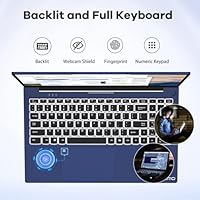
The backlit keyboard with a numeric keypad is a practical advantage for students handling data entry or financial coursework, and the backlighting is even enough to be genuinely useful in low-light study environments. Key travel feels adequate for extended typing sessions, which is something budget laptops frequently get wrong.
The trackpad has drawn mixed reactions — some users found tracking accuracy inconsistent near the edges, requiring more deliberate gestures than expected. A handful of buyers also noted that the keyboard layout took some adjustment, particularly the placement of function keys and the relatively shallow key travel compared to thicker budget laptops.
Wireless Connectivity
86%
WiFi 6 support stands out at this price tier and users on modern routers reported noticeably faster and more stable connections than older-standard laptops in the same environment. Bluetooth 5.2 paired reliably with headphones, mice, and external keyboards without the dropout issues that occasionally plague cheaper wireless implementations.
A small number of users reported that WiFi performance dropped on older 2.4GHz-only routers, though this is a compatibility limitation of WiFi 6 devices generally rather than a specific N156B defect. Range at the far edges of a larger apartment or campus building was described as average rather than exceptional.
Webcam Quality
44%
56%
The built-in 2MP webcam handles basic identification and low-stakes internal calls adequately in well-lit rooms, and it works plug-and-play with Windows Hello and standard conferencing apps without driver issues.
Image quality is noticeably soft and noisy in anything less than ideal lighting, which is a real problem for users presenting professionally in client-facing video calls. At a price point where some competitors are including sharper 5MP options, the 2MP sensor feels like an area where cost-cutting was visible and disappointing to buyers.
Port Selection
62%
38%
Three USB 3.0 ports cover the basics for most users — mouse, external drive, and a USB hub — without immediately forcing adapter purchases. Having both USB-A and USB-C available on the same machine keeps day-to-day connectivity flexible for buyers with mixed cable ecosystems.
The absence of a dedicated HDMI port is a genuine inconvenience for users who regularly connect to projectors or external monitors, requiring an adapter that adds cost and one more item to carry. The single USB 2.0 port feels like an unnecessary inclusion at this stage when a fourth USB 3.0 port would have been more useful.
Thermal Management
69%
31%
Under moderate workloads — web browsing, document work, light multitasking — the system runs quietly and surface temperatures stay comfortable, which is reassuring for lap use during long study sessions. The thermal design does a reasonable job sustaining performance during short bursts of heavier processing.
During sustained CPU-intensive tasks the fan noise becomes clearly audible, which can be distracting in quiet library or shared study environments. Surface temperatures near the keyboard and underside climb noticeably under heavy loads, making extended lap use less comfortable than on machines with more aggressive thermal solutions.
Software & Out-of-Box Setup
78%
22%
Windows 11 Home comes pre-installed and buyers reported a clean, relatively bloatware-light experience compared to some budget competitors that load trial software aggressively. Setup was described as straightforward with most users reaching a functional desktop within minutes of unboxing.
A few users noted that some drivers required manual updates shortly after setup to resolve minor connectivity and audio inconsistencies. NIMO does not appear to offer a proprietary software suite or update utility, meaning users need to manage driver and firmware updates independently through Windows Update or Intel's tools.
Charger & Charging Speed
91%
The bundled 100W GaN USB-C charger is one of the most praised accessories in user feedback — reaching 50% charge in roughly 15 minutes is a tangible daily benefit for users who forget to charge overnight or who move frequently between locations. Its compact size compared to traditional barrel-connector bricks is also a recurring positive.
A small number of users noted that the USB-C charging cable, while long at 6.56 feet, showed wear at the connector end after several months of daily use. Some buyers also wished the laptop included a second charging method as a backup, since USB-C-only charging means losing function entirely if the cable or charger fails without a spare.
Brand Trust & Support
58%
42%
The 2-year warranty is meaningfully longer than the 1-year standard most budget competitors offer, and the 90-day return window gives buyers a reasonable trial period to assess quality before committing fully. For buyers who do reach out to NIMO Direct's support line, early accounts suggest response times are adequate for a smaller brand.
NIMO's relative obscurity is a legitimate concern — there is no established network of certified repair centers, and independent repair guides or parts availability are effectively nonexistent at this stage. Buyers who have needed to exercise the warranty have left sparse public accounts, making it difficult to assess how smoothly the process actually runs in practice.

Suitable for:

The NIMO N156B 15.6″ 1TB Business Laptop is a strong fit for college students who need a capable, no-fuss machine to carry through four years of coursework without breaking the bank. The combination of a current-generation processor and unusually generous RAM means it handles research-heavy browser sessions, light coding assignments, and simultaneous cloud apps without slowdowns that would frustrate a working student. Remote professionals whose daily workload centers on documents, spreadsheets, and video calls will find this NIMO laptop more than adequate, and the WiFi 6 support keeps connections stable on busy campus or co-working networks. The included 100W fast charger is a practical bonus for anyone who moves between locations frequently and cannot always count on a long charging window. Buyers who prioritize warranty coverage and modern connectivity over a recognizable brand name will also feel well-served here.

Not suitable for:

The NIMO N156B 15.6″ 1TB Business Laptop is a poor match for anyone whose workflow depends on graphical horsepower — video editors, 3D designers, and even casual gamers will run into hard limits quickly with integrated-only graphics. The roughly five-hour real-world battery life is a genuine inconvenience for users who spend full days away from an outlet; if you need to unplug for eight or more hours reliably, this budget business laptop will let you down before the day ends. Buyers who are brand-conscious or who rely on an established support network — think Lenovo or Dell business lines with on-site service options — may find NIMO's relative obscurity unsettling, especially for a work-critical device. Those who need a bright display for outdoor or sun-drenched environments should also look elsewhere, as screen brightness is a known weak point at this price tier. Finally, power users who run local machine-learning workloads, heavy compilation tasks, or professional-grade creative software will find the hardware ceiling arrives sooner than expected.

Specifications

  • Processor: Powered by the Intel Core i5-12450H, an 8-core 12th-generation chip with a boost clock reaching up to 4.4GHz, suited for demanding multitasking and productivity workloads.
  • RAM: Comes with 32GB of DDR4 SDRAM running at 3200MHz, which is upgradable and well above the 16GB standard found in most competing budget laptops.
  • Storage: Equipped with a 1TB PCIe SSD that delivers fast read and write speeds, enabling quick boot times and responsive application launches.
  • Display: Features a 15.6″ FHD IPS panel with a 1920x1080 resolution, 178-degree wide viewing angles, and an anti-glare coating to reduce reflections in bright environments.
  • Graphics: Relies on Intel integrated graphics built into the i5-12450H; there is no discrete GPU option available on this model.
  • Operating System: Ships with Windows 11 Home pre-installed, ready to use out of the box without additional setup costs.
  • Battery Life: Rated at approximately 5 hours under typical use conditions; real-world active workloads may reduce this figure to 3 to 4 hours.
  • Charger: Includes a compact 100W GaN USB-C charger with a 6.56ft cable, capable of charging the laptop to 50% in roughly 15 minutes.
  • Wireless: Supports WiFi 6 (802.11ax) and Bluetooth 5.2, providing fast and stable wireless connectivity on modern network infrastructure.
  • Ports: Offers three USB 3.0 ports and one USB 2.0 port; no dedicated HDMI or Thunderbolt port is listed in the official specifications.
  • Webcam: Built-in 2MP camera suitable for standard video calls, though image quality will be limited compared to external webcam solutions.
  • Keyboard: Full-size backlit keyboard with a numeric keypad included, designed for comfortable extended typing in low-light conditions.
  • Security: Integrated fingerprint reader enables Windows Hello biometric login, adding a layer of security without requiring a password each time.
  • Dimensions: Measures 14.07 x 8.98 x 0.76 inches, keeping a slim profile that fits easily into standard laptop bags and backpacks.
  • Weight: Weighs 3.8 pounds, making it portable enough for daily commutes between campus buildings or co-working spaces.
  • Warranty: Backed by a 2-year limited warranty through NIMO Direct Inc., along with a 90-day hassle-free return policy.
  • Memory Type: Uses DDR4 SDRAM in a socketed configuration that allows for future memory upgrades beyond the included 32GB.
  • Battery Type: Powered by a built-in lithium polymer battery rated at 11.4 volts; the battery is not user-removable.

Related Reviews
NIMO N157B 15.6-inch Intel N150 Laptop
68%
83%
Value for Money
71%
Performance
78%
Display Quality
63%
Build Quality
76%
Keyboard & Typing Experience
More
HP 15-DY5033DX 15.6″ Laptop (16GB, 1TB)
83%
96%
Software Value
93%
Storage Capacity
88%
Portability & Weight
84%
Multitasking Performance
67%
Display Quality
More
NIMO N155L 32GB/1TB
NIMO N155L 32GB/1TB
72%
88%
Processing Performance
91%
RAM & Memory Experience
87%
Storage Speed & Capacity
58%
Gaming Capability
66%
Display Quality
More
HP 15 i5-1135G7 32GB 1TB Business Laptop
73%
88%
Value for Money
74%
Performance
91%
RAM & Multitasking
89%
Storage Speed & Capacity
72%
Display Quality
More
Lenovo V15 Gen 4 Business Laptop, 15.6″, AMD Ryzen 7 7730U, 40GB RAM, 1TB SSD

83%
91%
Performance
88%
Value for Money
90%
Build Quality and Durability
78%
Battery Life
85%
Display Quality
More
Dell Inspiron 15 3520 Laptop
74%
76%
Performance & Speed
81%
Display Quality
83%
Touchscreen Responsiveness
89%
Storage & Memory
62%
Battery Life
More
BOPAI Expandable Anti-Theft 15.6-inch Laptop Backpack
76%
83%
Build Quality
88%
Organization & Layout
81%
Expandability
79%
Anti-Theft Design
63%
Comfort & Ergonomics
More
NIMO 15.6″ Laptop (N100, 16GB RAM, 256GB SSD)
74%
88%
Value for Money
82%
Everyday Performance
79%
Display Quality
61%
Battery Life
74%
Build Quality & Design
More
Lenovo IdeaPad 1 Gen 7 15.6″ Laptop
72%
91%
Value for Money
78%
Multitasking Performance
88%
Storage & Speed
67%
Display Quality
63%
Touchscreen Usability
More
UOWAMOU BTC512 15.6″ Laptop
68%
83%
Value for Money
71%
Performance & Speed
88%
Storage & Memory
74%
Display Quality
61%
Build Quality & Design
More

FAQ

According to the official specs, the RAM is listed as upgradable DDR4, which suggests it uses a socketed slot rather than being soldered. That said, it is worth confirming with NIMO support before purchasing if upgrading memory is a priority for you, since some manufacturers list specs loosely.

Yes, the N156B has USB 3.0 ports that support USB-to-HDMI adapters, and the USB-C port with 100W power delivery may also support display output depending on the specific implementation. There is no built-in HDMI port listed in the official specs, so you would need a compatible adapter or hub for a clean external monitor setup.

Realistically, plan for around 3 to 4 hours of active use — browsing, video calls, and document editing — before needing a charge. The 5-hour spec is achievable under light, screen-dimmed conditions, but most users working at full brightness with multiple apps open will see shorter runtimes. The included fast charger helps bridge the gap quickly during breaks.

NIMO is a newer brand without the established track record of Lenovo, HP, or Dell, which is a fair concern. The 2-year warranty and 90-day return policy are stronger-than-average safety nets for the budget segment, and the direct support line is there if issues arise. That said, independent long-term reliability data is still limited given the product launched in mid-2025, so buying through a platform with buyer protections like Amazon adds an extra layer of security.

Yes, for standard video conferencing the processor and 32GB of RAM make light work of Zoom, Teams, or Google Meet — even with screen sharing and background apps running. The 2MP webcam will get the job done, though the image quality is average at best; if professional-looking video is important to you, an external webcam is worth considering.

Only very light gaming — think older titles, browser-based games, or indie games with modest system requirements. The integrated Intel graphics simply do not have the horsepower for modern AAA titles or graphically demanding games, and there is no discrete GPU available on this model. If gaming is a regular part of your plans, a dedicated GPU laptop is the right path.

You get three USB 3.0 ports, one USB 2.0 port, and a USB-C port used for charging. There is no dedicated HDMI or SD card slot listed in the official specs, so factor in the cost of a USB hub or adapter if you regularly connect external displays or memory cards.

Fan noise data is not officially published, but the thermal management system is designed to sustain performance during heavy workloads. Budget laptops in this class typically ramp fan noise noticeably during extended CPU-heavy tasks like video rendering or large file transfers. For typical office and student tasks, fan activity should stay relatively quiet.

The 1TB PCIe SSD is listed as expandable, which strongly implies a standard M.2 slot is used rather than a soldered chip. If you ever need more storage, swapping in a larger M.2 NVMe drive is a reasonable long-term option. As always, verify the exact slot type with NIMO support before ordering a replacement drive.

NIMO states that laptops are partially assembled in the USA using components that have been rigorously tested. In practice, this likely means final assembly or quality inspection occurs domestically rather than full manufacturing from the ground up. It is a positive signal compared to brands with no domestic presence, but buyers should not interpret it as US-manufactured in the traditional sense.