Overview

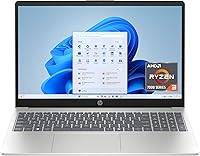
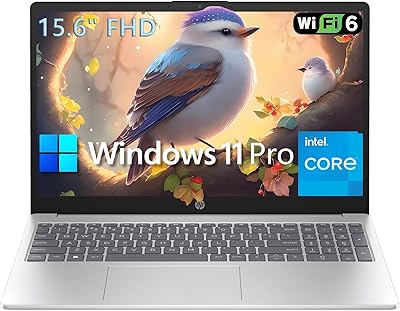
The HP Laptop 15-fc0099nr is a solid budget pick for students and everyday home users who want a touchscreen without paying premium prices. At this price point, a touch display is genuinely uncommon, and it adds real convenience for casual browsing and quick navigation. The slim, lightweight build — under four pounds — makes it easy to carry daily. One thing to know upfront: it ships with Windows 11 in S Mode, which limits app installs to the Microsoft Store unless you manually switch out of it. Capable for daily tasks, but don't expect it to power through heavy workloads.
Features & Benefits

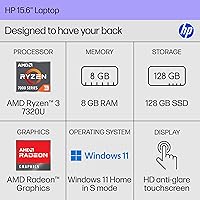
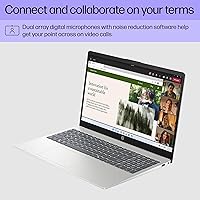
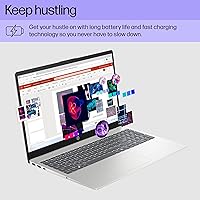
The Ryzen 3 7320U processor handles everyday tasks without drama — web browsing, video calls, document editing, and streaming all run comfortably. Paired with 8 GB of LPDDR5 RAM and a PCIe NVMe SSD, the machine feels noticeably more responsive than budget laptops of just a few years ago. The 15.6-inch anti-glare touchscreen works well for shared household use, especially in brighter rooms. Wi-Fi 6 keeps connections stable. Battery life holds up through a full school day. Two thoughtful extras worth calling out: a physical camera shutter and a mic mute button with an active LED — genuinely useful for video calls.

Best For

This budget touchscreen laptop fits neatly into a few specific situations. Students who need a portable machine for notes, research, and video calls will find it more than adequate. It works well as a shared family laptop for light browsing, streaming, and school assignments. First-time laptop buyers who want touchscreen navigation without a high price tag will appreciate the accessibility. Remote workers with straightforward needs — email, documents, video calls — will get along fine with it too. For seniors or less tech-savvy users, the touchscreen makes Windows feel more approachable. Just don't bring it to a video editing session.

User Feedback

Owners of this HP laptop tend to praise the touchscreen responsiveness, the lightweight feel, and how well the battery holds up in real daily use — those are consistent wins. The complaints are equally consistent: 128 GB of storage runs out faster than most buyers expect, especially after Windows updates and a few app installs. Cloud storage like OneDrive helps, but it's a workaround, not a fix. S Mode also catches buyers off guard — installing apps outside the Microsoft Store requires manually switching modes. Keyboard feel and trackpad quality get mixed reviews: functional, but unremarkable for the price.

Pros

  • Touchscreen at this price tier is genuinely rare and adds real daily convenience.
  • Battery comfortably lasts through a full school or workday on a single charge.
  • Lightweight at 3.52 pounds — easy to carry in a backpack all day without fatigue.
  • The NVMe SSD makes boot times and app launches feel faster than the price suggests.
  • Wi-Fi 6 support keeps connections stable even on congested home or campus networks.
  • Physical camera shutter and mic mute LED are practical, thoughtful privacy features.
  • Anti-glare coating makes the screen comfortable to use near windows or bright lights.
  • Clean out-of-box software experience with minimal pre-installed bloatware.
  • Affordable entry point for a modern Windows 11 machine with current-gen internals.
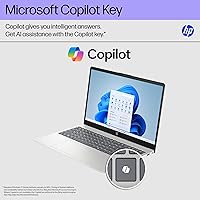
  • The dedicated Copilot key offers quick AI-assisted productivity for supported tasks.

Cons

  • 128 GB storage fills up fast — Windows updates alone can eat a significant chunk.
  • Ships in S Mode, which blocks common apps like Chrome until you manually disable it.
  • HD resolution looks noticeably soft compared to the 1080p screens now standard elsewhere.
  • The trackpad feels imprecise and plasticky, which becomes annoying during extended use.
  • USB-C port does not support charging or video output — a real limitation at this price.
  • No fingerprint reader or face recognition means every login requires a PIN or password.
  • Speaker audio is thin and weak, making headphones essentially required for media consumption.
  • Performance drops noticeably when multiple demanding tasks run at the same time.
  • The lid flexes when opened one-handed, raising mild concerns about long-term durability.
  • No SD card slot limits convenience for photographers or users who transfer files regularly.

Ratings

Our AI-generated scores for the HP Laptop 15-fc0099nr are built by analyzing thousands of verified global buyer reviews, with spam, bot activity, and incentivized feedback actively filtered out before any scoring begins. The ratings reflect what real everyday users consistently experienced — not just the highlights, but the friction points too. Both the genuine strengths and the recurring complaints are weighted transparently into every score you see below.
Value for Money
83%
Buyers regularly note that getting a touchscreen, Wi-Fi 6, and a modern Ryzen processor at this price tier feels like a strong deal. For students or families on a tight budget, the feature set punches above what most competitors offer in the same range.
The 128 GB SSD and HD-only display start to feel like compromises once you've lived with the machine for a few weeks. Some buyers felt they paid a fair price but still wish HP hadn't cut corners on storage capacity.
Performance
71%
29%
For the daily workload most buyers actually use it for — a dozen browser tabs, a YouTube stream, a Google Doc open in the background — the Ryzen 3 7320U holds up without constant frustration. The NVMe SSD makes boot times and app launches feel snappier than the price suggests.
Push it harder with multiple video calls, large downloads, and heavy tab use simultaneously and it starts to lag noticeably. Users who expected it to multitask like a mid-range machine were regularly disappointed.
Battery Life
88%
This is one of the most consistently praised aspects. College students report comfortably getting through a full day of classes — six to eight hours of real mixed use — without hunting for an outlet. That kind of reliability matters when you're moving between classrooms or coffee shops.
Heavy streaming or extended video call sessions drain the battery faster than the 12-hour rating implies. Buyers using it as a near-constant video conferencing machine found they needed a charger by early afternoon.
Display Quality
61%
39%
The anti-glare coating earns genuine appreciation from users who work near windows or in bright living rooms. The touchscreen layer is responsive and adds real usability for casual browsing, swiping through photos, or navigating with kids.
The 1366x768 resolution is the most common complaint about the screen — text and video look noticeably softer than on a 1080p panel, and buyers who watch a lot of content or do any image work find it underwhelming. Brightness tops out at 250 nits, which limits outdoor use.
Touchscreen Responsiveness
84%
Users are consistently pleased with how well the touch layer tracks taps and swipes in everyday use. For a budget machine, it rarely misregisters input, and the experience feels closer to a mid-range device than buyers expected at this price.
The touchscreen shows fingerprints quickly on the anti-glare surface, which some users found annoying enough to wipe down multiple times a day. It also doesn't support stylus input, which limits its usefulness for students hoping to hand-write notes.
Build Quality
68%
32%
The chassis feels reasonably solid for the price — there's minimal flex in the keyboard deck during normal typing. The matte finish resists minor scratches and doesn't attract fingerprints the way glossy lids do, which buyers appreciated for day-to-day handling.
The lid flexes noticeably when opened one-handed, and the hinge feels slightly loose compared to pricier HP models. A few buyers noted the plastic feels thin near the corners, raising mild concerns about long-term durability if the laptop gets tossed in a bag daily.
Keyboard & Trackpad
63%
37%
The keyboard is comfortable enough for sustained typing sessions — key spacing is decent, and the travel is acceptable for a slim budget laptop. Casual writers and students taking notes found it functional without major complaints during light daily use.
The trackpad is the weakest input element — it can feel imprecise during fast cursor movements, and the click action feels plasticky. Users coming from MacBooks or even mid-range Windows laptops found the trackpad noticeably inferior.
Storage Capacity
44%
56%
The PCIe NVMe format means the 128 GB that is available reads and writes quickly. For buyers who primarily work in a browser or stream everything, the speed of the storage makes the lightweight install feel smooth.
128 GB fills up alarmingly fast once Windows updates, a few apps, and some personal files are on board. This is the single most complained-about spec in user reviews — many buyers recommend budgeting for external storage or leaning heavily on OneDrive from day one.
Portability
89%
At 3.52 pounds and just under three-quarters of an inch thick, this is a genuinely easy laptop to carry around all day. Students switching between classes and remote workers moving between home and a cafe regularly call out the light weight as a daily comfort.
The power adapter adds bulk to your bag and is not particularly compact. A few users also noted the thin profile makes it slightly awkward to pick up one-handed off a flat desk surface.
Connectivity & Ports
74%
26%
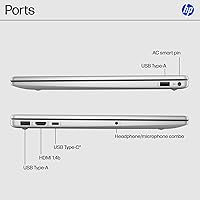
Wi-Fi 6 support means the 15-fc0099nr handles congested home networks better than older budget laptops, and real-world connection speeds feel stable. The port selection covers most daily needs — two USB-A, one USB-C, and HDMI for external displays.
The USB-C port does not support charging or video output, which is a meaningful limitation buyers discover after purchase. There is no SD card reader, and only one HDMI output at version 1.4b, which restricts 4K display use.
Privacy Features
81%
19%
The physical camera shutter is a standout feature for a budget machine — it gives users genuine peace of mind rather than relying on software. The mic mute button with its active LED indicator is equally practical for remote workers and students on frequent video calls.
These features are well-executed but limited in scope. There is no IR face recognition or fingerprint sensor, so users must rely entirely on password or PIN login, which some find inconvenient for a laptop used throughout a busy day.
Software & OS Experience
58%
42%
Windows 11 Home runs cleanly on this hardware for everyday tasks, and the interface is modern and familiar. The Microsoft Copilot button is a nice forward-looking touch that some users found genuinely useful for quick AI-assisted tasks.
S Mode is the biggest software friction point — users who try to install Chrome, VLC, or any non-Store app hit an immediate wall. Many didn't realize they'd need to permanently exit S Mode, and the process, while free, surprised buyers who expected a standard Windows experience out of the box.
Wireless Performance
78%
22%
Wi-Fi 6 compatibility gives this laptop noticeably more stable connections on crowded networks — useful in university dorms, shared apartments, or busy households with many devices competing for bandwidth. Bluetooth pairing with headphones and peripherals works reliably.
Range at the edge of a larger home or apartment can degrade faster than on some competing laptops. A handful of users reported occasional Wi-Fi reconnection issues after the laptop woke from sleep, though this was not a universal complaint.
Audio Quality
54%
46%
The built-in speakers are adequate for casual video watching and quick calls. Volume gets loud enough to fill a small bedroom, and dialogue in streaming content comes through clearly at moderate levels.
Bass is almost nonexistent and audio sounds thin at higher volumes. Users who watch a lot of movies or listen to music without headphones found the speaker output disappointing — it's functional, not enjoyable.
Setup & Out-of-Box Experience
72%
28%
Initial setup is quick and the machine is ready to use within minutes of opening. HP's pre-installed software is minimal compared to many budget Windows laptops, which means less time uninstalling bloatware before the machine feels clean.
S Mode creates an unexpected hurdle right away for users who immediately try to install familiar apps. The included documentation doesn't clearly explain S Mode limitations, which contributes to the frustration several buyers expressed in early reviews.

Suitable for:

The HP Laptop 15-fc0099nr is a well-matched choice for students who need a reliable, portable machine to carry between classes and use all day without stressing about battery life. It handles the real workload of academic life — research tabs, document editing, video lectures, and occasional video calls — without breaking a sweat. Families shopping for a shared household laptop will also find it a practical fit; the touchscreen makes it approachable for younger kids and older adults alike, and the anti-glare display works comfortably in bright living rooms. First-time laptop buyers who want something modern and easy to use without a steep learning curve will appreciate the clean Windows 11 interface and intuitive touch navigation. Remote workers whose daily routine stays within email, spreadsheets, and video conferencing will find this budget touchscreen laptop more than adequate for that scope of work. Seniors or less tech-confident users often gravitate toward it specifically because the touchscreen reduces dependence on the trackpad, making the whole experience feel more natural.
Not suitable for:

The HP Laptop 15-fc0099nr is not the right machine for anyone who needs real horsepower or significant local storage. If you regularly work with video editing software, run creative applications, play PC games, or need to process large files, the Ryzen 3 processor and integrated Radeon graphics will frustrate you quickly — this is not a performance machine in any serious sense. The 128 GB SSD is a hard constraint that will cause real problems for users who store large media libraries, game installs, or offline project files locally; cloud storage helps, but it is a workaround, not a solution. Power users who want to freely install any software from day one should also know that the machine ships in Windows S Mode, which blocks non-Microsoft-Store apps until you manually switch it off. Anyone expecting a crisp, sharp display for content creation, photo editing, or even casual 1080p media consumption will find the HD resolution noticeably soft by modern standards. If your workflow demands a capable USB-C port for charging or connecting an external monitor, this budget touchscreen laptop will also leave you short — its USB-C port handles data transfer only.
Specifications

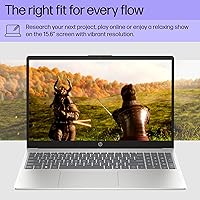
  • Display: 15.6″ HD touchscreen with 1366x768 resolution, micro-edge bezels, anti-glare coating, and 250 nits peak brightness.
  • Processor: AMD Ryzen 3 7320U with 4 cores, 8 threads, and a boost clock up to 4.1 GHz, built on a 4nm process node.
  • RAM: 8 GB LPDDR5-5500 MT/s onboard memory, soldered to the motherboard and not user-upgradeable.
  • Storage: 128 GB PCIe NVMe M.2 SSD, offering significantly faster read/write speeds than traditional hard drives.
  • Graphics: AMD Radeon integrated graphics, sharing system memory — suitable for casual media and basic tasks only.
  • Operating System: Windows 11 Home in S Mode pre-installed, which restricts app installs to the Microsoft Store until S Mode is manually disabled.
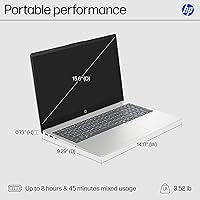
  • Battery Life: HP rates average battery life at up to 12 hours under mixed-use conditions; actual results vary by workload.
  • Wireless: Wi-Fi 6 (802.11ax) and Bluetooth are included for modern wireless connectivity on both networks and peripherals.
  • Ports: Includes 1x USB-C 5Gbps (data only), 2x USB-A 5Gbps, 1x HDMI 1.4b, 1x AC smart pin, and 1x headphone/mic combo jack.
  • Weight: The laptop weighs 3.52 pounds, making it comfortable to carry in a bag for all-day use.
  • Dimensions: Measures 14.17 x 9.29 x 0.73 inches, keeping a slim and travel-friendly profile for a 15.6-inch machine.
  • Camera Privacy: A physical camera shutter allows users to fully block the webcam without relying on any software setting.
  • Microphone: A dedicated hardware microphone mute button with an active LED indicator is built into the keyboard.
  • Keyboard Feature: Includes a dedicated Microsoft Copilot key for one-press access to AI-assisted productivity tools in Windows 11.
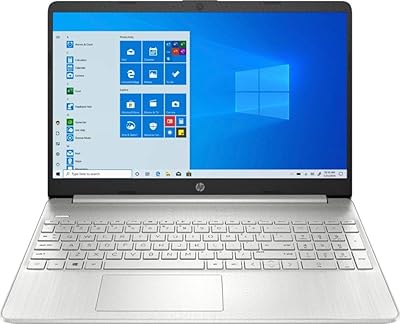
  • Finish & Color: Matte natural silver finish on the lid and keyboard frame with a textured base for a clean, professional look.
  • Wireless Standard: 802.11ax (Wi-Fi 6) supports faster throughput and better performance on congested multi-device networks compared to older Wi-Fi standards.
  • Memory Type: LPDDR5 RAM is soldered onboard at 5500 MT/s, delivering power-efficient performance compared to older DDR4 budget laptops.
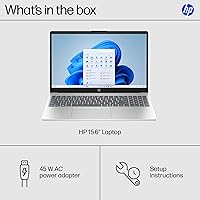
  • Optical Drive: No optical drive is included; all software installation must be done via download or external USB drive.

Related Reviews
HP 15 Intel N100 16GB/256GB
77%
88%
Value for Money
83%
Everyday Performance
91%
RAM & Multitasking
67%
Display Quality
72%
Build Quality & Portability
More
HP 15-DY1031WM Laptop 15.6″ Intel Core i3-1005G1 8GB RAM 256GB SSD
74%
75%
Performance
92%
Value for Money
55%
Battery Life
60%
Build Quality
85%
Portability
More
HP 15.6-inch Laptop 15-ef0021nr, Ryzen 3 3200U, 8GB RAM, 256GB SSD

82%
92%
Value for Money
85%
Performance
83%
Build Quality
89%
Portability
81%
Battery Life
More
HP 2020 15 15.6″ HD Touchscreen Laptop, Intel Core i5-1035G1, 16GB RAM, 512GB SSD
82%
89%
Performance
75%
Display Quality
90%
Portability
80%
Battery Life
85%
Build Quality
More
HP 15 G9 Laptop, 15.6″ FHD, AMD Athlon 3050U, 12GB RAM, 256GB SSD, Windows 11 Pro
82%
91%
Value for Money
85%
Display Quality
90%
Battery Life
88%
Performance for Everyday Tasks
86%
Build Quality
More
HP 15-EF0023dx Laptop
78%
88%
Performance
70%
Display Quality
85%
Portability
75%
Build Quality
72%
Battery Life
More
HP Pavilion 15-dw0083wm Laptop
78%
90%
Value for Money
85%
Portability & Weight
92%
Battery Life
75%
Performance (Everyday Tasks)
70%
Display Quality
More
HP Victus 15.6 i5 Gaming Laptop
82%
88%
Gaming Performance
85%
Multitasking & Productivity
91%
Display Quality
64%
Battery Life
70%
Portability
More
HP 15.6″ Ryzen 7 Laptop (64GB RAM, 2TB SSD)
85%
94%
Performance
90%
Display Quality
83%
Build Quality
78%
Portability
75%
Battery Life
More
HP 15 Laptop, Ryzen 3 5300U, 8GB RAM, 256GB SSD
79%
91%
Value for Money
88%
Portability
85%
Battery Life
82%
Performance
65%
Display Quality
More

FAQ

It comes with Windows 11 Home pre-installed and ready to use. You will just need to go through the standard first-time Windows setup — entering your Microsoft account details, choosing a few preferences — and you should be up and running within about ten minutes of opening the box.

S Mode is a restricted version of Windows that only allows apps installed from the Microsoft Store. That means popular programs like Google Chrome, VLC, or Spotify cannot be installed until you switch out of S Mode. The good news is that switching is free and permanent — you just do it once through Windows settings — but it is worth knowing about before you buy so it does not catch you off guard.

Not while it is in S Mode. Chrome is not available through the Microsoft Store, so you would need to exit S Mode first. Once you have done that, you can install Chrome or any other Windows-compatible software exactly as you normally would. The process takes just a couple of minutes and only needs to be done once.

Unfortunately, no. The 8 GB of LPDDR5 RAM is soldered directly onto the motherboard, which means it cannot be swapped out or expanded after purchase. What you buy is what you get, so factor that in if you think you might need more memory down the road.

Honestly, yes — it can fill up faster than you expect. Windows itself takes a meaningful chunk right away, and updates claim more over time. If you store a lot of photos, videos, or downloaded files locally, you will likely feel the squeeze within a few months. Using OneDrive or another cloud storage service for documents and media helps significantly, and an external USB drive is a cheap, practical backup option.

Only very light ones. The integrated AMD Radeon graphics are fine for casual or older low-demand titles, but anything modern and graphically intensive will run poorly or not at all at playable settings. If gaming is a priority, this is not the right machine for that use case.

Most users find it responsive and natural for casual tasks — swiping through pages, tapping links, pinching to zoom on photos or maps. It is not a stylus-enabled display, so handwriting notes is not really an option, but for touch navigation it works well and adds genuine convenience that is not common at this price point.

Yes, video calls are well within its comfort zone. The Ryzen 3 processor and 8 GB of RAM handle Zoom, Google Meet, and Microsoft Teams without issue, and the built-in mic mute button with LED indicator is actually a handy touch for meetings. Just keep in mind that running a video call while downloading files and streaming music simultaneously may cause some slowdown.

Yes, through the HDMI 1.4b port. Keep in mind that HDMI 1.4b supports up to 4K resolution but only at 30Hz, so it is fine for a secondary productivity display but not ideal for high-refresh-rate or 4K content. The USB-C port does not support video output, so HDMI is your only wired display option.

It is genuinely well-suited for that lifestyle. At 3.52 pounds and under an inch thick, it sits comfortably in most standard laptop compartments without adding significant weight to a school bag. Combined with the all-day battery life, it is one of the more practical daily-carry options in the budget laptop category.