Overview

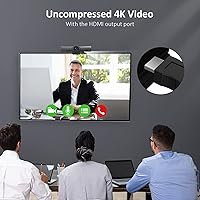
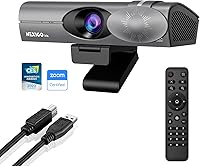
The NexiGo Iris 4K AI Webcam sits in an interesting middle ground — it's not a cheap plug-and-play webcam, but it's also not asking you to build a full camera rig. The headline hardware here is a large-format Sony STARVIS sensor, which is the kind of imaging component you'd normally find in dedicated cameras rather than a desk-mounted webcam. Connectivity runs two ways: use HDMI and you get full uncompressed 4K output to your PC; plug in via USB-A and you still get sharp 1080p at 60fps with no driver installation needed. There's also a physical remote in the box, which sounds minor until you're mid-presentation and need to switch modes without touching your machine.
Features & Benefits

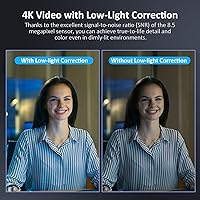
That large Sony STARVIS sensor — housed behind a ten-element all-glass lens — makes a real difference in rooms that aren't perfectly lit. Where most webcams wash out or go grainy the moment you step away from a bright window, the Iris webcam holds detail and color accuracy noticeably better in dim or backlit conditions. The AI auto-framing works reliably for steady speakers, keeping you centered as you shift in your chair or step slightly back from your desk — though don't expect miracles if you move quickly or your background is visually busy, since the tracking can occasionally lag or lose its lock. The noise-canceling mics handle moderate keyboard and ambient noise without much intervention.

Best For

This 4K AI webcam is a solid fit for remote workers who spend a significant portion of their day on video — people who present regularly, lead client-facing meetings, or simply care about looking sharp on camera. OBS users and streamers who want genuine 4K input without purchasing a separate capture card will find the HDMI workflow worth the short learning curve. Educators can put the Picture-in-Picture mode to practical use, showing their face and content simultaneously without juggling additional apps. It also works well in shared conference rooms since it requires no software installations or ongoing IT management, and the sensor handles poor lighting better than most alternatives in this class.

User Feedback

Buyers consistently note a meaningful jump in image quality compared to standard webcams, with particular appreciation for how accurately skin tones and colors are rendered even in less-than-ideal lighting. The microphones get mixed marks — adequate for video calls, but solo recorders often prefer a dedicated USB mic for cleaner results. A recurring friction point is the HDMI setup process, which surprises buyers who expected a simpler plug-in experience. The physical build feels solid but is noticeably heavier than typical webcams, so monitor-top compatibility is worth confirming beforehand. The remote control earns consistent praise as a genuinely useful tool rather than an afterthought. Fixed focus occasionally draws complaints from users sitting at non-standard distances from their desk.

Pros

  • The large Sony STARVIS sensor produces noticeably better image quality in dim or backlit rooms compared to standard webcams.
  • AI auto-framing keeps you centered during calls without needing to touch your computer.
  • HDMI output delivers fully uncompressed 4K video, a rare capability at this price point.
  • The included physical remote lets you switch modes and settings hands-free during live presentations.
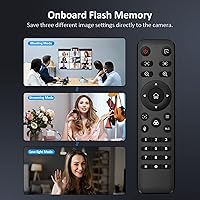
  • Onboard memory saves up to three custom image profiles, so you never have to reconfigure after a reboot.
  • Picture-in-Picture mode works well for educators showing their face alongside a presentation or whiteboard.
  • No driver installation means IT-free deployment in shared conference rooms or office environments.
  • The Iris webcam performs reliably with major platforms including Zoom, Teams, and OBS without extra configuration.
  • Color accuracy and skin tone rendering draw consistent praise from buyers upgrading from budget webcams.
  • A privacy cover is included in the box, which is a small but practical security feature many competitors skip.

Cons

  • The HDMI setup process is not intuitive and catches many first-time users off guard.
  • Fixed focus becomes a real limitation if you sit much closer or farther than a typical desk distance.
  • Built-in microphones are adequate for calls but fall short for anyone recording audio seriously.
  • At over two pounds, the weight can be problematic for thin monitor bezels or lightweight monitor arms.
  • Full 4K output requires an HDMI input on your PC, which many laptops lack without an adapter or capture card.
  • AI tracking can lag or lose its lock when subjects move quickly or the background is visually cluttered.
  • The price puts it in a tier where buyers have high expectations, and any shortcoming feels more noticeable.
  • No multi-camera support limits options for users who want to switch between multiple angles in their workflow.

Ratings

The scores below for the NexiGo Iris 4K AI Webcam were generated by AI after analyzing thousands of verified global buyer reviews, with spam, bot-submitted, and incentivized feedback actively filtered out. Each category reflects the honest distribution of real user experiences — strengths are acknowledged where they're earned, and friction points are not glossed over. The result is a transparent, balanced picture to help you decide whether this webcam fits your specific situation.
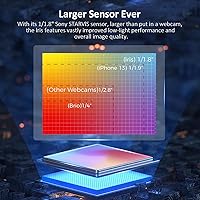
Image Quality
88%
Buyers consistently describe a visible and immediate improvement over standard webcams, particularly in how accurately skin tones and scene colors are rendered. The large sensor handles mixed or dim lighting far better than budget alternatives, and facial detail holds up well even in challenging backlit conditions.
A small number of users noted occasional overexposure in very bright rooms when leaving the camera on automatic settings. The image quality gap versus a mirrorless camera with a proper lens is still noticeable to discerning eyes, so expectations need to stay calibrated.
Low-Light Performance
91%
This is where the Iris webcam earns its strongest marks. Users working in dim home offices or rooms with only overhead ambient lighting reported sharp, low-noise images that other webcams in this category simply could not match. The large Sony STARVIS sensor is the direct reason for this advantage.
In near-total darkness or heavily underlit environments, the camera still struggles — no sensor at this size can fully compensate for an absence of usable light. A few users also noted that auto-exposure adjustments in rapidly changing light can take a beat longer than expected to stabilize.
AI Auto-Framing
74%
26%
For a stationary or moderately active speaker, the auto-framing works reliably and removes the need to manually reposition during calls. Remote workers who pace slightly or shift in their chair found the tracking smooth enough to use daily without intervention.
Fast or erratic movement — like standing up quickly or reaching across the frame — can cause the tracking to lag or momentarily lose its subject lock. Busy or visually complex backgrounds also trip up the AI more often than a clean wall setup would, which is worth knowing before relying on it in an important meeting.
Setup & Ease of Use
63%
37%
Plugging in via USB is genuinely plug-and-play — no drivers, no software, recognized immediately on both Windows and macOS. The physical remote and on-screen menu also make feature access straightforward once you understand the system, and many buyers praised the ability to recall saved profiles without any app involvement.
The HDMI workflow is where ease of use falls apart for a meaningful portion of buyers. Getting 4K output running requires understanding that your PC needs an HDMI input (not just output), which is non-obvious and has frustrated many first-time users who expected a simpler experience. Setup documentation could do much more to bridge this gap.
Build Quality
79%
21%
The physical construction feels solid and intentional — this is not a hollow plastic shell. Buyers who compared it side-by-side with other webcams frequently commented on how substantial it feels, and the all-glass lens housing contributes to that impression of durability.
The weight, at just over two pounds, is a practical concern for monitor-top mounting. Several users with thin-bezel or lightweight monitors reported instability, and a few noted the clip mount feels undersized relative to the body. Sturdier monitor or a dedicated arm is advisable.
Microphone Quality
66%
34%
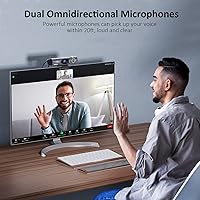
For video calls in a reasonably quiet home office, the built-in noise-canceling microphones perform adequately. Background keyboard noise and mild ambient hum are handled well, and most call participants on the other end report voices coming through clearly and without obvious artifacts.
Compared to a dedicated USB microphone in the same price range, the gap in audio quality is noticeable. Users who record instructional content, screen capture tutorials, or anything where audio is a primary deliverable consistently found the mics insufficient and ended up pairing this camera with a standalone mic anyway.
AI Picture-in-Picture Mode
82%
18%
Educators, trainers, and presenters found the PiP mode surprisingly practical for real-world use — being able to show your face alongside a zoomed view of materials without extra software is a genuine workflow advantage. The mode switches quickly and reliably via the remote.
The PiP layout itself is not customizable beyond basic positioning, so users with very specific presentation needs may find it limiting. A handful of buyers also noted that PiP isn't widely understood at first and takes some experimentation before it clicks as a feature.
Connectivity & Compatibility
84%
Broad compatibility across Windows versions and macOS, combined with zero driver requirements, makes this 4K AI webcam easy to deploy across different machines. It was confirmed to work cleanly with Zoom, Teams, Google Meet, and OBS without extra configuration steps.
The dual-connection design (HDMI plus USB-A) is a strength in theory but introduces confusion in practice. Many users — particularly laptop owners — discovered their device only had HDMI output ports, not input, making the 4K workflow inaccessible without additional hardware they hadn't anticipated purchasing.
Remote Control
86%
The included remote is one of the more pleasant surprises buyers mention. Being able to switch profiles, adjust zoom, or toggle modes mid-call without touching the computer feels like a small luxury that becomes surprisingly hard to live without once you're used to it.
The remote relies on IR line-of-sight, so it needs a clear path to the camera to register commands reliably. A small number of users reported occasional missed inputs in setups where the camera is positioned to the side rather than directly facing them.
Value for Money
71%
29%
For buyers who fully use the HDMI 4K output, AI tracking, and PiP mode, the value proposition is strong — these features combined are not available at a lower price point in a webcam form factor. The sensor quality alone justifies the investment for image-conscious professionals.
For buyers who end up using only the USB connection and skipping the advanced features, the price feels harder to justify against simpler alternatives. The value calculation really depends on how many of the hardware features you'll actively use; casual video callers are likely overpaying.
Fixed Focus Performance
67%
33%
At typical desk distances — roughly arm's length to about four feet — the fixed focus produces sharp, well-defined images without any adjustment needed. Most users in standard home office setups reported no issues with focus in day-to-day use.
Outside the standard distance range, the fixed focus becomes a tangible limitation. Users who sit very close to their monitor or who position the camera further back in a larger room reported soft or slightly blurred images, with no way to adjust focus manually or via the menu.
Onboard Memory & Profiles
83%
The ability to store and instantly recall up to three distinct image configurations is a practical feature that buyers with variable lighting conditions appreciate most. Moving from a morning call in natural light to an evening session under artificial light becomes a one-button operation.
Three profile slots cover most common scenarios but can feel limiting for power users who juggle many different environments — a streamer with multiple scene types, for example, might want more. There is also no way to back up or transfer profiles to another unit, which matters for teams with multiple cameras.
Pan, Tilt & Zoom Control
77%
23%
Having ten programmable PTZ positions is a feature that content creators and educators genuinely benefit from — being able to snap to a preset angle for a specific segment of a presentation adds a level of production control that most webcams can't offer.
The PTZ range is digital rather than mechanical, which means extreme zoom positions can show noticeable quality softening. A few buyers also found programming the positions to be more cumbersome than expected, with the manual being the clearest path to getting it right.
Privacy & Security Features
81%
19%
The included physical privacy cover addresses a real concern for remote workers and anyone who wants a hardware-level guarantee that the lens is blocked. It attaches cleanly and does not feel like a flimsy afterthought compared to covers on other webcams.
The cover is not tethered to the camera body, so it can be misplaced over time — a minor but recurring complaint from users who would prefer a sliding built-in shutter. No software-level privacy or encryption features are present, though this is standard for webcams in general.

Suitable for:

The NexiGo Iris 4K AI Webcam is built for people who spend a serious portion of their workday on camera and have grown frustrated with the soft, washed-out look of standard webcams. Remote professionals who lead client presentations, sales calls, or recurring team meetings will notice an immediate credibility boost from the sharper image and better color accuracy, particularly in offices that aren't optimally lit. Educators and online instructors will find the Picture-in-Picture mode genuinely useful for displaying both themselves and their content without patching together workarounds in streaming software. Content creators and streamers who want 4K capture without investing in a separate capture card will appreciate the HDMI workflow once it's set up. It's also a strong pick for shared conference rooms where IT simplicity matters — no drivers, no software dependencies, just plug in and go.

Not suitable for:

The NexiGo Iris 4K AI Webcam is not the right call for buyers who just need a reliable camera for the occasional video call and don't want to think about connection types or setup steps. The HDMI workflow, while powerful, requires your PC to have an available HDMI input or a compatible capture path — something many standard laptops simply don't have, making the 4K output inaccessible without extra hardware. Users who record voiceovers, podcasts, or any audio where clarity is critical will likely find the built-in microphones fall short compared to even a modest standalone USB mic. The fixed focus design can frustrate people who sit unusually close to or far from their monitor. At over two pounds, this 4K AI webcam is heavier than most monitor-mounted alternatives, which could be a stability concern depending on your setup. If your lighting is already excellent and your existing webcam produces a decent image, the practical upgrade may not justify the investment.

Specifications

  • Sensor: The camera uses a 1/1.8″ Sony STARVIS CMOS sensor, which is significantly larger than the sensors found in most consumer webcams and contributes directly to better low-light performance.
  • Lens: A 10-element all-glass lens assembly minimizes edge distortion and color fringing, producing more accurate and natural-looking facial detail compared to plastic lens alternatives.
  • Max Resolution: Via HDMI, the camera outputs uncompressed 4K video at 30fps; via USB-A, it delivers up to 1080p at 60fps for standard plug-and-play use.
  • Field of View: The fixed field of view spans 90 degrees horizontally, providing a wide enough angle for single-person home office use and small shared spaces.
  • Aperture: The lens aperture is f/2.2, allowing more light to reach the sensor in low-light conditions compared to narrower aperture webcams.
  • Digital Zoom: Up to 10x digital zoom is available, controllable via the included remote or on-screen menu without requiring companion software.
  • Connectivity: The camera connects via both HDMI output for full 4K uncompressed video and USB-A for standard 1080p operation, giving users flexibility based on their available ports.
  • Microphones: Two built-in noise-canceling microphones are positioned to reduce ambient background noise during calls and recordings in open or moderately noisy environments.
  • Onboard Memory: Flash memory built into the camera stores up to three separate image configuration profiles, which can be recalled instantly without reinstalling or reconfiguring software.
  • PTZ Control: The camera supports 10 programmable pan, tilt, and zoom positions, all adjustable and recallable via the physical remote control included in the box.
  • PiP Mode: Picture-in-Picture mode simultaneously displays a close-up face frame and a wider scene frame, useful for presentations and on-camera instruction without third-party software.
  • AI Tracking: Hardware-based AI automatically detects and frames the subject, adjusting the camera view to keep the speaker centered as they move within a reasonable range.
  • Privacy Cover: A physical privacy cover is included and attaches to the lens housing to block the camera view when not in use.
  • Remote Control: A dedicated physical remote is included in the box and provides access to all major camera functions including mode switching, zoom, and profile recall.
  • Dimensions: The camera body measures 2.36 x 6.69 x 2.28 inches, making it wider than most standard webcams due to the larger sensor and lens housing.
  • Weight: The unit weighs 2.16 pounds, which is notably heavier than typical webcams and may require a sturdy monitor or a compatible mount for stable placement.
  • Compatibility: The camera is compatible with Windows 7, 8, 10, and 11 as well as macOS, and works with major video platforms including Zoom, Microsoft Teams, and OBS.
  • Driver Requirement: No driver installation is required for standard operation, allowing the camera to function as a plug-and-play device on supported operating systems.

Related Reviews
NexiGo N950P 4K Zoomable Webcam
86%
93%
Video Quality
88%
Ease of Setup
85%
Zoom Functionality
90%
Audio Performance
89%
Privacy Features
More
Angetube 913AI 4K AI Webcam
86%
91%
Video Quality (4K)
84%
AI Tracking & Auto-Framing
96%
Ease of Setup
85%
Audio Quality (Noise-Canceling Mics)
88%
Build Quality & Design
More
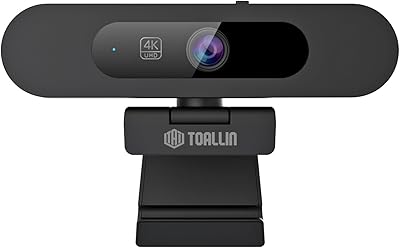
TOALLIN TL828A 4K AI Webcam
86%
91%
Video Quality
89%
AI Tracking & Auto-Framing
95%
Ease of Setup
88%
Audio Quality
83%
Build Quality
More
MOERTEK 4K Webcam
MOERTEK 4K Webcam
87%
91%
Video Quality
89%
Noise Reduction
85%
Auto Framing
94%
Ease of Setup
88%
Privacy Features
More
PixelForge 4K Webcam
86%
94%
Video Quality
88%
Audio Performance (Microphone)
91%
Ease of Setup
89%
Lighting Effectiveness
86%
Privacy Features
More
Combess 4K Webcam
Combess 4K Webcam
85%
91%
Video Quality
88%
Audio Performance
95%
Ease of Setup
70%
Field of View
93%
Privacy Features
More
Lusinx 4K Webcam
Lusinx 4K Webcam
86%
91%
Video Quality
88%
Noise Cancellation Performance
87%
Low-Light Performance
94%
Setup & Installation
75%
Microphone Clarity
More
PEATOP 4K-C80CCMD Webcam
75%
74%
Video Quality
68%
Autofocus Performance
61%
Low-Light Performance
63%
Microphone Quality
93%
Setup & Compatibility
More
NexiGo N930AF Webcam
81%
88%
Autofocus Performance
82%
Video Quality
61%
Low-Light Performance
71%
Built-in Microphone
96%
Ease of Setup
More
Lumina LX011 4K Webcam
81%
91%
Image Quality
87%
Low-Light Performance
83%
AI Auto-Framing
93%
Build Quality
78%
Microphone Quality
More

FAQ

USB is genuinely useful and gives you sharp 1080p at 60fps, which is more than enough for most video calls and streaming. The HDMI connection is there when you want full uncompressed 4K output — useful for high-end recordings or productions where you want the absolute best image. For everyday Zoom or Teams calls, USB will serve most people well.

Yes, you can still use the Iris webcam via USB-A, which works without any drivers and gives you 1080p at 60fps. The HDMI port on this camera is an output, so to use it for 4K you'd need an HDMI capture card connected to your laptop — something like an Elgato or similar device. If you don't have that setup, USB is the simpler and still very capable option.

For a seated speaker who shifts position or leans back occasionally, the auto-framing works reliably and keeps you centered without much lag. Where it can struggle is with fast or erratic movement, or if your background is visually busy — in those cases the tracking can briefly lose its lock. It's a solid feature for presentations and calls, just don't expect mirrorless-camera-level precision.

It works on both platforms. macOS is fully supported and no driver installation is needed on either system — just plug in and it's recognized automatically by your operating system and video apps.

It can work in a small conference room setting, particularly since it requires no driver installation and has a wide 90-degree field of view. That said, the AI tracking and framing are optimized around a single primary subject. For a larger room with multiple participants spread across a table, a dedicated conference room camera system would serve you better.

For video calls, the built-in mics are adequate and the noise canceling does a decent job filtering out keyboard clicks and background hum. If you're recording voiceovers, a podcast, or anything where audio clarity is the priority, a dedicated USB microphone will outperform it. Think of the built-in mics as a strong convenience option, not a replacement for a proper audio setup.

At just over two pounds, the Iris webcam is noticeably heavier than standard clip-on webcams, so it's worth checking your monitor's bezel thickness and sturdiness before mounting it on top. Thin-bezel monitors or lightweight displays may not hold it securely. If you have a standard desktop monitor with a reasonably sturdy top edge, it should be fine, but it's worth confirming before you buy.

No software installation is required. The AI tracking, Picture-in-Picture mode, and other features are all controlled through the on-screen display menu or the included remote control. That's actually one of the more practical design decisions here — everything runs from the hardware itself, so there's nothing to update or maintain on your computer.

Yes, the onboard flash memory lets you store up to three separate image profiles. You set each one up once — adjusting exposure, white balance, or other parameters — and then recall them instantly with the remote. It's a genuinely useful feature if you work in different lighting conditions throughout the day.

For the vast majority of users sitting at a standard desk distance — roughly two to four feet from the camera — fixed focus works perfectly well. Where it becomes a limitation is at the extremes: very close macro distances or unusually far placements. If your desk setup is standard, you're unlikely to notice it as an issue.

Where to Buy