Overview

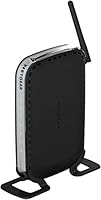
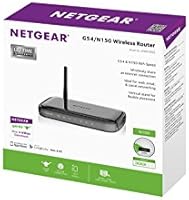
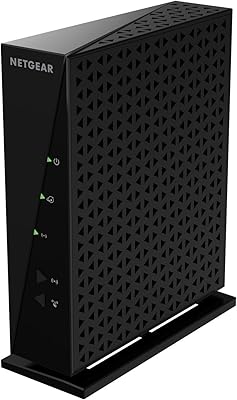
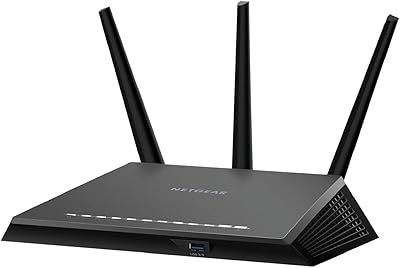
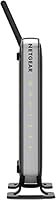
The NETGEAR RangeMax Wireless Router WNR1000 is designed to meet the needs of small to medium-sized homes. This reliable wireless router delivers a solid connection for basic home networking, offering a straightforward setup process using Netgear Genie. With support for WPA2 security, it helps keep your network safe. The router's 150 Mbps wireless speed is suitable for everyday activities like browsing and light streaming. This RangeMax router is an affordable choice for users looking to improve their internet experience without complex setup or configuration.

Features & Benefits

The NETGEAR WNR1000 offers several features that enhance its value for home users. The live parental controls provide peace of mind by allowing you to limit internet access and monitor online activity. For easy device pairing, the router includes the Push 'N Connect feature, which makes setup a breeze. The router also allows you to schedule Wi-Fi on and off times, which helps save energy when not in use. While it offers speeds up to 150 Mbps, it's perfect for light web browsing, email, and basic streaming tasks.

Best For

The NETGEAR WNR1000 is best suited for small to medium-sized homes where simple, budget-friendly Wi-Fi is needed. It's ideal for users who want a reliable, no-frills router that offers basic internet functionality. Families looking for parental control features will appreciate the safety it provides for young internet users. Additionally, those seeking to conserve power will benefit from the router's scheduled Wi-Fi on/off feature. If you don't need high-speed streaming or a vast range, this router is a good fit for light internet use.

User Feedback

The NETGEAR RangeMax Wireless Router WNR1000 has received praise for its easy setup and user-friendly interface, especially from first-time router users. Many customers are happy with its reliable performance in smaller homes, offering stable connectivity for basic needs. However, some users have noted that its wireless range is limited in larger or multi-story homes, which may require additional hardware or a stronger router. Despite this, it's widely recognized as a solid, affordable option for users with modest networking demands.
Pros

  • Easy setup with Netgear Genie makes it user-friendly, even for beginners.
  • Reliable Wi-Fi performance in small to medium-sized homes.
  • Good security with WPA2 encryption to protect connected devices.
  • Affordable option for basic internet needs like web browsing and streaming.
  • Live parental controls provide peace of mind for families with children.
  • Push 'N Connect simplifies device pairing with minimal effort.

Cons

  • Range is limited, making it less suitable for large or multi-story homes.
  • Wireless speeds may not be sufficient for heavy streaming or gaming.
  • Does not support newer Wi-Fi standards like 802.11ac, limiting future-proofing.
  • Some users report occasional signal drop in areas far from the router.
  • Setup process may be confusing for advanced users looking for deeper customization.
  • Not ideal for users who need high-speed internet for intensive tasks.

Ratings

The NETGEAR RangeMax Wireless Router WNR1000 has received a mix of positive and critical feedback from users worldwide, with reviews analyzed across multiple platforms and languages. Authentic, high-quality reviews, free from spam, bots, or exaggerated claims, were used to calculate the following ratings. Both the product’s strengths, such as ease of setup and affordability, and its pain points, like limited range for larger homes, are reflected in the scores below. These insights provide a clear picture of how this router performs in everyday use.

Ease of Setup
89%
Many users report that setting up this device is quick and straightforward, thanks to the intuitive Netgear Genie software. The user-friendly interface allows for easy configuration, even for those who are not tech-savvy. For most, it’s a hassle-free experience with minimal steps required to get everything running.
However, some users have mentioned occasional issues with the initial connection setup. In certain cases, the setup process can be slightly more complicated for individuals with less technical experience, especially when troubleshooting connection issues.
Wi-Fi Range
68%
32%
In smaller homes or apartments, the wireless range of this device is generally praised for providing solid and reliable coverage. Users in compact living spaces find that it comfortably reaches all areas with minimal interference, providing good signal strength for everyday tasks.
Unfortunately, the range becomes less effective in larger homes or multi-story setups. Many users have noted weak signals in distant rooms or on higher floors, which makes it less ideal for larger households that require robust coverage across multiple rooms.
Value for Money
92%
At this price point, users are very satisfied with what this router offers. It strikes a great balance between affordability and functionality, providing reliable connectivity and essential features like WPA2 security and scheduled Wi-Fi on/off. Many users feel it’s an excellent budget option for basic home networking.
While it’s a good value for smaller homes or apartments, some users feel it lacks some advanced features found in higher-end models. For those needing more powerful features like higher speeds or advanced configurations, this device may not meet all expectations.
Parental Controls
81%
19%
The live parental controls are a standout feature for families. They offer peace of mind by allowing parents to restrict access to inappropriate content, set usage schedules, and monitor connected devices. Users appreciate the flexibility these controls provide for managing their home network.
Some buyers report that while the parental controls are functional, they could be more intuitive or robust. A few mention that the interface for managing these settings could be more user-friendly and that certain features might not be as customizable as they’d prefer.
Security Features
85%
Users are pleased with the security features of this router, particularly the WPA2 encryption, which ensures that their home network remains protected from unauthorized access. It’s a good option for those looking for basic but effective security for everyday internet use.
However, some users have expressed concerns about the lack of more advanced security options, such as automatic firmware updates or more granular control over network settings. For those seeking high-level security, this device may fall short.
Reliability
80%
20%
The router is generally reliable for basic internet tasks, such as browsing and streaming. Users find that it consistently provides stable connections in smaller homes, with minimal downtime or connectivity interruptions, making it a dependable choice for everyday use.
A few users have reported occasional disconnections, especially when multiple devices are connected to the network. In these cases, the router struggles to maintain a stable connection, which can be frustrating for households with many devices in use.
Performance for Streaming
75%
25%
For standard video streaming, users find that this router works well, especially in smaller homes. Streaming content in HD is often smooth, and there are few interruptions when multiple devices are streaming at once.
However, performance drops in larger homes or when streaming 4K content. Users in multi-device households or larger spaces have reported buffering issues and slower speeds, especially when using bandwidth-heavy applications like 4K streaming.
Energy Efficiency
78%
22%
The scheduled Wi-Fi on/off feature is a hit with users looking to save energy. It allows them to turn off the router during certain hours, helping to reduce energy consumption when not in use. This is a simple yet effective feature for those conscious of power usage.
Some users mentioned that while the energy-saving feature is useful, it can be somewhat inconvenient if you forget to schedule it properly. In certain cases, it leads to unintended downtime, especially for those who prefer the router to remain constantly active.
Design and Build Quality
76%
24%
Users generally find the design of this router to be compact and well-built. It doesn’t take up much space and fits seamlessly into small home setups. The retractable antennas are a practical touch, as they help save space while still providing good signal strength.
Despite its compact design, a few users have noted that the build quality feels somewhat flimsy, especially the antennas. Some feel that the router could be sturdier, particularly if it’s going to be placed in areas with frequent movement or handling.
Customer Support
70%
30%
Some users have reported positive experiences with customer support, particularly in helping with setup and minor troubleshooting. The support team is responsive in addressing common issues, making it easier to resolve problems quickly.
However, several users have found customer support lacking in more complex technical issues. Some reported long wait times or unhelpful responses when trying to solve more intricate network-related problems, which left them feeling frustrated.
Software and App Experience
74%
26%
The Netgear Genie app simplifies the management of the router’s settings, allowing users to monitor and control their network from a smartphone or tablet. This is particularly appreciated for its ease of use and accessibility, offering a convenient way to manage basic settings on the go.
A few users have pointed out that the app can be slow or unresponsive at times. In some cases, the app doesn’t sync well with the router, causing delays or occasional connection drops when trying to access settings remotely.
Durability
72%
28%
The router generally performs well over time for users in smaller homes. Those who have had it for extended periods report no major issues with its longevity, and it continues to offer reliable service for basic internet needs.
Some buyers have expressed concerns about the long-term durability, with a few users noting that the device starts to show signs of wear after prolonged use. This includes occasional connectivity issues that require rebooting or resets, particularly after a year or more of use.
Compatibility with Other Devices
79%
21%
Users report good compatibility with a wide range of devices, including smartphones, laptops, and tablets. The router works well with most common devices without the need for additional configurations, which is a plus for those who want a seamless experience.
However, some users have encountered compatibility issues with certain smart home devices or gaming consoles, where the connection may drop or require additional troubleshooting to establish a stable link.
Wi-Fi Speed
71%
29%
For basic browsing and light streaming, users find the speed to be adequate. The router provides decent performance for typical home internet usage, especially in smaller spaces where high-speed performance isn’t a necessity.
However, several users have noted that the Wi-Fi speed is underwhelming for more demanding activities like online gaming or HD video streaming. The max speed of 150 Mbps may not be sufficient for larger households or those with heavy internet use.

Suitable for:

The NETGEAR RangeMax Wireless Router WNR1000 is an ideal choice for small to medium-sized homes with basic networking needs. It works well for users who want an affordable, reliable Wi-Fi solution without requiring advanced configurations. This router is especially beneficial for individuals or families looking for simple, secure internet access, such as students or budget-conscious households. With features like live parental controls, it is also a great option for families who want to monitor their children's internet usage. Additionally, those who don't need extensive range or high-speed demands will find this router perfectly suited to their needs.
Not suitable for:

This router is not well-suited for larger homes or users who need extensive Wi-Fi coverage or high-speed performance. The range limitations make it less effective in multi-story or expansive homes, where the signal strength might weaken significantly in distant rooms. Gamers or users who engage in high-bandwidth activities like 4K streaming may find the 150 Mbps speed insufficient. Additionally, those requiring advanced security features or customization may feel limited by the router's basic setup and features. In these cases, a higher-end router with better range and faster speeds would be a more appropriate choice.

Specifications

  • Wireless Standard: Supports 802.11g for wireless connectivity, providing compatibility with most older devices and moderate-speed internet use.
  • Max Speed: Offers wireless speeds of up to 150 Mbps, suitable for basic web browsing, streaming, and light online activities.
  • Security: Includes WPA2 encryption for secure wireless networking, protecting your data from unauthorized access.
  • Wireless Range: Designed for small to medium-sized homes, delivering reliable wireless coverage within these environments.
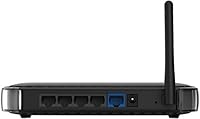
  • Ethernet Ports: Equipped with 5 Ethernet ports (1 WAN and 4 LAN) for wired connections to devices such as computers, printers, and game consoles.
  • Antennas: Features retractable antennas to improve wireless signal strength while maintaining a compact, space-saving design.
  • Parental Controls: Includes Live Parental Controls, allowing parents to manage and monitor their children’s internet usage and ensure safer browsing.
  • Push 'N Connect: Supports the Push 'N Connect feature, enabling quick, secure device pairing without needing to manually enter a password.
  • Wi-Fi Scheduling: Offers scheduled Wi-Fi on/off functionality, allowing users to conserve energy by automatically turning off the wireless network at specified times.
  • Setup Method: Easy setup process through the Netgear Genie app, guiding users through a simple installation process without needing advanced technical skills.
  • Form Factor: Compact design that fits easily in small spaces, making it suitable for home offices or living rooms where space is limited.
  • Compatibility: Compatible with most Wi-Fi-enabled devices, including laptops, smartphones, and tablets that support 802.11g or earlier wireless standards.
  • Power Supply: Operates on standard 100-240V input power, making it suitable for use in various regions worldwide.
  • Firmware: Supports firmware updates via Netgear Genie for easy maintenance and security patches.
  • Weight: Weighs approximately 0.5 kg (1.1 lbs), making it lightweight and easy to mount or place anywhere.
  • Dimensions: Measures 6.3 x 4.2 x 1.2 inches, offering a compact form factor that doesn’t take up much space.
  • Device Type: A dual-function router that acts as both a wireless access point and a wired router, providing flexible connectivity options.
  • Wireless Interference: Operates in the crowded 2.4 GHz frequency band, which may face interference in densely populated areas with many competing signals.

FAQ

Setting up this router is easy with the Netgear Genie setup wizard. Simply connect the router to your modem, power it on, and follow the step-by-step instructions on the Genie app. The process is quick, and you’ll be online in minutes.

This router uses the 802.11g wireless standard, which is suitable for basic internet browsing, email, and light streaming. It offers wireless speeds up to 150 Mbps.

This device is compatible with most Wi-Fi enabled devices, including laptops, smartphones, tablets, and smart TVs, as long as they support 802.11g or earlier wireless standards.

Yes, the NETGEAR RangeMax WNR1000 offers Live Parental Controls, allowing you to manage and restrict internet access on connected devices for safer browsing.

You can save power by using the router's scheduled Wi-Fi on/off feature. This lets you set times for the Wi-Fi to automatically turn off, which is ideal for saving energy when the network is not in use.

This router supports wireless speeds up to 150 Mbps, which is suitable for basic tasks like web browsing, streaming videos, and light gaming. However, for more demanding applications, you may want to consider a faster router.

The wireless range of this router is best suited for small to medium-sized homes. While it provides reliable coverage in these areas, its performance may be limited in larger or multi-story homes.

Yes, the Push 'N Connect feature makes pairing devices with this router simple. Just press the button on the router and your device will automatically connect without needing to enter a password.

Some users have reported limited range for larger homes or multi-story setups. Additionally, while the router is fine for basic use, it may struggle with high-bandwidth activities like 4K streaming or heavy gaming.

The NETGEAR WNR1000 can support several devices simultaneously, but the exact number will depend on the bandwidth usage. It’s designed for light to moderate use, so multiple users streaming or downloading large files might experience slower speeds.