Overview

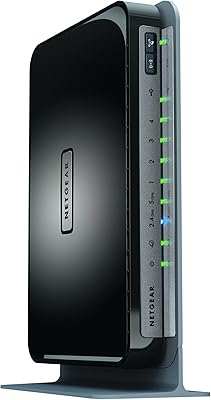
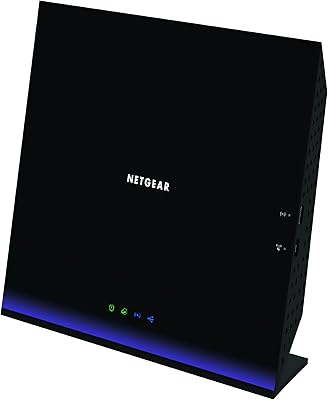
The NETGEAR R6200 AC1200 Dual Band Gigabit Router sits in a practical middle ground — capable enough for busy households, but not overbuilt to the point of pushing into premium pricing territory. It runs on an 800MHz processor, which gives it a meaningful edge over basic N-routers that struggle when five or six devices compete for bandwidth simultaneously. The 802.11ac standard means the 5GHz band can handle bandwidth-hungry tasks like HD streaming or video calls without the congestion that plagues older single-band hardware. Compared to higher-end AC1750 or AC3200 routers, this NETGEAR router trades raw top-end throughput for a more approachable, balanced package.
Features & Benefits

Running two bands at once is the R6200's most practical day-to-day strength. The 2.4GHz side handles less demanding devices — smart home gadgets, older laptops, the occasional tablet — while the 5GHz band is kept clear for anything that genuinely needs speed. The USB 3.0 port lets you attach an external hard drive and share files across the network, though real-world transfer speeds will vary depending on the drive and how many people are pulling from it at once. Gigabit Ethernet ports ensure wired connections to a desktop or smart TV won't become a bottleneck, and the NETGEAR Genie app makes initial setup manageable without ever touching a browser-based admin panel.

Best For

This dual-band router fits well in medium-sized homes where coverage gaps are starting to become a real frustration with an older router. It suits households running a mix of devices — some newer, some several years old — since its broad device compatibility stretches back through 802.11a/b/g/n standards. If you want to share an external drive over the network without buying a dedicated NAS appliance, the USB port makes that reasonably possible. Home office users who need a stable wired connection alongside wireless will appreciate the Gigabit ports. Non-technical users consistently find the Genie app lowers the setup learning curve to something manageable.

User Feedback

Owners tend to praise how straightforward the initial setup is, with many reporting consistent, dependable performance for everyday household use over extended periods. That said, a recurring criticism is that range in multi-story homes falls short — users in larger or oddly shaped spaces often notice the signal dropping off sooner than expected. Firmware update reliability comes up periodically, with some users reporting sluggish behavior or needing a full reset after certain updates. Long-term durability draws mixed responses; some units have run without issue for years, while others show signs of hardware fatigue earlier than buyers would hope. USB file sharing earns split opinions — functional for occasional transfers, but not a replacement for a proper network storage solution.

Pros

  • Dual-band operation lets you separate older, low-priority devices from bandwidth-heavy ones without much configuration effort.
  • The 800MHz processor keeps things stable under moderate multi-device loads without noticeable slowdowns during typical household usage.
  • Gigabit Ethernet ports ensure wired connections to desktops or smart TVs are never the weakest link in your network.
  • Setup is genuinely straightforward — the Genie app walks most users through the process in under 15 minutes.
  • Backward compatibility with older Wi-Fi standards means no device in your home gets left behind.
  • The USB 3.0 port is a practical bonus for occasional file sharing without buying separate hardware.
  • Many owners report years of reliable day-to-day performance with minimal intervention required.
  • Compact enough to tuck onto a shelf without dominating the space around it.

Cons

  • Signal range drops off noticeably in multi-story homes or spaces with thick interior walls.
  • Firmware updates have caused stability issues for some users, occasionally requiring a full factory reset to resolve.
  • USB storage sharing speeds vary too much depending on drive quality to be considered consistently dependable.
  • Hardware aging has been flagged by a subset of long-term owners, suggesting durability is not guaranteed beyond a few years.
  • Advanced network management options are limited compared to competing routers at a similar tier.
  • The internal antennas offer no flexibility for adjusting coverage direction, unlike models with external adjustable antennas.
  • No built-in support for Wi-Fi 5 beamforming, which newer routers in the same price range have begun offering.
  • Customer support experiences have been mixed, with some users finding resolution slow for firmware-related problems.

Ratings

The scores below reflect an AI-driven analysis of verified global user reviews for the NETGEAR R6200 AC1200 Dual Band Gigabit Router, with spam, bot-generated, and incentivized submissions actively filtered out before scoring. Each category captures what real buyers consistently praised or complained about across thousands of documented experiences. Strengths and shortcomings are weighted equally — nothing is glossed over.

Ease of Setup
88%
A clear majority of users found the initial setup process faster and less frustrating than expected. The NETGEAR Genie app removes the need to navigate a browser-based admin panel, and most households reported having their network live within 15 to 20 minutes of unboxing.
A small but consistent group encountered hiccups when trying to configure more advanced settings through the app, finding the interface limiting once they moved past the basics. ISP-specific modem compatibility occasionally caused extra troubleshooting steps during first-time setup.
Wireless Performance
74%
26%
For everyday tasks — HD streaming, video calls, and light gaming spread across several devices — the dual-band setup delivers noticeably more stable throughput than older single-band routers. Users in appropriately sized homes report clean, consistent speeds on the 5GHz band during peak household hours.
Performance ceiling becomes apparent when households push beyond moderate simultaneous use. Users running multiple 4K streams or large file transfers alongside gaming sessions reported speed drops that suggest the AC1200 tier is running close to its practical limits under those conditions.
Signal Range & Coverage
61%
39%
In single-story homes under roughly 1,800 square feet, coverage is generally described as adequate with few dead zones. Users who placed the router centrally in a medium-sized home tended to report the most satisfying range results.
This is the most consistently cited limitation in user feedback. Multi-story homes, spaces with thick concrete or brick walls, and larger open-plan layouts frequently produced weak signal zones on the far end of the coverage area. Internal antennas with no adjustment option make it harder to compensate for architectural challenges.
Build Quality & Design
69%
31%
The compact, foldable chassis is appreciated by users who want a router that fits discreetly on a shelf without protruding cables or antennas adding visual clutter. The physical build feels solid for the price tier, and most users reported no structural issues out of the box.
Long-term durability feedback is mixed — a meaningful subset of users reported hardware degradation after two to three years of continuous use, including overheating symptoms and port wear. The all-plastic casing, while lightweight, does not inspire premium confidence.
Firmware & Software Reliability
58%
42%
When the firmware runs smoothly, day-to-day performance is stable and requires little intervention. Users who stuck with factory firmware or applied updates selectively reported fewer issues and generally positive long-term experiences.
Firmware updates have been a recurring pain point, with a notable portion of users experiencing instability, dropped connections, or the need for a full factory reset after applying certain updates. NETGEAR's pace of releasing patches for this older model has slowed, which raises legitimate concerns about ongoing security maintenance.
USB Storage Sharing
63%
37%
For users who want to make a single external drive accessible to everyone in the house without buying dedicated NAS hardware, the USB 3.0 port gets the job done at a basic level. Occasional file transfers and media access over the local network work acceptably for low-demand use cases.
Real-world transfer speeds are inconsistent and heavily dependent on the attached drive's quality and how many devices are accessing it simultaneously. Users who treated this feature as a substitute for a proper NAS were regularly disappointed by throughput limitations and occasional connection drops during longer transfers.
Multi-Device Handling
77%
23%
Households running eight to twelve connected devices simultaneously — a realistic count for a modern family home — generally found the R6200 capable of managing the load without chronic slowdowns. The 800MHz processor and 256MB of RAM hold up better than entry-level alternatives under moderate congestion.
Performance starts to degrade noticeably once the connected device count climbs into the mid-teens, particularly if several of those devices are actively streaming or downloading. Users with smart home ecosystems added on top of regular household traffic sometimes reported intermittent instability.
Wired Connection Quality
86%
Gigabit Ethernet ports consistently earn strong marks from users who rely on wired connections for work desktops, NAS devices, or smart TVs. Speeds through the LAN ports are stable and fully utilize the bandwidth available from most residential internet plans.
There are only four LAN ports, which can be a limitation for users with several wired devices. A few users also noted that the WAN port, while Gigabit-rated, occasionally became a bottleneck when paired with higher-tier ISP plans exceeding 500Mbps.
Value for Money
72%
28%
At its price point, the R6200 offers a reasonable feature set — dual-band AC Wi-Fi, Gigabit ports, and USB sharing — that would have cost considerably more from competing brands at the time of its release. For buyers upgrading from an N-router, the performance jump is tangible.
Newer mid-range routers now offer Wi-Fi 6 or at least AC1750 speeds at comparable prices, making the R6200's value proposition harder to justify for first-time buyers today. Users who experienced early hardware failure found the price-to-longevity ratio particularly difficult to accept.
App & Remote Management
71%
29%
The NETGEAR Genie app is well-suited for non-technical users who want basic network visibility — connected devices, signal status, and simple parental controls — without needing any networking knowledge. Most users found the interface intuitive enough to navigate without consulting documentation.
Power users quickly outgrow the app's capabilities, as it lacks advanced QoS controls, detailed traffic logging, and VPN configuration. The app's compatibility with newer mobile operating system versions has also been inconsistently maintained over time.
Device Compatibility
84%
Backward compatibility spanning 802.11a through 802.11n means that virtually every Wi-Fi device a household is likely to own connects without issue. Users with older laptops or smart home sensors that do not support 802.11ac found this particularly reassuring.
While device compatibility is broad, some users noted that connecting a high volume of legacy 2.4GHz devices alongside modern ones caused the 2.4GHz band to become congested more quickly than expected. There is limited ability to prioritize or throttle specific device types.
Long-Term Durability
59%
41%
A substantial share of users report years of trouble-free operation, suggesting that units that avoid early firmware issues tend to last reasonably well. Buyers who kept the router in a well-ventilated spot reported fewer thermal issues over extended use.
Enough owners have reported hardware failures between the two- and four-year mark to make durability a genuine concern. Overheating and degraded port performance are the most commonly cited symptoms, and the lack of active cooling in the design likely contributes to these outcomes over time.
Parental Controls
66%
34%
Basic parental control features — website blocking and scheduled internet access by device — cover the needs of most families with younger children. The controls are accessible through the Genie app without requiring technical configuration knowledge.
The parental controls lack the depth that dedicated family-safety tools or newer routers with built-in content filtering services provide. Determined teenagers familiar with VPNs or device MAC spoofing can work around the restrictions without much effort.

Suitable for:

The NETGEAR R6200 AC1200 Dual Band Gigabit Router is a solid fit for households in the 1,500 to 2,500 square foot range where a basic single-band router has started showing its limits. If your home runs a mix of older laptops, smartphones, a gaming console or two, and maybe a smart TV — all competing for bandwidth at the same time — the dual-band setup genuinely helps by letting you sort devices across two separate channels. Home office workers who need a dependable wired connection to a desktop or NAS device will find the Gigabit Ethernet ports more than adequate for daily demands. The NETGEAR Genie app also makes this router a reasonable pick for non-technical users who want to get up and running without wading through a complicated admin interface. Anyone looking to share an external hard drive across the network without committing to a dedicated NAS appliance will find the USB 3.0 port a convenient, low-cost alternative.
Not suitable for:

The NETGEAR R6200 AC1200 Dual Band Gigabit Router is unlikely to satisfy buyers with very large homes, multi-story layouts, or thick concrete walls — the internal antennas simply do not project signal far enough to cover those environments reliably. Power users who run simultaneous 4K streaming, large file transfers, and competitive online gaming across a dozen or more devices will hit the ceiling on what AC1200 throughput can realistically deliver, and would be better served stepping up to an AC1750 or higher tier. Anyone who relies on USB-attached storage as a primary shared drive for regular heavy transfers should also think carefully, since real-world speeds through the USB port are inconsistent enough to frustrate frequent use. Users who want long-term firmware support and regular security patches may find the R6200 increasingly underpowered as NETGEAR shifts development attention to newer product lines. If you are building a network that needs advanced features like VPN server capability, detailed traffic monitoring, or robust QoS controls, this router's management tools will feel limited.
Specifications

  • Wi-Fi Standard: The router operates on the 802.11ac standard, commonly referred to as Wi-Fi 5, with backward compatibility covering 802.11a, b, g, and n devices.
  • Frequency Bands: Simultaneous dual-band operation runs a 2.4GHz channel alongside a 5GHz channel, allowing devices to be distributed across both for reduced congestion.
  • Max Throughput: Combined theoretical throughput reaches up to 1200Mbps, split between 300Mbps on the 2.4GHz band and 867Mbps on the 5GHz band.
  • Processor: An 800MHz single-core processor handles routing tasks and manages concurrent device connections without significant performance degradation under typical household loads.
  • RAM: 256MB of RAM supports stable multi-device operation and helps the router manage active connections and background processes simultaneously.
  • Flash Memory: 64MB of onboard flash memory stores the router firmware and configuration data.
  • USB Port: One USB 3.0 port allows an external hard drive to be connected and shared across the local network as basic network-attached storage.
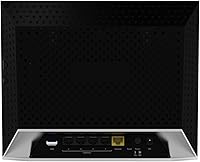
  • LAN Ports: Four Gigabit Ethernet LAN ports provide full-speed wired connections for desktops, smart TVs, gaming consoles, or NAS devices.
  • WAN Port: One Gigabit Ethernet WAN port connects the router to a modem or gateway from an internet service provider.
  • Antenna Type: Internal antennas are built into the router chassis, keeping the physical profile clean but limiting the ability to manually adjust signal direction.
  • Dimensions: The unit measures 7.79 x 7.5 x 2.55 inches, making it compact enough to place on a shelf or router stand without occupying significant space.
  • Weight: At 2.19 pounds, the R6200 is lightweight enough to wall-mount or reposition without difficulty.
  • Color: The router ships in a black finish with a foldable form factor that allows it to lie flat or stand upright.
  • Management App: The NETGEAR Genie application provides a graphical dashboard for setup, device monitoring, parental controls, and basic network diagnostics.
  • OS Compatibility: The router is officially compatible with Windows 7 and Mac OS for wired and wireless configuration via browser or the Genie app.
  • Device Support: Designed to connect laptops, smartphones, tablets, gaming consoles, and printers across both frequency bands without requiring manual driver installation.
  • Security Protocols: Supports WPA and WPA2 wireless security standards to protect the network from unauthorized access.
  • IPv6 Support: The R6200 includes IPv6 support, ensuring compatibility with modern network addressing as ISPs continue transitioning away from IPv4.

Related Reviews

Netgear WNDR4300 N750 Dual Band Gigabit Router
73%
78%
Wi-Fi Range & Coverage
86%
Setup & Ease of Use
74%
Connection Stability
88%
Wired (Ethernet) Performance
57%
USB Sharing (ReadySHARE)
More
Asus RT-AC1200 Wireless Dual-Band Router
83%
85%
Wi-Fi Performance
91%
Ease of Setup
78%
Coverage Range
88%
Parental Controls
81%
Streaming & Gaming Performance
More
NETGEAR WAX202 WiFi 6 Dual-Band Router
84%
88%
WiFi Performance
93%
Setup & Installation
85%
App Usability
89%
Speed & Coverage
90%
Device Connectivity
More
NETGEAR R6250 AC1600 Dual Band Wi-Fi Router
73%
91%
Ease of Setup
74%
Wi-Fi Performance
61%
Wi-Fi Range & Coverage
82%
Connection Stability
69%
Multi-Device Handling
More
NETGEAR WNDR3400 N600 Dual Band Wi-Fi Router
82%
85%
Performance
91%
Ease of Setup
87%
Dual-Band Performance
72%
Connection Stability
80%
Parental Controls
More
TP-Link Archer A6 AC1200 WiFi Router
76%
74%
WiFi Speed & Performance
67%
WiFi Range & Coverage
88%
Setup & Ease of Use
71%
Build Quality & Design
91%
Wired Port Performance
More
NETGEAR Nighthawk C6900-100NAS Dual Band AC1900 Cable Modem Router
85%
91%
Wi-Fi Performance
89%
Gaming and Streaming Speed
87%
Setup and Installation
92%
Value for Money
80%
Reliability and Stability
More
TRENDnet TEW-829DRU AC3000 Tri-Band Wireless Gigabit Dual-WAN VPN SMB Router
84%
91%
Performance & Speed
88%
Dual-WAN Functionality
72%
Ease of Setup
89%
Network Stability
84%
Security Features (VPN)
More
Linksys EA2700 Dual-Band Router
82%
84%
Wireless Performance
78%
Signal Coverage
88%
Setup & Installation
90%
Wired Connectivity
81%
Reliability
More
Cudy WR1300 AC1200 Gigabit WiFi Router
83%
88%
WiFi Performance
93%
Ease of Setup
85%
Signal Strength
75%
Connection Stability
80%
Build Quality
More

FAQ

It is genuinely one of the easier routers to get running. The NETGEAR Genie app walks you through the process step by step, and most people have it up and running in under 20 minutes. You do not need to access any complicated admin panels unless you want to dig into advanced settings.

It handles moderate simultaneous use reasonably well, but there are limits. If you have three or four people all streaming HD video or gaming online at the same time, you may notice occasional slowdowns. For heavier households, stepping up to an AC1750 or higher router would give you more headroom.

By default, the router broadcasts two separate networks — one on 2.4GHz and one on 5GHz — and you connect each device to whichever band you prefer. You can also set them up with the same network name if you want devices to switch automatically, though manual separation gives you more control over which devices use which band.

Most standard USB hard drives and flash drives are compatible, including FAT32 and NTFS-formatted drives. Keep in mind that actual transfer speeds over the network depend heavily on the drive's read and write speed and how many devices are accessing it simultaneously, so do not expect NAS-level performance from this feature.

Yes, the NETGEAR R6200 AC1200 Dual Band Gigabit Router is backward compatible with 802.11a, b, g, and n, so older devices connect to the 2.4GHz band without any issues.
This is where the R6200 gets mixed reviews. Single-story homes in the medium size range tend to get solid coverage, but two-story homes — especially those with thick walls or older construction materials — often see signal drop off on the upper floor. If you have a large or multi-level home, you may want to consider a mesh system or a router with external antennas instead.

You can configure the router to check for firmware updates automatically through the Genie app or the web admin panel. That said, some users have reported occasional instability after certain updates, so it is worth checking NETGEAR's release notes before applying a new firmware version.

Yes, the Genie app includes basic parental control features that let you restrict access to specific websites or set schedules for when certain devices can use the internet. It is not as granular as dedicated parental control software, but it covers the essentials for most households.

The R6200 does not include a built-in VPN server, which is a notable gap if that is a priority for you. You can still configure a VPN client connection on individual devices, but running a VPN server through the router itself is not supported.

Many users report several years of reliable use, but feedback on long-term durability is mixed. Some units run trouble-free for five or more years, while others show performance degradation or hardware issues earlier. Keeping the firmware updated and ensuring adequate ventilation around the unit tends to extend its useful life.

Where to Buy