Overview

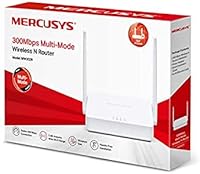
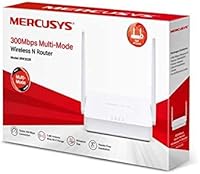
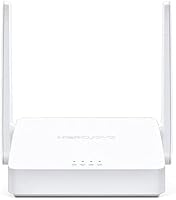
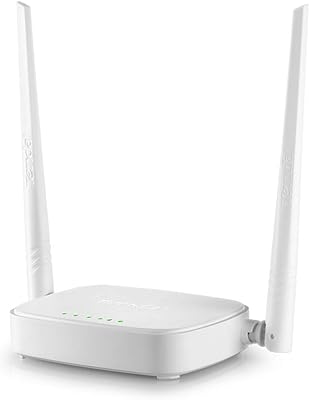
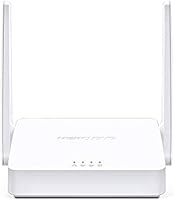
The Mercusys MW302R Wireless N Router is a no-frills, budget-conscious networking device from Mercusys — a TP-Link sub-brand built around making home connectivity accessible without a steep price tag. What separates this entry-level wireless router from a plain commodity box is its four operating modes: Router, Access Point, Range Extender, and WISP, all packed into one compact white unit. Theoretically capped at 300 Mbps, real-world throughput lands noticeably lower depending on distance, interference, and how many devices are connected. Operating exclusively on the 2.4 GHz band, it trades raw speed for range and compatibility — a reasonable tradeoff for light users, but a genuine limitation worth knowing before you buy.
Features & Benefits

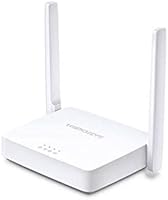
The MW302R packs more utility than its compact size implies. Switching between Router, Access Point, Range Extender, and WISP modes means one device can serve multiple roles across different living situations — though changing modes does require a reset and a few configuration steps, so it is not purely instant. The high-gain external antennas push the 2.4 GHz signal further than a typical compact router, which is genuinely useful in a one-bedroom apartment or small home. Parental controls let caregivers set access policies per device or time window, and the mobile app-guided setup keeps the whole process approachable for anyone who has never opened a router admin panel before.

Best For

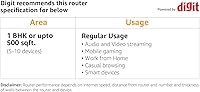
This budget router is a natural fit for renters, students, or anyone in a studio or one-bedroom space who simply needs working internet without paying for features they will never touch. It works particularly well for tech beginners who prefer a guided, app-based setup over digging through dense configuration menus. Families with younger children will appreciate having basic content controls in place, even if they are not the most granular available. The MW302R also earns its keep as a secondary device — drop it into Access Point or Range Extender mode to patch a weak signal corner in a larger home. For light browsing, video calls, and casual streaming across a handful of devices, it handles the load reliably.

User Feedback

Buyers who pick up this entry-level wireless router for basic home use tend to come away satisfied with how quickly it gets running — most describe a setup process measured in minutes rather than hours. The signal stability for everyday browsing and video calls earns consistent praise, particularly in smaller spaces. That said, users in larger homes or those hoping to run multiple 4K streams simultaneously run into real frustration; the single-band limitation is the most frequently cited complaint. The parental controls are welcomed in principle, though some buyers note they lack the scheduling depth found on pricier routers. Occasional mentions of needing periodic reboots after extended uptime are also worth factoring into your decision.

Pros

  • Setup takes minutes thanks to a guided mobile app that requires no technical background.
  • Four operating modes — Router, Access Point, Range Extender, and WISP — add genuine flexibility for different living situations.
  • Parental controls let caregivers restrict internet access by device or time schedule, which is rare at this price tier.
  • The 2.4 GHz band delivers solid range through walls, making it reliable in small to medium-sized spaces.
  • Compact footprint means it tucks away on a shelf without dominating the room.
  • Broad 802.11b/g/n compatibility keeps older devices connected without issues.
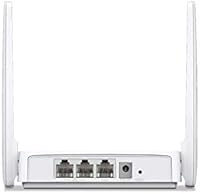
  • Wired RJ-45 ports allow stable connections for desktops, smart TVs, or consoles when Wi-Fi is not ideal.
  • Signal stability for everyday tasks like browsing, email, and standard-definition video is consistently reliable.
  • Backed by TP-Link's supply chain, spare parts and firmware support tend to be more accessible than with lesser-known brands.

Cons

  • Single-band 2.4 GHz operation means no 5 GHz lane for faster, less congested connections.
  • Real-world speeds fall noticeably below the 300 Mbps headline figure in most home environments.
  • Switching between operating modes requires a factory reset, which is disruptive if your needs change frequently.
  • Parental controls lack the scheduling depth and per-category filtering found on mid-range competitors.
  • Not well-suited to homes larger than roughly 800 to 1,000 square feet without a secondary device.
  • No USB port means no file or printer sharing over the network.
  • Long-term uptime can suffer, with some users reporting periodic reboots needed after extended use.
  • The budget router offers no app-based usage analytics or traffic monitoring for those who want visibility into their network.
  • No WPA3 security support, leaving it behind the current standard for wireless encryption.

Ratings

The ratings below reflect an AI-driven analysis of verified buyer reviews for the Mercusys MW302R Wireless N Router, collected from global markets and actively filtered to remove incentivized, bot-generated, and duplicate feedback. Each score honestly weighs both what users consistently praised and where the device fell short in real-world conditions. The result is a transparent, balanced picture of this entry-level router's genuine strengths and limitations.

Ease of Setup
91%
Getting this budget router online is one of its clearest strengths. The mobile app walks users through each step with minimal jargon, and most buyers report a complete working setup in under fifteen minutes — even those who had never configured a router before.
Switching between operating modes, such as moving from Router to Range Extender, requires a factory reset and a fresh configuration pass, which catches some users off guard who expected a simple toggle in the app.
Wi-Fi Speed & Throughput
58%
42%
For the household tasks this device is designed around — web browsing, email, standard-definition video calls, and casual streaming — the connection feels responsive and consistent. Users running light workloads on two or three devices rarely report perceptible lag.
The 300 Mbps headline figure is a ceiling almost never reached under real conditions. Users in apartments with neighboring networks report notable interference, and households attempting simultaneous HD or 4K streaming across multiple devices frequently hit congestion on the single 2.4 GHz band.
Wi-Fi Coverage & Range
67%
33%
In compact living spaces — studios, one-bedroom apartments, or small offices — the high-gain external antennas do a reasonable job of pushing the signal into corners that cheaper routers miss entirely. Users in open-plan environments rate coverage more favorably.
The whole-home coverage marketing overpromises for anything beyond roughly 800 square feet or layouts with multiple walls. Users in two-story homes or units with brick or concrete construction frequently report dead zones that the MW302R struggles to resolve on its own.
Signal Stability
74%
26%
Day-to-day connection stability earns positive marks from the majority of users who use this entry-level wireless router for standard tasks. Work-from-home buyers handling video calls and cloud document syncing report that dropped connections are infrequent under normal conditions.
A recurring subset of users report that after several weeks of continuous uptime, the router becomes sluggish or drops connections until restarted. This pattern is consistent enough to suggest a memory management issue that firmware updates have not fully resolved for all units.
Parental Controls
63%
37%
The inclusion of any parental control functionality at this price point is genuinely appreciated. Parents in smaller households find the per-device access scheduling useful for setting bedtime internet cutoffs or limiting screen time for children on specific tablets or consoles.
The controls stop well short of what more involved parents need. There is no category-based content filtering, no individual URL blocking, and no usage reporting. Families wanting meaningful content restrictions quickly discover the feature is more of a basic timer than a true safety tool.
Multi-Mode Versatility
71%
29%
Having four functional modes in a single inexpensive device provides real value for users whose networking needs shift over time. A buyer who starts using it as a primary router in one apartment can repurpose it as an access point or range extender after moving to a larger home.
Each mode switch requires a reset and manual reconfiguration, which means the versatility is not as fluid as it sounds in practice. Buyers who expected to flip between modes on demand were frequently disappointed by the friction involved.
Value for Money
83%
Measured strictly against the use cases it was built for, the MW302R delivers a fair return on spending. First-time renters, students, and light internet users who need a working Wi-Fi network without complexity get reliable performance at a cost well below most branded alternatives.
The value equation weakens quickly for anyone whose needs expand. Buyers who discover they need better speed, wider coverage, or stronger parental controls within a year often find themselves spending more on a replacement than if they had invested in a mid-range device upfront.
Build Quality & Durability
66%
34%
The unit feels appropriately constructed for its market tier — light but not flimsy, with a clean white shell that resists surface scuffs during normal handling. Most users report no physical deterioration after twelve or more months of continuous use.
The plastic casing flexes noticeably under mild pressure, and the antenna bases feel less secure than those on mid-range competitors. A small number of buyers have reported antenna wobble or port loosening after repeated cable insertions over time.
Design & Form Factor
78%
22%
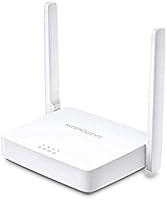
The compact footprint and neutral white color make this router easy to place without it becoming a visual distraction. At just over 12 ounces, it is light enough to mount on a wall bracket or reposition between rooms without any hassle.
The external antennas, while functional, give the unit a somewhat dated appearance compared to more modern sleek designs. Users who care about aesthetics may find it less appealing sitting out on a desk or entertainment unit.
App & Interface Usability
77%
23%
The Mercusys mobile app is cleanly laid out and avoids the dense, confusing menus that plague many budget router admin panels. Buyers with no prior networking experience consistently report finding the most important settings — Wi-Fi name, password, and mode — without difficulty.
The app's feature depth is limited, and advanced users looking for fine-grained controls such as QoS settings, VLAN configuration, or detailed traffic logs will find themselves switching to the browser-based interface, which itself lacks depth compared to higher-end alternatives.
Device Compatibility
86%
The 802.11b/g/n standard covers an exceptionally wide range of devices, meaning everything from an older laptop to a current-generation smartphone or gaming console connects without any compatibility friction. Users with mixed device households report no issues across brands or operating systems.
The absence of 802.11ac or Wi-Fi 5 support means devices capable of faster wireless connections are artificially capped. Owners of newer high-performance laptops or consoles will not be able to take advantage of their hardware's full wireless capability.
Wired Connectivity
79%
21%
The RJ-45 Ethernet ports provide a stable, low-latency wired option that users with gaming consoles or desktop PCs consistently prefer for reliability. Wired connections through this router test as consistently stable, even when the wireless network is under moderate load.
The port count is limited, which constrains users who want to hard-wire multiple devices simultaneously. There is also no gigabit Ethernet support, meaning wired throughput is capped below what faster internet plans or local network transfers could otherwise achieve.
Long-Term Reliability
61%
39%
The majority of buyers using this device for basic daily tasks report months of largely uninterrupted service. For a device in this price tier, sustained performance over a standard one-to-two year ownership period is a reasonably common outcome.
Reports of performance degradation over time — slower speeds, more frequent drops, or the need for weekly reboots — appear often enough to be a genuine concern rather than isolated incidents. Long-term firmware support from Mercusys has also been inconsistent across older models in their lineup.
Network Security
62%
38%
WPA2 encryption is supported and enabled by default, which provides an adequate baseline for protecting a home network against casual intrusion. The setup process also prompts users to set a custom password, reducing the risk of leaving factory defaults in place.
The absence of WPA3 support is a meaningful gap as newer devices and security standards increasingly rely on it. There are no built-in threat detection tools, no automatic vulnerability alerts, and no guest network isolation controls beyond a basic guest Wi-Fi toggle.

Suitable for:

The Mercusys MW302R Wireless N Router is a genuinely practical pick for anyone who needs basic, dependable Wi-Fi without spending more than necessary. Renters in studio or one-bedroom apartments will find it covers their space comfortably without the overhead of a feature-loaded device they will never fully use. Tech beginners benefit most here — the mobile app setup removes the intimidation of logging into a router admin panel, and the whole process typically wraps up in under fifteen minutes. Parents with younger children will appreciate the parental controls, which allow setting access schedules or restricting specific devices, even if the controls are not the most detailed on the market. The MW302R also makes a solid secondary device for someone who already has a main router but needs to extend coverage to a dead-zone room or connect it as a dedicated access point.
Not suitable for:

The Mercusys MW302R Wireless N Router is a poor match for households that put serious demands on their network. If you have multiple people simultaneously streaming in HD or 4K, joining video calls, and gaming online, the single-band 2.4 GHz ceiling will become a frustration quickly — real-world throughput falls well short of the 300 Mbps theoretical maximum, especially as distance and interference increase. Larger homes with multiple floors or thick walls should not rely on this budget router as their sole coverage solution; the antennas help at this price point, but they are not a substitute for a mesh system or a more powerful dual-band router. Power users who want granular Quality of Service controls, advanced firewall settings, or detailed traffic monitoring will find the feature set too bare. If you are buying for a growing household with five or more active devices and heavier internet habits, spending more upfront on a dual-band or Wi-Fi 5 router will save real frustration later.
Specifications

  • Brand: Mercusys is a budget-focused networking sub-brand operated by TP-Link, designed to bring reliable connectivity to entry-level home users.
  • Model: The device carries the model designation MW302R, identifying it within the Mercusys Wireless N router lineup.
  • Max Speed: The router is rated for a theoretical maximum throughput of 300 Mbps, with real-world speeds typically lower depending on environment and connected devices.
  • Frequency Band: Operates exclusively on the 2.4 GHz single band, offering wider range at the cost of peak speed compared to dual-band alternatives.
  • Wi-Fi Standard: Supports the 802.11b/g/n wireless standard, ensuring backward compatibility with a broad range of older and current Wi-Fi devices.
  • Operating Modes: The device supports four distinct modes — Router, Access Point, Range Extender, and WISP — switchable via the admin interface with a configuration reset required.
  • Antennas: Equipped with high-gain external antennas intended to extend signal reach in small to medium-sized indoor spaces.
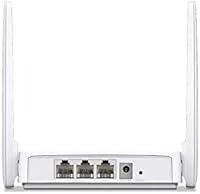
  • Ethernet Ports: Includes RJ-45 Ethernet ports for establishing stable wired connections to devices such as desktops, consoles, or smart TVs.
  • Parental Controls: Offers policy-based parental controls that allow caregivers to restrict internet access per device or set time-based schedules.
  • Setup Method: Installation is guided through a Mercusys mobile app or an intuitive browser-based web interface, requiring no advanced technical knowledge.
  • Dimensions: The unit measures 3.66 x 5.35 x 1.02 inches, making it compact enough to sit unobtrusively on a shelf or desktop.
  • Weight: The router weighs 12.3 ounces, keeping it lightweight and easy to reposition as needed.
  • Color: Ships in a clean white finish that blends into most home and office environments without drawing attention.
  • Compatible Devices: Works with laptops, smartphones, tablets, desktop computers, and gaming consoles across a wide range of operating systems.
  • Recommended Use: Intended primarily for home and light small-business networking scenarios involving general browsing, video calls, and moderate device counts.
  • Manufacturer: Manufactured by TP-Link Technologies, the parent company behind the Mercusys brand, which provides firmware support and product documentation.
  • Security: Supports WPA and WPA2 wireless encryption standards to protect the home network from unauthorized access.
  • Power Supply: Powered via an included external power adapter; the device requires a standard electrical outlet and does not operate on battery.

Related Reviews
Linksys E2000 Wireless-N Router
74%
88%
Ease of Setup
71%
Wireless Signal Strength
67%
Dual-Band Performance
91%
Wired Connection Reliability
83%
Guest Network Feature
More
NETGEAR R6200 AC1200 Dual Band Gigabit Router
71%
88%
Ease of Setup
74%
Wireless Performance
61%
Signal Range & Coverage
69%
Build Quality & Design
58%
Firmware & Software Reliability
More
NETGEAR WNR2000 N300 Wireless Router
70%
91%
Ease of Setup
63%
Wireless Performance
52%
Range & Coverage
78%
Wired Connectivity
83%
App & Management
More
NETGEAR RangeMax Wireless Router WNR1000
78%
89%
Ease of Setup
68%
Wi-Fi Range
92%
Value for Money
81%
Parental Controls
85%
Security Features
More
SANOXY Wireless-N Wifi Repeater 300Mbps
82%
85%
WiFi Range Extension
90%
Ease of Setup
76%
Build Quality
80%
Signal Strength in Dead Zones
88%
Compatibility with Routers
More
Cisco WAP4410N Wireless-N Access Point

71%
88%
Build Quality
91%
Long-Term Durability
58%
Wireless Performance
76%
PoE Implementation
62%
Ease of Setup
More
N newline Newcoo 50CDB
77%
88%
Battery Life
71%
Microphone Noise Cancellation
83%
Connection Reliability
67%
Wearing Comfort
86%
Charging Base Usability
More
Monster N-Lite 211 Wireless Earbuds
78%
88%
Battery Life
82%
Sound Quality
79%
Connectivity & Stability
58%
Mic & Call Quality
66%
Fit & Comfort
More
D-Link DIR-605L N300 Wireless Router
66%
83%
Ease of Setup
54%
Wireless Range
51%
Throughput Speed
78%
Value for Money
67%
Build Quality
More
Asus RT-AC1200 Wireless Dual-Band Router
83%
85%
Wi-Fi Performance
91%
Ease of Setup
78%
Coverage Range
88%
Parental Controls
81%
Streaming & Gaming Performance
More

FAQ

It is genuinely one of the easier setups in this category. You download the Mercusys app, plug in the router, and follow the on-screen steps — most people get it running in under fifteen minutes. You do not need to touch any advanced settings unless you want to.

For a typical two-bedroom apartment under roughly 800 square feet, coverage is usually solid. In larger spaces, or in units with thick concrete or brick walls, you may notice signal drop-off toward the far end. The high-gain antennas help, but they are not a replacement for a mesh system if your space is larger or awkwardly shaped.

Yes, Range Extender mode is one of the four built-in options. You would switch the device to that mode through the web interface, which requires a reset from its default Router mode. Once configured, it picks up your existing Wi-Fi signal and rebroadcasts it to a weaker area.

For one or two people streaming standard or HD content at the same time, it handles the load without much trouble. If multiple people in the household are all streaming in HD or 4K simultaneously, the single 2.4 GHz band can become a bottleneck, and you may notice buffering or reduced quality.

Yes, it is compatible with virtually any ISP that provides a standard modem or gateway with an Ethernet output. Simply connect the WAN port to your modem, and the router handles the rest. It works in most markets and supports common connection types including DHCP, PPPoE, and static IP.

The parental controls let you restrict internet access by device and set time windows during which certain devices can or cannot connect. However, they do not offer category-based content filtering or individual URL blocking out of the box, which is a limitation compared to pricier routers with more advanced family safety features.

Absolutely — the RJ-45 Ethernet ports let you run a wired connection from the router directly to a console, smart TV, or desktop. Wired connections generally give you more stable latency than Wi-Fi, which is worth doing for gaming or any device that stays in one spot.

Most users report stable performance for everyday tasks over extended periods. A small number of buyers have mentioned needing to restart the device after weeks of continuous uptime, particularly if the connection drops unexpectedly. Scheduling a weekly automatic reboot through the admin panel can help prevent this if it becomes a pattern.

For a solo worker or a small team doing video calls, file sharing, and web browsing, this budget router holds up well. It is not built for an office with heavy data transfers, cloud backup running in parallel, or a large number of active devices, but for light-duty remote work it is a sensible, cost-effective choice.

The router stores your configuration in its internal memory, so your Wi-Fi name, password, and other settings will be retained after a power outage or accidental unplug. You should not need to set it up again from scratch every time power is restored.