Overview

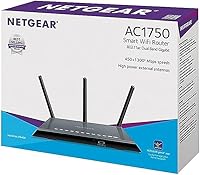
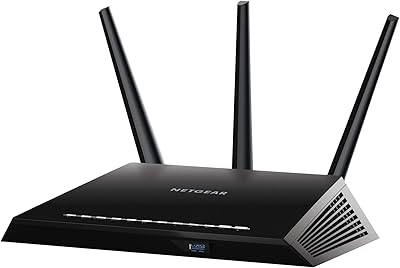
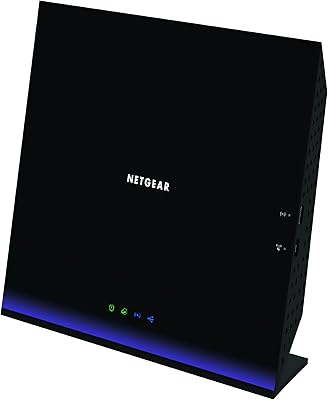
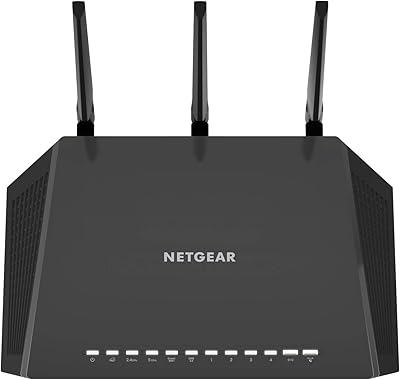
The Netgear R6400 AC1750 Wi-Fi Router has been around long enough to earn a reputation as a dependable mid-range option for households that need reliable coverage without overcomplicating things. This is a Wi-Fi 5 router, which means it is not cutting-edge anymore, but for everyday browsing, video calls, and streaming on a handful of devices, it still holds its own. Years on the market have resulted in mature firmware and a steady stream of updates, which tends to matter more than people expect. The flat, low-profile design sits neatly on a shelf or can be wall-mounted, so it does not demand prime real estate on your desk.
Features & Benefits

The R6400 runs both the 2.4 GHz and 5 GHz bands simultaneously. In practical terms, the 2.4 GHz side covers a wider area with better wall penetration — ideal for smart home gadgets and phones roaming around the house — while the 5 GHz band delivers faster throughput for devices that stay closer to the router. Four gigabit LAN ports mean you can hardwire a desktop, a smart TV, and a NAS without grabbing a separate switch. The USB 3.0 port adds light file-sharing capability. Netgear Genie handles parental controls and guest networks through a straightforward web interface, and the double firewall setup offers solid baseline network security for a typical home.

Best For

This dual-band router is well suited to homes in the 1,500 to 2,000 square foot range where a single access point can realistically cover everything. If your household streams 4K on a TV or two, handles video calls, and has a few phones and laptops on the network, it manages that load without complaint. It is also a practical upgrade for anyone still running an older 802.11n router — the speed improvement is immediately noticeable. Small home offices benefit from the wired port options, and families who want parental controls without paying a monthly fee will appreciate having that built in. Just do not expect it to anchor a demanding multi-gamer setup.

User Feedback

With a 3.9-star average across a few hundred ratings, the R6400 lands in broadly positive territory, though the feedback tells a nuanced story. Most buyers highlight easy initial setup through the Genie app and note that wireless range holds up well for the price class. Long-term owners — those past the two-year mark — often report it is still running without issues, which speaks to build quality. On the flip side, a recurring complaint involves the 5 GHz band dropping inconsistently, particularly after firmware updates. Heat buildup gets mentioned occasionally, with some users resorting to periodic reboots. Netgear customer support draws mixed opinions, so factor that in if post-purchase assistance matters to you.

Pros

  • Setup through the Netgear Genie app is quick and approachable even for non-technical users.
  • Four gigabit LAN ports cover most home wiring needs without requiring a separate switch.
  • Built-in parental controls and guest network access come at no extra subscription cost.
  • The 2.4 GHz band provides solid, wide-reaching coverage for smart home devices and roaming phones.
  • The R6400 has been on the market long enough to benefit from mature, well-tested firmware.
  • Flat, low-profile design fits neatly on a shelf or can be wall-mounted to save space.
  • The USB 3.0 port adds basic file and printer sharing without needing additional hardware.
  • WPA2-PSK encryption and a double firewall offer adequate baseline security for typical households.
  • Long-term owners frequently report the hardware still running reliably after two or more years of continuous use.
  • A noticeable real-world speed improvement over older wireless-n routers, especially for streaming and downloads.

Cons

  • The 5 GHz band drops intermittently for some users, particularly after firmware updates.
  • Larger homes over 2,000 square feet will likely need a range extender to avoid dead zones.
  • Heat buildup under sustained heavy use can trigger instability without adequate ventilation.
  • Wi-Fi 6 alternatives at comparable prices now offer better performance and a longer hardware lifespan.
  • Netgear customer support draws consistently mixed reviews, with slow response times cited frequently.
  • Parental controls lack per-app blocking and detailed activity logging compared to dedicated services.
  • The firmware update schedule has slowed, raising questions about how long active support will continue.
  • USB file-sharing speeds are noticeably slower than a dedicated NAS and impractical for heavy transfers.
  • No built-in VPN server, DNS-over-HTTPS support, or advanced threat detection for security-conscious users.
  • The Netgear Genie app interface feels dated alongside newer router management platforms from competing brands.

Ratings

Our scores for the Netgear R6400 AC1750 Wi-Fi Router are generated by AI after analyzing hundreds of verified buyer reviews worldwide, with spam, incentivized posts, and bot activity actively filtered out. The result is an honest breakdown that reflects what real households experienced day-to-day — both the genuine strengths and the frustrations that kept this router from a perfect score.
Wireless Range
78%
22%
For homes in the 1,500 to 2,000 square foot range, the R6400 covers most floor plans without requiring a second access point. High-powered internal amplifiers help the signal push through drywall and floor ceilings reasonably well, and many users in two-story homes report solid coverage on both levels.
Larger homes or layouts with thick concrete walls start exposing the router's limits noticeably. Dead zones appear in garages and far bedrooms, and several users found they needed a Wi-Fi extender to fully cover their space — an added cost that erodes the value proposition.
5 GHz Band Stability
61%
39%
When the 5 GHz band is cooperating, it delivers fast, low-latency connections ideal for 4K streaming or video calls on devices within a reasonable distance. Users who stay within 20 to 30 feet of the router generally report a smooth, consistent experience on this band.
This is the R6400's most discussed weakness. A recurring pattern in reviews involves the 5 GHz band dropping unexpectedly, particularly following firmware updates. Some users resolve it with a reboot, but others report it happening every few days, which becomes genuinely annoying in a working-from-home setup.
Setup & Ease of Use
84%
The Netgear Genie app walks first-time users through the setup process clearly, and most buyers report being online within 10 to 15 minutes of unboxing. The web-based dashboard is similarly approachable, with clearly labeled menus that do not require any networking knowledge to navigate.
The app experience has drawn some criticism for occasional connectivity hiccups during initial pairing, and a few users note the interface feels dated compared to competitors like TP-Link or Eero. Advanced settings like QoS configuration can feel buried for anyone who wants more granular control.
Wired Port Performance
88%
Four gigabit LAN ports is a genuine advantage at this price tier, and users who hardwire desktops, smart TVs, or NAS drives consistently praise the wired throughput. If you have a mix of wired and wireless devices, the R6400 handles both without any noticeable bottleneck on the Ethernet side.
The ports themselves perform well, but their physical placement on the rear panel can make cable management awkward depending on your shelf or wall-mount setup. There is no port aggregation support, which is a minor limitation for home lab users who might want to push higher throughput to a NAS.
Value for Money
72%
28%
At its price point, the R6400 offers a respectable combination of gigabit ports, dual-band wireless, USB sharing, and built-in parental controls that would cost more if assembled through separate devices. For buyers upgrading from an aging 802.11n router, the performance jump is immediately tangible.
The value calculation has shifted over time. Wi-Fi 6 routers from TP-Link and others now compete at very similar prices, offering meaningfully better performance and longevity. Paying the same amount for a Wi-Fi 5 router in 2024 requires a conscious trade-off that buyers should weigh honestly.
2.4 GHz Band Reliability
81%
19%
The 2.4 GHz band performs dependably for the types of devices that rely on it most — smart home gadgets, IoT sensors, and phones moving around the house. Its wider reach and better wall penetration make it the workhorse band for ambient connectivity throughout the home.
In dense apartment buildings or neighborhoods with heavy Wi-Fi traffic, the 2.4 GHz band experiences congestion that the router cannot fully mitigate on its own. Channel selection is manual unless you enable auto-selection, and a few users report the band slowing significantly when many 2.4 GHz neighbors are active.
Firmware & Software Updates
66%
34%
Years on the market mean Netgear has had time to address many early software bugs, and the firmware is generally more polished today than it was at launch. Automatic update notifications through Genie mean most users stay reasonably current without having to manually check.
Firmware updates have a mixed track record with this model specifically — several reviews document that updates introduced new band instability or reset custom settings without warning. Netgear's update cadence has also slowed considerably, which raises reasonable questions about how much longer active support will continue.
Parental Controls
74%
26%
Built-in parental controls through Netgear Genie let families set time limits and content filters by device without needing a third-party subscription. For households with younger kids, having these controls baked in and accessible through a simple dashboard is a meaningful convenience.
The controls are functional but not sophisticated. Tech-savvy teenagers can sometimes work around them, and the content filtering categories are fairly broad compared to dedicated parental control services. There is no per-app blocking or detailed activity logging, which limits usefulness for parents who want deeper visibility.
Heat Management
63%
37%
Under normal household loads — a few streaming devices, phones, and laptops — the R6400 runs warm but not alarmingly so. Users who place it in an open, ventilated spot on a shelf generally do not report heat-related issues during typical daily use.
Under sustained heavy use, the chassis gets noticeably hot to the touch, and a meaningful number of long-term owners trace their intermittent drop-out issues back to thermal throttling. Placing it in an enclosed cabinet or media console amplifies the problem significantly, and there are no ventilation fans to assist cooling.
USB Sharing & NAS Functionality
67%
33%
The USB 3.0 port is a useful bonus for basic file sharing across the home network. Connecting an external hard drive and accessing it from multiple computers works reasonably well for light use cases like shared photo libraries or document backups.
Transfer speeds through the USB share are noticeably slower than a dedicated NAS, and the implementation is basic enough that power users will find it limiting quickly. Printer sharing through this port works but can require extra configuration steps that some users find more trouble than it is worth.
Network Security
79%
21%
WPA2-PSK encryption combined with SPI and NAT firewall layers covers the security baseline that most home users actually need. Guest network isolation works reliably, which is genuinely useful for keeping visiting devices off your primary network without handing out your main password.
There is no built-in VPN server, no DNS-over-HTTPS support, and no advanced threat detection — features that more security-conscious users will miss. For a router that has been available since 2017, the security feature set has not evolved much, which is a gap that matters more as home networks grow more complex.
Build Quality & Design
76%
24%
The flat, horizontal form factor is practical and relatively unobtrusive on a shelf or entertainment unit. The plastic chassis feels adequately sturdy, and the wall-mount option is a thoughtful inclusion that many similarly priced routers skip.
The all-black matte plastic picks up dust visibly and scuffs with handling, and the overall aesthetic is firmly utilitarian. It does not look out of place, but it will not blend into a modern living room the way some newer routers with cleaner designs might.
Customer Support Experience
54%
46%
Netgear has an established support infrastructure with online documentation, community forums, and direct support channels. For common setup questions, the self-service knowledge base is reasonably thorough and resolves many issues without needing to contact anyone directly.
Direct customer support receives consistently mixed reviews. Wait times are frequently cited as long, and some users report being redirected between channels without resolution. For a product in this price range, several buyers expressed frustration that support quality did not match the brand's reputation.
Long-Term Reliability
73%
27%
A notable portion of reviews come from buyers who have used the R6400 for two or more years, and many report it is still functioning without major hardware failure. For a router in continuous operation, that kind of staying power is worth acknowledging.
The longer-term picture is complicated by the 5 GHz instability issue, which some owners say never fully resolved across multiple firmware versions. A subset of buyers also reported the unit failing entirely after 18 to 24 months, which, while not the majority experience, is frequent enough to register as a pattern.

Suitable for:

The Netgear R6400 AC1750 Wi-Fi Router is a practical fit for households that need dependable, no-fuss wireless coverage without overbuilding their network. If you live in an apartment or a home under 2,000 square feet and your daily demands include streaming video on a couple of TVs, video calls, and general browsing across phones and laptops, this router handles that load without complaint. Families who want built-in parental controls and a guest network without paying a monthly subscription will find those features genuinely useful and accessible through the Netgear Genie interface. It also suits small home office setups well, particularly if you want to hardwire a desktop or NAS device while keeping wireless available for everything else — the four gigabit LAN ports make that straightforward. If you are still running an older wireless-n router and want a meaningful upgrade without a steep learning curve or a steep price, the R6400 delivers that step up cleanly.
Not suitable for:

The Netgear R6400 AC1750 Wi-Fi Router is harder to recommend for buyers who are shopping the current market with an eye toward long-term value, because Wi-Fi 6 routers have reached similar price points and offer noticeably better performance and a longer useful life ahead of them. Households larger than 2,000 square feet will likely find the coverage falls short in far rooms or on separate floors, and adding a range extender to compensate introduces its own complications. Anyone who relies heavily on a fast, stable 5 GHz connection — for competitive gaming, large file transfers, or dense video conferencing — may find the band's documented instability a recurring frustration rather than an occasional inconvenience. Power users looking for advanced features like a built-in VPN server, DNS-level ad blocking, or detailed per-device traffic analytics will hit the ceiling of what this router offers fairly quickly. If post-purchase support matters to you, the mixed track record on Netgear customer service is also worth factoring into your decision.
Specifications

  • Wireless Standard: The router operates on 802.11ac (Wi-Fi 5), supporting legacy 802.11a/b/g/n devices as well.
  • Speed Class: AC1750 class delivers up to 450 Mbps on the 2.4 GHz band and up to 1300 Mbps on the 5 GHz band simultaneously.
  • Frequency Bands: Dual-band operation runs both 2.4 GHz and 5 GHz concurrently, allowing devices to connect to whichever band suits them best.
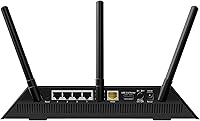
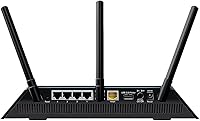
  • Ethernet Ports: Five gigabit ports are included — one WAN port for the modem and four LAN ports for wired devices like desktops, smart TVs, or NAS drives.
  • USB Port: One USB 3.0 port supports basic network-attached storage or shared printer access across connected devices.
  • Antennas: Three fixed internal antennas are paired with high-powered amplifiers and beamforming technology to direct signal toward connected devices.
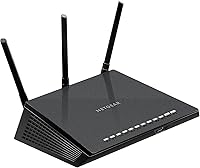
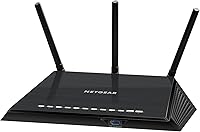
  • Dimensions: The unit measures 9.84 x 7.24 x 1.97 inches, with a flat horizontal profile designed for shelf placement or wall mounting.
  • Weight: The router weighs 1.58 pounds, making it lightweight enough to wall-mount without heavy-duty hardware.
  • Security: Network protection includes WPA/WPA2-PSK wireless encryption combined with both SPI and NAT firewall layers for dual-barrier defense.
  • Management App: Netgear Genie is available as both a browser-based dashboard and a mobile app for setup, monitoring, parental controls, and guest network management.
  • Parental Controls: Built-in parental controls allow per-device time scheduling and content filtering without requiring a third-party subscription service.
  • Guest Network: A dedicated guest network feature isolates visitor devices from the primary home network on both 2.4 GHz and 5 GHz bands.
  • Input Voltage: Universal input voltage of 100–240V means the router is compatible with power standards across most countries worldwide.
  • Operating System: The router runs Netgear Genie firmware, which manages all routing, wireless, and administrative functions through a proprietary interface.
  • Color & Finish: The chassis is finished in matte black plastic with a low-profile design intended to blend unobtrusively into home entertainment setups.
  • Compatibility: Works with any ISP-provided cable, DSL, or fiber modem and connects wirelessly to laptops, smartphones, tablets, smart TVs, and PCs.
  • Beamforming: Implicit beamforming focuses wireless signal toward active client devices rather than broadcasting evenly in all directions, improving effective range.
  • Amazon Rating: The router holds a 3.9 out of 5 star average based on 220 verified ratings on Amazon as of the time of this review.

Related Reviews

NETGEAR Nighthawk R6900P Wi-Fi Router
85%
88%
Wi-Fi Speed & Performance
85%
Coverage Area
83%
Device Connectivity
91%
Setup & Installation
89%
Security Features
More
NETGEAR WNDR3400 N600 Dual Band Wi-Fi Router
82%
85%
Performance
91%
Ease of Setup
87%
Dual-Band Performance
72%
Connection Stability
80%
Parental Controls
More
NETGEAR C6250 AC1600 Modem Router Combo
74%
84%
Value for Money
88%
Ease of Setup
71%
Wi-Fi Performance
82%
Modem Speed & Reliability
73%
Provider Compatibility
More
NETGEAR R6250 AC1600 Dual Band Wi-Fi Router
73%
91%
Ease of Setup
74%
Wi-Fi Performance
61%
Wi-Fi Range & Coverage
82%
Connection Stability
69%
Multi-Device Handling
More
Netgear Nighthawk AX4 RAX40 Wi-Fi 6 Router
84%
92%
Wi-Fi Speed & Performance
88%
Ease of Setup & Installation
85%
Coverage Range
78%
App Usability
90%
Stability for Gaming & Streaming
More
Linksys EA7200 AC1750 Dual-Band Wi-Fi Router
76%
91%
Ease of Setup
63%
Wi-Fi Range
82%
Connection Stability
77%
Multi-Device Performance
84%
App & Management
More
Synology RT2600ac Wi-Fi Router
85%
88%
Performance
91%
Wi-Fi Speed & Coverage
80%
Setup & Installation
90%
Security Features
84%
Ease of Use
More
LNN 788 Wi-Fi 6 Router
74%
91%
Ease of Setup
78%
Wi-Fi Speed Performance
67%
Coverage & Range
82%
Multi-Device Handling
79%
Gaming & Streaming Quality
More
Synology WRX560 Dual-Band Wi-Fi 6 Router
77%
91%
Network Security
88%
Software & Firmware
86%
VLAN & Network Segmentation
83%
Wired Connectivity
71%
Wireless Performance
More
Linksys EA6900 AC1900 Dual-Band Wi-Fi Router
73%
91%
Ease of Setup
78%
Wi-Fi Speed & Performance
67%
Wireless Range
73%
Beamforming Effectiveness
74%
Build Quality & Design
More

FAQ

It is genuinely one of the easier routers to set up at this price level. The Netgear Genie app walks you through each step clearly, and most users report being online within 10 to 15 minutes of plugging everything in. You do not need any networking knowledge — just follow the prompts.

It depends on the size and layout. For homes up to around 2,000 square feet with standard drywall construction, most users get adequate coverage on both floors. If you have a larger home, thick concrete walls, or a sprawling floor plan, you may find dead zones in far corners and need a range extender to fill them in.

Yes, for two or three simultaneous 4K streams it handles things comfortably, especially if those TVs are hardwired via Ethernet or reasonably close to the router. Where it starts to show strain is if you are also running video calls, gaming, and multiple wireless devices at peak demand all at the same time.

This is a known and recurring issue with the Netgear R6400 AC1750 Wi-Fi Router that a number of users have reported, often triggered by firmware updates. The most common workaround is to log into the router settings and manually set the 5 GHz channel rather than leaving it on auto, and to make sure your firmware is on the latest stable release. If the problem persists, a factory reset followed by a fresh setup resolves it for some users.
You can, and it works reasonably well for light use — think accessing shared photos, documents, or media files. That said, transfer speeds through the USB share are slower than a proper NAS device, so if you plan on moving large video files regularly, you may find it frustratingly slow.

No subscription is needed. The built-in parental controls through Netgear Genie let you set time limits and content filters by device at no extra cost. It is not the most advanced system available, but for families with younger children it covers the basics without any recurring fees.

Fairly well, from what long-term owners report. Many buyers who have been running the R6400 for two years or more say the hardware is still performing without any failures. The main caveat is that the 5 GHz instability issue some users experience does not always resolve permanently, and a small number of units have been reported to fail in the 18 to 24 month range.

Honestly, it is worth checking current prices before committing. Wi-Fi 6 routers from brands like TP-Link have come down to price ranges that overlap with this router, and they offer better multi-device performance and a longer useful lifespan going forward. If the R6400 is significantly cheaper at the time you are shopping, it still makes sense for modest needs — but at equal prices, a Wi-Fi 6 option is the smarter long-term buy.

It runs warm under normal household loads, which is typical for a router of this class. The issue arises when it is placed in an enclosed cabinet or media console where heat cannot escape — in those conditions, some users report instability or random reboots that clear up once the router is moved to an open, ventilated spot.

The R6400 works with any ISP — cable, DSL, or fiber — as long as you have a separate modem to connect it to. It is not a modem-router combo, so you plug it into whatever modem your provider supplies and it takes things from there. There are no ISP restrictions on compatibility.

Where to Buy