Overview

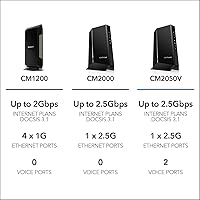
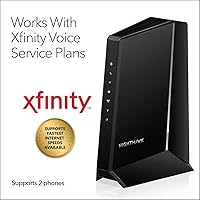
The NETGEAR Nighthawk CM2050V is a purpose-built DOCSIS 3.1 cable modem aimed squarely at Xfinity subscribers who want to squeeze the most out of a high-tier internet plan. If your household streams 4K on multiple devices, runs smart home gadgets, and handles video calls all at once, this cable modem is built to handle that load. One important caveat upfront: this is an Xfinity-only device. It won't work with Verizon, AT&T, CenturyLink, or any DSL provider. What separates this Xfinity-certified modem from most of the competition is its support for two integrated phone lines — a genuinely rare feature at this tier. Ranked inside the top ten in its Amazon category, it has the track record to back up its positioning.
Features & Benefits

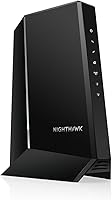
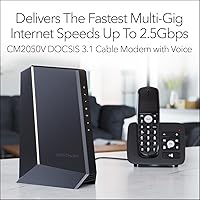
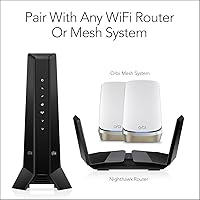
At the heart of this cable modem is a 2.5Gbps Ethernet port — the only wired output, but one that delivers true multi-gig throughput when your Xfinity plan can support it. DOCSIS 3.1, in plain terms, means the modem is built for today's heavy bandwidth demands and has headroom for faster plans as they roll out. There's no built-in WiFi, so you'll need your own router; pairing it with a WiFi 6 setup gets you the full benefit of those speeds wirelessly. The two phone lines support caller ID, call forwarding, and three-way conferencing. Owning this modem outright also means no monthly rental fee — a quiet but real saving that compounds on your Xfinity bill over time.

Best For

This Xfinity-certified modem makes the most sense for Xfinity customers on gigabit or multi-gig plans who want hardware that can actually keep pace with what they're paying for. It's also a natural fit for households that haven't dropped the landline — if you rely on Xfinity Voice for one or two phone numbers, this modem handles that natively without any separate adapter. Home office users will appreciate owning a stable device rather than depending on ISP-supplied equipment. On the router side, this cable modem works with any brand, but it pairs especially well with a WiFi 6 or mesh system. If your ISP isn't Xfinity, though, this unit simply isn't the right choice.

User Feedback

With over 3,800 ratings and a 4.2-star average, the Nighthawk CM2050V earns strong marks for activation ease and long-term connection stability. Many buyers report a smooth Xfinity setup and consistent performance over months of daily use. On the downside, negative reviews cluster around two recurring themes: the unit runs noticeably warm during extended operation, and some users experienced delays when provisioning the phone lines. VoIP call quality gets mixed reactions — reliable for most households, but not always on par with a dedicated voice service. A handful of lower-star reviews cite frustrating customer support during troubleshooting, and firmware update disruptions appear occasionally, with brief outages reported after automatic updates.

Pros

  • Eliminates Xfinity modem rental fees, recovering the purchase cost over time without ongoing charges.
  • DOCSIS 3.1 certification keeps this cable modem ready for faster Xfinity plan tiers as they roll out.
  • Two built-in phone ports support full Xfinity Voice service without needing a separate adapter.
  • The single 2.5G Ethernet port delivers true multi-gig throughput for compatible high-speed plans.
  • Activation on Xfinity is widely reported as straightforward, with most users online within minutes.
  • Compatible with any third-party router, giving buyers full flexibility over their WiFi setup.
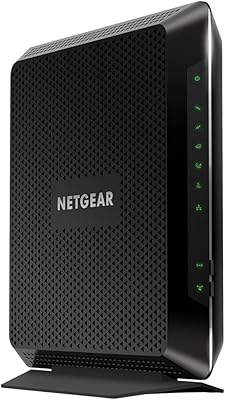
  • Sturdy vertical tower build feels durable and manages cable routing cleanly on a desk or shelf.
  • Integrated calling features — caller ID, call forwarding, three-way conferencing — work without extra equipment.
  • Long-term connection stability is a consistent theme among buyers who have used it for a year or more.

Cons

  • Runs noticeably hot under sustained heavy load, with some users reporting heat-related performance issues.
  • Xfinity-pushed firmware updates cannot be deferred and have caused brief outages for some households.
  • Phone line provisioning can lag behind internet activation, leaving voice service offline for days.
  • VoIP call quality on the second line is inconsistent, with echo and latency reported by multiple users.
  • Only one Ethernet output port means a router or switch is mandatory for any wired multi-device setup.
  • Customer support is poorly rated, with troubleshooting often failing to distinguish hardware faults from ISP issues.
  • The included Ethernet cable is standard Gigabit spec, which undercuts the modem's own 2.5G port capability.
  • Upload speeds cap at 500 Mbps, a real constraint for users on upload-intensive workflows.
  • If you move to a non-Xfinity service area, this hardware has no resale value for your new provider.

Ratings

The NETGEAR Nighthawk CM2050V earned its place near the top of the cable modem market, and these scores reflect exactly why — and where it falls short. Our AI analyzed thousands of verified global buyer reviews, actively filtering out incentivized, bot-generated, and spam submissions to surface authentic experiences. The result is an honest scorecard that captures both what this Xfinity-certified modem does exceptionally well and the friction points real users actually encountered.
Internet Performance & Stability
88%
Most Xfinity subscribers on gigabit and multi-gig plans report impressively steady connections with minimal drops over months of continuous use. Buyers in dense suburban households with many simultaneous connected devices consistently praise how reliably this cable modem holds its link under load.
A subset of users noted occasional brief disconnections following automatic firmware pushes from Xfinity, which can be disruptive if you work from home. Speeds are also ultimately capped by your ISP plan tier, so buyers on mid-range plans may not feel a meaningful difference from cheaper modems.
Xfinity Activation & Setup
83%
The majority of buyers describe activation as refreshingly painless — plugging in, calling Xfinity, and being online within 20 minutes. The modem is widely recognized by Xfinity's provisioning system, which significantly reduces the back-and-forth that can plague third-party hardware setup.
A recurring minority report that Xfinity's provisioning system occasionally fails to recognize the modem on the first attempt, requiring a second or third call to support. Phone line activation specifically drew more complaints than internet setup, with some users waiting days for voice service to go live.
Voice & Phone Line Quality
71%
29%
For households moving away from ISP-rented equipment but still depending on a landline, having two phone ports built directly into this cable modem removes the need for a separate telephony adapter. Call clarity on established lines generally satisfied users with standard household calling needs.
VoIP quality is a real point of contention — some users report echo, slight delay, or dropped calls, particularly on the second line. This isn't always a modem hardware issue, but because it's integrated, frustrated users have no easy way to isolate or swap out just the voice component.
Multi-Gig Speed Capability
86%
The single 2.5G Ethernet port is genuinely capable of saturating even the highest residential Xfinity plans currently available. Buyers who upgraded from older DOCSIS 3.0 modems consistently describe a tangible jump in peak throughput, particularly during large file transfers and 4K multi-stream evenings.
There is only one Ethernet output port, which means you must connect a router or switch downstream — a non-issue for most, but worth flagging. Upload speeds max out at 500 Mbps, which can feel like a bottleneck for users on symmetrical or upload-heavy plans.
Heat Management
58%
42%
Under light-to-moderate load, the unit stays reasonably warm without triggering any obvious throttling in most home environments. Vertical placement allows passive airflow to move through the chassis without requiring any active cooling.
Heavy sustained loads cause this cable modem to run noticeably hot — multiple reviewers describe the casing as uncomfortable to touch after hours of use. A handful of users reported performance degradation or reboots they attribute to thermal buildup, particularly when the unit is enclosed in a cabinet or entertainment center.
Build Quality & Design
76%
24%
The tall tower form factor feels sturdy and deliberate, not cheap or plasticky. At 2.44 pounds it has enough heft to suggest solid internal construction, and it sits upright without tipping — a practical detail that matters when cables are pulling at the ports.
The all-black vertical tower aesthetic is purely functional and won't blend into living spaces that prefer discreet hardware. There are no rubber feet included in some units, according to a few buyers, which means the base can slide on smooth surfaces.
Value for Money
79%
21%
At its price point, this cable modem pays for itself within roughly a year or two simply by eliminating the monthly modem rental fee that Xfinity charges. For Xfinity Voice customers especially, avoiding separate hardware costs for telephony adds another layer of long-term savings.
The upfront investment is significant compared to modems that handle internet-only plans. If you don't need voice support or aren't on a plan fast enough to fully utilize the 2.5G port, there are capable DOCSIS 3.1 options at notably lower price points.
Router Compatibility
91%
Buyers report zero compatibility issues pairing this cable modem with routers from ASUS, TP-Link, Eero, Google, and NETGEAR's own Orbi lineup. The 2.5G Ethernet handoff works cleanly with any modern router that has a matching 2.5G WAN port.
Owners of older routers with only Gigabit WAN ports will cap their connection at 1Gbps regardless of plan speed — a minor but real limitation that buyers should check before purchasing. NETGEAR's push toward its own ecosystem in marketing materials can feel subtly exclusionary to non-NETGEAR router owners.
Firmware & Long-Term Reliability
67%
33%
When firmware updates go smoothly, this cable modem is genuinely a set-it-and-forget-it device that runs stably for months without needing a manual reboot. Long-term owners frequently note it outlasts cheaper modems that require periodic restarts to maintain performance.
Firmware updates are pushed by Xfinity and cannot be deferred, which has caused brief but disruptive outages for some users. A smaller group reports that certain firmware versions introduced connectivity hiccups that persisted until a factory reset, which is a frustrating process when you also need to re-provision phone lines.
Customer Support Experience
53%
47%
When the hardware itself is functioning correctly, there is rarely a need to contact NETGEAR support at all — which is itself a positive indicator of baseline product reliability for most buyers.
Users who did encounter issues describe NETGEAR support as slow to respond and occasionally unhelpful in distinguishing between modem faults and Xfinity provisioning issues. Several one-star reviews specifically cite support interactions rather than hardware failure as their primary frustration, which drags down overall sentiment.
Physical Port Selection
62%
38%
Two RJ-11 phone ports and a single 2.5G Ethernet port cover the core use case this modem was built for, and the physical layout keeps cable management clean for most wall-mounted or shelf installations.
One Ethernet port means anyone wanting a wired multi-device setup without a router is simply out of luck. Buyers accustomed to modems with additional USB or secondary Ethernet ports will find the port selection deliberately minimal.
Packaging & Initial Unboxing
74%
26%
Most buyers describe the box contents as practical and complete — modem, power adapter, Ethernet cable, and phone cords included. The quick-start guide is clear enough for non-technical users to get internet working without reading a manual.
The included Ethernet cable is standard Gigabit spec, which some buyers find ironic given the modem's 2.5G port — a 2.5G-rated cable would be a small but appropriate inclusion at this price tier. Phone cables included are short, limiting placement flexibility for users who need to reach a distant phone jack.
Xfinity Plan Tier Compatibility
84%
This cable modem is certified for Xfinity's highest residential tiers, including their multi-gig offerings, which means it won't become a bottleneck as Xfinity rolls out faster plan options in new markets. Buyers report no plan-level compatibility issues after Xfinity network upgrades in their area.
It is strictly an Xfinity device — if you move to a home where Xfinity is not available or switch providers, this modem has zero residual value. That ISP lock-in is not a flaw exactly, but it is a genuine risk factor worth weighing before committing.

Suitable for:

The NETGEAR Nighthawk CM2050V is built for a specific and well-defined buyer: an Xfinity subscriber on a gigabit or multi-gig internet plan who wants to own their equipment outright and stop paying a monthly modem rental fee. It makes particular sense for households that still rely on a landline through Xfinity Voice, since having two integrated phone lines eliminates the need for a separate telephony adapter altogether. Home office setups benefit especially — stable multi-gig connectivity combined with a reliable phone line in a single device simplifies the home networking stack considerably. Families with multiple heavy internet users streaming, gaming, and video conferencing simultaneously will appreciate the headroom this cable modem provides. It also pairs naturally with a WiFi 6 router or mesh system for buyers who want to future-proof their entire home network in one upgrade cycle.
Not suitable for:

The NETGEAR Nighthawk CM2050V has a hard boundary that disqualifies a broad range of buyers before they even open the box: it works exclusively with Xfinity. If your internet comes from Verizon, AT&T, CenturyLink, or any DSL or fiber provider, this modem is simply incompatible — full stop. Buyers on lower-tier Xfinity plans that cap well below a gigabit will not extract meaningful value from the hardware's capabilities and would be better served by a more affordable DOCSIS 3.1 option. Anyone who needs built-in WiFi in a single device should also look elsewhere, since this cable modem has no wireless functionality and requires a separate router. If you live in a rental or frequently relocate to areas where Xfinity may not be available, the ISP lock-in creates real financial risk. Finally, buyers who are sensitive to heat output or plan to install the unit inside an enclosed cabinet should think carefully, as thermal management under sustained load has been a documented frustration for a notable share of users.
Specifications

  • Modem Standard: This cable modem uses DOCSIS 3.1, the current gold standard for residential cable internet, offering significant speed and efficiency improvements over older DOCSIS 3.0 hardware.
  • Max Download Speed: Peak download throughput reaches 2.5 Gbps, making it compatible with Xfinity's highest-tier residential internet plans available today.
  • Max Upload Speed: Maximum upload speed is rated at 500 Mbps, which covers the vast majority of residential upload demands but may feel limiting on symmetrical or upload-heavy plans.
  • Ethernet Port: A single 2.5G Ethernet port handles the WAN connection to your router, capable of passing multi-gig speeds to any compatible downstream router or switch.
  • Voice Ports: Two RJ-11 telephone ports support simultaneous Xfinity Voice service connections for up to two separate phone lines.
  • Calling Features: Supported voice features include caller ID, call waiting, call forwarding, three-way conferencing, and other standard enhanced calling options through Xfinity Voice.
  • WiFi: This modem has no built-in wireless functionality; a separate WiFi router or mesh system must be connected via the Ethernet port to provide wireless coverage.
  • Compatible ISP: This modem is certified exclusively for use with Xfinity cable internet and voice service and is not compatible with Verizon, AT&T, CenturyLink, DSL, fiber, or satellite providers.
  • Dimensions: The unit measures 6.8″ long by 3.7″ wide by 8.2″ tall, following a vertical tower form factor designed for shelf or desk placement.
  • Weight: The modem weighs 2.44 pounds, giving it enough heft to stay stable with cables attached without being difficult to reposition.
  • Model Number: The official model designation is CM2050V-100NAS, which should be referenced when confirming Xfinity compatibility or contacting NETGEAR support.
  • Brand: Manufactured by NETGEAR, a US-based networking hardware company with an extensive history in residential and business modem and router equipment.
  • Warranty: NETGEAR provides a standard one-year limited hardware warranty covering manufacturing defects under normal use conditions.
  • Power Input: The modem requires an external AC power adapter; it does not support Power over Ethernet or any battery backup functionality natively.
  • Market Rank: As of available data, this cable modem holds the number 9 position in the Computer Networking Modems category on Amazon, with over 3,800 verified ratings.
  • User Rating: The modem carries a 4.2 out of 5 star average across more than 3,823 global ratings, reflecting broadly positive long-term satisfaction with noted exceptions around heat and voice setup.
  • Coax Connection: The modem connects to your cable wall outlet via a standard F-type coaxial connector, the same fitting used on most residential cable installations in North America.

Related Reviews

Netgear Nighthawk AX5200 Router
87%
92%
Wi-Fi Performance
89%
Range & Coverage
84%
Setup & Installation
88%
Reliability & Stability
91%
Gaming & Streaming Experience
More
Netgear Nighthawk AX12 AX11000 Router
87%
92%
Wi-Fi Performance
89%
Speed & Latency
85%
Ease of Setup
88%
Build Quality
90%
Security Features
More
NETGEAR Nighthawk CM1200
75%
88%
Internet Speed Performance
83%
Setup & Installation
63%
Long-Term Reliability
79%
Value for Money
71%
Compatibility & ISP Support
More
NETGEAR Nighthawk R7350 AC2400 Router
82%
88%
Performance for Gaming
85%
Streaming Performance
91%
Ease of Setup
82%
Wi-Fi Range and Coverage
84%
Reliability
More
NETGEAR Nighthawk RAX120 WiFi 6 Router
84%
94%
WiFi Performance
91%
Coverage Area
88%
Speed Stability
72%
Ease of Setup
77%
App Experience
More
Netgear Nighthawk R6700 AC1750 WiFi Router
86%
88%
Performance & Speed
91%
Security Features
85%
Ease of Setup
80%
Wi-Fi Range & Coverage
83%
Build Quality
More
NETGEAR Nighthawk RAXE500 WiFi 6E Router
86%
92%
WiFi Coverage
89%
Speed Performance
90%
Setup and Installation
86%
Security Features
91%
Device Support Capacity
More
NETGEAR Nighthawk MK63S WiFi 6 System
87%
91%
Performance with Multiple Devices
88%
Coverage and Range
94%
Ease of Setup and Installation
89%
Security Features
84%
App and Software Experience
More
NETGEAR Nighthawk CAX30
79%
88%
Setup & Installation
83%
WiFi Speed & Performance
71%
WiFi Coverage & Range
91%
Modem Reliability & Uptime
78%
Value for Money
More
NETGEAR Nighthawk BE9300 WiFi 7 Router
88%
94%
Wireless Performance
91%
Coverage Area
88%
Device Capacity
85%
Setup & Installation
90%
Security Features
More

FAQ

Yes, that is exactly what it is designed to do. The two RJ-11 ports on the back connect directly to your existing phone handsets, and Xfinity Voice service runs through the modem alongside your internet connection. Just keep in mind that phone line activation sometimes takes longer than internet activation — it is not unusual for voice to go live a day or two after internet is up.

No, it will not. This cable modem is certified only for Xfinity cable internet service. Verizon Fios, AT&T Fiber, CenturyLink, and any DSL or fiber-based provider use entirely different network technologies that are incompatible with DOCSIS cable modems. If your home is served by one of those providers, you will need a different device entirely.

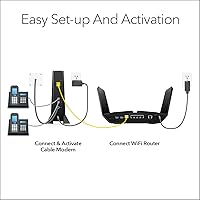
You will need a separate router. The Nighthawk CM2050V has no built-in wireless capability — it is a modem only. Connect any WiFi router to its 2.5G Ethernet port and you are set. If your router only has a Gigabit WAN port, your speeds will be capped at 1 Gbps regardless of your plan, so pairing with a WiFi 6 router that has a 2.5G WAN port gets you the full benefit.

The process is straightforward for most users. Connect the coax cable and power adapter, then either use the Xfinity app to activate your new modem or call Xfinity's activation line and provide the modem's MAC address and serial number, both printed on the label on the bottom of the unit. Internet activation typically takes under 30 minutes. If you are also activating Xfinity Voice, expect that part to take longer — sometimes a separate follow-up call to Xfinity is needed.

It does run warm, and that is a documented pattern among owners. Under normal operating conditions, warmth to the touch is expected and typically harmless. The concern arises when the unit is placed inside an enclosed cabinet or a confined space with poor airflow, where heat buildup can occasionally cause instability. Keeping it in open air on a shelf is the simplest fix and resolves most heat-related complaints.

Honestly, if you are on a mid-tier plan and do not use Xfinity Voice, there are capable DOCSIS 3.1 modems at a lower price point that will handle 400 Mbps without breaking a sweat. The real value of this particular modem is in its multi-gig capability and integrated voice support. If you are planning to upgrade to a gigabit or faster plan in the near future, or you need the phone lines, then it starts to make more financial sense.

Any standard landline telephone with an RJ-11 connector will work fine plugged into the phone ports on the back. You do not need a special VoIP phone — your existing corded or cordless handsets should connect and function normally once Xfinity Voice is provisioned on the line.

Since this modem handles both internet and voice over the same cable connection, a full cable outage will affect both services simultaneously. There is no independent fallback for phone service built into the unit. If uninterrupted phone access during outages is critical for your household, a UPS battery backup connected to the modem can help with short power interruptions, but a full Xfinity network outage will still take down both services.

Xfinity charges a monthly fee for modem rental that adds up considerably over a year or two. Owning the NETGEAR Nighthawk CM2050V outright eliminates that recurring cost entirely. The math generally favors ownership if you plan to stay with Xfinity for at least a couple of years, and even more so if you factor in that you are getting higher-performance hardware than most rental modems Xfinity provides by default.
Yes, Xfinity controls the firmware on certified modems and pushes updates automatically — you cannot block or defer them. For the vast majority of users this is a non-event, but some owners have reported brief connection drops during update cycles, typically in the middle of the night. If you experience repeated disruptions after an update, a factory reset followed by re-provisioning through Xfinity often resolves lingering issues.