Overview

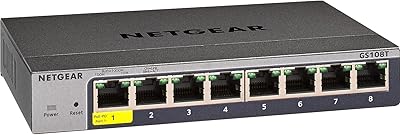
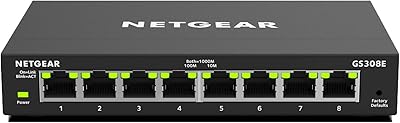
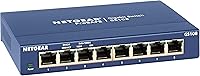
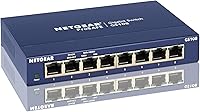
The NETGEAR GS108 8-Port Gigabit Ethernet Switch has been a staple on networking shelves since 2014, and its staying power near the top of the bestseller charts says something real about its reputation. This isn't a flashy piece of kit — it's a workhorse. What keeps people coming back is the combination of a solid metal enclosure, a fanless design that runs without making a sound, and a setup experience that requires exactly nothing from you beyond plugging in a cable. For anyone who just wants more wired ports without reading a manual, the GS108 delivers precisely that.
Features & Benefits

All eight ports run at full gigabit speed simultaneously — no bottlenecking, no shared bandwidth pool, no surprises. Because this 8-port unmanaged switch skips management entirely, there's no web interface or configuration page waiting to confuse you. Plug it in and it works. The energy-efficient design draws a maximum of 2.8 watts and scales down further when ports aren't busy, which matters when it's running around the clock. Fanless passive cooling means total silence, and the included wall-mount hardware lets you tuck it out of sight if desk space is tight. The lifetime warranty with next-business-day replacement rounds things out sensibly.

Best For

This gigabit switch earns its place in a few specific scenarios. If your router has four ports and you're juggling a NAS drive, a smart TV, a desktop, and a gaming console, this is the logical answer. Home office users who want a wired backbone without calling in IT will find it perfectly suited to their needs. It's also a straightforward upgrade for anyone still running an older 10/100 switch — the jump to true gigabit is immediately noticeable when moving large files. Worth noting: there's no VLAN support or traffic prioritization here. If you need those features, look elsewhere. For pure wired port expansion, though, it's hard to fault.

User Feedback

With nearly 14,000 ratings averaging 4.7 stars, the GS108 has an unusually consistent track record. The dominant theme in positive reviews isn't excitement — it's quiet satisfaction. People plug it in, it works, and they stop thinking about it for years. Long-term reliability comes up repeatedly, with many buyers reporting continuous operation without a single failure. The minority of complaints typically involve occasional dead-on-arrival units or a port degrading after extended use. Those who've gone through warranty claims generally describe the replacement process as straightforward. A handful of buyers note the unit runs slightly warm, which is entirely normal for passive cooling — worth knowing, but not a red flag.

Pros

  • All eight ports deliver full gigabit speed simultaneously — no port sharing or bandwidth limitations to worry about.
  • Setup takes under a minute: plug in power, connect devices, done — no app, no login, no configuration page.
  • The metal enclosure feels genuinely sturdy and holds up far better than the plastic shells common at this price point.
  • Completely silent operation thanks to passive cooling — a real advantage in bedrooms, living rooms, or quiet office spaces.
  • Energy draw tops out at just 2.8 watts, making it cheap to run 24 hours a day without guilt.
  • The lifetime warranty with next-business-day replacement is unusually generous and gives real long-term confidence.
  • Wall-mount hardware is included in the box, so tucking it out of sight is an option from day one.
  • Nearly 14,000 buyer ratings averaging 4.7 stars reflects years of consistent, real-world performance across many different setups.
  • Buyers who have needed warranty replacements consistently report the process is handled quickly and without hassle.

Cons

  • No PoE output means you cannot power cameras, access points, or VoIP phones directly from this switch.
  • Completely unmanaged design offers zero traffic control — no VLANs, no QoS, no port prioritization of any kind.
  • The unit runs noticeably warm during extended use, which may concern buyers in poorly ventilated or enclosed spaces.
  • A small but consistent number of buyers have received dead-on-arrival units, suggesting occasional quality control inconsistencies.
  • No built-in uplink or SFP fiber port limits its usefulness in setups that need longer cable runs or fiber connections.
  • Sold and warranted for US and Canada only — international buyers have no official warranty support.
  • Eight ports sounds like plenty until you factor in the uplink back to your router, leaving effectively seven usable device ports.
  • No indicator lights for link speed, making it impossible to confirm at a glance whether a connection is running at full gigabit.

Ratings

The NETGEAR GS108 8-Port Gigabit Ethernet Switch has been rated across the categories below using an AI-driven analysis of thousands of verified global buyer reviews, with spam, incentivized, and bot-generated feedback actively filtered out before scoring. Each score reflects the real distribution of praise and frustration found in authentic purchase feedback, so both standout strengths and genuine pain points are represented without sugarcoating.
Ease of Setup
97%
Buyers consistently describe setup as one of the fastest and least stressful hardware experiences they've had — unbox it, plug in the cables, and everything works. There are no drivers, no apps, and no configuration screens to navigate, which is a genuine relief for non-technical users who just want their devices connected.
A small number of buyers who expected some form of status feedback or guided setup found the complete absence of any interface disorienting at first. There is truly nothing to configure, which is a feature for most people but can feel oddly sparse if you're used to managed hardware.
Reliability & Longevity
93%
Long-term reliability is the single most praised quality across the review base. Buyers regularly report running the GS108 continuously for three, four, and even five or more years without a single port failure or dropout, which is a strong indicator of build durability beyond what the price might suggest.
A consistent minority of buyers have received units with one or more ports that failed shortly after purchase, suggesting occasional manufacturing inconsistencies rather than a design flaw. These cases appear to be outliers, but they are frequent enough in the feedback to be worth noting.
Build Quality
88%
The all-metal enclosure stands out immediately at this price point, where plastic shells are far more common. Users frequently comment that the switch feels noticeably more solid than competing products, and the metal casing also contributes to passive heat dissipation during extended operation.
The unit does run warm during continuous use, and a small number of buyers in enclosed setups or warm rooms have expressed concern about long-term thermal stress. The chassis has no ventilation slots, so placement in a well-aired spot is important for sustained performance.
Value for Money
91%
The combination of gigabit speeds across all eight ports, a metal build, fanless operation, and a lifetime warranty at this price tier is genuinely difficult to match. Most buyers feel the pricing is fair given what they're getting, especially those upgrading from older or cheaper plastic switches.
A few buyers feel the price has crept upward over the years relative to the competition, and note that comparable unmanaged gigabit switches from other brands can now be found for less. The lifetime warranty helps justify the cost, but price-sensitive shoppers do occasionally find better short-term value elsewhere.
Port Performance
89%
All eight ports handle full gigabit throughput simultaneously without throttling or shared-bandwidth penalties, which matters when several devices are transferring large files at once. Gamers and NAS users in particular praise the consistent, low-latency wired connections across every port.
There are no speed indicator lights on the ports, so you cannot tell at a glance whether a connection is negotiating at 100 Mbps or 1 Gbps — a minor but genuinely frustrating omission for users troubleshooting slow transfers caused by a bad cable or older device.
Noise Level
96%
The completely fanless design means total acoustic silence during operation, which buyers in quiet environments — home offices, bedrooms, media rooms — specifically call out as a deciding factor in their purchase. There are no moving parts, so noise is simply not a variable with this switch.
Passive cooling trades silence for slightly elevated surface temperatures, and in very warm or enclosed spaces the chassis can get uncomfortably warm to the touch. This isn't a noise complaint, but it is the direct trade-off that the silent design requires buyers to manage.
Energy Efficiency
86%
IEEE 802.3az compliance means the switch actively scales down power draw on ports that are idle or handling light traffic, which matters for always-on devices running 24 hours a day. At a peak of 2.8 watts, the running cost over a year is negligible even in high-electricity-cost regions.
There is no on/off switch, so the unit is always drawing power as long as it is plugged in. Buyers who wanted the option to cut power easily without unplugging the adapter found this mildly inconvenient, though it's a common trait across unmanaged switches in this category.
Physical Design & Mounting
82%
18%
The compact footprint works well on a cluttered desk, and the included wall-mount hardware means buyers can cleanly tuck it out of sight behind a TV cabinet or mount it near a patch panel without buying anything extra. Buyers in tidy home office setups especially appreciate this flexibility.
The power adapter is external and the cable is relatively short, which can make cable management awkward depending on where the switch is mounted or placed. A few buyers also noted that the wall-mount orientation places the ports facing downward, which adds a slight bend to cables that aren't long enough to loop comfortably.
Warranty & Support
84%
The ProSAFE Lifetime Limited Warranty with next-business-day replacement is an unusually strong commitment for hardware at this price tier. Buyers who have actually gone through the replacement process tend to describe it positively, noting that NETGEAR honored the warranty without excessive friction.
The warranty is valid only in the US and Canada, which is a hard stop for international buyers or those who relocate. Some buyers have also reported that reaching live support for questions — rather than a replacement — involved longer wait times than the lifetime warranty branding might imply.
Indicator Lights
58%
42%
Each port has a basic link and activity LED that confirms a device is connected and traffic is moving, giving users a quick visual check that cables are properly seated and the switch is functioning. For most home users, this is all the feedback they realistically need from the front panel.
There is no speed differentiation in the LED behavior — both 100 Mbps and 1 Gbps connections show the same indicator, making it impossible to diagnose a speed negotiation problem without external tools. This is a recurring frustration for buyers trying to confirm they're actually achieving gigabit performance across every port.
Compatibility
94%
The GS108 works with any device that has an RJ45 port and auto-negotiates speed down to 10 Mbps if needed, so mixing older and newer hardware on the same switch is never a problem. Buyers consistently report zero compatibility issues across PCs, Macs, NAS devices, smart TVs, and gaming consoles.
There is no SFP or fiber port, and no uplink port is designated, so the switch is limited to copper Ethernet connections under standard cable-length constraints. Buyers with longer runs or a fiber backbone in their setup will need additional hardware that the GS108 cannot replace.
Network Control Features
31%
69%
For buyers who explicitly want a zero-configuration switch, the complete absence of management features is the point — there is nothing to break, nothing to misconfigure, and no firmware to keep updated for security reasons. That simplicity is genuinely valuable for straightforward home and small office use cases.
The lack of any management features — no VLANs, no QoS, no port mirroring, no traffic monitoring — is a hard dealbreaker for anyone who needs even basic network segmentation or traffic prioritization. This is not a limitation that can be worked around; it is a fundamental design boundary of unmanaged hardware.
Packaging & Unboxing
74%
26%
The switch arrives well-protected with all necessary accessories included — power adapter, mounting hardware, and documentation — so buyers are ready to deploy it immediately without a separate accessories purchase. Most buyers describe the unboxing as efficient and practical without unnecessary waste.
A handful of buyers have noted that the packaging provides minimal cushioning for the unit during shipping, and a small number received units with cosmetic scuffs or dents upon arrival. This hasn't translated into widespread functional damage complaints, but it suggests the packaging could be more protective for a product in this price range.

Suitable for:

The NETGEAR GS108 8-Port Gigabit Ethernet Switch is built for people who need reliable wired connectivity without any networking expertise or ongoing configuration. It fits naturally into home setups where a router's built-in ports have run out — think a living room media cabinet with a smart TV, a streaming stick, a NAS drive, and a gaming console all competing for a single port. Home office workers who simply want a stable, fast wired connection for a few devices will find it does exactly what they need and nothing more. Small business owners running a handful of workstations without a dedicated IT person will appreciate that there's no management interface to misconfigure or maintain. If you're still running an older 10/100 switch and moving large files across your network feels painfully slow, upgrading to this gigabit switch will make a noticeable, immediate difference in day-to-day transfers.

Not suitable for:

The NETGEAR GS108 8-Port Gigabit Ethernet Switch is a poor fit for anyone who needs granular control over their network traffic. There's no VLAN support, no QoS configuration, no port mirroring, and no traffic monitoring — it is genuinely unmanaged in every sense of the word, which is a hard stop for small businesses with any compliance or segmentation requirements. Network administrators who need to isolate guest traffic, prioritize VoIP calls, or monitor bandwidth by device should be looking at a managed or smart switch instead. The GS108 also has no PoE output, so it cannot power IP cameras, access points, or VoIP phones directly — you'd need a separate PoE injector or a different switch entirely. It's also sold and warranted only for use in the US and Canada, so international buyers should factor that into their decision before purchasing.
Specifications

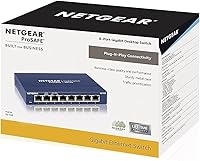
  • Ports: The switch provides 8 x RJ45 Gigabit Ethernet ports, each capable of 10/100/1000 Mbps auto-negotiation.
  • Throughput: Each port delivers up to 1 Gbps simultaneously with a non-blocking switching fabric, so no port steals bandwidth from another.
  • Management: This is a fully unmanaged switch — there is no software, web interface, or configuration of any kind required or available.
  • PoE Support: The GS108 does not supply Power over Ethernet, so it cannot directly power cameras, access points, or VoIP handsets.
  • Energy Standard: The switch complies with IEEE 802.3az (Energy Efficient Ethernet), automatically reducing power draw on idle or low-traffic ports.
  • Cooling: Passive fanless cooling keeps the unit completely silent during operation, with no moving parts to wear out over time.
  • Case Material: The outer enclosure is constructed from metal, providing durability and better heat dissipation compared to plastic alternatives at this price point.
  • Dimensions: The unit measures 8.54″ long by 6.5″ wide by 4.29″ tall, compact enough for a desktop or tucked behind a media cabinet.
  • Weight: At 1.62 pounds, the switch is light enough to wall-mount without heavy-duty hardware or structural concerns.
  • Max Power Draw: Peak power consumption is rated at 2.8 watts, making it inexpensive to run continuously around the clock.
  • Input Voltage: The switch operates on 12V DC supplied via the included external power adapter.
  • Mounting Options: Both desktop placement and wall mounting are supported, with the necessary mounting hardware included in the box.
  • Warranty: NETGEAR covers this switch under its ProSAFE Lifetime Limited Hardware Warranty, including next-business-day replacement for failed units.
  • Compatibility: The GS108 works with any device that has a standard RJ45 Ethernet port, including PCs, Macs, consoles, NAS drives, and smart TVs.
  • Region: This switch is designed and warranted specifically for use in the United States and Canada only.
  • Interface Type: All ports use the standard RJ45 connector, compatible with Cat5e, Cat6, and Cat6a Ethernet cables.
  • Availability: The GS108 has been continuously available since October 2014 and remains in active production with no discontinuation planned.

Related Reviews
NETGEAR GS608 8-Port Gigabit Ethernet Switch
83%
97%
Ease of Setup
91%
Network Performance
94%
Silent Operation
67%
Build Quality
83%
Value for Money
More
NETGEAR GS308PP 8-Port PoE+ Gigabit Ethernet Switch
85%
93%
Setup & Installation
88%
Performance & Reliability
90%
PoE+ Functionality
84%
Build Quality & Design
91%
Noise Level (Fanless Design)
More
NETGEAR GS308E 8-Port Managed Network Switch
81%
93%
Reliability & Uptime
96%
Silent Operation
67%
Ease of Setup
78%
Web Management Interface
88%
Value for Tier
More
NETGEAR GS108Tv3 8-Port Gigabit Smart Switch
79%
83%
Ease of Setup
91%
Network Feature Depth
74%
NETGEAR Insight App
67%
Build Quality
96%
Silent Operation
More
NETGEAR GS308EP
NETGEAR GS308EP
81%
88%
PoE+ Performance
91%
Ease of Setup
74%
Build Quality
82%
Network Management Features
93%
Value for Money
More
NETGEAR GS108PP 8-Port Gigabit Ethernet PoE+ Switch
88%
95%
Ease of Setup
90%
PoE Performance
88%
Reliability
92%
Noise Level
87%
Build Quality
More
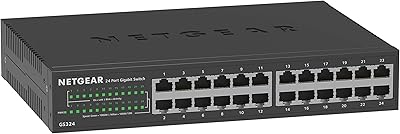
NETGEAR GS324 24-Port Gigabit Ethernet Switch
84%
97%
Ease of Setup
94%
Silent Operation
89%
Build Quality
92%
Port Performance & Stability
67%
Thermal Management
More
NETGEAR GS316 16-Port Gigabit Network Switch
85%
97%
Ease of Setup
96%
Noise Level
78%
Build Quality
91%
Port Performance
88%
Reliability & Longevity
More
NETGEAR FS608 8-Port Fast Ethernet Switch
88%
88%
Network Performance
91%
Port Reliability
95%
Ease of Setup
90%
Build Quality
87%
Power Efficiency
More
Tenda TEG1008M 8-Port Gigabit Ethernet Switch
86%
95%
Ease of Setup
89%
Performance/Stability
91%
Noise Level
87%
Build Quality
85%
Mounting Flexibility
More

FAQ

Not at all. The GS108 is genuinely plug-and-play — connect the power adapter, run your Ethernet cables, and every port starts working immediately. There is no app to download, no web interface to configure, and no account to create. If you can plug in a lamp, you can set up this switch.

No, the GS108 does not support Power over Ethernet. If you need to power PoE devices like cameras, VoIP phones, or access points directly from the switch, you would need a separate PoE switch or a standalone PoE injector for each device.

It shouldn't. The non-blocking gigabit switching fabric means all eight ports can operate at full speed simultaneously without any port throttling or shared-bandwidth penalties. As long as your router and cables can handle gigabit speeds, adding this switch won't create a bottleneck.

It runs completely silently. There is no fan — the metal case handles heat passively — so there is no noise whatsoever. Plenty of buyers specifically mention placing it in bedrooms or living rooms for exactly this reason.

It runs slightly warm to the touch after extended operation, which is normal for a fanless metal device. As long as it's in a reasonably ventilated spot and not sealed inside a closed cabinet with no airflow, the temperature stays well within safe operating limits.

Yes, you can connect one switch to another using a standard Ethernet cable between any available port on each unit. Just keep in mind that daisy-chaining does consume one port on each switch for the uplink connection, so plan your total port count accordingly.

It works with both without any difference in setup or performance. Ethernet switches operate at the network layer and are completely OS-agnostic — Macs, Windows PCs, Linux machines, gaming consoles, and smart TVs all connect the same way.

NETGEAR's ProSAFE Lifetime Limited Warranty covers hardware failures for the life of the product, and the replacement program includes next-business-day shipping in most cases. Buyers who have gone through the process generally report it being straightforward, though you'll want to have your proof of purchase handy.

Not really. Having extra ports means you won't need to buy another switch when you add a device later, and unused ports simply sit idle at negligible power draw. The 8-port version is usually a smarter long-term choice than buying a 5-port switch and running out of space within a year.

No, and this is an important limitation to understand. Because the GS108 is completely unmanaged, it has no traffic management features of any kind — no VLANs, no QoS, no port prioritization. If you need to segment your network or guarantee bandwidth for specific applications, you would need to step up to a smart or managed switch instead.

Where to Buy