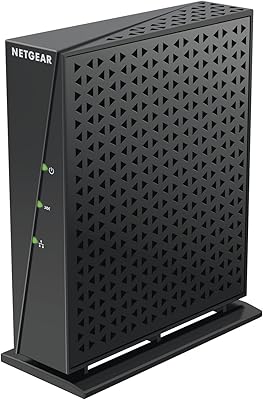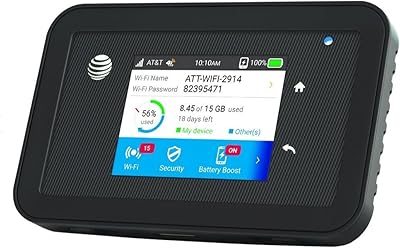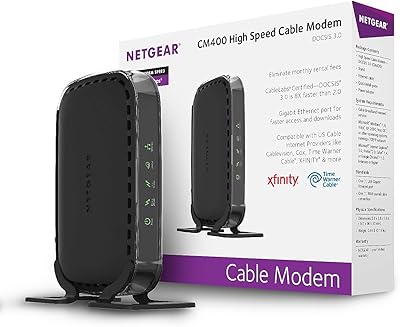
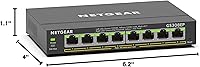
Overview

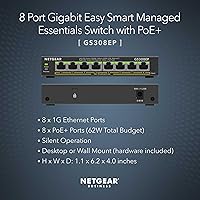
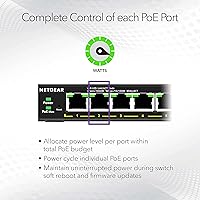
The NETGEAR GS308EP occupies a genuinely useful middle ground in the networking market — it is not a bare-bones unmanaged switch, but it also does not ask you to wrestle with a CLI to get things configured. All eight ports support Gigabit PoE+, sharing a 62W total power budget, which is enough to run a handful of cameras or phones without any external injectors. The compact plastic chassis supports both desktop and wall mounting, so it fits wherever you need it. On sale since late 2020 and currently ranked among the top sellers in its category, this PoE+ switch has earned its reputation through consistent, real-world performance.

Features & Benefits

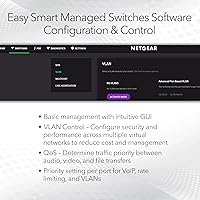
What makes this smart managed switch stand out is that it gives you real network controls without requiring an IT degree to use them. The Easy Smart Managed Essentials web interface lets you configure basic VLANs, set QoS priorities, enable IGMP snooping, and activate automatic DoS protection — all through a browser, no command line needed. With a 16 Gbps switching capacity, traffic moves at full Gigabit speed across all eight ports simultaneously with no bottlenecks. The fanless housing means it runs in complete silence, which matters if you are placing it under a desk or in a living room cabinet. A three-year hardware warranty rounds things out.

Best For

This PoE+ switch fits a specific need particularly well: small offices, home labs, or surveillance setups where you need to power multiple devices — cameras, VoIP phones, wireless access points — from a single box without cluttering the area with power adapters. If you have been running an unmanaged switch but find yourself wanting to segment traffic or prioritize voice calls, this smart managed switch gives you those controls at a practical price point. It is also a strong fit for anyone working in a shared space, since the completely silent operation never announces itself. One caveat: with a shared 62W budget, running eight high-draw PoE+ devices at once requires some upfront planning.

User Feedback

Across a large pool of verified buyers, the consistent themes are reliability and ease of setup — people mention getting VLANs and camera networks up and running in under an hour, which is not something you often hear about managed switches. The web interface draws particular praise compared to similarly priced alternatives. That said, a fair number of users flag that the management portal looks a bit dated and lacks some polish of newer competitors. The power budget also comes up: if you are powering devices that draw close to the full PoE+ allowance per port, you will want to tally your wattage before buying. Long-term reliability earns high marks consistently.

Pros

  • All 8 ports deliver PoE+, eliminating the need for separate power injectors at every device.
  • The NETGEAR GS308EP includes VLAN, QoS, IGMP snooping, and DoS protection accessible through a browser — no CLI required.
  • Completely fanless design means zero noise, even in quiet office or home environments.
  • Buyers consistently report multi-year reliability with no significant port failures or instability.
  • The three-year limited warranty is longer than most competitors offer in this price tier.
  • Wall or desktop mounting flexibility makes it easy to deploy in rack-less spaces.
  • Full Gigabit throughput on all ports with no bottlenecks, even under simultaneous traffic loads.
  • Strong long-term sales rank and large review pool signal a proven, widely trusted product.
  • Setup time from unboxing to a working managed network is reported as under an hour by most buyers.
  • Compatible with a wide range of IP cameras, VoIP phones, and access points from major brands.

Cons

  • The 62W shared PoE budget requires careful planning when connecting multiple high-draw devices.
  • The management web interface looks visually dated compared to newer competing switches.
  • No mobile-friendly UI makes on-the-go configuration inconvenient for network admins in the field.
  • The management plane can occasionally become unresponsive, requiring a power cycle to restore access.
  • Plastic housing raises durability questions in warmer or poorly ventilated installation environments.
  • Wall-mount hardware included in the box is basic and may not feel secure on all surface types.
  • Customer support quality is inconsistent, with slow response times noted by several buyers.
  • Firmware updates are infrequent, and there is no automatic update mechanism to keep the switch current.

Ratings

The NETGEAR GS308EP scores here reflect AI-driven analysis of verified global buyer reviews, with spam, bot-generated, and incentivized submissions actively filtered out before scoring. Across thousands of real-world deployments — from small office camera systems to home lab setups — this PoE+ switch shows clear strengths and a few honest limitations that buyers should weigh before purchasing. Both sides of the experience are represented transparently in the categories below.

PoE+ Performance
88%
Users running IP cameras, VoIP phones, and wireless access points consistently report that the PoE+ delivery is stable and reliable over long periods. The ability to power eight devices simultaneously without external injectors is a genuine convenience that buyers highlight repeatedly in real deployments.
The 62W shared budget is the one recurring sticking point — if you connect several high-draw devices like PTZ cameras or dual-radio APs, you can hit the ceiling faster than expected. Planning your wattage upfront is not optional; a few buyers learned this the hard way after purchase.
Ease of Setup
91%
The web-based Easy Smart Managed Essentials interface gets frequent praise for letting non-specialists configure VLANs and QoS rules without reading a manual. Multiple reviewers mention going from box to functional network in under an hour, which is rare for any managed switch in this price tier.
A small subset of users with prior enterprise switch experience find the interface slightly unintuitive in terms of menu layout. The initial IP assignment step trips up a handful of buyers who are not familiar with accessing a switch via a static address.
Build Quality
74%
26%
The compact plastic chassis feels solid enough for desk or wall mounting, and the port connections are tight with no wobble reported. For the price tier this occupies, the physical construction meets expectations and does not feel flimsy in day-to-day handling.
Experienced buyers note the housing is all plastic with no metal reinforcement, which raises questions about long-term durability in warmer or dustier environments. It is not a concern for a climate-controlled office, but it is worth noting for anyone considering deployment in a utility closet or garage.
Network Management Features
82%
18%
For a switch at this price point, having working VLAN segmentation, QoS prioritization, IGMP snooping, and automatic DoS protection is genuinely useful. IT admins deploying this in small offices report that these tools handle the most common traffic management tasks without requiring anything more advanced.
This is strictly a Layer 2 device — there is no routing, no dynamic routing protocols, and no advanced ACLs. Users who eventually need inter-VLAN routing will outgrow it, and a few buyers admit they overestimated the management depth before purchasing.
Value for Money
93%
At its price point, getting eight PoE+ ports with basic managed features and a three-year warranty is difficult to beat. Buyers who compare it directly to similarly priced alternatives consistently conclude that the GS308EP delivers more usable functionality per dollar than most competitors in the segment.
If your needs are strictly unmanaged and you have no interest in VLANs or QoS, you are paying a small premium for features you will never touch. The value case is strongest when you actually use the management layer; otherwise a cheaper unmanaged switch might serve just as well.
Silent Operation
96%
The completely fanless design earns near-universal praise from users who place this switch in open office areas, living rooms, or bedroom home labs. Unlike fan-cooled switches that develop bearing noise over time, there is nothing mechanical to wear out or hum at 2am.
There are essentially no reported cons related to noise — the fanless design simply works. The only theoretical concern is passive thermal management in enclosed, poorly ventilated spaces, though actual heat-related complaints in reviews are rare.
Port Density & Layout
79%
21%
Eight Gigabit ports on a compact footprint covers the majority of small office and home network scenarios comfortably. The port spacing is adequate, and users running standard patch cables report no crowding even with all eight in use.
For anyone who eventually needs nine or more PoE ports, there is no expansion path on this unit — you would need an additional switch. A few users also wish the ports were spaced slightly wider to accommodate bulkier right-angle connectors without interference.
Management Interface Design
63%
37%
The browser-based interface is functional and gets the job done for core tasks like VLAN setup and port monitoring. Users coming from fully unmanaged switches generally find it a step forward in visibility and control.
Compared to newer competitors, the UI looks noticeably dated — think early-2010s web design. Reviewers who have used more modern switch interfaces from competing brands point out that navigation can feel clunky, and there is no mobile-friendly layout to speak of.
Reliability & Longevity
89%
Units purchased in 2020 and 2021 are still running without issues for many buyers, which speaks well to long-term stability. Uptime reports are consistently positive, with very few mentions of random reboots, port failures, or firmware-related instability under normal loads.
A small number of long-term users report that the management web interface can occasionally become unresponsive and require a power cycle to restore access — the switching function itself keeps working, but the management plane hiccups. It is infrequent but worth knowing.
Mounting & Form Factor
84%
The ability to mount on a wall or sit on a desk without any adapters gives this switch real flexibility in rack-less environments. The compact footprint means it tucks behind monitors or onto wall plates in small server closets without consuming much space.
Wall-mount screw holes are functional but the included hardware is basic. A few buyers mention the unit can feel slightly precarious on smooth vertical surfaces if the mounting screws are not seated into studs or solid material.
PoE Power Budget Planning
58%
42%
For users with low-to-moderate draw devices like standard IP cameras and basic VoIP phones, the 62W shared budget is sufficient and causes no issues. Buyers who map out their wattage before purchasing tend to be satisfied with how the power is allocated across ports.
This is the most consistent pain point in the review pool. Users who connect a mix of high-draw devices without pre-calculating total wattage sometimes find one or more devices failing to power on. The budget is not unusually low for this price tier, but it demands attention.
Firmware & Software Updates
67%
33%
NETGEAR does provide firmware updates for this switch, and several buyers report that updates have arrived without breaking existing configurations. The update process through the web interface is straightforward for anyone comfortable with basic network administration.
Update frequency is not high, and a handful of users feel that the management software has not received the UX improvements it needs over its years on the market. There is no automatic update feature, so staying current requires manual check-ins.
Compatibility
87%
The GS308EP works cleanly with the full range of expected devices — IP cameras from major brands, Ubiquiti and TP-Link access points, standard VoIP handsets, and general computers. Buyers across a wide mix of brands and device types report no compatibility surprises.
A small number of users flag minor interoperability quirks with certain third-party PoE devices that draw power in non-standard ways, though this is not a widespread issue. Most compatibility problems are resolved by checking the device's PoE standard against the switch specs.
Warranty & Support
77%
23%
The three-year limited hardware warranty is longer than what most competitors offer at this price, and buyers who have needed to invoke it report that NETGEAR honored replacements without significant friction. For a set-and-forget device, that coverage window provides real peace of mind.
NETGEAR's customer support responsiveness gets mixed reviews — phone and chat wait times are a recurring complaint, and some users feel that tier-one support lacks the technical depth to help with managed switch configuration questions beyond basic troubleshooting.

Suitable for:

The NETGEAR GS308EP is a strong fit for anyone who needs to power and manage multiple network devices without building out a full rack or hiring a network engineer to configure it. Small business owners running a handful of IP cameras, a VoIP phone system, and a wireless access point will find that this PoE+ switch handles all of it from a single box, cleanly and quietly. Home lab enthusiasts and prosumers who have outgrown a basic unmanaged switch — and want to start segmenting traffic with VLANs or prioritizing voice traffic with QoS — will appreciate that those features are genuinely accessible here without a CLI. It is also a practical choice for anyone placing networking gear in a shared or visible space, since the fanless design means it produces zero audible noise during operation. Installers setting up small surveillance systems will particularly value the plug-and-play PoE+ delivery across all eight ports, eliminating the need for individual power injectors at each camera location.

Not suitable for:

The NETGEAR GS308EP is not the right tool if your network requirements have grown beyond basic Layer 2 switching. There is no inter-VLAN routing, no dynamic routing protocol support, and no advanced access control lists — if those features are on your checklist, you need a Layer 3 switch and should budget accordingly. Anyone planning to simultaneously power eight high-draw PoE+ devices, such as PTZ cameras or dual-radio access points, should do the wattage math carefully before buying, because the 62W shared budget can run short in demanding configurations. Users who manage networks remotely and need a polished, modern management interface may find the dated web UI frustrating compared to newer alternatives on the market. And if you simply need a dumb switch to connect computers with no PoE requirement whatsoever, you would be paying for management features you will never use — a plain unmanaged switch would serve you better at a lower cost.

Specifications

  • Ports: The switch includes 8 Gigabit Ethernet RJ45 ports, all of which support PoE+.
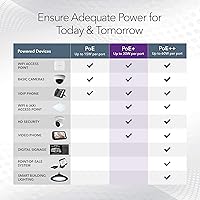
  • PoE Standard: All 8 ports comply with IEEE 802.3at (PoE+), supplying up to 30W per port depending on total budget availability.
  • PoE Budget: Total PoE power budget is 62W shared across all active PoE+ ports simultaneously.
  • Switching Capacity: Non-blocking switching fabric runs at 16 Gbps, supporting full Gigabit throughput on all ports at the same time.
  • Management Type: Managed via the Easy Smart Managed Essentials web interface, providing Layer 2 controls without requiring command-line access.
  • Management Features: Supported management functions include basic VLAN configuration, QoS prioritization, IGMP snooping, and automatic DoS protection.
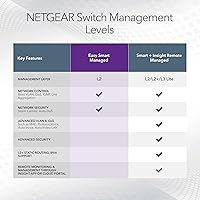
  • Management Layer: This is a Layer 2 switch only; it does not support Layer 3 routing or inter-VLAN routing.
  • Cooling: The unit is fully fanless, relying on passive cooling with no moving parts and zero acoustic output.
  • Dimensions: The chassis measures 10.2″L x 10.2″W x 2.2″H, making it suitable for desktop surfaces or wall mounting.
  • Weight: The switch weighs 2.42 pounds (approximately 1.1 kg), light enough for single-person wall installation.
  • Mounting Options: Supports both desktop placement and wall mounting; necessary hardware for wall mounting is included in the box.
  • Housing Material: The enclosure is constructed from plastic with a black finish, designed for indoor deployments only.
  • Interface Type: All network connections use standard RJ45 connectors; there are no SFP fiber uplink ports on this model.
  • Power Input: The switch ships with a 2V, 0.5A external power adapter included in the box.
  • Max Temperature: The rated upper operating temperature is 123 degrees Fahrenheit (approximately 51 degrees Celsius).
  • Warranty: NETGEAR backs this switch with an industry-standard 3-year limited hardware warranty.
  • Compatibility: Compatible with IP cameras, VoIP phones, wireless access points, computers, and other standard network devices.
  • Model Number: The official model number is GS308EP-100NAS, and the UPC is 606449153026.
  • Availability: This switch was first made available in November 2020 and has maintained a top-10 ranking in its Amazon category since.

Related Reviews
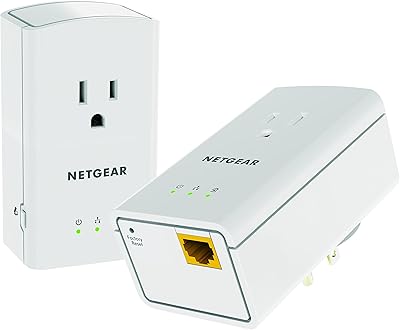
NETGEAR Powerline 500 XAVB5421
82%
88%
Performance for Streaming and Gaming
91%
Ease of Setup
62%
Connection Stability in Larger Homes
86%
Value for Money
89%
Extra Power Outlet Functionality
More
NETGEAR R6120 WiFi Router
87%
95%
Ease of Setup
89%
WiFi Performance
90%
Device Support
91%
Range for Small Homes
87%
Build Quality
More
NETGEAR CM400 Cable Modem
85%
88%
Performance
92%
Setup and Installation
85%
Reliability
90%
Compatibility with ISPs
94%
Cost Savings (Rental Fees)
More
NETGEAR CM700 Cable Modem
82%
88%
Performance
92%
Value for Money
90%
Compatibility with ISPs
85%
Setup & Installation
80%
Reliability
More
NETGEAR C7500 Modem Router
81%
89%
Performance with Cable Plans
91%
WiFi Coverage
72%
Ease of Setup
88%
Device Connectivity (Number of Devices Supported)
85%
Value for Money
More
NETGEAR DM200 DSL Modem
82%
91%
Ease of Setup
88%
Connection Stability
84%
Compatibility with ISPs
92%
Value for Money
87%
Design & Size
More
Netgear Nighthawk AX5200 Router
87%
92%
Wi-Fi Performance
89%
Range & Coverage
84%
Setup & Installation
88%
Reliability & Stability
91%
Gaming & Streaming Experience
More
NETGEAR Unite Explore AC815S
83%
88%
Performance & Speed
93%
Battery Life
85%
Portability
79%
Setup & Ease of Use
87%
Connection Stability
More
Netgear DM111PSP ADSL2+ Modem
84%
85%
Performance
90%
Ease of Installation
88%
Compatibility with Operating Systems
82%
Build Quality
87%
Design & Size
More
NETGEAR Wireless Router N300 (WNR2000)
82%
92%
Ease of Setup
88%
Value for Money
90%
Parental Controls
85%
Wi-Fi Stability
60%
Range for Larger Homes
More

FAQ

Yes, all 8 ports support PoE+, but they share a combined 62W power budget. That means if all eight ports are active, the available wattage gets divided among them. Most standard IP cameras and VoIP phones draw well under 10W each, so for typical setups you will be fine — but if you are connecting several high-draw devices like PTZ cameras or dual-band access points, add up your expected wattage before assuming everything will power on simultaneously.

No software installation is required. The NETGEAR GS308EP is managed entirely through a web browser — you access its interface by typing its IP address into your browser, log in, and configure settings from there. It works on any modern browser and any operating system, so there is nothing to install or maintain on your computer.

Yes, and this is actually one of the most common reasons people choose this switch over a basic unmanaged model. The web interface lets you create port-based VLANs to isolate your camera traffic from your main LAN, which is a smart security practice. It is not the most feature-rich VLAN implementation you will find, but for separating IoT devices or cameras from workstations, it handles the job well.

Completely silent — there are no fans or any moving parts inside. You could place it on a desk right next to you in a quiet room and never know it is running. This makes it a genuinely good choice for open office environments, home offices, or any shared space where equipment noise is a concern.

In the vast majority of cases, yes. The switch uses the standard IEEE 802.3at PoE+ protocol, which is compatible with Ubiquiti UniFi access points, Axis and Hikvision cameras, Cisco VoIP phones, and most other mainstream PoE+ devices. Where rare compatibility issues arise, they are typically with non-standard or passive PoE devices, so just double-check that your device uses 802.3af or 802.3at before connecting.

Yes, the unit supports wall mounting and the necessary hardware comes in the box. The chassis is compact and lightweight enough that one person can handle the installation comfortably. Just make sure you are mounting into a stud or solid backing — the included hardware is basic and the plastic body will not tolerate a loose mount well over time.

It sits between the two, which is part of its appeal. This smart managed switch gives you real management capabilities — VLANs, QoS, IGMP snooping, DoS protection — without the complexity of a full enterprise managed switch. What it does not have is a command-line interface or Layer 3 routing features, so it is not a replacement for a full managed switch in more complex network environments.

The switching and PoE functions typically keep working even if the web management interface stops responding, so your connected devices stay online. To restore access to the management portal, a quick power cycle usually resolves it. This is an occasional complaint from long-term users, but it is infrequent and does not affect the core networking function of the device.

It is a reasonable budget for an 8-port switch at this price point, but it is on the tighter side if you plan to fully load all eight ports with power-hungry devices. Some competing switches at a higher price offer 120W or more. For cameras and standard VoIP phones averaging 5–10W each, 62W covers a typical small deployment comfortably — just do not assume you can max out all eight ports with dual-band APs or large PTZ cameras without hitting the ceiling.

NETGEAR offers a three-year limited hardware warranty, which is longer than most competitors provide at this price level. The replacement process is generally described as straightforward by buyers who have used it — you submit a claim through NETGEAR support and they arrange a replacement unit. The main complaint about support is response time rather than the outcome, so if you do need to make a warranty claim, persistence through their support channels pays off.

Where to Buy

eBay
In stock $119.99
B&H Photo-Video-Audio
In stock $119.99
Full Compass Systems
In stock $124.99
Hummingbird Networks
In stock $81.68
CDW
In stock $86.99
Central Computers
In stock $89.99
Connection
In stock $99.99
colamco.com
In stock $102.41
Rackfinity.com
In stock $104.12
Techinn.com
In stock $105.99