Overview

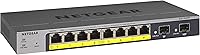
The NETGEAR GS110TP 8-Port PoE+ Gigabit Smart Switch occupies a useful middle ground in the networking market — capable enough for real infrastructure work, yet approachable enough that you don't need a Cisco certification to configure it. It's a 10-port unit in a solid metal chassis that fits on a desk or mounts flush to a wall, with no internal power supply adding unnecessary bulk. What makes this NETGEAR smart switch worth a serious look is the combination of genuine management features and a lifetime limited warranty with next-business-day replacement — uncommon at this price tier. Compact, practical, and built to last.
Features & Benefits

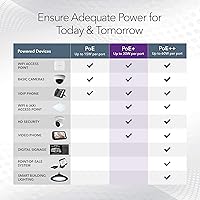
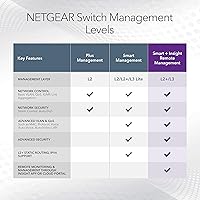
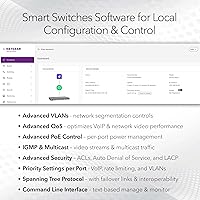
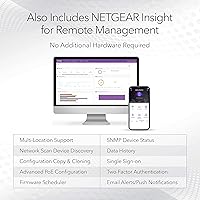
The eight PoE+ ports share a 55W total power budget, which is worth calculating carefully before you commit. Powering a mixed bag of access points, cameras, or VoIP handsets will likely work fine — but load all eight ports with high-draw hardware and you'll hit the ceiling fast. The two 1G SFP uplink slots are a real differentiator at this price point; the ability to run fiber or a DAC cable to a core switch is not something every competitor offers. The GS110TP handles VLANs, QoS, IGMP snooping, and SNMP monitoring through a local web interface, with optional NETGEAR Insight cloud access for remote oversight when needed.

Best For

This PoE+ switch is a natural fit for small offices deploying a few Wi-Fi 6 access points or VoIP handsets — situations where you need reliable PoE delivery and basic network segmentation without paying for a full enterprise stack. Wall-mounted retail or hospitality environments benefit from the compact metal chassis and the included mounting hardware. Home lab users who want genuine VLAN control without committing to rack-mount gear will find the form factor refreshingly manageable. It also suits small camera deployments well, though eight lower-draw cameras is really the practical ceiling given the shared power budget. The optional Insight cloud layer is there if you need it, not forced on you if you don't.

User Feedback

Overall sentiment around the GS110TP skews solidly positive — most owners find the web UI intuitive and PoE delivery dependable out of the box. The recurring frustration, and it surfaces often enough to warrant attention, is the shared power budget. Buyers who loaded every port with high-draw devices found themselves debugging underpowered hardware rather than running a stable network. The Insight cloud app gets credit for remote visibility but draws consistent complaints about mobile app reliability. A smaller group struggled with initial VLAN configuration, citing documentation that doesn't hold your hand through edge cases. Despite those friction points, the large majority of reviewers say they would purchase it again.

Pros

  • Reliable PoE+ delivery across all eight ports keeps access points and cameras running without hiccups.
  • The web-based management interface is straightforward enough that most IT-generalists can configure it without a manual.
  • Two SFP uplink ports enable fiber or DAC connections — a genuine differentiator at this price point.
  • VLAN, QoS, and IGMP snooping support covers real SMB segmentation needs without paying for an enterprise stack.
  • Metal chassis handles warm environments well, rated up to 60°C for non-climate-controlled closets.
  • Lifetime limited warranty with next-business-day replacement provides long-term peace of mind.
  • Optional Insight cloud management adds remote visibility without locking you into a mandatory subscription.
  • Energy Efficient Ethernet compliance keeps idle power draw low over time.
  • Compact footprint with included wall-mount kit suits tight or unconventional installation spaces.
  • Near-silent operation makes it practical for open-office or front-of-house deployments.

Cons

  • The 55W shared PoE budget runs out quickly if multiple high-draw devices are connected simultaneously.
  • Insight cloud mobile app reliability is inconsistent and has frustrated users managing remote sites from smartphones.
  • No rack-mount option limits installation flexibility in proper server room environments.
  • VLAN configuration documentation is thin — expect to rely on community forums for anything beyond basic setup.
  • Single external power adapter means the switch has no built-in redundant power path if the adapter fails.
  • Maximum uplink speed is limited to 1G, which creates a potential bottleneck in bandwidth-intensive environments.
  • No advanced Layer 3 routing features rules it out for networks that need inter-VLAN routing at the switch level.
  • The web GUI, while usable, feels dated compared to newer competitors with modern dashboard interfaces.
  • No hardware stacking support restricts scalability as a network grows beyond a single small site.

Ratings

Our AI rating engine analyzed verified buyer reviews from multiple global markets for the NETGEAR GS110TP 8-Port PoE+ Gigabit Smart Switch, actively filtering out incentivized, spam, and bot-generated feedback to surface what real network administrators and small business owners actually experience. The scores below reflect both where this PoE+ switch earns genuine praise and where real frustrations have emerged across hundreds of deployments. Nothing is glossed over — strengths and pain points are weighted equally.

PoE Reliability
88%
Owners consistently report that powered devices — access points, VoIP handsets, IP cameras — come up cleanly and stay up without the port cycling or negotiation failures that plague cheaper switches. In small office and home lab deployments, the PoE delivery is described as rock solid over months of continuous operation.
The 55W shared budget is a hard ceiling that catches buyers off guard when they scale up. Connecting more than four or five moderate-draw devices simultaneously can starve lower-priority ports, and the default priority settings are not always intuitive for first-time users.
Build Quality
83%
The all-metal enclosure feels substantial for a switch this compact, and users report zero flex or rattle even after wall mounting in environments with some vibration. For a unit that often lives in a back-office closet or on a bracket behind a TV display, the chassis holds up without issue.
The external power adapter feels like a weak link — the brick itself is functional but cheap in the hand, and a failed adapter taking down the whole switch is a genuine single point of failure that a better-quality internal PSU would avoid.
Web Management Interface
79%
21%
Most IT generalists get through basic setup — enabling PoE ports, assigning VLANs, configuring QoS priorities — without cracking open the manual. The interface is functional and logically laid out for someone with even modest networking experience, which is more than can be said for several competing smart switches at this price.
The UI design shows its age; it lacks the polished dashboard feel of newer platforms. Loading times between configuration pages can be sluggish, and the interface is not responsive on mobile browsers, making on-the-go adjustments from a phone impractical without the Insight app.
NETGEAR Insight Cloud App
61%
39%
For IT admins overseeing a remote site from a laptop, the Insight cloud layer adds genuine convenience — checking port status, reviewing traffic, or rebooting a port without driving across town is a real operational win. The desktop browser version is the more reliable way to access it.
Mobile app experience is inconsistent enough that several users have given up on it entirely. Reports of delayed status updates, occasional login failures, and a UI that does not always reflect live switch state undermine trust in time-sensitive situations. It works, but not reliably enough to depend on.
VLAN & Segmentation
74%
26%
VLAN support is functional and covers the core SMB use cases well — separating guest Wi-Fi from corporate traffic, isolating IoT devices, or partitioning a surveillance network all work as expected once configured correctly. QoS and IGMP snooping round out a capable Layer 2 feature set.
The configuration documentation does not go deep enough for complex multi-VLAN setups, and a subset of buyers — particularly those setting up tagged trunks across multiple switches — report having to piece together solutions from community forums rather than official guides.
SFP Uplink Capability
86%
Having two 1G SFP slots on a switch at this price tier is a meaningful differentiator. Users connecting to fiber runs or using DAC cables for short uplinks to a NAS or core switch get clean, reliable Gigabit connectivity without any reported compatibility headaches with standard SFP modules.
The uplinks top out at 1G, which is adequate for most small office traffic profiles today but will become a bottleneck for anyone aggregating high-bandwidth surveillance footage or transferring large files between network storage simultaneously across all ports.
Thermal Management
91%
Passive cooling through the metal chassis works remarkably well in practice. Multiple owners report the switch running warm but never hot even in wiring closets without dedicated air conditioning, and the fanless design means it operates completely silently in any environment.
In very tight enclosed spaces with poor airflow — inside a sealed AV cabinet, for example — the unit can get uncomfortably warm under sustained PoE load. The 60°C operating ceiling is generous, but passive cooling has physical limits that active airflow would address more reliably.
Setup & Initial Configuration
77%
23%
Out-of-the-box setup for straightforward deployments is quick — plug in, connect to the web interface using the default IP, and basic PoE functionality is running within minutes. The included quick start guide covers the fundamentals adequately for users who just need ports up fast.
The jump from basic setup to more advanced configuration is steeper than the documentation suggests. First-timers attempting SNMP integration or inter-VLAN tagging often find themselves relying on third-party tutorials, which adds time and friction to an otherwise smooth initial experience.
Form Factor & Mounting
89%
The compact 9.3″ footprint and included wall-mount kit make it easy to tuck this switch into spaces where larger units simply will not fit. Retail environments and small hospitality venues that need discreet infrastructure consistently call out the mounting flexibility as a genuine practical benefit.
The desktop-only or wall-only mounting options exclude anyone who needs standard rack installation. Without 1U rack ears, deploying this in a proper equipment rack requires a third-party shelf solution, which adds cost and occupies more rack space than a native rack-mount unit would.
Energy Efficiency
84%
IEEE 802.3az compliance means the switch intelligently reduces power on idle or lightly loaded ports, and owners running the unit in always-on environments note that it does not run hot or drive up electricity costs noticeably over time.
The efficiency gains are real but modest in absolute terms for a small 8-port switch — the savings are more meaningful in principle than they are as a measurable line item on a power bill, especially in single-switch deployments.
Value for Money
82%
18%
The combination of PoE+ on all 8 ports, dual SFP uplinks, smart management, and a lifetime warranty at this price tier is difficult to match from competing brands. For a small business or home lab budget, this PoE+ switch delivers a feature set that would have cost considerably more a few years ago.
The 55W PoE budget feels underpowered relative to the port count for the price — competing units in the same range offer larger budgets. Buyers who realize they need more headroom after purchase face the frustration of either managing device priorities carefully or replacing the switch entirely.
Warranty & Support
93%
A lifetime limited warranty with next-business-day replacement is exceptional coverage for a switch at this price, and owners who have exercised the warranty report the replacement process is straightforward. The 24/7 chat support option adds a layer of confidence for business-critical deployments.
Some users report that NETGEAR chat support, while available around the clock, can vary in technical depth depending on the agent. Complex configuration questions occasionally receive generic responses that push users toward community forums rather than providing direct resolution.
Compatibility
87%
The GS110TP plays well with standard PoE-enabled devices across manufacturers — access points from Ubiquiti, Axis cameras, Yealink phones, and similar hardware connect and negotiate power without issue. Standard SFP modules from major vendors insert and link up without special configuration.
Occasional compatibility edge cases surface with non-standard PoE adapters or legacy devices that rely on passive PoE rather than the 802.3at standard. These situations are rare but can cause confusion when a device fails to power up without an obvious error message in the management interface.

Suitable for:

The NETGEAR GS110TP 8-Port PoE+ Gigabit Smart Switch is a strong match for small business owners, IT generalists, and serious home lab users who need genuine network management without the cost or complexity of enterprise-grade hardware. If your setup involves deploying several Wi-Fi 6 access points, a handful of VoIP handsets, or a small IP camera system, this PoE+ switch delivers reliable power and traffic control across all eight ports with room for VLAN segmentation and QoS tuning. Retail shops, small hospitality venues, and remote offices benefit especially from its wall-mount option and optional Insight cloud visibility — the ability to check in on a remote site without driving there has obvious practical value. The two SFP uplink ports make it a credible choice for anyone already running fiber infrastructure or planning to connect to a higher-capacity core switch, which is a capability rarely found in competing units at this price level. IT admins managing multiple small sites will appreciate that Insight cloud oversight is available but never forced, keeping things simple for locations that just need local-only management.
Not suitable for:

The NETGEAR GS110TP 8-Port PoE+ Gigabit Smart Switch is not the right tool if your PoE load is heavy or unpredictable — the 55W shared budget is a firm ceiling, and anyone planning to run eight ports at full draw will run into underpowering issues that are frustrating to diagnose after the fact. Buyers who need advanced Layer 3 routing, hardware stacking, or 10G uplinks should look at a higher-tier platform, as this switch tops out at L2/L2+ with Gigabit-only connectivity. Organizations that require a rack-mount form factor with standard 1U rails will find the desktop and wall-mount-only options limiting. If your team relies heavily on mobile device management, the Insight cloud app's reported inconsistency on mobile platforms could introduce friction in a fast-paced environment. Finally, network newcomers who have never configured VLANs should be aware that the documentation does not walk through complex scenarios in depth, and troubleshooting can require patience or outside research.
Specifications

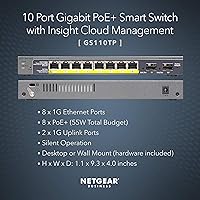
  • Total Ports: The switch provides 10 ports in total: 8 Gigabit Ethernet ports with PoE+ capability and 2 Gigabit SFP uplink slots.
  • PoE Standard: All 8 copper ports support IEEE 802.3at (PoE+), delivering up to 30W per port subject to the shared power budget.
  • PoE Budget: The total PoE power available across all 8 ports is 55W, shared dynamically among connected powered devices.
  • SFP Uplinks: Two dedicated 1G SFP slots accept standard SFP modules for fiber or DAC copper direct-attach connections to upstream switches or NAS devices.
  • Management: The switch is managed via a local web GUI and optionally via the NETGEAR Insight cloud app for remote monitoring and configuration.
  • Network Layer: Operates at Layer 2 and L2+ with L3 Lite capabilities, supporting static routing, VLANs, QoS, IGMP snooping, and SNMP.
  • Switching Type: Non-blocking Gigabit switching ensures full 1000 Mbps throughput per port without internal bandwidth contention.
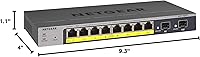
  • Dimensions: The chassis measures 9.3″ long by 4″ wide by 1.1″ tall, making it one of the most compact options in its class.
  • Weight: The unit weighs 1.31 lb, light enough for straightforward wall mounting without heavy-duty anchoring hardware.
  • Case Material: The enclosure is constructed from metal, which aids heat dissipation and gives the unit durability for long-term deployment.
  • Max Temperature: The switch is rated to operate reliably in ambient temperatures up to 60°C, suitable for warm wiring closets without active cooling.
  • Power Supply: Power is delivered via an external 54V, 1.25A adapter running on 110V AC, with no internal power supply unit.
  • Energy Efficiency: The switch complies with IEEE 802.3az Energy Efficient Ethernet, reducing power consumption during low-traffic periods automatically.
  • Mounting Options: Supports both flat desktop placement and wall mounting, with a wall-mount kit included in the box.
  • Warranty: Covered by NETGEAR's Lifetime Limited Hardware Warranty with next-business-day replacement and 24/7 expert chat support.
  • Data Rate: Each port operates at up to 1000 Mbps (1G), with auto-negotiation for compatibility with slower 10/100 Mbps devices.
  • SNMP Support: Supports SNMP management via NETGEAR NMS 300, allowing integration into existing network monitoring systems.
  • Box Contents: The package includes the switch, a 54V power adapter with cable, a quick install guide, and a wall-mount kit.

Related Reviews

NETGEAR GS108PP 8-Port Gigabit Ethernet PoE+ Switch
88%
95%
Ease of Setup
90%
PoE Performance
88%
Reliability
92%
Noise Level
87%
Build Quality
More
NETGEAR GS308PP 8-Port PoE+ Gigabit Ethernet Switch
85%
93%
Setup & Installation
88%
Performance & Reliability
90%
PoE+ Functionality
84%
Build Quality & Design
91%
Noise Level (Fanless Design)
More
NETGEAR GS108Tv3 8-Port Gigabit Smart Switch
79%
83%
Ease of Setup
91%
Network Feature Depth
74%
NETGEAR Insight App
67%
Build Quality
96%
Silent Operation
More
NETGEAR GS308EP
NETGEAR GS308EP
81%
88%
PoE+ Performance
91%
Ease of Setup
74%
Build Quality
82%
Network Management Features
93%
Value for Money
More
NETGEAR GS324TP 26-Port PoE Gigabit Ethernet Smart Switch
84%
94%
PoE+ Performance
86%
Ease of Setup
91%
Energy Efficiency
89%
Connectivity and Uplink Speed
85%
Build Quality
More
NETGEAR GS752TP 52-Port PoE Gigabit Ethernet Smart Switch
86%
88%
Performance and Speed
91%
Ease of Installation
85%
PoE+ Power Capabilities
80%
Management Features and Software
92%
Build Quality and Durability
More
NETGEAR GS728TP 28-Port PoE Gigabit Ethernet Smart Switch
86%
88%
Overall Performance
92%
Value for Money
85%
Ease of Setup
91%
PoE+ Functionality
89%
Quiet Operation
More
NETGEAR MS108TUP 8-Port Ultra60 PoE Multi-Gig Ethernet Smart Switch
86%
88%
Ease of Setup
90%
Performance (Speed)
91%
PoE Support & Power Budget
87%
Remote Management (Insight App)
94%
Noise & Cooling
More
D-Link DGS-1100-08PV2 8-Port Gigabit Smart Managed PoE+ Switch
87%
85%
Performance & Reliability
88%
PoE Power Delivery
90%
Ease of Setup
91%
Fanless Design & Noise Levels
87%
Value for Money
More
TP-Link TL-SG2210P V3 8-Port PoE Switch
83%
91%
Value for Money
74%
PoE Performance
83%
Ease of Setup
86%
Omada SDN Integration
88%
Build Quality
More

FAQ

It depends on the power draw of each device. The 55W shared budget means you can comfortably power several low-draw devices like access points or VoIP phones, but if you connect high-draw devices like PTZ cameras or newer Wi-Fi 6 APs pulling close to 25W each, you will hit the ceiling fast. Always add up the PoE wattage of everything you plan to connect before purchasing.

You can manage the GS110TP entirely through its local web interface without ever touching the Insight app. The cloud management option is there if you want remote access, but it is completely optional and does not require a paid subscription for basic use.

Yes, the two SFP ports accept standard 1G SFP modules, so you can plug in a fiber transceiver to connect to a fiber run or an upstream switch. You can also use a DAC copper direct-attach cable if you just need a short high-speed link to a NAS or core switch.

For basic tasks like enabling PoE ports and setting up a simple network, the web interface is genuinely approachable. Where things get trickier is VLAN and QoS configuration — the built-in documentation does not go deep, so expect to lean on NETGEAR community forums or third-party guides if you run into edge cases.

No, the NETGEAR GS110TP 8-Port PoE+ Gigabit Smart Switch does not have rack-mount ears and is not designed for 1U rack installation. It is built for desktop placement or wall mounting only, so if rack mounting is a requirement, you will need a different model.
There is no fan — this switch relies entirely on passive cooling through its metal chassis. It operates silently, which makes it a good fit for open offices, reception areas, or any environment where noise matters.

The switch will prioritize PoE delivery based on port priority settings. Ports with lower priority will either receive reduced power or be denied power altogether, which means some devices may not function properly. Setting port priorities correctly before deployment can help you control which devices take precedence.

Yes, VLAN support is built in and is one of the main reasons to choose a smart-managed switch over a basic unmanaged one. You can tag and untag traffic across ports to keep guest, IoT, and corporate traffic logically separated. Configuration takes a bit of learning, but it works reliably once set up correctly.

Basic Insight cloud management is included at no additional cost. NETGEAR does offer a paid Insight Pro tier with more advanced multi-site management features, but casual remote monitoring of a single switch does not require any subscription.

It works well for smaller camera setups using standard PoE IP cameras, but keep the 55W power budget in mind. Eight low-draw cameras pulling around 5 to 7W each will fit comfortably, but higher-resolution cameras with IR illuminators or pan-tilt-zoom motors can consume 15 to 25W each, which will strain the available budget considerably.