Overview

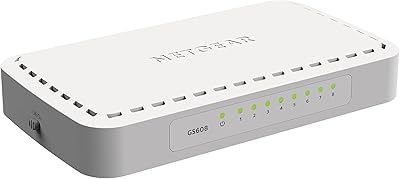
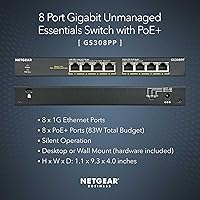
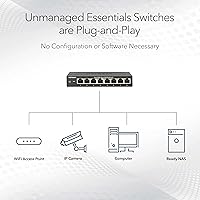
The NETGEAR GS308PP 8-Port PoE+ Gigabit Switch is a straightforward, no-fuss solution aimed at small businesses, home labs, and DIY network builders who need reliable Power over Ethernet without the overhead of managed software. What sets it apart from many switches in its class is that all 8 ports carry PoE+, backed by an 83W total power budget — not a watered-down subset. Plug it in, connect your devices, and you're done. There's nothing to configure, no dashboard to log into. NETGEAR also built in FlexPoE support, meaning if your power needs grow, you can swap in a larger external adapter rather than replacing the whole unit.
Features & Benefits

One thing that immediately stands out about this PoE+ switch is how it handles power distribution. Many competitors in this price range offer PoE on only 4 of their 8 ports — the GS308PP gives you the full complement, which matters when you're wiring up several IP cameras or dual-band access points simultaneously. The 83W shared budget is generous enough for most small setups, though it does require some planning if you're running several power-hungry devices at once. The fanless metal chassis keeps things completely quiet while also serving as a passive heat sink. A wall-mount kit is included, which is a small but practical touch for anyone mounting this in a closet or above a TV cabinet.

Best For

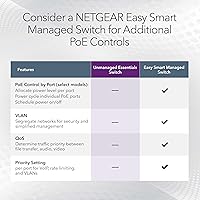
This unmanaged gigabit switch hits a sweet spot for a fairly specific buyer. If you're setting up a home security system with multiple PoE cameras, running a few VoIP handsets, or expanding Wi-Fi coverage through access points — all without wanting to touch a CLI — this is a natural fit. It's also well-suited to home lab enthusiasts who want dependable PoE performance without paying for managed features they'll never use. Small retail shops, boutique hotels, and similar environments benefit from its maintenance-free operation; there's nothing to update or babysit. Just know this is strictly unmanaged — if you need VLANs or QoS, you'll want to look at NETGEAR's Easy Smart or managed tiers instead.

User Feedback

Reviews for the GS308PP are overwhelmingly positive, with buyers regularly highlighting how painless the initial setup is — no drivers, no apps, just plug and go. The all-port PoE+ coverage draws repeated praise, particularly from users who had previously dealt with switches that only power half their ports. The included wall-mount hardware also gets consistent appreciation. That said, a handful of users have flagged noticeable heat buildup during sustained heavy use when most ports are feeding power-hungry devices at once — something worth keeping in mind if ventilation around the unit is limited. A small number also noted that the 83W pool can feel tight in demanding configurations. Overall, the reliability track record is strong, and the 3-year warranty provides meaningful peace of mind.

Pros

  • Every single port supports PoE+, so there are no awkward compromises about which devices get power and which do not.
  • Plug-and-play setup means most buyers are fully operational within minutes of opening the box.
  • The fanless metal chassis runs completely silently, making it genuinely livable in noise-sensitive spaces.
  • An 83W total power budget comfortably handles typical small-office or home security loads without throttling.
  • The included wall-mount kit removes a common frustration — you do not need to source hardware separately.
  • FlexPoE support means you can upgrade the power supply if your needs grow, rather than replacing the whole switch.
  • The compact footprint fits easily on a shelf, mounted to a wall, or tucked into a wiring closet without dominating the space.
  • A three-year limited hardware warranty is longer than what many competitors in this category offer.
  • The metal build feels noticeably more substantial than plastic-bodied alternatives at a similar price point.
  • Real-world reliability reports from buyers are consistently strong across a wide range of deployment scenarios.

Cons

  • The 83W budget is shared across all ports, so running eight high-draw devices simultaneously requires careful power math.
  • No management interface at all means zero visibility into traffic, errors, or port-level activity.
  • Heat can accumulate on the chassis surface during sustained full-load PoE use if airflow around the unit is restricted.
  • There is no option to prioritize power to critical ports if the total budget becomes strained.
  • Only a single power input is supported, limiting flexibility for non-standard or backup power configurations.
  • No link aggregation or redundancy features, which matters in environments where uptime is critical.
  • The GS308PP is strictly a 1G device — there is no path to faster uplink speeds without replacing it entirely.
  • No traffic isolation between ports, meaning all connected devices share the same broadcast domain by default.

Ratings

The scores below for the NETGEAR GS308PP 8-Port PoE+ Gigabit Switch were generated by AI after analyzing thousands of verified global buyer reviews, with spam, bot submissions, and incentivized feedback actively filtered out. Both the standout strengths and the recurring frustrations are reflected honestly in every category — nothing has been smoothed over to make the product look better than it is.
Ease of Setup
96%
Buyers across skill levels — from first-time home network builders to seasoned IT professionals setting up a temporary office — consistently describe the unboxing-to-operational time as just a few minutes. There is genuinely nothing to configure: plug in power, connect devices, done.
A small number of users expected some form of status dashboard or app and felt disoriented by the complete absence of feedback beyond the port LEDs. For anyone accustomed to managed switches, the lack of any interface can feel sparse rather than simple.
PoE Port Coverage
93%
Having every single port deliver PoE+ is the feature buyers cite most often when explaining why they chose this switch over cheaper alternatives. For someone deploying six cameras across a property, not having to puzzle out which ports carry power is a genuine day-to-day convenience.
The all-port PoE+ capability is only useful up to the 83W ceiling, and a few buyers discovered that limitation the hard way after connecting several high-draw devices without pre-calculating their combined load. It does not change the port count, but it does constrain real-world flexibility at full capacity.
Power Budget Adequacy
71%
29%
For typical small-office or home security setups — say, five or six standard IP cameras and a single access point — the 83W shared budget is comfortable and rarely causes issues. Most buyers running moderate loads report zero power-related dropouts over extended periods.
Users running a denser mix of high-wattage devices, such as PTZ cameras combined with dual-band access points, report hitting the ceiling and experiencing port shutdowns. The 83W pool sounds generous until you do the math on simultaneous maximum draws, which is a real planning burden for power-heavy deployments.
Build Quality
88%
The all-metal chassis earns consistent praise from buyers who have previously dealt with plastic-bodied budget switches that flex under light pressure or crack at the port openings. It feels appropriately solid for something that may be mounted on a wall or left running continuously for years.
A handful of reviewers noted that the finish scratches more easily than expected during installation, and the port labels on the chassis are small enough to be difficult to read in low-light wiring closets. Neither issue affects function, but they are cosmetic imperfections at this price point.
Thermal Management
67%
33%
The fanless design eliminates noise entirely, which is the right trade-off for the target environments this switch is built for — home offices, living spaces, hospitality back rooms. Under typical loads, the chassis surface stays only mildly warm to the touch.
Under sustained full-load PoE operation with most ports active, the metal enclosure gets noticeably hot, and a minority of buyers have flagged this as a concern for longevity in enclosed spaces. There is no thermal protection indicator, so users have no easy way to know when the unit is running hotter than ideal.
Value for Money
89%
Buyers frequently compare this switch favorably against competitors that charge similar prices for only four PoE ports, noting that the full eight-port PoE+ coverage represents a considerably better return on investment for camera and access point deployments. The included wall-mount kit adds further practical value.
The price sits noticeably above the cheapest unmanaged options, and buyers who only need PoE on two or three ports may feel they are paying for capability they will never use. For stripped-down single-use cases, the cost-to-need ratio tilts slightly unfavorably.
Reliability & Uptime
91%
Long-term buyers — some reporting continuous operation across two or more years — describe the GS308PP as a set-and-forget device that simply stays up. Spontaneous reboots and port failures are rarely mentioned, which is exactly the behavior you want from infrastructure hardware.
A small cluster of reviews describes units that failed or began dropping ports after extended high-temperature operation, which aligns with the thermal concerns flagged elsewhere. These appear to be outliers, but they do suggest that thermal environment plays a meaningful role in long-term reliability.
Port LED Indicators
74%
26%
The per-port LEDs make it easy to confirm at a glance which devices are connected and actively passing traffic, which is useful during initial setup or when troubleshooting a dead connection without any management interface to consult.
There is no dedicated PoE activity indicator separate from the link LED, so users cannot quickly tell from across the room whether a port is actively delivering power or just passing data. Several buyers wished for more granular visual feedback given the absence of any software monitoring.
Mounting & Installation
86%
Including the wall-mount hardware in the box is a practical decision that users appreciate, especially those mounting the switch in tight closets or above cable trays where a trip back to the hardware store would be genuinely frustrating. The unit is light enough for one-person installation.
The mounting template in the included guide is basic, and a few buyers noted that the screw hole spacing requires careful measurement before drilling. The instructions, while sufficient, assume a baseline level of comfort with physical installation that complete beginners might not have.
Noise Level
98%
Completely silent in all documented use cases — a result of the fanless passive-cooling design. Buyers who have placed this switch in bedrooms, studio apartments, or recording-adjacent spaces report zero audible presence from the unit under any load.
There is essentially no negative feedback on noise; the only minor gripe from a small number of reviewers is that the silent operation makes it harder to tell when the unit is powered on without checking the LEDs directly.
Compatibility
87%
The GS308PP works with virtually any standard PoE or non-PoE device out of the box — IP cameras, access points, VoIP phones, NAS units, computers, and printers all connect and operate without any compatibility configuration. Auto-MDI/MDIX means cable type is never a concern.
A few international buyers noted that the included power adapter is rated for 110V AC only, creating an extra step for users outside North America who need to source a compatible adapter locally. This is a minor but real inconvenience for globally deployed hardware.
Warranty & Support
82%
18%
The three-year limited hardware warranty is longer than the one-year coverage common among budget-tier competitors, and NETGEAR's replacement process is generally described as straightforward in buyer follow-up reviews. The brand's established service infrastructure adds reassurance.
Several buyers noted that reaching NETGEAR support for warranty claims required patience, with response times varying considerably by region. The warranty also covers hardware defects only, so power surge damage or self-inflicted configuration errors fall outside its scope.
FlexPoE Expandability
76%
24%
The ability to swap in a higher-wattage power adapter and expand the PoE budget without replacing the switch itself is a forward-thinking design choice that gives this unmanaged gigabit switch a longer useful life for buyers whose device counts might grow over time.
Compatible higher-wattage adapters are not widely stocked by mainstream retailers, and NETGEAR's documentation on exactly which adapters are supported is less clear than buyers would prefer. In practice, most users will never use this feature, but those who need it may find the execution frustrating.
Physical Footprint
91%
At under 10 inches long and just over an inch tall, this PoE+ switch fits comfortably in spaces where larger managed switches simply would not go — narrow wall shelves, shallow wiring closets, or beside a router on a small desk. The compact form factor is a recurring positive in user reviews.
The compact chassis does mean port spacing is tighter than on rackmount alternatives, and a few buyers using thick or angled RJ45 connectors found adjacent ports crowded enough to cause minor installation awkwardness. It is a minor issue but worth noting for users with non-standard cable assemblies.

Suitable for:

The NETGEAR GS308PP 8-Port PoE+ Gigabit Switch is a strong match for anyone who needs to power multiple network devices without running separate electrical cables to each one. It's particularly well-suited to home security setups where you're deploying four, six, or even eight PoE IP cameras across a property — every port pulls its weight here, unlike switches that reserve PoE for only half their connections. Small business owners running a handful of VoIP phones alongside a wireless access point or two will find the 83W budget more than adequate for moderate, real-world loads. Home lab enthusiasts who want a reliable, always-on PoE backbone without the learning curve of managed interfaces will appreciate the complete absence of software, logins, or firmware headaches. It also fits neatly into quiet environments — a living room media cabinet, a bedroom server nook, a boutique hotel's back closet — where fan noise would be genuinely disruptive.
Not suitable for:

The NETGEAR GS308PP 8-Port PoE+ Gigabit Switch is not the right tool if your network demands any form of traffic management, segmentation, or prioritization. There are no VLANs, no QoS controls, no IGMP snooping — if those terms matter to your setup, you need to step up to NETGEAR's Easy Smart or fully managed lines. The 83W shared power pool is also a real constraint worth taking seriously: if you plan to run eight devices that each draw close to their maximum PoE+ allowance, you will hit the ceiling and some devices may not receive adequate power. Users expecting 10-gigabit uplinks or SFP fiber ports for connecting to a core switch will need to look elsewhere entirely, as this is a purely copper, access-layer device. It is also limited to a single power input voltage, making it a poor fit for international deployments or off-grid setups requiring DC power options.
Specifications

  • Model Number: The unit carries the official model designation GS308PP-100NAS.
  • Total Ports: The switch provides 8 x Gigabit Ethernet ports, all using standard RJ45 connectors.
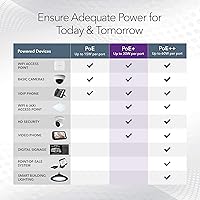
  • PoE Standard: All 8 ports conform to IEEE 802.3at (PoE+), supporting devices that require up to 30W per port.
  • PoE Budget: The total shared power budget across all ports is 83W, which must be distributed among all active powered devices.
  • Data Rate: Each port operates at up to 1000 Mbps (1 Gigabit per second) full-duplex.
  • Management: This is a fully unmanaged switch with no software interface, web GUI, or CLI of any kind.
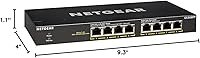
  • Dimensions: The chassis measures 9.3″ long by 4″ wide by 1.1″ tall, making it compact enough for most shelves or closets.
  • Weight: The unit weighs 1.32 pounds, light enough for single-person wall mounting without assistance.
  • Chassis Material: The housing is constructed from metal, which aids passive heat dissipation and overall structural durability.
  • Cooling Method: Cooling is entirely passive — there are no internal fans, resulting in completely silent operation.
  • Mounting Options: The switch supports both desktop placement and wall mounting; a rack and wall mount kit is included in the box.
  • Input Voltage: The unit requires a standard 110V AC power input via the included external power adapter.
  • FlexPoE: NETGEAR FlexPoE technology allows the internal power budget to be expanded by replacing the included adapter with a higher-wattage compatible unit.
  • Warranty: NETGEAR covers this switch with a 3-year limited hardware warranty from the date of purchase.
  • In the Box: The package includes the switch itself, a rack and wall mount kit, a power adapter, and a printed installation guide.
  • UPC: The Global Trade Identification Number for this unit is 00606449146820.
  • Certifications: The switch carries CE certification, meeting applicable European electromagnetic and safety standards.
  • Port Interface: All network connections use RJ45 jacks with auto-MDI/MDIX, so crossover cables are never required.
  • Current Rating: The unit draws up to 1 amp at its rated input voltage under normal operating conditions.
  • BSR Ranking: This product holds a top-10 ranking in the Computer Networking Switches category on Amazon, reflecting sustained sales volume.

Related Reviews

NETGEAR GS308EP
NETGEAR GS308EP
81%
88%
PoE+ Performance
91%
Ease of Setup
74%
Build Quality
82%
Network Management Features
93%
Value for Money
More
NETGEAR GS108PP 8-Port Gigabit PoE+ Unmanaged Switch
80%
93%
PoE Power Delivery
96%
Ease of Setup
91%
Long-Term Reliability
94%
Silent Operation
74%
Build Quality
More
BV-Tech POE-SW802G 8-Port Gigabit PoE+ Switch
79%
94%
Ease of Setup
88%
PoE Reliability
67%
Power Budget
61%
Build Quality
91%
Value for Money
More
LINOVISION POE-SW508G Industrial 8-Port PoE++ Switch
77%
91%
Power Delivery
88%
Build Quality
93%
PoE Watchdog
84%
Installation Ease
86%
Thermal Performance
More
YuLinca 6-Port Gigabit PoE Switch with 4 PoE+ Ports
87%
95%
Ease of Installation
88%
PoE Functionality
91%
Build Quality
87%
Performance and Speed
94%
Fanless Operation (Noise)
More
Cqenpr 8-Port 120W Outdoor Gigabit PoE Switch
80%
93%
Ease of Installation
88%
Weatherproof Durability
84%
PoE Power Delivery
79%
AI Watchdog Reliability
82%
Surge & Lightning Protection
More
Loocam LNA-SPG1008 8-Port Gigabit PoE Switch
80%
94%
Ease of Setup
76%
PoE Power Delivery
83%
Build Quality
88%
Compatibility
71%
Extended Transmission Range
More
YuanLey 8-Port 120W Gigabit PoE Switch
80%
91%
Value for Money
94%
Ease of Setup
78%
PoE Power Delivery
83%
Build Quality
74%
Thermal Performance
More
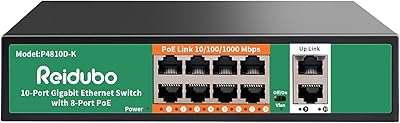
Reidubo P4810D-K 8-Port Gigabit PoE Switch
78%
93%
Ease of Setup
88%
PoE Reliability
67%
Power Budget Adequacy
82%
Build Quality
61%
VLAN Functionality
More
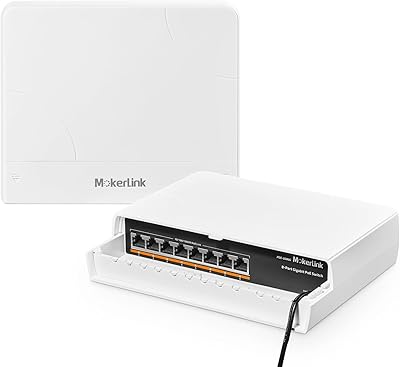
MokerLink 8-Port Outdoor Gigabit PoE Switch
81%
93%
Ease of Setup
84%
Build Quality
81%
PoE Performance
77%
Weather Resistance
89%
Gigabit Throughput
More

FAQ

All 8 ports support PoE+, which is genuinely one of the stronger selling points of this switch. A lot of competing switches in this price range only offer PoE on 4 of their 8 ports, so having full coverage across every connection is a meaningful advantage when you need to power multiple cameras or access points.

Add up the maximum wattage draw of every device you plan to power through the switch. A typical indoor IP camera draws around 7 to 10W, a standard wireless access point around 12 to 15W, and a VoIP phone roughly 3 to 5W. If your total comes in well under 83W with some headroom, you're fine. Just keep in mind the budget is shared, so one port drawing 30W leaves 53W for everything else.

None whatsoever. You plug in the power adapter, connect your devices, and the switch starts forwarding traffic immediately. There is no app to install, no web interface to visit, and no account to create. If you've never set up a network switch before, this is about as approachable as it gets.

Yes, and the mount kit is included in the box, which is a nice touch since many switches in this category require you to source your own hardware. The unit is light enough that a single person can handle the installation comfortably.

The metal chassis does warm up during operation, which is by design — it acts as a passive heat sink. Under normal loads with a few cameras or access points, the warmth is mild and unremarkable. If you're running most or all ports at their maximum PoE draw simultaneously, the surface will get noticeably warmer, so make sure there's reasonable airflow around the unit and avoid enclosing it in a sealed cabinet.

FlexPoE means you can replace the included power adapter with a higher-wattage compatible unit to increase the total PoE budget beyond the stock 83W. Most home and small-office users will never need this, but it's a useful escape hatch if your device count grows over time and you start pushing the power limits.

No. The NETGEAR GS308PP 8-Port PoE+ Gigabit Switch is completely unmanaged, meaning there are no VLANs, no QoS settings, no port isolation, and no traffic monitoring of any kind. All connected devices share the same broadcast domain. If you need any of those features, you'll want to look at NETGEAR's Easy Smart or fully managed switch lines instead.
Absolutely. The ports work as standard gigabit Ethernet connections regardless of whether the connected device supports PoE. Non-PoE devices simply don't receive power through the cable — the data connection works exactly the same. You can freely mix PoE cameras with regular computers, printers, or storage devices on the same switch.

Completely silent. There are no fans inside the unit, so the only thing you'll ever hear is the faint click of cables being plugged in. This makes it well-suited for bedrooms, living rooms, or any space where fan noise from networking gear would be annoying.

The switch will begin cutting power to lower-priority ports to protect the devices that connected first, though the exact behavior can vary depending on which devices are drawing power and in what order they were connected. To avoid unexpected dropouts, it's worth budgeting your total power draw conservatively and leaving at least 10 to 15 percent headroom below the maximum.

Where to Buy