Overview

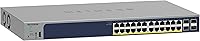
The NETGEAR GS728TP 28-Port Managed PoE+ Gigabit Switch sits in a comfortable middle ground — capable enough for demanding business networks, yet approachable enough that you don't need a Cisco certification to configure it. NETGEAR has been a trusted name in SMB networking for decades, and this switch reflects that experience: solid hardware, a browser-based management interface that doesn't punish you for skipping CLI training, and a lifetime limited warranty that signals genuine long-term confidence. Optional Insight cloud management adds a useful future-proofing layer for multi-site teams, though it's entirely optional if you prefer local control.
Features & Benefits

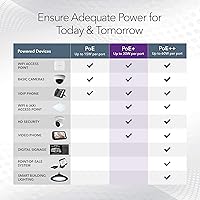
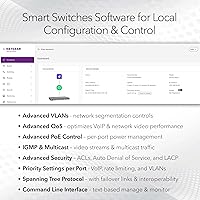
The GS728TP's most talked-about spec is its 24 PoE+ ports, but the real question is whether that 190W shared power budget fits your deployment. Powering 24 devices simultaneously at full draw isn't realistic — typical WAPs pull 12–15W and IP cameras 5–12W, so most mixed-device setups land comfortably within the limit. The four SFP uplink ports are a genuine bonus for connecting buildings via fiber. On the management side, the web GUI covers VLANs, QoS, IGMP snooping, and link aggregation without requiring CLI expertise. Energy-efficient operation under IEEE 802.3az rounds things out for environmentally conscious IT teams.

Best For

This managed PoE+ switch makes the most sense for small-to-medium businesses that need real network control without paying enterprise prices. Think a retail chain deploying IP cameras and wireless access points across a single floor, or a school IT team managing separate VLANs for staff and students. It's also well-suited for network engineers who want cloud-optional management — the Insight platform is there if you need remote multi-site visibility, but you're not forced into a subscription. Organizations that value long-term reliability over cutting-edge specs will especially appreciate the next-business-day replacement guarantee backing this hardware.

User Feedback

Buyer sentiment for the GS728TP is consistently positive, with most reviewers highlighting how surprisingly straightforward the web-based setup is compared to CLI-dependent alternatives at this price point. The 24/7 support chat gets specific praise — a real differentiator when something goes wrong late at night. That said, a recurring concern among users running denser PoE setups is the 190W ceiling; a handful of buyers discovered mid-deployment that powering high-wattage cameras and multiple WAPs simultaneously stretched the budget uncomfortably thin. Firmware update experiences are mixed — some report smooth updates, others encounter occasional quirks. Rack-mounted users have flagged mild heat buildup in poorly ventilated enclosures.

Pros

  • Browser-based setup is genuinely intuitive, even for IT teams without deep CLI experience.
  • All 24 PoE+ ports support IEEE 802.3at, making them compatible with a wide range of business devices.
  • Four dedicated SFP uplink ports allow clean fiber connections between floors or buildings.
  • Advanced VLAN and QoS configuration gives real traffic control without enterprise-level complexity.
  • Optional Insight cloud management lets multi-site teams monitor the network remotely without being locked into a subscription.
  • Lifetime limited hardware warranty is rare at this price tier and adds meaningful long-term value.
  • Next-business-day replacement policy means downtime is minimized if hardware ever fails.
  • Energy-efficient design under IEEE 802.3az helps reduce operating costs over time.
  • Compact form factor fits cleanly on a desktop or in a standard rack with included mounting hardware.
  • 24/7 chat support from NETGEAR is consistently praised by buyers when configuration issues arise.

Cons

  • The 190W shared PoE budget can run thin quickly in high-density deployments with power-hungry devices.
  • No 10G uplink option limits inter-switch throughput in bandwidth-heavy environments.
  • Layer 3 support is lite only — no dynamic routing protocols for more complex network topologies.
  • Firmware updates have been inconsistent for some users, occasionally introducing unexpected behavior.
  • Heat buildup in poorly ventilated rack enclosures has been flagged by a subset of users.
  • The web GUI, while accessible, can feel sluggish or dated compared to newer cloud-native competitors.
  • No redundant power supply option, which is a concern for deployments requiring high availability.
  • Insight cloud management, while optional, adds a dependency layer some IT teams would rather avoid entirely.

Ratings

Our AI-generated scores for the NETGEAR GS728TP 28-Port Managed PoE+ Gigabit Switch were produced by analyzing verified buyer reviews from multiple global markets, with spam, bot-submitted, and incentivized feedback actively filtered out before scoring. The ratings below reflect both where this switch genuinely excels and where real users have run into friction — nothing has been softened to protect the brand. If a category scored low, there is a real pattern of buyer dissatisfaction behind it.
PoE Port Density
83%
For most SMB deployments, having 24 PoE+ ports in a single 1U unit is genuinely useful — users running mixed environments with IP cameras, access points, and VoIP handsets consistently praise the port count as hitting a practical sweet spot. It removes the need for separate power injectors across the rack.
The 190W shared budget is where the praise stops for some buyers. IT managers who tried to fully populate the switch with higher-draw devices found themselves doing uncomfortable math and, in some cases, re-engineering their deployment to stay within budget.
PoE Power Budget
67%
33%
For lighter deployments — say, 12 to 16 standard IP cameras averaging 8W each — the 190W budget is comfortable and causes no issues whatsoever. Users in these scenarios report stable, uninterrupted power delivery with headroom to spare.
Dense deployments are where this rating drops. Users trying to power 20-plus devices, especially a mix of PTZ cameras and tri-band access points, hit the ceiling and found NETGEAR's budget allocation less generous than competing switches at similar price points. This is the single most common complaint across verified reviews.
Management Interface
88%
The browser-based GUI is consistently highlighted as one of the GS728TP's strongest attributes. IT administrators coming from CLI-heavy environments describe it as refreshingly practical — VLAN setup, QoS rules, and port monitoring are all accessible without referencing a command reference manual.
Long-time users note the interface feels dated visually compared to newer cloud-native competitors, and page load times can be sluggish on older management workstations. A handful of reviewers also found that certain advanced settings required more digging through submenus than expected.
Setup & Onboarding
86%
Out-of-box setup is frequently cited as faster and more intuitive than comparable managed switches. The included hardware guide covers rack mounting and initial IP configuration clearly, and most buyers report being up and running within an hour of unboxing.
Users who attempted to activate Insight cloud management for the first time noted an occasionally confusing registration flow, particularly around linking devices to an existing NETGEAR account. Local-only setup is smooth; cloud onboarding adds unnecessary friction.
Build Quality
84%
The metal chassis feels solid and appropriately dense for a business-grade device. Buyers who rack-mounted the unit report it sitting securely without flex, and the port connectors feel well-manufactured with consistent resistance when plugging in RJ45 cables.
The grey plastic fascia and overall aesthetic feel utilitarian rather than premium, which is not a functional issue but does stand out when racked alongside higher-end equipment. A few users noted the SFP port rubber caps were fiddly to remove cleanly without tools.
Noise & Thermal Management
71%
29%
In open rack environments or desktop placements with adequate airflow, the GS728TP runs quietly enough to coexist in a shared office space without drawing complaints. Under normal mixed loads it stays cool and well within thermal tolerances.
Users who mounted the switch in enclosed or poorly ventilated rack cabinets reported audible fan spin-up under sustained PoE load and elevated surface temperatures. This is a real concern for deployments in tight network closets where airflow is restricted — not a dealbreaker, but worth planning around.
Firmware Reliability
69%
31%
Core switching and PoE functionality has remained stable across most firmware versions reported by buyers. Users who stick to well-tested firmware releases and avoid updating immediately after a new version drops tend to have trouble-free long-term operation.
Firmware update experiences are genuinely inconsistent. Some buyers have flagged behavioral quirks post-update, including minor GUI anomalies and one reported instance of VLAN configurations requiring re-verification after an upgrade. The lack of a staged rollout or rollback notification adds risk for production environments.
Value for Money
81%
19%
When buyers factor in the lifetime limited warranty, next-business-day replacement, and the breadth of Layer 2 and Layer 3 Lite features available at this price tier, the overall value proposition is considered strong. Comparable managed switches with similar port counts often cost significantly more.
Buyers who primarily needed basic PoE switching without VLAN or QoS management felt they overpaid for features they never used. And for those who needed the 380W budget of the higher-tier sibling model, the cost jump felt justified in hindsight — making the GS728TP feel like an awkward middle ground in certain scenarios.
Customer Support
82%
18%
NETGEAR's 24/7 chat support receives consistent praise across reviews, particularly from smaller IT teams without internal senior networking expertise. Response times are generally fast, and multiple users credit chat support with resolving configuration issues the same day they were encountered.
Some users escalating beyond first-line chat support to phone or ticket-based technical assistance reported longer resolution times and less consistent agent quality. The experience appears to vary notably depending on which support channel is used and the technical complexity of the issue.
Cloud Management (Insight)
74%
26%
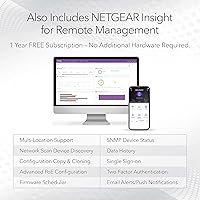
For multi-site IT teams, the optional Insight cloud platform genuinely adds value — remote visibility, configuration templating, and alert notifications are real productivity gains when you are managing switches across several locations from a single dashboard.
Users who activated Insight found the platform adds a dependency layer that requires an internet connection and NETGEAR account continuity. There have also been occasional complaints about Insight portal responsiveness and feature parity gaps compared to the local web GUI, which undermines confidence in it as a primary management tool.
SFP Uplink Performance
79%
21%
The four 1G SFP ports perform reliably for inter-floor fiber runs and uplink connections to core switches. Users connecting remote buildings via fiber report stable throughput and no compatibility issues with standard third-party SFP transceivers from reputable vendors.
The limitation to 1G SFP speeds is a meaningful constraint for growing networks. Organizations that have since upgraded their core infrastructure to 10G find these uplinks becoming a bottleneck, and there is no upgrade path short of replacing the switch entirely.
VLAN & QoS Functionality
87%
VLAN segmentation and QoS configuration are among the most praised functional capabilities of this switch. IT administrators managing separate VLANs for surveillance, voice, and general data traffic report the feature set is more than sufficient for typical SMB network designs.
Advanced QoS users who came from higher-tier enterprise hardware noted that the GS728TP's QoS options, while functional, lack some of the granular policy controls available on full Layer 3 switches. For standard traffic prioritization the feature works well; for complex multi-class traffic shaping it shows its limits.
Warranty & Longevity
93%
The lifetime limited hardware warranty is a standout differentiator that buyers reference repeatedly as a key purchase driver. Combined with next-business-day replacement, it provides a level of long-term assurance that is uncommon at this price tier and meaningfully reduces total cost of ownership over a multi-year deployment.
The warranty applies to the original purchaser only and does not transfer with resale, which reduces residual value if you later upgrade and try to sell the unit. A handful of buyers also noted the replacement process, while effective, required more documentation than expected before a replacement unit was dispatched.
Port Labeling & Physical Usability
76%
24%
Port numbering is clearly marked on the front panel, and the LED status indicators per port give useful at-a-glance information about link speed and PoE activity without requiring login to the management interface. Rack installation with the included hardware is described as straightforward.
Under lower ambient lighting conditions — common in server rooms — the LED indicators can be difficult to read at a glance due to their relatively small size and close spacing across 28 ports. A brighter or color-differentiated LED scheme for PoE-active ports would have been a practical improvement.
Energy Efficiency
85%
IEEE 802.3az compliance delivers real-world power savings on inactive or low-utilization ports, which buyers in 24/7 always-on environments report as a meaningful operating cost reduction over time. The design reflects a thoughtful approach to reducing idle power draw without impacting performance.
Energy savings are most noticeable on partially populated switches. Fully loaded deployments running maximum PoE draw see less benefit from the efficiency features, as the power budget is being actively consumed regardless of the 802.3az logic on individual ports.

Suitable for:

The NETGEAR GS728TP 28-Port Managed PoE+ Gigabit Switch is a strong fit for small-to-medium businesses that need genuine network control without the complexity or cost of full enterprise hardware. If your organization is deploying a mix of IP security cameras, wireless access points, and VoIP phones across a single location, the 24 PoE+ ports give you the flexibility to power and manage all of them from one central device. IT administrators who want VLAN segmentation, QoS prioritization, and IGMP snooping through a browser-based interface — rather than memorizing CLI commands — will find the management layer refreshingly approachable. Schools, retail environments, and mid-size offices that need to separate guest and staff traffic, or prioritize video surveillance bandwidth, are exactly the kind of use cases this switch was designed around. Organizations that also value post-purchase support will appreciate the lifetime warranty and next-business-day replacement policy, which reduce the long-term risk of the investment considerably.
Not suitable for:

The NETGEAR GS728TP 28-Port Managed PoE+ Gigabit Switch is not the right call for every networking scenario, and it is worth being honest about where it falls short. The 190W shared PoE budget is the most common dealbreaker: if you plan to run 20 or more high-draw devices simultaneously — think PTZ cameras at 25W each or high-end tri-radio access points — you will hit the ceiling fast and potentially see devices dropping power unexpectedly. Home users or very small offices with just a handful of devices will likely find the feature set overkill and the price hard to justify when a simpler unmanaged switch would do the job at a fraction of the cost. Network engineers who require full Layer 3 routing with dynamic routing protocols like OSPF or BGP will also be underwhelmed, as the L3 Lite designation means static routing only. And if your team needs 10G uplink ports for high-throughput inter-switch connections, this switch does not offer that — the four SFP ports are 1G only, which can become a bottleneck in bandwidth-intensive environments.
Specifications

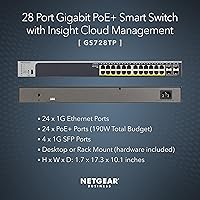
  • Total Ports: The switch provides 28 total ports: 24 Gigabit Ethernet PoE+ ports and 4 x 1G SFP fiber uplink ports.
  • PoE Standard: All 24 copper ports support IEEE 802.3at PoE+, allowing each port to deliver up to 30W to connected devices.
  • PoE Power Budget: The total shared PoE power budget across all 24 ports is 190W, which must be factored carefully in dense deployments.
  • SFP Uplinks: Four dedicated 1G SFP slots support standard fiber transceivers for inter-building or inter-floor network connections.
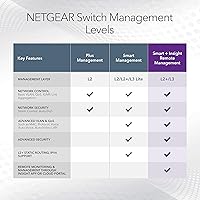
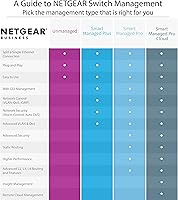
  • Management Type: The switch uses a browser-based smart management interface with optional NETGEAR Insight cloud management and SNMP support.
  • Management Layer: Network control operates at Layer 2, Layer 2+, and Layer 3 Lite, supporting static routing but not dynamic routing protocols.
  • VLAN Support: Advanced VLAN configuration is supported, enabling logical network segmentation for guest, staff, and device-class traffic separation.
  • QoS: Quality of Service controls allow administrators to prioritize time-sensitive traffic such as VoIP and video surveillance streams.
  • IGMP Snooping: IGMP snooping is supported to optimize multicast traffic and reduce unnecessary bandwidth consumption across the network.
  • Link Aggregation: Link aggregation (LAG) is supported, allowing multiple physical ports to be bonded together for increased throughput and redundancy.
  • IPv6 Support: Full IPv6 compatibility is included, making the switch suitable for modern network environments transitioning away from IPv4-only infrastructure.
  • Energy Efficiency: The switch complies with IEEE 802.3az Energy Efficient Ethernet, automatically reducing power consumption on idle or low-activity ports.
  • Mounting Options: The unit supports both desktop tabletop placement and standard rackmount installation, with all necessary brackets and screws included in the box.
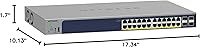
  • Dimensions: Physical dimensions measure 10.13 x 1.7 x 17.34 inches, occupying 1U of rack space in a standard 19-inch rack enclosure.
  • Weight: The switch weighs 8.32 pounds, making it manageable for a single person to install in a rack without specialized equipment.
  • Warranty: NETGEAR provides a Lifetime Limited Hardware Warranty covering manufacturing defects for the original purchaser for the life of the product.
  • Replacement Policy: Next Business Day hardware replacement is included, significantly reducing network downtime in the event of a hardware failure.
  • Technical Support: 24/7 access to NETGEAR technical support via chat is included at no additional cost with the product purchase.
  • Model Number: The official model number for this switch is GS728TP-200NAS, used for firmware downloads, support cases, and warranty registration.
  • Color & Finish: The enclosure is finished in a neutral grey that blends into standard server room or office equipment environments without drawing attention.

Related Reviews

YuLinca 6-Port Gigabit PoE Switch with 4 PoE+ Ports
87%
95%
Ease of Installation
88%
PoE Functionality
91%
Build Quality
87%
Performance and Speed
94%
Fanless Operation (Noise)
More
NETGEAR GS108PP 8-Port Gigabit PoE+ Unmanaged Switch
80%
93%
PoE Power Delivery
96%
Ease of Setup
91%
Long-Term Reliability
94%
Silent Operation
74%
Build Quality
More
NETGEAR GS308PP 8-Port PoE+ Gigabit Switch
85%
96%
Ease of Setup
93%
PoE Port Coverage
71%
Power Budget Adequacy
88%
Build Quality
67%
Thermal Management
More
NETGEAR GS305EP 5-Port PoE Gigabit Switch
79%
91%
Ease of Setup
78%
PoE Performance
97%
Noise Level
67%
Management Interface
72%
Build Quality
More
NETGEAR GS308E 8-Port Managed Network Switch
81%
93%
Reliability & Uptime
96%
Silent Operation
67%
Ease of Setup
78%
Web Management Interface
88%
Value for Tier
More
NETGEAR GS305E 5-Port Gigabit Managed Switch
76%
93%
Value for Money
84%
Setup & Ease of Use
81%
Build Quality & Durability
88%
Network Performance & Throughput
97%
Silent Operation
More
NETGEAR GS308EP
NETGEAR GS308EP
81%
88%
PoE+ Performance
91%
Ease of Setup
74%
Build Quality
82%
Network Management Features
93%
Value for Money
More
NETGEAR GS316P 16-Port PoE+ Gigabit Switch
77%
97%
Ease of Setup
94%
PoE Port Coverage
61%
PoE Power Budget
88%
Build Quality
96%
Noise Level
More
NETGEAR GS316PP 16-Port PoE+ Gigabit Ethernet Switch
85%
92%
Value for Money
89%
Ease of Use
86%
Energy Efficiency
76%
PoE Power Delivery
90%
Quiet Operation
More
NETGEAR GS305P v2 Unmanaged PoE Switch
84%
96%
Ease of Setup
81%
PoE Performance
88%
Build Quality
97%
Noise Level
83%
Value for Money
More

FAQ

Technically yes, but the 190W shared budget means you need to do the math first. If your devices average around 8W each — which is common for standard IP cameras or basic access points — you can comfortably power all 24 ports. High-draw devices like PTZ cameras or tri-band wireless APs can consume 20–30W each, so in those cases you may hit the ceiling well before filling every port.

Insight is completely optional. The switch has a full browser-based management interface that works entirely on your local network without any cloud account or subscription. Insight is worth considering if you manage multiple sites remotely, but plenty of users never activate it at all and have no issues.

It depends on how comfortable your team is with basic networking concepts. The web GUI is one of the more approachable interfaces in this category — setting up VLANs and port configurations is straightforward compared to CLI-based alternatives. That said, if no one on your team has ever configured a managed switch before, expect a learning curve, and lean on NETGEAR's 24/7 chat support when you get stuck.

The SFP slots are standard 1G ports and are compatible with most industry-standard SFP transceivers, including NETGEAR's own modules as well as third-party options from manufacturers like Cisco, FS, and 10Gtek. That said, NETGEAR does not officially guarantee compatibility with all third-party transceivers, so it is worth checking community forums or NETGEAR's compatibility list before purchasing.

The core difference is control. An unmanaged switch just forwards traffic — no VLANs, no QoS, no traffic prioritization. If you have a mixed environment with cameras, voice, and data on the same network, that lack of control can cause real problems like choppy VoIP calls during heavy video traffic. The GS728TP gives you the tools to segment and prioritize, which pays off quickly in environments with more than a dozen connected devices.

Yes, it fits in a standard 19-inch rack and occupies 1U of space. NETGEAR includes the mounting brackets and screws in the box, so you do not need to source them separately. Rubber footpads are also included if you prefer desktop placement instead.

The track record is mixed based on user reports. Most updates have been routine and problem-free, but some users have encountered minor quirks after certain firmware releases — primarily around interface behavior rather than core switching functions. The general advice is to read the release notes before updating and avoid flashing new firmware the same week you deploy in a production environment.

The GS728TP does have internal cooling, but under normal loads it operates at a low noise level that most users describe as barely noticeable in a typical office environment. Users who have rack-mounted it in enclosed, poorly ventilated cabinets have noted it can run warm and the fan becomes more audible, so adequate airflow in the enclosure matters.

Yes, link aggregation is supported, which lets you bond two or more ports together for higher throughput to a server or NAS that also supports LAG. This is particularly useful if you have a storage server that needs more than 1Gbps of sustained bandwidth from the switch.

NETGEAR's lifetime limited warranty covers hardware defects for the original purchaser, and the next-business-day replacement policy is the practical safety net most IT managers care about. The replacement process generally involves contacting NETGEAR support, verifying the fault, and receiving a replacement unit shipped out the next business day — which is a realistic turnaround compared to many competitors at this price tier.

Where to Buy