Overview

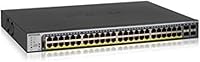
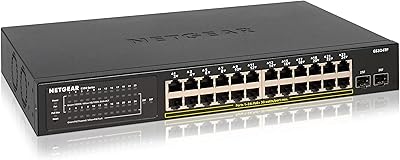
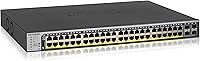
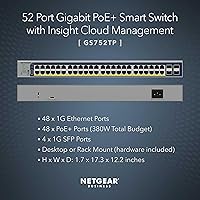
The NETGEAR GS752TP 52-Port PoE+ Gigabit Smart Switch occupies a practical middle ground that a lot of growing businesses don't realize they need until they've outgrown a dumb switch and aren't ready to commit to full enterprise hardware. With 48 PoE+ data ports and 4 SFP uplink slots, this PoE+ smart switch delivers real port density alongside the flexibility to connect via fiber or copper uplinks. The 380W PoE budget is genuinely useful for powering a mixed fleet of IP cameras, VoIP handsets, and wireless access points from a single unit. Whether it sits on a desktop or slides into a rack, the GS752TP handles both without any adapter drama — and that installation flexibility alone makes it worth a close look for smaller IT teams.
Features & Benefits

The 48 PoE+ ports are the core draw here, but what matters day-to-day is how the GS752TP handles power allocation across all of them. The 380W shared budget sounds generous until you start doing the math: 48 devices drawing around 8W each nudges you past budget, so the per-port power priority and scheduling controls become essential tools for managing a mixed deployment, not optional extras. The four 1G SFP uplinks give you a clean handoff to a core switch or fiber run. On the management side, the Smart managed web GUI covers VLAN segmentation, QoS prioritization, and SNMP monitoring without demanding CLI proficiency. The 104 Gbps switching capacity keeps traffic moving without bottlenecks, and the hardware carries a lifetime limited warranty with next-business-day replacement.

Best For

This NETGEAR managed switch makes the most sense for SMBs actively deploying IP cameras, wireless access points, or VoIP phones and needing a single unit to power and manage all of them. IT administrators who've hit the ceiling of an unmanaged switch — no VLANs, no traffic shaping, no visibility — will find the GS752TP's feature set hits a useful sweet spot without requiring Cisco-level expertise. Network installers will appreciate that rackmount and desktop options are both supported out of the box with mounting hardware included. It's less suited to environments that already run full-featured L3 switches or where the PoE device count is likely to saturate the 380W power budget without careful planning ahead.

User Feedback

Across nearly 300 ratings, the GS752TP holds a 4.5-star average — a solid result for a business-class networking device where buyers tend to be more technically demanding. Most long-term users highlight rock-solid PoE delivery and stable uptime as the standout qualities, with several noting it has been running without incident for multiple years in production environments. The web interface earns mixed marks: plenty of admins find it intuitive enough for day-to-day tasks, but a recurring complaint is that it feels dated and sluggish on certain browsers. A handful of users also flag that the 380W budget gets tight when most ports are occupied by higher-draw devices. Notably, the NETGEAR support experience — both the warranty process and live chat access — receives consistently positive mentions even in otherwise critical reviews.

Pros

  • 48 PoE+ ports with per-port power scheduling and priority controls make managing a mixed device fleet genuinely practical.
  • The 380W PoE budget comfortably handles a moderate, well-planned deployment of cameras, phones, and access points.
  • Four 1G SFP uplinks provide real flexibility for fiber or copper handoffs to a core switch or ISP connection.
  • VLAN segmentation, QoS prioritization, and SNMP monitoring are all accessible through the web GUI without requiring CLI skills.
  • A lifetime limited hardware warranty with next-business-day replacement is a stronger post-purchase safety net than most competitors offer.
  • Rackmount and desktop mounting hardware are both included in the box — no extra kits or adapter orders needed.
  • 104 Gbps non-blocking switching capacity keeps throughput consistent even under heavier simultaneous traffic loads.
  • Long-term users consistently report years of stable, incident-free operation in live production environments.
  • NETGEAR's 24/7 expert chat support receives repeated praise from buyers who needed help during setup or troubleshooting.
  • The GS752TP delivers enterprise-adjacent PoE management at a price point that does not require enterprise-level budget approval.

Cons

  • The web interface is widely described as dated and can run slowly on certain browsers, making routine admin tasks more tedious than they should be.
  • Fully populating all 48 ports with high-draw PoE devices will exceed the 380W power ceiling, requiring deliberate upfront capacity planning.
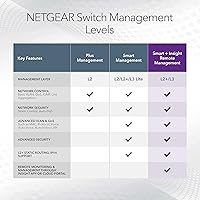
  • The Smart managed tier has no L3 routing capabilities, ruling it out for networks that require inter-VLAN routing at the switch level.
  • First-time setup carries a real learning curve, especially for buyers transitioning from purely unmanaged or consumer-grade hardware.
  • 128MB of RAM and 32MB of flash provide limited headroom for large MAC address tables or aggressive firmware update cycles.
  • There is no built-in redundant power supply option, which is a meaningful gap for always-on deployments in business-critical environments.
  • At nearly 5kg, solo rackmount installation can be awkward, and cable management in tight spaces requires extra attention.
  • The one-year technical support window is relatively short, meaning buyers will need to budget for extended support or rely on self-service resources fairly quickly.

Ratings

Our AI rating engine processed verified buyer reviews for the NETGEAR GS752TP 52-Port PoE+ Gigabit Smart Switch from across global markets, applying spam filters and excluding incentivized or bot-generated submissions to surface what real network administrators and IT professionals consistently report. The scores below reflect an honest synthesis of recurring praise and genuine frustrations — no category has been inflated and no legitimate complaint has been softened. Where strengths are clear, the scores show it; where trade-offs exist, they are reflected with equal weight.
PoE Performance
88%
In real-world deployments running mixed fleets of IP cameras, VoIP handsets, and wireless access points, users consistently report stable and reliable PoE delivery across all active ports. Per-port power scheduling and priority controls give administrators meaningful tools to prevent lower-priority devices from consuming budget that critical infrastructure depends on.
The 380W shared budget becomes a genuine constraint once active port count climbs above roughly 40 devices, particularly when high-draw access points pulling 15W or more are in the mix. Several buyers report having to redesign their device allocation plans after discovering the power ceiling mid-deployment rather than during planning.
Port Density & Layout
91%
Having 48 PoE+ ports and 4 SFP uplinks consolidated into a single chassis is a meaningful operational win for SMBs eliminating separate PoE injector arrays from their wiring closets. Installers report that this consolidation alone simplifies cable management considerably, especially in space-constrained environments where every rack unit counts.
Organizations that only need 24 or fewer active PoE ports will find themselves paying for port density they cannot realistically use, making the per-port investment harder to justify. There is no lower-count variant in the same Smart managed tier that occupies a smaller footprint for leaner deployments.
Management Interface
67%
33%
The browser-based web GUI covers all the practical essentials — VLAN configuration, QoS rules, port-level monitoring, and SNMP setup — without requiring CLI expertise, which is a genuine advantage for IT generalists running a small business network. Most admins report that once past the initial learning curve, routine daily tasks become predictable and manageable.
The interface is widely described by users as visually dated and can run noticeably slowly on browsers other than Chrome, adding friction to what should be straightforward configuration sessions. A recurring complaint involves certain settings pages taking several seconds to load, which becomes particularly frustrating during bulk VLAN setup across many ports simultaneously.
Value for Money
84%
For SMBs that genuinely need managed PoE at meaningful port density, this PoE+ smart switch sits at a price point that competing platforms would match only with additional licensing fees and higher hardware costs. The lifetime limited hardware warranty and next-business-day replacement are frequently cited by buyers as tipping the value calculation firmly in this unit's favor.
Buyers who ultimately need fewer than 30 active PoE ports may find the cost-per-port harder to justify compared to a 24-port alternative in a comparable management tier. The web GUI's age relative to newer competitors also means you are paying for proven hardware rather than a modern software experience, which some buyers only realize after unboxing.
Hardware Reliability
92%
Long-term user feedback on hardware durability is consistently strong, with multiple verified buyers reporting continuous operation across two, three, and even four years in live production environments without a single unit failure. The chassis build quality is described as solid and purpose-appropriate for wiring closet and light server room conditions.
A small number of users report units arriving with early-life hardware failures, though these appear to be isolated incidents rather than a systematic quality concern across the production run. The absence of a redundant power supply option means any PSU failure requires invoking the warranty replacement process rather than a quick field swap.
Setup & Configuration
63%
37%
The web GUI provides enough logical menu structure that IT generalists with basic networking knowledge can work through initial VLAN and QoS setup without external consultants. NETGEAR's online documentation and community forums offer additional reference material that most buyers find adequate for resolving common sticking points during first-time setup.
Most negative reviews for this switch center specifically on setup complexity rather than hardware problems, with buyers accustomed to unmanaged plug-and-play units often surprised by the time investment required. First-time Smart managed switch users commonly report needing several hours or a full day to get VLANs and QoS behaving correctly across all ports.
VLAN & QoS Depth
82%
18%
802.1Q VLAN support and QoS traffic prioritization both function reliably through the web interface, giving SMB network admins the segmentation and bandwidth control they need without the overhead of a CLI-driven enterprise platform. Users running camera VLANs alongside corporate data networks and guest segments report that the configuration holds stably once correctly established.
The VLAN and QoS feature set covers standard SMB needs comfortably but stops well short of the advanced ACL and policy-based routing capabilities that experienced enterprise admins expect. Organizations with more complex multi-site or dynamic routing requirements will find this NETGEAR managed switch reaches its ceiling sooner than they would like.
Uplink Flexibility
79%
21%
Four dedicated 1G SFP slots support both fiber and copper transceiver modules, giving installers the flexibility to connect to a core switch or fiber backbone without a separate media converter. This is particularly appreciated by network engineers working across older buildings with mixed cabling infrastructure, where transceiver choice matters.
All four SFP uplinks top out at 1 Gbps per port, which can become a bottleneck in higher-traffic environments where aggregated port traffic regularly approaches that ceiling. Organizations planning for 10G uplink capability in the near term will need to factor in a hardware upgrade path, as no 10G option is available on this unit.
Warranty & Support
93%
A lifetime limited hardware warranty combined with next-business-day replacement is a genuinely strong ownership proposition — buyers who have invoked the warranty process report smooth, fast replacement experiences with minimal disruption to their network. The bundled year of 24/7 expert chat access provides a meaningful safety net that first-time managed switch buyers find particularly reassuring.
Technical support access is only bundled for the first year, meaning ongoing configuration assistance becomes a self-service or paid arrangement relatively quickly after purchase. Buyers operating outside North America have reported that next-business-day replacement service level agreements can be harder to enforce in practice depending on regional logistics.
Power Budget Planning
71%
29%
Per-port power scheduling and priority controls give administrators real tools for managing a constrained shared power pool across a heterogeneous device mix. Assigning higher priority to mission-critical access points and cameras ensures those devices maintain consistent power even when the 380W budget comes under pressure from a crowded active port population.
The 380W shared budget is the most cited limitation in user reviews, with admins noting that deploying high-draw access points across a significant portion of ports quickly exhausts available headroom. Effective planning for a fully populated switch effectively requires a detailed power draw spreadsheet before purchasing, which too many buyers only discover they needed after the fact.
Build Quality
86%
The chassis feels appropriately solid for a business-class networking unit, and the dual desktop and rackmount capability with all mounting hardware included in the box is a practical detail that installers working across varied site types genuinely appreciate. At roughly 5 kg, it is substantial enough to feel well-constructed without being unwieldy during solo installation.
The rated upper operating temperature of 25 degrees Celsius is on the conservative side, making unconditioned installations — like open storage rooms or spaces without dedicated cooling — a potential concern for sustained reliability. A subset of buyers also note the chassis runs noticeably warm under sustained heavy PoE load, reinforcing the need for proper ventilation.
Switching Performance
89%
The 104 Gbps non-blocking switching fabric ensures that traffic between connected devices does not queue or degrade under realistic SMB workloads, including concurrent video surveillance streams, VoIP calls, and file transfers running simultaneously. This is one area where verified buyers across multiple deployment scales consistently agree without notable exceptions.
While the switching capacity is more than sufficient for current SMB workloads, the hardware tops out at 1G per SFP uplink port, which can create an aggregation ceiling for high-bandwidth environments. Buyers anticipating significant traffic growth over a multi-year horizon should verify the uplink throughput meets their projected future requirements before committing.
Documentation Quality
68%
32%
NETGEAR provides a reasonable base of online documentation and active community forum threads that cover most standard configuration scenarios for this class of managed switch. Buyers with prior experience on any Smart managed platform generally report that the GUI is organized well enough to navigate without extensive manual reading.
First-time managed switch users frequently report that official documentation does not provide sufficient step-by-step guidance for more complex configurations like multi-VLAN setups or SNMP integration with third-party platforms. Several buyers mention relying primarily on third-party video walkthroughs and community forum threads to fill gaps that official materials leave open.
Long-term Stability
94%
Among buyers who have operated the GS752TP for two or more years, hardware stability is the single most consistently praised attribute — units stay up, ports remain live, and PoE delivery stays consistent without unexpected reboots or device failures. This track record carries particular weight in always-on business environments where unplanned downtime has direct operational consequences.
A small subset of users report that firmware updates have occasionally introduced temporary configuration quirks requiring a post-update settings review, which is a minor but real inconvenience in a live production network. The 32 MB flash allocation also leaves limited headroom for future firmware growth, which could constrain long-term update capability over the full operational lifespan of the unit.
Browser Compatibility
61%
39%
Chrome users generally report a functional and reasonably responsive management experience, with the web GUI rendering correctly and most configuration tasks completing without browser-related friction. For deployments where the admin machine runs a standardized Chrome environment, this limitation is largely a manageable non-issue in practice.
Firefox, Edge, and older browser versions produce noticeably degraded performance in the management interface, with slow page loads and occasional rendering inconsistencies that turn routine configuration tasks into unnecessarily frustrating sessions. Multiple users specifically flag this as an overlooked pain point that has not been meaningfully addressed through firmware or interface updates since launch.

Suitable for:

The NETGEAR GS752TP 52-Port PoE+ Gigabit Smart Switch is purpose-built for small and medium-sized businesses that have outgrown a basic unmanaged switch but have no appetite for the cost and complexity of a full enterprise platform. If your organization is deploying IP cameras, VoIP handsets, or wireless access points across an office or multi-room environment, having 48 PoE+ ports under a single managed unit means you're consolidating both power delivery and network control in one place. IT administrators who need VLAN segmentation, QoS prioritization, and SNMP visibility will find the Smart managed web GUI covers those bases without demanding CLI expertise or expensive add-on licensing. Network installers working across varied site conditions will appreciate that both rackmount and desktop deployment hardware ship in the box, removing one more variable from the job. Buyers who place real weight on post-purchase support — especially a lifetime hardware warranty backed by next-business-day replacement — will find the long-term ownership value here is meaningfully stronger than most comparably priced alternatives.
Not suitable for:

The NETGEAR GS752TP 52-Port PoE+ Gigabit Smart Switch is not the right fit for every buyer, and being honest about that upfront matters more than a clean sale. If your environment already runs Cisco, HPE Aruba, or any full L3 managed switch, the Smart managed tier will feel limiting — it lacks the routing depth, advanced ACL support, and CLI control that experienced network engineers rely on. The 380W total PoE budget also becomes a hard constraint when you start filling ports with higher-draw devices; 48 ports at just 8W each already exceeds that ceiling, so anyone planning a fully dense PoE deployment will need to model their power draw carefully before committing. Home users or micro-offices with a handful of devices will find the port count excessive and the management layer more complexity than they need. Buyers who expect a genuinely modern management interface should also be prepared for a web GUI that users consistently describe as functional but dated, and that can run slowly depending on the browser.
Specifications

  • Total Ports: The switch provides 52 total ports: 48 x Gigabit PoE+ RJ45 data ports and 4 x 1G SFP uplink slots.
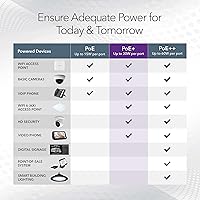
  • PoE Standard: All 48 data ports conform to IEEE 802.3at (PoE+), capable of delivering up to 30W per port within the shared power budget.
  • PoE Budget: The total shared PoE power pool across all simultaneously active ports is 380W.
  • SFP Uplinks: Four 1G SFP slots support both fiber and copper transceiver modules for flexible uplink connectivity; transceivers are sold separately.
  • Switching Capacity: Aggregate non-blocking switching capacity is 104 Gbps, enabling full wire-speed throughput across all ports simultaneously.
  • Management: Network administration is handled via a browser-based Smart managed web GUI with SNMP support compatible with NETGEAR NMS 300.
  • VLAN & QoS: Supports 802.1Q VLAN segmentation and QoS traffic prioritization, both configurable through the web interface without any CLI access.
  • RAM: Onboard system RAM is 128 MB, used for MAC address table operations and general switch processing.
  • Flash Memory: Onboard flash storage is 32 MB, allocated for firmware and persistent configuration data.
  • Form Factor: Supports both desktop placement and standard 19″ rackmount installation, with all necessary mounting hardware included in the box.
  • Weight: Unit weight is 4.93 kg (10.85 lbs), consistent with standard 1U rackmount hardware.
  • USB Port: Includes one USB 2.0 port for auxiliary connectivity purposes.
  • Max Temperature: The rated upper operating temperature is 25 degrees Celsius (77 degrees Fahrenheit).
  • Warranty: Covered by a Lifetime Limited Hardware Warranty with next-business-day hardware replacement included as standard.
  • Tech Support: Includes one year of 24/7 technical support access via NETGEAR expert chat at no additional cost.
  • Model Number: The official model number is GS752TP-200EUS, listed under ASIN B07CCD7VD7.

Related Reviews

NETGEAR GS324TP 26-Port Smart PoE+ Switch
81%
88%
Build Quality
84%
PoE Performance
86%
Setup Experience
67%
Management Interface
83%
Value for Money
More
NETGEAR GS728TP 28-Port Managed PoE+ Gigabit Switch
80%
83%
PoE Port Density
67%
PoE Power Budget
88%
Management Interface
86%
Setup & Onboarding
84%
Build Quality
More
NETGEAR GS110TP 8-Port PoE+ Gigabit Smart Switch
83%
88%
PoE Reliability
83%
Build Quality
79%
Web Management Interface
61%
NETGEAR Insight Cloud App
74%
VLAN & Segmentation
More
TP-Link Festa FS352GP 52-Port Gigabit Smart Managed PoE Switch
84%
87%
Performance
91%
Ease of Setup
89%
PoE+ Power Delivery
92%
Cloud Management Experience
85%
Build Quality
More
YuLinca 6-Port Gigabit PoE Switch with 4 PoE+ Ports
87%
95%
Ease of Installation
88%
PoE Functionality
91%
Build Quality
87%
Performance and Speed
94%
Fanless Operation (Noise)
More
NETGEAR GS308EP
NETGEAR GS308EP
81%
88%
PoE+ Performance
91%
Ease of Setup
74%
Build Quality
82%
Network Management Features
93%
Value for Money
More
NETGEAR GS108Tv3 8-Port Gigabit Smart Switch
79%
83%
Ease of Setup
91%
Network Feature Depth
74%
NETGEAR Insight App
67%
Build Quality
96%
Silent Operation
More
NETGEAR GS308PP 8-Port PoE+ Gigabit Switch
85%
96%
Ease of Setup
93%
PoE Port Coverage
71%
Power Budget Adequacy
88%
Build Quality
67%
Thermal Management
More
NETGEAR GS316P 16-Port PoE+ Gigabit Switch
77%
97%
Ease of Setup
94%
PoE Port Coverage
61%
PoE Power Budget
88%
Build Quality
96%
Noise Level
More
NETGEAR GS108PP 8-Port Gigabit PoE+ Unmanaged Switch
80%
93%
PoE Power Delivery
96%
Ease of Setup
91%
Long-Term Reliability
94%
Silent Operation
74%
Build Quality
More

FAQ

It depends entirely on what each device draws. The total PoE budget is 380W shared across all 48 ports, which sounds generous until you run the numbers. A typical IP camera draws 5 to 8W, a VoIP phone around 3 to 5W, and a modern Wi-Fi 6 access point anywhere from 12 to 25W. Mix higher-draw APs with cameras and phones and you can hit the ceiling well before port 48. The per-port power priority settings exist specifically for this scenario, so you can protect critical devices from being starved if the shared budget gets stretched.

A standard web browser is all you need for day-to-day management. The GS752TP uses a browser-based web GUI that handles VLANs, QoS, port configuration, and basic monitoring without any client software installation. If you want centralized SNMP management across multiple devices, NETGEAR NMS 300 is compatible but entirely optional — most admins manage this switch directly through the browser.

Yes. The four SFP slots accept both fiber and copper 1G transceiver modules, so you can connect to a fiber run, a core switch, or an ISP handoff depending on your infrastructure. The transceivers are not included in the box, so you will need to source compatible 1G SFPs separately based on your cabling type.

Both are supported through the Smart managed web GUI with no additional licensing required. 802.1Q VLANs let you isolate traffic between departments, camera networks, or guest segments, while QoS lets you prioritize latency-sensitive traffic like VoIP or video streams. Neither feature requires CLI knowledge — it is all configured through point-and-click menus in the browser interface, though it does take some familiarity with networking concepts to get it right the first time.

An unmanaged switch is purely plug-and-play with no configuration options, no VLAN support, no traffic prioritization, and no visibility into your network. The NETGEAR GS752TP 52-Port PoE+ Gigabit Smart Switch gives you meaningful control over all of those things: you can segment traffic, prioritize critical devices, monitor port-level activity, and manage power delivery per port. For a business running cameras, phones, or wireless access points, that control often makes the difference between a stable, well-organized network and one that becomes a recurring troubleshooting problem.
The lifetime limited hardware warranty is one of the stronger coverage policies in this product category. If the unit fails due to a hardware defect, NETGEAR replaces it the next business day — you are not waiting a week for depot repair. The main caveat is that the included technical support access via expert chat only covers the first year, so after that, you would rely on community resources or paid support options for configuration help.

Yes, without any issues. The PoE+ standard (IEEE 802.3at) is universal, so any device that draws power over Ethernet — regardless of brand — will work with this PoE+ smart switch. Ubiquiti APs, Axis or Hikvision cameras, Cisco or Polycom VoIP phones — if the device supports PoE or PoE+, it will power up and function normally.

It is functional and covers everything most SMB admins need, but the criticism is fair and worth knowing upfront. Users consistently describe it as feeling dated compared to more modern management dashboards, and it can run slowly depending on the browser you use. Chrome tends to behave better than others. If you are expecting a polished modern UI, you may be underwhelmed — but if your goal is reliably configuring VLANs, QoS rules, and port statistics, it gets the job done without drama.

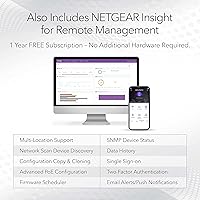
Remote management is possible through SNMP, which lets this NETGEAR managed switch integrate with NMS 300 or compatible third-party monitoring platforms. You can also access the web GUI remotely over a VPN connection if your network infrastructure supports it. There is no native cloud management portal, so any remote access depends on your existing network setup rather than a standalone cloud service.

The jump is real but manageable. The biggest complaint from otherwise satisfied buyers is that initial setup takes longer than expected, not that the hardware is unreliable or confusing long-term. Most admins who are new to managed switches find that working through the interface and NETGEAR's online documentation for a session or two is enough to get comfortable. It is not a same-day plug-and-play experience, but it is significantly more approachable than a full enterprise CLI switch — that middle-ground positioning is precisely its appeal for this type of buyer.

Where to Buy