Overview

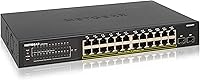
The NETGEAR GS324TP 26-Port Smart PoE+ Switch sits comfortably in the mid-range managed switch category, built for small-to-medium businesses that need to power a meaningful number of PoE devices without jumping to enterprise-grade complexity. Part of NETGEAR’s established S350 series, it carries a reputation for solid software support and long-term reliability. The hardware layout — 24 copper Gigabit ports plus 2 SFP uplinks — fits naturally into a wiring closet or a shallow desktop rack. The 190W shared PoE+ budget is the number to pay attention to before buying; it shapes every deployment decision. This is a Layer 2 smart switch, not a full CLI-driven enterprise unit, and knowing that upfront will save you time evaluating it.
Features & Benefits

The GS324TP packs its 24 PoE+ ports into a shared 190W budget, which in real-world terms means you can comfortably run around 12 to 15 standard wireless access points drawing roughly 13W each, or a mix of IP cameras and VoIP phones at similar draw levels. Push every port to its 802.3at maximum and you will hit the ceiling fast — so plan your deployment carefully. Management is handled through a straightforward web GUI, with optional SNMP and NMS300 integration for those who want centralized monitoring. VLAN segmentation, QoS prioritization, IGMP snooping, and Link Aggregation are all on board, covering the essentials for traffic control without demanding CLI expertise. The two SFP uplinks add fiber backbone flexibility for connecting to a core switch or extending across buildings.

Best For

This PoE+ switch makes the most sense for small businesses, branch offices, or serious home labs deploying a mix of wireless access points, IP security cameras, and VoIP phones across a single floor or compact building. IT generalists — rather than dedicated network engineers — will find the management layer approachable without feeling stripped-down. If your space is tight, the option to mount it in a 1U rack slot or sit it on a desk, with all hardware included, is genuinely useful. It also suits teams migrating off unmanaged switches who need VLAN separation and basic traffic prioritization but are not ready to invest in a full enterprise platform. NETGEAR’s 5-year warranty adds meaningful peace of mind for budget-conscious buyers.

User Feedback

With a 4.7 out of 5 rating built from over 660 reviews since 2019, this NETGEAR smart switch has a long, consistent track record. Buyers consistently highlight how painless the initial setup is — the web GUI gets most people running in under an hour — and praise the metal build and reliable PoE delivery across all ports. The criticism that surfaces most often centers on the 190W power ceiling: in all-port-active deployments with high-draw devices, you can run short faster than expected. A secondary complaint worth noting is that the management interface looks dated compared to cloud-managed alternatives from competitors. Neither issue is a dealbreaker for the right buyer, but both are worth factoring in before committing.

Pros

  • All 24 copper ports support PoE+, so there is no guesswork about which ports can actually power connected devices.
  • The 190W budget comfortably handles a realistic mixed deployment of access points, IP cameras, and VoIP phones at typical draw levels.
  • VLAN, QoS, IGMP snooping, and Link Aggregation give IT teams solid traffic control without demanding enterprise-level expertise.
  • Web GUI setup is approachable enough that most IT generalists can have the GS324TP configured and running in well under an hour.
  • Two SFP uplink ports enable fiber backbone connections or inter-switch links without any additional hardware purchases.
  • Consistent 4.7-star rating across more than 660 reviews since 2019 reflects genuine, long-term buyer satisfaction in real deployments.
  • Metal chassis construction holds up well in wiring closets and light rack environments based on sustained user feedback.
  • Flexible mounting — desktop or 1U rack — with all necessary hardware included keeps initial deployment simple and cost-free.
  • NETGEAR’s 5-year limited hardware warranty meaningfully exceeds the coverage window offered by many comparable mid-range switches.
  • IEEE 802.3az energy efficiency and quiet operation make it practical for open office or customer-facing environments.

Cons

  • The 190W shared PoE budget becomes a hard constraint the moment you try to simultaneously max out all 24 ports with high-draw devices.
  • The management interface looks visually dated and lacks the polished, intuitive layout found in newer cloud-managed switch platforms.
  • No Layer 3 routing support means inter-VLAN routing requires a separate router, adding cost and complexity to the overall network design.
  • There is no cloud management option or mobile app, making remote monitoring inconvenient for IT teams managing multiple sites.
  • Centralized SNMP monitoring via NMS300 requires a separate software installation, adding friction for teams expecting out-of-the-box oversight.
  • CLI-dependent network engineers will find the GUI too limiting for complex or non-standard configurations that go beyond the basics.
  • No redundant or external power supply option exists, which is a drawback for environments where network uptime is mission-critical.
  • Software and firmware updates have been reported as infrequent, which can be a concern for teams managing long-term security compliance.
  • At just under 6 pounds and 13 inches wide, it is not well suited for portable, temporary, or frequently relocated network setups.

Ratings

The scores below reflect an AI-driven analysis of verified global user reviews for the NETGEAR GS324TP 26-Port Smart PoE+ Switch, with spam, bot-generated submissions, and incentivized feedback actively filtered out to ensure the data reflects genuine buyer experiences. Each category rating is built from recurring patterns identified across hundreds of real-world deployments, from small business wiring closets to home lab setups. Both standout strengths and honest pain points are transparently represented so you get an accurate picture rather than a polished average.

Build Quality
88%
The metal enclosure feels solid and purposeful — buyers consistently note it lacks the lightweight plastic feel common in cheaper switches at this port count. After years of continuous rack or desktop use, users report no warping, port loosening, or structural issues worth flagging.
A few buyers noted the chassis runs warm under heavy PoE loads, and the lack of any integrated temperature monitoring in the web GUI means you are relying on ambient awareness rather than data. Nothing dangerous, but worth noting in warmer or poorly ventilated server rooms.
PoE Performance
84%
Users running mixed deployments of IP cameras, access points, and VoIP phones report that PoE delivery is stable and consistent across all 24 ports. In real-world setups powering 10 to 15 devices simultaneously, the switch negotiates power reliably without spontaneous drops or renegotiation events.
A handful of users in high-density deployments noticed instability surfacing when ports are loaded with devices drawing close to their maximum wattage. The issue overlaps with the shared 190W ceiling rather than delivery quality itself, but the two are difficult to separate cleanly in practice.
Setup Experience
86%
First-time configuration is one of the most consistently praised aspects across buyer reviews. Most users report having devices connected, VLANs created, and PoE allocation reviewed within an hour of unboxing — without prior managed-switch experience required. The web wizard reduces the barrier meaningfully.
Users migrating from other brands occasionally find NETGEAR's menu structure and terminology slightly unintuitive at first. Accessing advanced features like Link Aggregation or IGMP settings requires some exploration, and inline help documentation within the GUI itself is notably sparse.
Management Interface
67%
33%
The web GUI handles the core tasks most SMB admins need: setting up VLANs, adjusting QoS priorities, monitoring port status, and reviewing PoE allocation. For teams that do not need frequent deep-dive configuration, it is functional enough to stay out of the way.
This is where the GS324TP draws the most consistent criticism. The interface feels visually stuck in an earlier era, lacking the clean dashboards and real-time analytics found in modern cloud-managed alternatives. There is no mobile access and no meaningful at-a-glance health monitoring, which frustrates teams used to more current tooling.
Value for Money
83%
For the port count, PoE budget, and managed feature set delivered, buyers consistently feel the pricing sits in a fair range. The GS324TP frequently surfaces as a strong mid-range choice versus competitors, especially when the 5-year warranty is folded into the total cost-of-ownership calculation.
Some buyers feel that newer alternatives at similar price points now bundle cloud management and a better software experience as standard, which makes this switch feel slightly less compelling than it did a few years ago. The hardware holds up, but the software side has not kept pace with the market.
Power Budget
71%
29%
For mixed-device deployments where not every port is drawing maximum wattage, 190W goes a long way. A realistic setup of 12 access points at 13W each alongside six IP cameras at 10W each sits comfortably within budget — exactly the use case this switch is designed around.
The 190W ceiling is the most frequently cited limitation in user reviews, particularly among buyers who planned a high-density deployment without pre-calculating total draw. Fully loading all 24 ports with 802.3at-maximum devices is not possible, and some buyers discovered this only after purchase.
Network Feature Set
78%
22%
VLAN segmentation, QoS, IGMP snooping, and Link Aggregation cover the practical needs of most small business networks without requiring an enterprise budget. IT admins setting up a guest Wi-Fi VLAN separate from their corporate LAN, or prioritizing VoIP traffic, will find everything needed here.
The feature set stops cleanly at Layer 2, meaning inter-VLAN routing and dynamic routing protocols require an external router or a higher-tier switch. Power users who need advanced ACLs or scripted configuration will find the capabilities increasingly limiting as network complexity grows.
Reliability & Stability
91%
Long-term uptime is one of the clearest strengths reflected across hundreds of reviews. Users running this PoE+ switch in always-on environments — retail camera systems, school wireless infrastructure, small office VoIP networks — consistently report months to years of continuous operation with no unexpected reboots or port failures.
A small segment of users has reported occasional firmware-related quirks, typically after updates, requiring a reboot to resolve minor connectivity anomalies. These appear infrequent and isolated, but anyone needing zero-tolerance uptime should factor in the absence of redundant power supply or hardware failover options.
SFP Uplink Flexibility
74%
26%
Having two dedicated SFP uplink ports lets small IT teams extend the network over fiber runs to an adjacent building or connect to a core switch without consuming any copper port count. Most users report solid compatibility with standard third-party 1G SFP modules alongside NETGEAR-branded ones.
The uplinks are capped at 1G, which can become a bottleneck when aggregate traffic from a heavily loaded port array is funneled through a single uplink. Buyers expecting 10G fiber uplink capability at this price point will need to step up to a higher product tier.
Noise & Thermal
89%
Passive cooling means there are no fans to generate noise, and buyers consistently report the switch operates silently in real office settings. Several users specifically mention placing it on a front desk or in an open-plan workspace without any complaints — a genuine advantage over fan-cooled alternatives.
Without active cooling, chassis temperature climbs more noticeably during dense PoE deployments or in warm environments. A small number of buyers in hot climates or poorly ventilated wiring closets reported warmer-than-expected surface temperatures when many high-draw ports were simultaneously active.
Warranty & Support
87%
A 5-year limited hardware warranty stands out clearly at this price tier, where two or three years is more typical among competitors. Buyers cite the long coverage window as a meaningful factor in their purchase decision, and many treat it as a signal of NETGEAR's confidence in the hardware.
Some users report that reaching NETGEAR support for non-warranty queries — firmware help, configuration guidance — can involve long wait times or unhelpful automated responses. The warranty coverage is solid, but the surrounding support experience can be inconsistent depending on the contact channel used.
Mounting Flexibility
82%
18%
The ability to switch between desktop and 1U rack placement — with all hardware included in the box — is a practical convenience that saves buyers a separate parts purchase. Users in evolving environments report starting on a desk and later moving it to a rack as their setup matured, without any additional cost.
The included rack ears are functional but feel basic, and a small number of users note they seem slightly less substantial than those bundled with higher-end switches. The unit also occupies a full 1U slot, which rack-space-constrained environments with tight cabinet layouts should account for upfront.
Energy Efficiency
85%
IEEE 802.3az compliance means the switch automatically reduces power draw on idle or low-traffic ports, translating to real electricity savings in 24/7 business deployments. Users in always-on office environments note it does not draw noticeably more than comparable switches in the same class.
Buyers looking for granular energy monitoring — per-port consumption stats or total wattage readouts — will not find that visibility in the GUI. The savings happen passively in the background, but there is no dashboard to confirm how much power is actually being conserved at any moment.
Firmware & Updates
63%
37%
NETGEAR does release firmware updates for this switch, and the update process itself is straightforward through the web GUI: download from NETGEAR's support site, upload through the interface, and the switch handles the rest. For buyers who configure once and leave it running, the current firmware covers the essential bases.
The pace of firmware releases has drawn criticism from longer-term users as too slow for a product still actively sold in security-sensitive environments. Bug fixes and feature improvements arrive infrequently, and the switch has not received any meaningful UI modernization or significant feature additions for a considerable stretch of time.
Port Density
81%
19%
Having 24 PoE+ copper ports plus 2 SFP uplinks in a 1U form factor is a well-rounded combination for most SMB deployments. It covers a typical office floor or small building without requiring daisy-chaining across multiple switches, which keeps the network architecture clean and straightforward to manage.
For organizations anticipating growth beyond 24 powered endpoints in the near term, this switch offers no expansion path — once ports are full, a second switch is required. Buyers who are already close to the 24-device ceiling should factor in scalability costs before committing to this model.

Suitable for:

The NETGEAR GS324TP 26-Port Smart PoE+ Switch is a strong fit for small-to-medium businesses, branch offices, and serious home lab operators who need to centrally power and manage a substantial fleet of PoE devices. Think of an office floor running 10 to 15 wireless access points, a retail space wiring in IP cameras across multiple zones, or a school consolidating VoIP handsets onto a single managed switch — these are the deployment scenarios where this hardware earns its place. IT administrators who want meaningful network control (VLANs for traffic separation, QoS for prioritizing voice, IGMP snooping for multicast efficiency) but have no appetite for the steep learning curve of a full enterprise CLI will find the web-based management interface a practical middle ground. The 2 SFP uplink ports are a genuine bonus for anyone who needs a fiber run back to a core switch or wants to link floors across a building. Teams stepping up from a basic unmanaged switch, who now need visibility and control over network traffic, will find this a well-priced and natural upgrade.

Not suitable for:

If you need Layer 3 routing capabilities — static routes, inter-VLAN routing, or dynamic routing protocols — the NETGEAR GS324TP 26-Port Smart PoE+ Switch is not the right tool, and pushing it beyond its Layer 2 design will only lead to workarounds and frustration. Enterprises or larger deployments requiring cloud-based centralized management, zero-touch provisioning, or deep analytics dashboards will find the on-premises web GUI limiting and the feature set trailing behind more modern managed competitors. The 190W shared PoE budget is a hard ceiling that causes real problems if you plan to fully populate all 24 ports with high-draw devices — running 24 ports at their 802.3at maximum would demand several times what this switch can actually deliver, so dense, power-hungry deployments need a higher-budget unit. Anyone who relies on CLI-driven automation, scripted configuration, or tight integration with platforms like Ansible or modern NMS tools may find the management options here too constrained. If long-term cloud visibility or mobile-app management is a non-negotiable requirement for your team, look elsewhere before committing.

Specifications

  • Total Ports: The switch provides 26 total ports: 24 Gigabit Ethernet copper ports and 2 x 1G SFP fiber uplink ports.
  • PoE+ Ports: All 24 copper ports support IEEE 802.3at PoE+, capable of delivering up to 30W per port to connected powered devices.
  • PoE Budget: The total shared PoE power budget is 190W, distributed dynamically across all simultaneously active PoE+ ports.
  • SFP Uplinks: Two 1G SFP uplink ports accept standard fiber or copper SFP modules for backbone connections or inter-switch links.
  • Throughput: Non-blocking switching throughput is rated at 24 Gbps, supporting wire-speed data transfer across all ports simultaneously.
  • Management: This is a Layer 2 smart-managed switch administered via a web-based GUI, with optional SNMP monitoring through NETGEAR NMS300.
  • Network Features: Supported Layer 2 features include 802.1Q VLAN, QoS traffic prioritization, IGMP snooping, and IEEE 802.3ad Link Aggregation.
  • Dimensions: The unit measures 13 x 8.1 x 1.7 inches (L x W x H), occupying a single 1U slot when rack-mounted.
  • Weight: The switch weighs 5.93 pounds, suitable for both desktop placement and standard 1U rack installations.
  • Case Material: The enclosure is constructed from metal, providing structural durability and passive heat dissipation during continuous operation.
  • Mounting Options: The switch supports both desktop and 1U rackmount configurations; all necessary mounting hardware is included in the box.
  • Energy Efficiency: The switch complies with IEEE 802.3az Energy Efficient Ethernet, reducing power draw automatically on idle or low-traffic ports.
  • Max Temperature: The rated maximum operating temperature is 40 degrees Celsius (104 degrees Fahrenheit) for standard indoor environments.
  • Warranty: NETGEAR provides a 5-year limited hardware warranty, covering manufacturing defects under normal operating conditions.
  • Model Number: The official model designation is GS324TP-100NAS, used for firmware downloads, warranty registration, and support requests.
  • Product Series: This switch belongs to NETGEAR’s S350 series, a line of smart-managed switches built for small-to-medium business environments.

Related Reviews
NETGEAR GS110TP 8-Port PoE+ Gigabit Smart Switch
83%
88%
PoE Reliability
83%
Build Quality
79%
Web Management Interface
61%
NETGEAR Insight Cloud App
74%
VLAN & Segmentation
More
NETGEAR GS752TP 52-Port PoE+ Gigabit Smart Switch
81%
88%
PoE Performance
91%
Port Density & Layout
67%
Management Interface
84%
Value for Money
92%
Hardware Reliability
More
NETGEAR GS728TP 28-Port Managed PoE+ Gigabit Switch
80%
83%
PoE Port Density
67%
PoE Power Budget
88%
Management Interface
86%
Setup & Onboarding
84%
Build Quality
More
NETGEAR MS108TUP Multi-Gigabit PoE Smart Switch
83%
93%
Multi-Gig Port Performance
91%
PoE Power Delivery
78%
Setup & Initial Configuration
71%
NETGEAR Insight Cloud Management
67%
Value for Money
More
YuanLey 26-Port 400W Unmanaged PoE+ Switch

78%
91%
Value for Money
88%
PoE Performance
94%
Ease of Setup
79%
Build Quality
52%
Fan Noise
More
YuLinca 6-Port Gigabit PoE Switch with 4 PoE+ Ports
87%
95%
Ease of Installation
88%
PoE Functionality
91%
Build Quality
87%
Performance and Speed
94%
Fanless Operation (Noise)
More
MokerLink 26-Port Gigabit Unmanaged PoE Switch
79%
91%
Value for Money
88%
Port Count & Layout
73%
PoE Power Budget
93%
Ease of Setup
86%
Build Quality & Chassis
More
NETGEAR GS116PP 16-Port PoE+ Gigabit Switch
83%
96%
Ease of Setup
93%
PoE Port Coverage
68%
Power Budget Adequacy
88%
Build Quality
97%
Noise Level
More
NETGEAR GS316PP 16-Port PoE+ Gigabit Ethernet Switch
85%
92%
Value for Money
89%
Ease of Use
86%
Energy Efficiency
76%
PoE Power Delivery
90%
Quiet Operation
More
NETGEAR GS108PP 8-Port Gigabit PoE+ Unmanaged Switch
80%
93%
PoE Power Delivery
96%
Ease of Setup
91%
Long-Term Reliability
94%
Silent Operation
74%
Build Quality
More

FAQ

That depends on how much power each AP draws. Most SMB access points consume between 10W and 15W, so with a 190W shared budget you can comfortably run 12 to 15 of them simultaneously while leaving a reasonable safety margin. If your APs are high-performance models drawing closer to 25W each, that number drops to around seven or eight. Always check your AP’s PoE draw spec before finalizing your deployment plan.

It works with any device that conforms to the IEEE 802.3at (PoE+) or 802.3af (PoE) standard, regardless of brand. IP cameras, VoIP phones, intercoms, and access points from virtually any manufacturer will power up and operate normally. You are not locked into the NETGEAR ecosystem in any way.

Remote access is possible via the web GUI over a VPN connection to your network. However, the GS324TP does not include a built-in cloud management portal or a dedicated mobile app, so managing it without a VPN or similar tunnel requires some additional network configuration. For teams managing sites remotely on a regular basis, that limitation is worth factoring in before buying.

Yes. The switch is designed for passive cooling without active fans, which makes it genuinely quiet in normal operating conditions. That makes it a reasonable choice for customer-facing spaces, small offices, or anywhere that fan noise would be disruptive. Just make sure there is adequate ventilation around the unit so heat can dissipate properly.

The NETGEAR GS324TP 26-Port Smart PoE+ Switch sits between a fully plug-and-play unmanaged switch and a complex enterprise CLI unit. The smart management layer lets you create VLANs to isolate traffic (keeping guest Wi-Fi separate from your internal network, for example), apply QoS rules to prioritize VoIP calls, and monitor what is happening across ports. If you are running more than a handful of PoE devices or have any security or reliability requirements, those features are genuinely useful rather than just nice-to-have.

Hardware stacking is not supported on this switch. You can link multiple units through the SFP uplink ports, but they will operate as independent switches rather than a single unified system. If true hardware stacking is a requirement for your deployment, you would need to look at NETGEAR’s higher-tier managed switch lines.

Yes, jumbo frames are supported, which is helpful if you are transferring large files between servers and a NAS device on the same network. Enabling jumbo frames reduces packet overhead and can noticeably improve throughput on storage-heavy workloads. You will need to enable it through the web GUI and ensure all devices in the path also support the same jumbo frame size.

The uplink slots accept standard 1G SFP modules in both fiber (single-mode or multi-mode depending on the module) and copper variants. NETGEAR sells compatible modules directly, but most reputable third-party 1G SFP modules also work without issue. Just confirm the module is rated for 1G speeds and matches the fiber type you are running.

NETGEAR’s 5-year limited warranty is one of the better coverage windows in this product class. Registration is done online through NETGEAR’s support portal, and the process is fairly standard: you submit a claim, provide proof of purchase, and NETGEAR handles defective hardware under normal use conditions. Keeping your purchase receipt and serial number accessible will make any future claim much smoother.

Not particularly. Out of the box, the switch works like any standard switch for basic connectivity without requiring any configuration. The management features are available when you want them, not forced on you from the start. When you are ready to set up VLANs or QoS, the web GUI walks through it step by step, and NETGEAR’s documentation for the S350 series is reasonably thorough for common setup scenarios.

Where to Buy