Overview

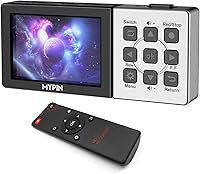
If you are tired of dealing with bulky computer setups just to save some gameplay footage, the MYPIN 1080p 60fps HDMI Capture Card with 3.5-inch LCD offers a refreshing alternative. This standalone capture device is designed for gamers and media enthusiasts who want total freedom from a dedicated PC. You simply plug in your source and record directly to local storage. Because it features a built-in battery and playback capabilities, you can actually review your clips on the go. It completely removes the friction of complex software, letting you record console gameplay without pc interference. Just remember that you will need to provide your own TF card to save those files, as one is not included in the box.
Features & Benefits

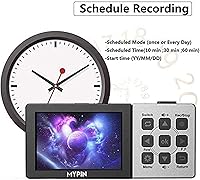
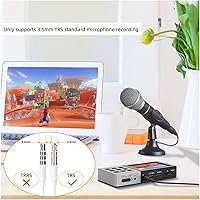
The MYPIN recorder packs a surprising amount of utility into a compact frame, largely thanks to its integrated display that handles real-time monitoring. When writing this mypin 1080p video recorder review, we noticed a crucial detail regarding its video resolution specifications. While it accepts a 60fps input signal, the actual captured footage is saved at 1080p resolution and 30fps. Powering the unit is a built-in 3000mAh lithium-ion battery that delivers roughly three hours of continuous portable use. Content creators can add direct voiceover commentary through the audio input, though you must ensure your microphone uses a TRS connection to function properly. Finally, it functions as a highly capable hdmi recorder with schedule function, allowing you to automate the capture of live television events while you are away from home.

Best For

This portable capture card hits the sweet spot for console players who want a straightforward way to archive their best matches without wrestling with desktop software. It is a fantastic standalone hdmi capture card for digitizing old media from set-top boxes or standard DVRs directly to modern digital formats. Content creators traveling to events will appreciate having a highly compact, all-in-one recording rig that fits easily in a backpack. Furthermore, individuals wanting to capture live sports or scheduled television broadcasts can utilize the automated timer feature. If your workflow demands quick, reliable local recording rather than complex live streaming setups, this hardware removes the usual technical hurdles. You get a capture card with built in screen that genuinely simplifies the entire video archiving process.

User Feedback

Buyers frequently praise the true independence of this device, noting that the ability to ditch the computer makes their recording setups much cleaner. The inclusion of a handy remote control is widely cited as a major convenience, especially when sitting across the room from the television. On the downside, some owners express frustration over the strict TRS microphone requirement, as many modern headsets use TRRS plugs and will need an adapter. Still, the overwhelming majority of users feel the pros heavily outweigh that minor hurdle. The capacity to instantly playback and verify captured footage right on the integrated screen gives people immediate peace of mind. Overall, it delivers exactly what it promises for those prioritizing simple, untethered video recording.

Pros

  • Operates completely independently without requiring a computer or complex software.
  • The integrated 3.5-inch screen allows you to monitor and playback your footage instantly.
  • A built-in 3000mAh battery provides roughly three hours of highly portable recording time.
  • You can schedule recordings in advance, effectively turning the unit into a modern DVR.
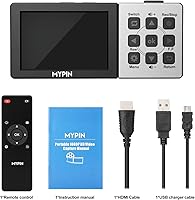
  • The MYPIN 1080p 60fps HDMI Capture Card with 3.5-inch LCD includes a handy remote.
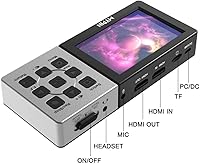
  • It captures clean 1080p video directly to universally compatible MP4 files on a TF card.
  • The dedicated microphone jack makes adding live voiceover commentary incredibly simple.

Cons

  • The hardware permanently caps all recorded video at 30fps, even when receiving a 60fps signal.
  • You must purchase your own TF card separately to actually save any captured files.
  • The microphone input strictly requires a TRS connection, making most TRRS headsets completely incompatible.
  • The remote control relies on infrared technology, requiring a direct line of sight to function.
  • Navigating large folders of saved clips using the physical device buttons can become surprisingly tedious.
  • The glossy plastic screen cover is somewhat prone to picking up scratches during heavy travel.

Ratings

We have compiled global verified buyer feedback to generate these AI-driven ratings for the MYPIN 1080p 60fps HDMI Capture Card with 3.5-inch LCD, carefully filtering out spam and incentivized reviews. This comprehensive breakdown transparently highlights both the standout strengths and the practical pain points real users experience during everyday recording.

Standalone Convenience
92%
Buyers absolutely love the true independence this portable capture card offers for their setups. By completely eliminating the need for a dedicated PC or complex software, it removes major technical hurdles. It is incredibly freeing to just plug in an HDMI cable and immediately start archiving footage.
While PC-free recording is the primary draw, some power users miss the advanced customization options found in desktop software. You cannot tweak granular encoding settings or stream directly to platforms like Twitch without a computer. It is strictly a local recording device, which limits live broadcast capabilities.
Video Capture Quality
78%
22%
The visual fidelity is consistently described as crisp and vibrant when capturing standard high-definition feeds from consoles or set-top boxes. For casual archiving and digitizing older media, the 1080p resolution provides more than enough clarity to preserve those important moments.
The biggest point of contention is that while the device accepts a 60fps input, it strictly records at 30fps. Fast-paced action gamers notice this reduced framerate immediately when reviewing their intense multiplayer matches. Those expecting buttery-smooth 60fps local files often feel let down by this hardware limitation.
Built-in Display
86%
The integrated 3.5-inch monitor is repeatedly highlighted as a game-saving feature for immediate visual feedback. Users greatly appreciate being able to instantly review their captured clips without needing to transfer files first. It provides excellent peace of mind knowing the recording actually worked as intended.
The screen is adequately sized for basic framing and menu navigation, but the viewing angles are somewhat narrow. Glare can easily wash out the image if you are recording in a brightly lit room or outdoors. Do not expect smartphone-level pixel density from this functional preview monitor.
Battery Life & Portability
84%
With a built-in 3000mAh battery, this standalone capture device easily survives long gaming sessions or extended digitization projects. You can confidently take it to gaming tournaments or a friend's house without obsessing over finding a spare wall outlet. Three hours of true untethered runtime is incredibly convenient.
Recharging the internal battery takes a considerable amount of time once it finally depletes. A few road warriors noted that cold environments seem to drain the power cell slightly faster than the advertised three hours. Heavy users will definitely want to keep a power bank nearby.
Audio Input & Microphone
68%
32%
Adding live commentary directly over your gameplay without routing through a mixing board is a massive workflow upgrade. The 3.5mm input effectively captures clear voiceovers, making it remarkably easy to narrate video guides. It saves hours of tedious post-production audio syncing.
The absolute biggest frustration among buyers is the strict requirement for a TRS microphone connection. Most modern gaming headsets use TRRS plugs, meaning they simply will not work without a separate adapter. This unexpected hardware incompatibility catches a lot of excited content creators completely off guard.
Storage Management
74%
26%
Saving universal MP4 files directly to a TF card makes transferring footage to a phone or editing bay beautifully seamless. Supporting capacities up to 128GB ensures you can capture several hours of high-definition video before needing to swap out your storage media.
The lack of an included TF card is a frequent annoyance for buyers who want to start recording straight out of the box. Additionally, navigating large libraries of saved clips using the physical device buttons can become surprisingly tedious over time. You will eventually need a PC for organization.
Scheduled Recording Feature
81%
19%
Automating the capture process for live television broadcasts or sports events is a uniquely powerful feature for a portable device. Users love setting the timer and walking away, trusting the recorder to wake up and digitize the selected channel flawlessly. It essentially turns any HDMI source into a modern DVR.
Setting up the schedule requires navigating a somewhat clunky internal menu system that feels a bit outdated. If the connected set-top box goes to sleep or changes resolution, the scheduled recording might fail to capture a valid video signal. It requires careful setup to ensure total reliability.
Remote Control Usability
88%
Including a dedicated remote control is widely praised by users who integrate this hardware into their living room entertainment centers. Starting a recording from the couch with a single button press is incredibly satisfying and eliminates the need to hover over the device. It adds immense practical convenience.
The remote relies on traditional infrared technology, which means you must maintain a clear, unobstructed line of sight to the recorder. If the capture box is tucked behind a television or game console, the remote commands will frustratingly fail to register. The plastic build also feels slightly flimsy.
Build Quality & Design
76%
24%
The compact footprint ensures this hardware fits neatly into any existing entertainment center without creating unwanted clutter. Despite the lightweight chassis, the physical buttons provide a satisfying, tactile click that reassures you your inputs are actually being registered. It feels intentionally designed for practical, everyday handling.
The predominantly plastic housing feels noticeably less premium than heavier, metal-clad alternatives in the capture hardware market. Scratches can accumulate quickly on the glossy screen cover if the unit is tossed carelessly into a backpack. A protective carrying case would have been a highly appreciated addition.
Setup & Ease of Use
89%
True plug-and-play functionality makes this an absolute dream for people who feel intimidated by complex audio-visual routing. The learning curve is virtually non-existent, allowing even completely non-technical users to successfully digitize their family videos within minutes. The menus are barebones but undeniably straightforward.
The simplistic interface lacks detailed on-screen tooltips, forcing you to consult the physical manual if you forget what a specific icon means. Troubleshooting connection issues is somewhat difficult since the device does not provide specific error codes when an HDMI signal drops. You are largely left guessing during failures.
Value for Money
82%
18%
Getting a capture card, preview monitor, and battery-powered recorder in a single package delivers exceptional bang for your buck. For the specific niche of PC-free capturing, it completely eliminates the need to buy an expensive laptop just to manage your video archiving. The all-in-one design saves serious cash.
The value proposition diminishes slightly when you factor in the hidden costs of purchasing a mandatory TF card and a potential microphone adapter. Serious streamers who eventually want to broadcast live will outgrow this hardware, forcing them to purchase a separate PC-connected capture card anyway.

Suitable for:

The MYPIN 1080p 60fps HDMI Capture Card with 3.5-inch LCD is an excellent choice for console gamers and content creators who want to record footage without tying up a dedicated computer. It is especially useful for individuals looking to digitize older media from set-top boxes or standard DVRs directly onto modern digital storage. Because of its built-in battery and compact size, traveling gamers can easily pack it in a bag to capture tournament matches on the go. Furthermore, home users wanting to archive live television broadcasts will find the scheduled recording feature incredibly handy. Ultimately, if your primary goal is straightforward, untethered video archiving, this standalone device fits the bill perfectly.
Not suitable for:

Conversely, the MYPIN 1080p 60fps HDMI Capture Card with 3.5-inch LCD is a poor fit for ambitious streamers who want to broadcast directly to platforms like Twitch or YouTube. Because it functions purely as a local recording drive, you still need a dedicated PC and different hardware for live broadcasting. It is also completely unsuitable for competitive players who absolutely require buttery-smooth 60fps captured footage, as this unit permanently caps recordings at 30fps regardless of the input signal. Additionally, users who expect to plug standard TRRS gaming headsets straight into the audio jack will be frustrated by the strict TRS requirement. If you want high-framerate capture or advanced software integration, look for a traditional desktop-bound alternative.
Specifications

  • Input Resolution: The device supports a maximum video input signal of 1080p at 60 frames per second.
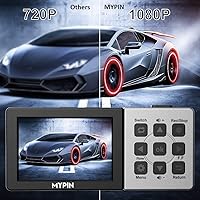
  • Capture Resolution: All recorded video footage is locally saved at a maximum resolution of 1080p at 30 frames per second.
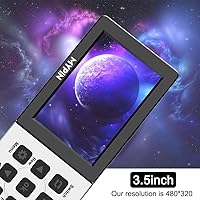
  • Display Screen: It features an integrated 3.5-inch LCD monitor for real-time viewing and immediate playback.
  • Battery Capacity: A built-in 3000mAh lithium-ion battery powers the unit for approximately three hours of continuous use.
  • Storage Media: Video files are recorded directly to a user-supplied TF card with a maximum supported capacity of 128GB.
  • Microphone Input: Audio commentary can be added via a dedicated 3.5mm jack that strictly requires a TRS connection.
  • Audio Output: Users can listen to playback through the integrated speaker or connect headphones via a standard audio jack.
  • Hardware Interface: The primary interface for data transfer and power delivery utilizes a standard USB connection.
  • Recording Format: All captured video and audio are encoded and saved in the universally compatible MP4 file format.
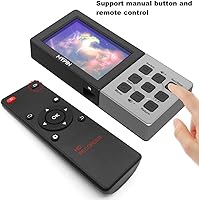
  • Included Accessories: The package includes a dedicated infrared remote control for operating the device from a distance.
  • Special Features: A built-in scheduling function allows users to program automated recording sessions for live television events.

Related Reviews

MYPIN MYPIN-4K60-AVGC Capture Card
70%
83%
Ease of Setup
67%
Video Recording Quality
71%
4K Passthrough Performance
61%
Software Compatibility
69%
Audio Capture & Mic Input
More
ikuai 3.5″ USB 3.0 Hard Drive Enclosure
80%
93%
Ease of Setup
71%
Build Quality
62%
Cable Quality & Reliability
88%
Drive Compatibility
74%
Data Transfer Speed
More
Mirabox HSV3217 4K Capture Card
79%
91%
Ease of Setup
74%
Video Capture Quality
88%
HDMI Passthrough Performance
82%
Software Compatibility
61%
Build Quality
More
Rybozen V316B-FR Capture Card
84%
88%
Build Durability
93%
Setup Simplicity
84%
Video Capture Fidelity
89%
Passthrough Performance
81%
Thermal Management
More
Y&H ezcap261 USB 3.0 HDMI Capture Card
73%
88%
Ease of Setup
82%
1080p Streaming Performance
41%
4K Capture Viability
76%
Pass-Through Quality
53%
Build Quality
More
Koolertron 5.5-inch LCD Digital Microscope
82%
86%
Image Quality
90%
Magnification Range
87%
Ease of Use
91%
Adjustability of Stand
80%
Illumination Performance
More
Inateck FE3001 3.5-Inch USB 3.0 SATA Hard Drive Enclosure
85%
87%
Value for Money
91%
Data Transfer Speed
94%
Setup/Installation
88%
Build Quality
80%
Compatibility
More
ICY DOCK flexiDOCK MB830SP-B 3-Bay 3.5 Inch SATA/SAS HDD Docking Enclosure
83%
93%
Ease of Installation
88%
Build Quality
87%
Performance & Speed
79%
Cooling Efficiency
65%
Noise Levels
More
Qonakism Dual HDMI Capture Card
83%
91%
Video Quality
88%
Ease of Use
94%
Setup/Installation
89%
Latency
84%
Build Quality
More
Narvitech NJ300
Narvitech NJ300
85%
94%
Initial Setup Ease
88%
Recording Stability
92%
Passthrough Latency
86%
Party Chat Integration
67%
Thermal Management
More

FAQ

Not at all! This standalone capture device is designed specifically to work without a PC. You just plug your console's HDMI cable directly into the unit, insert a memory card, and hit record.

No, you will need to purchase your own TF card separately to save your footage. The device supports cards up to 128GB in size, which is plenty for several hours of high-definition video.

The MYPIN 1080p 60fps HDMI Capture Card with 3.5-inch LCD specifically requires a TRS (Tip-Ring-Sleeve) microphone connection. Most modern gaming headsets use a TRRS plug, which combines the headphone and mic signals. You will need an inexpensive TRS adapter to make your headset mic compatible.
This specific model is designed solely for local recording rather than live broadcasting. While you can certainly upload the saved MP4 files to YouTube later, it does not connect to streaming software like OBS.

While the device can accept a 60fps input signal from your console, it caps the actual saved recording at 30 frames per second. The footage will still look incredibly crisp at 1080p, but it won't have that ultra-smooth 60fps framerate.

You can expect roughly three hours of continuous recording time from a fully charged battery. It is highly portable, but if you are planning an all-day gaming marathon, you might want to keep it plugged into a power source.

Absolutely, and that is one of the best features of this portable capture card! The integrated screen allows you to instantly watch your recorded clips to ensure you captured exactly what you needed.

Yes, it is fantastic for archiving older media formats. As long as your playback device can output a standard HDMI signal, you can record it straight to the memory card.

You simply use the menu to set a specific start time and duration, much like an old-school VCR. Just make sure your source device, like a cable box, is powered on and tuned to the correct channel when the timer triggers.

The remote is very straightforward and adds a lot of convenience if you have the unit sitting by your television. Just keep in mind that it uses infrared technology, so you need a clear line of sight to the recorder for the button presses to register.