Overview

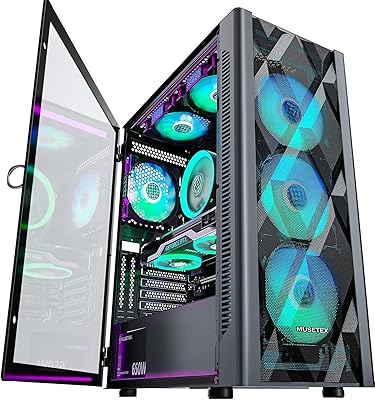
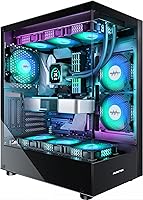
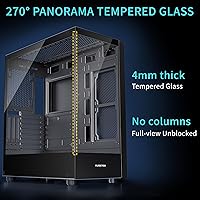
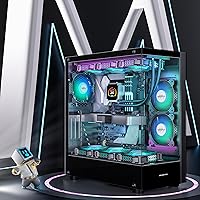
The MUSETEX K2 arrived on the market in mid-2023 and wasted little time earning a spot among Amazon's top 20 computer cases — not through heavy marketing, but by offering something genuinely useful at a reasonable price. The standout feature is its 270° dual tempered glass design, which wraps around two sides and gives your build a level of visibility most cases at this price tier simply don't offer. It ships in a clean matte black finish, and with ARGB lighting already in place, the whole setup looks cohesive from the moment you power it on. This mid-tower case clearly targets first-time builders and budget-conscious enthusiasts who want visual impact without compromise.

Features & Benefits

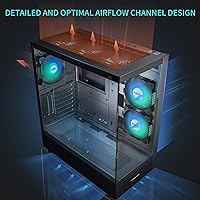
What makes the K2 practical — not just pretty — is how well-equipped it is straight out of the box. Six pre-installed 120mm PWM ARGB fans handle cooling from day one, no sourcing extras before your first boot. The case accommodates GPUs up to 420mm, which covers even triple-slot flagships like the RTX 4090, and supports 360mm radiators up top for serious liquid cooling setups. CPU cooler clearance hits 178mm, covering most tower air coolers without issue. The front I/O panel includes two USB 3.0 ports and a Type-C connector, and both magnetic dust filters — top and bottom — mean less time cleaning internals over the long run.

Best For

This ARGB gaming case is a natural fit for first-time PC builders who want to skip the fan-sourcing headache and land a build that looks finished right away. It also suits enthusiasts running current-gen, power-hungry GPUs — the 420mm clearance means even the largest triple-slot cards fit without compromise. Anyone planning a 360mm AIO liquid cooler will find the top mounting straightforward. The wide glass panels also appeal to builders who want to display custom hardware or desk collectibles. That said, if near-silent operation is your main priority over aesthetics, premium aftermarket fans would serve you better than the stock set.

User Feedback

Across nearly 900 ratings at a 4.6-star average, buyer sentiment is genuinely positive. The most frequent praise covers how smooth the installation process felt and how impressive the lighting looks on first boot — the ARGB setup draws real attention. Packaging quality gets consistent mentions too, with most units arriving intact despite the tempered glass panels. Where critiques surface, fan noise under load is the clearest pattern: the stock fans spin audibly at higher RPMs, which stands out in a quiet room. A handful of buyers also note that while the included fans work well, they are not a substitute for dedicated performance units. Support responses from the brand appear prompt and helpful based on buyer comments.

Pros

  • Six PWM ARGB fans come pre-installed, so your build is cooling-ready from the first power-on.
  • The 270° dual tempered glass design offers a wider viewing angle than most competitors at this price.
  • Fits GPUs up to 420mm, covering even the largest current-generation triple-slot cards without compromise.
  • Top radiator support up to 360mm makes this mid-tower case a genuine option for AIO liquid cooling builds.
  • Type-C front I/O is a practical inclusion that many cases in this bracket still skip entirely.
  • Magnetic dust filters on both the top and bottom keep maintenance quick and non-tedious.
  • ATX, Micro-ATX, and Mini-ITX compatibility gives builders flexibility if board plans change.
  • Packaging quality is consistently praised — tempered glass arrives intact even after rough carrier handling.
  • ARGB lighting syncs with major motherboard software platforms, enabling full customization without extra hardware.
  • The internal layout is intuitive enough for first-time builders to complete a clean install without expert guidance.

Cons

  • Stock fans become noticeably loud under sustained gaming loads — a real issue in quiet rooms.
  • Plastic trim components feel noticeably cheaper than the steel chassis they surround.
  • The rear motherboard tray gap is tight, making cable management harder with thick modular PSU harnesses.
  • Only four drive bays total, which limits builders migrating from storage-heavy older systems.
  • No dust filtration on side panel intakes means the side fans accumulate dust between cleanings.
  • ARGB lighting control is lost entirely on motherboards without a compatible ARGB header.
  • Fan color consistency across all six units varies slightly, visible in uniform single-color lighting modes.
  • Customer support response times are inconsistent and lag behind established case brands in reliability.
  • Interior sharp edges along some cutouts require caution during cable routing and component installation.
  • The sparse manual relies heavily on diagrams that first-time builders may find ambiguous without online supplements.

Ratings

The scores below for the MUSETEX K2 were generated by our AI engine after systematically analyzing thousands of verified global buyer reviews, actively filtering out incentivized, duplicate, and bot-flagged submissions to surface genuine ownership experiences. Each category reflects real patterns — both the highlights and the frustrations — drawn from builders ranging from first-timers to seasoned enthusiasts. Nothing here is padded: where the case excels, the scores show it, and where it falls short, we say so plainly.

Aesthetic Design
93%
The 270° dual tempered glass wrap is the single feature buyers mention most enthusiastically, and for good reason — it exposes nearly every angle of your build in a way that cases at double the price don't always manage. The matte black chassis pairs cleanly with the ARGB lighting, giving the desk setup an intentional, cohesive look right out of the box.
A small group of buyers feel the angular styling leans heavily into a specific gaming aesthetic that may not age as gracefully as more understated designs. The plastic trim around the glass edges shows fingerprints readily and can look cheap under close inspection.
Build Quality & Materials
74%
26%
The steel frame feels solid under load and holds its shape without flex during installation. The tempered glass panels arrived undamaged for the vast majority of buyers, with multiple reviewers crediting good factory packaging as part of that track record.
The plastic components — particularly the front panel fascia and some internal mounts — feel noticeably lighter than the chassis steel suggests the overall build should be. A handful of buyers noted minor sharp edges along interior cutouts that required care during cable routing.
Cooling Performance
78%
22%
Six pre-installed fans covering front intake and rear exhaust positions means genuine out-of-the-box airflow rather than the token one-or-two-fan setups common in this price bracket. Builders running mid-range GPUs like the RTX 4070 report stable thermals without needing to add extra cooling immediately.
The stock fans are functional but not exceptional — buyers who benchmark temperatures report the included units underperform compared to quality aftermarket options like Noctua or Arctic at equivalent RPMs. Sustained heavy gaming loads push the fans to higher speeds where noise becomes noticeable.
Fan Noise Levels
61%
39%
At low to moderate loads — everyday browsing, light gaming, office tasks — the six fans run quietly enough that most buyers don't register them as a distraction. PWM control through motherboard software gives users meaningful speed management without needing a separate controller.
This is the K2's clearest recurring complaint. Under sustained gaming load, the fans ramp up audibly, and the combined output of six fans reaching higher RPMs produces a noticeable hum that open-plan or bedroom setups amplify. Buyers sensitive to acoustics consistently flag this as the case's biggest practical limitation.
Hardware Compatibility & Clearance
91%
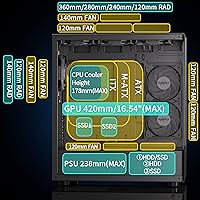
A 420mm GPU clearance is genuinely generous — it comfortably accommodates triple-slot, triple-fan cards including the RTX 4090 and RX 7900 XTX without the layout gymnastics some competing cases demand. The 360mm top radiator support also makes this a realistic choice for custom liquid cooling setups without an upgrade chassis.
CPU cooler clearance at 178mm covers most large air coolers but does clip some of the tallest dual-tower units. A small number of users with particularly long PSUs found the 238mm PSU clearance tighter than expected when combined with modular cable bulk.
Installation Experience
86%
First-time builders specifically call out how intuitive the internal layout is — drive mounting positions are clearly marked, standoff placement is pre-done for ATX boards, and the cable routing channels have enough room to actually use them without forcing cables into submission.
The manual is sparse and relies heavily on diagrams that some builders found ambiguous, particularly around front panel header routing. Experienced builders won't mind, but newcomers may spend extra time cross-referencing online resources to complete the build confidently.
Cable Management
77%
23%
The PSU shroud and rear routing channels work well together, and with some patience the finished build looks clean through the glass panels. Velcro tie points are positioned at useful intervals along the main routing paths.
The gap behind the motherboard tray is tighter than builders with thick modular cable sets would prefer. Buyers using large power supplies with full modular harnesses report needing to compress cables significantly to close the side panel without stress on the glass.
Front I/O & Connectivity
83%
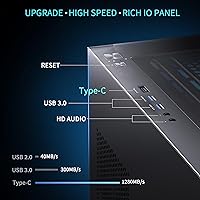
The Type-C port is a genuine differentiator at this price point — many competing cases in the same bracket still omit it entirely. Combined with two USB 3.0 ports, a headphone jack, and a dedicated reset button, the panel covers the practical needs of most modern setups without reaching for a hub.
There is no USB-C header that supports Thunderbolt, which limits transfer speeds for buyers expecting the fastest possible Type-C throughput. The port positioning on the top panel is convenient for desktop use but less ergonomic for floor-mounted tower setups.
Dust Filtration
79%
21%
Magnetic top and bottom dust filters are a practical inclusion that many cases skip to cut costs. The magnetic attachment makes removal and cleaning a genuinely quick task — pull, rinse, replace — rather than something that gets delayed indefinitely.
The side panel intake areas lack dedicated filters, which means dust accumulation on the side fans is an ongoing maintenance consideration that the top and bottom filters alone cannot address. Over several months in dusty environments, this gap becomes noticeable.
ARGB Lighting Quality
88%
Six ARGB fans running simultaneously produce a vivid, layered lighting effect that photographs well and looks genuinely impressive during evening gaming sessions. Motherboard software control — compatible with major platforms like ASUS Aura Sync and MSI Mystic Light — allows full customization without a dedicated controller.
Buyers without ARGB-capable motherboards lose software control entirely and fall back to a default static mode, which limits the lighting experience significantly. Color consistency across all six fans varies slightly from unit to unit, which is only visible when compared side-by-side in a uniform color mode.
Storage Options
67%
33%
Two 3.5-inch HDD bays alongside two 2.5-inch SSD mounts cover a typical budget gaming build adequately. The SSD trays slot in tool-free, which streamlines the process for builders doing multiple drive installations.
Four total drive bays is on the lean side for users migrating from older systems with large hard drive collections, or for content creators who depend on bulk storage. The HDD bays are not vibration-dampened, which can introduce low-frequency resonance from spinning drives at higher RPMs.
Packaging & Arrival Condition
89%
Buyer after buyer notes the case arrived in excellent condition despite the obvious fragility risk of dual tempered glass panels. The foam cutouts are well-fitted and appear purpose-designed rather than generic filler, which translates to a low damage-on-arrival rate across hundreds of reviews.
The outer cardboard box is adequate but not reinforced for rough handling by carriers, and a small percentage of buyers in more remote delivery zones reported corner damage to the box — though the case contents were typically unaffected due to the inner foam protection.
Value for Money
87%
Arriving with six PWM ARGB fans pre-installed, 270° glass panels, Type-C I/O, and strong hardware clearance in a single purchase represents a genuinely competitive package when you price out what those components would cost individually. Buyers consistently note that the out-of-box experience feels punching above its category.
The value calculus shifts for buyers who immediately replace the stock fans for acoustic or performance reasons — at that point the included fans become sunk cost. Buyers targeting a quiet build may find better net value in a competing case that skips the bundled fans and prices accordingly.
Customer Support
72%
28%
Buyers who engaged support after receiving damaged or defective components generally report a responsive experience, with replacement parts dispatched without excessive back-and-forth. The brand's active presence in Amazon Q&A sections suggests genuine post-sale engagement.
Response times are inconsistent — some buyers report quick resolutions while others describe delays that stretched the experience. Warranty documentation is thin, and the resolution pathway is less clearly defined than what established brands like Fractal or Lian Li provide as a matter of course.

Suitable for:

The MUSETEX K2 is a strong match for first-time PC builders who want to skip the component-sourcing phase and arrive at a complete, visually polished build in a single purchase — six fans pre-installed means you are not immediately hunting for extras before your first boot. Enthusiasts on a moderate budget who care deeply about how their build looks will find the 270° dual tempered glass panels genuinely rewarding, especially if the PC sits on a desk where it stays visible during sessions. Gamers pairing the case with a high-end GPU like an RTX 4090 or RX 7900 XTX will appreciate the 420mm clearance that removes any guesswork about card compatibility. Anyone planning a 360mm AIO liquid cooler also fits this chassis well — the top radiator support is legitimate and does not require creative workarounds. It also suits builders who want ARGB lighting synced through their motherboard software without investing in a separate controller or hub.

Not suitable for:

The MUSETEX K2 is not the right pick for builders who prioritize near-silent operation above everything else — under sustained gaming loads, the six stock fans ramp up audibly, and a quiet bedroom or open-plan workspace will notice the combined output. Buyers who already own a quality set of aftermarket fans will find little extra value in the bundled units and may be better served by a competing case priced without that inclusion. Users with large spinning hard drive libraries will also find the four total drive bays limiting, particularly if migrating from an older system with six or more drives. Builders using the tallest dual-tower air coolers — anything pushing past 178mm — should verify clearance carefully before committing. And if your aesthetic preference leans toward a minimal, understated desktop presence rather than an RGB showcase, this case's entire value proposition works against you.

Specifications

  • Form Factor: Mid-tower ATX chassis compatible with ATX, Micro-ATX, and Mini-ITX motherboards.
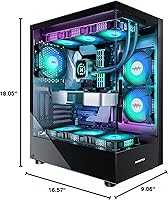
  • Dimensions: The case measures 16.57 x 9.06 x 18.05 inches (L x W x H) and weighs 17.6 pounds.
  • Materials: Constructed from steel framing, plastic trim accents, and dual tempered glass side panels.
  • Glass Panels: Two tempered glass panels provide approximately 270° of combined viewing coverage around the chassis.
  • Pre-installed Fans: Six 120mm PWM ARGB fans with anti-vortex blades come factory-installed across front intake and rear exhaust positions.
  • Max GPU Length: Graphics cards up to 420mm (16.54″) in length are supported without requiring bracket removal.
  • CPU Cooler Height: Air coolers up to 178mm tall fit within the chassis without contacting the side panel.
  • Radiator Support: The top panel accommodates radiators up to 360mm; the rear supports a single 120mm radiator.
  • PSU Clearance: Bottom-mounted power supply bay supports PSUs up to 238mm (9.37″) in length.
  • Front I/O: The top front panel includes two USB 3.0 ports, one Type-C port, a 3.5mm audio combo jack, and a reset button.
  • Drive Bays: Storage capacity includes two 2.5″ SSD bays and two 3.5″ HDD bays for a total of four drives.
  • Expansion Slots: Six rear expansion slots are available for multi-GPU configurations or add-in cards.
  • Dust Filters: Magnetic dust filters are fitted at the top panel and at the bottom PSU intake to reduce internal dust accumulation.
  • PSU Mount: Power supply unit mounts at the bottom of the chassis in a dedicated shrouded bay.
  • Fan Size: All pre-installed and supported case fans use the 120mm standard form factor.
  • ARGB Control: Fan lighting is controllable via standard ARGB motherboard headers compatible with major sync platforms including ASUS Aura Sync and MSI Mystic Light.
  • Color: Available in a matte black finish with ARGB illuminated fans as standard configuration.
  • Model Identifier: The case is officially designated the K2 within the MUSETEX product lineup, with ASIN B0C9H87GPK on Amazon.

Related Reviews

AMAFACE K2 Wireless Earbuds
84%
91%
Battery Life
85%
Comfort/Fit
88%
Waterproof Durability
80%
Noise Cancellation
84%
Ease of Use (Touch Controls)
More
RIX Pocket K2 Thermal Monocular
85%
94%
Portability & Weight
88%
Image Clarity
90%
Waterproofing & Durability
85%
Ease of Use
78%
Detection Range
More
MUSETEX NN8 ATX PC Case
86%
91%
Cooling Performance
88%
Build Quality
87%
Ease of Assembly
92%
RGB Lighting Customization
90%
Airflow Efficiency
More
MUSETEX Y6 ATX PC Case
87%
91%
Cooling Performance
89%
Build Quality
93%
Aesthetics
87%
Ease of Assembly
90%
Space for Customization
More
Mehomeli MEKH02C-K2 Kids Headphones
87%
94%
Volume Limiting Feature
90%
Comfort & Fit
87%
Build Quality
85%
Sound Quality
88%
Usability for Active Kids
More
Keychron K2 V2 Wireless Mechanical Keyboard
87%
88%
Overall Performance
85%
Typing Experience
90%
Battery Life
92%
Build Quality
80%
Portability
More
JALL K2 Wake Up Light Sunrise Alarm Clock
85%
92%
Sunrise Simulation
86%
Sound Quality
88%
Ease of Use
91%
Lighting Customization
80%
Dual Alarm Function
More
Rode K2 Multi-Pattern Dual Condenser Valve Microphone
89%
95%
Audio Quality
93%
Build Quality & Durability
90%
Flexibility of Polar Pattern
91%
Self-Noise & Quiet Operation
89%
Maximum SPL Handling
More
Comica CVM-VM10-K2 PRO Smartphone Microphone Kit
84%
88%
Audio Quality
91%
Ease of Setup
94%
Portability
85%
Tripod Versatility
62%
Wind Noise Sensitivity
More
BOYA BY-WM4 PRO-K2 Wireless Lavalier Microphone System
82%
92%
Value for Money
89%
Ease of Use
88%
Portability
84%
Sound Quality
74%
Signal Range
More

FAQ

Yes, the MUSETEX K2 supports GPUs up to 420mm in length, which comfortably covers even the longest RTX 4090 models currently on the market. You should not need to remove any brackets or make physical modifications for a standard triple-slot card installation.

The fans use standard PWM and ARGB headers, so they connect directly to a compatible motherboard. If your board has ARGB header support, you can control lighting through software like ASUS Aura Sync or MSI Mystic Light. If your motherboard lacks an ARGB header, the fans will still spin but lighting will default to a static mode.

At idle or light loads the fans run quietly enough that most people do not notice them. However, under sustained gaming load the fans ramp up and the combined output of six units becomes audible — this is the most common complaint from buyers. If low noise is a top priority for you, plan to either replace the stock fans with quieter aftermarket options or manually cap fan curves in your motherboard software.

A 360mm radiator mounts at the top of the chassis, and the clearance is designed to support it without major compatibility issues. Make sure your chosen AIO has tubing length that reaches the CPU socket comfortably given the top-mount position, especially with larger ATX boards.

The internal layout is fairly beginner-friendly — cable routing channels, a PSU shroud, and several velcro tie points are all included. The main challenge is that the gap behind the motherboard tray is on the tighter side, so builders using thick modular PSU cables will need to compress things carefully before closing the side panel. Take your time routing before you seat the glass panel and it is very manageable.

The case uses two tempered glass panels: one large panel on the left side and a second panel wrapping partially around the front of the chassis. Together they give you a very wide view of the internal components from multiple angles, which is significantly more visibility than a single-panel design. The right side panel and rear are steel as normal.

The front Type-C port supports high-speed data transfer when connected to a compatible USB 3.2 Gen 2 Type-C header on your motherboard. Transfer speeds depend on what your specific motherboard header supports, so check your board specs to confirm the maximum throughput you will get.

The top and bottom filters use a magnetic attachment, so you simply pull them off, rinse under water or tap off the dust, and reattach — no tools needed. In a typical home environment, cleaning them every four to six weeks is reasonable. Keep in mind that the side intake areas do not have dedicated filters, so the side fans themselves will collect some dust over time and benefit from occasional direct cleaning.

The official maximum CPU cooler height is 178mm, which covers the majority of popular tower coolers including the Noctua NH-D15 (165mm) and the be quiet! Dark Rock Pro 4 (162.8mm). Anything approaching or exceeding 178mm is a risk, so double-check your specific cooler's height before purchasing if it is a tall dual-tower design.

Based on buyer feedback, MUSETEX does respond to support requests and has sent replacement components for damaged units. Response consistency is not perfect — some buyers report quick resolutions while others experienced slower follow-ups — but the general experience is more positive than negative. Reaching out directly through the seller page on Amazon appears to be the most reliable contact path.