Overview

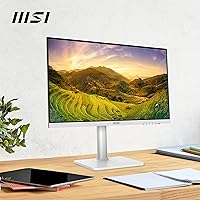
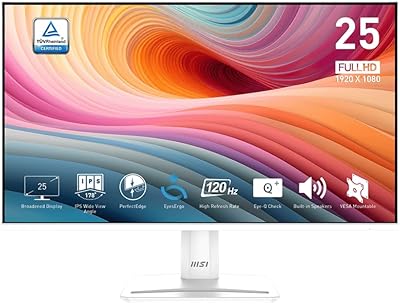
The MSI Modern MD2412PW 24-inch IPS Monitor sits in MSI's productivity-focused Modern lineup, targeting home office workers and students who want a capable daily display without overspending. What immediately stands out is the white colorway — rare at this price point and a genuine visual upgrade over the sea of black panels most desks are drowning in. At 1080p on a 24-inch screen, sharpness is perfectly adequate for documents, browsing, and video calls. Slim bezels and a compact footprint keep things tidy. It competes directly with budget-to-mid-range options from LG, AOC, and ViewSonic, and holds its own on first impressions.
Features & Benefits

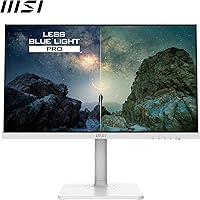
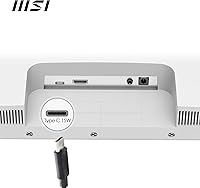
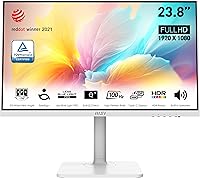
The MD2412PW steps past the standard 60Hz baseline with a 100Hz refresh rate and Adaptive-Sync support, which makes scrolling noticeably smoother and casual gaming more responsive. The IPS panel holds consistent, accurate colors at a 178-degree viewing angle — no washed-out tones when glancing from the side. A USB-C port handles device charging at 15W, convenient for phones and tablets, though it will only trickle-charge a power-hungry laptop. Eye-care features including Less Blue Light PRO and MSI Eye-Q Check help reduce strain during long sessions. The height-adjustable stand and VESA support round out a genuinely practical set of extras.

Best For

This 24-inch IPS display is a natural fit for remote workers and students who need a dependable screen for long days without a high price tag. If you run a dual-monitor setup and care about desk aesthetics, the white finish makes it one of the few budget-friendly options that actually coordinates. Light gamers will get enough from the 100Hz panel without paying for performance they don't need. Compact desks benefit from the adjustable stand, and anyone regularly connecting a USB-C phone or tablet will find the single-cable convenience genuinely useful rather than a throwaway selling point.

User Feedback

Buyers consistently praise color accuracy out of the box — most report skipping manual calibration entirely for everyday use. The white finish gets particular credit for staying clean and scratch-resistant over time, and assembly is straightforward. On the downside, the built-in speakers disappoint beyond basic background audio. The HDR Ready label raises realistic skepticism; in practice, the panel's brightness ceiling limits any visible impact, so treat it as HDR in name only. A few buyers mention wishing the stand offered swivel or pivot movement, and occasional dead-pixel reports appear in reviews — rare, but worth factoring in if you're ordering online without a nearby return option.

Pros

  • IPS panel delivers accurate, consistent colors right out of the box with no manual calibration needed for most users.
  • The white finish is genuinely rare at this price point and holds up well over time without yellowing or scratching easily.
  • 100Hz refresh rate and Adaptive-Sync make everyday scrolling and light gaming noticeably smoother than a standard 60Hz display.
  • Height-adjustable stand provides real ergonomic value that many competing panels at this price simply do not offer.
  • USB-C port keeps cable clutter minimal for users connecting phones, tablets, or low-power laptops.
  • Wide 178-degree viewing angle means colors stay accurate whether you are viewing straight on or from the side.
  • VESA mount compatibility gives flexibility to wall-mount or use a third-party arm if the stand does not suit your setup.
  • Less Blue Light PRO and MSI Eye-Q Check help reduce eye strain during long work sessions in a practical, non-intrusive way.
  • Assembly is straightforward and quick — most buyers report having it up and running in under ten minutes.
  • Slim bezels and compact dimensions make it a good fit for smaller desks without sacrificing screen real estate.

Cons

  • Built-in speakers are underwhelming — fine for a notification ping, but not a replacement for even a basic external speaker.
  • HDR Ready is a label only; real-world brightness and contrast fall well short of a true HDR viewing experience.
  • At 15W, USB-C power delivery will trickle-charge or struggle to sustain a power-hungry laptop under active workloads.
  • The stand has no swivel or pivot, which limits flexibility for users who want portrait orientation or angled positioning.
  • Occasional dead-pixel reports surface in buyer reviews — not common, but worth noting if you are ordering without easy return access.
  • FHD 1080p resolution on a 24-inch panel is adequate but not sharp enough for users who work with fine text or dense data at length.
  • No USB-A hub ports means the this 24-inch IPS display does not help consolidate peripheral connections the way some competitors do.
  • The panel's color gamut coverage is not specified beyond HDR Ready, which makes it a poor fit for any color-managed workflow.
  • At 13 pounds, it is not particularly heavy, but the lack of a carry handle or compact fold makes repositioning less convenient than expected.

Ratings

The MSI Modern MD2412PW 24-inch IPS Monitor scores below are generated by our AI engine after analyzing thousands of verified global buyer reviews, with spam, bot submissions, and incentivized feedback actively filtered out before any scoring takes place. The results reflect the full picture — what real users genuinely appreciate about this display and where it consistently falls short — so you can make a confident buying decision either way.
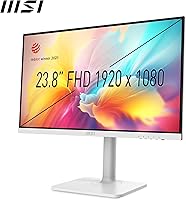
Image Quality
78%
22%
The IPS panel produces natural, accurate colors that most buyers find usable straight out of the box, with no manual calibration required for documents, video calls, or everyday browsing. The wide 178-degree viewing angle means the image holds up well even when viewed from the side, which home office users working at an angle particularly appreciate.
At 1080p on a 24-inch screen, pixel density is adequate but not impressive — users coming from higher-resolution panels often notice the step down, especially with dense text or spreadsheets. Contrast performance is average for an IPS panel, and deep blacks are not a strength.
Build Quality
74%
26%
The chassis feels solid enough for a display at this price tier, and the white finish in particular draws consistent praise for holding its appearance over months of use without yellowing or picking up visible scratches. Assembly is quick and the stand locks in firmly with no wobble reported during typical desk use.
The plastics, while acceptable, do feel lightweight when handled closely, and a few buyers note the back panel flexes slightly under pressure. It does not feel fragile, but it does not convey the rigidity you would expect from a premium build either.
Design & Aesthetics
86%
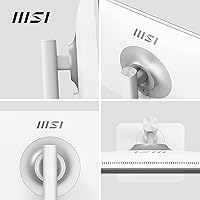
The white colorway is genuinely rare at this price point and consistently earns praise from buyers who have put effort into building a clean or minimal desk setup. Slim bezels on three sides keep the look tidy, and the overall proportions are compact enough to sit comfortably on smaller workstations without visual bulk.
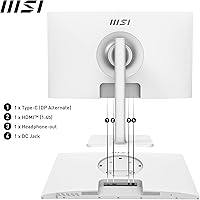
The rear of the monitor is less refined than the front, with a visible cable routing area that some buyers find distracting in open-shelf setups. The design is clean rather than distinctive, so buyers expecting a premium feel from the aesthetics alone may find it merely pleasant rather than impressive.
Refresh Rate & Smoothness
81%
19%
The step from 60Hz to 100Hz is genuinely perceptible in daily use — scrolling through long documents or web pages feels noticeably crisper, and light gaming benefits from the reduced tearing when paired with Adaptive-Sync. For the target audience, this is a practical upgrade that improves the daily feel of the display beyond what the spec number alone suggests.
Buyers who have used 144Hz or higher gaming monitors will likely find 100Hz underwhelming for fast-paced titles, and the Adaptive-Sync implementation does not cover the full range of frame rates equally well at the lower end. It is a meaningful step up from 60Hz, but not a substitute for a dedicated gaming panel.
Ergonomics & Adjustability
67%
33%
The height-adjustable stand is a genuine advantage at this price tier, letting users align the screen properly with their eye level — something many competing budget monitors skip entirely. VESA compatibility adds further flexibility for buyers who want to wall-mount or switch to a third-party arm.
The stand offers height and tilt only — there is no swivel or pivot, which is a recurring complaint from users who want portrait orientation for reading or coding. For a monitor positioned as a productivity-first display, the absence of full ergonomic range feels like a missed opportunity.
Eye-Care Performance
79%
21%
Less Blue Light PRO works quietly in the background and most users who work six or more hours daily report noticeably less end-of-day eye fatigue compared to their previous displays. The MSI Eye-Q Check break reminder is an understated but genuinely useful feature for users prone to losing track of time at the screen.
The blue light reduction does shift color temperature slightly toward warmer tones, which some users find distracting for color-sensitive work and choose to disable. The Eye-Q Check reminders, while helpful, lack customization — the intervals cannot be precisely configured beyond preset options.
USB-C Functionality
62%
38%
For users connecting a smartphone, tablet, or lightweight ultrabook, the USB-C port delivers a clean single-cable experience that keeps the desk tidy and removes the need for a separate charger. Buyers who pair the MD2412PW with a phone or a low-wattage device are consistently satisfied with the convenience.
At 15W, the power delivery ceiling is too low for most full-size laptops — connecting a MacBook or a mid-range Windows machine under active workload results in a net battery drain rather than a charge. This is the most commonly cited practical disappointment among buyers who purchased specifically for laptop charging.
HDR Performance
41%
59%
The panel does accept HDR signals, which means compatible content will display without errors or forced SDR fallback, and the HDR Ready designation is technically accurate in that narrow sense.
Real-world HDR impact is minimal to nonexistent — the panel's brightness output is not sufficient to deliver the highlight pop or shadow depth that HDR content is designed to show. Buyers who paid attention to the HDR Ready label expecting a meaningful upgrade from SDR report feeling misled, and this category is one of the most consistent sources of post-purchase disappointment.
Built-in Speakers
44%
56%
For video calls, quick system notifications, and background audio at low volume, the built-in speakers get the job done without needing a separate device. Users who simply need sound present on the desk for occasional use do not find themselves searching for alternatives.
Audio quality is thin, with limited bass and noticeable distortion at higher volumes, and most buyers replace or supplement them with external speakers or headphones within a short time. For music, movies, or any extended listening, they fall short of what even a basic speaker bar delivers.
Value for Money
83%
When measured against what it costs, the MD2412PW punches reasonably well — an IPS panel, 100Hz, height adjustment, USB-C, VESA compatibility, and a white finish in a single package is a genuinely competitive combination at this price tier. Buyers who prioritize daily productivity and aesthetic fit over raw performance consistently rate the value highly.
Buyers with specific needs — laptop charging, HDR, or portrait-mode ergonomics — quickly find that the value proposition weakens when those features are factored in as half-measures. For those buyers, spending a little more on a better-matched display would deliver sharper overall value.
Setup & Out-of-Box Experience
88%
Assembly is consistently praised as fast and tool-free, with most users reporting the display is ready in under ten minutes from opening the box. Default image settings are usable immediately, and the on-screen display menu is straightforward enough that most buyers never need to consult a manual.
The included cable selection is basic, and a small number of buyers report packaging that left the monitor with minor cosmetic marks on arrival — not widespread, but enough to appear as a pattern in reviews. A more protective inner packaging layer would reduce this entirely.
Connectivity Options
63%
37%
HDMI and USB-C cover the most common connection scenarios for modern laptops, desktops, and consoles, making the port selection practical for the typical buyer at this tier. Most users find that two inputs are sufficient for their primary and secondary device.
The absence of DisplayPort is a notable gap for users connecting to desktop graphics cards, and there are no USB-A hub ports to consolidate peripherals through the monitor. Buyers managing multiple devices simultaneously quickly hit the limits of what two ports can support.
Brightness & Glare Handling
66%
34%
In typical indoor lighting conditions, brightness is adequate for comfortable daily use, and most buyers working in controlled home office environments do not find it lacking. The panel holds up reasonably well in moderately lit rooms.
In brighter environments or near a window, the glossy screen surface reflects ambient light noticeably, which can wash out the image and cause eye strain — this is a recurring complaint from buyers in naturally lit spaces. Maximum brightness is not high enough to overcome reflections in challenging lighting, so placement near windows requires careful consideration.

Suitable for:

The MSI Modern MD2412PW 24-inch IPS Monitor is a smart pick for students and remote workers who spend most of their day in browsers, documents, and video calls and simply need a reliable, easy-on-the-eyes panel at a price that does not sting. The white colorway makes it one of the very few budget-range displays that fits naturally into a clean or minimal desk setup — if aesthetics matter to you as much as function, that alone sets it apart from the usual sea of matte black alternatives. Light gamers will find the 100Hz refresh and Adaptive-Sync combination genuinely useful for casual play, even if this is never going to be a dedicated gaming display. People working long hours will appreciate the built-in eye-care tools and the height-adjustable stand, which together make extended sessions more comfortable than the hardware price tag might suggest. Anyone running a USB-C phone or ultrabook alongside their workstation will also get real value from the single-cable charging convenience.
Not suitable for:

If you do serious color work — photo editing, video grading, or graphic design — the MD2412PW is not the right tool; it is a productivity panel, not a color-critical one, and its spec sheet does not include the color space coverage or factory calibration that those workflows demand. The HDR Ready label is worth treating with healthy skepticism: real-world brightness output falls short of delivering any meaningful HDR effect, so buyers expecting genuine high-dynamic-range performance will come away disappointed. Power users who rely on a USB-C laptop as their main machine should know upfront that 15W charging will barely keep a MacBook or a mid-range Windows laptop alive under load, let alone charge it. The stand, while height-adjustable, does not swivel or pivot, which is a genuine limitation for anyone who rotates their screen for reading or portrait-mode layouts. Finally, if high-resolution output matters — you are working with dense spreadsheets, fine text, or detailed illustrations — a 1080p panel at 24 inches may not satisfy, and stepping up to a 1440p display would serve you better.

Specifications

  • Screen Size: The panel measures 24 inches diagonally, offering a comfortable viewing area for productivity tasks and casual use without dominating a small desk.
  • Panel Type: An IPS (In-Plane Switching) panel is used, providing accurate color reproduction and wide viewing angles compared to TN or VA alternatives.
  • Resolution: Native resolution is 1920 x 1080 (Full HD), delivering a pixel density suitable for everyday computing, though not as sharp as 1440p or 4K panels at this screen size.
  • Refresh Rate: The display runs at up to 100Hz, offering smoother motion than a standard 60Hz panel for both productivity scrolling and light gaming.
  • Response Time: Rated at 1ms response time, which helps minimize motion blur during fast-moving content under typical use conditions.
  • Viewing Angle: Horizontal and vertical viewing angles reach 178 degrees, meaning colors and brightness remain consistent when viewed from most positions around the screen.
  • Adaptive-Sync: Adaptive-Sync support reduces screen tearing and stuttering when the frame rate fluctuates, compatible with systems that support FreeSync or similar standards.
  • HDR Support: The panel carries an HDR Ready designation, indicating basic HDR signal acceptance, though peak brightness is not sufficient for a full or impactful HDR experience.
  • Connectivity: Inputs include one HDMI port and one USB-C port, covering the most common connection needs for modern laptops and desktop systems.
  • USB-C Charging: The USB-C port supports up to 15W power delivery, adequate for charging smartphones and tablets but insufficient for sustaining or charging power-hungry laptops under load.
  • Built-in Audio: Two integrated speakers are included, providing basic audio output suitable for calls and background media without requiring a separate speaker.
  • Eye-Care Tech: Less Blue Light PRO reduces blue light emission to help limit eye strain, while MSI Eye-Q Check provides on-screen reminders to take breaks during extended sessions.
  • Stand Adjustments: The included stand supports height adjustment, allowing users to align the screen with their eye level, though tilt is the only additional adjustment available.
  • VESA Mounting: The monitor is VESA mount compatible, enabling installation on a third-party monitor arm or wall bracket for greater positioning flexibility.
  • Aspect Ratio: The panel uses a standard 16:9 widescreen aspect ratio, which is the most common format for productivity software, streaming, and general computing.
  • Dimensions: The unit measures 8 x 21 x 19 inches with the stand attached, offering a relatively compact physical footprint for a 24″ display.
  • Weight: The monitor weighs 13 pounds including the stand, making it manageable for a single person to position or reposition on a desk.
  • Color Finish: The exterior is finished in white, which is uncommon at this price tier and provides a clean visual alternative to the standard matte black found on most budget monitors.

Related Reviews

ViewSonic VG2448A 24-inch IPS Monitor

83%
93%
Ergonomic Adjustability
88%
Eye Comfort
86%
Connectivity & Port Selection
74%
Image Quality
81%
Build Quality
More
ReHisk 241KV2 24-inch Gaming Monitor
73%
91%
Refresh Rate Performance
88%
Adaptive Sync
79%
Panel & Color Quality
54%
Brightness & HDR
67%
Build Quality
More
HP Series 5 524sf 24-inch Monitor
75%
78%
Display Quality
71%
Color Accuracy
67%
Brightness
86%
Eye Comfort
74%
Build Quality
More
Z-Edge U24I 24-inch IPS Monitor
85%
88%
Display Quality
92%
Value for Money
85%
Build Quality
84%
Gaming Performance
80%
Ergonomics & Design
More
KTC H24T27 24-inch QHD Gaming Monitor
68%
88%
Image Clarity
84%
Color Accuracy
74%
Gaming Performance
41%
HDR Quality
46%
Ergonomics & Adjustability
More
Dell E2420H 24-inch FHD IPS Monitor
88%
88%
Display Quality
90%
Color Accuracy
87%
Viewing Angles
92%
Ease of Setup
91%
Energy Efficiency
More
ViewSonic VP2468a 24-Inch IPS Monitor
76%
93%
Color Accuracy
89%
Connectivity
61%
Resolution & Pixel Density
86%
Build Quality
91%
Ergonomics
More
Dell P2419H 24-Inch IPS Monitor

84%
88%
Color Accuracy
91%
Viewing Angles
89%
Eye Comfort
93%
Stand Ergonomics
87%
Build Quality
More
LG 24MP400-B 24-inch IPS Monitor
71%
83%
Image Quality
91%
Value for Money
79%
Eye Comfort
64%
Gaming Performance
67%
Build Quality
More
Acer K243Y 24-inch Full HD IPS Monitor
84%
91%
Value for Money
88%
Display Quality
80%
Performance for Gaming
86%
Color Accuracy
84%
Build Quality
More

FAQ

Yes, it is genuinely well-suited for that. The IPS panel keeps colors consistent even during long sessions, and the built-in eye-care features help reduce fatigue over time. The height-adjustable stand also makes it easier to find a comfortable position, which matters more than people expect over an eight-hour workday.

It depends on your laptop. The USB-C port delivers 15W of power, which is enough to charge a phone or tablet or keep a low-power ultrabook ticking along. If you use a laptop that needs 45W or more to charge properly — most MacBooks and mid-range Windows machines fall into that category — the port will not keep pace under active use. Think of it as a top-up port, not a primary charger for a full-size laptop.

Based on buyer feedback, the finish holds up well over time. Yellowing and surface degradation are not commonly reported issues. The plastic feels reasonably solid for the price tier, and most long-term users note the color stays clean as long as the monitor is kept away from direct sunlight for extended periods.

Honestly, the HDR Ready label is more of a technical checkbox than a meaningful feature here. The panel can accept an HDR signal, but its brightness ceiling is not high enough to produce the kind of vivid highlights and deep shadow detail that real HDR content is designed to show. If HDR performance matters to you, this is not the display to buy for it — but for everything else it does well, that limitation rarely comes up.

Yes, as long as you connect via HDMI it will work fine with consoles. The 100Hz refresh rate is a nice bonus over a standard 60Hz TV for supported titles, and input lag is low enough for casual console gaming. Just keep in mind that the USB-C port is for PC and device connections — consoles will need the HDMI input.

No, the stand only adjusts for height and tilt — there is no pivot function to rotate the panel into portrait orientation. If portrait mode is something you need for coding or document reading, you would need to pair the monitor with a third-party VESA arm that supports rotation, since the display itself is VESA compatible.

It is solid for casual streaming. The IPS panel produces natural, accurate colors and the wide viewing angle means the picture looks consistent whether you are sitting directly in front or slightly off to the side — useful if you share a screen while watching. Do not expect cinematic contrast or deep blacks, as IPS panels typically cannot match OLED or VA in that regard, but for Netflix or YouTube it is more than capable.

It is, especially if your existing monitor is also white or you are building out a clean, minimal setup. The slim bezels keep the gap between panels tidy, and the size is standard enough that it sits comfortably alongside most 24- or 27-inch displays. Color consistency between different panel brands can vary, so do not expect a perfect match — but for side-by-side productivity use, it works well.

Setup is genuinely quick and simple. The stand attaches without tools in most cases, and the on-screen display menu is straightforward to navigate. Most buyers report having the MD2412PW up and running within ten minutes of opening the box, and the default image settings are usable immediately without needing to dig into calibration.

For background music or a quick video call, they will do the job. But if audio quality matters to you at all — music, movies, games — the built-in speakers are really just a fallback option rather than a feature to rely on. A basic desktop speaker or a pair of headphones will make a noticeable difference, and most buyers who care about sound end up using the monitor speakers as a backup rather than a primary audio source.