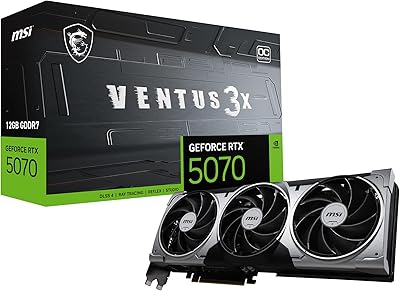
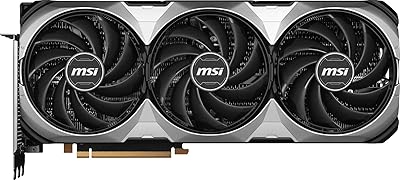
Overview

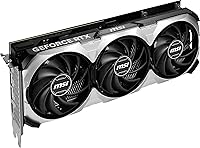
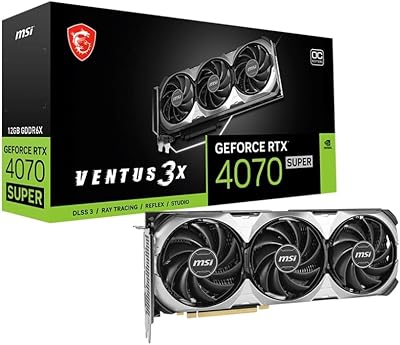
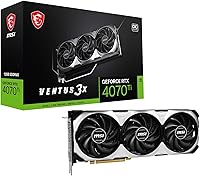
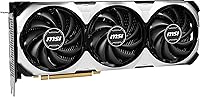
The MSI RTX 4070 Ti VENTUS 3X GPU sits in an interesting spot in the GPU landscape — powerful enough to satisfy enthusiast builders, yet not so over-specced that it crosses into flagship territory. This is MSI's quieter, no-RGB alternative to the GAMING X lineup, which makes it appealing to builders who care more about thermals than light shows. At 12.1 inches long, it fits comfortably in most mid-tower cases, though tighter builds should double-check clearance. It's a strong performer, but anyone shopping at this price point should honestly consider how it stacks up against newer-generation options before committing.
Features & Benefits

What makes the RTX 4070 Ti VENTUS card genuinely compelling is how Ada Lovelace's third-generation ray tracing cores and DLSS 3 Frame Generation translate into real, tangible frame rate gains in supported titles — not just benchmark numbers. The 12GB of GDDR6X handles 1440p ultra-texture workloads without breaking a sweat, and while the 192-bit memory bus draws some criticism online, real-world gaming at 1440p rarely hits a wall. The OC boost clock of 2655 MHz holds steady under sustained loads, thanks largely to the TORX Fan 4.0 triple-fan cooler, which keeps the card in the low-to-mid 70°C range while staying quiet enough that you will barely notice it at idle.

Best For

This triple-fan Ada Lovelace GPU hits its stride at 1440p, particularly for gamers chasing high refresh rates in both competitive shooters and demanding AAA titles. It's also a reasonable pick for content creators doing video editing or light 3D rendering — 12GB of GDDR6X is enough VRAM to stay productive without paying flagship prices. Builders running mid-tower rigs will appreciate the clean, RGB-free aesthetic, and the 12.1-inch length works in most standard cases. VR users and sim enthusiasts will find the sustained clock speeds and DLSS 3 support particularly useful. For anyone still on a 20- or 30-series card, the generational jump here is hard to ignore.

User Feedback

Buyers broadly agree this MSI VENTUS 3X earns its 4.5-star rating, with the most consistent praise going to thermal performance and build quality — the card runs cool and quiet under real gaming conditions, which matters more than specs on paper. That said, the value-per-dollar conversation surfaces regularly; at this price tier, some buyers feel the 192-bit bus is a concession that AMD rivals do not make at comparable specs. Installation feedback is mostly positive, though a handful of reviewers noted the card's length required some cable management creativity. Driver stability on day one gets good marks. The noise profile under load is a genuine highlight, frequently compared favorably to louder competing cooler designs.

Pros

  • Handles 1440p ultra settings with headroom to spare across virtually every modern title.
  • DLSS 3 Frame Generation provides a tangible fps boost in a growing list of supported games.
  • The TORX Fan 4.0 triple-fan cooler keeps temperatures in the low-to-mid 70s Celsius under sustained gaming loads.
  • Near-silent at idle thanks to fan-stop behavior — the fans simply do not spin until the card needs them.
  • Clean, RGB-free design fits naturally into understated or all-black builds without clashing.
  • The 2655 MHz OC boost clock holds consistently during extended sessions, not just in short benchmark bursts.
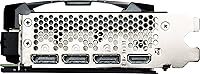
  • Solid display output flexibility with three DisplayPort 1.4a connections and one HDMI 2.1 port for multi-monitor setups.
  • Day-one driver stability is broadly praised — buyers report a smooth out-of-box experience without hunting for patches.
  • NVLink support adds niche but real value for workstation users exploring dual-GPU configurations.
  • At 2.54 pounds and a standard dual-slot footprint, installation is physically straightforward in most mid-tower builds.

Cons

  • The 192-bit memory bus is a genuine bottleneck in bandwidth-heavy 4K scenarios and is narrower than some rivals at this tier.
  • At this price point, newer GPU generations from both NVIDIA and AMD have shifted the competitive value equation noticeably.
  • No RGB whatsoever — builders who care about lighting aesthetics will need to look at other SKUs in MSI's lineup.
  • The 12.1-inch card length can be a tight fit in smaller mid-towers; case compatibility needs careful verification before buying.
  • 12GB of VRAM, while adequate today, may feel limiting for professional workloads or future titles with higher VRAM demands.
  • The RTX 4070 Ti VENTUS card lacks a factory overclock that dramatically separates it from reference spec — gains are modest.
  • Some buyers found the PCIe power adapter situation fiddly depending on PSU cable configurations.
  • Value-per-dollar is debatable for buyers who do not actively use DLSS 3 titles or ray-tracing-heavy games.
  • No LCD display, zero-RPM indicator, or premium cosmetic extras that some competing cards at this tier include.

Ratings

The scores below were generated by our AI after analyzing verified global buyer reviews for the MSI RTX 4070 Ti VENTUS 3X GPU, with spam, bot submissions, and incentivized feedback actively filtered out to reflect genuine ownership experiences. We examined feedback across performance, thermal behavior, build quality, value, and real-world usability to give you a balanced, transparent picture. Both the standout strengths and the recurring frustrations are represented honestly in each category.

1440p Gaming Performance
93%
Buyers consistently report that this triple-fan Ada Lovelace GPU handles every major 1440p title at ultra settings with frame rates well above the 60fps floor — often sitting comfortably above 100fps in demanding AAA games. Competitive players running 165Hz or 240Hz monitors find the card keeps pace without hitting artificial ceilings.
A small subset of users running extremely CPU-limited setups noted that the card can occasionally feel bottlenecked by their processor in highly competitive titles, which is more a system pairing issue than a GPU fault. There are no widespread complaints specific to 1440p output quality itself.
4K Gaming Capability
71%
29%
For casual 4K gaming or titles that respond well to DLSS 3 upscaling, the RTX 4070 Ti VENTUS card performs respectably, delivering playable frame rates that genuinely impress buyers coming from older GPU generations. DLSS Quality mode at 4K is a practical sweet spot that many reviewers praise.
Native 4K at ultra settings in the most demanding titles exposes the limits of the 192-bit bus and 12GB VRAM ceiling, with some users noting dropped frames or texture streaming hesitation in open-world games. Buyers who made this their primary 4K card frequently wish they had stepped up to a wider-bus alternative.
Thermal Performance
88%
Under sustained gaming loads, the card routinely holds in the low-to-mid 70s Celsius range, which buyers with previous hot-running GPUs find refreshingly controlled. Long gaming sessions of two or more hours show no significant thermal creep, and the cooler clearly has headroom to spare.
In very poorly ventilated cases with limited intake airflow, a handful of buyers reported temperatures climbing closer to 80-83°C, which is still safe but noticeably warmer. The card relies on good case airflow to perform at its thermal best, so it is not entirely forgiving of cramped or airflow-restricted builds.
Noise Levels
87%
The zero-RPM idle mode is one of the most frequently praised features in user reviews — buyers working at their desk during the day report they forget the card is even installed. Under gaming load, the TORX Fan 4.0 triple-fan setup stays audible but never intrusive, comparing favorably to competing dual-fan designs.
At maximum fan speeds during stress testing or prolonged heavy compute workloads, the fan noise becomes more present and some acoustically sensitive users found it distracting. This is not a common complaint during normal gaming use, but it surfaces in reviews from users who push the card hard for extended periods.
Value for Money
66%
34%
Buyers upgrading from 20-series or 30-series cards consistently describe the performance-per-dollar as a solid step forward, and DLSS 3 support adds tangible longevity to the investment. For those who prioritize 1440p gaming and want proven Ada Lovelace features, the purchase holds up well in day-to-day use.
At its price point, this MSI VENTUS 3X faces increasing pressure from newer GPU generations and AMD alternatives that offer wider memory buses or more VRAM for comparable or lower cost. Several reviewers explicitly flagged that the value equation feels harder to defend the longer the card stays at its launch-era pricing.
DLSS 3 & Ray Tracing
89%
Buyers who actively game in DLSS 3-supported titles report frame rate gains that feel almost generational — Frame Generation in games like Cyberpunk 2077 or Alan Wake 2 transforms the experience compared to older non-Frame Generation cards. Third-gen RT cores also make ray-traced visuals noticeably smoother in titles that push it hard.
The benefit is entirely contingent on developers supporting DLSS 3, and buyers who primarily play older titles or multiplayer games without support see little practical gain from these features. A few reviewers also noted that Frame Generation can introduce mild input latency in certain titles, which competitive players found undesirable.
Build Quality
91%
The card feels premium in hand, with a rigid backplate, tight tolerances on the fan shroud, and no flex in the PCB that some cheaper cards exhibit. Buyers who have handled multiple GPU brands frequently mention MSI's build consistency as a reason they returned to the brand.
The aesthetic is intentionally utilitarian — no RGB, a plain black shroud, and no premium cosmetic touches like a transparent fan housing or illuminated logo. For builders who prioritize the visual side of their builds, this can feel like a cost-cutting measure even at a premium price tier.
Installation Experience
78%
22%
Most buyers report a clean, uncomplicated installation with no immediate driver conflicts or POST issues. Out-of-box performance without any manual tuning satisfied the large majority of reviewers, and MSI Afterburner compatibility for those who do want to tweak is straightforward.
The 12.1-inch card length caught some buyers off guard, particularly those working with older mid-tower cases that had never needed to accommodate a GPU this long. PCIe power connector routing also drew minor complaints from builders with modular PSUs whose cable lengths made the 16-pin adapter slightly awkward to seat cleanly.
Driver Stability
84%
Day-one driver experience is broadly positive, with buyers reporting stable operation out of the box across a range of motherboard and CPU pairings. NVIDIA's driver cadence for the 40-series has been consistent, and most users note they have not had to roll back or troubleshoot driver-related crashes.
A small number of reviewers experienced driver timeout errors in specific games or when running multiple monitors at high refresh rates simultaneously, though these appear isolated rather than systemic. NVIDIA's occasional driver regressions with major updates remain an unpredictable risk for any NVIDIA-based card, not unique to this model.
Memory Bus & Bandwidth
58%
42%
At 1440p, the 192-bit interface delivers enough bandwidth that the overwhelming majority of buyers never perceive it as a real-world constraint. Paired with GDDR6X's higher per-pin speed compared to standard GDDR6, the effective throughput is more competitive than the bus width alone suggests.
The 192-bit bus is the single most discussed technical criticism across buyer reviews, and for good reason — competing cards at overlapping price points offer 256-bit interfaces that provide noticeably more headroom at 4K. Buyers running texture packs, modded games, or professional compute workloads are the most likely to feel this constraint concretely.
Display Connectivity
86%
Three DisplayPort 1.4a outputs alongside HDMI 2.1 covers virtually every multi-monitor scenario buyers described, including triple-monitor productivity setups and single high-refresh gaming displays. HDMI 2.1 support is particularly appreciated by buyers connecting to OLED TVs for couch gaming.
DisplayPort 2.0 is absent, which means native uncompressed 4K at very high refresh rates requires DSC compression — a technical footnote that matters to early adopters eyeing next-generation displays but is a non-issue for the majority of current monitor users.
Content Creation Suitability
74%
26%
Video editors working in DaVinci Resolve with 4K timelines, and 3D artists using Blender for mid-complexity scenes, report that the 12GB of GDDR6X handles their workloads comfortably without spilling into system RAM. CUDA acceleration in Adobe's suite also runs reliably on this card.
Heavy professional workloads involving large 3D scenes, high-resolution texture baking, or sustained AI inference tasks can push the VRAM close to its ceiling, which forces some creators to reduce batch sizes or resolution settings. For dedicated professional users, 16GB or 24GB cards are a meaningfully better long-term investment.
Case Compatibility
76%
24%
The dual-slot footprint keeps the card from blocking adjacent PCIe slots in most standard ATX configurations, and the 12.1-inch length fits without issue in the majority of modern mid-tower and full-tower cases that buyers described using. MSI's build avoids unnecessary shroud protrusions that can complicate cable routing.
Compact mid-towers, mATX builds, or older cases with internal drive cages will frequently find the length problematic, and buyers in this situation who did not pre-measure reported significant installation frustration. The card is simply not designed with small form factor builds in mind.
Longevity & Future-Proofing
67%
33%
Ada Lovelace's feature set — particularly DLSS 3, AV1 hardware encoding, and improved RT cores — gives this card a software roadmap that should remain relevant as more titles adopt these features over the next few years. Buyers who think in three-to-four-year upgrade cycles generally feel comfortable with that timeline.
The 192-bit bus and 12GB VRAM cap are legitimate concerns for longevity as game VRAM demands continue climbing, and buyers who plan to keep their GPU for five or more years are right to be cautious. Newer generation hardware arriving at competitive prices is already beginning to reframe this card's long-term value narrative.

Suitable for:

The MSI RTX 4070 Ti VENTUS 3X GPU is an excellent fit for enthusiast PC builders who have settled on 1440p as their primary gaming resolution and want to push high refresh rates in both competitive titles and visually demanding AAA games. If you're running a 1440p 144Hz or 165Hz monitor and want frames to spare, this card delivers comfortably without requiring you to step up to flagship pricing. Gamers who actively use DLSS 3-supported titles will get outsized benefit here, since Frame Generation can meaningfully boost perceived smoothness in games that support it. It's also a practical choice for part-time content creators — video editors working in DaVinci Resolve or lightweight 3D artists will find the 12GB of GDDR6X adequate for most project scales. VR enthusiasts and sim racers running demanding titles like Microsoft Flight Simulator will appreciate the sustained clock speeds and low thermal profile during long sessions. Anyone still on a 20-series or older 30-series card will notice a genuine, day-to-day difference, not just a marginal bump.
Not suitable for:

The MSI RTX 4070 Ti VENTUS 3X GPU is a harder sell if native 4K gaming at ultra settings across all titles is your primary goal — the 192-bit memory bus does create a bandwidth ceiling that shows up in the most texture-heavy 4K scenarios, and buyers with that specific target should seriously consider stepping up or looking at competing options with wider bus widths. Professional 3D artists, machine learning researchers, or anyone running GPU-accelerated workloads that regularly exceed 12GB of VRAM will hit a wall sooner than they'd like. Budget-conscious builders cross-shopping with current-generation alternatives may also find the value proposition harder to justify, particularly as newer GPU generations have shifted the competitive landscape. If your case is compact or has tight GPU clearance, the 12.1-inch card length requires careful pre-purchase measurement. And if RGB lighting and aesthetics are part of your build identity, this card's plain, workmanlike shroud offers nothing in that department.
Specifications

  • GPU Chip: Powered by the NVIDIA GeForce RTX 4070 Ti, built on TSMC's 4N process node as part of the Ada Lovelace generation.
  • Architecture: Ada Lovelace architecture brings third-generation RT cores and fourth-generation Tensor cores for improved ray tracing and AI-accelerated rendering.
  • VRAM: Equipped with 12GB of GDDR6X memory, offering fast bandwidth suited to high-resolution textures and demanding rendering workloads.
  • Memory Bus: The memory interface runs at 192-bit width, which is narrower than some competing cards at this performance tier.
  • Boost Clock: The OC edition boosts up to 2655 MHz, running above NVIDIA's reference boost speed for slightly improved sustained performance.
  • Cooler: MSI's TORX Fan 4.0 triple-fan cooler uses dispersion fan blades paired with traditional fan blades to increase airflow and reduce noise.
  • Fan Behavior: The cooler features zero-RPM idle mode, meaning the fans remain completely stopped under light loads until a temperature threshold is reached.
  • Display Outputs: Connectivity includes three DisplayPort 1.4a ports and one HDMI 2.1 port, supporting up to four simultaneous displays.
  • Max Resolution: Supports digital output up to 7680x4320 (8K) resolution via HDMI 2.1 or DisplayPort 1.4a with DSC compression.
  • DLSS Support: Supports DLSS 3, including Frame Generation technology, which is exclusive to Ada Lovelace cards and can significantly boost frame rates in compatible titles.
  • Ray Tracing: Includes third-generation ray tracing cores, delivering meaningfully faster RT performance compared to Ampere-generation predecessors.
  • NVLink: NVLink is supported, allowing two compatible NVIDIA cards to be paired for specific professional and compute workloads that leverage multi-GPU configurations.
  • Card Length: The card measures 12.1 inches (307 mm) in length, requiring adequate clearance in the target case before installation.
  • Card Weight: Weighs 2.54 pounds (approximately 1.15 kg), which is typical for a triple-fan card of this class.
  • Slot Width: Occupies a dual-slot footprint on the motherboard, though the cooler shroud physically extends slightly beyond two slots in height.
  • Lighting: The VENTUS 3X series carries no RGB lighting, featuring a clean black shroud designed for builders who prefer a low-profile aesthetic.
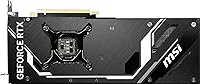
  • Series: Part of MSI's VENTUS lineup, which prioritizes thermal efficiency and quiet operation over cosmetic features like RGB or premium backplates.
  • User Rating: Holds an average rating of 4.5 out of 5 stars based on 266 ratings, ranking at #1,265 in Amazon's Computer Graphics Cards category.

Related Reviews
MSI RTX 4060 Ti Ventus 3X GPU
80%
83%
Gaming Performance
61%
VRAM Adequacy
86%
Thermal Management
84%
Noise Level
67%
Value for Money
More
MSI RTX 4070 Super 12GB Graphics Card
80%
91%
1440p Gaming Performance
88%
Thermal Management
86%
Noise Levels
67%
Value for Money
72%
VRAM & Memory Performance
More
MSI RTX 4070 Ti Super 16G GPU
83%
91%
Gaming Performance
93%
VRAM Capacity
68%
Thermal Performance
82%
Noise Level
84%
Build Quality
More
MSI RTX 3080 Ti Ventus 3X GPU
79%
92%
Gaming Performance
89%
Thermal Management
86%
Noise Levels
88%
Build Quality
87%
Cooling Efficiency
More
MSI RTX 3070 Ti Ventus 3X GPU
79%
88%
Gaming Performance
91%
Thermal Performance
89%
Noise Level
63%
VRAM Adequacy
87%
Build Quality
More
MSI RTX 3080 VENTUS 3X Graphics Card
82%
91%
Gaming Performance
87%
Thermal Management
78%
Noise Levels
69%
VRAM Capacity
88%
Build Quality
More
MSI GeForce RTX 4070 Ventus 2X 12G OC
86%
91%
Gaming Performance at 1440p
89%
Gaming Performance at 4K
94%
Cooling Efficiency
85%
Noise Levels
92%
Value for Money
More
MSI RTX 4070 Ti SUPRIM X GPU
82%
94%
Thermal Performance
91%
Noise Level
88%
Gaming Performance
71%
VRAM Adequacy
93%
Build Quality
More
MSI RTX 5070 Ventus 3X OC 12GB
82%
88%
Gaming Performance
86%
Thermal Management
83%
Noise Levels
84%
Build Quality
79%
Value for Money
More
MSI GeForce RTX 4080 SUPER 16GB VENTUS 3X OC Graphics Card
84%
96%
Gaming Performance
91%
Cooling Efficiency
65%
Power Consumption
89%
Build Quality
94%
4K/8K Gaming Compatibility
More

FAQ

At 12.1 inches long, the RTX 4070 Ti VENTUS card fits in most standard mid-tower cases, but it is worth checking your case's listed maximum GPU length before purchasing. Cases with front-mounted storage cages or cramped interiors can be tight. If your case supports at least 310-315mm of GPU clearance, you should be fine.

For 4K gaming it depends on the title and quality settings. At 1440p ultra, 12GB handles virtually everything available today without issue. At native 4K ultra with the most texture-heavy games, you may occasionally see the buffer fill up, though many 4K gaming scenarios still run well within the limit. If 4K at max settings in every future title is your firm goal, the VRAM ceiling is worth factoring into your decision.

It comes up because competing cards at similar performance levels sometimes use a 256-bit bus, which provides higher memory bandwidth. In practical 1440p gaming, the difference rarely shows up in real gameplay. At 4K with demanding textures, the narrower bus can become a mild constraint in bandwidth-sensitive scenarios. For most buyers gaming at 1440p, it is not a day-to-day problem.

The TORX Fan 4.0 triple-fan cooler keeps noise levels impressively low. Under sustained gaming, most users report it stays in the low-to-mid 70s Celsius while remaining noticeably quieter than single or dual-fan designs at the same performance level. At idle, the fans stop entirely, so the card is completely silent outside of gaming sessions.

NVIDIA recommends a minimum 700W power supply for the RTX 4070 Ti. Realistically, a quality 750W or 850W PSU gives you comfortable headroom, especially if your CPU and other components draw meaningful power. Make sure your PSU has the required PCIe power connectors or a compatible adapter for the 16-pin connector the card uses.

Yes, it does. DLSS 3 Frame Generation is an Ada Lovelace exclusive feature, meaning it only works on 40-series NVIDIA cards. In supported games, it can effectively multiply your frame rate output, which is particularly noticeable at higher resolutions. The list of supported titles has been growing steadily since launch.

Yes, within reasonable limits. The 12GB of GDDR6X is comfortable for most video editing workflows in DaVinci Resolve or Premiere Pro, including 4K timelines with color grading. For heavy 3D rendering or large scene work in tools like Blender or Cinema 4D, it handles a solid range of project sizes. If your projects regularly push beyond 10-12GB of GPU memory, you may want to look at workstation-class cards with more VRAM.

No, the VENTUS 3X line has no RGB lighting at all. MSI designed it specifically for builders who want a clean, understated look. If lighting is important to your build, MSI's GAMING X TRIO version of the RTX 4070 Ti does include RGB and a more premium shroud.

The RTX 4080 is a meaningful step up in raw performance, particularly at 4K and in memory bandwidth, with a wider 256-bit bus and more VRAM. The 4070 Ti VENTUS card closes the gap at 1440p, where both cards produce very high frame rates, but the 4080 pulls ahead noticeably in 4K workloads and professional tasks. The trade-off is a significant price premium for the 4080, so if 1440p is your primary resolution, the jump is harder to justify.

For most gamers, NVLink support on this card is not practically useful — game engines do not leverage multi-GPU setups the way they once did with SLI. Where it matters is in specific professional compute environments, certain GPU rendering applications, or research workloads where two cards can be linked to pool resources. If you are a regular gamer, you can safely ignore this feature.