Overview

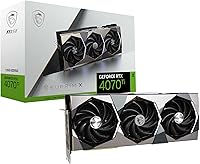
The MSI RTX 4070 Ti SUPRIM X GPU sits at the top of MSI's Ada Lovelace lineup, and it shows. This is not a reference card dressed up in a fancy cooler — it's a fully custom design with premium components throughout. Built on NVIDIA's Ada Lovelace architecture, it represents a meaningful step forward from the previous Ampere generation in both performance-per-watt and raw throughput. The 12GB of GDDR6X VRAM is worth addressing honestly: for most 1440p and even 4K gaming today it holds up well, though pushing native 4K at maximum settings in VRAM-hungry titles can occasionally expose its limits. Think of this SUPRIM X card as a high-refresh 1440p powerhouse with strong, but not unconditional, 4K credentials.
Features & Benefits

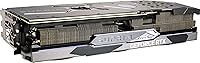
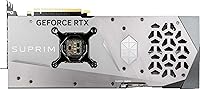
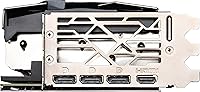
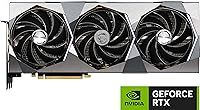
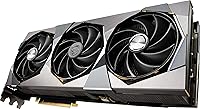
The Tri-Frozr 3 cooling system is the first thing you notice once the card is installed — three large fans and a substantial heatsink that keep temperatures controlled even during extended gaming sessions. At idle, the fans stop completely, so your PC runs silent during browsing or light tasks. The factory boost clock of 2790 MHz is among the highest shipped on any 4070 Ti, delivering real performance gains without touching overclocking software. DLSS 3 and Frame Generation are worth understanding: Frame Generation uses AI to insert synthetic frames between rendered ones, which can effectively double framerates in supported titles. Four display outputs — three DisplayPort 1.4a and one HDMI 2.1 — round out a well-specified package.

Best For

This high-end GPU is purpose-built for two types of buyers. If you're gaming at 1440p on a 165Hz or higher monitor, this SUPRIM X card gives you enough headroom to keep frames high even in demanding titles without leaning heavily on upscaling. For 4K players, the experience is strong in DLSS-enabled games where Frame Generation compensates for the heavier resolution load. Content creators will also appreciate the NVENC AV1 encoder, which produces excellent video quality faster than most software encoders. One practical note before buying: this card measures 13.3 inches long. Mid-tower owners should verify clearance before ordering — it is genuinely one of the larger cards in its class.

User Feedback

Across 72 ratings and a 4.3-star average, buyers are largely satisfied with MSI's flagship 4070 Ti. Cooling is the most praised aspect — people note that temperatures stay controlled under sustained load and the card runs nearly silent during everyday use. Out-of-box overclock stability earns consistent compliments too; most owners report no need to manually tune anything. On the critical side, two concerns surface regularly. Physical size is one: the 13.3-inch length has caused fitment issues for compact mid-tower users who didn't check clearance. The other is VRAM — at native 4K with maximum settings and texture-heavy mods, 12GB feels tight in a handful of demanding titles.

Pros

  • The Tri-Frozr 3 cooling system keeps temperatures impressively controlled even during extended gaming sessions.
  • Zero-fan idle mode means your PC runs completely silent during everyday desktop use.
  • A factory boost clock of 2790 MHz delivers top-tier performance straight out of the box with no tuning required.
  • DLSS 3 and Frame Generation support can effectively double framerates in compatible titles.
  • NVENC AV1 encoding is a practical advantage for video creators who want faster exports with strong quality retention.
  • Build quality feels premium — military-grade components and a substantial PCB that inspires confidence.
  • Four versatile display outputs cover multi-monitor setups and support up to 8K resolution.
  • Out-of-box overclock stability means most buyers never need to open MSI Afterburner at all.
  • Strong user satisfaction with a 4.3-star average rating across dozens of real-world buyers.

Cons

  • At 13.3 inches long, this SUPRIM X card will not fit in many compact mid-tower or small-form-factor cases.
  • The 12GB VRAM ceiling is becoming a tangible limitation in a small but growing number of VRAM-hungry games at native 4K.
  • Buyers who game without DLSS or Frame Generation will see less value relative to the asking price.
  • The card weighs 4.45 pounds, which may require a GPU support bracket to prevent sag over time.
  • Native 4K at maximum settings in non-DLSS titles can expose performance limits that the price bracket might not suggest.
  • MSI Mystic Light RGB software has a historically mixed reputation for stability and ease of use.
  • The size and power requirements make this high-end GPU a poor match for anyone planning a small or energy-efficient build.
  • With only 72 ratings at time of writing, the long-term reliability data is thinner than more widely reviewed competitors.

Ratings

The scores below for the MSI RTX 4070 Ti SUPRIM X GPU were generated by our AI after analyzing verified global buyer reviews, actively filtering out incentivized, bot-generated, and duplicate submissions to surface only genuine user sentiment. Each category reflects both the real strengths buyers celebrate and the frustrations they do not hesitate to mention. This SUPRIM X card earns high marks in several areas but also reveals a few honest trade-offs that buyers at this tier deserve to know upfront.
Thermal Performance
94%
The Tri-Frozr 3 cooling solution is consistently singled out as one of the strongest aspects of this card. Buyers running extended gaming sessions — sometimes three to four hours of back-to-back play — report temperatures staying well within comfortable operational ranges without the fans spinning up aggressively.
A small number of users in poorly ventilated cases or hot ambient environments noted that temperatures climbed higher than expected, suggesting the cooling system performs best when the rest of the build has adequate airflow. It is outstanding but not immune to the limits of its surroundings.
Noise Level
91%
Zero-fan idle mode is genuinely appreciated by buyers who use their PCs for work and gaming in the same session — the card sits completely silent during browsing, video playback, and light productivity tasks. Even under full gaming load, the acoustic profile remains controlled and unobtrusive in most setups.
Under extreme sustained stress — think prolonged rendering or mining-style loads — the fans do ramp up audibly, though this is well within expected behavior for a card this powerful. Buyers with open-frame cases or side panels removed may notice more fan noise than those in enclosed builds.
Gaming Performance
88%
At 1440p with high refresh rates, this high-end GPU handles virtually every current title at maximum or near-maximum settings with frames to spare. DLSS 3 and Frame Generation push this advantage further in supported games, making 165Hz gameplay feel genuinely effortless without constantly watching frame counters.
At native 4K without any upscaling, a handful of demanding titles expose the performance ceiling more than buyers at this price point might expect. The card is a strong 4K performer with DLSS enabled, but those committed to purely native rendering will occasionally wish for more headroom.
VRAM Adequacy
71%
29%
For the large majority of games at 1440p and even 4K with DLSS quality mode active, 12GB of GDDR6X handles textures and assets without complaint. Buyers who have embraced DLSS-driven workflows report no meaningful VRAM-related issues in day-to-day gaming.
This is the category where honest concern is warranted. A growing subset of titles at native 4K ultra settings can push against or past the 12GB ceiling, causing texture pop-in or performance instability. Buyers who mod heavily or play VRAM-hungry titles like recent open-world games at maximum texture settings have flagged this limitation directly.
Build Quality
93%
The physical construction of MSI's flagship 4070 Ti inspires confidence the moment it is in hand. Military-grade capacitors, a rigid backplate, and a heatsink that feels overbuilt rather than merely adequate give this card a premium, long-lasting feel that cheaper AIB variants simply do not match.
The card's substantial weight — 4.45 pounds — means the PCIe slot takes real mechanical stress over time, particularly if the system is moved or transported. Without a support bracket, some buyers noticed visible GPU sag after several months, which is a legitimate structural concern rather than a build quality defect.
Physical Size & Fitment
62%
38%
For builders in full-tower cases with generous GPU clearance, the card slots in cleanly and the triple-slot footprint does not cause any unusual compatibility issues. The large physical presence is a natural consequence of the premium cooling solution and does not feel excessive in the right enclosure.
This is a recurring real-world pain point in user reviews. At 13.3 inches long, the card physically cannot fit in a meaningful number of mid-tower cases, and several buyers report discovering this only after ordering. Anyone building in a compact enclosure must verify clearance carefully — this is not a card that squeezes into tight spaces.
Out-of-Box Overclock
89%
Shipping at 2790 MHz boost is one of the more aggressive factory overclocks available on a 4070 Ti, and buyers consistently report that this clock speed holds reliably under sustained gaming without triggering thermal throttling or instability. Most owners have no reason to open overclocking software at all.
For enthusiasts who enjoy pushing cards further manually, the already-elevated factory clock leaves a narrower margin for additional headroom compared to baseline models. Some technically inclined buyers noted diminishing returns when attempting to push beyond what MSI already configured.
DLSS 3 & Frame Generation
87%
Buyers gaming in DLSS 3-supported titles — which now includes a substantial catalog — report transformative framerate improvements, particularly at 4K where the AI-generated frames bridge the gap between what the hardware renders and what high-refresh monitors demand. It is a tangible, real-world advantage that justifies the Ada Lovelace generation.
Frame Generation introduces a mild increase in input latency that some players in fast-paced competitive games find noticeable enough to disable the feature. Additionally, game support is still tied to developer implementation, meaning older titles and some newer releases do not offer Frame Generation at all.
Content Creation Utility
84%
The NVENC AV1 encoder is a practical upgrade for streamers and video editors who have switched to AV1-supported platforms and software. Export times for 4K footage in DaVinci Resolve and OBS are noticeably faster compared to CPU encoding, and the quality-to-file-size ratio is genuinely better than H.264 output.
AV1 encoding support in mainstream creative applications is still maturing, and buyers using older or niche software may not be able to access this feature without updates or workarounds. The utility is strong but dependent on the creator's existing software ecosystem.
Display Connectivity
86%
Four outputs covering three DisplayPort 1.4a and one HDMI 2.1 port accommodate virtually every common monitor setup, from triple 1440p workstation arrays to a single high-end 4K display. The HDMI 2.1 port in particular handles 4K at 144Hz cleanly, which matters for buyers connecting to large-screen TVs or newer gaming monitors.
There is no USB-C or Thunderbolt output on this card, which limits options for buyers using USB-C monitors or looking to connect external GPU enclosures. For a flagship-tier card, the absence of any USB-C display connectivity is a minor but real omission for some users.
RGB & Aesthetics
74%
26%
Mystic Light RGB integration looks attractive in windowed builds and the lighting effects are customizable enough to satisfy most enthusiasts who care about system aesthetics. The overall visual design of the SUPRIM X shroud is bold without being gaudy, and it photographs well in build showcases.
MSI's Mystic Light software has a long-standing reputation for being finicky — installation issues, sync conflicts with non-MSI components, and occasional software crashes are complaints that surface regularly in user reviews. The hardware looks great; the software managing it is less reliable than buyers at this price level expect.
Value for Money
68%
32%
For buyers specifically targeting the absolute top of the 4070 Ti segment with premium cooling, the highest factory overclock, and flagship build quality, this SUPRIM X card delivers everything it promises. Enthusiasts who have tried lower-tier AIB variants often acknowledge the upgrade feels justified in terms of thermals and stability.
Positioned close to RTX 4080 territory in price, this card puts buyers in a difficult spot: the 4080 offers 16GB of VRAM and a performance lead at native 4K that becomes harder to ignore at this investment level. The value proposition is strong within the 4070 Ti segment but weakens when the comparison expands to the broader GPU market.
Driver & Software Stability
81%
19%
NVIDIA's driver ecosystem is mature and well-supported, and most buyers report a plug-and-play experience with stable drivers across Windows 10 and 11. Ada Lovelace-specific features like Frame Generation and AV1 encoding have been well-implemented in driver updates since the architecture launched.
A small number of buyers reported initial driver conflicts during setup, particularly those upgrading from AMD GPUs where a clean driver removal was necessary before installation. These are not card-specific issues but platform-level friction that new NVIDIA buyers occasionally encounter.
Long-Term Reliability
79%
21%
Military-grade components and MSI's track record with premium tier cards suggest durable long-term operation under normal conditions. The thermal headroom built into the Tri-Frozr 3 design means the card rarely pushes to its thermal limits, which generally correlates with better component longevity over time.
With only 72 ratings available at time of analysis, the long-term reliability data pool is thinner than more widely reviewed cards, making it harder to draw firm conclusions about failure rates over multi-year ownership. Early buyers have not reported widespread issues, but the sample size warrants cautious optimism rather than certainty.

Suitable for:

The MSI RTX 4070 Ti SUPRIM X GPU is the right choice for gamers who have invested in a high-refresh 1440p monitor and want to run demanding titles at or near maximum settings without compromise. If your display runs at 165Hz or higher, this SUPRIM X card has enough headroom to keep framerates consistently high in virtually every current title. 4K gamers who primarily play in DLSS 3-supported games will also get strong results — Frame Generation in particular can dramatically lift framerates by generating AI-assisted frames between rendered ones, making 4K at high refresh rates genuinely achievable. Content creators who rely on GPU-accelerated encoding will appreciate the NVENC AV1 support, which produces high-quality output noticeably faster than CPU-based workflows. Enthusiasts who care about acoustics and thermals will find the Tri-Frozr 3 cooling setup hard to beat, with near-silent operation during light use and well-controlled temperatures under sustained load.
Not suitable for:

Buyers planning to game at native 4K with every quality slider maxed out — no upscaling, no compromises — should think carefully before committing to this card. The MSI RTX 4070 Ti SUPRIM X GPU carries 12GB of GDDR6X VRAM, which is adequate for the vast majority of scenarios but can run tight in a growing number of texture-heavy titles at native 4K ultra settings, particularly as games push higher memory demands each year. Anyone building into a compact mid-tower or mini-ITX case should also pause — at 13.3 inches long and 4.45 pounds, this card simply will not fit in many smaller enclosures, and real buyers have run into this problem. If your budget is stretched and you are primarily gaming at 1080p, this high-end GPU is well beyond what that resolution requires, and the money would be better directed toward a less expensive tier. Finally, buyers who have no interest in DLSS or Frame Generation and rely purely on native rendering will not extract the same value as those who use these tools regularly.
Specifications

  • Chipset: Built on the NVIDIA GeForce RTX 4070 Ti using NVIDIA's Ada Lovelace architecture, the same generation that introduced hardware-accelerated Frame Generation.
  • VRAM: Equipped with 12GB of GDDR6X memory running on a 192-bit interface, offering strong bandwidth for high-resolution and texture-intensive workloads.
  • Boost Clock: Factory overclocked to a boost clock of 2790 MHz, which sits at the higher end of what any AIB partner ships on a 4070 Ti out of the box.
  • Display Outputs: Provides three DisplayPort 1.4a ports and one HDMI 2.1 port, supporting up to four simultaneous displays or a single 8K display at 60Hz.
  • Max Resolution: Supports a maximum digital output resolution of 7680x4320, commonly referred to as 8K UHD.
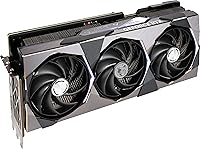
  • Card Length: The card measures 13.3 inches (approximately 338mm) in length, making case clearance verification essential before purchase.
  • Card Width: Spans 5.6 inches in width, occupying a triple-slot footprint inside the chassis.
  • Weight: The card weighs 4.45 pounds (approximately 2.02kg), which is substantial enough that a GPU support bracket is advisable for long-term sag prevention.
  • Cooling System: Uses MSI's Tri-Frozr 3 thermal solution consisting of three large fans, a multi-heat-pipe heatsink, and a zero-fan idle mode that stops fan rotation during light workloads.
  • Zero-Fan Idle: Fan blades remain completely stationary when GPU temperatures stay below the thermal threshold, resulting in silent operation during desktop and light productivity use.
  • DLSS & Frame Gen: Fully supports NVIDIA DLSS 3 including Frame Generation, an AI-driven technique that synthesizes additional frames to significantly increase output framerates in compatible titles.
  • AV1 Encoding: Includes NVIDIA's eighth-generation NVENC encoder with AV1 support, enabling faster and higher-quality video exports compared to previous-generation H.264 hardware encoding.
  • RGB Lighting: Integrated MSI Mystic Light RGB illumination is controllable via MSI's Mystic Light software, allowing synchronization with other compatible MSI components.
  • NVLink Support: NVLink multi-GPU connectivity is supported, though practical software support for NVLink in consumer gaming applications remains extremely limited.
  • Memory Interface: The 192-bit memory bus provides the bandwidth headroom needed to maintain smooth performance in high-resolution and asset-heavy gaming scenarios.
  • PCB Quality: Built on a custom PCB using military-grade components including solid capacitors and chokes rated for extended operational stability under high sustained loads.
  • Architecture: Ada Lovelace replaces the prior Ampere generation with improved shader efficiency, dedicated hardware for Frame Generation, and a new optical flow accelerator.
  • Ratings: Holds a 4.3-star average rating based on 72 verified buyer ratings on Amazon at the time of publication.

Related Reviews
MSI RTX 3080 Suprim X 10G GPU
78%
93%
Thermal Performance
89%
Noise Levels
91%
Build Quality
88%
Gaming Performance
51%
Case Compatibility
More
MSI GeForce RTX 3090 SUPRIM X 24GB
87%
96%
Performance
93%
Cooling System Efficiency
72%
Power Consumption
89%
Value for Money
91%
Build Quality
More
MSI RTX 4090 SUPRIM Liquid X GPU
80%
94%
Thermal Performance
92%
Noise Levels
91%
Raw GPU Performance
93%
VRAM Capacity
58%
Installation Experience
More
MSI RTX 4070 Gaming X Trio GPU
82%
92%
1440p Gaming Performance
93%
Thermal Performance
91%
Noise Levels
89%
Build Quality
71%
Value for Money
More
MSI GeForce RTX 2080 Ti Gaming X Trio
87%
94%
Gaming Performance
91%
Ray Tracing Quality
88%
Thermals and Cooling
90%
Build Quality
65%
Noise Level Under Load
More
MSI RTX 4070 Ti Super 16G GPU
83%
91%
Gaming Performance
93%
VRAM Capacity
68%
Thermal Performance
82%
Noise Level
84%
Build Quality
More
MSI RTX 4070 Ti VENTUS 3X GPU
79%
93%
1440p Gaming Performance
71%
4K Gaming Capability
88%
Thermal Performance
87%
Noise Levels
66%
Value for Money
More
MSI GeForce RTX 3080 Ti Gaming X Trio Graphics Card
80%
93%
Thermal Performance
88%
Noise Levels
91%
Gaming Performance
89%
VRAM & Memory Bandwidth
86%
Build & Physical Quality
More
MSI RTX 3060 Ti X Trio GPU
77%
93%
Thermal Performance
91%
Noise Levels
88%
1440p Gaming Performance
89%
Build Quality
67%
Value for Money
More
MSI RTX 3070 Ti 8GB Graphics Card
82%
91%
Gaming Performance
93%
Thermal Management
88%
Noise Levels
67%
VRAM Headroom
92%
Build Quality
More

FAQ

That depends entirely on your specific case's GPU clearance, and it is worth checking before you order. This SUPRIM X card measures 13.3 inches long, which exceeds the maximum GPU length of many popular mid-tower enclosures. Look up your case's listed maximum GPU length in the manufacturer's specs — if it is under 340mm, you may have a problem. Full-tower cases are a safe bet.

For most 4K gaming today, yes — but with caveats. The majority of well-optimized titles at 4K high or ultra settings sit comfortably within 12GB. The concern arises in a small but growing number of VRAM-hungry games where native 4K at maximum texture settings can push into or past that limit. If you rely on DLSS quality mode rather than native 4K rendering, VRAM pressure drops considerably and the 12GB holds up much better.

Frame Generation is part of DLSS 3 and works by having the GPU generate entirely synthetic frames between the ones it actually renders, using AI to keep them looking coherent. In supported games, it can roughly double the framerate you see on screen, which makes high-refresh 4K gaming far more achievable. The trade-off is a slight increase in input latency, which most people do not notice in single-player titles but some competitive players prefer to disable.

No. The card ships with a factory boost clock of 2790 MHz, which is already among the highest in the 4070 Ti segment. Most buyers report stable, full-performance operation straight out of the box without touching MSI Afterburner or any overclocking utility.

Noticeably quiet for a card this capable. The Tri-Frozr 3 cooling system is well-regarded for keeping noise levels low even during demanding sessions. At idle and during light use, the fans stop entirely, so you will hear nothing from the GPU at all. Under a full gaming load, the fans spin up but remain at a reasonable level — multiple buyers specifically call out the acoustics as a strong point.

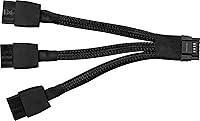
NVIDIA recommends at least a 700W power supply for the RTX 4070 Ti, though most builders opt for 750W to 850W to ensure headroom, especially if the rest of the system is power-hungry. A quality PSU with a 16-pin (or 12VHPWR) connector is ideal, as that is the primary power input on this card.

Yes, without any issues. MSI's flagship 4070 Ti provides three DisplayPort 1.4a outputs and one HDMI 2.1 port, so you can drive up to four displays simultaneously if needed. The HDMI 2.1 port supports 4K at 144Hz or 8K at 60Hz, making it a flexible option for high-resolution single-display setups as well.

At native 1440p gaming, the performance gap between this high-end GPU and the RTX 4080 is relatively modest, and most players would be hard-pressed to notice a difference in actual gameplay. Where the 4080 pulls ahead more meaningfully is native 4K at ultra settings and its 16GB of VRAM, which provides more future headroom. If 4K with zero upscaling and max VRAM headroom is your priority, the 4080 makes a stronger case. For everyone else, the 4070 Ti tier offers strong value at a lower outlay.

It is a smart precaution. The card weighs 4.45 pounds and spans over 13 inches, which puts real mechanical stress on the PCIe slot over time, especially if the case is moved or transported occasionally. A GPU support bracket is inexpensive insurance and most enthusiast-level cases either include one or have aftermarket options available.

Quite useful if you produce video content regularly. AV1 delivers significantly better compression than H.264 at comparable quality, meaning smaller file sizes without visible quality loss. The hardware encoder on Ada Lovelace GPUs handles this at speeds that would take a CPU much longer to match, which adds up quickly when you are exporting long recordings or streams. Applications like DaVinci Resolve and OBS Studio support NVENC AV1 encoding directly.