Overview

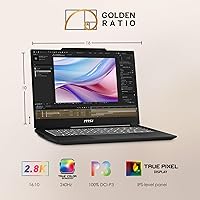
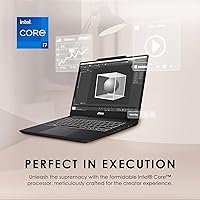
The MSI Creator M14 A13VE Laptop arrived in early 2024 as a genuinely compelling choice for creatives who want real performance without hauling a heavy workstation around. At under an inch thick and just over six pounds, it packs a capable CPU and discrete GPU into a portable chassis that slides into a backpack without drama. The 2.8K resolution display is the standout feature — noticeably sharper than the standard 1080p panels crowding this price tier. Freelancers, design students, light video editors, and hybrid workers are squarely in the target audience, and the Creator M14 line has a clear identity separate from MSI's gaming-focused products.

Features & Benefits

The i7-13620H's hybrid core architecture handles multitasking impressively — Lightroom exports, a crowded browser, and a video call can run together without noticeable slowdown. The RTX 4050 delivers legitimate GPU acceleration in apps like Premiere Pro and Blender, with 6GB of VRAM covering most mid-complexity creative workloads. The 2.8K panel reproduces color with solid accuracy for photo editing and grading, though its 60Hz refresh rate will disappoint anyone hoping to game regularly. Fast DDR5 memory and a 1TB NVMe drive keep file operations snappy, while Windows Hello login — via facial recognition or fingerprint — adds a layer of daily convenience that is easy to take for granted until you use a laptop without it.

Best For

This MSI creator laptop earns its place most clearly in the hands of digital artists and designers who prioritize color accuracy over raw screen size. College students and early-career creatives will find it capable enough for demanding software without the cost or bulk of a full workstation. Light video editors cutting 1080p or 4K footage benefit from the RTX-powered export speeds, and the compact footprint suits hybrid workers who carry it between a home desk and a meeting room. Casual gaming is technically possible on the RTX 4050, but keep expectations measured — this machine is built for creative output, not frame rates.

User Feedback

Buyers of this 14-inch creative notebook consistently highlight display sharpness and solid build quality as standout positives — the screen in particular draws repeat praise for how it handles color-sensitive work. The recurring criticisms are equally consistent: battery life drops noticeably when the GPU is under load, and the Cooler Boost fans get audible during sustained rendering or export tasks. The RAM upgradeability question surfaces often in buyer discussions, and MSI's own recommendation that Windows 11 Pro is preferable for business users is a practical note worth flagging before purchase. Overall sentiment leans positive for creative users, but those expecting strong gaming or all-day battery life may find the trade-offs harder to accept.

Pros

  • The 2.8K display delivers genuinely sharp, color-accurate output that stands out among competitors in this price range.
  • The i7-13620H handles heavy multitasking well — running creative apps alongside a busy browser rarely causes slowdowns.
  • RTX 4050 GPU acceleration meaningfully speeds up exports and renders in Premiere Pro, Lightroom, and Blender.
  • At under an inch thick and 6.21 lbs, the Creator M14 is easy to carry between locations without fatigue.
  • Fast DDR5 RAM and a 1TB NVMe SSD keep file access and app launches impressively responsive.
  • Windows Hello facial recognition and fingerprint login make daily security feel effortless rather than intrusive.
  • Wi-Fi 6 support provides stable, fast wireless connectivity in congested environments like co-working spaces or campuses.
  • The professional, non-gaming aesthetic means this MSI creator laptop fits comfortably in office or client-facing settings.
  • The backlit keyboard and HD audio add practical everyday comfort without requiring any third-party accessories.

Cons

  • Battery life drops noticeably under GPU load, making a charger a near-constant companion for intensive work sessions.
  • The 60Hz refresh rate limits the display's appeal for anyone who values smooth motion, even outside of gaming.
  • Cooler Boost fans can become audibly distracting during sustained rendering or export tasks in quiet environments.
  • The RTX 4050 with 6GB VRAM may feel constrained for more demanding 3D projects or high-resolution VFX pipelines.
  • Windows 11 Home ships as the default OS, which creates hurdles for users who need Pro-level enterprise features.
  • RAM upgradeability is a frequent concern among buyers, and MSI has not made the upgrade path straightforward or clearly documented.
  • Only three USB 3.0 ports may feel limiting for creators who regularly connect multiple peripherals simultaneously.
  • Thermal performance under prolonged workloads can cause the chassis to run warm, which affects comfort during extended lap use.

Ratings

The scores below reflect an AI-driven analysis of verified global user reviews for the MSI Creator M14 A13VE Laptop, with spam, bot activity, and incentivized submissions actively filtered out to ensure honest signal. Both the standout strengths and the recurring frustrations buyers report are transparently reflected in each category — nothing has been softened or inflated. Whether this 14-inch creative notebook earns a place in your bag depends heavily on your workflow, and these ratings are designed to help you make that call clearly.

Display Quality
88%
The 2.8K panel is consistently praised by photographers, illustrators, and video editors who notice the jump in sharpness and color richness compared to standard 1080p screens in this price range. Color reproduction feels accurate enough for real editing work without constant external calibration.
The 60Hz refresh rate is a genuine limitation that creative buyers notice almost immediately, especially those who have used higher-refresh panels before. Motion during scrolling and cursor movement lacks the fluidity that 90Hz or 120Hz displays provide, which some users find unexpectedly distracting during daily work.
Processing Performance
84%
The i7-13620H handles multitasking confidently — running Lightroom, a browser with a dozen tabs, and a communication app simultaneously without breaking a sweat is a realistic daily scenario this CPU manages well. Sustained workloads like batch exports and multi-app creative sessions feel noticeably faster than older Intel generations.
Under prolonged heavy loads, CPU performance can throttle slightly as thermals build up, particularly when both CPU and GPU are pushed hard at the same time. Users doing complex 3D or video work for hours on end occasionally report the machine feeling sluggish toward the end of long sessions without a fan mode adjustment.
GPU & Creative Acceleration
81%
19%
The RTX 4050 makes a real difference in GPU-accelerated workflows — Premiere Pro exports, Lightroom AI masking, and Blender CUDA rendering all benefit tangibly from having a dedicated Ada-architecture GPU rather than relying on integrated graphics. For a slim 14-inch machine, this level of GPU capability at this price tier is genuinely competitive.
The 6GB VRAM ceiling becomes a constraint for more demanding tasks like high-resolution 3D scenes or multi-layer 4K compositions with heavy effects. Users pushing the GPU hard in sustained creative workloads sometimes find frame rates or render stability less consistent than they expected from an RTX-class card.
Portability
86%
At under an inch thick and just over six pounds, the Creator M14 slips into a backpack without dominating the bag, which hybrid workers and students carrying it daily appreciate significantly. The chassis does not feel cheaply light — there is enough heft to feel durable without being exhausting to transport.
Six-plus pounds is not featherweight territory — users accustomed to ultrabooks under five pounds notice the difference on longer commutes or travel days. The power brick adds meaningful weight and bulk to the carry load, which is easy to underestimate when evaluating portability on paper.
Battery Life
57%
43%
For light productivity tasks like document editing, video calls, and casual browsing, the battery holds up reasonably well and gets most users through a half-day of untethered work. Users who predominantly stay in low-power modes with the GPU mostly idle report more satisfying endurance.
The moment GPU-intensive work kicks in — rendering, exporting, or even demanding browser-based tasks — battery life drops sharply and falls below what most buyers expect from a modern laptop. Working away from a power outlet for a full day of creative work is not a realistic scenario without significant workflow compromises.
Build Quality & Design
83%
The chassis feels premium relative to its price point, with a clean matte black finish that reads as professional rather than gaming-aggressive — a distinction that matters to creative professionals in client-facing environments. Buyers consistently describe it as solid and confidence-inspiring in hand.
The lid and palm rest show fingerprints and smudging fairly readily with regular use, requiring more frequent cleaning than buyers with glossy-finish preferences might expect. A small number of users have flagged minor flex in the keyboard deck under firm typing pressure, though this does not affect structural integrity.
Thermal Management
66%
34%
Under light-to-moderate workloads the machine stays cool and quiet, which makes it comfortable to use in office or study environments without drawing attention. MSI's Cooler Boost mode effectively pulls temperatures down when manually activated during heavy creative sessions.
During sustained rendering or export tasks, the fans ramp up noticeably and the bottom of the chassis gets warm enough to make lap use uncomfortable. Users who spend long stretches in Blender or exporting 4K footage report that thermal throttling occasionally chips away at peak performance without active cooling management.
Fan Noise
62%
38%
In everyday mixed-use scenarios — browsing, document editing, video playback — the fans are barely noticeable, which makes the machine a reasonable choice for quiet coworking spaces or libraries during lighter tasks. Casual users who are not pushing the hardware hard rarely notice fan noise at all.
Under load, Cooler Boost fans reach a volume level that is distracting in quiet rooms and noticeably audible over ambient noise. Buyers who work in shared or noise-sensitive spaces — recording studios, open offices, or classrooms — have flagged this as a recurring frustration during export-heavy workflow days.
RAM & Storage
79%
21%
The 16GB DDR5 configuration handles real creative multitasking well — switching between Photoshop, a browser, and Slack without slowdown is a daily reality for most users at this spec level. The 1TB NVMe SSD is fast and spacious enough to house a solid project library without immediate external drive dependency.
The soldered RAM is a meaningful long-term limitation — users who expect to scale their workflow intensity over two or three years cannot simply upgrade the memory. One terabyte fills up faster than expected once raw video footage and large asset libraries enter the picture, pushing users toward external storage sooner than anticipated.
Display Refresh Rate
53%
47%
For static or slow-motion creative work — photo editing, illustration, document-heavy design tasks — 60Hz is technically sufficient and most users in pure creative workflows do not find it limiting during focused work sessions. Color accuracy and resolution compensate meaningfully for the lower refresh rate in those specific contexts.
The 60Hz ceiling is increasingly hard to justify as competing laptops in this price range push 90Hz or 120Hz as standard. Buyers who use the machine for any amount of gaming, fast video scrubbing, or general UI navigation frequently cite the 60Hz panel as the single most disappointing aspect of the overall package.
Value for Money
77%
23%
Stacking the 2.8K display, RTX 4050 GPU, and 13th Gen i7 together in a sub-one-inch chassis at this price point represents a genuinely competitive proposition for creative buyers who prioritize display quality and GPU capability over all-day battery life. For design students and early-career creatives, the performance-per-dollar ratio lands well.
Buyers who prioritize battery longevity, a high-refresh display, or RAM upgradeability will find competitors at a similar price that address those needs more directly. The value case weakens if your workflow is gaming-heavy or demands full-day untethered operation, where the trade-offs feel less justified.
Keyboard & Typing Experience
74%
26%
The backlit keyboard is well-suited for working in dim conditions, and the key travel feels adequate for extended writing or coding sessions without excessive fatigue. Most buyers transitioning from other MSI machines find the layout intuitive and the backlighting evenly distributed.
The keyboard does not stand out as a category-defining feature — users coming from premium ultrabooks or mechanical keyboard setups will find the feel somewhat ordinary. Key spacing and feedback have drawn mild criticism from touch-typists who prefer a more distinct tactile response.
Connectivity & Ports
68%
32%
Wi-Fi 6 delivers reliable, fast wireless performance in busy network environments like university campuses or co-working spaces, which frequent travelers and students appreciate. Bluetooth connectivity pairs smoothly with peripherals, and the three USB 3.0 ports cover basic daily setups without issue.
Three USB 3.0 ports is a thin selection for creative professionals who simultaneously connect external drives, drawing tablets, audio interfaces, and dongles. The absence of a broader port variety — including Thunderbolt or a wider range of display outputs — limits desk setup flexibility without investing in an additional hub.
Security Features
82%
18%
Windows Hello facial recognition via the integrated IR webcam works quickly and reliably in normal lighting conditions, making passwordless login feel effortless within the first few days of use. The fingerprint sensor provides a solid backup that users consistently find more accurate and responsive than equivalent features on competing machines.
Facial recognition can struggle in very low light or bright backlight situations, occasionally falling back to the fingerprint sensor or PIN as a workaround. Neither feature is significantly differentiated from what other mid-range Windows laptops offer, so it functions as expected rather than exceeding expectations.
Software & OS Experience
69%
31%
Windows 11 Home runs cleanly on this hardware with no significant performance drag, and the out-of-box experience is straightforward enough for non-technical users to get productive quickly. MSI Center provides useful control over fan modes and performance profiles without requiring third-party software.
The absence of Windows 11 Pro is a practical limitation for business users or professionals working within managed IT environments, and the upgrade cost is an unexpected additional expense MSI itself acknowledges. A handful of users have also noted the usual pre-installed software clutter that requires cleanup before the system feels fully optimized.

Suitable for:

The MSI Creator M14 A13VE Laptop is a strong fit for creatives who need a capable, portable machine without committing to a heavy workstation-class device. Digital artists and graphic designers will appreciate the 2.8K display's color accuracy for detailed illustration and photo editing work, where panel quality genuinely matters at this price point. Design students and early-career professionals benefit from the GPU-accelerated workflows in apps like Lightroom, Premiere Pro, and Blender — tasks that would bottleneck a machine without a discrete GPU. Hybrid workers who alternate between home desks and office environments will find the compact footprint and clean aesthetic easy to carry and professional enough to use in client-facing settings. Light-to-moderate video editors cutting 1080p or 4K timelines will notice real gains from the RTX 4050 during exports, without needing to invest in a significantly more expensive machine.
Not suitable for:

Buyers who plan to use this as a primary gaming machine should look elsewhere — the MSI Creator M14 A13VE Laptop was not designed for that role, and the 60Hz display will feel limiting compared to gaming-focused laptops at similar price points. Power users handling extremely demanding 3D rendering, complex VFX work, or large multi-track audio sessions may find the RTX 4050 and 6GB of VRAM hit their ceiling faster than expected. Anyone who relies heavily on untethered, all-day battery life will likely find themselves reaching for a charger more often than they would like, especially during GPU-intensive sessions. Business professionals who need enterprise-grade software compatibility or centralized IT management should also note that this machine ships with Windows 11 Home rather than Pro, which can create friction in managed corporate environments. If a high-refresh-rate display is non-negotiable for your daily workflow — even outside of gaming — the 60Hz panel will be a persistent frustration.
Specifications

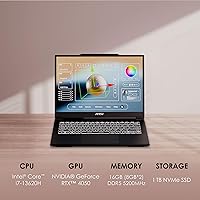
  • Processor: Powered by the 13th Gen Intel Core i7-13620H, a hybrid-architecture CPU with 10 cores designed to balance sustained performance with power efficiency across creative workloads.
  • Graphics: Equipped with an NVIDIA GeForce RTX 4050 GPU featuring 6GB of dedicated VRAM, supporting hardware-accelerated ray tracing and GPU compute tasks in creative applications.
  • Display: 14-inch IPS-level panel with a 2880x1800 (2.8K) resolution, a 60Hz refresh rate, and a wide color gamut suited for photo editing and color-sensitive design work.
  • RAM: 16GB of DDR5 memory running at 5200MHz, providing fast data throughput for multitasking across demanding creative and productivity applications simultaneously.
  • Storage: 1TB NVMe SSD offering fast sequential read and write speeds, keeping application launches, project file access, and system boot times consistently quick.
  • Operating System: Ships with Windows 11 Home; MSI officially recommends upgrading to Windows 11 Pro for business or enterprise use cases that require advanced management features.
  • Weight: Weighs 6.21 lbs (approximately 2.82 kg), making it portable enough for daily commuting while remaining sturdy rather than ultra-lightweight.
  • Dimensions: Measures 12.39 x 9.19 x 0.88 inches, keeping the overall footprint compact and the chassis under one inch thick for easy bag storage.
  • Wireless: Supports Wi-Fi 6 (802.11ax) for high-speed wireless networking in congested environments, plus Bluetooth for peripheral and accessory connectivity.
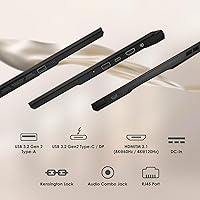
  • USB Ports: Includes three USB 3.0 ports for connecting external drives, hubs, peripherals, and other accessories at high transfer speeds.
  • Security: Features a Windows Hello-compatible IR webcam for facial recognition login and an integrated fingerprint sensor, enabling fast and passwordless daily authentication.
  • Keyboard: Full-size backlit keyboard designed for comfortable use in low-light environments, with key illumination suited for late-night creative sessions or dimly lit workspaces.
  • Battery: Powered by an integrated Lithium Polymer battery; battery endurance is adequate for light productivity tasks but decreases noticeably under sustained GPU workloads.
  • Cooling System: MSI's Cooler Boost technology actively manages thermal performance under load, though fans may become audible during extended rendering or export sessions.
  • Color: Available in Black, giving the chassis a professional and understated appearance appropriate for both studio and office environments.
  • Memory Speed: DDR5 RAM operates at 5200MHz, which provides meaningful bandwidth improvements over DDR4 in memory-intensive applications like video editing and 3D rendering.
  • Availability: First became available in March 2024 as part of the Creator M14 product line, positioned as a mid-range option within MSI's creator-focused laptop lineup.

Related Reviews
MSI Creator A16 AI+ 16-inch Laptop
85%
94%
Display Quality
92%
Performance
78%
Portability
80%
Battery Life
85%
Build Quality
More
MSI Raider GE68HX 16 Gaming Laptop
85%
94%
Gaming Performance
92%
Graphics Quality
93%
Processor Power
88%
Display Quality
72%
Portability/Weight
More
MSI Katana 15 B13VGK Gaming Laptop
72%
89%
Gaming Performance
84%
Value for Money
67%
Thermal Management
63%
Display Quality
61%
Build Quality
More
MSI Pulse GL66 15.6″ Gaming Laptop
70%
83%
Gaming Performance
67%
Thermal Management
78%
Display Quality
41%
Battery Life
63%
Build Quality
More
Acer Predator Triton Neo 16 Gaming Creator Laptop
83%
91%
Performance
94%
Display Quality
68%
Portability
89%
Thermal Management
77%
Battery Life
More
MARGOLAI M14 S 14-inch Laptop
63%
81%
Value for Money
58%
Performance
44%
Battery Life
84%
Portability
62%
Display Quality
More
MSI Cyborg Gaming Laptop 2024, Intel i7-13620H, 32GB RAM, 1TB SSD, RTX 4050
85%
91%
Gaming Performance
88%
Multitasking & Productivity
93%
Display Quality
85%
Build Quality
67%
Battery Life
More
MSI GV15 15.6″ Gaming Laptop - Intel Core i5-11400H, GTX 1650, 8GB RAM, 256GB SSD
83%
92%
Value for Money
80%
Gaming Performance
88%
Display Quality
85%
Portability
67%
Battery Life
More
MSI Raider GE68HX Gaming Laptop, 16″ FHD+ Display, Intel i9-14900HX, 64GB RAM, 4TB SSD, RTX 4070
84%
95%
Gaming Performance
94%
Processor Speed
93%
Graphics Quality
90%
Display Quality
85%
Build Quality
More
MSI Thin 15.6-inch Gaming Laptop
72%
72%
Gaming Performance
83%
Display Quality
81%
Build Quality
58%
RAM & Multitasking
61%
Thermal Management
More

FAQ

This is one of the most common questions buyers ask before purchasing, and unfortunately the Creator M14 does not offer straightforward RAM upgradability — the memory is soldered to the motherboard. The 16GB DDR5 configuration covers most creative workflows comfortably, but if you anticipate needing more in the future, this is a real limitation worth factoring in before you buy.

Both applications run well on this MSI creator laptop thanks to the RTX 4050 handling GPU-accelerated tasks like export rendering, noise reduction, and effects processing. Lightroom catalog work and Premiere Pro timelines in 1080p feel responsive, and even 4K editing is manageable for light-to-moderate projects. You may hit some limits with very complex multi-layer sequences or high-resolution RAW workflows, but for most working creatives it holds up reliably.

The RTX 4050 can handle casual and older games at reasonable settings, so it is not entirely off the table. That said, this is a creative productivity laptop first — the 60Hz display limits how smooth fast-paced games feel, and the thermals are tuned for sustained workloads rather than game-optimized performance. If gaming is a significant priority for you, a dedicated gaming laptop will serve you better.

Realistically, expect four to six hours of mixed productivity use — document work, light browsing, and video calls. Push the GPU with rendering or export tasks and that window shrinks considerably. If you plan to work remotely or away from an outlet for extended periods, packing the charger is genuinely advisable rather than optional.

The display covers a wide color gamut and the 2.8K resolution gives you noticeably more pixel density than a standard 1080p panel, which helps with detail work in Photoshop and Lightroom. Color accuracy is strong for this price tier, though professional photographers working to strict print-production color standards may still want to profile the display with a colorimeter for the most critical work.

Yes — it hits a practical balance of performance, portability, and capability that suits design and media programs well. The sharp display helps with detailed visual work, the i7 and RTX 4050 cover the software those programs typically require, and at just over six pounds it is light enough for campus use without being fragile.

Under sustained loads — long Blender renders or multi-pass video exports — the Cooler Boost fans do become audible. They are not disruptive in a busy environment, but in a quiet room or library they are noticeable enough to potentially reach for headphones. During lighter work like browsing, document editing, or video playback, the system runs quietly without issue.

It ships with Windows 11 Home, which covers everything most individuals and students need. However, MSI itself acknowledges that Windows 11 Pro is preferable for business use — so if you need features like BitLocker encryption, Remote Desktop hosting, or domain joining for a corporate network, you would need to factor in the cost of a Pro upgrade.

The 14-inch creative notebook includes three USB 3.0 ports, which is workable but not generous. If you regularly connect an external drive, a USB microphone, and a drawing tablet at the same time, you will likely want a small USB hub. The absence of a wider variety of ports is a practical trade-off for keeping the chassis slim.

The chassis feels solid for its weight class, with a build quality that matches what buyers expect from MSI's creator-focused line rather than their entry-level offerings. It holds up well to the routine wear of daily commuting in a laptop bag. It is not MIL-SPEC ruggedized, so you would not want to drop it, but it does not feel flimsy or cheap in hand.