Overview

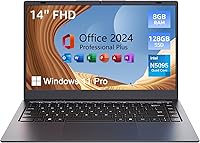
The MARGOLAI M14 S 14-inch Laptop is a no-frills Windows 11 notebook aimed squarely at buyers who need basic computing without spending much. At under 0.65 inches thick and roughly 3.9 pounds, it's genuinely easy to toss in a bag and forget about — which counts for something. Don't expect it to handle video editing or heavy multitasking; this budget notebook lives in lighter territory: web browsing, word processing, video calls. What gives it a leg up on similarly priced competitors is the inclusion of MS Office 2024 right out of the box, which alone saves buyers a meaningful recurring expense. Expectations managed correctly, it holds its own.

Features & Benefits

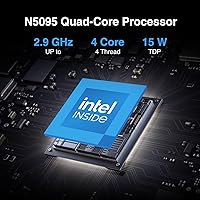
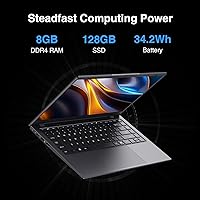
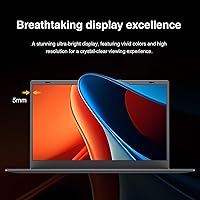
The M14 S runs on an Intel Celeron quad-core chip — modest by any measure, but adequate for the tasks this machine is built for. The 128GB SSD makes a real difference compared to old spinning-drive budget laptops; boot times are quick and apps open without that familiar groan. Eight gigabytes of DDR4 RAM keeps a handful of browser tabs and a Word document running without constant slowdowns. The 14-inch IPS panel won't wow anyone used to high-res displays, but the viewing angles are solid for indoor use. Dual-band WiFi handles both crowded and faster 5GHz networks, and the physical camera shutter is a small but thoughtful addition that privacy-conscious users genuinely appreciate.

Best For

This entry-level laptop makes the most sense for a fairly specific crowd. Students who need a portable machine for note-taking, light research, and writing assignments will find it fits that brief well — and the bundled Office suite means they don't have to sort out subscriptions on day one. It's equally well-suited to seniors or casual users who primarily want to browse, stream video, or video chat with family. The M14 S also works as a secondary or guest machine kept around the house, or a travel backup you won't stress about losing or banging around. Modest needs, modest price — it delivers on that promise.

User Feedback

Buyers who pick up this budget notebook tend to appreciate how quickly it gets going — setup is straightforward, and the pre-loaded Office suite earns consistent praise as a genuine value perk. Portability also gets mentioned often; people like that it's light enough to carry without thinking. On the downside, storage fills fast: 128GB disappears quickly once Windows updates and a few apps land, making a Micro SD card almost mandatory. Battery life draws the most consistent criticism — roughly four hours is not enough for a full school day or long travel leg. A handful of buyers also flag hesitation around brand familiarity and long-term support, which is a fair concern given MARGOLAI's limited track record.

Pros

  • MS Office 2024 comes pre-installed, saving buyers the cost of a separate subscription right away.
  • The SSD storage makes boot times and app launches noticeably quicker than older budget laptops with spinning drives.
  • At under four pounds and less than an inch thick, this budget notebook is genuinely easy to carry around.
  • Dual-band WiFi support means it connects reliably on both congested 2.4GHz and faster 5GHz networks.
  • The physical camera shutter is a practical privacy feature that is uncommon at this price point.
  • Windows 11 out of the box means no extra setup or OS purchase required.
  • Eight gigabytes of RAM keeps light multitasking — a few tabs, a document, some music — running without constant slowdowns.
  • The IPS panel offers decent viewing angles, so the screen remains readable from non-direct positions.
  • A Micro SD slot provides an affordable way to expand storage without buying external hardware.
  • HDMI output allows easy connection to an external monitor or TV when needed.

Cons

  • Battery life hovers around four hours in real use, making a charger a near-constant travel companion.
  • 128GB of storage fills up faster than expected once Windows updates and everyday apps are installed.
  • The Celeron processor struggles noticeably when more than a few applications compete for resources at once.
  • Brand obscurity raises reasonable questions about long-term support, warranty handling, and parts availability.
  • The 1366x768 display resolution looks soft compared to the full HD panels now common even on low-cost rivals.
  • Integrated graphics rule out any casual gaming or GPU-assisted creative work entirely.
  • Build quality feedback from buyers is mixed, with some noting the chassis feels less solid than expected.
  • The trackpad and keyboard have drawn criticism for feeling imprecise, which may frustrate users who type heavily.
  • No USB-C port limits forward compatibility with newer accessories and charging standards.
  • Wireless spec is listed as 802.11n in places, which is older than the dual-band marketing implies and worth scrutinizing.

Ratings

The scores below for the MARGOLAI M14 S 14-inch Laptop were generated by our AI system after analyzing verified purchase reviews from buyers worldwide, with spam, bot-submitted, and incentivized feedback actively filtered out before any scoring was applied. The results reflect a balanced picture — where this budget notebook genuinely earns its place and where real users have run into frustration. Both sides are represented honestly here, so you can make a clear-eyed call before buying.

Value for Money
81%
19%
For buyers who need a functional Windows 11 machine with Office pre-loaded and don't want to spend much, the M14 S delivers a lot of checkboxes at a price that makes it hard to argue with. Reviewers consistently cite the bundled MS Office 2024 license as a standout perk that tips the value calculation meaningfully in this laptop's favor.
While the price is attractive, buyers occasionally feel shortchanged when real-world limitations like the short battery life and constrained storage kick in sooner than expected. A few reviewers noted that spending a little more upfront on a competing brand would have saved them workarounds down the line.
Performance
58%
42%
For light, everyday workloads — typing in Word, joining a Zoom call, streaming a show — the Celeron processor and 8GB of RAM keep things moving without constant lag or freezing. Users doing basic tasks report a generally acceptable experience that meets their modest expectations.
The moment you stack multiple demanding browser tabs, run background updates, or ask it to do anything beyond casual use, the Celeron chip shows its ceiling quickly. Several reviewers noted that the system becomes sluggish in ways that feel frustrating for anyone used to a mid-range processor.
Battery Life
44%
56%
Some light users doing minimal screen-brightness tasks report stretching the battery beyond the rated estimate under very controlled conditions, and the laptop charges back up at a reasonable pace once plugged in.
Four hours is the honest ceiling in typical use, and that is simply not enough for a full school day, a long flight, or an extended work session away from an outlet. This is the single most common complaint across buyer reviews, and it meaningfully limits how truly portable the machine actually is.
Portability
84%
At under four pounds and barely two-thirds of an inch thick, this budget notebook genuinely disappears into a backpack or tote bag without adding noticeable bulk or weight. Students and travelers who picked it up as a carry-around machine consistently praised how unobtrusive it is to transport.
The relatively short battery life undercuts the portability story — a charger and cable adds weight and a dependency that reduces the freedom a light laptop should provide. A few buyers also noted the power brick is bulkier than they anticipated for such a slim machine.
Display Quality
62%
38%
The 14-inch IPS panel offers viewing angles that hold up better than TN screens at this price, making it comfortable to use at the kitchen table or share content with someone sitting beside you. Indoor use in reasonably lit environments is generally described as satisfactory by most buyers.
The 1366x768 resolution looks noticeably soft compared to the full HD screens now standard on even entry-level competing laptops, and several buyers mentioned the screen brightness struggles in brighter rooms or near windows. For anything involving detailed photo viewing or fine text, the display's limitations become apparent fast.
Build Quality
59%
41%
The slim chassis does a reasonable job of looking presentable for its price tier, and most buyers report the machine arrives without obvious cosmetic defects or assembly issues out of the box. For casual, low-stress use around the home or in a classroom, it holds together adequately.
The plastic construction flexes more than buyers would like, particularly around the keyboard deck and display lid, and the overall feel is firmly in budget territory. Some reviewers noted that the hinges and chassis inspire little confidence for long-term daily use, especially if the laptop gets moved around frequently.
Keyboard & Trackpad
56%
44%
The keyboard layout covers the standard key arrangement without any glaring omissions, and for occasional typing sessions, most users find it functional enough to get through a document or fill out a form without major complaints.
Reviewers who type heavily — students writing long papers, for instance — tend to find the key travel shallow and the feedback mushy, which becomes tiring over longer sessions. The trackpad draws consistent criticism for imprecise tracking and a clicking mechanism that feels cheap compared to competitors in a similar price range.
Storage
51%
49%
The SSD makes a genuine difference over the spinning hard drives that plagued older budget laptops — boot times are quick and apps open without that lengthy wait that used to define cheap notebooks. For buyers who primarily use cloud storage and stream content rather than saving files locally, 128GB may stretch further.
128GB is tight from day one after Windows 11, system files, and Office are installed, leaving limited breathing room for personal files and additional apps. Buyers who download media, accumulate photos, or install several programs quickly hit the wall and are forced to rely on Micro SD cards or external drives as an ongoing workaround.
Connectivity
73%
27%
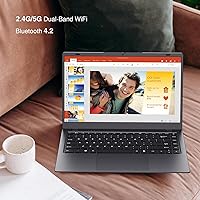
Dual-band WiFi support means the M14 S can connect to the faster, less congested 5GHz band at home or in a modern office, which is a genuine step up from single-band budget alternatives. Bluetooth 4.2 pairs reliably with wireless mice, headphones, and keyboards without reported dropout issues.
The wireless chipset references the older 802.11n standard in the technical specs, which falls behind the 802.11ac or WiFi 6 connections now common even on modestly priced competitors. There is also no USB-C port on the machine, which increasingly matters as more peripherals and chargers adopt that standard.
Port Selection
67%
33%
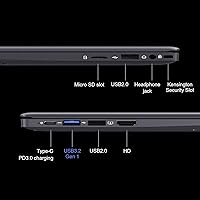
The inclusion of a full-size HDMI port is genuinely useful for connecting to a TV or external monitor, and the Micro SD card slot provides a practical built-in path for adding cheap storage expansion. Having both USB-A 3.2 and USB-A 2.0 ports means most standard accessories plug in without needing an adapter.
The absence of a USB-C port is a real gap that will frustrate buyers who have invested in USB-C accessories or who expected to use a modern universal charger. Three USB-A ports total is also on the lean side for users who regularly connect a mouse, USB drive, and another peripheral simultaneously.
Setup & Ease of Use
79%
21%
Windows 11 and Office arriving pre-installed and ready to use out of the box earns consistent praise from buyers who want to open the box and get going without a lengthy setup process. Reviewers buying this for less tech-savvy family members specifically appreciated that there was minimal configuration required before handing it over.
A handful of buyers reported that pre-installed bloatware or initial Windows update processes consumed a noticeable chunk of the already limited storage and slowed down the first-day experience. Those unfamiliar with Windows 11 may also find the interface a small learning curve compared to older Windows versions.
Camera & Privacy
71%
29%
The physical sliding camera shutter stands out as a thoughtful feature that is rarely found at this price point, and privacy-conscious buyers — particularly parents setting up laptops for kids — specifically called it out as a deciding factor. The webcam itself delivers adequate quality for standard video calls on Zoom or Google Meet.
Webcam image quality is basic and struggles in lower light conditions, which can make video calls look grainy or washed out in anything other than a well-lit room. Buyers who regularly do professional video calls or live streaming will likely want to invest in an external USB webcam to avoid looking underlit or pixelated.
Brand Reliability
48%
52%
A portion of buyers who took the chance on an unfamiliar brand report a trouble-free experience and express surprise at how functional the machine turned out to be for the asking price. For buyers who covered themselves with a solid return policy through the seller, the brand-risk factor felt manageable.
MARGOLAI has limited brand recognition and an unclear long-term support track record, which makes warranty claims, driver updates, and part replacement harder to navigate than with established names like Lenovo or HP. Several reviewers flagged that customer service responsiveness was slow or difficult to reach when issues did arise.
Thermal Management
55%
45%
Under light workloads — browsing, writing, or streaming — the machine tends to stay quiet and surface temperatures remain comfortable, which is fine for lap use during casual tasks. Users doing simple daily tasks report the fan rarely becomes intrusive during normal operation.
When the processor is pushed harder, even briefly, the laptop can run warm and the fan audibly ramps up in a way that some buyers found distracting in quiet environments like libraries or meetings. Sustained heavier workloads cause noticeable throttling as the system prioritizes heat management over maintaining peak speed.

Suitable for:

The MARGOLAI M14 S 14-inch Laptop is a practical pick for anyone whose computing needs stay on the lighter end of the spectrum. Students at the high school or early college level will find it handles note-taking, essay writing, and basic research without complaint — and the pre-loaded MS Office 2024 removes one immediate expense from the equation. Seniors or retirees who primarily use a laptop for video calls, email, and casual web browsing will appreciate how straightforward it is to set up and use day-to-day. It also works well as a dedicated guest machine or a secondary device kept around the house for quick tasks. Frequent travelers who want a lightweight backup laptop — one they won't lose sleep over if it gets bumped around in a bag — will find the sub-four-pound build genuinely convenient. For buyers whose priority is getting a functional Windows 11 machine with office software included at a minimal spend, this entry-level laptop delivers exactly that without unnecessary complications.

Not suitable for:

The MARGOLAI M14 S 14-inch Laptop is not the right tool for anyone who pushes a computer beyond basic tasks. The Intel Celeron processor and integrated graphics simply cannot handle video editing, photo processing, gaming, or running demanding software — attempting any of these will result in sluggish, frustrating performance that no amount of patience will fix. The roughly four-hour real-world battery life is a genuine dealbreaker for students or professionals who need to work unplugged through a full day; carrying a charger everywhere defeats much of the portability benefit. The 128GB SSD sounds adequate on paper, but between the Windows installation, system updates, and a few applications, usable space shrinks fast — anyone with a large photo library, video files, or a growing app collection will hit the wall quickly. Buyers who rely on heavy browser workloads with dozens of tabs open simultaneously will also notice the system straining under that kind of pressure. Finally, shoppers who place significant weight on brand reputation, established customer support networks, or long-term hardware reliability should look toward more established names in the laptop market.

Specifications

  • Display Size: The screen measures 14 inches diagonally with an IPS panel that provides wider viewing angles than standard TN displays.
  • Resolution: The display outputs at 1366x768 pixels, which is standard HD and adequate for everyday documents and video streaming.
  • Processor: An Intel Celeron quad-core CPU runs at a 2.0 GHz base clock and can boost up to 2.9 GHz for short bursts of heavier activity.
  • RAM: The system comes with 8GB of DDR4 RAM installed, sufficient for light multitasking across a handful of open applications.
  • Storage: A 128GB solid-state drive handles the operating system, applications, and user files with noticeably faster read and write speeds than traditional hard drives.
  • Operating System: Windows 11 comes pre-installed and activated, requiring no additional OS purchase or setup from the buyer.
  • Bundled Software: MS Office 2024 is included out of the box, covering Word, Excel, and PowerPoint without a separate subscription.
  • Graphics: Graphics are handled by integrated Intel GPU cores built into the Celeron processor, with no dedicated graphics card present.
  • WiFi: Dual-band WiFi supports both 2.4GHz and 5GHz networks, though the wireless chipset is rated to the 802.11n standard.
  • Bluetooth: Bluetooth 4.2 is built in, supporting wireless peripherals such as mice, keyboards, and headphones.
  • USB Ports: The laptop includes one USB-A 3.2 port and two USB-A 2.0 ports for connecting external devices and accessories.
  • Video Output: A full-size HDMI port allows the laptop to connect to an external monitor or TV for extended or mirrored display use.
  • Storage Expansion: A Micro SD card slot enables affordable storage expansion without requiring an external USB drive.
  • Camera Privacy: A physical sliding shutter sits over the built-in webcam, allowing users to block the camera lens mechanically at any time.
  • Battery Life: Rated battery life is approximately 4 hours under typical use conditions, which is on the shorter end for a portable notebook.
  • Weight: The laptop weighs 3.92 pounds, keeping it reasonably easy to carry in a bag for daily commutes or travel.
  • Dimensions: The chassis measures 12.8 x 8.3 x 0.65 inches, giving it a slim profile that fits comfortably in standard laptop sleeves.
  • Audio Output: A 3.5mm headphone jack is included on the chassis for wired headphone or speaker use.
  • Power Input: The laptop charges via a dedicated DC barrel connector rather than USB-C, so the proprietary charger must be kept handy.
  • Battery Type: Power comes from a single built-in lithium-ion battery pack that is included with the unit at purchase.

Related Reviews

HP 14-dq0020nr 14-inch Laptop 64GB
80%
72%
Performance
94%
Portability
88%
Battery Life
81%
Build Quality
75%
Display Quality
More
HP 14 Celeron 14-inch Touchscreen Laptop

68%
74%
Value for Money
52%
Performance
43%
Storage Adequacy
91%
Portability
61%
Display Quality
More
Dell Inspiron 14 5440 Laptop, 14-inch, Intel Core i5, 8GB RAM, 512GB SSD
86%
88%
Performance
91%
Build Quality
94%
Portability
81%
Battery Life
75%
Display Quality
More
Dell 14 Plus Laptop DB14250-14-inch 2.5K, Intel Core Ultra 7, 16GB RAM, 1TB SSD

85%
91%
Performance
94%
Display Quality
85%
Battery Life
88%
Build Quality
86%
Keyboard Usability
More
HP 14 Inch Laptop
HP 14 Inch Laptop
83%
92%
Value for Money
89%
Portability & Weight
90%
Battery Life
80%
Performance
84%
Build Quality
More
ASUS Chromebook CM14 (CM1402CM2A-DS44)
72%
83%
Value for Money
88%
Build Quality & Durability
74%
Performance & Speed
58%
Display Quality
84%
Battery Life
More
ASUS Vivobook S 14 OLED M5406WA
76%
94%
Display Quality
88%
Portability & Build
86%
CPU Performance
61%
Thermal Management & Fan Noise
67%
Battery Life
More
GOLF SUPAGS Women's Laptop Backpack 14-Inch
85%
89%
Value for Money
84%
Comfort & Ergonomics
91%
Laptop Protection
85%
Durability
80%
Organization & Storage
More
Alecewey F2 14-inch Laptop Screen Extender
85%
85%
Portability
90%
Display Quality
88%
Ease of Use
92%
Setup Time
63%
Weight
More
HP Chromebook 14a-nf0009nr 14-inch Laptop
82%
91%
Battery Life
88%
Portability & Weight
92%
Value for Money
80%
Performance for Everyday Tasks
85%
Display Quality
More

FAQ

For most standard college tasks — writing papers, attending online classes, using spreadsheets, and light research browsing — the M14 S holds up reasonably well. It's the more demanding stuff, like running multiple heavy applications at once or working with large media files, where it starts to show its limits. If your coursework stays in the Office and browser lane, you'll likely be fine.

The version of MS Office 2024 bundled with this laptop is a one-time license tied to the device, not a recurring Microsoft 365 subscription. That means you get the core apps — Word, Excel, PowerPoint — without an annual fee, which is a genuine perk at this price point.

On most budget Celeron notebooks in this category, the RAM is soldered directly to the motherboard, meaning it cannot be upgraded after purchase. Storage expansion via a Micro SD card is your most practical option for adding space, though you can also use an external USB drive for larger files.

Honestly, the roughly 4-hour rating is fairly accurate under normal use — light browsing, document work, and some video streaming. It's not enough for a full school or work day without a charger nearby. If you need unplugged endurance, this is the single biggest limitation to be aware of before buying.

Very light, low-demand games like Roblox may run at reduced settings, but performance will be choppy and unreliable. Minecraft on minimal graphics might be playable, though not comfortably. Anything beyond very casual, low-spec gaming is not what this machine is built for, and pushing it that way tends to lead to frustration.

It can be, yes. Windows 11 is reasonably straightforward for basic tasks, and the fact that Office is already installed means there's less setup friction upfront. The screen is a comfortable size for reading, and the machine itself is light enough to move around the house without hassle. A family member may want to help with the initial setup just to get things organized properly.

The easiest fix is picking up a Micro SD card — the laptop has a built-in slot for one, and cards with 128GB or 256GB of extra storage are inexpensive. You can also offload photos, videos, and documents to a cloud service like OneDrive, which Windows 11 integrates with natively, or use an external USB drive for larger file collections.

Yes, there is a built-in webcam suitable for video calls on platforms like Zoom or Google Meet. Quality is basic — typical of budget notebooks — so don't expect it to rival a standalone webcam. The physical camera shutter is a nice touch, letting you block the lens when the camera is not in use.

No, this entry-level laptop does not include a USB-C port. You get one USB-A 3.2 and two USB-A 2.0 ports, plus HDMI and a Micro SD slot. If you rely on USB-C accessories or want to charge via USB-C, this would be a real limitation worth factoring into your decision.

MARGOLAI is a lesser-known brand with a limited track record compared to established names like Lenovo, HP, or Acer. That doesn't mean the product is bad, but it does mean that warranty support and long-term parts availability are harder to predict. Before buying, it's worth checking the seller's return policy on Amazon and confirming what warranty coverage is actually offered, so you're not caught off guard if an issue comes up.