Overview

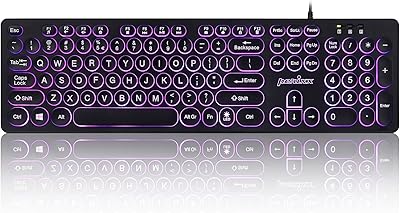
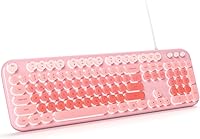
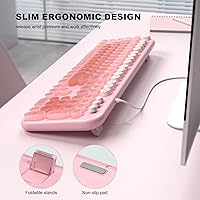
The MOWUX SK-693EL Wired Backlit Keyboard arrived in mid-2024 as a straightforward option for desk-setup fans who want something that looks good without a significant spend. It sports retro round keycaps bathed in a pink LED glow, which genuinely does make a plain desk feel more put-together. The membrane switches and USB-A plug-and-play connection keep things simple — no drivers to hunt down, no pairing headaches. A foldable rear stand and anti-slip base cover the ergonomic basics. For casual typists and students shopping at the accessible end of the market, that combination of aesthetics and low-friction setup is a solid starting point.
Features & Benefits

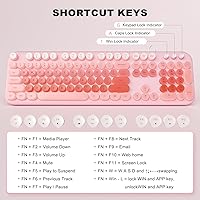
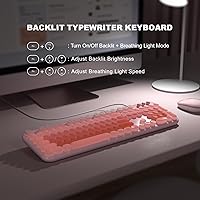
The backlight is more configurable than you might expect here. Using Fn key combos, you can adjust brightness and speed on the fly and toggle flash modes without touching any software. The full 104-key layout keeps a number pad intact — something compact boards routinely sacrifice. Twelve multimedia shortcuts handle the everyday stuff: volume, play and pause, email, and more. Caps Lock and Num Lock indicators sit in the upper right corner, a small but genuinely useful touch. Key legends use an anti-wear printing treatment, so they should hold up to daily use better than what you typically see on budget keyboards.

Best For

This retro-style keyboard makes the most sense for students, remote workers, or anyone building out a home desk setup without a big budget. It is especially practical for low-light work — the pink LED backlight pulls real duty at night, not just decorative weight. Chromebook and Windows users get full functionality right out of the box. Mac users, however, should know upfront that some multimedia keys will not respond as expected — that limitation is worth checking before purchasing. It also works well as a gift for someone who wants a visually appealing, more functional keyboard without needing any technical guidance to get started.

User Feedback

Buyers consistently highlight the visual appeal and how fast setup goes — plug in and start typing. Key feel earns solid marks from casual users, though anyone crossing over from a mechanical board will immediately notice the shallower membrane travel. Some reviewers point out that backlight brightness is not perfectly even across every key, which is a common trade-off at this price tier. Mac users occasionally flag non-functional shortcut keys as a real annoyance. Build quality draws mixed reactions; the lightweight chassis feels adequate for a stationary desk but not especially rigid. On balance, most buyers feel the MOWUX keyboard delivers good everyday value for what it costs.

Pros

  • Plug-and-play setup works instantly on Windows and Chromebook — no drivers, no configuration hassle.
  • The pink LED backlight is practical for low-light work, not just a decorative gimmick.
  • Full 104-key layout retains a number pad, which compact alternatives routinely sacrifice.
  • Anti-slip feet and a foldable tilt stand keep the keyboard stable and positioned comfortably.
  • Twelve multimedia shortcuts handle volume, playback, and mail without leaving the keyboard.
  • Anti-wear key legends hold up well through months of regular everyday typing.
  • Wired USB-A connection means zero latency and no batteries to manage or replace.
  • At its price point, the feature-to-cost ratio is genuinely competitive for casual users.
  • Caps Lock and Num Lock indicators are clearly visible without being distracting.
  • A 12-month warranty adds reassurance that is not always guaranteed at this budget tier.

Cons

  • Backlight brightness is uneven across keys, with some noticeably dimmer spots once you look closely.
  • The plastic chassis feels hollow under pressure and develops a flex-prone feel over time.
  • Mac users lose access to most multimedia shortcut functions — a frustrating gap for Apple households.
  • Spacebar wobble and inconsistent stabilizer dampening are recurring complaints from attentive buyers.
  • The membrane key feel becomes noticeably fatiguing during extended, high-volume typing sessions.
  • Fn shortcut combinations for backlight control are not labeled on the keys, requiring manual reference.
  • Cable length runs short for desktop tower setups where USB ports are positioned low or behind the unit.
  • Bottom-out sound has a hollow plastic quality that feels louder than expected for a membrane board.
  • Single fixed backlight color offers no customization beyond brightness and animation speed adjustments.
  • Support is limited to email only, with response times that can lag during busy periods.

Ratings

The MOWUX SK-693EL Wired Backlit Keyboard scores below are generated by our AI review engine after analyzing verified global buyer feedback, with spam, incentivized, and bot-flagged submissions actively filtered out. The ratings reflect a balanced read of real-world experience — where this retro-style keyboard genuinely delivers and where it falls short. Both strengths and recurring frustrations are weighted transparently so you can make an informed call before buying.
Value for Money
83%
For a budget-tier full-size keyboard with backlighting and multimedia shortcuts, most buyers feel they are getting a fair deal. Students and home users in particular report that the feature set punches above what they expected at this price point, especially given the included tilt stand and anti-slip base.
Power users or anyone who types heavily for long stretches may feel the membrane construction limits long-term satisfaction relative to cost. A few buyers noted that slightly pricier alternatives offer noticeably better build rigidity, making the value case less clear-cut for that audience.
Typing Experience
67%
33%
Casual typists — people drafting emails, browsing, or doing light data entry — generally find the key response acceptable and comfortable for everyday sessions. The round keycap shape gets positive mentions for feeling distinct and easier to locate by touch during low-light use.
Anyone coming from a mechanical keyboard will immediately feel the shallow travel and soft, mushy actuation that membrane switches produce. Extended typing sessions surface fatigue faster than expected, and a handful of reviewers specifically called out inconsistent key resistance across the board.
Backlight Quality
71%
29%
The pink LED glow is genuinely attractive in a dim room and makes this backlit keyboard a popular choice for evening work or gaming sessions. The ability to adjust brightness and animation speed via Fn shortcuts — without any software — is a practical touch that buyers appreciate.
Backlight uniformity is a recurring complaint: some keys glow noticeably brighter or dimmer than their neighbors, which becomes distracting once you notice it. The single-color limitation also means users hoping for RGB customization will be disappointed, as this is a fixed-hue setup only.
Build Quality
62%
38%
The keyboard sits flat and stable on a desk thanks to the rubber anti-slip feet, and most users report it does not shift around during normal typing. For a lightweight peripheral at this tier, day-to-day handling feels adequate if not impressive.
At 1.7 pounds, the chassis feels noticeably hollow and flex-prone when pressure is applied near the center. Several buyers described the plastic construction as thin, and a few flagged creaking sounds during more forceful typing — a concern for durability over months of daily use.
Ease of Setup
94%
Plug-and-play via USB-A genuinely means plug and play — Windows, Chromebook, and most systems recognize this retro-style keyboard instantly with zero driver installation. Reviewers consistently highlight this as a strong point, especially buyers setting it up for less tech-savvy family members.
There is effectively no setup complexity to criticize, though the Fn shortcut combinations for backlight control are not printed on the keys, meaning users must reference the manual the first few times. That is a minor inconvenience rather than a real barrier.
Mac Compatibility
44%
56%
The keyboard does connect and function for basic typing on macOS without any issues, and the plug-and-play behavior works just as it does on Windows. For Mac users who only need a standard typing peripheral and nothing more, it gets the job done.
Multiple Mac users report that a significant portion of the multimedia shortcut keys simply do not register on macOS, making those functions dead weight on Apple systems. MOWUX does disclose this limitation, but buyers who missed the fine print have left frustrated reviews citing poor Mac support.
Aesthetic Design
88%
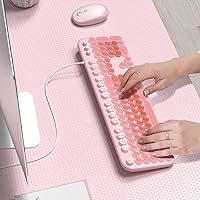
The round keycap style combined with the pink LED backlight is the primary reason many buyers chose this keyboard over plainer alternatives. It photographs well for desk setup posts and holds up as a cohesive visual choice for pastel or pink-themed workspaces.
The aesthetic is deliberate and niche — buyers who prefer a more neutral or professional-looking keyboard will find the styling too specific. The pink-only color variant limits its versatility for shared or office environments where a subtler look is preferred.
Key Legibility
78%
22%
Anti-wear key legends hold up well through several months of regular use based on buyer reports, with no significant fading noted in early-to-mid ownership periods. Legibility is solid under the LED backlight, which makes finding keys in the dark genuinely easy.
The legend print is not laser-etched, so very heavy typists may begin to see wear at high-frequency keys like E, A, and S past the six-month mark. Under bright ambient light without the backlight active, the legends can appear slightly low-contrast depending on viewing angle.
Multimedia Shortcuts
73%
27%
The 12 multimedia combinations cover the practical bases — volume, playback, mail, and file explorer — and work reliably on Windows and Chromebook without any configuration. For users who frequently adjust volume or skip tracks while working, these shortcuts become natural habit quickly.
The shortcut layout requires memorization since there are no secondary legends printed on the keycaps. Mac users lose access to most of these functions entirely, and even on Windows, a couple of the less common shortcuts occasionally require a second press to register.
Ergonomics & Comfort
69%
31%
The foldable rear tilt stand offers two angle positions, and most users find the raised angle more comfortable for extended sessions than laying the keyboard completely flat. The full-size layout keeps wrist movement minimal since everything is within reach.
There is no wrist rest included, and the tilt angles are limited compared to keyboards with adjustable multi-step stands. Users with larger hands or specific ergonomic needs may find the fixed angle options insufficient for all-day comfort.
Key Stability (Wobble)
64%
36%
Under normal typing pressure, most keys track consistently without rattling or lateral movement. Stabilizers on wider keys like the spacebar and shift perform adequately for a membrane board at this price tier.
A subset of buyers noted that spacebar wobble is perceptible on their units, and the stabilizers do not dampen sound particularly well. Compared to entry-level mechanical options in a similar price range, key stability is a weak spot that some reviewers specifically called out.
Cable & Connectivity
81%
19%
The wired USB-A connection delivers consistent, lag-free input that wireless budget keyboards at this tier rarely match. There are no dropped connections, no pairing rituals, and no batteries to manage — straightforward advantages that many buyers actively chose this keyboard for.
The cable length has drawn occasional criticism for being borderline short in desktop tower setups where the USB ports sit on the floor. There is also no cable routing channel on the underside, so cord management on a tidy desk requires external solutions.
Noise Level
66%
34%
Membrane construction keeps actuation sounds softer than most mechanical alternatives, which makes this retro-style keyboard a workable choice in shared spaces, light office environments, or late-night sessions where noise is a concern.
The bottom-out sound on this board has a hollow, plastic-y clack that some reviewers found louder than anticipated for a membrane switch. In quiet rooms, it is noticeable, and a few buyers returning from scissor-switch laptop keyboards found the sound profile a step backwards.
Indicator Lights
79%
21%
Caps Lock and Num Lock LEDs in the upper right corner are clearly visible without being distracting, and buyers appreciate the at-a-glance confirmation — particularly when switching between tasks that require number pad entry versus navigation keys.
The indicators are small and positioned away from the keys they reference, so users who glance at the key itself out of habit may still miss the status. There is no scroll lock indicator, which is a minor omission that some users noted when troubleshooting.
Warranty & Support
72%
28%
A 12-month manufacturer warranty is a meaningful assurance at this price level, and several buyers reported that MOWUX support responded to email inquiries within a reasonable timeframe. Replacement or refund resolutions appear to be handled without excessive friction based on review feedback.
Support is email-only, with no live chat or phone option, which adds friction for buyers who need a fast resolution. A handful of reviewers mentioned delayed response times during what appeared to be peak order periods, suggesting support capacity may not scale consistently.

Suitable for:

The MOWUX SK-693EL Wired Backlit Keyboard is a practical pick for students, casual home users, and remote workers who want a desk setup that looks good without committing serious money to a peripheral. If you spend your days writing emails, doing light data entry, or browsing — rather than grinding out marathon coding sessions — the membrane typing experience will feel comfortable enough and the aesthetic payoff is real. The pink LED backlight earns its place for anyone who regularly works in dim conditions, turning what could be a purely decorative feature into something genuinely functional at night. Chromebook and Windows users get the smoothest experience here, with full plug-and-play compatibility and working multimedia shortcuts right out of the box. It also works well as a thoughtful gift for a teenager, a college student setting up their first real desk, or a non-technical family member who just wants something that looks nice and works immediately.
Not suitable for:

The MOWUX SK-693EL Wired Backlit Keyboard is not the right tool for heavy typists, writers, or developers who spend six or more hours a day at a keyboard — the membrane construction simply does not hold up to that kind of demand in terms of comfort or tactile feedback. Mechanical keyboard enthusiasts will find the shallow key travel and soft actuation unsatisfying from the first keystroke, and no amount of backlight customization changes that fundamental feel. Mac users should approach with caution: a meaningful portion of the multimedia shortcut keys do not function on macOS, which reduces the keyboard's practical feature set on Apple systems. Anyone prioritizing long-term durability will also want to look elsewhere — the lightweight plastic chassis shows its limits under sustained daily pressure, and build rigidity is a genuine concern past the first year. Finally, buyers who need multi-color RGB lighting, programmable keys, or hot-swap switch support are simply shopping in the wrong product category here.
Specifications

  • Switch Type: The keyboard uses membrane switches, which provide a soft, quiet actuation suited to casual typing and everyday home or office use.
  • Layout: Full-size 104-key QWERTY layout with a dedicated numeric keypad on the right side for data entry and productivity tasks.
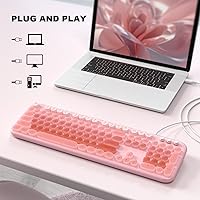
  • Connectivity: Connects via a fixed USB-A cable, delivering a stable, plug-and-play wired connection with no wireless pairing or Bluetooth setup required.
  • Backlight Color: Single-color pink LED backlight with no RGB or multi-color modes available on this model.
  • Backlight Controls: Brightness level, animation speed, and flash mode are all adjustable using Fn key combinations directly on the keyboard without any software.
  • Multimedia Keys: Includes 12 multimedia shortcut combinations covering volume control, media playback, email, file explorer, and other system functions.
  • Key Legends: Keycap legends use an anti-wear printing treatment designed to resist fading under prolonged daily use.
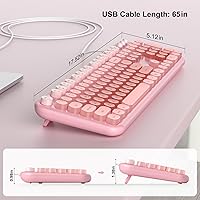
  • Tilt Stand: A foldable rear stand is built into the underside of the keyboard, allowing users to raise the back edge for a more comfortable typing angle.
  • Base Grip: Rubber anti-slip feet on the underside prevent the keyboard from sliding on smooth desk surfaces during normal use.
  • Status Indicators: Dedicated Caps Lock and Num Lock LED indicator lights are located in the upper right corner of the keyboard for at-a-glance status confirmation.
  • Dimensions: The keyboard measures 17.95 x 6.46 x 1.54 inches, making it a standard full-size footprint suitable for most desk setups.
  • Weight: The unit weighs 1.7 pounds, making it lightweight and easy to reposition, though this also contributes to a less substantial feel in hand.
  • Compatibility: Compatible with Windows XP, Vista, 7, 8, 8.1, 10, and 11, as well as Mac OS and Chromebook, though some multimedia keys are non-functional on macOS.
  • Power Source: Powered entirely through the USB connection — no batteries, charging cables, or external power adapters are required.
  • Driver Requirement: No driver installation is needed; the keyboard is recognized automatically by compatible operating systems upon plugging in the USB-A connector.
  • Keycap Shape: Keys feature a retro round keycap design that distinguishes this keyboard visually from standard flat-profile alternatives.
  • Model Number: The official model number for this keyboard is SK-693EL, as designated by manufacturer MOWUX.
  • Warranty: MOWUX provides a 12-month manufacturer warranty, with after-sales support handled via email contact with the brand directly.

Related Reviews

HP 400 Backlit Wired Keyboard
86%
89%
Backlighting Performance
87%
Typing Comfort
82%
Ergonomics
91%
Build Quality
85%
Portability
More
Atelus USB Wired Backlit Keyboard
87%
91%
Typing Comfort
88%
Backlight Visibility
83%
Build Quality
86%
Key Responsiveness
85%
Ergonomics
More
POWZAN KB770
POWZAN KB770
79%
83%
Typing Experience
88%
Build Quality
91%
Noise Level
67%
RGB Backlighting
74%
Mac Compatibility
More
Perixx PERIBOARD-332
81%
83%
Typing Comfort
74%
Build Quality
69%
Backlighting Quality
91%
Compact Design & Portability
67%
Cross-Platform Compatibility
More
Perixx PERIBOARD-333RGB Wired Backlit USB Keyboard
85%
88%
Typing Comfort & Responsiveness
84%
RGB Backlighting Customization
79%
Build Quality & Durability
91%
Value for Money
83%
Multimedia Key Functionality
More
Perixx PERIBOARD-317R Wired Backlit USB Keyboard
83%
88%
Ease of Use
85%
Typing Comfort
77%
Backlighting Performance
92%
Value for Money
90%
Key Visibility
More
Perixx PERIBOARD-326 Wired Mini Backlit USB Keyboard
85%
87%
Typing Comfort
80%
Build Quality
90%
Backlighting Performance
91%
Portability
72%
Key Response
More
Arteck HA305-3B USB Wired Backlit Keyboard
80%
97%
Ease of Setup
83%
Typing Experience
74%
Backlight Quality
71%
Build Quality & Durability
92%
Value for Money
More
seenda KUW01 7-Color Backlit Wired Ergonomic Keyboard
85%
89%
Ergonomics & Comfort
85%
Build Quality & Durability
90%
Backlighting Customization
92%
Ease of Setup & Use
88%
Typing Experience
More
MOWUX Retro Typewriter Keyboard
87%
91%
Typing Experience
85%
Build Quality
89%
Ergonomics and Comfort
94%
Design and Aesthetics
88%
Key Switch Feel (Tactile Response)
More

FAQ

No, none at all. The MOWUX SK-693EL Wired Backlit Keyboard is fully plug-and-play — just connect the USB-A cable to your computer and it will be recognized automatically. Windows, Chromebook, and Mac all handle it without any driver downloads.
You cannot change the backlight color since this is a fixed pink single-color LED. What you can control is brightness, animation speed, and whether the light is on or off. Press Fn + F12 to toggle the light or cycle flash modes, Fn + Up/Down arrow to adjust brightness, and Fn + Left/Right arrow to change animation speed.

Not all of them, unfortunately. Basic typing works fine on macOS, but a portion of the multimedia shortcuts — things like media playback controls and some system shortcuts — will not respond on Mac. If multimedia keys are important to your workflow and you are on a Mac, this is worth factoring into your decision before purchasing.

The pink LED is most striking in dim or dark environments, where it genuinely helps with key visibility. In a brightly lit room it is still visible but far subtler. If the backlight is the main reason you are buying it, you will get the most out of it during evening or nighttime use.

Quite different. This retro-style keyboard uses membrane switches, which have a softer, quieter feel with less tactile feedback than mechanical alternatives. If you are used to a mechanical board and enjoy that crisp, clicky response, the membrane feel here may feel flat by comparison. For casual everyday typing, though, most users find it comfortable enough.

Generally not. The rubber anti-slip feet on the underside do a decent job of keeping the keyboard in place on smooth desk surfaces during normal typing. Heavy-handed typists may notice some minor shifting, but for everyday use the grip holds reasonably well.

It depends on the device. Any device that supports standard USB-A HID keyboard input and does not require special drivers may recognize this backlit keyboard. Most Android tablets and some smart TVs with USB ports can use it. However, it is not officially tested or warranted for consoles like PlayStation or Xbox, so compatibility there is not guaranteed.

Press Fn + F12 to cycle through the backlight modes. Keep pressing that combination until it lands on the steady, non-animated mode you prefer. You can then use Fn + Up or Down arrow to dial in the brightness level that looks best for your setup.

The keys use an anti-wear printing treatment that holds up well under moderate daily use — most buyers report no significant fading within the first six months to a year. Very heavy typists who hammer the same keys for hours every day may start to see wear at high-frequency keys sooner, but for average use the legends are reasonably durable at this price tier.

The MOWUX keyboard comes with a 12-month manufacturer warranty. If you run into an issue, you contact MOWUX directly via email with your order details and a description of the problem. Based on buyer reports, they generally respond and offer replacement or resolution, though support is email-only — there is no live chat or phone line available.