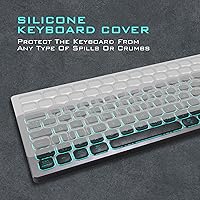
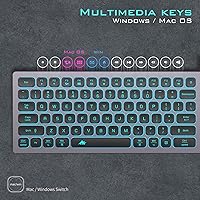
Overview

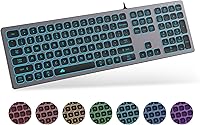
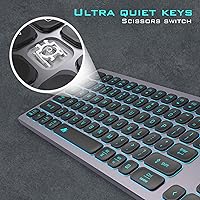
The POWZAN KB770 is a slim, aluminum-bodied wired keyboard that arrived in late 2020 targeting anyone tired of noisy mechanical clatter but unwilling to settle for a flimsy plastic board. It occupies a practical middle ground — full-size layout with a numeric keypad, chiclet-style keys, and a Space Gray finish that sits naturally alongside Apple hardware without being marketed exclusively to Mac users. The scissor-switch mechanism is what separates it from standard membrane keyboards: you get a crisper, more defined keystroke without the loud click. Plug it in via USB-A and it simply works, no driver installation required.

Features & Benefits

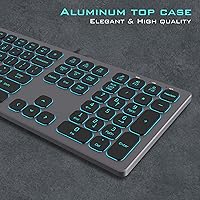
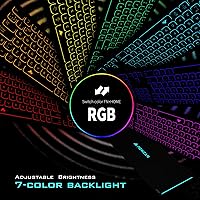
The low-profile scissor switches are rated for 5 million keystrokes and produce a soft, laptop-like feel that heavy typists tend to appreciate across long sessions. The RGB backlighting offers seven color modes cycled through Fn key shortcuts — no software download required, which keeps setup refreshingly simple. Switching between Mac and Windows modes involves holding a dedicated key for five seconds until the indicator LED blinks to confirm the swap; it works reliably once you know the process. A 5.5-foot cable gives comfortable reach on most desktop setups, and the aluminum top plate adds a rigidity that most boards at this price tier simply do not offer.

Best For

This aluminum keyboard makes the most sense for people who type in shared spaces — an open-plan office, a bedroom, a library — where a loud mechanical board would draw complaints. It is also a natural pick for Mac users who want a full numeric keypad, something Apple's own keyboards have never included. Students, accountants, or anyone who regularly enters numerical data will feel that difference quickly. The zero-driver USB setup makes it especially practical in managed IT environments or for users who simply do not want to dig through system settings. If you want a solid, quiet board without paying flagship prices, this chiclet-style keyboard is a well-rounded answer.

User Feedback

Across close to 1,000 ratings, the POWZAN wired keyboard sits at roughly 4.2 stars, reflecting a mostly satisfied user base with a few recurring gripes. The quiet typing experience is the compliment that surfaces most often, and the build quality earns genuine surprise — buyers do not typically expect an aluminum chassis at this price. On the downside, some Mac users find the mode-switching process confusing without reading the manual first. A handful of longer-term owners have flagged keycap legend fading after sustained heavy use, which is worth factoring in. RGB enthusiasts should also know that lighting is zone-based rather than per-key, a real limitation for anyone wanting custom lighting configurations.

Pros

  • Scissor switches keep noise noticeably lower than mechanical alternatives — a genuine relief in shared spaces.
  • The aluminum top plate feels far more premium than the price bracket typically delivers.
  • Full-size numeric keypad fills a gap that Mac-native keyboards have always left open.
  • Plug-and-play USB-A setup works instantly on both Windows and macOS without any driver installation.
  • Seven RGB color modes are easily cycled via Fn shortcuts — no software download required.
  • A 5.5-foot cable reaches comfortably to tower PCs tucked under or beside desks.
  • Twelve platform-specific hotkeys cover everyday shortcuts on both operating systems without remapping.
  • Low-profile key height reduces wrist strain during long typing sessions compared to taller desktop keyboards.
  • The Space Gray finish pairs naturally with Apple hardware without looking out of place on a Windows desk.
  • At roughly 4.2 stars across nearly 1,000 reviews, real-world satisfaction is consistently above average for the category.

Cons

  • RGB lighting is zone-based only — no per-key control and no memory to save a preferred color mode.
  • Keycap legends on high-frequency keys have been reported to fade after six to twelve months of heavy use.
  • The Mac mode-switching process is not printed on the keyboard itself, leaving new users without an obvious guide.
  • Keyboard feet lack sufficient rubber grip, causing the board to slide on smooth desk surfaces during fast typing.
  • The non-detachable cable makes tidy cable management and portability more inconvenient than necessary.
  • KVM switch users are out of luck — the manufacturer explicitly flags incompatibility with most KVM setups.
  • The spacebar and Enter key stabilizers produce a faint rattle audible in very quiet environments.
  • No wrist rest is included, and the fixed chassis angle may be uncomfortable during very extended sessions.
  • Switching back to Windows mode from Mac mode occasionally requires unplugging and re-plugging the cable.
  • The underside is plastic, which creates a noticeable contrast with the premium feel of the aluminum top plate.

Ratings

The POWZAN KB770 has been evaluated by our AI rating system after analyzing verified global buyer reviews, with spam, bot-submitted, and incentivized feedback actively filtered out before scoring. The results reflect a balanced picture — genuine strengths in build quality and typing comfort sit alongside real-world frustrations that a certain type of buyer will want to weigh carefully. Every score below captures what actual users experienced over weeks and months of daily use, not just first-impression reactions.

Typing Experience
83%
The scissor switches strike a comfortable balance between feedback and quiet operation that membrane keyboards rarely match. Reviewers who type for extended stretches — writers, coders, data entry workers — consistently note reduced finger fatigue compared to higher-actuation alternatives. The low-profile keycap height mimics a laptop keyboard, which many find immediately familiar.
Users coming from quality mechanical switches often find the travel distance too shallow and the tactile feedback underwhelming for fast, rhythmic typing. A small number of reviewers reported inconsistent key registration on edge keys after several months of heavy use.
Build Quality
88%
The aluminum top plate is the single most praised aspect of this keyboard among verified buyers, who consistently describe it as feeling significantly more substantial than the price suggests. There is minimal flex when pressing firmly across the middle of the board, which is not something you can say about most competitors in this segment.
The underside remains plastic, which some buyers find jarring given the premium feel of the top surface. A few reviewers noted that the feet lack rubber grip, causing the board to shift slightly on smooth desks during intensive typing sessions.
Noise Level
91%
Quiet operation is the most frequently cited reason buyers chose this keyboard, and real-world feedback confirms it delivers. Open-plan office workers and people who share bedroom desks report that colleagues and partners no longer complain about typing noise, which is a meaningful quality-of-life improvement.
It is not completely silent — the stabilizers on larger keys like the spacebar and Enter produce a faint rattle that becomes noticeable in a very quiet room. Users expecting near-silent performance comparable to dedicated silent switches may find this a mild disappointment.
RGB Backlighting
67%
33%
The seven lighting color modes add genuine desk ambiance and are easy to cycle through without any software installation, which casual users appreciate. Brightness adjustment via Fn shortcuts is intuitive once learned, and the lighting is even across the board in most modes.
The RGB is zone-based rather than per-key, which is a hard limitation for anyone wanting custom lighting profiles or per-key assignments. Enthusiasts who expected more control based on product imagery have expressed clear disappointment, and this gap between expectation and reality drags the score down noticeably.
Mac Compatibility
74%
26%
The dedicated Mac mode, confirmed by an LED indicator, genuinely reassigns key functions to match macOS conventions, making this a practical option for Mac users who need a full numeric keypad that Apple never provides natively. Hotkeys for brightness, mission control, and media playback work correctly in Mac mode.
The mode-switching process — holding a key for five seconds until the indicator blinks — catches many Mac users off guard, and the manual is not always included clearly in the box. Some users on newer macOS versions report that a handful of hotkeys do not map perfectly, requiring manual workarounds.
Windows Compatibility
86%
On the Windows side, the keyboard behaves exactly as expected right out of the box, with all standard keys, multimedia shortcuts, and the numeric keypad functioning without any configuration. The plug-and-play USB-A connection works across Windows versions going back to XP, which makes it versatile in mixed-generation setups.
Switching back from Mac mode to Windows mode can occasionally require re-plugging the cable if the indicator does not respond, a minor but recurring nuisance mentioned by dual-OS users. There is no dedicated Windows key indicator, which creates brief confusion when users forget which mode is active.
Key Legends & Labeling
61%
39%
Out of the box, the keycap legends are sharp, legible, and well-aligned, with the backlight shining through cleanly in low-light conditions. Casual users who do not type in near-darkness rarely mention any issue with readability.
Longer-term owners have flagged legend fading on high-frequency keys — Q, A, S, and the spacebar — after six to twelve months of heavy daily use. This is the most consistent durability complaint in the review pool and suggests the printing process is not laser-etched or double-shot, reducing long-term reliability.
Setup & Ease of Use
93%
Plug-and-play via USB-A means there is genuinely nothing to install, configure, or troubleshoot on either Windows or Mac for basic use. Buyers who have struggled with driver conflicts or bloatware on other keyboards specifically call this out as a relief.
The Fn-layer shortcuts and OS-switching behavior are not printed on the keys themselves, so new users must reference an external guide or the product page to unlock the full functionality. For less tech-savvy buyers, this creates a short but real learning curve.
Cable Quality & Length
78%
22%
The 5.5-foot cable is long enough to reach tower PCs positioned under desks or to the side of a monitor, which a surprising number of competing keyboards fail to accommodate. The cable feels adequately braided at the connector ends, reducing wear at stress points.
The cable is not braided along its full length, and a few users mention it tends to coil and resist lying flat on the desk. It is also not detachable, so any cable damage means replacing the entire keyboard.
Value for Money
84%
The combination of an aluminum chassis, scissor switches, RGB lighting, and cross-platform hotkeys at a mid-range price point is genuinely difficult to match in the same category. Most buyers feel they received more than the price implied, particularly when comparing the build rigidity to more expensive plastic alternatives.
As the product ages and keycap legends begin to fade, the long-term value calculation weakens. Buyers who replace keyboards every two to three years will likely feel satisfied, but those expecting a five-year daily driver may find the durability does not fully justify even the modest investment.
Ergonomics & Comfort
76%
24%
The low-profile design and minimal key height reduce wrist extension during long typing sessions, which remote workers and students consistently praise after switching from taller desktop keyboards. The board is light enough at 1.2 pounds to reposition easily on a crowded desk.
There is no wrist rest included and no tilt adjustment beyond the fixed-angle chassis, which some users find slightly uncomfortable during very long sessions. Buyers with larger hands occasionally note that the key spacing feels tighter than a traditional full-size layout.
Numeric Keypad
87%
Having a dedicated full-size numpad is the primary reason many buyers — particularly accountants, spreadsheet-heavy analysts, and data entry professionals — choose this keyboard over slimmer alternatives. The numpad keys are the same size and feel as the main cluster, so there is no adjustment period.
The numpad layout sits closer to the main keys than on some extended keyboards, which can cause accidental keypresses for users transitioning from a wider-format board. A small number of reviewers also noted that Num Lock behavior differs slightly between Mac and Windows modes.
Portability
69%
31%
At just over a pound and 0.6 inches thin, this aluminum keyboard is easy to slip into a bag for hybrid workers moving between home and office. The compact profile means it does not dominate a laptop bag or backpack compartment.
The fixed, non-detachable cable is the biggest obstacle to portability — wrapping and unwrapping a 5.5-foot cord daily is tedious, and without a cable clip or velcro tie included in the box, it becomes a tangle management problem for frequent travelers.
Lighting Controls
72%
28%
Cycling through the seven color modes and adjusting brightness entirely through Fn key combinations means there is zero reliance on third-party software, which keeps the system clean and works across any operating system without compatibility concerns.
With no software support whatsoever, there is no way to save a preferred lighting mode — the keyboard resets to its default state each time it is unplugged and reconnected. For users with a strong preference for a specific color, this becomes a minor but repeated annoyance.

Suitable for:

The POWZAN KB770 is a strong match for anyone who types in a shared environment and has grown tired of the noise complaints that come with mechanical keyboards. Mac users who need a numeric keypad will find this particularly useful, since Apple's own keyboards have never included one — and this board switches cleanly into Mac mode for proper hotkey support. Remote workers and students who log long typing hours will appreciate the low-profile scissor switches, which reduce finger fatigue without the shallow mushiness of a typical membrane board. Budget-conscious buyers who want an aluminum-bodied keyboard without paying flagship prices get genuine value here — the top plate feels noticeably more solid than most competitors at this tier. It also suits anyone in an IT-managed office where installing drivers is restricted or simply not worth the hassle, since the USB-A connection requires absolutely nothing beyond plugging in.

Not suitable for:

The POWZAN KB770 is not the right tool for RGB lighting enthusiasts who want per-key customization or software-controlled lighting profiles — the zone-based system with no companion app will frustrate anyone expecting that level of control. Mechanical switch devotees who value deep tactile feedback, audible clicks, or high actuation resistance will find the scissor switches underwhelming by comparison. Users who need KVM switch compatibility should look elsewhere, as the keyboard is explicitly not supported by most KVM setups, which is a hard dealbreaker for multi-machine power users. Anyone expecting a long-term daily driver lasting five or more years should factor in the reported keycap legend fading on high-frequency keys, which suggests the printing process has a finite lifespan under heavy use. Finally, frequent travelers who want to pack a keyboard regularly will find the fixed, non-detachable 5.5-foot cable more of a burden than a convenience.

Specifications

  • Brand & Model: Manufactured by POWZAN under the model designation KB770.
  • Dimensions: The keyboard measures 17.3″ long, 5″ wide, and 0.6″ tall, sitting notably flat on a desk surface.
  • Weight: The assembled unit weighs 1.2 pounds, making it light enough to reposition easily without being flimsy.
  • Body Material: The top plate is constructed from aluminum, while the underside casing is plastic.
  • Switch Type: Scissor-switch mechanism with a low-profile chiclet keycap design, similar in feel to a premium laptop keyboard.
  • Switch Lifespan: Each key switch is rated for up to 5 million keystrokes under normal operating conditions.
  • Layout: Full-size layout with a dedicated numeric keypad, function row, and standard alphanumeric cluster.
  • Interface: Connects via a fixed USB-A cable; no wireless or Bluetooth option is available on this model.
  • Cable Length: The permanently attached USB cable measures 5.5 ft (170 cm) from the keyboard body to the connector tip.
  • Backlighting: RGB backlight with 7 color modes, controlled entirely through Fn key shortcuts with no software required.
  • Hotkeys: Includes 12 dedicated shortcut keys covering common functions for both macOS and Windows operating systems.
  • OS Compatibility: Officially compatible with Windows 11, 10, 8, 7, XP, Vista, and 2000, as well as macOS in dedicated Mac mode.
  • Mode Switching: OS mode is toggled by holding the Mac or Win key for 5 seconds until the scroll lock LED blinks 5 times to confirm.
  • Color Option: Available in Space Gray (model variant KB770), designed to complement Apple and neutral-toned desktop setups.
  • KVM Support: The manufacturer explicitly states this keyboard is not compatible with most KVM switch configurations.
  • Plug & Play: No drivers or software installation are required; the keyboard is recognized immediately upon USB connection on supported operating systems.
  • Release Date: First made available for purchase in September 2020 and remains in active production as of the latest product listing.

Related Reviews
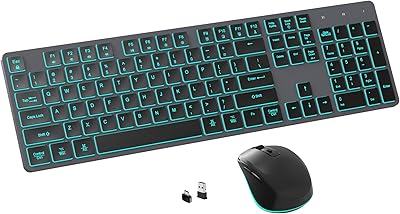
POWZAN RF425 Backlit Wireless Keyboard and Mouse Combo
86%
88%
Ergonomics & Comfort
90%
Backlighting Customization
91%
Quiet Typing Experience
87%
Battery Life
82%
Mouse Functionality
More

FAQ

It is fully plug-and-play over USB-A, so there are no drivers or software to install. Just connect it to your computer and it is ready to use within seconds on both Windows and macOS.

Hold the dedicated Mac or Win key for about five seconds and release it once the scroll lock indicator blinks five times — that confirms the switch. If you do not see the blink, try unplugging and reconnecting the cable before attempting again. It is worth bookmarking the steps the first time, since the process is not printed anywhere on the keyboard itself.

The backlighting works on both operating systems because it is controlled entirely through Fn key combinations rather than software. You can cycle through the seven color modes and adjust brightness without installing anything, regardless of which OS you are running.

Unfortunately, no. The POWZAN KB770 uses zone-based RGB lighting without any companion software, so per-key customization is not possible. If individually addressable keys are important to you, this keyboard is not the right fit.

Based on hundreds of verified buyer reviews, the scissor switches do deliver meaningfully quieter keystrokes than mechanical keyboards. The main keys are genuinely subdued, though the spacebar and Enter key produce a faint stabilizer rattle that is noticeable in a very quiet room.

In Mac mode, the 12 hotkeys cover functions like screen brightness, volume, media playback, and Mission Control, and they map correctly for most macOS versions. A small number of users on newer macOS releases have reported that one or two hotkeys require manual remapping, but core functions work as expected for the majority of buyers.

No — the manufacturer specifically warns that this keyboard is not supported by most KVM switch setups. If you need to share a keyboard across multiple machines using a KVM, you should look for a keyboard that explicitly lists KVM compatibility.

Based on real user feedback, the legends hold up well for casual to moderate use, but heavy daily typists have reported noticeable fading on high-frequency keys like Q, A, S, and the spacebar after roughly six to twelve months. The keycaps appear to use printed rather than laser-etched or double-shot legends, which limits long-term durability under intense use.

No wrist rest is included, and the chassis sits at a fixed angle with no adjustable feet for tilt. The low-profile design naturally keeps wrist extension minimal, but if you rely on a wrist rest or prefer a steeper typing angle, you will need to source those accessories separately.

The cable is permanently attached and cannot be removed, which is the main practical limitation for travel. Wrapping and managing a 5.5-foot cord daily gets tedious without a dedicated cable tie or pouch, neither of which is included in the box. The keyboard itself is slim and light enough to travel with, but the fixed cable makes it less convenient than a wireless or detachable-cable alternative.